
NUVIS S 2000 - Film camera NIKON - Free user manual and instructions
Find the device manual for free NUVIS S 2000 NIKON in PDF.


| Product type | Film camera - Advanced Photo System (IX240) |
| Brand | NIKON |
| Model | NUVIS S 2000 |
| Dimensions (closed) | 89 × 60.5 × 29 mm |
| Dimensions (open) | 122.5 × 60.5 × 29 mm |
| Weight (without battery) | 140 g |
| Power source | 1 CR2 3V lithium battery |
| Lens | Nikon 24-48 mm f/4.5-8.2 zoom lens (5 elements in 5 groups) |
| Focus | Passive autofocus, from 0.4 m to infinity |
| Built-in flash | 4 modes: auto, off, forced, slow sync |
| Flash range | 0.4-5 m (24 mm) / 0.4-2.8 m (48 mm) at ISO 200 |
| Print formats | P (panorama 1:3), H (wide vision 9:16), C (classic 2:3) |
| Viewfinder | Real image zoom, 85% coverage (H format) |
| Shutter | Programmed electronic, 2.5 to 1/500 s |
| Self-timer | 10 seconds |
| Remote control | Optional, infrared, range < 5 m |
| Data recording | Date and title (30 titles in 12 languages) |
| Battery life | Approximately 10 films of 25 shots (half with flash) |
| Supplied accessories | Strap AN-L16 |
| Maintenance | Clean with a soft, dry cloth; avoid high temperatures and humidity |
| Safety | Do not disassemble; avoid water; do not look at the sun through the viewfinder |
| Repairability | Entrust to an authorized Nikon service center |
Frequently Asked Questions - NUVIS S 2000 NIKON
1. Check the battery voltage; replace if necessary (use a CR2 lithium battery).
2. Make sure the flash mode is not set to 'flash off' (symbol '®' on the screen).
3. Check that the flash is not obstructed by your fingers or the strap.
- A camera case CS-L24 (with pocket for remote control).
- An infrared remote control (for remote shutter release, range < 5 m).
The remote control requires a replaceable battery (life approx. 10 years). For replacement, contact a Nikon service center.
User questions about NUVIS S 2000 NIKON
0 question about this device. Answer the ones you know or ask your own.
Ask a new question about this device
Download the instructions for your Film camera in PDF format for free! Find your manual NUVIS S 2000 - NIKON and take your electronic device back in hand. On this page are published all the documents necessary for the use of your device. NUVIS S 2000 by NIKON.
USER MANUAL NUVIS S 2000 NIKON
Thank you for purchasing the Nikon Nuvis S 2000 camera.
Your new Nikon camera employs the Advanced Photo System (IX240 system).
The symbol ^* appears on all Advanced Photo System (APS) format cameras.
Be sure to read this instruction manual thoroughly before use, and keep it close at hand.
*The Advanced Photo System symbol is a trademark of all IX240 products.
Take some trial shots.
Before taking important pictures, be sure to take a few trial shots first to familiarize yourself with the camera and all of its features.
Accessories
Check that you have the item shown below before using your camera.
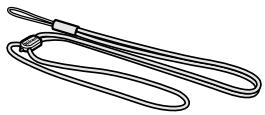
Neck strap AN-L16
Optional accessories
- Camera case CS-L24
(Remote control unit can be stored inside pocket.)
Remote control unit P.
Attaching the strap
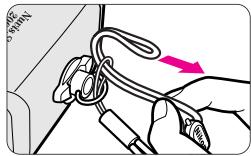
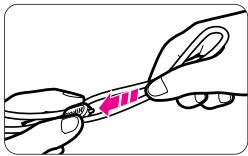
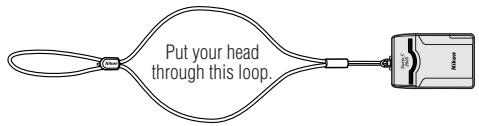
Attach the strap by inserting it through the strap slot and adjust the length using the lug on the strap as shown.
Your Nikon camera features:
E
Choice of three print types (P, H, C), which can be mixed on the same roll.

PP. 14-15
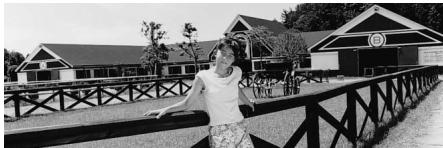
P-type (panorama)
Aspect ratio = 1:3
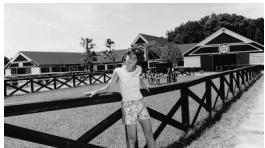
H-type (wide-vision)
Aspect ratio = 9:16

C-type (classic)
Aspect ratio = 2:3


P. 28

P. 21
The 2x power zoom lens covers the range of focal lengths from 24mm to 48mm .
P. 15
Title imprinting (ex. "MERRY CHRISTMAS" or "CONGRATULATIONS") on the back of the pictures.
When the available light is low or the subject is backlit, the camera automatically fires the flash.
Remote-controlled operation (optional) is possible. P.26
Photographing subjects as close as 0.4m (1.3 ft.) is possible. PP. 14, 16, 27
A slide cover protects the lens, viewfinder window, and LCD panel when the camera is not in use.
Contents
Foreword 2
Accessories 3
Your Nikon camera features 4
Camera parts 6-7
LCD panel indications 7
Tips on using the Nuvis S 2000 8
Getting started
Installing the battery 9
Checking battery power 9
Loading the film 10-11
IX240 film cartridge 11
Data recording function 12
Basic operation
Holding the camera properly 13
Shutter release operation 13
Viewfinder indications 14
Selecting a print type 14-15
Zooming 15
Focusing and shooting 16-17
Difficult-to-focus subjects 17
Battery power saving function 17
Removing the film 18
Take the exposed film cartridge to a photo lab. 19
To rewind the film in mid-roll 19
Advanced operation
How to use focus lock 20
Selecting the flash mode 21
Auto flash photography 21
Flash cancel mode 22
Anytime flash mode 22-23
Slow sync flash mode 23
Selecting other modes 24
Red-eye reduction mode 25
Remote control photography (optional) 26
Self-timer operation 27
Close-up shooting 27
Title recording function 28-29
List of user imprinted titles 29
Setting the date and time 30-31
Other information
Troubleshooting 32-33
Specifications 34-35
For safe handling of the camera (WARNING/CAUTION) 36-37
E
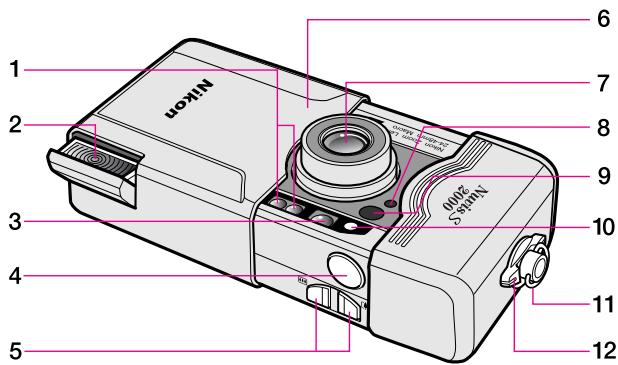
1 Autofocus windows
2 Flash (P.21)
3 Viewfinder window (P.14)
4Shutter release button (P.13)
5 Zoom buttons (P.15)
6 Slide cover (power switch) (P.9)
7 Lens
8 Remote control reception sensor (P.26)
9 Red-eye reduction(P.25)/ Self-timer (P.27)/ AF assist illuminator lamp
10 Auto exposure metering window
11 Neck strap slot (P.3)
12 Cartridge chamber cover lock release lever (P. 10)
13 Viewfinder eyepiece (P. 14)
14 Orange LED (flash/film rewinding indicator)/ Green LED (in-focus indicator) (P. 14)
15 (mid-roll rewind) button (P. 19)
16 TITLE (title mode select) button P.28
17 (language setting) button (PP.28)/
(flash mode) button (PP.21-23)/
SEL (date select) button (P.30)
18 PHC selector (P. 14)
19 LCD panel
20 DATE button (PP. 12, 30)
21 (title select) button (P. 28)/MODE (Red-eye reduction/Self-timer/Remote control) button (PP. 24-27)/ADJUST (date adjust) button (P. 30)
22 Cartridge chamber cover (P. 10)
23 Tripod socket (PP. 22, 23, 26, 27)
24 Battery chamber lid (P.9)
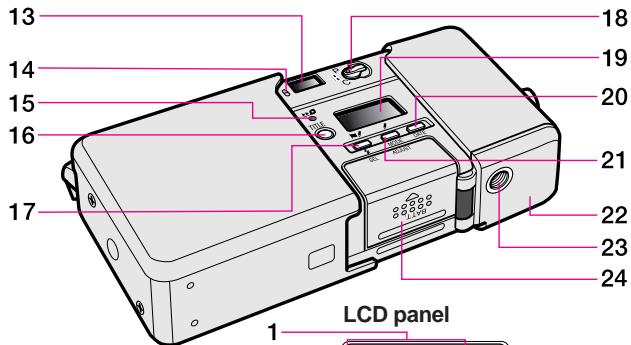
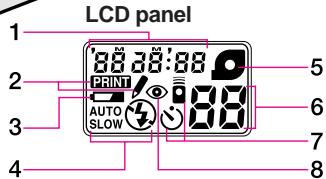
LCD panel indications
1 Date and time indicator (P. 12)/
Title recording indicator (P.28)
2 Data recording indicator (PP. 12, 28)
3 Low battery power indicator (P.9)
4 Flash mode indicator (PP. 21-23)
5 Cartridge indicator (P.11)
6 Frame counter (P.11)
7 Remote control/Self-timer indicator (PP. 26-27)
8 Red-eye reduction indicator (P.25)
Tips on using the Nuvis S 2000
E
Camera care tips
- Close the slide cover to turn the camera off when not in use. This prevents accidental release of the shutter and resulting battery drain.
- The Nuvis S 2000 is not a waterproof and therefore should not be exposed to rain or saltwater. If water gets on the camera, wipe it off with a dry cloth immediately.
- Do not subject the camera to high temperatures such as those encountered near a heater or stove or the interior of a car during summer.
- Store the camera in a cool, dry, clean place. Do not expose it to chemicals such as camphor or naphthalene. Using a desiccant during storage is recommended.
- Firing the flash repeatedly makes the battery and camera hot. Allow enough time for them to cool off before taking pictures again.
- Do not drop the camera or hit it against a hard surface.
-
Use a dry, soft cotton cloth or commercially available blower brush or lens cleaner to remove dirt and smudges.
-
When storing the camera for a long time, remove the battery. Also once a month, insert a battery and fire the flash several times to reform its capacitor.
Notes on battery
- Be sure to check battery power when taking important pictures. Carry spare batteries when traveling abroad.
- Battery power becomes less when the temperature drops below 0^ ( 32^ ). When taking pictures at low temperatures, keep the battery warm. Battery power will recover when the temperature goes back to normal.
Notes on IX240 film cartridge
- Carrying spare IX240 film cartridges is recommended when traveling abroad where the IX240 film cartridges may not be available.
Getting started
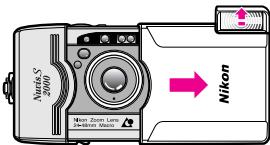
1 Open the slide cover until it click-stops.
When closing the slide cover, do not close it too quickly, as this may damage the lens.
- When the camera is not used for approx. 2 minutes, the camera turns off automatically. (P.17)
Installing the battery
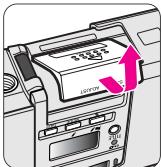
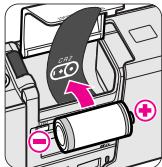
2 Install the battery.
Open the battery chamber lid.
Install one 3V lithium battery CR2 inside the battery chamber as shown.
Close the battery chamber lid until it clicks shut.
- Remember to reset the date and time when the battery is replaced. (PP. 30-31)
Checking battery power
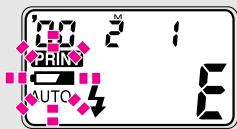
Check battery power.
Open the slide cover to turn the camera on.
- The lens automatically extends out to the W (wideangle) position and the flash pops up.
- If a low battery power indicator " " does not appear, battery power is full.
- If " " blinks or nothing appears on the LCD panel, the battery is exhausted and needs to be replaced.
Loading the film
E
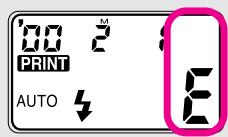
1 Open the slide cover and check that no cartridge indicator “O” is visible on the LCD panel.
- If the number of frames appears on the LCD panel, a partially exposed cartridge is already loaded.
- If the letter "E" and the cartridge indicator "O" appear on the LCD panel, a cartridge that is fully exposed is loaded and should be removed.
(P.18)
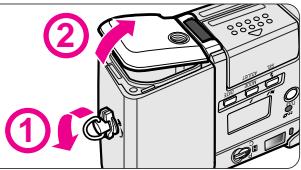
2 Turn the cartridge chamber cover lock release lever in the direction of the arrow to open the cartridge chamber cover.
The cartridge chamber cover locks automatically after loading. Do not try to open the cover until film rewinding is complete and the motor inside the camera stops.
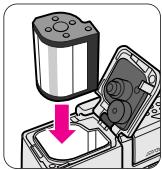
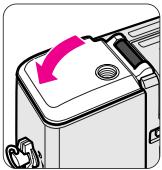
3 Insert a film cartridge in the cartridge chamber and close the cover.
- Use only IX240 film cartridge. (Regular 35mm film cannot be used.)
- Check that the VEI (Visual Exposure Indication) shows "O" (unexposed) before loading. (P. 11)
- Close the cartridge chamber cover until it clicks shut.
IX240 film cartridge
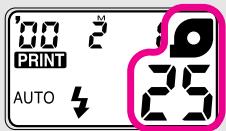
4 Check that the available number of frames and " " appear on the LCD panel.
- If the number of frames does not appear, reload the film.
- "E" blinks if a fully exposed film cartridge (the VEI shows "E3"), a partially exposed film cartridge ("D"), or a processed film cartridge ("□") is inserted.

Available film cartridges: 40-exposure, 25-exposure, and 15-exposure films.
IX240 film cartridges do not have a film leader. The film is automatically pulled out and set inside the camera.
The VEI (Visual Exposure Indication) shows the four states of the film.
Notes on handling IX240 film cartridges
- Do not touch, disassemble or apply strong physical shock to the Data disk, Lightlock door or Cartridge spool.
- Do not break the Irreversible Processed Indicator. If broken, consult your nearest photo lab.
- Do not subject the film to direct sunlight, high temperatures near a heater or stove, dust and humidity, or a strong magnetic field.
Data recording function
E
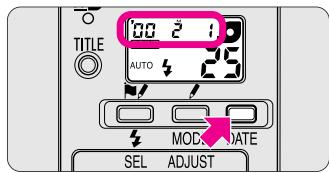
Set your preferred display mode.
Press the DATE button.
The "Year" section is displayed and printed in two digits and the "time" is in 24-hour cycle. The date appearing in the illustration above shows "2000, February, 1."
- "---" appears when "No recording" mode is selected.
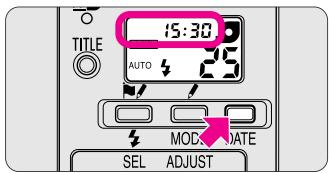
- Press the DATE button to select one of three displays. Each time the button is pressed, the display changes in the order indicated:

- Press and hold the DATE button for more than 2 sec. while "---" is displayed. The display changes in the order indicated:

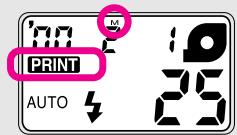
- When shooting while "PRINT" appeared on the LCD panel, data on the LCD panel will be recorded. No data is recorded when the "- - - " mode is selected.
"M" on the LCD panel indicates a month display, but will not be imprinted on the back of the pictures. - Ask your photo lab that displays an "Authorized Photo Lab Mark" sign for the location of the recorded data.
- When adjusting the date and time, refer to "Setting the date and time" on page 30.
Basic operation
Holding the camera properly
Shutter release operation
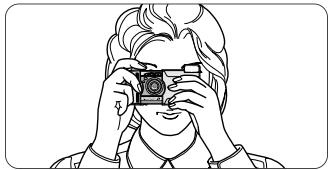
- Keep your elbows against your body and both hands on the camera as you press the camera to your face.
- Be careful not to push down the flash unit when it's in the popped up position. If the flash is pushed down, the orange LED blinks to warn you. The flash does not fire when the shutter is released.

- When holding the camera vertically, make sure that the flash is on top as shown.
- To avoid camera shake, hold the camera steady.
Do not block the lens, flash, or autofocus windows with your fingers or hair.
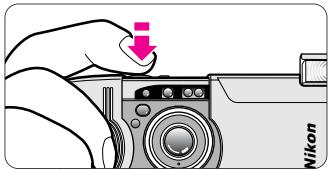
Lightly press the shutter release button to achieve focus and exposure and the green LED will light up. While the shutter release button is depressed lightly, the focus is locked. (P. 20) Press the shutter release button all the way to release the shutter.
Viewfinder indications
E
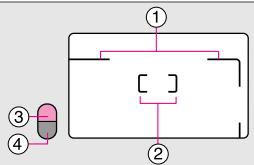
① Parallax compensation marks
For close-up shooting at a distance of approx. 0.4 to 1m (1.3 to 3.3 ft.)
② Autofocus frame mark
Center this mark on the subject.
③ Orange LED
If lit continuously: Flash is ready to fire.
If blinking: Flash is recycling and not to ready to fire, Film is rewinding, or Flash is not popped up all the way.
④Green LED
If lit continuously: Correct focus has been achieved.
14
If blinking: Correct focus has not been achieved or the shooting distance is closer than approx. 0.4m (1.3 ft.)
Selecting a print type
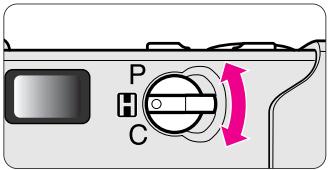
Use the PHC selector to select your desired print type before shooting.
- You can select any one of three print types (P, H or C) by switching the PHC selector at any time while film is loaded. (P. 4) Available picture area differs depending on the print type selected.
- You can also change the type of print when ordering extra prints at the photo lab.
CAUTION!
To prevent possible injury to your eye, hold the camera away from your face when you operate the PHC selector.
Zooming
Available picture area
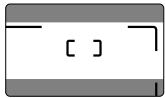
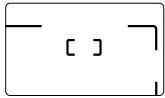
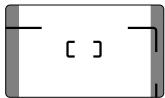
Areas cut off in the final print differ depending on the print type (P/H/C).
P-type
(panorama)
Aspect ratio = 1:3
H-type
(wide-vision)
Aspect ratio = 9:16
C-type
( classic)
Aspect ratio = 2:3
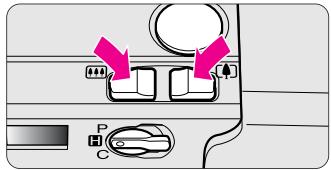
Look through the viewfinder and compose the picture by pressing the zoom buttons.
When the desired image size has been achieved, remove your finger from the zoom button.
- When the camera is not in use for approx. 2 min., the lens automatically retracts to the (wideangle) position. (P.17)
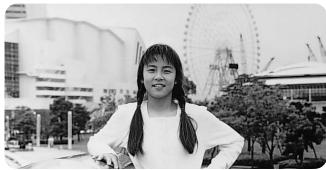
Press the zoom button to extend the lens to 48mm for taking telephoto pictures.
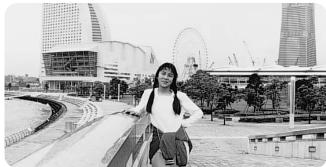
Press the zoom button to retract the lens to 24mm for taking wide angle pictures.
Focusing and shooting
E
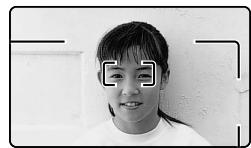
1 Compose the picture.
- Center the autofocus frame mark on the subject.
To ensure sharp pictures, make sure your subject is at least approx. 0.4m (1.3 ft.) away from the camera.
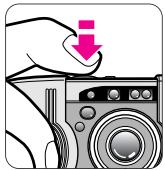
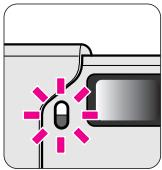
2 Focus on the subject.
Lightly press the shutter release button.
- The green LED lights up when focusing is complete.
If the green LED blinks slowly: the shutter is locked, because the shooting distance is less than 0.4m (1.3 ft.).
If the green LED blinks quickly: the subject is difficult to focus (P. 17). In this case, the shutter can be released, resulting in out-of-focus pictures.
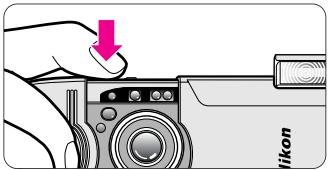
3 Gently depress the shutter release button all the way to take a picture.
- If there is not enough light or the subject is backlit, the flash fires automatically. (PP. 21-23)
- After shooting, the number of available frames is reduced on the LCD panel one-by-one.
- Pressing the shutter release button with a jerky motion may cause camera shake.
Close the slide cover to turn the camera power off to save battery power.
Battery power saving function
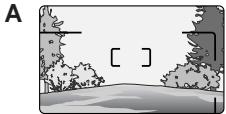
Difficult-to-focus subjects:
The following subjects may be too difficult to focus. In these cases, use focus lock (P.20) by focusing on another subject equidistant from the camera.
A Low-contrast subjects such as the blue sky or highly reflective surfaces like shiny cars or water.
B Subjects with continuous and repeated patterns.
C Both near and far subjects present at the same time within the autofocus frame mark.
D Strongly backlit subjects or those having a bright shiny background.
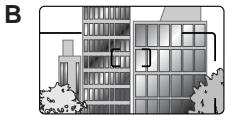
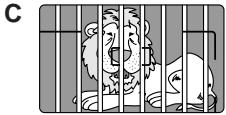
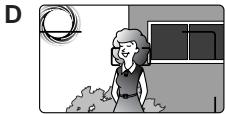
- When the camera is not used for approx. 2 minutes after opening the slide cover to turn the power on, the camera turns off automatically to save battery power. The lens automatically retracts to the (wide angle) position and the power turns off.
- Press the shutter release button lightly or any other button to turn the camera back on and the LCD panel will light up.
- To avoid accidental battery drain, remember to close the slide cover to turn the camera off when not in use.
Removing the film
E
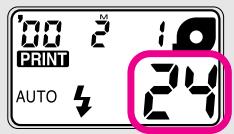
The film starts rewinding automatically.
- At the end of the roll of film, film rewrites automatically and the frame counter counts backwards one by one as the orange LED blinks.
- If you want to remove the film while the number of available frames still appears on the LCD panel, rewind the film midway through the roll. (P. 19)
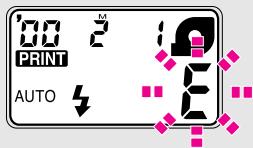
2 Make sure the blinking "E" is visible on the LCD panel.
- When the film is completely rewound, "E" blinks.
- If film rewind stops midway through the roll due to a dead battery, it resumes automatically as soon as the battery is replaced.
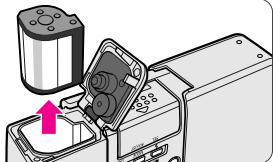
3 Open the cartridge chamber cover and remove the film.
Do not open the cartridge chamber cover until "E" starts blinking.
- When opening the cartridge chamber cover, make sure that the camera bottom faces up, or the cartridge may fall out.
Take the exposed film cartridge to a photo lab.
To rewind the film in mid-roll

- We recommend bringing your film cartridge to a photo lab that displays an "Authorized Photo Lab Mark" sign above for processing and printing.
- Your negatives are returned inside the cartridge for easy storage.
- Index prints (small images of each frame exposed on the roll of film) are supplied with the negatives.
- For more information, consult your photo lab.
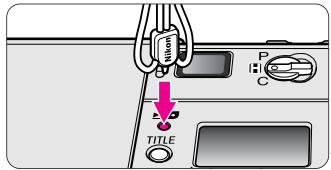
1 Press the button using the stud on the strap lug or the point of ball-point pen.
- Once rewinding starts, there is no need to continue pressing the mid-roll rewind button.
- When rewinding is complete, "E" starts blinking. Do not try to open the cover until "E" starts blinking.
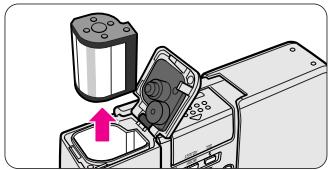
2 Remove the film.
Open the cartridge chamber cover.
Remove the film.
Once the film has been removed in mid-roll, it cannot be used again.
Advanced operation
How to use focus lock
E
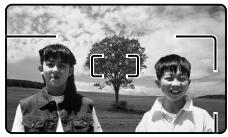
1 Compose the picture.
- When the main subject is outside the autofocus frame mark “C”, the area behind the subject will be in focus.
When your main subject is not in the center of the frame:

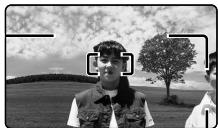
2 Center the autofocus frame mark on the main subject.
Lightly press the shutter release button.
- Make sure that the green LED lights up.

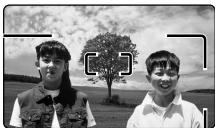
3 Recompose the picture and shoot.
While depressing the shutter release button lightly, recompose the picture.
Then depress the shutter release button all the way.
- As long as the shutter release button is pressed lightly, focus is locked.
- Do not change the camera-to-subject distance while lightly pressed the shutter release button.
Selecting the flash mode
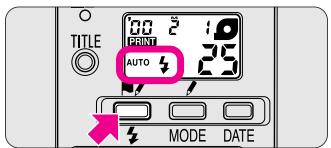
Press the button until the desired flash mode indicator appears.
- For details, see the reference page of each flash mode.
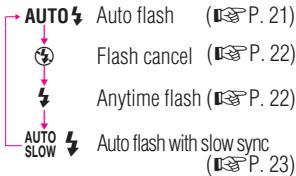
- When the camera power is turned off, the flash mode reverts to auto flash.
Auto flash photography
The flash automatically fires when the available light is low or the subject is backlit.
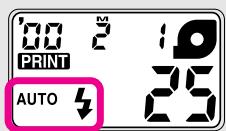
1 Open the slide cover to turn the camera on.
- When the camera is turned on, "AUTO" appears on the LCD panel. Auto flash mode is automatically activated.
- The camera senses when the available light is low or the subject is backlit and automatically fires the flash.
- When “ 心 ” appears on the LCD panel, the flash does not fire. In this case, no orange LED lights up.

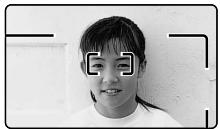
2 Check that the orange and green LEDs come on, then shoot.
Before shooting with flash, make sure the subject is within the flash shooting distance range. Refer to the following guide (ISO 200).
(24mm) : approx. 0.4 to 5m (1.3 to 16.4 ft.)
(48mm) : approx. 0.4 to 2.8m (1.3 to 9.2 ft.)
- If the orange LED is blinking, the flash is recycling and the shutter is locked. Lightly press the shutter release button again after approx. 6 sec. and wait for the orange LED to light up before shooting.
Flash cancel mode
Use this mode where flash photography is prohibited or to achieve a natural lighting effect in night scenes.
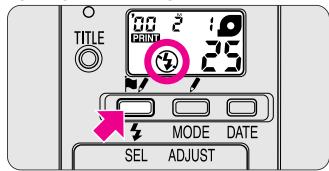
Press the button until " ④ " appears on the LCD panel.
- Since slow shutter speeds are usually selected in this mode, use a tripod to prevent camera shake.

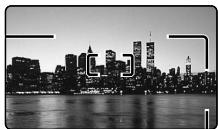
2 Compose the picture and shoot.
Lightly press the shutter release button.
Make sure the green LED lights up, then depress the shutter release button all the way to take the picture.
Anytime flash mode
Use this mode to fire the flash intention
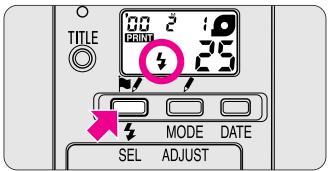
Press the button until " appears on the LCD panel.
ally regardless of the available light.
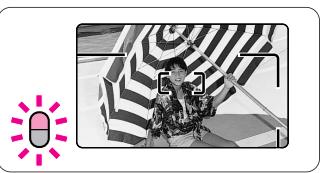
2 Compose the picture and shoot.
Lightly press the shutter release button.
Make sure the orange and green LEDs light up, then depress the shutter release button all the way to take the picture.
- If the orange LED is blinking, lightly press the shutter release button again after approx. 6 sec. and wait for the orange LED to light up before shooting.
Slow sync flash mode
Use this mode to obtain the correct exposure for both the main subject and background in low-light situations or at night.
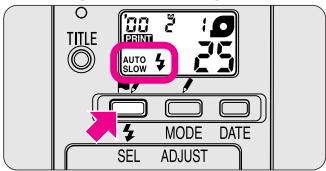
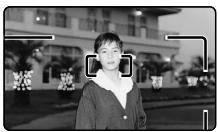
Press the button until "AUTO" appears on the LCD panel.
- Since slow shutter speeds are usually selected in this mode, use a tripod to prevent camera shake.
- When the subject is bright, “ 心 ” appears on the LCD panel and flash does not fire. In this case, no orange LED lights up.

2 Compose the picture and shoot.
Lightly press the shutter release button.
Make sure the orange and green LEDs light up, then depress the shutter release button all the way to take the picture.
- If the orange LED is blinking, lightly press the shutter release button again after approx. 6 sec. and wait for the orange LED to light up before shooting.
Selecting other modes
To match your shooting purposes, red-eye reduction, remote control and self-timer modes are selectable.

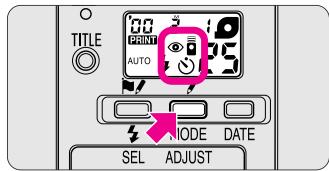
Each time the MODE button is pressed, the display changes in the order indicated.
- For details, see the reference page for each mode.
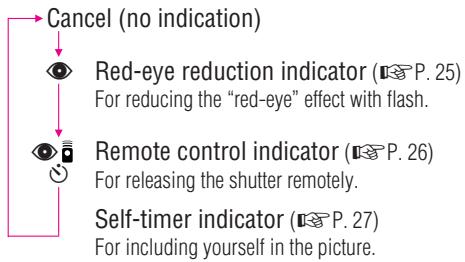
Red-eye reduction mode
In flash photography, the subject's eyes may sometimes appear bright red. To reduce the "red-eye" effect, use this mode.
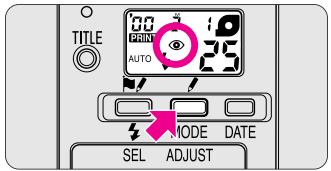
Press the MODE button until " " appears on the LCD panel.
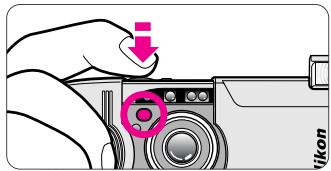
2 Compose the picture and lightly press the shutter release button.
- Because the red-eye reduction lamp lights up for a second before the flash fires, be careful not to move the camera or let the subject move until the flash fires.
The red-eye reduction mode is not recommended when shooting fast-moving subjects.
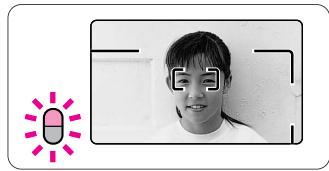
3 Check that the orange and green LEDs light up before shooting.
- If the orange LED is blinking, lightly press the shutter release button again after approx. 6 sec. and wait for the orange LED to light up before shooting.
- To cancel the red-eye reduction mode, press the MODE button until "..." disappears from the LCD panel. This mode cannot be canceled by turning the power off.
Red-eye reduction and flash cancel modes can be set together, but in this case red-eye reduction cannot be performed.
Remote control photography (optional)
For releasing the shutter remotely:
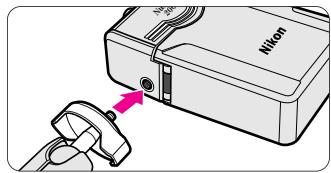
1 Place the camera on a tripod or a secure flat surface.
Remote control extends up to approx. 5m (16.4 ft.) while facing the camera. If the camera-to-subject distance is more than 5m (16.4 ft.) away, use the self-timer mode. (P.27)
- If the reception sensor on the camera is exposed to direct sunlight or other strong light, the remote control will not operate properly.
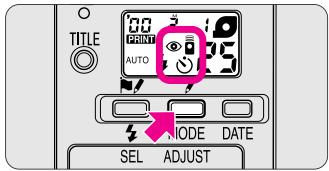
Press the MODE button until " " appears on the LCD panel.
- Remote control will be automatically canceled if not used for more than approx. 2 minutes or the slide cover is closed. That means that within 2 minutes after taking the last shots, you can still continue to shoot remotely.
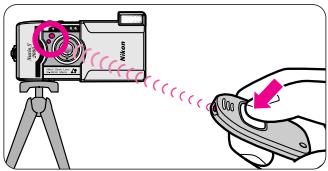
3 Compose the picture and shoot.
Aim the remote control unit at the camera and press the shutter release button on the unit.
The red-eye reduction lamp lights up for approx. 2 sec. before the shutter is released.
- If the shutter cannot be released with the remote control, change the battery inside the remote control unit. (The life of the battery is approx. 10 years.) Visit an authorized Nikon dealer or service center to change it.
Self-timer operation
When you want to include yourself in the picture:

1 Press the MODE button until " ” appears on the LCD panel.
- Self-timer operation will be automatically canceled if not used more than approx. 2 minutes or the slide cover is closed.
- Placing the camera on a tripod is recommended.

2 Compose the picture and depress the shutter release button all the way.
- The red-eye reduction lamp blinks for 8 sec., then lights up for 2 sec. before the shutter is released.
- Self-timer operation is canceled after shooting.
- To cancel self-timer operation, close the slide cover.
Close-up shooting
For taking subjects such as close-ups of flowers:
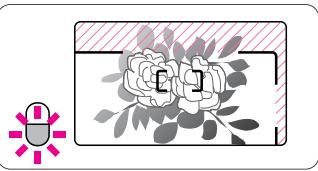
- When taking subjects within the range of approx. 0.4 to 1m (1.3 to 3.3 ft.), compose the picture within the parallax compensation marks. The area / / / as shown above will be cut off in the final print.
- When the subject is closer than approx. 0.4m (1.3 ft.), the green LED blinks slowly and the shutter is locked.
- If the subject is very close, the green LED blinks quickly and the shutter can be released, resulting in out-of-focus pictures.
Title recording function
For imprinting a title on the back of pictures:
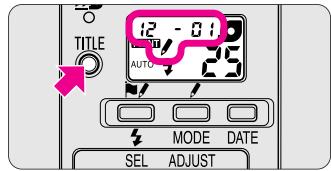
Press the TITLE button until "”, language and title codes appear on the LCD panel.
- 30 titles are selectable in 12 languages.
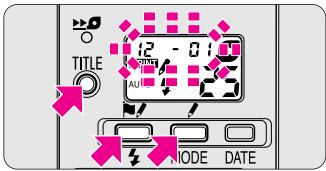
2 Select the language/title codes.
Press the TITLE button for more than 2 sec. The title or language code starts blinking.
Press the button to set the language code. Press the button to set the title code. Pressing each button continuously changes the code quickly.
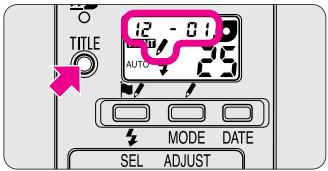
3 Set the language/title codes.
Press the TITLE button and the preferred code stops blinking and appears on the LCD panel. Then shoot.
- When " " appears on the LCD panel, title recording is possible even when the date display is activated on the LCD panel by pressing the DATE button.
Language provided
| Code | Language |
| 1 | Danish |
| 2 | Finnish |
| 3 | French |
| 4 | German |
| 5 | Italian |
| 6 | Japanese |
| 8 | Norwegian |
| 9 | Portuguese |
| 10 | Spanish |
| 11 | Swedish |
| 12 | British English |
| 13 | American English |
Titles provided for British English
| Code | Title |
| 01 | HONEYMOON |
| 02 | WEDDING |
| 03 | HANUKKAH |
| 04 | GRADUATION |
| 05 | FAMILY |
| 06 | PARTY |
| 07 | HOLIDAY |
| 08 | ANNIVERSARY OF MARRIAGE |
| 09 | FRIENDS |
| 10 | SCHOOL EVENT |
| 11 | TRIP |
| 12 | I LOVE YOU |
| 13 | THANK YOU |
| 14 | SEASON'S GREETINGS |
| 15 | HAPPY BIRTHDAY |
| Code | Title |
| 16 | CONGRATULATIONS |
| 17 | MERRY CHRISTMAS |
| 18 | FESTIVAL |
| 19 | FIRST DAY OF SCHOOL |
| 20 | HAPPY NEW YEAR |
| 21 | REUNION |
| 22 | FATHER'S DAY |
| 23 | MOTHER'S DAY |
| 24 | BAPTISM |
| 25 | ST. VALENTINE'S DAY |
| 26 | GOOD FRIDAY |
| 27 | EASTER MONDAY |
| 28 | HAPPY EASTER |
| 29 | ST. GEORGE'S DAY |
| 30 | MAY DAY HOLIDAY |
For titles in other language, see the attached "List of Imprinted User Title".
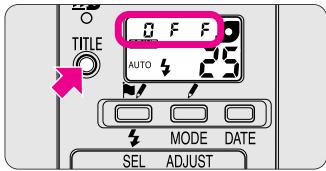
- To cancel the title recording function, press the TITLE button and make sure "\/" and language/title codes have disappeared. The letter "OFF" lights up for 2 sec. on the LCD panel before returning to the date display.
E
Setting the date and time
E
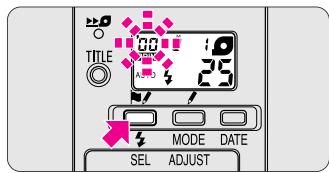
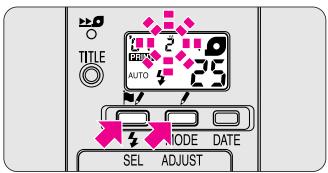
1 Entering the setting mode
Press the SEL (date select) button for more than 2 seconds.
The "year" section starts blinking.
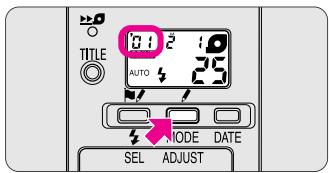
2 Setting the "year"
Press the ADJUST (date adjust) button to set the correct year.
Each time the ADUST button is pressed, the number increases by one.
- Pressing the ADJUST button continuously for more than 2 sec. changes the number quickly.
3 Setting the "month"
Press the SEL button. The "month" section starts blinking.
Press the ADJUST button to set the correct month.
Press the SEL button.
- Repeat procedures 2 and 3 to set the day, hour and minute.
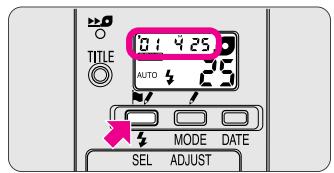
Getting out of the setting mode
Press the SEL button and the corrected date appears on the LCD panel.
- If another button is pressed while setting the date/time, all the previously set data will be set at this time.
The date appearing in the illustration above shows "2001, April, 25."
When the battery is replaced
Note that 00 00 appears on the LCD panel when the battery is replaced.
- No data will be recorded if 00 000 appears on the LCD.
- Repeat procedures from 1 to 4 to set the date and time.
Troubleshooting
Check the cause of the trouble using the following chart. It may save you a trip to your nearest Nikon service center.
| Problem | Check this | Ref. page |
| The shutter cannot be released. | ·If the orange LED blinks when the shutter release button is pressed lightly, the flash is recycling and the shutter is locked. Remove your finger from the shutter release button and wait for approx. 6 seconds. Then lightly press the shutter release button again and make sure the orange LED lights up before reshooting. ·If the green LED blinks slowly, the camera is too close to the subject. Avoid shooting subjects that are less than approx. 0.4m (1.3 ft.) from the camera. | 14, 21 14, 16 |
| The flash does not fire. | ·If the orange LED blinks when the shutter release button is pressed lightly, the flash is recycling and the shutter is locked. Remove your finger from the shutter release button and wait for approx. 6 seconds. Then lightly press the shutter release button again and make sure the orange LED lights up before reshooting. ·Check battery power. If the battery is exhausted, replace the battery with a fresh one. ·If the “#” mark appears on the LCD panel, the flash will not fire. | 14, 21 9 21-23 |
| The subject appears out of focus in the print. | ·Clean the autofocus windows if dirty. ·To avoid camera shake, gently depress the shutter release button. ·When photographing difficult-to-focus subjects, be sure to center the autofocus frame mark on the subject, or use focus lock. | 6, 13 13 17, 20 |
| The cartridge chamber cover does not open. | ·The film is not completely exposed. Take pictures up to the end of the roll, or rewind the film in mid-roll. | 18, 19 |
| No indicators appear on the LCD panel when the slide cover is opened. | ·The battery was not properly loaded in the battery chamber. Make sure to orient the positive (+) and negative (−) poles correctly. ·The battery is exhausted or no battery is installed. Install a new battery. ·If no indicators appear after installing a new battery, the camera is broken. In this case, contact your nearest Nikon dealer or a camera shop for repair. | 9 9 - |
| The shutter cannot be released even if the shutter release button on the remote control unit is pressed. | ·You are out of the remote control working range. Move closer to the camera. ·If the remote control is exposed to direct sunlight or other strong light, change the location of the remote control. ·The battery in the remote control is exhausted. Do not attempt to replace the battery yourself, but go to a Nikon service center. ·Press the MODE button once again until “←” appears on the LCD panel if the remote controller is not used for more than approx. 2 minutes. | 26 26 - |
| 26 |
A characteristic of electronic camera
In rare cases, when strong static electricity or the like is applied to the camera, the camera may not work properly. If this happens, remove the battery. Please note that the date and time must be reset when the battery is replaced, because settings are erased when the battery is removed. (P. 30)
Specifications
Type of camera
IX240 (Advanced Photo System) type autofocus AE lens-shutter camera with Nikon Zoom 24-48mm f/4.5-8.2 lens
Usable film
IX240 System (Advanced Photo System) film cartridge (16.7× 30.2mm)
Print aspect ratio
P, H and C-type available
Lens
24mm f/4.5-48mm f/8.2 (30mm-60mm converted to 35mm type); 5 elements in 5 groups
Shutter
Programmed electronic shutter; also serves as diaphragm blades; Shutterspeeds: 2.5 to 1/500 sec.
Viewfinder
Real-image zoom viewfinder; frame coverage approx. 85% for H-type printed image area; approx. 0.32x magnification at 24mm, approx. 0.56x at 48mm;
Viewfinder information
P/H/C-type image size marks with parallax compensation marks, Autofocus frame, Orange LED—Lights up: flash ready, blinks (at 4 Hz): flash is recycling; blinks quickly (at 8 Hz): flash pops up improperly, Green LED—Lights up: complete of focus operation; blinks slowly (at 2 Hz): subject is too close to
achieve correct focus; blinks quickly (at 8 Hz): subject is difficult to focus, Orange LED—Blinks (at 4 Hz): film is rewinding.
Focusing
Wide-area passive autofocus; Activated by lightly pressing the shutter release button; Distance range from 0.4m (1.3 ft) to infinity; With AF assist illuminator LED (also serves as red-eye reduction lamp)
Focus lock
Focus is locked as long as shutter button is lightly pressed.
Exposure control
Electronically controlled program AE; Auto exposure range (ISO 200):
EV 6-17 at 24mm, EV 6-18 at 48mm; Flash fires automatically if the available light is low.
Film speed setting
ISO 50, 100, 200, 400 and 800 film automatically set.
Film operation
Drop-in loading system; Wrong film loading prevention mechanism; Cartridge chamber cover lock mechanism
Frame counter
Shown in the LCD panel; Count-down type
Self-timer
Electronically controlled; Activated by depressing shutter release button; 10 sec. duration, blinking/ lighting up in 2 steps
Film advance
Film is automatically thrust to the first frame after inserting cartridge; Film automatically advances by one frame after each shot; Auto rewind at the end of film roll; Mid-roll rewind function available
Remote control (optional)
Infrared wireless remote control; 2 sec. delay shutter release; Automatically canceled after 2min if not used; Effective range is within approx. 5m (16.4 ft.) straight in front of the camera; Battery will last for approx. 10 years; Dimensions (W× H× D) :approx. 60× 27× 10mm (2.4× 1.1× 0.4 in.); Weight (including battery): approx. 13g (0.5 oz.)
Built-in flash
Four flash modes available: Auto flash, Flash cancel, Anytime flash, and Slow sync flash; Flash automatically fires when available light is low or subject is backlit; Flash shooting range: approx. 0.4-5m (1.3-16.4 ft.) at 24 mm, approx. 0.4-2.8 m (1.3-9.2 ft.) at 48mm (ISO 200); Shutter release button is locked during flash charging; Recycling time approx. 6 sec.
Red-eye reduction mode
Red-eye reduction lamp lights up for approx. 1 sec. before flash fires
Battery life
Approx. 10 rolls of 25-exposure film when flash is used for half of exposures.
LCD panel (Power is on)
Frame counter, Flash mode, Red-eye reduction, Self-timer/Remote control Cartridge, Low battery power, Title/Date/time, Data recording
Power source
One 3V lithium battery CR2
Data recording function
Magnetic recording system; Date/title setting; Date displayed on LCD panel with five choices: Year/Month/Day, Month/Day/Year, Day/Month/Year, Hour/Minute, or No recording; 24-hour cycle with no AM/PM; auto leap year adjustment until 2039; Built-in clock with timing accuracy within ± 90 sec. a month; Power source is same as camera body; Title recording function: selectable from 30 titles in 12 languages which can be printed on the back of pictures.
Dimensions (W× H× D)
Approx. 89 × 60.5 × 29 ~mm (3.5 x 2.4 x 1.1 in.) (with slide cover closed)
Approx. 122.5 × 60.5 × 29 ~mm (4.8 x 2.4 x 1.1 in.) (with slide cover opened)
Weight (without battery)
Approx. 140g (4.9 oz.)
For safe handling of the camera
E
WARNING
- Do not attempt to disassemble, repair, or modify the camera yourself, as it houses high-voltage circuitry which can cause an electric shock. Another reason is that these actions could cause the camera to malfunction.
- If the camera is dropped and damaged, do not touch any exposed interior metal parts, as it houses high-voltage circuitry which can cause an electric shock. Remove the battery and take the camera to your local Nikon dealer for repair.
- If you detect smoke coming from the camera, stop operation immediately and turn the camera off. Let the camera cool off before removing the battery. Then take the camera to your local Nikon dealer for repair.
- Do not submerge the camera in water or allow water to splash on it, as this may cause an electric shock or a fire.
-
Do not operate the camera in an environment containing a combustible gas, as this may cause a fire or explosion.
-
Do not look at the sun or a strong light source directly through the viewfinder, as this may damage your retina, resulting in permanent eye damage.
- Do not let the strap wind around your neck. In particular, never put the strap around a child's neck, as this may cause suffocation.
- Keep batteries out of the reach of children. If a battery is accidentally swallowed, call a doctor immediately.
- Never use thinner, benzene, or other active agents for cleaning the camera, as this may damage the camera, cause it to catch on fire, or harm your health.
CAUTION
- Do not operate the camera with wet hands, as this may cause an electric shock.
- Keep the camera out of reach of children. This will prevent them from swallowing batteries or small accessories.
- To prevent possible injury to your eye, hold the camera away from your face when you operate the PHC selector.
- Do not fire the flash close to a person's eyes, as this may cause temporary blindness.
- When the camera is not in use, close the slide cover and avoid placing it in direct sunlight. Strong sunlight entering the lens may cause the camera to catch on fire.
-
Do not carry the camera while it's mounted on a tripod, as you might bump into something and injure yourself or others.
-
Do not walk around while looking through the viewfinder, as you might lose your step, fall down, and injure yourself.
- Do not throw used batteries into a fire. Also do not short-circuit, disassemble, or heat the battery, as this may cause it to catch on fire or explode.
Always follow the warning instructions printed on batteries to prevent them from catching on fire or exploding. - Never use batteries not specified in this instruction manual, as this may cause them to generate heat or catch on fire.
- If corrosive liquids seep from the battery and get on your skin or clothes, wash immediately with running water. If they get in your eyes, wash immediately with water and see a doctor.
Vorwort
Dimensions (L x H x E)
No reproduction in any form of this manual, in whole or in part (except for brief quotation in critical articles or reviews), may be made without written authorization from NIKON CORPORATION.
- Take some trial shots.
- Accessories
- Optional accessories
- Attaching the strap
- Your Nikon camera features:
- Contents
- Getting started
- Basic operation
- Advanced operation
- Other information
- LCD panel indications
- Tips on using the Nuvis S 2000
- E
- Camera care tips
- Notes on battery
- Notes on IX240 film cartridge
- Installing the battery
- Checking battery power
- Loading the film
- IX240 film cartridge
- Check that the available number of frames and " " appear on the LCD panel.
- Notes on handling IX240 film cartridges
- Data recording function
- Holding the camera properly
- Shutter release operation
- Viewfinder indications
- Selecting a print type
- CAUTION!
- Zooming
- Available picture area
- P-type
- H-type
- C-type
- Focusing and shooting
- Compose the picture.
- Focus on the subject.
- Lightly press the shutter release button.
- Gently depress the shutter release button all the way to take a picture.
- Battery power saving function
- Difficult-to-focus subjects:
- Removing the film
- The film starts rewinding automatically.
- Make sure the blinking "E" is visible on the LCD panel.
- Open the cartridge chamber cover and remove the film.
- Take the exposed film cartridge to a photo lab.
- To rewind the film in mid-roll
- How to use focus lock
- Center the autofocus frame mark on the main subject.
- Recompose the picture and shoot.
- Selecting the flash mode
- Auto flash photography
- Flash cancel mode
- Anytime flash mode
- Slow sync flash mode
- Selecting other modes
- Red-eye reduction mode
- Remote control photography (optional)
- For releasing the shutter remotely:
- Self-timer operation
- When you want to include yourself in the picture:
- Close-up shooting
- For taking subjects such as close-ups of flowers:
- Title recording function
- For imprinting a title on the back of pictures:
- Setting the date and time
- Getting out of the setting mode
- When the battery is replaced
- Troubleshooting
- A characteristic of electronic camera
- Specifications
- Type of camera
- Usable film
- Print aspect ratio
- Lens
- Shutter
- Viewfinder
- Viewfinder information
- Focusing
- Focus lock
- Exposure control
- Film speed setting
- Film operation
- Frame counter
- Self-timer
- Film advance
- Remote control (optional)
- Built-in flash
- Battery life
- LCD panel (Power is on)
- Power source
- Dimensions (W× H× D)
- Weight (without battery)
- For safe handling of the camera
- WARNING
- CAUTION
- Vorwort
- Dimensions (L x H x E)
Brand : NIKON
Model : NUVIS S 2000
Category : Film camera