Optio L50 - Camera PENTAX - Free user manual and instructions
Find the device manual for free Optio L50 PENTAX in PDF.


| Product Type | Compact Digital Camera |
| Model | Optio L50 |
| Brand | Pentax |
| Effective Megapixels | 7.1 MP |
| Optical Zoom | 3x |
| Digital Zoom | 4x |
| Image Sensor | 1/2.5-inch CCD |
| Maximum Image Resolution | 3072 x 2304 pixels |
| Lens | Pentax zoom lens, 6.3-18.9 mm (equivalent to 38-114 mm in 35mm format) |
| Aperture Range | F2.6 - F4.8 |
| Focus Range | Normal: 0.6 m to infinity; Macro: 0.15 m to 0.6 m |
| LCD Monitor | 2.0-inch TFT color LCD, approx. 115,000 pixels |
| Storage Media | SD/SDHC memory card, internal memory (approx. 10 MB) |
| Power Source | 2x AA alkaline or rechargeable Ni-MH batteries |
| Dimensions (W x H x D) | Approx. 89.5 x 60 x 26 mm (excluding protrusions) |
| Weight | Approx. 130 g (without batteries and memory card) |
| Main Functions | Auto, program, night scene, landscape, portrait, sport, and movie modes; face detection; shake reduction (digital); voice recording; USB connectivity |
| Maintenance and Cleaning | Clean the lens with a soft, dry cloth; avoid exposure to moisture and extreme temperatures; do not use solvents |
| Safety Precautions | Do not disassemble or modify the camera; avoid dropping; keep away from children; do not look directly at the sun through the viewfinder |
| Spare Parts and Repairability | No user-serviceable parts inside; contact authorized Pentax service center for repairs |
| General Information | Release date: 2007; supports PictBridge; compatible with Windows and Mac |
Frequently Asked Questions - Optio L50 PENTAX
User questions about Optio L50 PENTAX
0 question about this device. Answer the ones you know or ask your own.
Ask a new question about this device
Download the instructions for your Camera in PDF format for free! Find your manual Optio L50 - PENTAX and take your electronic device back in hand. On this page are published all the documents necessary for the use of your device. Optio L50 by PENTAX.
USER MANUAL Optio L50 PENTAX
C_KHJU_COVEI_7.111 Page 1 Tuesday, January 27, 2000 3.07 PM
PENTAX Corporation
2-36-9, Maeno-cho, Itabashi-ku, Tokyo 174-8639, JAPAN (http://www.pentax.co.jp/english)
PENTAX Europe GmbH
Julius-Vosseler-Strasse, 104, 22527 Hamburg, GERMANY
(European Headquarters
(HQ - http://www.pentaxeurope.com)
(Germany - http://www.pentax.de)
Hotline: 0180 5 736829 / 0180 5 PENTAX
Austria Hotline: 0820 820 255 (http://www.pentax.at)
PENTAX U.K. Limited
ENTAX House.
Heron Drive, Langley, Slough, Berks SL3 8PN, U.K.
(http://www.pentax.co.uk) Hotline: 0870 736 8299
PENTAX France S.A.S.
112 Quai de Bezons - BP 204, 95106 Argenteuil Cedex, FRANCE
(http://www.pentax.fr)
Hotline: 0826 103 163 (0,15€ la minute) Fax: 01 30 25 75 76
600 12th Street, Suite 300 Golden, Colorado 80401, U.S.A.
(PENTAX Service Department)
12000 Zuni Street, Suite 100B
Westminster, Colorado 80234, U.S.A.
(http://www.pentaximaging.com)
PENTAX Canada Inc.
1770 Argentina Road Mississauga, Ontario L5N 3S7, CANADA
(http://www.pentax.ca)
PENTAX Trading
23D, Jun Yao International Plaza, 789 Zhaojiabang Road,
Xu Hui District, Shanghai, 200032 China
(http://www.pentax.com.cn)

AP026805/NL Copyright © PENTAX Corporation 2008
FOM 01.02.2008 Printed in Europe
PENTAX
Optio L50
Digitale Camera
Optio L50
Handleiding
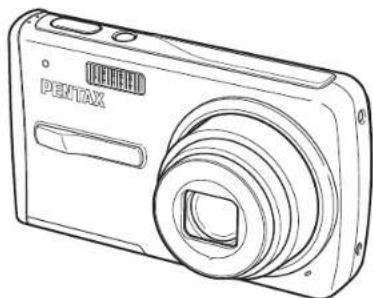
natural_image
Line drawing of a Pentax digital camera with no text or symbols on the body


Monitorindicaties....18
Voorbereidingen 21
natural_image
Illustration of a hand holding a camera with a heart-shaped photo inside, next to a cartoon dog (no text or symbols)natural_image
Illustration of a person using a digital camera to interact with a device displaying flower icons, next to a potted plant (no text or symbols present)text_image
Illustration showing a film strip with cartoon dogs and a person using a camera, illustrating the concept of digital content.natural_image
Line drawing of a digital camera with lens and screen (no text or symbols)Camera Optio L50

natural_image
Simple line drawing of a U-shaped object with a handle and loop (no text or symbols)natural_image
Simple diagram of two concentric circles with no text or symbolsSoftware (cd-rom) S-SW77

natural_image
Coiled network of USB connectors with a central cable (no text or symbols visible)USB-kabel I-USB7 (*)

natural_image
Coiled cable with two connectors and a connector plug (no text or symbols visible)AV-kabel I-AVC7 (*)

Oplaadbare lithium-ionbatterij
D-LI78 (*)
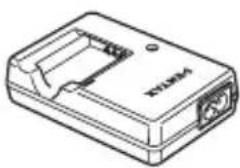
natural_image
Line drawing of a rectangular electronic device with ports and a label (no readable text or symbols)Batterijlader D-BC78 (*)
natural_image
Coiled cable with two connectors (no text or symbols visible)Netsnoer (*) Handleiding

text_image
PENTAX Optio L50 Operating Manual EN TALAWAY ELECTRIC POWER SINCEMBER 2014 HOLDEN ELECTRIC POWER BEANS(deze handleiding)
©: Digital SR (p.122)
A2Mapnummer (p.170)
A3Bestandsnummer
natural_image
Black-and-white photo of a coastal landscape with trees and hills, no visible text or symbolsScherpstelkader
text_image
MENU Stop OK OK OKnatural_image
Black-and-white beach scene with palm trees, buildings, and sky (no readable text or symbols)
natural_image
Black-and-white photo of a wooden pier with a gazebo on calm water, no visible text or symbols
natural_image
Black-and-white beach scene with palm trees and distant buildings under a cloudy sky (no readable text or symbols)
text_image
OK MENU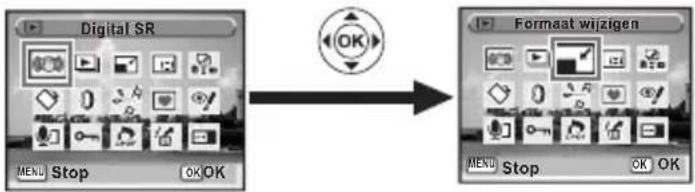
text_image
Digital SR MENU Stop OK OK Formaat wijzigen MENU Stop OK OK
text_image
SHUTTER OK Tot halverwege indrukken
natural_image
Black-and-white beach scene with palm trees and water, no visible text or symbolsnatural_image
Black-and-white beach scene with palm trees, distant buildings, and sky (no readable text or symbols)Foto's maken 📌p.40
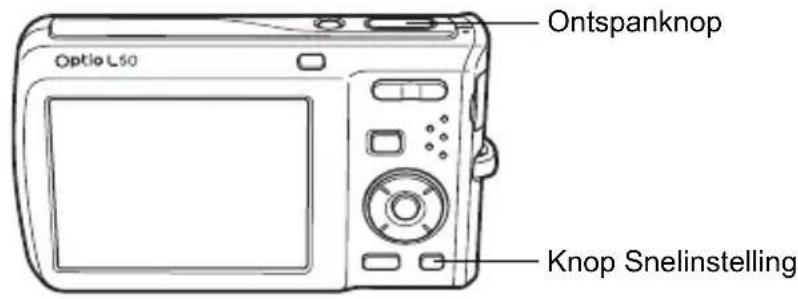
text_image
Ontspanknop Optio L50 Knop Snelinstellingnatural_image
Black-and-white photo of a wooden pier with a traditional pavilion on calm water, no visible text or symbolsnatural_image
Three-panel grayscale image grid with heart, flower, and cloud shapes, no text or symbols present
natural_image
Black-and-white photo of a wolf's head framed in a heart shape, surrounded by floating flowers and a small icon with 'OK' buttons (no readable text or symbols)
natural_image
Black-and-white photo of a sleeping dog on a ledge, with no visible text or symbols in the main image area.natural_image
Black-and-white photo of a dog resting on a bench, with camera interface icons and no readable text or symbols.natural_image
Black-and-white photo of two baby faces with camera bounding boxes, no visible text or symbolsnatural_image
Black-and-white photo of a cityscape with street lamp and distant buildings (no visible text or symbols)natural_image
Abstract white silhouette on gray background, no text or symbols present
natural_image
Abstract white shape on gray background, no text or symbols present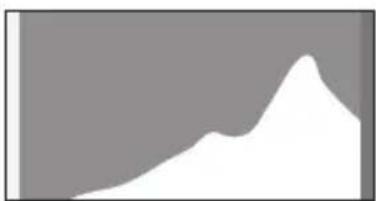
natural_image
Abstract white shape on gray background, no text or symbols presenttext_image
Witbalans AWB Auto MENU Stop OK OK
natural_image
Exterior view of a modern building with outdoor structure and trees in background (no visible text or symbols)Uitleg
natural_image
Black-and-white portrait of a young girl with short hair, wearing a turtleneck (no visible text or symbols)natural_image
Black-and-white photo of a young child with long hair, holding an object near his mouth (no visible text or symbols)text_image
Zoom/☑/Q knop Knop ▶ Vierwegbesturing Knop OK Knop Snelinstelling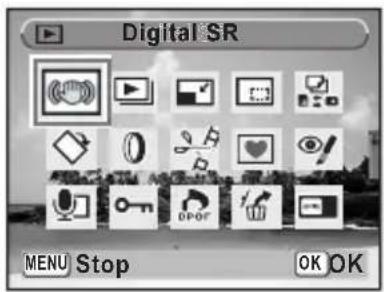
text_image
Digital SR MENU Stop OK OKnatural_image
Black and white photo of a dolphin swimming in water, no visible text or symbolsnatural_image
Grid of black-and-white photos showing coastal landscapes and urban areas, including beach, palm trees, buildings, and water (no text or symbols)text_image
Stop Wissen OK/MSUtext_image
Knop ▶ Vierwegbesturing Knop OK
text_image
Beveiligen MENU Stop OK OKtext_image
Knop ▶ Vierwegbesturing Knop OK
natural_image
Black-and-white beach scene with camera interface overlay and directional arrows (no readable text or symbols)text_image
Knop ▶ Vierwegbesturing Knop OK
text_image
Digital filter MENU Stop OK OKnatural_image
Black-and-white photo of a wooden pier at dusk with a traditional pavilion on the water, no visible text or symbols.text_image
Knop ▶ Vierwegbesturing Knop OK
natural_image
Grid of grayscale image thumbnails with heart, flower, and cloud shapes, no text or symbols presentnatural_image
Black-and-white photo of a wolf in a heart-shaped frame with floating objects and UI icons (no readable text or symbols)natural_image
Black-and-white photo of a dog inside a heart-shaped frame, with no visible text or symbols on the image itself.
text_image
Knop ▶ Vierwegbesturing Knop OK
text_image
Video bewerken MENU Stop OK OKtext_image
Knop ▶ Vierwegbesturing Knop OK Knop Snelinstelling OK DPOF MENU Stop OK OKtext_image
01:30:22 00:01:22 SHUTTER REC Stoppen 02/02/2008 Index 14:25
natural_image
Black-and-white photo of a wooden pier with a traditional pavilion on calm water, no visible text or symbols.
natural_image
Black-and-white photo of a wooden pier at dusk with a traditional pavilion on the water, no visible text or symbols.natural_image
Black-and-white beach scene with palm trees, distant buildings, and a camera interface (no readable text or symbols)text_image
▶-knop Vierwegbesturing Knop OK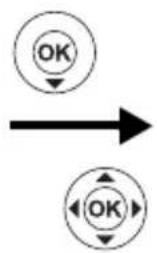
flowchart
graph TD
    A["OK"] --> B
    C["OK"] --> D
text_image
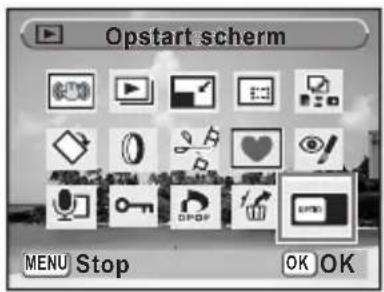
Opstart scherm MENU Stop OK OK(Batterijlader D-BC78, netsnoer)
Netvoedingsadapterset K-AC78
Video ★★★ “Best”, ★★ “Beter”, ★ “Goed”
Opslagmedia Intern geheugen (ca. 51,1 MB), SD-geheugenkaart, SDHC-geheugenkaart
C_K0450.00K Page 205 Tuesday, February 12, 2008 1.09 FM
Memo
Index
Symbolen
[Opname] menu ..... 51
-stand 10,115
- knop 44, 46
▶- knop 44, 46
▶-stand 10, 115
[Installingen] menu ..... 52
■ Snelinstelling 63
Snelinstelling, knop 45, 47, 57
Wissen 43, 12
Tele 78
Groothoek 78
Q Vergroten 118
Negen opnamen, weergave .... 116
Zelfontspanner 70
Continuopname 77
Snelinstelling ● ......63
Snelinstelling, knop 📄 45, 47, 57
Soft flitser SOFT 89
Splitsen, video-opnamen ... 148
Spotmeting □ 96
Standard AF 87
T
Taal 36,169
Thuistijd 38
C_K0450.00K Page 206 Tuesday, February 12, 2008 1.09 FM
Memo
C_K0450.00K Page 209 Tuesday, February 12, 2008 1.09 FM
Memo