SILENT BRASS PERSONAL STUDIO ST-7 - Musical Instrument Accessories YAMAHA - Free user manual and instructions
Find the device manual for free SILENT BRASS PERSONAL STUDIO ST-7 YAMAHA in PDF.


| Brand | YAMAHA |
| Model | SILENT BRASS PERSONAL STUDIO ST-7 |
| Product type | Silent practice system for brass instruments |
| Compatibility | Trumpet, cornet, flugelhorn (bell diameter 5" to 6") |
| Dimensions (approx) | 180 x 180 x 100 mm |
| Weight (approx) | 300 g |
| Power supply | 9V battery or AC adapter (not included) |
| Battery life | Approximately 6 hours with alkaline battery |
| Main functions | Mute, headphone output, 5 digital effects (reverb, delay, chorus, etc.), equalizer |
| Auxiliary input | 3.5 mm mini-jack for audio player |
| Headphone output | 3.5 mm stereo mini-jack |
| Mute material | Reinforced ABS plastic |
| Included accessories | ST7 mute, control unit, audio cable, carrying strap |
| Care and cleaning | Wipe with a soft dry cloth. Do not use solvents. |
| Safety | Do not immerse in water. Use only with recommended batteries. |
| Spare parts and repairability | Batteries, audio cable. Contact an authorized YAMAHA service center for repairs. |
| General information | Designed for silent practice with natural sound and built-in effects. |
Frequently Asked Questions - SILENT BRASS PERSONAL STUDIO ST-7 YAMAHA
User questions about SILENT BRASS PERSONAL STUDIO ST-7 YAMAHA
0 question about this device. Answer the ones you know or ask your own.
Ask a new question about this device
Download the instructions for your Musical Instrument Accessories in PDF format for free! Find your manual SILENT BRASS PERSONAL STUDIO ST-7 - YAMAHA and take your electronic device back in hand. On this page are published all the documents necessary for the use of your device. SILENT BRASS PERSONAL STUDIO ST-7 by YAMAHA.
USER MANUAL SILENT BRASS PERSONAL STUDIO ST-7 YAMAHA
Yamaha Silent Brass Personal Studio ST7
Thank you for purchasing the Yamaha Silent Brass Personal Studio ST7. In order to obtain the maximum performance and enjoyment from your ST7, we urge you to read this Owner's Manual thoroughly before using. Please keep this Owner's Manual, and the warranty in a safe place for later reference.

Contents of Set
- Personal Studio ST7
Owner's Manual
- Pickup Mute are not included.
! Disconnecting the cable while the power is ON may result in damage to the unit. The sudden noise may also may result in hearing impairments.
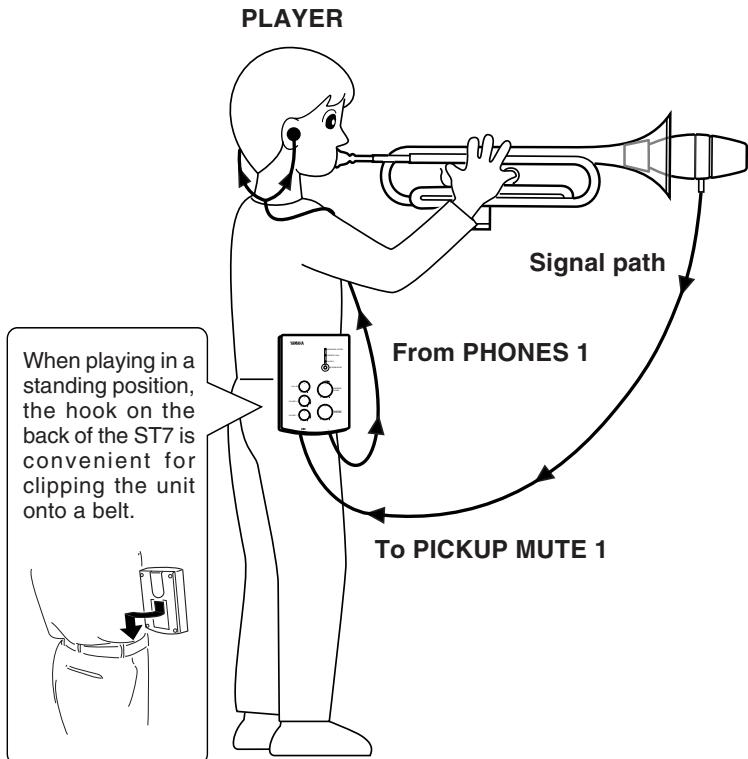
* Pickup Mute, exclusive connection cable and stereo earphone are not included.
Personal Studio ST7
Frequency Characteristics
PLAYER 1/2 : 200Hz to 16KHz, includes an internal equalizer
AUX IN : 20Hz to 16 KHz
Input/Output Levels
PICKUP MUTE 1/2 : -38dBm (0dBm=0.775Vrms)
AUX IN : -10dBm
PHONES 1/2 : -10dBm (150Ω impedance)
LINE OUT : -10dBm (10Ω impedance)
Reverb
Digital Converter : Sampling Frequency 32kHz AD/DA Converter 15 bits
Mode : 3 types (REHEARSAL ROOM, CONCERT HALL, CHURCH)
Jacks and Terminals (all mini jack type except DC10-12V)
PICKUP MUTE 1/2 : Pickup Mute exclusive (power supply and line signal combined)
PHONES 1/2 : Impedance 8 to 150Ω (stereo) (accommodates headphones)
LINE OUT (stereo) : Output impedance 1k
AUX IN (stereo) : Input impedance 30k
DC10-12V : AC adaptor PA-1D (PA-1 for Great Britain)
Control
MASTER VOLUME, PLAYER 1/2 Volume, AUX IN Volume, REVERB MODE Button and lamps, REVERB LEVEL, POWER Switch, Belt Hook
Power Supply
AC adaptor PA-1D
six AAA size 1.5V batteries. (Operation with Manganese batteries last about 3 hours, Alkaline batteries last about 7 hours.)
Dimensions (W x D x H) 111 x 159 x 41 mm
$$ (4 - 3 / 8") \times (6 - 1 / 4") \times (1 - 5 / 8") $$
Weight 250 g (0.55 lbs.) without batteries
- Specifications and design are subject to change without notice.
Your ST7 will give you years of reliable service if you follow the simple rules given below:
■ Location
Do not expose it to the following conditions to avoid deformation, discoloration, or more serious damage.
- Direct sunlight (e.g. near a window).
- High temperatures (e.g. near a heat source, outside, or in a car during the daytime).
- Excessive humidity.
- Excessive dust.
Strong vibration.
Power Supply
- Turn the power switch OFF when not in use.
- If you use an AC power adaptor, unplug the adaptor from the AC outlet if not to be used for an extended period of time.
- Unplug the AC power adaptor during electric storms.
- Avoid plugging the AC power adaptor into the same AC outlet as appliances with high power consumption, such as electric heaters or ovens. Also avoid using multiplug adaptors since these can result in reduced sound quality and possibly damage.
Turn Power OFF When Making Connections
- To avoid damage to the Personal Studio and other devices to which it is connected (a sound system, for example), turn the power switches of all related devices OFF prior to connecting or disconnecting audio cables.
■ Handling and Transport
- Never apply excessive force to the controls, connectors or other parts.
- Always unplug cables by gripping the plug firmly, not by pulling on the cable.
- Disconnect all cables before moving the unit.
- Physical shocks caused by dropping, bumping, or placing heavy objects on the unit can result in scratches and more serious damage.
Cleaning
- Clean the cabinet and panel with a dry soft cloth.
- A slightly damp cloth may be used to remove stubborn grime and dirt.
- Never use cleaners such as alcohol or thinner.
- Avoid placing vinyl objects on top of the unit (vinyl can stick to and discolor the surface).
Electrical Interference
- This unit contains digital circuitry and may cause interference if placed too close to radio or television receivers. If this occurs, move it further away from the affected equipment.
YAMAHA is not responsible for damage caused by improper handling or operation.
SPECIALMESSAGESECTION
This product utilizes batteries or an external power supply (adaptor). DO NOT connect this product to any power supply or adaptor other than one described in the manual, on the name plate, or specifically recommended by Yamaha.
This product should be used only with the components supplied or; a cart, rack, or stand that is recommended by Yamaha. If a cart, etc., is used, please observe all safety markings and instructions that accompany the accessory product.
SPECIFICATIONS SUBJECT TO CHANGE:
The information contained in this manual is believed to be correct at the time of printing. However, Yamaha reserves the right to change or modify any of the specifications without notice or obligation to update existing units.
Do not attempt to service this product beyond that described in the user-maintenance instructions. All other servicing should be referred to qualified service personnel.
This product, either alone or in combination with an amplifier and headphones or speaker/s, may be capable of producing sound levels that could cause permanent hearing loss. DO NOT operate for long periods of time at a high volume level or at a level that is uncomfortable. If you experience any hearing loss or ringing in the ears, you should consult an audiologist.
IMPORTANT: The louder the sound, the shorter the time period before damage occurs.
NOTICE: Service charges incurred due to a lack of knowledge relating to how a function or effect works (when the unit is operating as designed) are not covered by the manufacturer's warranty, and are therefore the owner's responsibility. Please study this manual carefully and consult your dealer before requesting service.
ENVIRONMENTAL ISSUES: Yamaha strives to produce products that are both user safe and environmentally friendly. We sincerely believe that our products and the production methods used to produce them meet these goals. In keeping with both the letter and the spirit of the law, we want you to be aware of the following:
Battery Notice: This product may also use "household" type batteries. Some of these may be rechargeable. Make sure that the battery being charged is a rechargeable type and that the charger is intended for the battery being charged.
When installing batteries, do not mix old batteries with new, or with batteries of a different type. Batteries MUST be installed correctly. Mismatches or incorrect installation may result in overheating and battery case rupture.
Warning: Do not attempt to disassemble or incinerate any battery. Keep all batteries away from children. Dispose of used batteries promptly and as regulated by the laws in your area. Note: Check with any retailer of household type batteries in your area for battery disposal information.
Disposal Notice: Should this product become damaged beyond repair, or for some reason its useful life is considered to be at an end, please observe all local, state, and federal regulations that relate to the disposal of products that contain lead, batteries, plastics, etc. If your dealer is unable to assist you, please contact Yamaha directly.
NAMEPLATE LOCATION: The nameplate is located on the bottom of the product. The model number, serial number, power requirements, etc., are located on this plate. You should record the model number, serial number, and the date of purchase in the spaces provided below and retain this manual as a permanent record of your purchase.
Model
Serial No.
Purchase Date
PLEASE KEEP THIS MANUAL
92-BP
FCC INFORMATION (U.S.A.)
1. IMPORTANT NOTICE: DO NOT MODIFY THIS UNIT!
This product, when installed as indicated in the instructions contained in this manual, meets FCC requirements. Modifications not expressly approved by Yamaha may void your authority, granted by the FCC, to use the product.
- IMPORTANT: When connecting this product to accessories and/or another product use only high-quality shielded cables. Cable/s supplied with this product MUST be used. Follow all installation instructions. Failure to follow instructions could void your FCC authorization to use this product in the USA.
- NOTE: This product has been tested and found to comply with the requirements listed in FCC Regulations, Part 15 for Class "B" digital devices. Compliance with these requirements provides a reasonable level of assurance that your use of this product in a residential environment will not result in harmful interference with other electronic devices. This equipment generates/uses radio frequencies and, if not installed and used according to the instructions found in the user's manual, may cause interference harmful to the operation of other electronic devices. Compliance with FCC regulations does not guarantee that interference will not occur in all installations. If this product is found to be the source of interference, which can be determined by turning the unit "OFF" and "ON", please try to eliminate the problem by using one of the following measures:
Relocate either this product or the device that is being affected by the interference.
Utilize power outlets that are on different branch (circuit breaker or fuse) circuits or install AC line filter/s.
In the case of radio or TV interference, relocate/reorient the antenna. If the antenna lead-in is 300 ohm ribbon lead, change the lead-in to co-axial type cable.
If these corrective measures do not produce satisfactory results, please contact the local retailer authorized to distribute this type of product. If you cannot locate the appropriate retailer, please contact Yamaha Corporation of America, Electronic Service Division, 6600 Orangethorpe Ave, Buena Park, CA 90620
The above statements apply ONLY to those products distributed by Yamaha Corporation of America or its subsidiaries.
CANADA
THIS DIGITAL APPARATUS DOES NOT EXCEED THE "CLASS B" LIMITS FOR RADIO NOISE EMISSIONS FROM DIGITAL APPARATUS SET OUT IN THE RADIO INTERFERENCE REGULATION OF THE CANADIAN DEPARTMENT OF COMMUNICATIONS.
LE PRESENT APPAREIL NUMERIQUE N'EMET PAS DE BRUITS RADIOELECTRIQUES DEPASSANT LES LIMITES APPLICABLES AUX APPAREILS NUMERIQUES DE LA "CLASSE B" PRESCRITES DANS LE REGLEMENT SUR LE BROUILLAGE RADIOELECTRIQUE EDICTE PAR LE MINISTERE DES COMMUNICATIONS DU CANADA.
The above illustration shows the standard settings of each control.
Top Panel
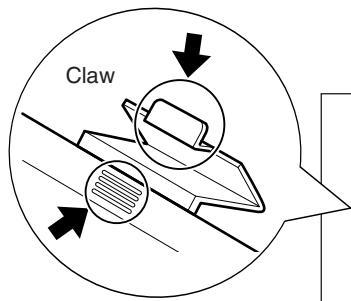
Attaching the battery cover is easier if you press down on the notched portion (4 lines) and the claw simultaneously.
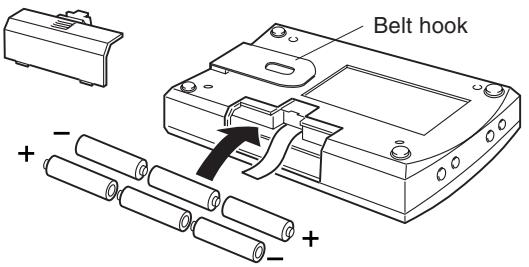
Insert the batteries as shown below.
Power Supply
The Personal Studio ST7 can be operated with battery or AC power.
Always turn the power OFF when making AC power connections or replacing batteries.
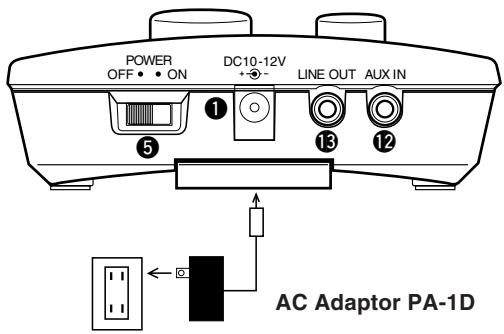
Using a Power Adaptor
Please use the supplied power adaptor. * (adaptor not included in some countries)
- Plug the DC output cable from the adaptor into the DC10-12V jack ① on the top panel. (See the Illus. above)
- Plug the AC adaptor into a convenient wall AC power socket.
Using Batteries

When using an AC adaptor, use the supplied AC adaptorPA-1D to power the ST7. The use of an incompatible adaptor may result in irreparable damage, or cause fire. The use of an incompatible adaptor may also void the warranty. Please use caution.
- Open the battery compartment, located on the back panel of the ST7.
- Insert six AAA size 1.5V batteries taking careful note of the polarity markings as shown in the illustration above.
Place the batteries on top of the ribbon for easy removal at a later date.
- Replace the battery compartment cover.
When the AC adaptor is connected, battery power is automatically disconnected. However, poor connection of the AC adaptor or power cable will result in power being drawn from the batteries.

It is recommended that batteries be replaced early. Run down batteries will result in the following:
1 Reverb does not function properly.
2 Earphone sound is unstable.
3 Noise becomes audible.
When one of these symptoms appears, take note of the cautions below and replace the used batteries with a complete set of new batteries.
- Make sure to follow polarity indications on the battery compartment when replacing batteries. Improper insertion may result in fire.
Always replace worn batteries with a complete set of new batteries. NEVER mix old and new batteries! Do not mix different types of batteries (alkaline, manganese), or batteries from different makers, or different battery types by the same maker. Doing so may result in fire! - To prevent possible damage to the unit due to battery leakage and unnecessary power drain, remove the batteries from the unit if it is not to be used for an extended period of time.
Using the Silent Brass

Before connecting the cable and attaching the mute, make sure the power is switched OFF and the earphones are removed from your ears.
-
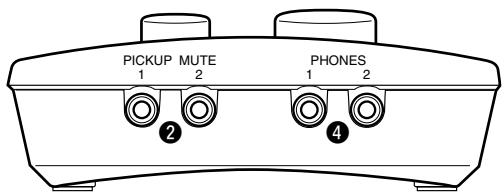
Connect the ST7 PICKUP MUTE 1 Jack ② to the Pickup Mute's Output Jack with the supplied cable. A lock nut is attached to one end of the cable. Securely attach the lock nut end of the cable to the Pickup Mute's Output Jack, then tighten the lock nut.
-
Don't connect the end of the cable that is not equipped with the lock nut to the mute. The cable may easily be unplugged.
- PICKUP MUTE 1/2 Jacks ② are specifically designed with power supply and line signal for the Pickup Mute. Do not connect any other equipment to the jacks.

When the power is switched ON, before connecting the PICKUP MUTE Jack 2 and the Pickup Mute's OUTPUT Jack, turn the MASTER VOLUME 7 to its lowest level. If the MASTER VOLUME level is not lowered, a sudden burst of sound or noise will result which could lead to hearing impairments.
- Slide the ST7's ON/OFF Switch ⑤ to the ON position.
-
Connect the Stereo Earphones to the ST7's PHONES 1 jack ④ , and make sure that the L and R sides of the earphones are properly placed. ( P, 12)
-
An optional pair of stereo earphones (or headphones) can be connected to the PHONES 2 jack 4 enabling a second person to listen along.
-
Firmly insert the Pickup Mute into the bell of the instrument.

Make sure the Pickup Mute is firmly inserted into the bell of the instrument before playing.
- Use the PLAYER 1 VOLUME ⑥ and the MASTER VOLUME ⑦ to adjust the volume to a comfortable playing level.
The PLAYER 1 VOLUME ⑥ controls the level of the PICKUP MUTE 1 ② Jack.
The MASTER VOLUME ⑦ controls the overall volume of the ST7 (PLAYER 1 VOLUME ⑥, PLAYER 2 VOLUME ⑧ and AUX IN VOLUME ⑨) simultaneously. (When the AUX IN VOLUME ⑨ is set to minimum, no sound will be produced from equipment (CD player, etc). connected to the AUX IN jacks ⑫).
For optimum use of the PLAYER 1 VOLUME ⑥ and PLAYER 2 VOLUME 8
use the 3 o'clock position as a reference (see illustration on the right).

- The PLAYER 2 VOLUME ③ controls the level of the PICKUP MUTE 2 Input ② . By connecting an optional Pickup Mute to this jack, two people can play through the ST7 at the same time.

- Do not operate the ST7 at high volume levels when using earphones (or headphones).
- Doing so can lead to hearing impairments.
About the Reverb
The ST7's internal processor includes 3 reverb types.
Reverb is added to the input signal received by the PICKUP MUTE 1/2 inputs.
- Set the REVERB LEVEL Dial to about the mid level point.
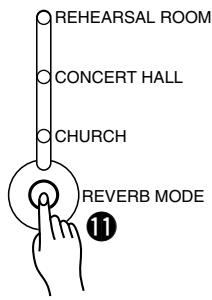
- Pressing the REVERB MODE button will cause the REVERB MODE to cycle through its 3 REVERB MODES.
REHEARSAL ROOM
Simulates the natural reverberation of a rehearsal room.
CONCERT HALL
Duplicates the longer reverberation time of a concert hall.
- CHURCH (This setting gives the longest reverb time)
Simulates the natural reverberation of a church.
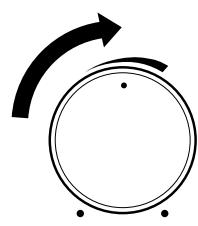
- Turn the REVERB LEVEL control to adjust the amount of the reverb effect. Turn the control to the right (clockwise) to increase the effect, turn the control to the left (counter clockwise) to decrease the effect. Set the REVERB LEVEL to a pleasing level and try playing.
10
REVERB LEVEL
Using the AUX IN/LINE OUT Jacks
The AUX IN jack
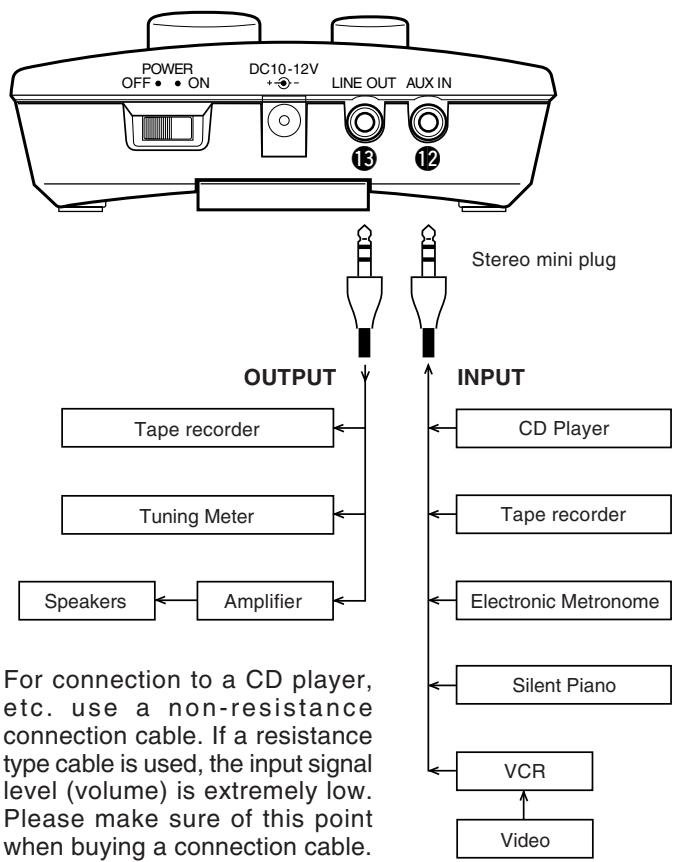
The ST7's AUX IN jack can be used to connect an external stereo signal source to the ST7. Connecting a CD player, tape recorder, etc. to the AUX IN jack with an audio cable allows you to play along with an external audio source.
The AUX IN jack's ② signal level is controlled by the AUX IN VOLUME ⑨ control.
The LINE OUT Jack
The ST7's LINE OUT jack ⑤ delivers the stereo signal of the ST7 for connection to a stereo mixing console or tape recorder for listening by external speakers or recording.

- Make sure that the power of the ST7 and any external equipment is turned OFF before making any connections. Also, set the volume of any external audio sources to the minimum level before connecting. A high volume setting could result in damage to the equipment, hearing impairments or electrical shock.
- The AUX OUT jack signal must never be returned to the AUX IN jacks, either directly or through external equipment. Doing so will result in the production of feedback, and damage to the internal unit.