Earz - Earphones Armodd - Free user manual and instructions
Find the device manual for free Earz Armodd in PDF.


User questions about Earz Armodd
0 question about this device. Answer the ones you know or ask your own.
Ask a new question about this device
Download the instructions for your Earphones in PDF format for free! Find your manual Earz - Armodd and take your electronic device back in hand. On this page are published all the documents necessary for the use of your device. Earz by Armodd.
USER MANUAL Earz Armodd
natural_image
White ARMODD wireless earbuds with charging case, no visible text or symbols on the device itselfCZ HU EN
3 13 23

natural_image
Empty white image with four corner markers (no text or symbols)CZ
Obsah
Popis produktu 5
natural_image
Line drawing of a human head profile with ear, earbell, and magnified inset showing ear (no text or symbols)Popis funkcí
Ovládání hovoru
natural_image
Line drawing of a human head profile with ear, earbell, and ear tube (no text or symbols)A funkciók leírása
Hívásvezérlés
How to wear earphones 26
How to turn on and pair the earphones 26
How to turn off the earphones 27
Description of functions 28
Important notes, recommendations and FAQs 29
EN
Thank you for purchasing our product.
Please read these instructions before use. The manufacturer is not liable for any damage caused by improper use.
Product description
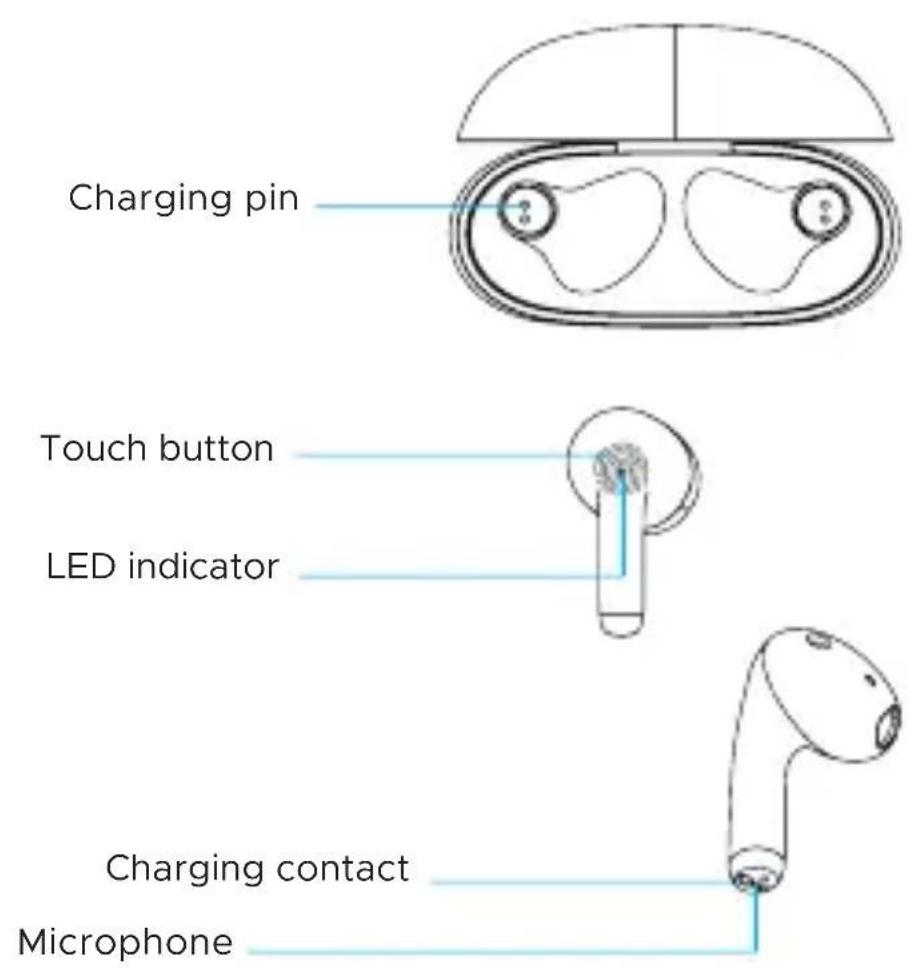
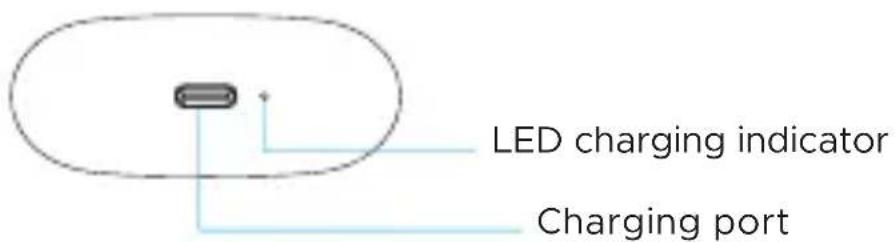
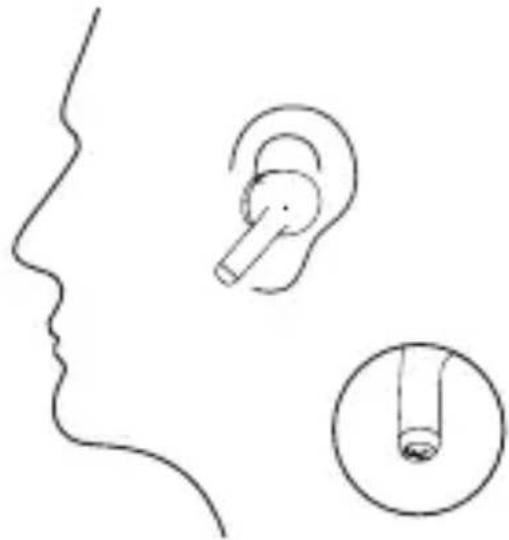
How to wear earphones
Place the earphones carefully in your ears and adjust them to the desired angle.
natural_image
Line drawing of a human head profile with ear, earbell, and tube insertion (no text or symbols)How to turn on and pair the earphones
- Before first use, fully charge the earphones in the charging case (at least 2 hours) using the included charging cable (5 V). Do not handle the charging case or the earphones during charging.
- After fully charged, disconnect the case from the charging cable, then open the case and take out the earphones. The earphones will turn on automatically.
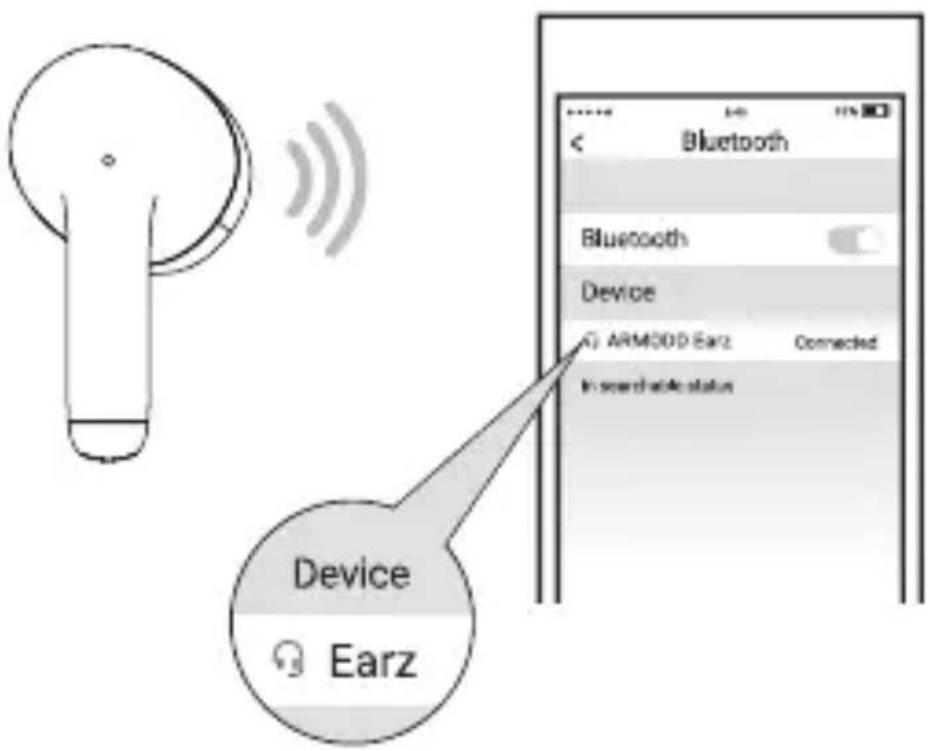
- On your phone, go to Bluetooth settings, turn on Bluetooth and search for nearby devices. Click on the name of the earphones and pair the device.
- The next time you remove the earphones from the case, the earphones will connect to the phone automatically (the phone must have Bluetooth turned on and visible).
How to turn off the earphones
-
Place the earphones in the charging case. The earphones will turn off automatically.
-
Hold the touch buttons on both earphones for about 8 seconds, the earphones will turn off. Hold the buttons again for about 5 seconds to turn the earphones back on.
-
When the earphones run out of power, they automatically turn off.
-
If the earphones are not paired with a phone or other device within 3 minutes of being turned on, they will automatically turn off.
Description of functions
Call control
Answer a call: Double-tap the touch button to answer a call
End call: Double-tap the touch button during a call to end the call
Reject a call: Hold the touch button for about 2 seconds to reject a call
Switch the call from the headset to the phone: Hold the touch button for about 2 seconds, the call will switch to the phone. Alternatively, select a device on your phone.
Music control
Play/Pause: Double tap the touch button to start/pause the music
Previous track: Hold the left touch button for about 2 seconds for the previous track
Next track: Hold the right touch button for about 2 seconds for next track
Activating Siri / voice assistant
Triple-tap the touch button to activate the voice assistant / Siri. The feature is only available for iOS and for selected phones.
Charging only the charging case
When the charging case is being charged, the LED indicator at the bottom will start flashing. When fully charged, the LED indicator will remain on.
Charging the earphones in the charging case
When the earphones are being charged, the LED indicator on the bottom of the charging case will
stay on for 4 seconds and then turn off. When fully charged, the LED indicator on the earphones will turn off.
Charging the charging case and earphones at the same time
When the charging case and earphones are being charged, the LED indicator on the bottom will start flashing. When fully charged, the LED indicator will remain on.
Charging the earphones when the charging case is empty
The LED indicator of the charging case will flash for 4 seconds and then turn off. It is necessary to charge the charging case first.
Important notes, recommendations and FAQs
-
Please follow the instructions in this manual.
-
Do not use earphones at high volume or for a long time to avoid possible hearing damage.
-
Do not use the earphones during a thunderstorm, which may cause the earphones to malfunction and the signal may be interrupted.
-
Before putting the earphones into the charging case, make sure the earphones are completely dry, or dry the earphones. Otherwise, the charging contacts could be damaged.
-
Use only the included original charging cable. Do not use other cables or quick chargers.
-
If the earphones do not pair with the mobile phone, try the following steps:
-
Make sure the earphones are fully charged.
- Make sure the earphones are turned on.
-
Make sure the earphones are not connected to another device. If so, it is necessary to disconnect the earphones in the Bluetooth settings of the phone/other device.
-
Make sure the Bluetooth function on the mobile phone is turned on and the visibility is turned on.
-
Make sure the earphones and mobile phone are within range (close to each other) for Bluetooth connection.
-
If the above does not help, hold the buttons of both earphones for at least 16 seconds.
-
If only one earpiece is playing, please put both earpieces into the charging case first and fully charge them. Then turn off the Bluetooth on the mobile phone first, take out both earphones from the case at the same time. Click the touch buttons of both earphones at the same time. Only then start pairing with your mobile phone.
-
Protect the earphones from falling or impact, do not expose them to high temperatures or direct sunlight. These may cause the earphones to malfunction or lead to their complete inoperability. Store the earphones at room temperature.
-
The earphones contain a built-in battery. Do not throw them into fire or expose them to extreme temperatures - risk of explosion.
-
Do not disassemble the earphones or accessories.
-
Do not use the product near explosives and chemicals.
-
Keep the product out of the reach of children. May contain small parts that could be inhaled.
- The software of the earphones is continuously updated. For this reason, the manufacturer reserves the right to change the instructions and individual functions without prior notice.
- After possible contact with water, dry the earphones.
- In case of further questions, contact the manufacturer.
Note
All images and description of functions may differ based on your version of the product and are used for illustrative purposes only.
Safe disposal
Do not dispose of the product in general waste as it may contain substances harmful to the environment.
Battery removal instructions
The product contains a built-in battery that may contain harmful substances and, as such, should not be disposed of in general municipal waste. You can remove the battery and hand it in for safe disposal.
Electronic waste
Leave the product at a dedicated electronic waste collection facility where its recycling or safe disposal is ensured. Contact your local municipality for a list of waste collection sites, or you can leave the used product with the seller.
Frequency band: 2402–2480 MHz
Max. performance: 1.06 dBm
Declaration of conformity
SMARTOMAT s.r.o. hereby declares that the ARMODD Earz device complies with Directive2014/53/EU. The full version of the EU declaration of conformity is available at this website:www.armodd.com
Technical support
Do you have any questions regarding your product? Do not hesitate to contact us. email: info@armodd.com www.armodd.com
Manufacturer
SMARTOMAT s.r.o., 1.máje 97, 460 02 Liberec, Czech republic

natural_image
Empty white image with four corner markers (no text or symbols)ARMODD
by

SMARTOMAT

For other
languages scan