
Prime 2 - Smartwatch Armodd - Free user manual and instructions
Find the device manual for free Prime 2 Armodd in PDF.


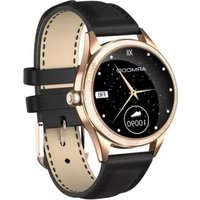
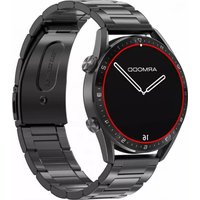
| Product Type | Smartwatch |
| Brand | Armodd |
| Model | Prime 2 |
| Display | 1.3-inch TFT color touchscreen |
| Resolution | 240 x 240 pixels (estimated) |
| Case Material | Plastic |
| Strap Material | Silicone |
| Dimensions | 45 x 45 x 10 mm (estimated) |
| Weight | 50 g (estimated) |
| Battery | Built-in lithium-ion, 260 mAh (estimated) |
| Charging Time | Approximately 2 hours |
| Charging Method | Magnetic charging cable (5V/1A) |
| Operating System | Proprietary RTOS |
| Compatibility | Android 6.0+ / iOS 11.4+ |
| Connectivity | Bluetooth 5.0 |
| Sensors | Heart rate, blood pressure, SpO2, accelerometer |
| Water Resistance | IP67 (dust and water immersion up to 1m/30min) |
| Functions | Heart rate, blood pressure, SpO2, step counter, sleep monitor, music control, call & message notifications, watch faces, alarm, stopwatch |
| Companion App | FitCloudPro |
| Navigation | Rotating crown + touchscreen |
| Included Accessories | Charging cable, user manual (quick start guide) |
Frequently Asked Questions - Prime 2 Armodd
User questions about Prime 2 Armodd
0 question about this device. Answer the ones you know or ask your own.
Ask a new question about this device
Download the instructions for your Smartwatch in PDF format for free! Find your manual Prime 2 - Armodd and take your electronic device back in hand. On this page are published all the documents necessary for the use of your device. Prime 2 by Armodd.
USER MANUAL Prime 2 Armodd
EN DE CZ SK HU RO PL
Before using carefully read these abridged instructions. To have a more complete experience of the product, we recommend downloading the detailed instructions at www.armodd.com The manufacturer is not liable for any damage caused by improper use of the product.

Charging and Switching On
- The smartwatch must be fully charged before first use. Always use the original charging cable supplied with the smartwatch. Always charge for no more than 2 hours and do not move the smartwatch while it is being charged.
- Connect the charging cable to the USB port of your notebook (it must be plugged in) or conventional mobile phone adapters (5 V/1A) and attach the magnetic puck at the opposite end of the cable to the charging surface of the smartwatch.
- If the display does not activate on its own, gently press the side button (1) for at least 3 seconds.
Pairing the watch with a mobile phone
For setting the smartwatch, the current time and date and their proper operation, the smartwatch must be paired with a mobile phone via the recommended FitCloudPro app. Do not pair the smartwatch to your mobile phone just via your phone's Bluetooth; always use the app! You can download the app using the QR code in the watch or find it in Google Play or the App Store.
- During installation, we recommend that you allow all authorisations that you are requested, including running the app in the background.
- Depending on your mobile phone model, we also recommend checking setting authorisations in the app management in your phone, especially location tracking.
- Before pairing, activate Bluetooth (make sure it is visible for all devices for an unlimited time) and GPS in your phone. Do not pair the smartwatch using the Bluetooth menu of the phone!
- Open the FitCloudPro. It is recommended that you create an account.
- The smartwatch should be as close as possible to the phone during pairing.
- Tap on the "Device" icon in the app (bottom) and then on "Select device".
- Tap on your device in the scanned devices shown. Confirm the pairing request on both the watch and the phone.
- Once the devices have been paired, set the required smartwatch functions in the app.
- To allow more precise measurements, it is recommended that you fill in your personal profile in the app.


EN

Language settings
Tap on the Settings icon in the smartwatch and then on the Languages icon and select the desired language.

Smartwatch controls
Button (1)
- Press and hold to turn the smartwatch on/off.
- Press briefly to activate the display or return to the menu.
- If the display is on, press the button briefly to display the menu of functions.
- Carefully turn the button and choose among watch faces or browse functions.
Press the button gently so as to not damage it.
Touchscreen (2)
- Swipe from left to right to show a list of calls and the most recent functions used.
- Swipe from right to left to show "Favourite functions", and by tapping on "+" you can add them or remove them.
- Swipe from top to bottom to show "Quick settings".
- Swipe from bottom to top to display the messages page.
- Swipe from bottom to top then from top to bottom to switch between functions.
- A short tap activates the function of your choice.
Display activation by twisting the wrist
Allow and set it up in the app in your phone.
Change the watch face
You may change it using several methods, both in the smartwatch and using the app.
Calling
- Make sure the watch is paired with the app on your phone and that you have Bluetooth turned on on your phone.
- In the watch menu, click on the Phone icon (Quick settings), then click on the Bluetooth Switch to turn it on.
-
In the Bluetooth available devices on your phone, click on your watch (ARMODD PR2) and set the desired functions. (The procedure may vary depending on the phone model).
-
If the function is permitted and the smartwatch is paired with your phone, you may make and answer calls both on the smartwatch and your phone.
- Up to 10 contacts can be saved on the smartwatch via the app.
Heart rate, Blood Pressure, SpO2
After activation, wait for the measurement to begin and end. The smartwatch must be in the correct position on your wrist.

2


Music player
Tap to enter the music player menu. The smartwatch must be paired with the phone, and the player must be turned on in the phone. Tap to play/stop, skip one track forward or backward.
- Audio output from the smartwatch - allow "Media sound". (Quick settings)
- Audio output from the phone - deactivate "Media sound".
Other functions - see detailed instructions
Important notes, recommendations and FAQs
- This product is not a medical device. Neither the smartwatch nor the app are intended for the diagnosis, treatment or prevention of illnesses and symptoms thereof. The values measured are illustrative.
- In order to ensure correct date and time settings, the smartwatch must be paired with a phone. Then the date and time will be set automatically.
- The smartwatch has the IP67 degree of protection. We recommend avoiding contact of the smartwatch with water under pressure, fast and rapidly flowing water, spraying and hot water and steam, because when using the smart watch, due to wear and tear of the case or its mechanical damage and microscopic cracks in the seal, water can penetrate into the smartwatch and cause damage.
- Battery life depends on the ambient temperature and the number of functions actively running. Running some functions may run the battery flat within several hours. Over time the capacity of the battery will reduce naturally. If not used, do not leave the smartwatch flat for an extended period of time and recharge the battery regularly.
- Protect the smartwatch from falls or impact; do not expose it to extreme temperature or direct sunlight. These conditions may cause malfunctions, or they can cause irreparable damage. Keep the smartwatch at room temperature if not in use.
- The smartwatch has a built-in battery. Do not expose it to flames or extreme temperature due to risk of explosion.
- Do not disassemble the smartwatch or its accessories.
- Do not use the product in close proximity to explosives and chemicals.
- Keep the product out of reach of children. It may contain small parts posing risk of inhalation.


EN

- The smartwatch software and the application itself are innovated on a continuous basis.
Therefore, the manufacturer reserves the right to amend the instructions and individual functions without prior notice. - We do not recommend exposing the smartwatch to sudden changes in pressure (e.g. diving, some water sports, etc.) or to liquids other than fresh water. Never use the buttons if the case is in contact with water. Water could penetrate into it and damage the smartwatch. After the smartwatch comes into contact with water, dry it.
- Further information in the detailed instructions.
Note: All images and description of functions may differ based on your version of the product and are used for illustrative purposes only.

Safe disposal
Do not dispose of the product in general waste as it may contain substances harmful to the environment.
Electronic waste
Leave the product at a dedicated electronic waste collection facility where its recycling or safe disposal is ensured. Contact your local municipality for a list of waste collection sites, or you can leave the used product with the seller.
Technical requirements for the telephone: Android 6.0+, iOS 11.4+, Bluetooth 5.0+
Frequency band: 2402–2480 MHz Max. performance: 1.06 dBm
Declaration of conformity
SMARTOMAT s.r.o. hereby declares that the ARMODD Prime 2 device complies with Directive2014/53/EU. The full version of the EU declaration of conformity is available at this website: www.armodd.com
Technical support: info@armodd.com
Manufacturer: SMARTOMAT s.r.o., 1.máje 97, 460 02 Liberec, Czech republic


Instructions in other languages:




- CHARGING AND SWITCHING ON
- PAIRING THE WATCH WITH A MOBILE PHONE
- LANGUAGE SETTINGS
- SMARTWATCH CONTROLS
- BUTTON (1)
- PRESS THE BUTTON GENTLY SO AS TO NOT DAMAGE IT
- TOUCHSCREEN (2)
- DISPLAY ACTIVATION BY TWISTING THE WRIST
- CHANGE THE WATCH FACE
- CALLING
- HEART RATE, BLOOD PRESSURE, SPO2
- MUSIC PLAYER
- IMPORTANT NOTES, RECOMMENDATIONS AND FAQS
- EN
- SAFE DISPOSAL
- ELECTRONIC WASTE
- DECLARATION OF CONFORMITY
Brand : Armodd
Model : Prime 2
Category : Smartwatch