
Dolphin 9700hc - Barcode Reader HONEYWELL - Free user manual and instructions
Find the device manual for free Dolphin 9700hc HONEYWELL in PDF.


| Product Type | Handheld Barcode Reader / Mobile Computer |
| Brand | Honeywell |
| Model | Dolphin 9700hc |
| Dimensions (H x W x D) | 200 x 80 x 40 mm |
| Weight | 400 g (with battery) |
| Display | 3.5-inch color touchscreen, VGA (480x640) |
| Keyboard | 28-key alphanumeric keypad |
| Processor | Marvell PXA320 806 MHz |
| Operating System | Windows Embedded Handheld 6.5 |
| Memory | 256 MB RAM / 1 GB Flash |
| Expansion Slot | microSD (up to 32 GB) |
| Barcode Scanner | Integrated 2D imager, reads 1D and 2D barcodes |
| RFID | Optional integrated HF RFID reader |
| Wireless Connectivity | Wi-Fi 802.11 a/b/g, Bluetooth 2.0+EDR |
| Battery | Rechargeable Li-Ion 3.7V, 4800 mAh |
| Operating Temperature | -10°C to 50°C |
| Drop Specification | Withstands multiple 4 ft drops to concrete |
| Ingress Protection | IP54 (dust and splash resistant) |
| Cleaning | Compatible with mild healthcare disinfectants |
| Software | Supports Honeywell Data Collection and barcode decoding apps |
| Accessories | Holster, desktop cradle, vehicle mount, spare batteries |
Frequently Asked Questions - Dolphin 9700hc HONEYWELL
User questions about Dolphin 9700hc HONEYWELL
0 question about this device. Answer the ones you know or ask your own.
Ask a new question about this device
Download the instructions for your Barcode Reader in PDF format for free! Find your manual Dolphin 9700hc - HONEYWELL and take your electronic device back in hand. On this page are published all the documents necessary for the use of your device. Dolphin 9700hc by HONEYWELL.
USER MANUAL Dolphin 9700hc HONEYWELL
Always here to help you
Register your product and get support at
www.philips.com/welcome


natural_image
Close-up of a Philips 3D-printed electric shaver with three rotary dials and a red button (no text or symbols visible)PT927
PT927CC
PT925
PT923
PT923CC
PT920
PT877
PT876
PT875
PT870
User manual
PHILIPS

natural_image
Simple line drawing of an open book with a grid on the left and a closed page on the right (no text or symbols)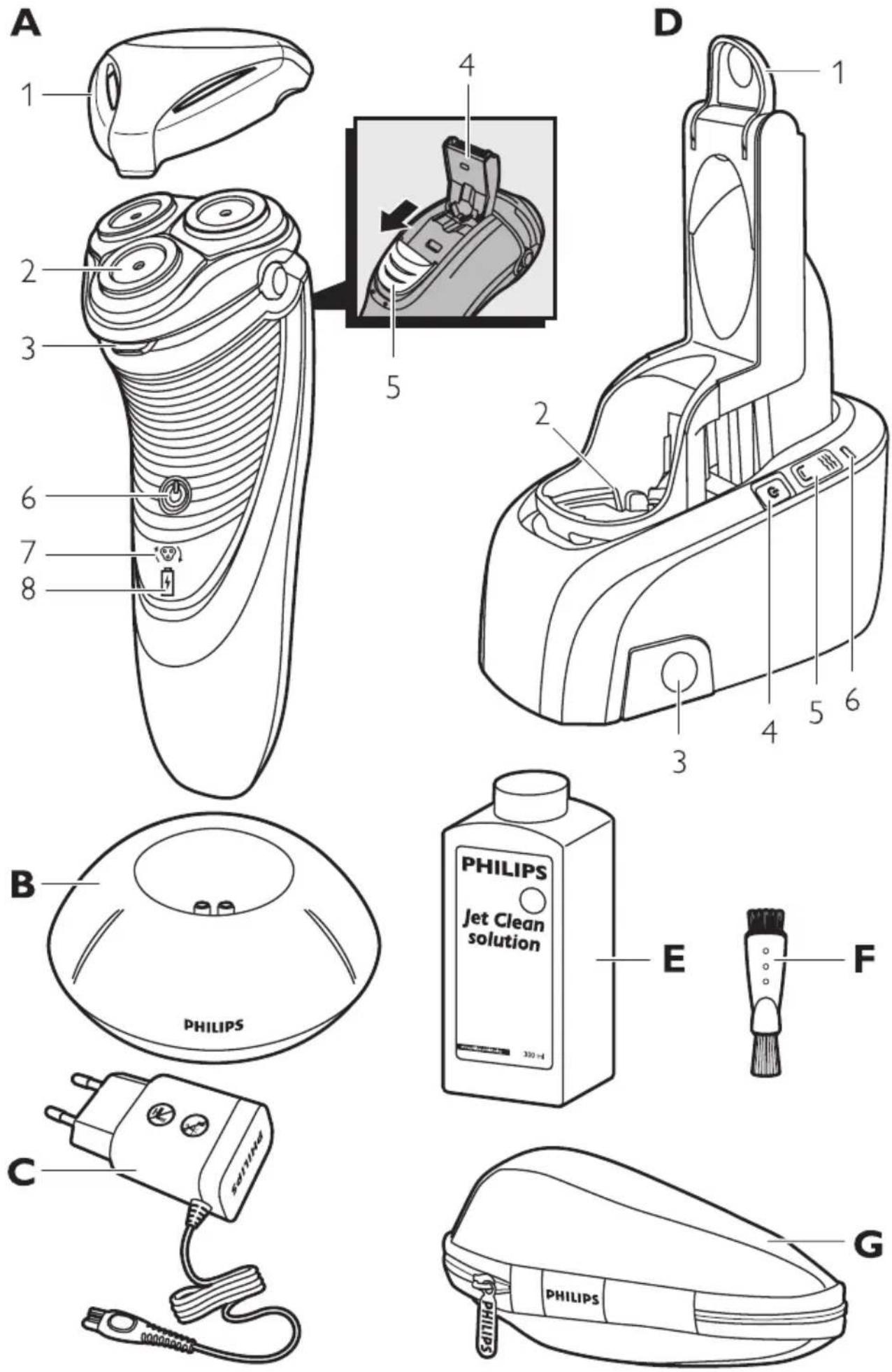
ENGLISH 6
БЪЛГАРСКИ 22
ČEŠTINA 39
EESTI 56
HRVATSKI 73
MAGYAR 90
КАЗАКША 107
LIETUVIŠKAI 124
LATVIEŠU 141
POLSKI 157
ROMÂNĂ 174
РУССКИЙ 191
SLOVENSKY 208
SLOVENŠČINA 225
SRPSKI 241
УКРАЇНСЬКА 258
Introduction
Congratulations on your purchase and welcome to Philips! To fully benefit from the support that Philips offers, register your product at www.philips.com/welcome.
Please read this user manual, as it contains information about the wonderful features of this shaver as well as some tips to make shaving easier and more enjoyable.
General description (Fig. 1)
A Shaver
1 Protection cap
2 Shaving unit
3 Shaving unit release button
4 Trimmer
5 Trimmer release slide
6 Shaver on/off button
7 Shaving head symbol
8 Battery symbol
B Charging stand (PT927/PT925/PT923/PT920/PT876/PT875 only)
C Adapter
D Jet Clean System (PT927CC/PT923CC only)
1 Locking lever
2 Shaver holder
3 Cleaning chamber release button
4 Jet Clean System on/off button
5 Cleaning symbol and 'fluid low' symbol
6 Battery symbol
E Jet Clean solution (HQ200)
F Cleaning brush
G Storage pouch (PT927CC/PT927/PT925/PT923CC/PT920/PT876 only)
Note: You can find the type number on the back of the shaver.
Important
Read this user manual carefully before you use the shaver, the Jet Clean System (PT927CC/PT923CC only) and the charging stand (PT927/PT925/PT923/PT920/PT876/PT875 only). Save the user manual for future reference.
Danger
- Keep the adapter dry.
Warning
- The adapter contains a transformer. Do not cut off the adapter to replace it with another plug, as this causes a hazardous situation.
- The shaver and the Jet Clean System are not intended for use by persons (including children) with reduced physical, sensory or mental capabilities, or lack of experience and knowledge, unless they have been given supervision or instruction concerning use of these appliances by a person responsible for their safety.

natural_image
No sign depicting a faucet with a diagonal line and a diagonal line, indicating no restrictions or absence of any other symbols.
natural_image
Illustration of a pair of electric shakers with a prohibition symbol (no text or labels)
natural_image
Prohibition sign showing a faucet crossed out by a diagonal line, indicating no fire or water discharge (no text present)- Children should be supervised to ensure that they do not play with the shaver and the Jet Clean System.
- Always unplug the shaver before you clean it under the tap.
Caution
- Never immerse the shaver in water.
- Never immerse the Jet Clean System or the charging stand in water nor rinse it under the tap.
- Do not use the shaver in the bath or in the shower.
- Never use water hotter than 80irc C to rinse the shaver.
- Be careful with hot water. Always check if the water is not too hot, to prevent your hands from getting burnt.
- The shaver, the Jet Clean System, the charging stand and the other accessories are not dishwasher-proof.
- Water may leak from the socket at the bottom of the shaver when you rinse it. This is normal and not dangerous because all electronics are enclosed in a sealed power unit inside the shaver.
- Do not use the shaver, Jet Clean System, adapter, charging stand or any other part if it is damaged, as this may cause injury. Always replace a damaged adapter, charging stand or part with one of the original type.
- Use, charge and store the shaver and the Jet Clean System at a temperature between 10irc C and 35irc C.
- Always place and use the shaver and the Jet Clean System on a surface that is fluid-resistant.
- Only use the adapter, charging stand and accessories supplied.
- Always put the protection cap on the shaver to prevent damage and to avoid dirt accumulation in the shaving heads.
- Only use the Jet Clean System with the original Jet Clean solution (HQ200).
- Always place the Jet Clean System on a stable, level and horizontal surface to prevent leakage.
- When the Jet Clean System is ready for use, do not move it to prevent leakage.
- The Jet Clean System thoroughly cleans but does not disinfect your shaver, therefore do not share the shaver with others.
- Empty the cleaning chamber of the Jet Clean System and clean the cleaning chamber thoroughly by rinsing it with hot tap water every 15 days.
- If the shaver and the Jet Clean System are subjected to a major change in temperature, pressure or humidity, let them acclimatise for 30 minutes before you use them.

natural_image
Simple black-and-white icon of a faucet with radiating lines, no text or symbols present.Compliance with standards
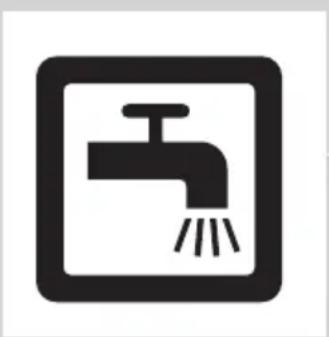
- This Philips appliance complies with all applicable standards and regulations regarding exposure to electromagnetic fields (EMF) can be safely cleaned under the tap.
General
- The appliance is equipped with an automatic voltage selector and is suitable for mains voltages ranging from 100 to 240 volts.
- The adapter transforms 100-240 volts to a safe low voltage of less than 24 volts.
Charging
It takes approx. 1 hour to fully charge the shaver.
When you charge the shaver for the first time or after a long period of disuse, let it charge until the white battery lights up continuously. A fully charged shaver provides up to 60 (PT927CC/PT927/ PT925/PT923/PT923CC/PT920) or 50 shaving minutes (PT877/PT876/PT875/PT870). The shaving time may be less than 60(PT927CC/PT927/PT925/PT923/PT923CC/PT920) or 50 shaving minutes (PT877/PT876/PT875/PT870) as a result of your shaving behaviour, your cleaning habits or your beard type.
Charge indications

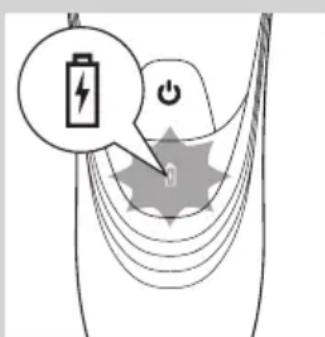
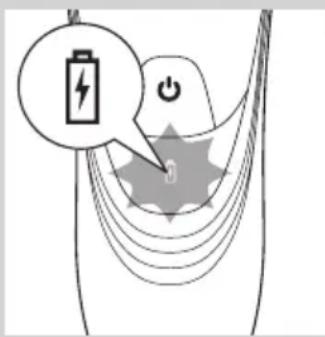
Battery low
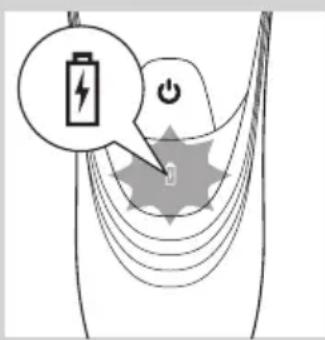
- When the battery is almost empty (when there are only 5 or fewer shaving minutes left), the battery light starts to flash orange.
- When you switch off the shaver, the battery light continues to flash orange for a few seconds.

Quick charging
- When you start charging the empty battery, the battery light flashes white and orange.
Note: When the battery light flashes white and orange towards only white, you can have a quick shave of three minutes.
Charging
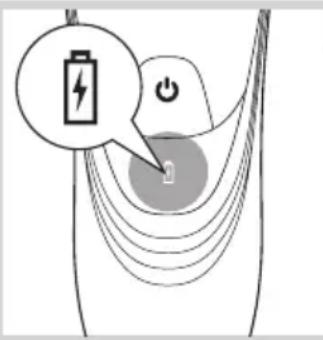
- When the shaver is charging, the battery light flashes white.

Battery fully charged
- When the battery is fully charged, the battery light lights up white continuously.
Note: After approx. 30 minutes, the battery light goes out to save energy.
Charging with the adapter
Do not charge the shaver in a closed pouch (PT927CC/PT927/PT925/PT923CC/PT923/PT920/PT877 only).
1 Put the small plug in the shaver.
2 Put the adapter in the wall socket.
The battery symbol show the charging status of the shaver (see section ‘Charge indications’ in this chapter).
Charging in the charging stand (PT927/PT925/PT923/PT920/PT876/PT875 only)

natural_image
Close-up of a handheld electronic device with a black arrow pointing to a circular base labeled 'Neu' and 'R', no readable text or symbols beyond the label.1 Put the small plug in the charging stand.
2 Put the adapter in the wall socket.
3 Place the shaver in the charging stand.
The battery symbol show the charging status of the shaver (see section ‘Charge indications’ in this chapter).
Charging in the Jet Clean System (PT927CC/PT923CC only)

natural_image
Illustration of a hand holding a plug inserted into a device component (no text or symbols visible)1 Put the small plug in the Jet Clean System.
2 Put the adapter in the wall socket.
3 Place the shaver without protection cap upside down in the shaver holder.
Note: The shaver cannot be placed in the Jet Clean System when the protection cap is on the shaving unit.

natural_image
Diagram of a mechanical device with a battery icon and directional arrow, no text or symbols present4 Push down the locking lever completely to lock the shaver into place.
The battery symbol on the Jet Clean System flashes to indicate that the shaver is being charged.
Note: When the Jet Clean System is performing the cleaning program, the battery symbol is out.

natural_image
Technical line drawing of a mechanical component with a magnified inset showing a battery symbol (no text or labels)When the battery is fully charged, the battery symbol on the Jet Clean System lights up continuously.
Note: After approx. 30 minutes, the battery symbol goes out to save energy.

natural_image
Two-step illustration of a hand using a tool to lift or press, showing the process (no text or symbols)5 To remove the shaver from the Jet Clean System, move the locking lever upwards until it does not go any further and remove the shaver.
Using the shaver
Note: You can also use the appliance directly from the mains. Simply connect the shaver to the mains.
Shaving
natural_image
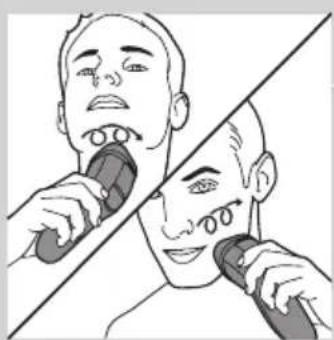
Illustration of a person using a handheld device to clean another (no text or symbols present)1 Press the on/off button once to switch on the shaver.
2 Move the shaving heads over your skin. Make circular movements.
- Your skin may need 2 or 3 weeks to get accustomed to the Philips shaving system.
3 Press the on/off button once to switch off the shaver.
4 Clean the shaver (see chapter 'Cleaning and maintenance').
Trimming
You can use the trimmer to groom your sideburns and moustache.

natural_image
Diagram of a hairbrush with a clip and handle, showing internal components and motion arrows (no text or symbols)1 Press the on/off button once to switch on the shaver.
2 Push the trimmer slide downwards to open the trimmer.
▶You can now start trimming.

natural_image
Line drawing of a device with a tool inserted, showing internal components and a downward arrow (no text or symbols)3 After trimming, close the trimmer and switch off the shaver.
Cleaning and maintenance
Never use compressed air, scouring pads, abrasive cleaning agents or aggressive liquids such as petrol or acetone to clean the shaver, the charging stand (PT927/PT925/PT923/PT920/PT876/PT875 only) and the Jet Clean System (PT927CC/PT923CC only).
- The best and most hygienic way to clean the shaver is in the Jet Clean System (PT927CC/PT923CC only). You can also rinse the shaver under the tap or clean it with the cleaning brush supplied.
- Clean the shaver after every shave for optimal shaving performance.
- Regular cleaning guarantees better shaving performance.
- For the best cleaning results, we advise you to use the Philips Cleaning spray (HQ110) and (PT927CC/PT923CC only) the Jet Clean solution (HQ200).
- Be careful with hot water. Always check if the water is not too hot, to prevent your hands from getting burnt.
Note: Water may leak from the socket at the bottom of the shaver when you rinse it. This is normal and not dangerous because all electronics are enclosed in a sealed power unit inside the shaver.
Cleaning the shaving unit under the tap

natural_image
Illustration of a hand holding a mechanical component with arrows indicating movement (no text or symbols)1 Switch off the shaver and disconnect it from the mains.
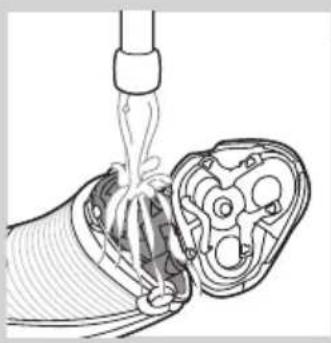
2 Press the release button to open the shaving unit.
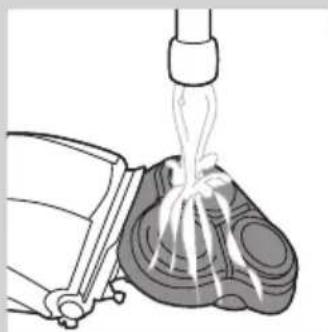
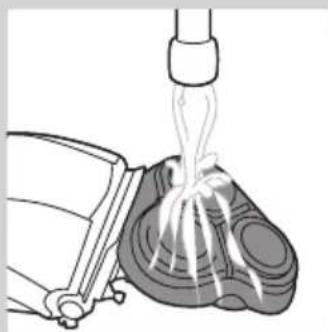
3 Rinse the shaving unit and hair chamber under a hot tap for 30 seconds.
Be careful with hot water. Always check if the water is not too hot, to prevent your hands from getting burnt.
natural_image
Diagram of a medical procedure showing fluid flow from a pipette into a device (no text or labels)- Rinse the hair chamber and the inside of the shaving unit.

natural_image
Illustration of a mechanical device emitting liquid from a piping bag (no text or symbols)- Rinse the outside of the shaving unit.
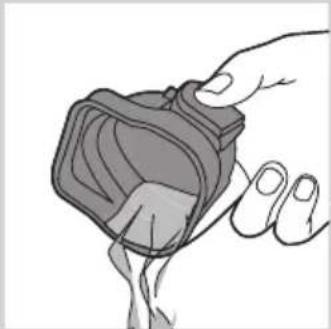
4 Close the shaving unit and shake off excess water.
Be careful not to hit the shaving unit against anything while shaking off excess water.
Never dry the shaving unit and the hair chamber with a towel or tissue, as this may damage the shaving heads and the coupling spindles.
5 Open the shaving unit again and leave it open to let the shaver dry completely.
Cleaning the shaving unit with the cleaning brush
natural_image
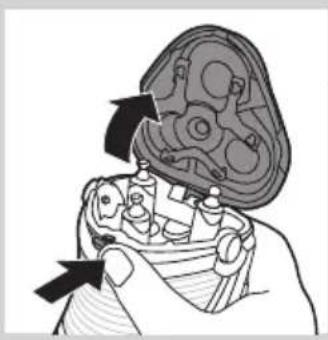
Illustration of a hand holding a mechanical component with arrows indicating direction (no text or symbols)1 Switch off the shaver and disconnect it from the mains.
2 Press the release button to open the shaving unit.
natural_image
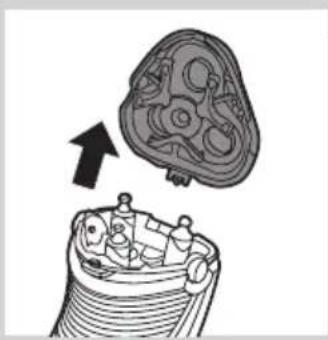
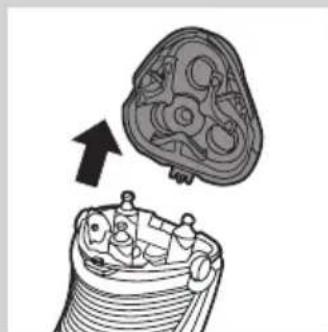
Diagram of a mechanical component with an arrow indicating upward motion (no text or symbols present)3 Pull the shaving unit off the shaver.
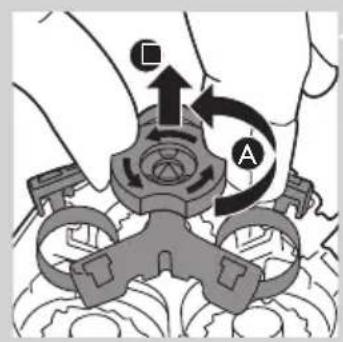
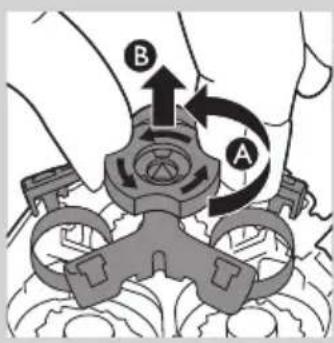
4 Turn the lock anticlockwise (A) and remove the retaining frame (B).
natural_image
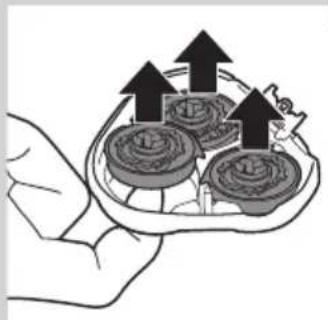
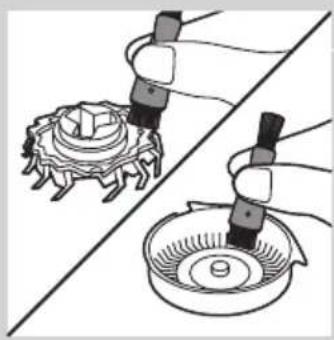
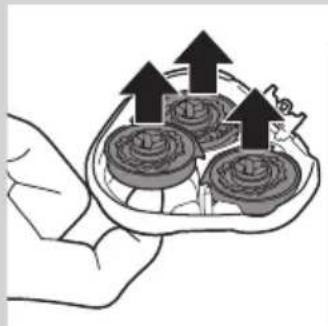
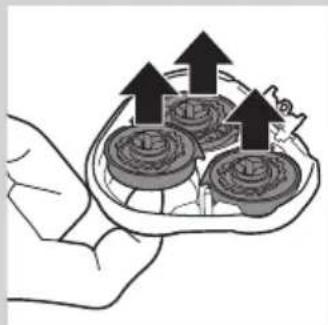
Illustration of a hand holding a tray with three circular objects and upward arrows, no text or symbols present.5 Remove and clean one shaving head at a time. Each shaving head consists of a cutter and a guard.
Note: Do not clean more than one cutter and guard at a time, since they are all matching sets. If you accidentally mix up the cutters and guards, it may take several weeks before optimal shaving performance is restored.
- Remove the cutter from the shaving guard and clean it with the brush.
natural_image
Illustration of two hands using pipette to apply a mechanical component to a circular base (no text or symbols present)- Clean the inside and outside of the shaving guard with the brush.
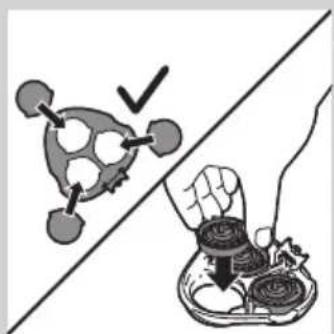
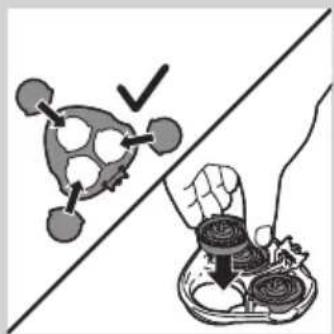
6 Put the shaving heads back into the shaving unit.
natural_image
Illustration showing a food item being cut off by a hand, with no visible text or symbols.Note: Make sure that the projections of the shaving heads fit exactly into the recesses.
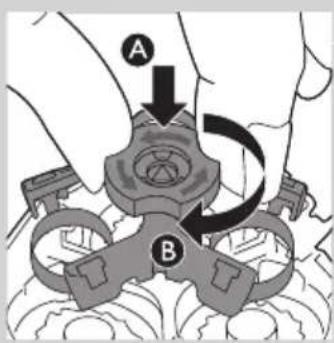
7 Put the retaining frame back into the shaving unit (A) and turn the lock clockwise (B).
natural_image
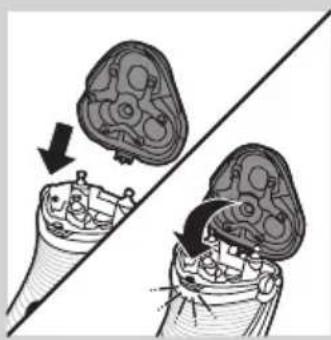
Diagram showing two views of a biological structure with arrows indicating movement or transformation (no text or symbols present)8 Insert the lug of the shaving unit into the slot in the top of the shaver. Then close the shaving unit.
Note: If the shaving unit does not close smoothly, check if you have inserted the shaving heads properly and if the retaining frame is locked.
Cleaning the shaving unit in the Jet Clean System (PT927CC/PT923CC only)
The Jet Clean System cleans the shaving unit.
Preparing the Jet Clean System for use
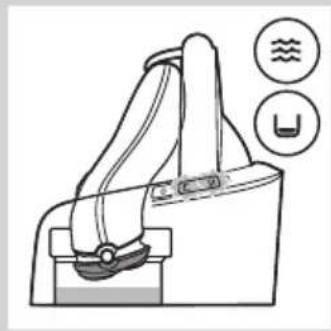
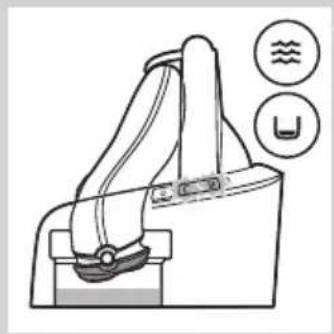
Note: Fill the cleaning chamber before first use and when the 'fluid low' symbol flashes to indicate that the fluid level is too low. When the fluid level drops below the minimum level, the cleaning symbol and the 'fluid low' symbol start to flash and the shaver holder returns to its starting position
natural_image
Line drawing of a handbag with buttons and icons (no text or symbols)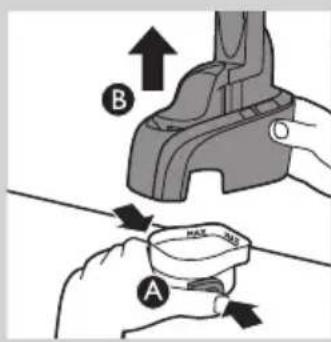
1 Simultaneously press the release buttons on both sides of the cleaning chamber (A). Then lift the Jet Clean System off the cleaning chamber (B).
The cleaning chamber remains behind.
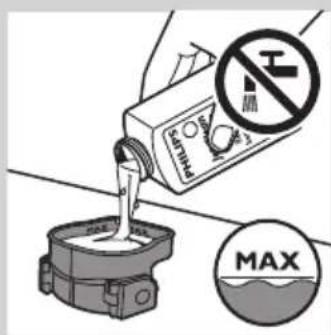
2 Unscrew the cap from the bottle with Jet Clean solution (HQ200) and remove the airtight seal.
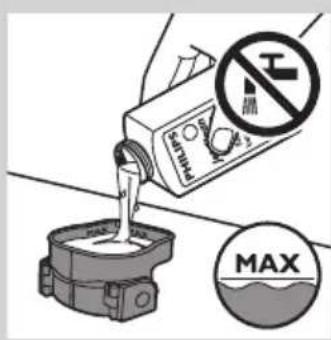
3 Fill the cleaning chamber with Jet Clean solution (HQ200) up to the MAX indication.
Note: Make sure the cleaning chamber is always filled above the MIN indication.
natural_image
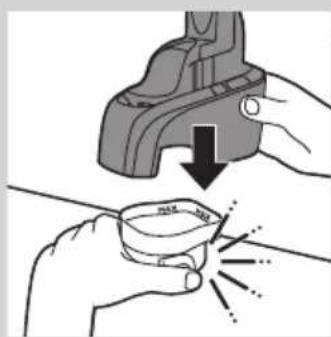
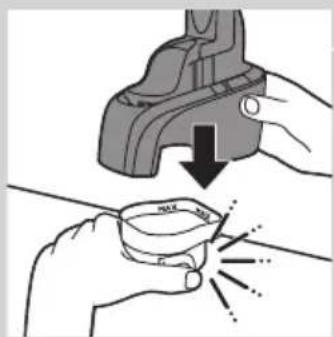
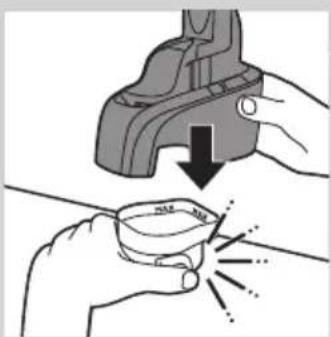
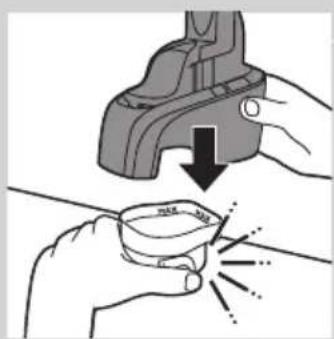
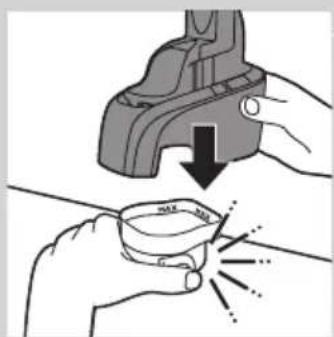
Illustration showing hands using a tool to lift a small bowl with a magnified view of the cup (no text or symbols)4 Place the Jet Clean System back onto the cleaning chamber ('click'). Make sure that the release buttons snap back into place.
When the cleaning chamber is filled with Jet Clean solution, do not move it to prevent leakage.

natural_image
Diagram of a battery charging mechanism with an arrow indicating direction (no text or symbols present)
natural_image
Diagram of a robotic arm with a power button and directional arrow (no text or symbols)

natural_image
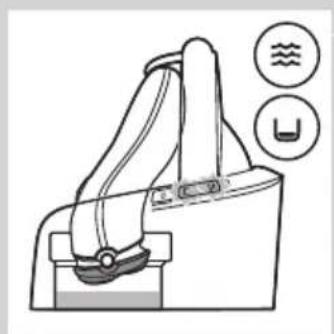
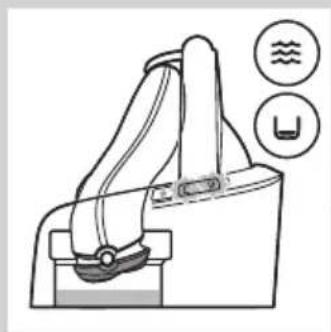
Diagram of a handbag with two circular indicators showing water and U symbols (no text or labels)5 Put the small plug in the Jet Clean System and put the adapter in the wall socket.
The shaver holder automatically moves to its highest position.
The Jet Clean System is now ready for use.
Using the Jet Clean System
1 Place the shaver without protection cap upside down in the shaver holder. Push down the locking lever completely to lock the shaver into place.
The battery symbol on the Jet Clean System goes on to indicate that the shaver is being charged.
Note: The shaver cannot be placed in the Jet Clean System when the protection cap is on the shaving unit.
2 Press the on/off button on the Jet Clean System to start the cleaning program.
The battery symbol on the Jet Clean System goes out.
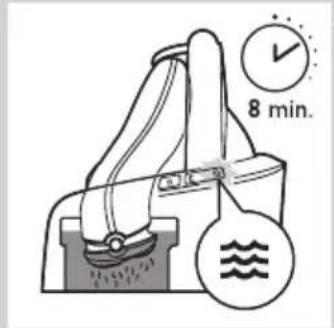
During the cleaning program, the cleaning symbol starts to flash and the shaver is automatically lowered into the cleaning fluid.
The shaver automatically switches on and off several times and moves up and down.
The cleaning symbol flashes throughout the cleaning program, which takes approx. 8 minutes.
After the cleaning program, the battery symbol on the Jet Clean System goes on to indicate that the shaver is being charged.
Note: If you press the on/off button of the Jet Clean System during the cleaning program, the program aborts and resets. In this case, the cleaning stops flashing and the shaver holder returns to its starting position. The shaver may still be wet and dirty, because the cleaning program has not been finished.
Note: If you remove the adapter from the wall socket during the cleaning program, the program aborts. The shaver holder remains in its current position. When you put the adapter back into the wall socket, the shaver holder moves to its highest position.
Note: When the fluid level drops below the minimum level, the cleaning symbol and the 'fluid low' symbol start to flash with intervals and the shaver holder returns to its starting position


natural_image
Illustration of a hand holding a small object with layered texture (no text or symbols)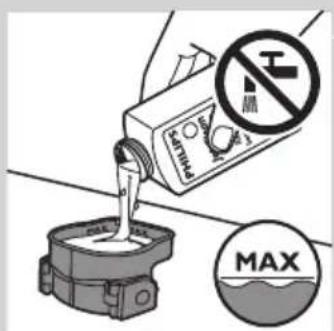
natural_image
Illustration of hands using a tool to lift a cup, showing a downward arrow and sparkles (no text or symbols)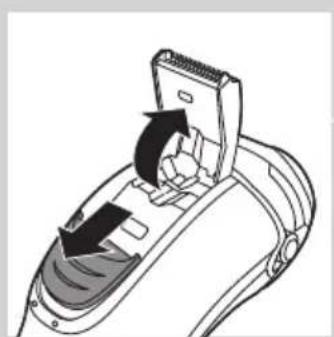
natural_image
Diagram of a hairdryer with directional arrows indicating movement (no text or symbols)Cleaning the Jet Clean System
Empty the cleaning chamber and clean it thoroughly by rinsing it with hot tap water every 15 days if you use the Jet Clean System daily. Otherwise empty and clean the cleaning chamber at least once a month.
1 Clean the outside of the Jet Clean System with a moist cloth.
Never immerse the Jet Clean System in water, nor rinse it under the tap.
2 Simultaneously press the release buttons on both sides of the Jet Clean System (A). Then lift the Jet Clean System off the cleaning chamber (B).
▶The cleaning chamber remains behind.
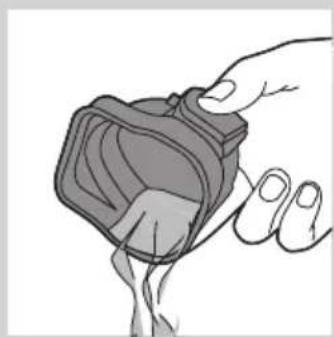
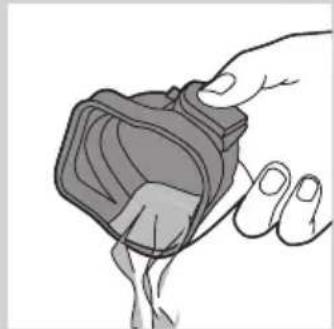
3 Pour any remaining cleaning fluid out of the cleaning chamber. You can simply pour the cleaning fluid down the sink, this is not harmful to the environment.
4 Rinse the cleaning chamber under a hot tap.
Be careful with hot water. Always check if the water is not too hot, to prevent your hands from getting burnt.
The cleaning chamber is not dishwasher-proof.
5 Fill the cleaning chamber with Jet Clean solution (HQ200) up to the MAX indication.
Note: Make sure the cleaning chamber is always filled above the MIN indication.
6 Place the Jet Clean System back onto the cleaning chamber ('click'). Make sure that the release buttons snap back into place.
Cleaning the trimmer with the cleaning brush
Clean the trimmer every time you have used it.
1 Switch off the shaver and disconnect it from the mains.
2 Push the trimmer slide downwards to open the trimmer.

natural_image
Illustration of a hand using a tool to adjust or install a component, with arrows indicating direction (no text or symbols present)3 Clean the trimmer with the short-bristled side of the cleaning brush. Brush up and down along the trimmer teeth.
4 Close the trimmer ('click').
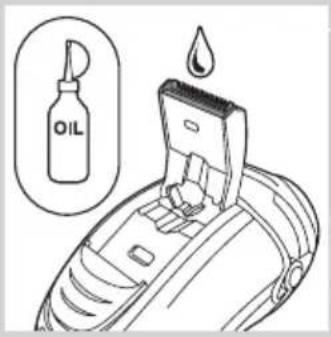
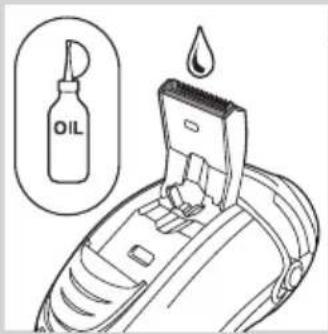
Tip: For optimal trimming performance, lubricate the trimmer teeth with a drop of sewing machine oil every six months.
Storage

natural_image
Diagram of a hand turning a circular component into a base, showing three concentric rings and a top hat (no text or symbols)There are several ways to store the shaver or to take it with you when you travel:
- Put the protection cap on the shaver after use to prevent damage and to avoid dirt accumulation in the shaving heads.
- Store the shaver in the pouch supplied (PT927CC/PT927/PT925/PT923CC/PT923/PT920/PT876 only).
- Store the shaver in the charging stand (PT927/PT923/PT920/PT876/PT875 only).
- Put the shaver in the Jet Clean System (PT927CC/PT923CC only). Make sure the protection cap is not on the shaving unit.
Note: If you do not want the shaver to charge while it is stored it in the Jet Clean System, just leave the locking lever in upright position.
Replacement
natural_image
Illustration of a plow with a magnified inset showing internal components (no text or symbols)For maximum shaving performance, we advise you to replace the shaving heads every two years.
Replacement reminder
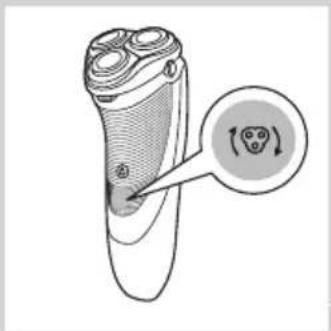
The shaving head symbol will light up to indicate that the shaving heads need to be replaced. Replace damaged shaving heads right away. Only replace the shaving heads with original HQ9 Philips Shaving Heads (PT927CC/PT927/PT925/PT923CC/PT923/PT920) or HQ8 Philips Shaving Heads (PT877/PT876/PT875/PT870).
1 The shaving head symbol lights up orange continuously.
ENGLISH18

natural_image
Illustration of a mechanical assembly with arrows indicating direction (no text or symbols)2 Switch off the shaver. Disconnect the shaver from the mains and remove it from the Jet Clean System (PT927CC/PT923CC).
3 Press the release button to open the shaving unit.
4 Pull the shaving unit off the shaver.

5 Turn the lock anticlockwise (A) and remove the retaining frame (B).
6 Remove the shaving heads and place new ones in the shaving unit.

Note: Make sure that the projections of the shaving heads fit exactly into the recesses.
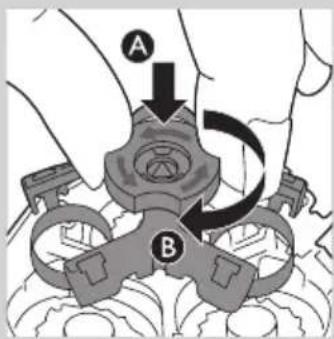
7 Put the retaining frame back into the shaving unit (A) and turn the lock clockwise (B).

natural_image
Diagram showing two views of a mechanical component with arrows indicating direction (no text or symbols)8 Insert the lug of the new shaving unit into the slot in the top of the shaver. Then close the shaving unit.
Note: If the shaving unit does not close smoothly, check if you have inserted the shaving heads properly and if the retaining frame is locked.

9 Press and hold the on/off button for 5 seconds to reset the replacement reminder on the shaver. The orange light goes out.
Ordering accessories

To retain the top performance of your shaver, make sure you clean it regularly and replace its shaving heads at the recommended time.
Shaving heads
- We advise you to replace your shaving heads every two years. Always replace with HQ9 Philips Shaving Heads (PT927CC/PT927/PT925/PT923CC/PT923/PT920) or HQ8 Philips Shaving Heads (PT877/PT876/PT875/PT870).
Cleaning
- PT927CC/PT923CC only: use Jet Clean solution (HQ200) for regular cleaning of the shaving heads.
- Use Cleaning spray (HQ110) to clean the shaving heads thoroughly.
Environment
natural_image
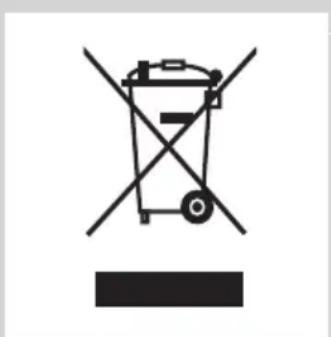
Symbol of a trash bin crossed with no visible text or labels- Do not throw away the shaver and the Jet Clean System (PT927CC/PT923CC only) with the normal household waste at the end of their life, but hand them in at an official collection point for recycling. By doing this, you help to preserve the environment.
natural_image
Symbol of a trash bin crossed with no text or numbers, representing waste sorting or disposal (no text present)- The built-in rechargeable shaver battery contains substances that may pollute the environment. Always remove the battery before you discard or hand in the shaver at an official collection point. Dispose of the battery at an official collection point for batteries. If you have trouble removing the battery, you can also take the appliance to a Philips service centre. The staff of this centre will remove the battery for you and will dispose of it in an environmentally safe way.
Removing the rechargeable shaver battery
Only remove the rechargeable battery when you discard the shaver. Make sure the rechargeable battery is completely empty when you remove it.
1 Disconnect the shaver from the mains, remove it from the Jet Clean System (specific types only) or remove it from the charging stand (specific types only).
2 Let the shaver operate until it stops.
3 Undo the screws in the back of the shaver and in the hair chamber.
4 Remove the front panel and the back panel.
5 Bend the 6 hooks aside and take out the power unit.
Be careful, the hooks are sharp.
6 Remove the battery.
Be careful, the battery strips are sharp.
Do not put the shaver back into the plugged-in Jet Clean System (specific types only) or charging stand (specific types only) after you have removed the rechargeable battery.
Do not connect the shaver to the mains again after you have removed the rechargeable battery.
Guarantee and support
If you need information or support, please visit www.philips.com/support or read the worldwide guarantee leaflet.
Guarantee restrictions
The shaving heads (cutters and guards) are not covered by the terms of the international guarantee because they are subject to wear.
Troubleshooting
This chapter summarises the most common problems you could encounter with the appliance. If you are unable to solve the problem with the information below, visit www.philips.com/support for a list of frequently asked questions or contact the Consumer Care Centre in your country.
Problem Possible cause Solution
| The shaver does not shave as well as it used to. | The Jet Clean System (PT927CC/PT923CC only) has not cleaned the shaver properly because the cleaning fluid in the cleaning chamber is soiled or the cleaning fluid level is too low. | Clean the shaver thoroughly before you continue shaving. If necessary, clean and refill the cleaning chamber (see chapter ‘Cleaning and maintenance’). |
| The shaving heads are damaged or worn. | Replace the shaving heads (see chapter ‘Replacement’). | |
| Long hairs obstruct the shaving heads. | Clean the shaving heads one by one (see section ‘Cleaning the shaving unit with the cleaning brush’ in chapter ‘Cleaning and maintenance’). |
Problem Possible cause Solution
| You have not inserted the shaving heads properly. | Make sure that the projections of the shaving heads fit exactly into the recesses (see section 'Cleaning and maintenance'). | |
| The shaver does not work when I press the on/off button. | The rechargeable battery is empty. | Recharge the battery (see chapter 'Charging') or connect the shaver to the mains. |
| The temperature of the shaver is too high. In this case, the shaver does not work. | As soon as the temperature of the shaver has dropped sufficiently, you can switch on the shaver again. | |
| The shaver is not entirely clean after I clean it in the Jet Clean System (PT927CC/PT923CC only). | The cleaning fluid in the cleaning chamber is soiled. | Empty and rinse the cleaning chamber (see chapter 'Cleaning and maintenance'). |
| The cleaning fluid level is too low. If the fluid volume in the cleaning chamber drops below the minimum level during the cleaning program, the program aborts.The cleaning symbol and the 'fluid low' symbol flash at intervals and the holder returns to its starting position. | Refill the cleaning chamber with cleaning fluid up to the MAX level (see chapter 'Cleaning and maintenance'). | |
| You have used another cleaning fluid than the original Philips cleaning fluid. | Only use Jet Clean solution HQ200. | |
| You have not closed the locking lever of the Jet Clean System properly, or you have not placed the shaver in the Jet Clean Shaver properly. In these cases the Jet Clean System starts to operate, but the cleaning program is not performed properly. | Place the shaver without protection cap in the Jet Clean System properly. Close the locking lever properly. | |
| The Jet Clean System (PT927CC/PT923CC only) does not work when I press the on/off button. | The Jet Clean System is not connected to the mains. | Put the small plug in the Jet Clean System and put the adapter in the wall socket. |
| Water leaks from the shaver after cleaning. | This is normal and not dangerous. During rinsing some water may collect between the power unit and the housing. After rinsing this water flows out through the socket. The power unit is completely watertight so water cannot reach the electronic parts of the shaver. Your shaver continues to be absolutely safe. | |
Въведение
natural_image
Prohibition sign showing a faucet without a shower, enclosed in a circle (no text or symbols)
natural_image
Illustration of a pair of electric shakers with a prohibition symbol (no text or labels)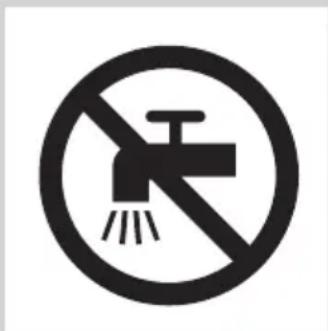
natural_image
Prohibition sign with a faucet and diagonal line, no text or symbols presentПредупреждение
natural_image
Simple black-and-white icon of a faucet with raindrops, no text or symbols present.Изтощена батерия
Бързо зареждане
Зареждане
natural_image
Close-up of a medical or laboratory device with a downward arrow pointing to a spherical base (no visible text or symbols)natural_image
Hand holding a mechanical component with a black arrow pointing to a section (no visible text or symbols)natural_image
Diagram of a battery charger with an icon indicating battery charging (no text or symbols present)natural_image
Technical line drawing of a mechanical component with a magnified inset showing a battery (no text or symbols present)natural_image
Two mechanical clamps in action, one being inserted and the other being cut (no text or symbols visible)natural_image
Illustration of a person using a handheld device to clean another (no text or symbols present)natural_image
Diagram of a hairdryer with directional arrows indicating movement (no text or symbols)natural_image
Diagram of a hand using a tool to adjust or install a device component, with arrows indicating the process (no text or symbols present)natural_image
Illustration of a hand holding a mechanical component with arrows indicating direction (no text or symbols)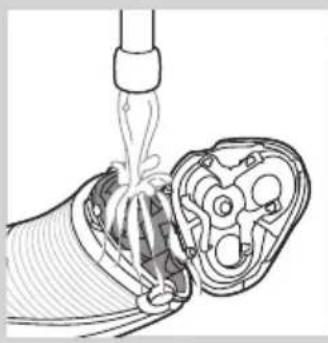
natural_image
Diagram of a medical procedure showing a catheter inserted into a device with internal components (no text or labels)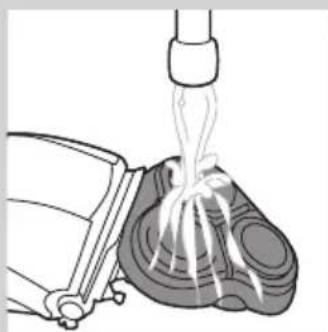
natural_image
Illustration of a mechanical device pouring liquid into a container (no text or symbols)natural_image
Illustration of a mechanical assembly with gears and a handle, showing no text or symbolsnatural_image
Diagram of a mechanical component with an arrow indicating direction, showing internal parts and housing (no text or symbols)natural_image
Illustration of a hand holding a tray with three small food items, each with upward arrows indicating growth (no text or symbols)natural_image
Illustration of two hands using droppers to apply liquid onto a mechanical component (no text or symbols)natural_image
Illustration showing a hand holding a tray with food items, separated by a diagonal line (no text or symbols)natural_image
Diagram showing two mechanical components with arrows indicating motion, no text or symbols presentnatural_image
Diagram of a washing machine with water level indicators (no text or symbols)natural_image
Illustration of hands using a tool to lift a cup, showing a downward arrow and spark effect (no text or symbols)natural_image
Diagram of a battery charger with a magnified view showing battery symbol (no text or labels)natural_image
Mechanical device diagram showing a lever mechanism with a power button and directional arrow (no text or symbols)
natural_image
Line drawing of a handbag with buttons and water symbols (no text or labels)
natural_image
Illustration of a hand holding a small object, possibly a device or container, with no visible text or symbols.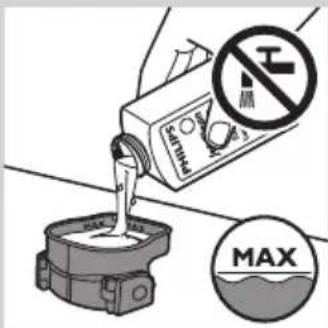
natural_image
Illustration of hands using a tool to apply liquid pressure, showing a drop and droplet shape (no text or symbols)natural_image
Diagram of a hairdryer with directional arrows indicating movement (no text or symbols)natural_image
Illustration of a hand holding a tool with arrows indicating movement or force (no text or symbols)natural_image
Diagram of a hand turning a three-pin electric shaver (no text or symbols present)natural_image
Diagram of a hairbrush with a magnified inset showing internal teeth and facial changes (no text or symbols)
natural_image
Illustration of a hand holding a mechanical component with arrows indicating direction (no text or symbols)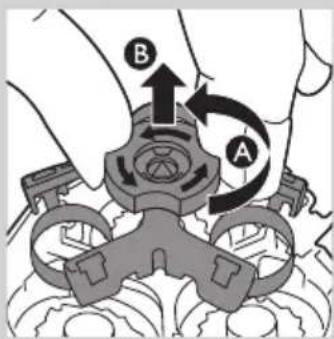
natural_image
Illustration showing a hand holding a bowl with food items, separated by a diagonal line (no text or symbols)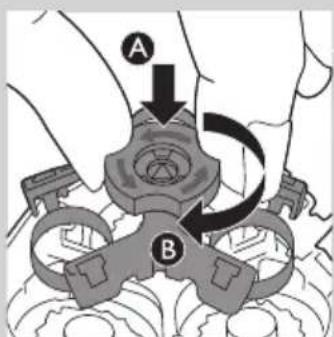
natural_image
Diagram showing two views of a mechanical component with arrows indicating direction (no text or symbols)
natural_image
Symbol of a trash bin crossed with a diagonal line, representing no waste or discharge (no text or numbers present)natural_image
Prohibition sign showing a faucet without a shower, enclosed in a circle (no text or symbols)
natural_image
Illustration of a pair of electric shakers with a prohibition symbol (no text or labels)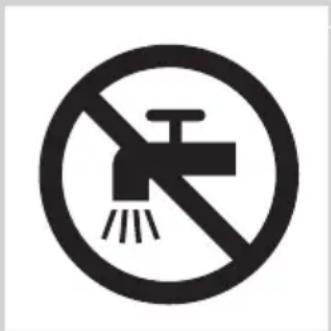
natural_image
Simple black-and-white icon of a faucet with raindrops (no text or symbols)Soulad s normami
Vybitá baterie
Rychlé nabíjení
Nabíjení
natural_image
Illustration of a hand using a tool to adjust or install a mechanical component (no text or symbols visible)natural_image
Diagram of a mechanical device with a battery icon and directional arrow, no text or symbols presentnatural_image
Technical line drawing of a mechanical component with a magnified inset showing a battery symbol (no text or labels)natural_image
Illustration of two hand-painted tool tips on a diagonal line, showing mechanical assembly (no text or symbols)natural_image
Illustration of a person using a handheld device to clean another (no text or symbols present)natural_image
Diagram of a hairbrush with a clip and handle, showing mechanical components without any text or symbolsnatural_image
Diagram of a device being inserted into a component, showing a tool and arrow indicating direction (no text or symbols present)natural_image
Illustration of a mechanical assembly with arrows indicating movement or force (no text or symbols present)natural_image
Diagram of a medical procedure showing fluid flow from a pipette into a device (no text or labels)natural_image
Illustration of a medical procedure showing fluid flow from a bottle onto a patient's foot (no text or symbols)natural_image
Illustration of a mechanical assembly with arrows indicating direction (no text or symbols)natural_image
Diagram of a mechanical component with an arrow indicating direction, showing internal structure (no text or symbols)natural_image
Illustration of a hand holding a tray with three small food items, each with an upward arrow (no text or symbols)natural_image
Illustration of two hands using a tool to adjust a mechanical component, no text or symbols presentnatural_image
Illustration showing a molecular structure with a checkmark and a hand holding coins (no text or symbols present)natural_image
Medical illustration showing two views of a surgical instrument with arrows indicating movement or force (no text or symbols present)natural_image
Diagram of a handbag with water symbols and U-shaped button, no text or labels presentnatural_image
Illustration of hands using a tool to apply a magnified view of a small object (no text or symbols present)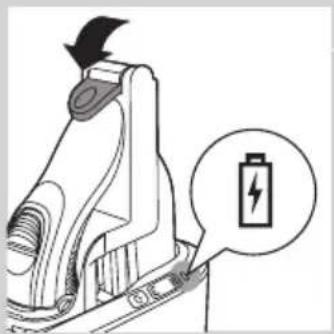
natural_image
Diagram of a battery charging mechanism with a magnified view showing battery symbol (no text or labels)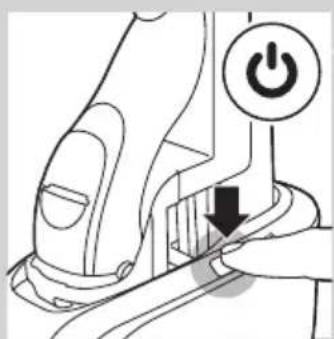
natural_image
Diagram of a mechanical device with a power button and arrow indicating action (no text or symbols present)
natural_image
Line drawing of a mechanical device with no visible text or symbols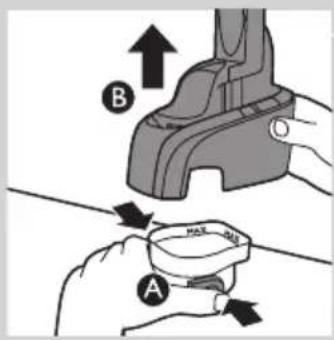
natural_image
Illustration of a hand holding a small object with a curved handle, no text or symbols present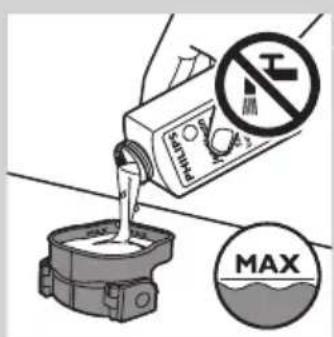

natural_image
Illustration of hands using a tool to lift a cup, showing motion and shading (no text or symbols)natural_image
Diagram of a device's internal structure showing a cable or connector with arrows indicating direction (no text or symbols present)natural_image
Illustration of a hand using a tool to adjust or install a mechanical component (no text or symbols visible)natural_image
Diagram of a hand turning a plow into a three-pin shaver (no text or symbols)natural_image
Diagram of a hairbrush with a circular icon highlighting the brush tip (no text or symbols present)natural_image
Illustration of a hand holding a mechanical component with arrows indicating direction (no text or symbols)natural_image
Illustration of a food safety concept with a hand holding a bowl and a checkmark over a food item (no text or symbols)natural_image
Diagram showing two views of a biological structure with arrows indicating movement or transformation (no text or labels)natural_image
Symbol of a waste bin with crossed lines indicating no waste, and a solid black rectangle below (no text or labels)natural_image
Prohibition sign showing a faucet crossed out by a diagonal line, indicating no leakage or disinfection (no text present)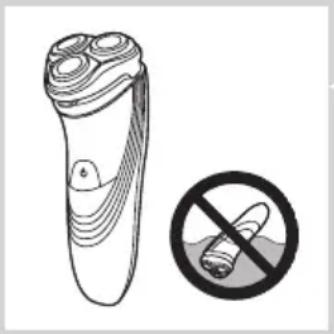
natural_image
Illustration of a pair of electric shakers with a prohibition symbol (no text or labels)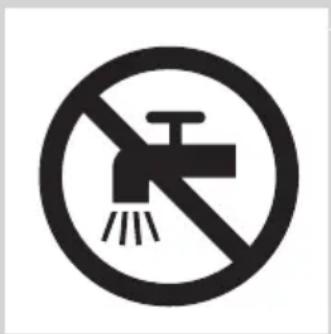
natural_image
Prohibition sign showing a faucet without a shower, enclosed in a circle (no text or symbols)natural_image
Simple black-and-white icon of a faucet with radiating lines, no text or symbols present.Vastavus standarditele
Aku on tühi
Kiirlaadimine
Laadimine
Aku on täis laetud
natural_image
Illustration of a hand using a tool to adjust or install a mechanical component (no text or symbols visible)1 Sisestage väike pistik Jet Clean süsteemi.
2 Sisestage adapter seinakontakti.
3 Asetage ilma kaitsva katteta pardel tagurpidi pardlihoidjasse.
natural_image
Diagram of a mechanical device with a battery icon and directional arrow, no text or symbols presentnatural_image
Technical line drawing of a mechanical component with a magnified inset showing a battery symbol (no text or labels)natural_image
Illustration of two hand-painted tool tips on a diagonal line, showing mechanical assembly (no text or symbols)natural_image
Illustration of a person using a handheld device to clean another (no text or symbols present)natural_image
Diagram of a hairbrush with a clip and handle, showing internal components and motion arrows (no text or symbols)natural_image
Line drawing of a device with a tool inserted, showing internal components and a downward arrow (no text or symbols)natural_image
Illustration of a hand holding a mechanical component with arrows indicating movement or force (no text or symbols present)natural_image
Diagram of a medical procedure showing a catheter inserted into a device with internal tubing (no text or labels)- Loputage karvakambrit ja pardlipea sisemust.
natural_image
Illustration of a mechanical device pouring liquid into a container (no text or symbols)natural_image
Illustration of a hand holding a mechanical component with arrows indicating direction (no text or symbols)natural_image
Diagram of a mechanical component with an arrow indicating direction, showing internal parts and a top view (no text or symbols)
natural_image
Illustration of a hand holding a tray with three small food items and upward arrows indicating growth (no text or symbols)
natural_image
Illustration of two hands using a pipette to clean a mechanical component, with no visible text or symbols.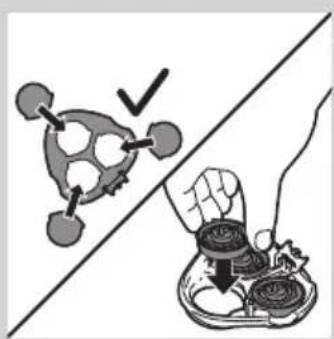
natural_image
Illustration showing a food item being cut off by a hand, with no visible text or symbols.
natural_image
Diagram showing two views of a mechanical component with arrows indicating motion, no text or symbols presentnatural_image
Diagram of a mechanical device with labeled parts and icons (no readable text or symbols)natural_image
Illustration of hands using a tool to lift a cup, showing motion and shading (no text or symbols)natural_image
Diagram of a battery charger with an icon indicating battery charging (no text or symbols present)

natural_image
Diagram of a handbag with buttons and icons indicating water level and weight (no text or symbols)
natural_image
Illustration of a hand holding a small object with visible internal structure (no text or symbols)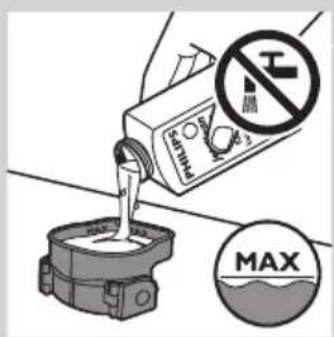
natural_image
Illustration of hands using a tool to lift a cup, showing motion and shading (no text or symbols)
natural_image
Diagram of a hairdryer with black arrows indicating direction (no text or symbols)natural_image
Illustration of a hand holding a tool with arrows indicating motion or force (no text or symbols)natural_image
Diagram of a hand turning a three-pin electric shaver with a top handle (no text or symbols)natural_image
Illustration of a hand holding a three-pin electric shaver with a circular arrow indicating rotation (no text or symbols)natural_image
Illustration of a hand holding a mechanical component with arrows indicating movement (no text or symbols)natural_image
Illustration of a food safety symbol (no text or labels present)natural_image
Medical illustration showing two views of a surgical instrument with arrows indicating movement (no text or labels)
natural_image
Symbol of a waste bin with no text or labels, crossed by two crossed lines and a solid black rectangle below (no text or symbols present)natural_image
Prohibition sign of a faucet without any text or symbols
natural_image
Illustration of a pair of electric shakers with a prohibition symbol (no text or labels)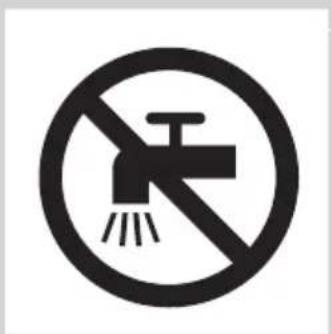
Oprez
natural_image
Simple black-and-white icon of a faucet with raindrops (no text or symbols)Sukladnost standardima
Baterija je gotovo prazna
- Kada je baterija gotovo prazna (kada preostane samo 5 minuta ili manje vremena za brijanje), indikator baterije počinje bljeskati narančasto.
- Kada isključite aparat za brijanje, indikator baterije nastavlja bljeskati narančasto još nekoliko sekundi.
Brzo punjenje
- Kada počnete puniti praznu bateriju, indikator baterije bljeska bijelo i narančasto.
Napomena: Kada indikator baterije bljeska bijelo i narančasto prema samo bijeloj boji, na raspolaganju vam je brzo brijanje od tri minute.
Punjenje
- Dok se aparat za brijanje puni, indikator baterije bljeska bijelo.

natural_image
Close-up of a remote control device with a black arrow pointing to the base (no text or symbols visible)natural_image
Illustration of a hand holding a plug inserted into a device component (no text or symbols visible)natural_image
Diagram of a mechanical device with a battery icon and directional arrow, no text or symbols presentnatural_image
Technical line drawing of a mechanical component with a magnified inset showing a battery (no text or symbols present)natural_image
Illustration of two hand-painted tool tips on a diagonal line, showing mechanical assembly (no text or symbols)5 Kako biste izvadili aparat za brijanje iz sustava Jet Clean, pomaknite ručicu za zaključavanje prema gore do kraja i izvadite aparat za brijanje.
Uporaba aparata za brijanje
natural_image
Illustration of a person using a handheld device to clean another (no text or symbols present)natural_image
Diagram of a hairdryer with a brush and lever mechanism (no text or symbols)natural_image
Diagram of a hand using a tool to adjust or install a device component, with arrows indicating the process (no text or symbols present)3 Nakon podrezivanja zatvorite trimer i isključite aparat za brijanje.
natural_image
Illustration of a hand holding a mechanical component with arrows indicating movement or force (no text or symbols present)1 Isključite aparat za brijanje i iskopčajte ga iz struje.
2 Pritisnite gumb za otpuštanje kako biste otvorili jedinicu za brijanje.
3 Jedinicu za brijanje i spremnik za dlake 30 sekundi ispirite pod mlazom vruće vode.
natural_image
Diagram of a medical procedure showing a catheter inserted into a device with internal tubing (no text or labels)- Isperite spremnik za dlake i unutrašnjost jedinice za brijanje.
natural_image
Illustration of a mechanical device pouring liquid into a container (no text or symbols)- Isperite vanjski dio jedinice za brijanje.
natural_image
Illustration of a mechanical assembly with arrows indicating direction (no text or symbols)1 Isključite aparat za brijanje i iskopčajte ga iz struje.
2 Pritisnite gumb za otpuštanje kako biste otvorili jedinicu za brijanje.
natural_image
Diagram of a mechanical component with an arrow indicating direction, no text or symbols present3 Jedinicu za brijanje skinite s aparata.

natural_image
Illustration of a hand holding a tray with three small food items, each with an upward arrow indicating growth (no text or symbols present)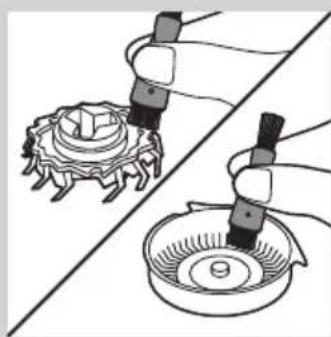
natural_image
Illustration of two hands using a tool to adjust a mechanical component, no text or symbols present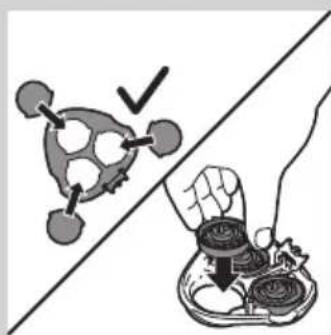
natural_image
Illustration showing a molecular structure with a checkmark and a hand holding a container (no text or symbols present)
natural_image
Diagram showing two mechanical components with arrows indicating movement or assembly (no text or symbols present)8 Umetnite jezičac jedinice za brijanje u utor na gornjem dijelu aparata za brijanje. Zatim zatvorite jedinicu za brijanje.
Napomena: Ako se jedinica za brijanje ne zatvara lako, provjerite jesu li glave za brijanje ispravno umetnute i je li zaključan okvir za pričvršćivanje.
Čišćenje jedinice za brijanje u sustavu Jet Clean (samo PT927CC/PT923CC)
Sustav Jet Clean čisti jedinicu za brijanje.
Priprema sustava Jet Clean za uporabu
natural_image
Diagram of a mechanical device with labeled parts and icons (no readable text or symbols)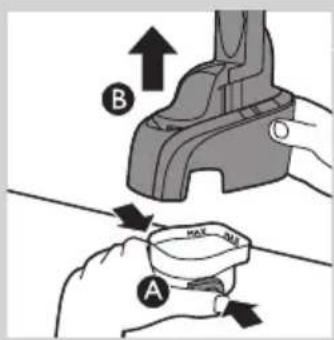
1 Istovremeno pritisnite gumbe za otpuštanje s obje strane komore za čišćenje (A). Zatim sustav Jet Clean podignite s komore za čišćenje (B).
natural_image
Illustration of hands using a tool to lift a cup, showing motion and shading (no text or symbols)4 Sustav Jet Clean vratite na komoru za čišćenje ("klik").
natural_image
Diagram of a battery charger mechanism with an arrow indicating direction and a battery symbol (no text or labels present)


natural_image
Line drawing of a washing machine handle with water level indicators (no text or symbols)2 Istovremeno pritisnite gumbe za otpuštanje s obje strane sustava Jet Clean (A). Zatim sustav Jet Clean podignite s komore za čišćenje (B). Komora za čišćenje ostaje.

natural_image
Illustration of a hand holding a small object with a curved handle, no text or symbols present3 Preostalu tekućinu za čišćenje izlijte iz komore za čišćenje. Tekućinu možete izliti u sudoper jer nije štetna za okoliš.
4 Komoru za čišćenje isperite pod mlazom vruće vode.
natural_image
Illustration of hands using a tool to lift a cup, showing a downward arrow and spark effect (no text or symbols)6 Sustav Jet Clean vratite na komoru za čišćenje ("klik"). Pazite da gumbi za otpuštanje sjednu na mjesto.
Čišćenje trimera četkom

natural_image
Diagram of a hairdryer with directional arrows indicating movement or force (no text or symbols)Očistite trimer nakon svake uporabe.
1 Isključite aparat za brijanje i iskopčajte ga iz struje.
2 Klizač trimera gurnite prema dolje kako biste otvorili trimer.

natural_image
Illustration of a hand holding a tool with arrows indicating motion or force (no text or symbols)3 Trimer očistite onom stranom četke na kojoj se nalaze kraće dlačice. Zupce trimera četkom prijeđite u smjeru gore-dolje.
4 Zatvorite trimer ("klik").
natural_image
Diagram of a hand turning a three-pin electric shaver (no text or symbols)natural_image
Illustration of a hand holding a three-pin electric shaver with a circular diagram highlighting the internal mechanism (no text or symbols present)1 Simbol glave za brijanje počet će postojano svijetliti narančasto.
2 Isključite aparat za brijanje. Aparat za brijanje iskopčajte iz napajanja ili izvadite iz sustava Jet Clean (PT927CC/PT923CC).

natural_image
Illustration of a hand holding a mechanical component with arrows indicating movement (no text or symbols)3 Pritisnite gumb za otpuštanje kako biste otvorili jedinicu za brijanje.
4 Jedinicu za brijanje skinite s aparata.
natural_image
Illustration showing a molecular structure with a checkmark and a hand holding a tray (no text or symbols)natural_image
Diagram showing two mechanical components with arrows indicating movement or assembly (no text or symbols present)
8 Umetnite jezičac nove jedinice za brijanje u utor na gornjem dijelu aparata za brijanje. Zatim zatvorite jedinicu za brijanje.
Napomena: Ako se jedinica za brijanje ne zatvara lako, provjerite jesu li glave za brijanje ispravno umetnute i je li zaključan okvir za pričvršćivanje.
natural_image
Symbol of a trash bin with crossed lines indicating no waste or discharge, and a solid black rectangle below (no text or labels)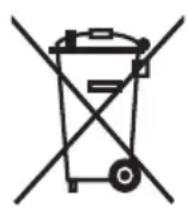
natural_image
Prohibition sign showing a faucet without a shower, enclosed in a circle (no text or symbols)
natural_image
Illustration of a pair of electric shakers with a prohibition symbol (no text or labels)
natural_image
Black and white icon of a faucet with raindrops falling (no text or symbols)Gyors töltés
Töltés
natural_image
Close-up of a handheld device with a black arrow pointing to a circular base labeled 'Hog.pai' (no other text or symbols visible)natural_image
Illustration of a hand using a tool to adjust or install a mechanical component (no text or symbols visible)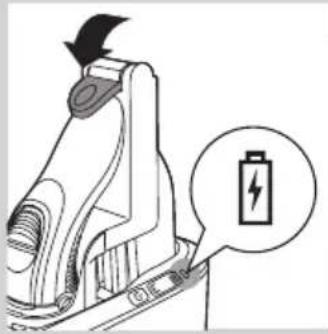
natural_image
Diagram of a mechanical device with a battery symbol and lightning bolt icon (no text or labels)natural_image
Technical line drawing of a mechanical component with a magnified inset showing a battery symbol (no text or labels)natural_image
Illustration of two hand tools on a diagonal line, one adjusting the other with an arrow (no text or symbols)natural_image
Illustration of a person using a handheld device to clean another (no text or symbols present)natural_image
Diagram of a hairbrush with a clip inserted into the jaw (no text or symbols)natural_image
Diagram of a device being inserted into a component, showing tool and internal structure (no text or symbols)natural_image
Illustration of a hand holding a mechanical component with arrows indicating direction (no text or symbols)natural_image
Diagram of a medical procedure showing fluid flow from a pipette into a device (no text or labels)natural_image
Illustration of a mechanical device pouring liquid into a container (no text or symbols)natural_image
Illustration of a hand holding a mechanical component with arrows indicating direction (no text or symbols)natural_image
Diagram of a mechanical component with an arrow indicating upward motion, no text or symbols presentnatural_image
Illustration of a hand holding a tray with three food items and upward arrows indicating growth (no text or symbols)natural_image
Illustration of two hands using pipette to apply a mechanical component to a circular base (no text or symbols present)natural_image
Illustration showing a molecular structure with a checkmark and a hand holding a tray of food items (no text or symbols)natural_image
Diagram showing two mechanical components with arrows indicating motion or assembly, no text or symbols presentnatural_image
Diagram of a hand holding a device with two circular icons labeled 'U' and 'S', no readable text or symbols present.

natural_image
Illustration showing hands using a tool to remove or apply a small bowl, with no text or symbols present.
natural_image
Diagram of a battery charger with an icon indicating battery symbol (no text or labels present)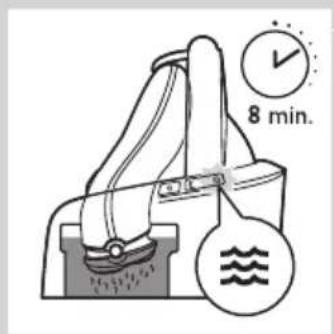

natural_image
Diagram of a mechanical device with labeled parts and icons (no readable text or symbols)
natural_image
Illustration of a hand holding a small object with a curved handle, no text or symbols present
natural_image
Diagram of a hairdryer with black arrows indicating direction (no text or symbols)
natural_image
Hand holding a connector with arrows indicating direction (no text or symbols)natural_image
Diagram of a hand turning a three-pin electric shaver (no text or symbols)natural_image
Diagram of a hand holding a small electric shaver with a magnified inset showing the internal mechanism (no text or symbols present)natural_image
Illustration of a hand holding a mechanical component with arrows indicating direction (no text or symbols)natural_image
Illustration of a hand holding a tray with food items, separated by a diagonal line (no text or symbols)natural_image
Diagram showing two views of a mechanical component with internal structures, no text or symbols presentnatural_image
Symbol of a waste bin with crossed lines indicating no waste, and a solid black rectangle below (no text or labels)natural_image
Prohibition sign showing a faucet without a shower, enclosed in a circle (no text or symbols)
natural_image
Illustration of a pair of electric shakers with a prohibition symbol (no text or labels)
- Kaupcizdigine jauapty adamny, kadafalaayincsy z hemece kpylfiny paiidalanu nyskaularyncsy z kozfalu ymikindig men oilya u kabeti shekteuli, condai-aç biimí men təjiribesí az aamdardyh (balalardy kosa) byl ystarany jəne Jet Clean jyiesin koldanyyna bolmайдy.
natural_image
Simple black-and-white icon of a faucet with raindrops (no text or symbols)Батарея заряды аз
Зарядтау
natural_image
Illustration of a handheld device with a black arrow pointing to a circular base labeled 'Hot gel' (no text or symbols on the device itself)natural_image
Illustration of a hand using a tool to adjust or install a mechanical component (no text or symbols visible)natural_image
Diagram of a mechanical device with a battery icon and lightning bolt symbol (no text or labels)natural_image
Technical line drawing of a mechanical component with a magnified inset showing a battery symbol (no text or labels present)natural_image
Illustration of two hand-painted tool holders performing a manual operation on a diagonal line (no text or symbols)natural_image
Illustration of a person using a handheld device to clean another (no text or symbols present)natural_image
Diagram of a hairdryer with a device inserted, showing internal components and directional arrows (no text or symbols)natural_image
Diagram of a device being inserted into a component, showing a tool and arrow indicating direction (no text or symbols present)natural_image
Illustration of a hand holding a mechanical component with internal gears and a handle (no text or symbols)natural_image
Diagram of a medical procedure showing fluid flow from a tube into a device (no text or labels)natural_image
Illustration of a mechanical device emitting fluid from a piping bag (no text or symbols)natural_image
Illustration of a hand holding a mechanical component with arrows indicating direction (no text or symbols)natural_image
Diagram of a mechanical component with an arrow indicating direction, showing internal parts and a cylindrical body (no text or symbols)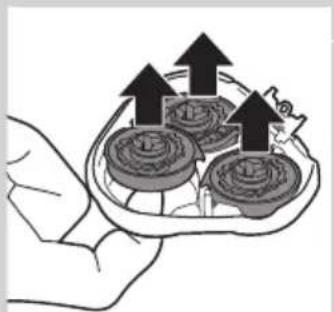
natural_image
Illustration of a hand holding a tray with three small food items, each with upward arrows indicating growth (no text or symbols present)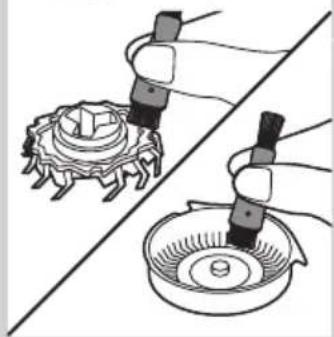
natural_image
Illustration of two hands using a tool to adjust a mechanical component, with no visible text or symbols.
natural_image
Illustration showing a hand holding coins above a divided line, with a checkmark and abstract shapes (no text or symbols)
natural_image
Medical illustration showing two views of a surgical instrument with arrows indicating movement (no text or labels)natural_image
Diagram of a mechanical device with labeled parts and icons (no readable text or symbols)
natural_image
Diagram of a battery plug with an arrow indicating direction, and a magnified view showing the battery symbol (no text or labels present)
natural_image
Diagram of a mechanical device with a power button and arrow indicating action (no text or symbols present)
natural_image
Diagram of a handbag with attached straps and water symbols (no text or labels)
natural_image
Illustration of a hand holding a small object with a curved handle, no text or symbols present

natural_image
Illustration showing hands using a tool to lift a cup with a magnifying glass (no text or symbols)natural_image
Diagram of a hairbrush with black arrows indicating direction (no text or symbols)natural_image
Illustration of a hand holding a tool with arrows indicating motion or force (no text or symbols)natural_image
Diagram of a hairbrush with three blades and a top blade, showing mechanical components (no text or symbols)Ауыстыру
natural_image
Diagram of a hand holding a small object with a circular arrow and three circular elements, no text or symbols present.natural_image
Illustration of a hand holding a mechanical component with arrows indicating motion (no text or symbols)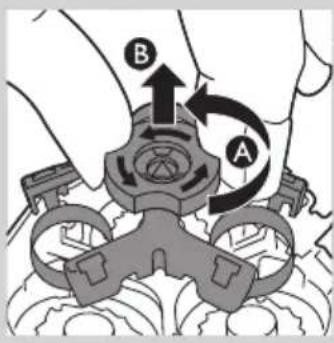
natural_image
Illustration showing a hand holding a tray with food items, separated by a diagonal line (no text or symbols)natural_image
Diagram showing two views of a mechanical component with arrows indicating direction (no text or symbols)
natural_image
Symbol of a waste bin with no text or labels, crossed by two crossed lines and a solid rectangle below (no text or symbols present)natural_image
Prohibition sign showing a faucet crossed out by a diagonal line, indicating no leakage or disinfection (no text present)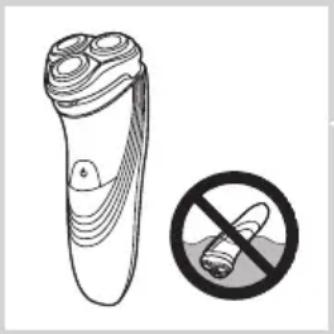
natural_image
Illustration of a pair of electric shakers with a prohibition symbol (no text or labels)natural_image
Simple black-and-white icon of a faucet with radiating lines, no text or symbols present.Atitiktis standartams
Senka baterija
Greitasis įkrovimas
lkrovimas
natural_image
Close-up of a handheld electronic device with a black arrow pointing to a circular base labeled 'Neurol', no text or symbols present.natural_image
Illustration of a hand holding a tool interacting with a mechanical component (no text or symbols visible)natural_image
Diagram of a mechanical device with a battery icon and directional arrow, no text or symbols presentnatural_image
Technical line drawing of a mechanical component with a magnified inset showing a battery symbol (no text or labels present)natural_image
Illustration of two mechanical components with arrows indicating motion, no text or symbols presentnatural_image
Illustration of a person using a handheld device to clean another (no text or symbols present)natural_image
Diagram of a hairbrush with a scroll wheel and directional arrows indicating motion (no text or symbols)natural_image
Diagram of a hand using a tool to adjust or install a device component, with no visible text or symbols.natural_image
Illustration of a mechanical assembly with arrows indicating movement or force (no text or symbols present)natural_image
Diagram of a medical procedure showing fluid flow from a tube into a device (no text or labels)natural_image
Illustration of a mechanical device pouring liquid into a container (no text or symbols)natural_image
Illustration of a hand holding a mechanical component with arrows indicating direction (no text or symbols)natural_image
Diagram of a mechanical component with an arrow indicating direction, showing internal structure (no text or symbols)natural_image
Illustration of a hand holding a tray with three small food items, each with an upward arrow indicating growth (no text or symbols present)natural_image
Illustration of two hands using a pipette to clean a mechanical component, no text or symbols presentnatural_image
Medical illustration showing two views of a surgical instrument with arrows indicating movement (no text or symbols)natural_image
Diagram of a washing machine with water level indicators (no text or symbols)natural_image
Illustration of hands using a tool to apply liquid pressure onto a cup, with no text or symbols present.
natural_image
Diagram of a battery holder with an arrow indicating direction and a battery icon (no text or symbols)
natural_image
Diagram of a showerhead with water level indicators (no text or symbols)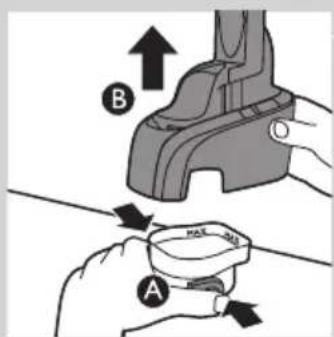

natural_image
Illustration of a hand holding a small object with a curved handle (no text or symbols)

natural_image
Illustration showing hands using a tool to lift a cup, with no text or symbols present.natural_image
Diagram of a hairdryer with a device inserted, showing internal components and directional arrows (no text or symbols)natural_image
Hand holding a tool interacting with a mechanical component, showing motion arrows (no text or symbols)natural_image
Diagram of a hand turning a leaf with three circular blades (no text or symbols)Pakeitimas
natural_image
Diagram of a hairbrush with a circular icon highlighting the brush tip (no text or symbols present)natural_image
Illustration of a hand holding a mechanical component with arrows indicating direction (no text or symbols)natural_image
Illustration of a food safety concept with a hand holding a bowl and a checkmark over a food item (no text or symbols)natural_image
Diagram showing two mechanical components with arrows indicating movement, no text or symbols presentnatural_image
Symbol of a waste bin with crossed lines indicating no waste, and a solid black rectangle below (no text or labels)natural_image
Prohibition sign showing a faucet without raindrops, enclosed in a circle (no text)
natural_image
Illustration of a pair of electric shakers with a prohibition symbol (no text or labels)
natural_image
Prohibition sign showing a faucet crossed out by a diagonal line, indicating no pollution or water release.natural_image
Simple black-and-white icon of a faucet with radiating lines, no text or symbols present.Tukša baterija
Ātra uzlāde
Lādēšana
natural_image
Illustration of a hand holding a plug inserted into a device component (no text or symbols visible)natural_image
Diagram of a mechanical device with a battery icon and directional arrow, no text or symbols presentnatural_image
Technical line drawing of a mechanical component with a magnified inset showing a battery symbol (no text or labels)natural_image
Illustration of two hand-painted tool tips on a diagonal line, showing mechanical assembly (no text or symbols)5 Lai iznemtu skuvekli no Jet Clean sistēmas, pavirziet blokēšanas sviru uz augšu līdz galam un iznemiet skuvekli.
Skuvekla lietošana
natural_image
Illustration of a person using a handheld device to clean another (no text or symbols present)natural_image
Diagram of a hairdryer with a brush and lever mechanism (no text or symbols)natural_image
Line drawing of a device with a tool inserted, showing internal components and a downward arrow (no text or symbols)natural_image
Illustration of a hand holding a mechanical component with arrows indicating movement (no text or symbols)natural_image
Diagram of a medical procedure showing fluid flow from a pipette into a device (no text or labels)natural_image
Diagram of a mechanical device emitting a bundle of wires into a housing (no text or symbols)natural_image
Illustration of a hand holding a mechanical component with arrows indicating movement (no text or symbols)natural_image
Diagram of a mechanical component with an arrow indicating direction, showing internal structure without any text or symbols.
natural_image
Illustration of a hand holding a tray with three circular objects and upward arrows, no text or symbols present.
natural_image
Illustration of two hands using a tool to adjust a mechanical component, no text or symbols present
natural_image
Illustration showing a molecular structure with a checkmark and a hand holding a container (no text or symbols)
natural_image
Diagram showing two mechanical components with arrows indicating motion, no text or symbols presentnatural_image
Diagram of a handbag with water level indicators (no text or symbols)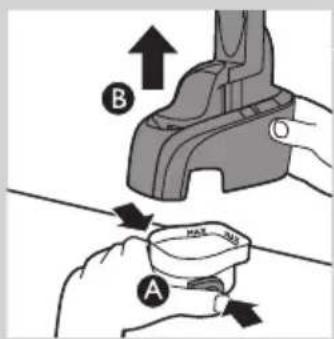
natural_image
Illustration of hands using a tool to lift a cup, with a magnified view showing light effects (no text or symbols)natural_image
Diagram of a battery charger with an arrow indicating direction and a battery icon (no text or symbols)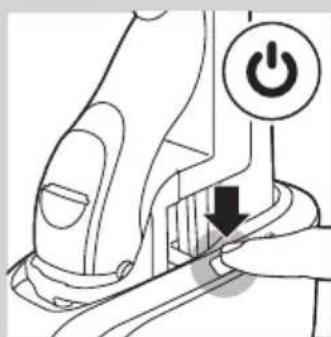
natural_image
Diagram of a robotic arm with a power button and directional arrow (no text or symbols)
natural_image
Diagram of a hand pump mechanism with water level indicators (no text or symbols)
natural_image
Illustration of a hand holding a small object with a curved handle, no text or symbols present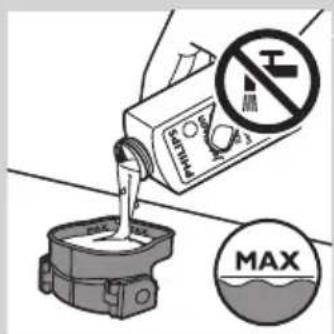

natural_image
Illustration showing hands using a tool to lift a cup with a magnifying glass (no text or symbols)
natural_image
Diagram of a hairdryer with arrows indicating direction (no text or symbols)natural_image
Illustration of a hand holding a tool interacting with a mechanical component (no text or symbols visible)natural_image
Diagram of a hand turning a three-pin electric shaver (no text or symbols)natural_image
Diagram of a plush or electric shaver with a circular button indicating rotation (no text or symbols present)natural_image
Illustration of a mechanical assembly with gears and components, no text or symbols presentnatural_image
Illustration of a hand holding a bowl with liquid, alongside a molecular structure with a checkmark (no text or symbols)natural_image
Diagram showing two views of a mechanical component with arrows indicating direction (no text or symbols)natural_image
Symbol of a waste bin with no text or labels, crossed by two crossed lines and a solid black rectangle below (no text or symbols present)natural_image
Prohibition sign showing a faucet without a shower, enclosed in a circle (no text or symbols)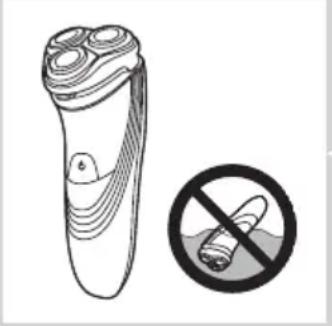
natural_image
Illustration of a pair of electric shakers with a prohibition symbol (no text or labels)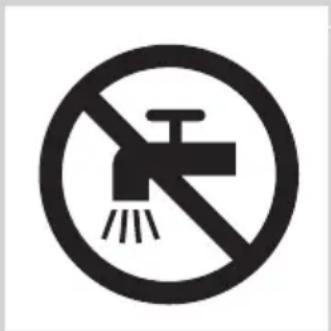
natural_image
Simple black-and-white icon of a faucet with raindrops, no text or symbols present.Zgodność z normami
Szybkie ładowanie

Ładowanie
natural_image
Illustration of a hand inserting a plug into a device component (no text or symbols visible)natural_image
Diagram of a battery charger with a lightning bolt symbol and a magnified view of its battery (no text or labels present)natural_image
Technical line drawing of a mechanical component with a magnified inset showing a battery (no text or symbols)natural_image
Two mechanical tools or clamps performing a manual operation, showing hand positioning and cutting tool (no text or symbols visible)natural_image
Illustration of a person using a handheld device to clean another's face (no text or symbols present)natural_image
Diagram of a hairdryer with black arrows indicating direction (no text or symbols)natural_image
Diagram of a hand using a tool to adjust or install electronic components, with no visible text or symbols.natural_image
Illustration of a hand holding a mechanical component with arrows indicating direction (no text or symbols)natural_image
Diagram of a medical procedure showing fluid flow through a tube into a device (no text or labels)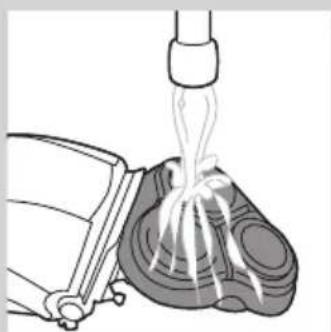
natural_image
Diagram of a mechanical device emitting fluid from a nozzle (no text or symbols)natural_image
Illustration of a hand holding a mechanical component with arrows indicating movement (no text or symbols)natural_image
Diagram of a mechanical component with an arrow indicating direction, showing internal structure without any text or symbols.natural_image
Illustration of a hand holding a tray with three food items, each marked with upward arrows (no text or symbols)natural_image
Illustration of two hands using pipette to apply a mechanical component to a circular base (no text or symbols present)natural_image
Diagram showing two mechanical components with arrows indicating movement or assembly (no text or symbols present)natural_image
Line drawing of a washing machine handle with water level indicators (no text or symbols)natural_image
Illustration of hands using a tool to remove or apply a small bowl, with no text or symbols present.
natural_image
Diagram of a battery holder mechanism with an arrow indicating direction and a battery symbol (no text or labels)
natural_image
Diagram of a mechanical device with a hand pressing a button labeled 'Power' (no text or symbols beyond the icon)
natural_image
Diagram of a mechanical device with labeled parts and icons (no readable text or symbols)

natural_image
Illustration of a hand holding a small object with layered texture (no text or symbols)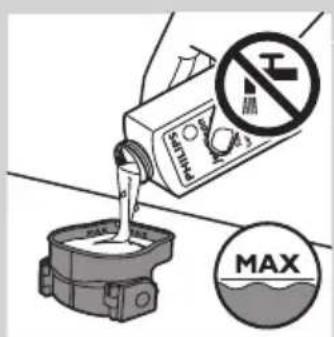
natural_image
Illustration of hands using a tool to lift a cup, with no text or symbols presentnatural_image
Diagram of a hairdryer with a brush and lever mechanism (no text or symbols)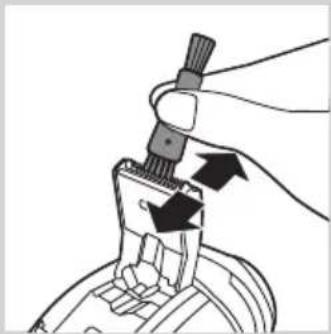
natural_image
Illustration of a hand using a tool to adjust or install a mechanical component (no text or symbols visible)natural_image
Diagram of a hand turning a circular component into a base, showing three concentric rings and a top hat (no text or symbols)natural_image
Diagram of a hairbrush with a circular arrow indicating rotation (no text or symbols)natural_image
Illustration of a hand holding a mechanical component with arrows indicating movement (no text or symbols)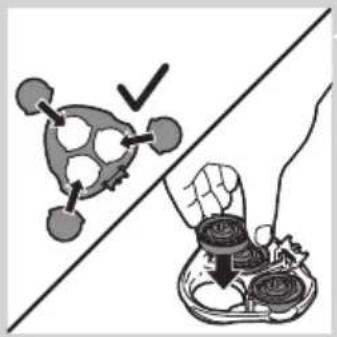
natural_image
Illustration showing a hand holding a tray with food items, separated by a diagonal line (no text or symbols)natural_image
Diagram showing two views of a mechanical component with arrows indicating direction (no text or symbols)natural_image
Symbol of a waste bin with no text or labels, including a crossed-out box and a solid rectangle below (no readable text or symbols)natural_image
Symbol of a trash bin crossed with a diagonal line, representing no waste or discharge (no text or labels)natural_image
Prohibition sign showing a faucet without a shower, enclosed in a circle (no text or symbols)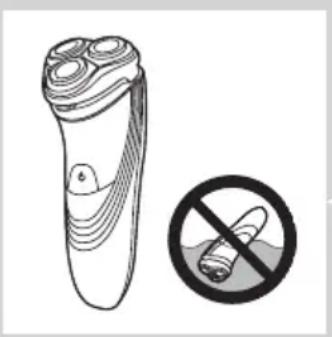
natural_image
Illustration of a pair of electric shakers with a prohibition symbol (no text or labels)
natural_image
Simple black-and-white icon of a faucet with raindrops, enclosed in a rounded square (no text or symbols)Baterie descărcată
Încărcare rapidă
Încărcare
natural_image
Illustration of a hand holding a mechanical component with a black arrow pointing to a section (no text or symbols present)natural_image
Diagram of a battery component with an arrow indicating direction and a magnified view showing battery symbol (no text or labels)natural_image
Technical line drawing of a mechanical component with a magnified inset showing a battery (no text or symbols)natural_image
Two mechanical clamps performing a tool manipulation operation, showing step-by-step assembly (no text or symbols)natural_image
Illustration of a person using a handheld device to clean another's face (no text or symbols present)natural_image
Diagram of a hairdryer with a brush and lever mechanism (no text or symbols)natural_image
Diagram of a device being inserted into a component, showing tool and internal structure (no text or symbols)natural_image
Illustration of a hand holding a mechanical component with arrows indicating movement (no text or symbols)
natural_image
Diagram of a medical procedure showing fluid flow through a device into a cross-sectional view (no text or labels)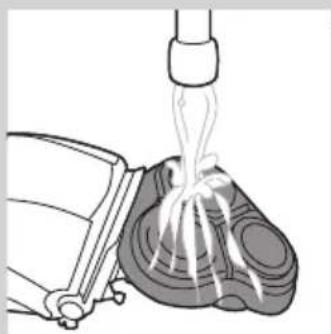
natural_image
Illustration of a mechanical device emitting fluid from a piping bag (no text or symbols)
natural_image
Illustration of a hand holding a mechanical component with arrows indicating direction (no text or symbols)natural_image
Diagram of a mechanical component with an arrow indicating upward motion, no text or symbols present
natural_image
Illustration of a hand holding a tray with coins and upward arrows, no text or symbols present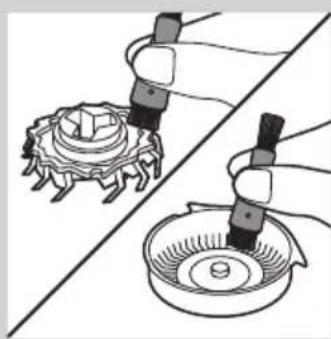
natural_image
Illustration of two hands using a tool to adjust a mechanical component, showing gear and base (no text or symbols)
natural_image
Diagram showing two views of a medical device with internal components and directional arrows (no text or labels)natural_image
Diagram of a handbag with buttons and icons, no readable text or symbols present
natural_image
Illustration of hands using a pliers to apply liquid to a cup, with no text or symbols present.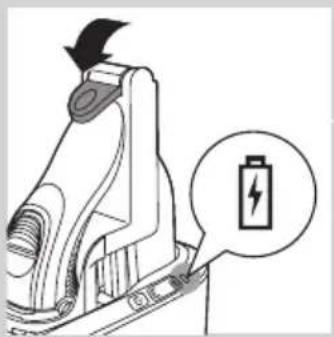
natural_image
Diagram of a battery holder mechanism with a lightning bolt symbol (no text or labels)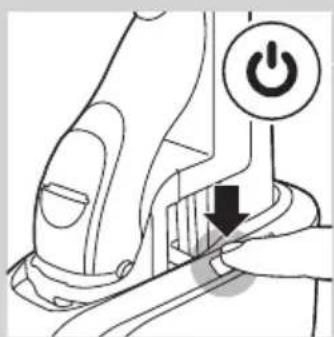
natural_image
Diagram of a mechanical device with a power button and arrow indicating action (no text or symbols present)
natural_image
Line drawing of a handbag with two circular icons labeled '水' and 'U' (no text or symbols on the diagram itself)
natural_image
Illustration of a hand holding a small object, possibly a container or device, with no visible text or symbols.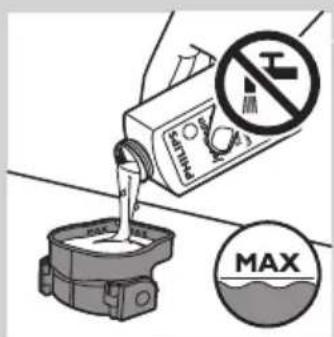

natural_image
Illustration of hands using a tool to lift a cup, with no text or symbols presentnatural_image
Diagram of a hairbrush with black arrows indicating direction (no text or symbols)natural_image
Illustration of a hand holding a tool with arrows indicating motion or force (no text or symbols)natural_image
Diagram of a hairbrush with three blades and a top blade, showing mechanical components (no text or symbols)Înlocuirea
natural_image
Diagram of a hand-painted electric shaver with a circular arrow indicating rotation (no text or symbols)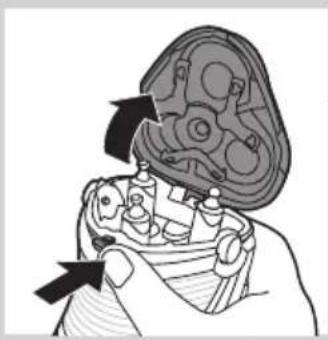
natural_image
Illustration of a hand holding a mechanical component with arrows indicating movement (no text or symbols)

natural_image
Illustration showing a hand holding a bowl with liquid, next to a molecular structure with a checkmark (no text or symbols)
natural_image
Diagram showing two views of a mechanical component with arrows indicating direction (no text or symbols)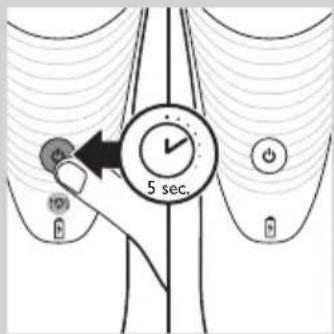
natural_image
Symbol of a waste bin with crossed lines indicating no waste, and a solid black rectangle below (no text or labels)natural_image
Prohibition sign showing a faucet crossed out by a diagonal line, indicating no fire or water discharge (no text present)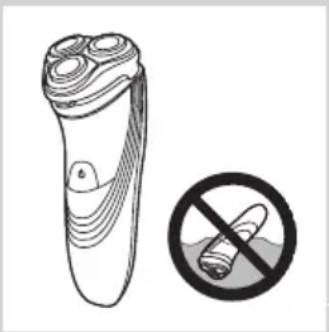
natural_image
Illustration of a pair of electric shakers with a prohibition symbol (no text or labels)
natural_image
Simple black-and-white icon of a faucet with raindrops, no text or symbols present.Быстрая зарядка

Зарядка
natural_image
Close-up of a medical or electronic device with a black arrow pointing to a circular component labeled 'Neural' (no text or symbols on the device itself)natural_image
Close-up of a hand holding a mechanical component with a black arrow pointing to a detail (no text or symbols visible)natural_image
Diagram of a mechanical device with an arrow indicating direction and a battery icon (no text or symbols)natural_image
Technical line drawing of a mechanical component with a magnified inset showing a battery (no text or symbols)natural_image
Illustration of two hand-painted mechanical components, one being cut with a black arrow and the other holding a tool (no text or symbols)natural_image
Illustration of a person using flashlights to observe teeth (no text or symbols present)natural_image
Diagram of a hairdryer with a black arrow indicating the process (no text or symbols present)natural_image
Diagram of a device being inserted into a component, showing a tool and arrow indicating direction (no text or symbols present)natural_image
Illustration of a person holding a mechanical device with arrows indicating movement (no text or symbols)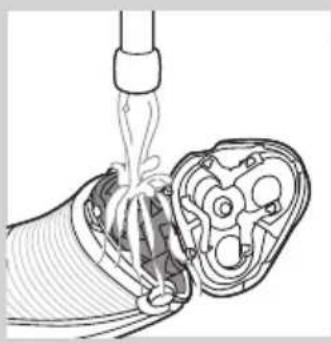
natural_image
Diagram of a medical procedure showing fluid flow through a tube into a cross-sectional view (no text or labels)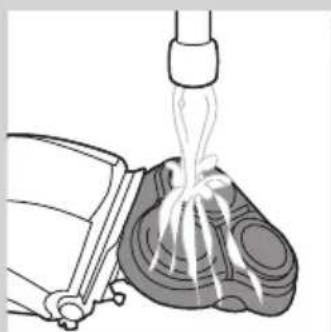
natural_image
Diagram of a mechanical device emitting fluid from a nozzle (no text or symbols)natural_image
Illustration of a mechanical assembly with gears and a handle, showing no text or symbolsnatural_image
Diagram of a mechanical component with an arrow indicating direction, showing internal parts and a top view (no text or symbols)natural_image
Illustration of a hand holding a tray with three round objects and upward arrows, no text or symbols present.natural_image
Illustration of two hands using a tool to adjust a mechanical component, showing a gear-like component and a rotating base (no text or symbols)natural_image
Illustration showing a hand holding a tray with food items, alongside a stylized robot-like object with a checkmark (no text or symbols)natural_image
Diagram showing two mechanical components with arrows indicating motion, no text or symbols presentnatural_image
Diagram of a washing machine with water level indicators (no text or symbols)natural_image
Illustration of hands using a tool to lift a cup, with no text or symbols present
natural_image
Diagram of a battery charger with a lightning bolt symbol and a magnified view of its battery (no text or labels present)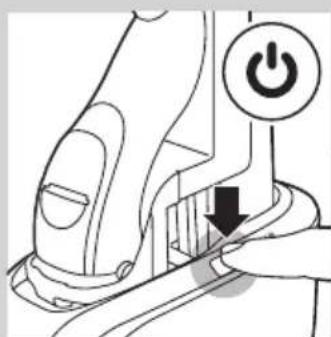
natural_image
Diagram of a robotic arm with a power button and directional arrow (no text or symbols)
natural_image
Diagram of a handbag with buttons and icons, no readable text or symbols present

natural_image
Illustration of a hand holding a small object with a curved handle, no text or symbols present
natural_image
Illustration of hands using a tool to lift a cup, showing motion and impact (no text or symbols)natural_image
Diagram of a hairdryer with black arrows indicating direction (no text or symbols)natural_image
Illustration of a hand holding a tool with arrows indicating motion or force (no text or symbols)natural_image
Diagram of a hand turning a circular component into a base, showing internal structure (no text or symbols)natural_image
Illustration of a hand holding a small object with a magnified inset showing a smiley face (no text or symbols)natural_image
Illustration of a hand holding a mechanical component with arrows indicating movement (no text or symbols)
natural_image
Diagram showing two mechanical components with arrows indicating movement or assembly, no visible text or symbolsnatural_image
Symbol of a waste bin with crossed lines indicating no waste, and a solid black rectangle below (no text or labels)natural_image
No sign depicting a faucet crossed out by a diagonal line, indicating no restrictions or prohibition (no text present)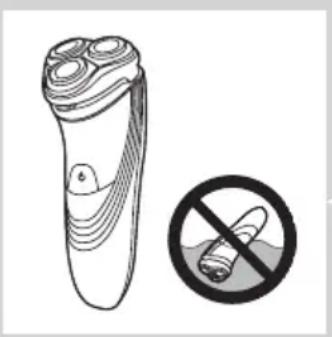
natural_image
Illustration of a pair of electric shakers with a prohibition symbol (no text or labels)
- Deti musia byt' pod dozorom, aby sa nehrali s holiacim strojčekom ani so systémom Jet Clean.
natural_image
Black and white icon of a faucet with raindrops, enclosed in a square frame (no text or symbols)Súlad zariadenia s normami
Rýchle nabíjanie
Nabíjanie
- Pri nabíjaní holiaceho strojčeka bliká kontrolné svetlo batérie nabielo.

natural_image
Close-up of a handheld device with a black arrow pointing to a circular base labeled 'Hot.pf' (no text or symbols on the device itself)1 Malú koncovku zasuňte do stojana na nabíjanie.
2 Adaptér pripojte do siet'ovej zásuvky.
3 Holiaci strojček postavte do stojana na nabíjanie.
Symbol batérie znázorňuje stav nabíjania holiaceho strojčeka (pozrite si čast’ „Ukazovatele nabíjania“ v tejto kapitole).
Nabíjanie v systéme Jet Clean (len modely PT927CC/PT923CC)

natural_image
Close-up of a hand using a tool to adjust or install a mechanical component (no visible text or symbols)natural_image
Diagram of a battery holder mechanism with an arrow indicating direction and a battery symbol (no text or labels present)4 Uzamykaciu páčku zatlačte úplne nadol, aby ste holiaci strojček uzamkli v danej polohe.
Symbol batérie na systéme Jet Clean bliká, čím signalizuje nabíjanie holiaceho strojčeka.
natural_image
Technical line drawing of a mechanical component with a magnified inset showing a battery symbol (no text or labels)Ked' je batéria úplne nabita, symbol batérie na systéme Jet Clean nepretržite svieti.
Poznámka: Po približne 30 minútach symbol batérie zhasne, aby sa šetrila energia.
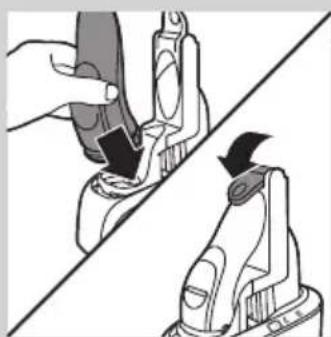
natural_image
Illustration of two hand-painted tool tips on a diagonal line, showing mechanical assembly (no text or symbols)5 Ak chcete odpojit' holiaci strojček od systému Jet Clean, posuňte uzamykaciu páčku nahor až na doraz a potom vyberte holiaci strojček.
natural_image
Illustration of a person using a handheld device to clean another (no text or symbols present)natural_image
Diagram of a hairbrush with a clip and handle, showing internal components and motion arrows (no text or symbols)natural_image
Line drawing of a device with a tool inserted, showing internal components and a downward arrow (no text or symbols)natural_image
Illustration of a mechanical assembly with arrows indicating direction (no text or symbols)1 Vypnite holiaci strojček a odpojte ho zo siete.
2 Stlačte uvolňovacie tlačidlo a otvorte holiacu jednotku.
3 Holiacu jednotku a komôrku na chípky oplachujte 30 sekúnd horúcou tečúcou vodou.
natural_image
Diagram of a medical procedure showing fluid flow through a device with a pipette (no text or labels)natural_image
Illustration of a mechanical device pouring liquid into a container (no text or symbols)natural_image
Illustration of a hand holding a mechanical component with arrows indicating assembly or movement (no text or symbols present)1 Vypnite holiaci strojček a odpojte ho zo siete.
2 Stlačte uvol'ňovacie tlačidlo a otvorte holiacu jednotku.

natural_image
Diagram of a mechanical component with an arrow indicating direction, showing internal structure (no text or symbols)3 Vytiahnite holiacu jednotku z holiaceho strojčeka.

natural_image
Illustration of a hand holding a tray with three round objects and upward arrows, no text or symbols present.natural_image
Illustration of two hands using pipette to process a mechanical component (no text or symbols present)natural_image
Illustration showing a molecular structure with a checkmark and a hand holding a container (no text or symbols)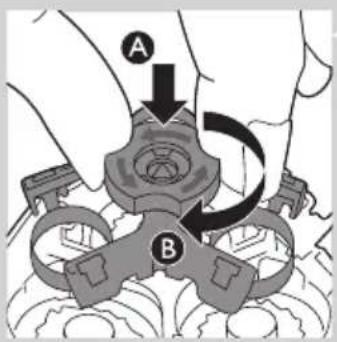
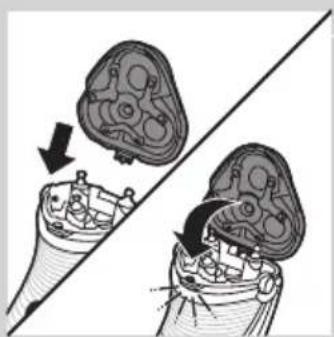
natural_image
Medical illustration showing two views of a surgical instrument with arrows indicating movement or force (no text or symbols present)natural_image
Diagram of a handbag with water symbols and U-shaped button, no text or labels present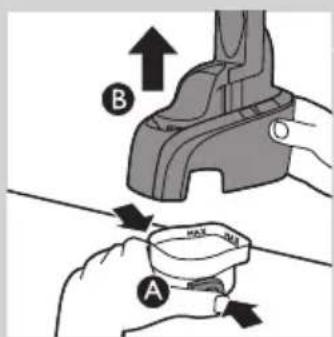
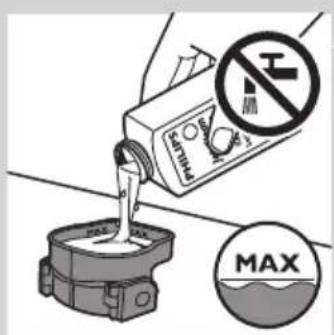
natural_image
Illustration of hands using a tool to lift a cup, showing motion and shading (no text or symbols)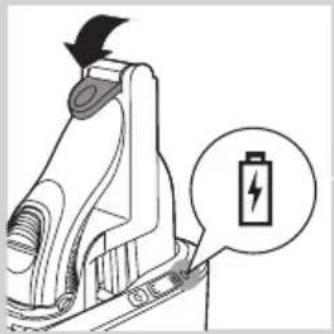
natural_image
Diagram of a battery charger with an icon indicating battery symbol (no text or labels present)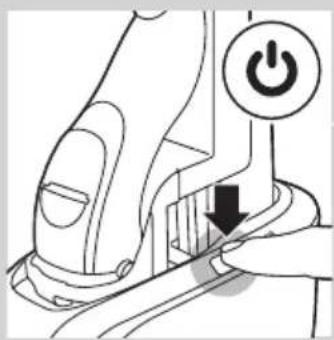

4 Systém Jet Clean nasad'te spät' na čistiacu komoru (budete počut' „cvaknutie“).
natural_image
Line drawing of a mechanical device with no visible text or symbols

natural_image
Illustration of a hand holding a small object with a curved handle, no text or symbols present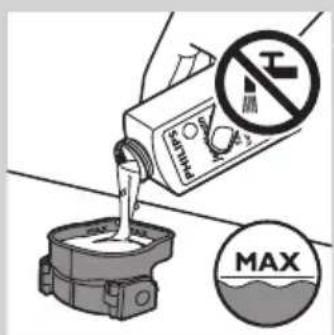

natural_image
Illustration of hands using a tool to lift a cup, showing motion and shading (no text or symbols)natural_image
Diagram of a hairdryer with a device inserted, showing internal components and directional arrows (no text or symbols)1 Vypnite holiaci strojček a odpojte ho zo siete.
natural_image
Hand holding a tool interacting with a mechanical component (no text or symbols visible)natural_image
Diagram of a hand turning a three-pin electric shaver (no text or symbols)Výmena
natural_image
Diagram of a hand-painted electric shaver with a circular arrow indicating rotation (no text or symbols)1 Symbol holiacej hlavy nepretržite bliká naoranžovo.
2 Vypnite holiaci strojček. Odpojte ho zo siete a vyberte ho zo systému Jet Clean (PT927CC/PT923CC).

natural_image
Illustration of a hand holding a mechanical component with arrows indicating direction (no text or symbols)3 Stlačte uvolňovacie tlačidlo a otvorte holiacu jednotku.
4 Vytiahnite holiacu jednotku z holiaceho strojčeka.

natural_image
Illustration showing a hand placing a container into a bowl while a molecular structure is shown with a checkmark (no text or symbols present)natural_image
Diagram showing two mechanical components with arrows indicating motion, no text or symbols presentnatural_image
Prohibition sign showing a faucet without a shower, enclosed in a circle (no text or symbols)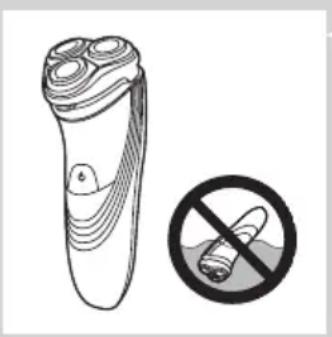
natural_image
Illustration of a pair of electric shakers with a prohibition symbol (no text or labels)
Previdno
- Brivnika ne potapljajte v vodo.
natural_image
Simple black-and-white icon of a faucet with radiating lines, no text or symbols present.Skladnost s standardi
Prazna baterija
Hitro polnjenje
- Ko začnete s polnjenjem prazne baterije, indikator baterije utripa belo in oranžno.
Opomba: Ko indikator baterije utripa belo in oranžno ter postopoma samo belo, je energije dovolj za triminutno hitro britje.

Polnjenje
- Ko se brivnik polni, indikator baterije utripa belo.

Baterija napolnjena
- Ko je baterija povsem napolnjena, indikator baterije sveti belo.
Opomba: Po približno 30 minutah indikator baterije zaradi varčevanja z energijo preneha svetiti.
natural_image
Illustration of a handheld device with a downward arrow and label 'Heiqet' (no text or symbols on the device itself)natural_image
Illustration of a hand inserting a plug into a device component (no text or symbols visible)natural_image
Diagram of a mechanical device with a battery icon and directional arrow, no text or symbols present4 Zaklepni vzvod potisnite povsem navzdol, da brivnik zaklenete na mesto.
Simbol baterije na sistemu Jet Clean utripa, kar pomeni, da se brivnik polni.
natural_image
Technical line drawing of a mechanical component with a magnified inset showing a battery symbol (no text or labels)natural_image
Illustration of two hand-painted tool tips on a diagonal line, showing mechanical assembly (no text or symbols)natural_image
Illustration of a person using a handheld device to clean another (no text or symbols present)natural_image
Diagram of a hairbrush with a clip and handle, showing internal components and motion arrows (no text or symbols)natural_image
Line drawing of a device with a tool inserted, showing internal components and a downward arrow (no text or symbols)3 Po striženju zaprite prirezovalnik in izklopite brivnik.
natural_image
Illustration of a hand holding a mechanical component with arrows indicating movement (no text or symbols)natural_image
Diagram of a medical procedure showing fluid flow from a pipette into a device (no text or labels)- Sperite zunanji del brivne enote.
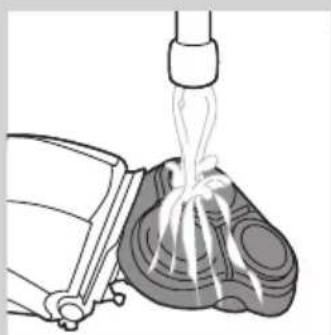
natural_image
Diagram of a mechanical device emitting fluid from a nozzle (no text or symbols)4 Zaprite brivno enoto in otresite odvečno vodo. Ko iz brivne enote otresate preostalo vodo, pazite, da z njo nikamor ne udarite.
natural_image
Illustration of a hand holding a mechanical component with arrows indicating movement (no text or symbols)natural_image
Diagram of a mechanical component with an arrow indicating direction, showing internal structure (no text or symbols)3 Brivno enoto odstranite z brivnika.


natural_image
Illustration of a hand holding a tray with three circular objects and upward arrows, no text or symbols present.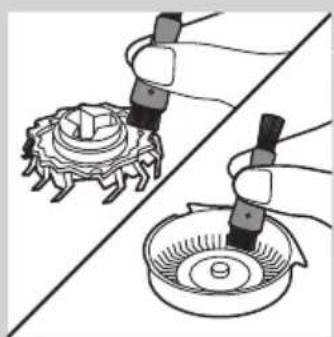
natural_image
Illustration of two hands using droppers to handle a mechanical component, with no visible text or symbols.
natural_image
Illustration showing a hand holding a tray with food items, separated by a diagonal line (no text or symbols)
4 Zaklep obrnite v levo (A) in odstranite nosilni okvir (B).
natural_image
Diagram showing two views of a mechanical component with arrows indicating motion, no text or symbols presentnatural_image
Diagram of a handbag with a handle and two circular icons labeled 'U' and 'S', no readable text or symbols present.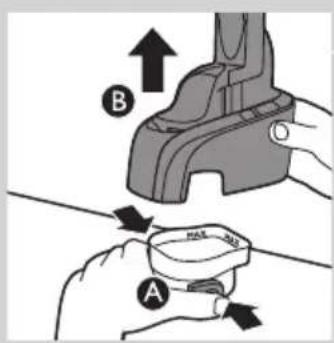
1 Hkrati pritisnite gumba za sprostitev na stranskih delih čistilne komore (A). Nato sistem Jet Clean dvignite iz čistilne komore (B). Čistilna komora ostane zadaj.
2 Odvijte pokrovček s steklenice s čistilom Jet Clean (HQ200) in odstranite neprepustno tesnilo.
3 Čistilo Jet Clean (HQ200) vlijte v čistilno komoro do oznake MAX. Opomba: Poskrbite, da v čistilni komori tekočina vedno sega nad oznako MIN.


natural_image
Illustration of hands using a tool to lift a cup, showing motion and impact (no text or symbols)4 Sistem Jet Clean postavite nazaj v čistilno komoro (slišen klik).
natural_image
Diagram of a mechanical device with an arrow indicating direction and a battery icon (no text or symbols)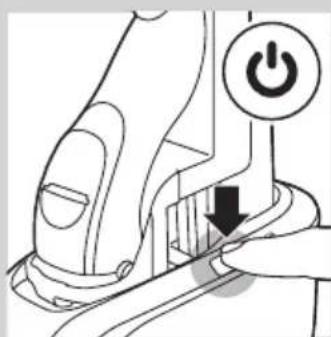
natural_image
Diagram of a robotic arm with a power button and arrow indicating action (no text or symbols present)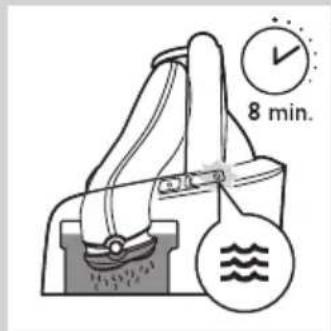

natural_image
Diagram of a washing machine with water level indicators (no text or symbols)
natural_image
Illustration of a hand holding a small object, possibly a device or container, with no visible text or symbols.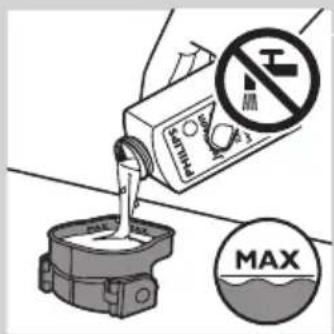
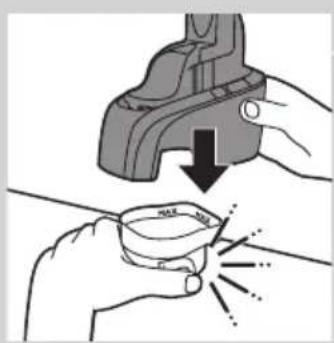
natural_image
Illustration of hands using a tool to lift a cup, showing a downward arrow and sparkles (no text or symbols)
natural_image
Diagram of a hairdryer with directional arrows indicating movement (no text or symbols)natural_image
Illustration of a hand inserting a plug into a connector (no text or symbols visible)natural_image
Diagram of a hand holding a three-pin electric shaver with a top handle (no text or symbols)natural_image
Illustration of a hairbrush with a circular arrow indicating rotation (no text or symbols)natural_image
Illustration of a hand holding a mechanical component with arrows indicating movement or force (no text or symbols present)5 Zaklep obrnite v levo (A) in odstranite nosilni okvir (B).
6 Odstranite brivne glave in v brivno enoto namestite nove.

natural_image
Illustration of a hand holding a bowl with food items, separated by a diagonal line (no text or symbols)natural_image
Diagram showing two views of a mechanical component with arrows indicating direction (no text or symbols)natural_image
Symbol of a trash bin with crossed lines indicating no waste or discharge, and a solid black rectangle below (no text or labels)natural_image
Symbol of a trash bin crossed out by two crossed lines, representing no waste or discharge (no text or labels)natural_image
Prohibition sign showing a faucet without raindrops, enclosed in a circle (no text)
natural_image
Illustration of a pair of electric shakers with a prohibition symbol (no text or labels)
natural_image
Simple black-and-white icon of a faucet with radiating lines, no text or symbols present.Skoro prazna baterija
Brzo punjenje
- Kada počnete da punite praznu bateriju, indikator baterije treptaće belo i narandžasto.
Napomena: Kada indikator baterije treperi belo sa malo narandžaste, imate vremena za tri minuta brzog brijanja.

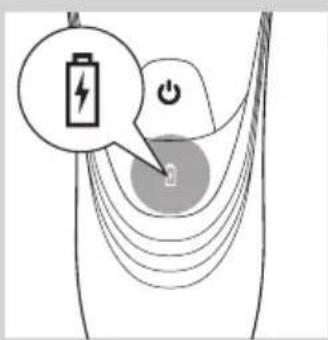
Punjenje
- Dok se aparat za brijanje puni, indikator baterije treperi belo.
natural_image
Illustration of a remote control device with a black arrow pointing to the base (no text or symbols on the device itself)natural_image
Illustration of a hand inserting a plug into a device component (no text or symbols visible)natural_image
Diagram of a battery charger with a lightning bolt symbol and a magnified view of its battery (no text or labels present)4 Pritisnite do kraja ručicu za zaključavanje kako bi aparat za brijanje legao na mesto.
Simbol baterije na Jet Clean sistemu treperi, što znači da se baterija aparata za brijanje puni.
Napomena: U toku čišćenja Jet Clean sistemom, simbol baterije ne svetli.
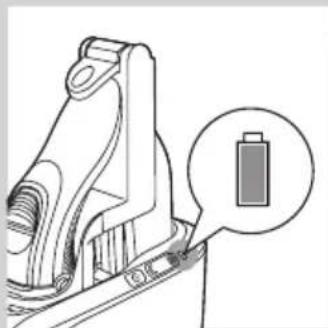
natural_image
Technical line drawing of a mechanical component with a magnified inset showing a battery (no text or symbols)Kada se baterija potpuno napuni, simbol baterije na Jet Clean sistemu će početi neprestano da svetli.
Napomena: Simbol baterije će se isključiti nakon približno 30 minuta radi uštede energije.

natural_image
Illustration of two hand-painted tool tips on a diagonal line, showing mechanical assembly (no text or symbols)5 Da biste uklonili aparat za brijanje iz Jet Clean sistema, pomerite ručicu za zaključavanje do krajnjeg gornjeg položaja i uklonite aparat za brijanje.
Upotreba aparata za brijanje
Napomena: Aparat možete da koristite i direktno sa mrežnim napajanjem. Samo ga priključite na električnu mrežu.
Brijanje

natural_image
Illustration of a person using a handheld device to clean another's face (no text or symbols present)1 Jednom pritisnite dugme za uključivanje/isključivanje da biste uključili aparat za brijanje.
2 Kružnim pokretima prelazite glavama za brijanje preko kože.
- Vašoj koži će možda trebati 2 do 3 sedmice da se navikne na Philips sistem brijanja.
3 Jednom pritisnite dugme za uključivanje/isključivanje da biste isključili aparat za brijanje.
4 Očistite aparat za brijanje (vidi poglavlje „Čišćenje i održavanje“).
Podrezivanje

natural_image
Diagram of a hairdryer with black arrows indicating direction (no text or symbols)Trimer možete da koristite za podrezivanje zulufa i brkova.
1 Jednom pritisnite dugme za uključivanje/isključivanje da biste uključili aparat za brijanje.
2 Pritisnite klizni prekidač nadole da biste otvorili trimer.
▶ Sada možete početi sa podrezivanjem.
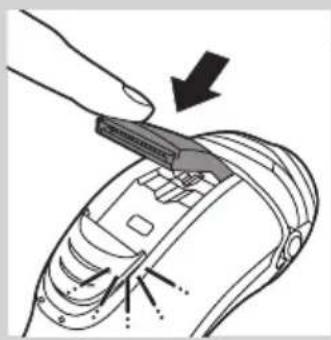
natural_image
Diagram of a hand using a tool to adjust or install a device component, with arrows indicating the process (no text or symbols present)3 Nakon podrezivanja, zatvorite trimer i isključite aparat za brijanje.
natural_image
Illustration of a hand holding a mechanical component with arrows indicating assembly or movement (no text or symbols present)
natural_image
Diagram of a medical procedure showing a catheter inserted into a device with internal components (no text or labels)
natural_image
Illustration of a mechanical device pouring liquid into a container (no text or symbols)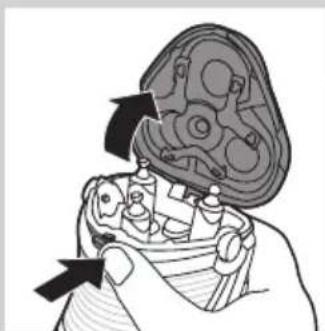
natural_image
Illustration of a hand holding a mechanical component with arrows indicating assembly or repair (no text or symbols present)1 Isključite aparat i izvucite kabl za napajanje iz utičnice.
2 Pritisnite dugme za oslobađanje i otvorite jedinicu za brijanje.
3 30 sekundi ispirajte jedinicu za brijanje i komoru za prikupljanje dlaka pod mlazom vruće vode.
Pazite sa vrućom vodom. Uvek proverite da voda ne bude prevruća da biste izbegli opekotine na rukama.
- Isperite komoru za prikupljanje dlaka i unutrašnjost jedinice za brijanje.
- Operite spoljni deo jedinice za brijanje.
natural_image
Diagram of a mechanical component with an arrow indicating upward motion, no text or symbols present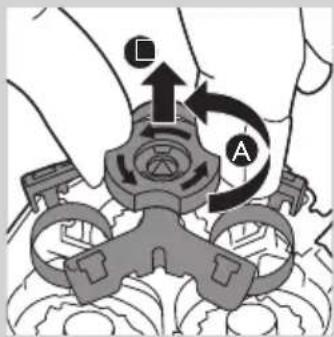

natural_image
Illustration of a hand holding a tray with three coins and upward arrows, no text or symbols present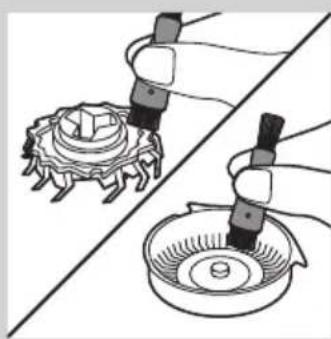
natural_image
Illustration of two hands using a tool to adjust a mechanical component, showing gear and base (no text or symbols)
natural_image
Illustration showing a molecular structure with a checkmark and a hand holding coins (no text or symbols present)3 Povucite jedinicu za brijanje sa aparata.
4 Okrenite bravu u pravcu suprotnom od smera kretanja kazaljke na satu (A) i izvadite granični okvir (B).
5 Uklanjajte i čistite jednu po jednu glavu za brijanje. Svaka glava za brijanje sastoji se od rezača i štitnika.
natural_image
Diagram showing two views of a medical device with internal components and arrows indicating movement (no text or labels)natural_image
Diagram of a mechanical device with labeled parts and icons (no readable text or symbols)1 Istovremeno pritisnite dugmad za oslobađanje sa obe strane komore za čišćenje (A). Zatim podignite Jet Clean sistem sa komore za čišćenje (B).
Komora za čišćenje ostaje ispod.
2 Odvijte poklopac sa boce sa Jet Clean rastvorom (HQ200), a zatim skinite nepropusnu zaštitu.

3 Napunite komoru za čišćenje Jet Clean rastvorom (HQ200) do oznake MAX.
natural_image
Illustration of hands using a pliers to apply liquid to a cup, with no text or symbols present.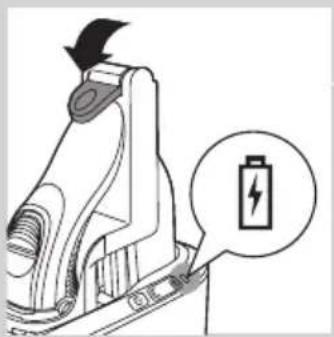
natural_image
Diagram of a mechanical device with a battery icon and arrow indicating direction (no text or symbols)
natural_image
Diagram of a mechanical device with a power button and arrow indicating action (no text or symbols present)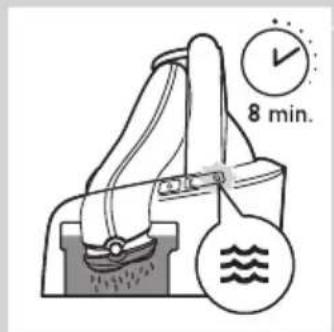
4 Vratite Jet Clean sistem na komoru za čišćenje („klik“). Pazite da dugmad za oslobađanje dobro legnu na svoja mesta.
Kada je komora za čišćenje napunjena Jet Clean rastvorom, nemojte da je pomerate kako ne bi došlo do izlivanja.
5 Uključite mali utikač u Jet Clean sistem, a adapter uključite u zidnu utičnicu.
Držač aparata za brijanje automatski se pomera u najviši položaj. Jet Clean sistem je sada spreman za upotrebu.
Upotreba Jet Clean sistema
1 Stavite aparat za brijanje bez zaštitnog poklopca naopako u držač aparata za brijanje. Pritisnite do kraja ručicu da bi aparat za brijanje legao na mesto. ▶Simbol baterije na Jet Clean sistemu se uključuje, što znači da se aparat puni.
Napomena: Aparat za brijanje ne može da se postavi u Jet Clean sistem kada se na jednici za brijanje nalazi zaštitni poklopac.
2 Pritisnite dugme za uključivanje/isključivanje na Jet Clean sistemu da biste započeli program čišćenja. ▶Simbol baterije na Jet Clean sistemu se isključuje.
Tokom programa čišćenja, simbol čišćenja počinje da treperi, a aparat za brijanje se automatski spušta u tečnost za čišćenje.
Aparat za brijanje se automatski uključuje i isključuje nekoliko puta i pokreće se gore-dole.
Simbol čišćenja treperi tokom celog programa čišćenja, koji traje približno 8 minuta.
Nakon programa čišćenja, simbol baterije na Jet Clean sistemu se uključuje, što znači da se aparat puni.
Napomena: Ukoliko tokom programa čišćenja pritisnete dugme za uključivanje/isključivanje Jet Clean sistema, program čišćenja će se prekinuti i resetovati. U tom slučaju, simbol čišćenja prestaje da treperi, a držač aparata za brijanje se vraća u početni položaj. Aparat za brijanje će možda i dalje biti mokar i prljav pošto program čišćenja nije završen.
Napomena: Ukoliko tokom programa čišćenja uklonite adapter iz zidne utičnice, program se prekida. Držač aparata za brijanje ostaje u trenutnom položaju. Kada adapter ponovo priključite u zidnu utičnicu, držač aparata za brijanje se podiže u najviši položaj.

natural_image
Diagram of a handbag with water level indicators (no text or symbols)

natural_image
Illustration of a hand holding a small object, possibly a device or container, with no visible text or symbols.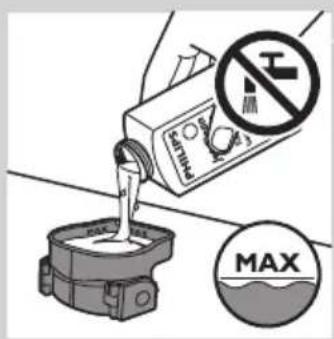
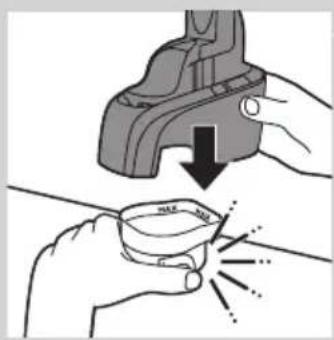
natural_image
Illustration of hands using a tool to lift a cup, showing motion and shading (no text or symbols)Napomena: Kada nivo tečnosti padne ispod minimalnog nivoa, simbol čišćenja i simbol „tečnost pri kraju“ počinju naizmenično da trepere u intervalima, a držač aparata za brijanje se vraća u početni položaj
Čišćenje Jet Clean sistema
natural_image
Diagram of a hairbrush with black arrows indicating movement or force (no text or symbols)1 Isključite aparat i izvucite kabl za napajanje iz utičnice.
2 Pritisnite klizni prekidač nadole da biste otvorili trimer.

natural_image
Illustration of a hand holding a tool with arrows indicating motion or force (no text or symbols)3 Očistite trimer stranom četke sa kratkim vlaknima. Povlačite četku gore i dole niz zupce trimera.
4 Zatvorite trimer („klik“).
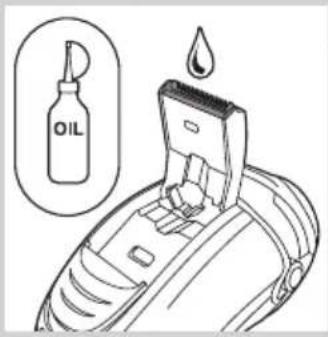
Savet: Za najbolje rezultate podrezivanja, podmažite zupce trimera jednom kapi ulja za šivaću mašinu na svakih 6 meseci.
Odlaganje
natural_image
Diagram of a hairbrush with three blades and a top blade, showing the process (no text or symbols)Zamena
natural_image
Diagram of a hand-painted electric shaver with a circular arrow indicating rotation (no text or symbols)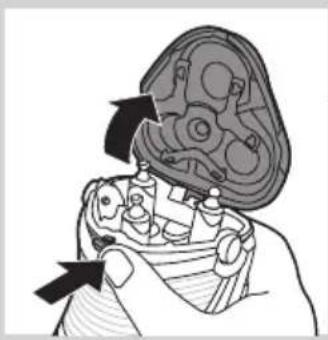
natural_image
Illustration of a hand holding a mechanical component with arrows indicating direction (no text or symbols)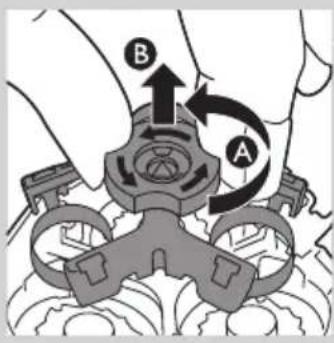
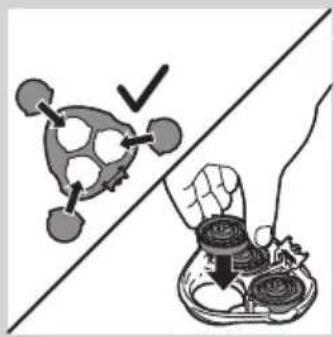
natural_image
Illustration of a hand holding a tray with food items, separated by a diagonal line (no text or symbols)
1 Simbol glave za brijanje neprekidno svetli narandžasto.
2 Isključite aparat za brijanje. Isključite aparat iz električne mreže ili ga sklonite sa Jet Clean sistema (samo kod modela PT927CC/PT923CC).
3 Pritisnite dugme za oslobađanje i otvorite jedinicu za brijanje.
4 Povucite jedinicu za brijanje sa aparata.
5 Okrenite bravu u pravcu suprotnom od smera kretanja kazaljke na satu (A) i izvadite granični okvir (B).
6 Skinite glave za brijanje i u jedinicu za brijanje stavite nove glave.
natural_image
Diagram showing two views of a mechanical component with arrows indicating direction (no text or symbols)
natural_image
Symbol of a trash bin crossed with two crossed lines, no text or numbers present
- Ugrađena punjiva baterija sadrži supstance koje mogu da zagade okolinu. Uvek uklonite bateriju pre nego što bacite aparat ili ga predate na službenom odlagalištu. Baterije odlažite na službenom mestu za odlaganje baterija. Ako imate problema sa uklanjanjem baterije, aparat možete da odnesete u Philips servisni centar. Osoblje centra će ukloniti bateriju i odložiti je tako da ne zagađuje okolinu.
Uklanjanje punjive baterije aparata za brijanje
natural_image
Prohibition sign showing a faucet crossed out by a diagonal line, indicating no leakage or disinfection (no text present)
natural_image
Illustration of a pair of electric shakers with a prohibition symbol (no text or labels)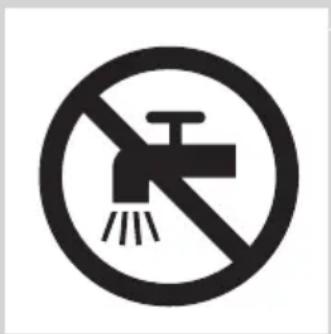
natural_image
Prohibition sign showing a faucet without a showerhead, enclosed in a circle (no text or symbols)natural_image
Simple black-and-white icon of a faucet with raindrops (no text or symbols)Розряджена батарея
Швидке заряджання
Заряджання
natural_image
Illustration of a hand holding a tool interacting with a mechanical component (no text or symbols visible)natural_image
Diagram of a battery plug with a lightning bolt symbol and magnified view (no text or labels)natural_image
Technical line drawing of a mechanical component with a magnified inset showing a battery symbol (no text or labels)natural_image
Illustration of two hand-painted tool tips on a diagonal line, showing mechanical assembly (no text or symbols)natural_image
Illustration of a person using a handheld device to clean another (no text or symbols present)natural_image
Diagram of a hairbrush with a clip and handle, showing internal components and motion arrows (no text or symbols)natural_image
Line drawing of a device with a tool inserted, showing internal components and a downward arrow (no text or symbols)natural_image
Illustration of a mechanical assembly with arrows indicating direction (no text or symbols)natural_image
Diagram of a medical procedure showing fluid flow through a device with a pipette inserted (no text or labels)natural_image
Illustration of a mechanical device pouring liquid into a container (no text or symbols)natural_image
Illustration of a hand holding a mechanical component with arrows indicating direction (no text or symbols)natural_image
Diagram of a mechanical component with an arrow indicating upward motion, no text or symbols presentnatural_image
Illustration of a hand holding a tray with coins and upward arrows, no text or symbols presentnatural_image
Illustration of two hands using a tool to adjust a mechanical component, showing gear and base (no text or symbols)natural_image
Illustration showing a hand holding coins above a divided line, with a checkmark and abstract shapes (no text or symbols)natural_image
Diagram showing two views of a medical device with internal components and directional arrows (no text or labels)natural_image
Diagram of a handbag with buttons and icons, no readable text or symbols present
natural_image
Illustration of hands using a pliers to apply liquid to a cup, with no text or symbols present.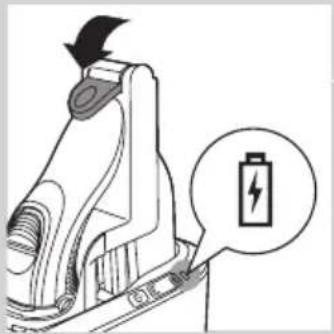
natural_image
Diagram of a battery charger with a lightning bolt symbol and a magnified view of its battery (no text or labels present)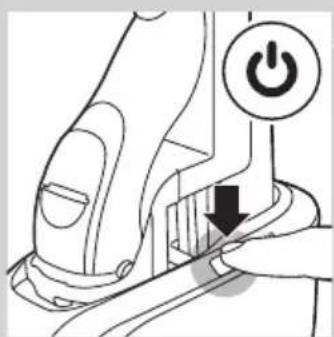
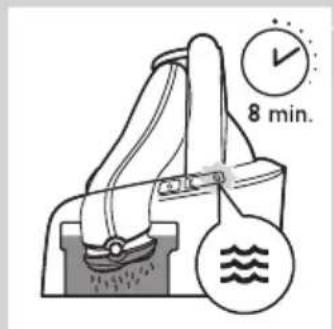
natural_image
Diagram of a hand pump mechanism with water level indicators (no text or symbols)
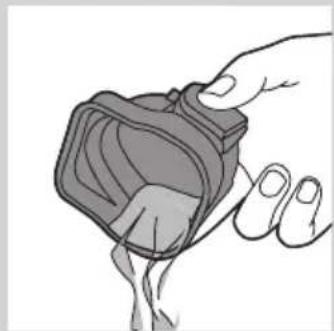
natural_image
Illustration of a hand holding a small object, possibly a device or container, with no visible text or symbols.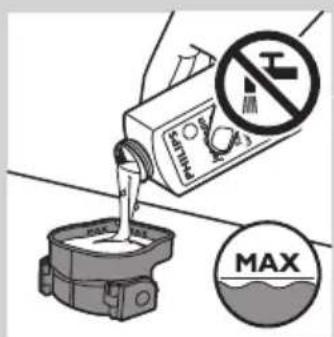

natural_image
Illustration of hands using a tool to lift a cup, showing a downward arrow and sparkles (no text or symbols)natural_image
Diagram of a hairbrush with black arrows indicating direction (no text or symbols)natural_image
Illustration of a hand holding a tool with directional arrows indicating movement or force (no text or symbols)natural_image
Diagram of a hand turning a leaf into a three-circular base (no text or symbols)Заміна
natural_image
Illustration of a hairbrush with a magnified inset showing internal structure (no text or symbols)
natural_image
Illustration of a mechanical assembly with arrows indicating direction (no text or symbols)
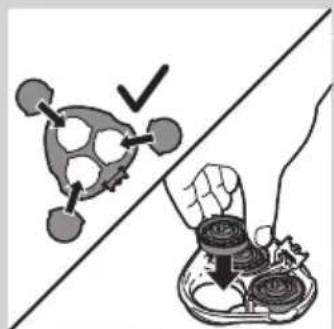
natural_image
Illustration showing a hand holding coins above a gear-like object, with no visible text or symbols.
natural_image
Diagram showing two mechanical components with arrows indicating motion, no text or symbols presentnatural_image
Symbol of a waste bin with crossed lines indicating no waste, and a solid black rectangle below (no text or labels)- Always here to help you
- User manual
- PHILIPS
- Introduction
- General description (Fig. 1)
- Important
- Danger
- Warning
- Caution
- Compliance with standards
- General
- Charging
- Charge indications
- Battery low
- Quick charging
- Battery fully charged
- Charging with the adapter
- Charging in the Jet Clean System (PT927CC/PT923CC only)
- Using the shaver
- Shaving
- Trimming
- Cleaning and maintenance
- Cleaning the shaving unit under the tap
- Cleaning the shaving unit with the cleaning brush
- Cleaning the shaving unit in the Jet Clean System (PT927CC/PT923CC only)
- Preparing the Jet Clean System for use
- Using the Jet Clean System
- Cleaning the Jet Clean System
- Cleaning the trimmer with the cleaning brush
- Storage
- Replacement
- Replacement reminder
- ENGLISH18
- Ordering accessories
- Shaving heads
- Cleaning
- Environment
- Removing the rechargeable shaver battery
- Guarantee and support
- Guarantee restrictions
- Troubleshooting
- Въведение
- Предупреждение
- Изтощена батерия
- Бързо зареждане
- Зареждане
- Soulad s normami
- Vybitá baterie
- Rychlé nabíjení
- Nabíjení
- Vastavus standarditele
- Aku on tühi
- Kiirlaadimine
- Laadimine
- Aku on täis laetud
- Oprez
- Sukladnost standardima
- Baterija je gotovo prazna
- Brzo punjenje
- Punjenje
- Uporaba aparata za brijanje
- Čišćenje jedinice za brijanje u sustavu Jet Clean (samo PT927CC/PT923CC)
- Priprema sustava Jet Clean za uporabu
- Čišćenje trimera četkom
- Gyors töltés
- Töltés
- Батарея заряды аз
- Зарядтау
- Ауыстыру
- Atitiktis standartams
- Senka baterija
- Greitasis įkrovimas
- lkrovimas
- Pakeitimas
- Tukša baterija
- Ātra uzlāde
- Lādēšana
- Skuvekla lietošana
- Zgodność z normami
- Szybkie ładowanie
- Ładowanie
- Baterie descărcată
- Încărcare rapidă
- Încărcare
- Înlocuirea
- Быстрая зарядка
- Зарядка
- Súlad zariadenia s normami
- Rýchle nabíjanie
- Nabíjanie
- Nabíjanie v systéme Jet Clean (len modely PT927CC/PT923CC)
- Výmena
- Previdno
- Skladnost s standardi
- Prazna baterija
- Hitro polnjenje
- Polnjenje
- Baterija napolnjena
- Skoro prazna baterija
- Upotreba aparata za brijanje
- Brijanje
- Podrezivanje
- Upotreba Jet Clean sistema
- Čišćenje Jet Clean sistema
- Odlaganje
- Zamena
- Uklanjanje punjive baterije aparata za brijanje
- Розряджена батарея
- Швидке заряджання
- Заряджання
- Заміна
Brand : HONEYWELL
Model : Dolphin 9700hc
Category : Barcode Reader