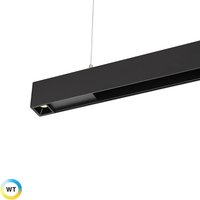
WS-23018 - Lighting WAC Lighting - Free user manual and instructions
Find the device manual for free WS-23018 WAC Lighting in PDF.


User questions about WS-23018 WAC Lighting
0 question about this device. Answer the ones you know or ask your own.
Ask a new question about this device
Download the instructions for your Lighting in PDF format for free! Find your manual WS-23018 - WAC Lighting and take your electronic device back in hand. On this page are published all the documents necessary for the use of your device. WS-23018 by WAC Lighting.
USER MANUAL WS-23018 WAC Lighting
CAUTION: TO PREVENT ELECTRICAL SHOCK, ENSURE ELECTRICITY HAS BEEN TURNED OFF AT THE CIRCUIT BREAKER BEFORE BEGINNING.
- Read all instructions before installing.
- System is intended for installation by a licensed electrician in accordance with the National Electrical Code (NEC) and local regulations.
- When handling the fixture, do not apply pressure to the LEDs. Hold the fixture by the base only.
- Retain installation instructions for future maintenance reference.
WARNING: All parts must be used as indicated in these instructions. This product is designed for use only with the supplied parts and/or accessories designated for use by dweLED. Substitution of parts or accessories not designated for use with this product by dweLED could result in personal injury or property damage, and will void the warranty. Contact an authorized dealer or the manufacturer if any parts are damaged or missing.
MAINTENANCE NOTE: Coastal conditions may cause mineral and residue build-up on the fixture. We recommend that customers in coastal areas clean all external surfaces of the fixture once every two weeks with a wet cloth.
text_image
Mounting Screw Driver Mounting Back Plate Bare Copper Ground Wire A Wire Connector Black Wire White Wire Junction Box Junction Screw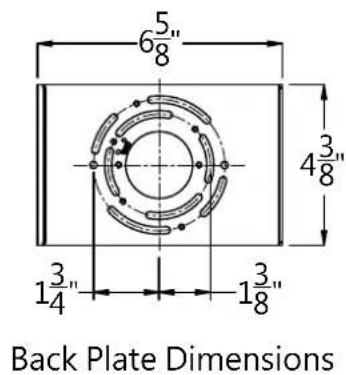
text_image
6½" 4¾" 1¾" 1¾" Back Plate DimensionsPREPARATION
- Shut off the power at the circuit breaker and remove existing fixture, including the crossbar.
- Carefully unpack your new fixture and lay out all the parts on a clear area. Be careful not to lose any small parts necessary for installation.
MOUNTING THE FIXTURE (Fig. 1)
- Remove the mounting screw (B) from the fixture.
- Secure the mounting back plate to the junction box using the screws provided with the junction box.
NOTE: (i) using any other non-original-manufacturer provided junction box screws may result in safety issue; (ii) the side of the mounting plate marked "GND" must face out.
CONNECTING THE WIRES (Fig. 2)
- Connect the driver's input wires to junction box wires as shown (Fig. 2). Make sure that all wire connectors (A) are secured. If your outlet box has a green or bare copper ground wire, connect the fixture's ground wire to it. Otherwise, connect the fixture's ground wire directly to the back plate using the green screw provided. After wires are connected, tuck them carefully inside the junction box.
- Secure the fixture to the mounting back plate using the mounting screw (B).
DIMMING WIRING INFORMATION (Fig. 3)
- This fixture features electronic low voltage (ELV or TRAIC) dimming capabilities. See notes below for specific dimming wires information.
- To utilize ELV or TRAIC dimming: use wires black (hot), white (neutral) and bare copper ground wire (ground).
- To utilize 0-10V dimming: use wire purple (dim+), gray (dim-), black (hot), white (neutral) and bare copper ground wire (ground).
NOTE: Make sure to connect 0-10V prior to power-up the fixture in order to allow the 0-10V dimming to function properly.
Fig. 2 Wiring

text_image
Fixture Wires Black or Smooth House Wires Black (Hot) Fixture Wires White or Ribbed House Wires White (Neutral) Fixture Wires Bare Wire (Ground) House Wires Green or Bare Copper (Ground)Fig. 3

text_image
Black - Hot White - Neutral Purple - Dim+ Grey - Dim- Red - Fixture+ Black - Fixture-dweLED.com
Phone (800) 526.2588
Fax (800) 526.2585
Headquarters/Eastern Distribution Center
44 Harbor Park Drive
Port Washington, NY 11050
Central Distribution Center
1600 Distribution Ct
Lithia Springs, GA 30122
Western Distribution Center
1750 Archibald Ave
Ontario, CA 91761