DVB 116 T2PVR - Receiver GoGen - Free user manual and instructions
Find the device manual for free DVB 116 T2PVR GoGen in PDF.


| Product Type | Digital Terrestrial Receiver (DVB-T2/T) |
| Brand | GoGen |
| Model | DVB 116 T2PVR |
| Tuner Type | COFDM (DVB-T/T2) |
| Frequency Range | VHF: 170-230 MHz, UHF: 470-860 MHz |
| Bandwidth | 6, 7, or 8 MHz |
| Input Signal Level | -75 to -20 dBm |
| RF Connector | IEC169-2, female, 75 Ω |
| Demodulation | QPSK, QAM16, QAM64 |
| Video Decoding | MPEG-2, H.265 |
| Video Resolution | 576i, 480i, 720p, 1080i, 1080p |
| Audio Decoding | MPEG-1/2, MP3, WMA, WAV |
| USB Port | USB 2.0 |
| Supported File Systems | FAT32, NTFS |
| Power Supply | DC 12 V via adapter (100-240 V AC, 50/60 Hz) |
| Max Power Consumption | < 8 W |
| Standby Power Consumption | < 0.5 W |
| Operating Temperature | 0 to +40 °C |
| Humidity | ≤ 95% |
| Dimensions (approx.) | 180 x 130 x 40 mm |
| Weight (approx.) | 0.5 kg |
| PVR Function | Yes, USB recording and timeshift |
| Child Lock | Yes, parental rating and PIN |
| Multimedia Playback | Video, music, photo (MPG, AVI, MKV, MP3, JPG, etc.) |
Frequently Asked Questions - DVB 116 T2PVR GoGen
User questions about DVB 116 T2PVR GoGen
0 question about this device. Answer the ones you know or ask your own.
Ask a new question about this device
Download the instructions for your Receiver in PDF format for free! Find your manual DVB 116 T2PVR - GoGen and take your electronic device back in hand. On this page are published all the documents necessary for the use of your device. DVB 116 T2PVR by GoGen.
USER MANUAL DVB 116 T2PVR GoGen
natural_image
Abstract logo design with a stylized white 'S' inside a circle on black background (no text or symbols)DVB 116 T2PVR
GoGEN
natural_image
Black GoGen brand electronic device with smooth curved body and mounting feet (no visible text or symbols on body)DŮLEŽITÉ BEZPEČNOSTNÍ POKYNY
natural_image
Black GoGen brand electronic device with smooth curved body and small base (no visible text or symbols)1.2 Zadní panel
5.1 Správce kanálů
7.1 Dětský zámek
9.1 Multimédia
1) REŽIM VÝBĚRU FILTRU
DÔLEŽITÉ BEZPEČNOSTNÉ POKYNY
natural_image
Black electronic device labeled 'GoGen' on a white background (no additional text or symbols visible)1.2 Zadný panel
5.1 Správca kanálov
7.1 Detský zámok
9.1 Multimédia
1) REŽIM VÝBERU FILTRA
- Táto ponuka umožňuje používatel'ovi zmenit' režim filtra z filmu na hudbu alebo z hudby na fotografie atd'.

IMPORTANT SAFETY INSTRUCTIONS
- Read these instructions.
- Keep these instructions.
- Heed all warnings.
- Follow all instructions.
- Do not use this apparatus near water.
- Clean only with dry cloth.
- Do not block any ventilation openings, install in accordance with the instructions.
- Do not install near any heat sources such as radiations, heat registers, stoves, or other apparatus (including amplifiers) that produce heat.
- Do not defeat the safety purpose of the polarized plug. If the provided plug does not fit into your outlet, consult an electrician for replacement of the obsolete outlet.
- Protected the power cord from being walked on or pinched particularly at plugs, convenience receptacles, and the point where they exit from the apparatus.
- Only use attachments/accessories specified by the manufacturer.
- Unplug this apparatus during lighting storms or when unused for long periods of time.
- Refer all servicing to qualified service personnel. Servicing is required when the apparatus has been damaged in any way, such as power-supply cord or plug is damaged, liquid has been spilled or objects have fallen into the apparatus, the apparatus has been exposed to rain or moisture, does not operate normally, or has been dropped.
- Mains plug is used as the disconnect device, the disconnect device shall remain readily operable.
- The ventilation should not be impeded by covering the ventilation openings with items, such as newspapers, table-cloth, curtains, etc.
- No naked flame sources, such as lighted candles, should be placed on the apparatus.
- Attention should be drawn to the environmental aspects of battery disposal.
- The use of apparatus in moderate climate.
- The apparatus shall not be exposed to dripping or splashing and that no objects filled with liquids, such as vases, shall be placed on the apparatus.
WARNING: To reduce the risk of fire or electric shock, do not expose this apparatus to rain or moisture.
WARNING: The batteries shall not be exposed to excessive heat such as sunshine, fire or the like.
| CAUTIONRISK OF ELECTRIC SHOCK!DO NOT OPEN! |

The symbol indicates that dangerous voltages constituting a risk of electric shock are present within this unit.

The symbol indicates that there are important operating and maintenance instructions in the literature accompanying this unit.

This symbol indicates that this product incorporates double insulation between hazardous mains voltage and user accessible parts. When servicing use only identical replacement parts.

CAUTION: When the apparatus was in electrostatic circumstance, it may be malfunction and need to reset by user.
WARNING: The USB memory stick should be plugged in the unit directly.
USB extension cable should not be used to avoid failing of data transferring and interference caused.
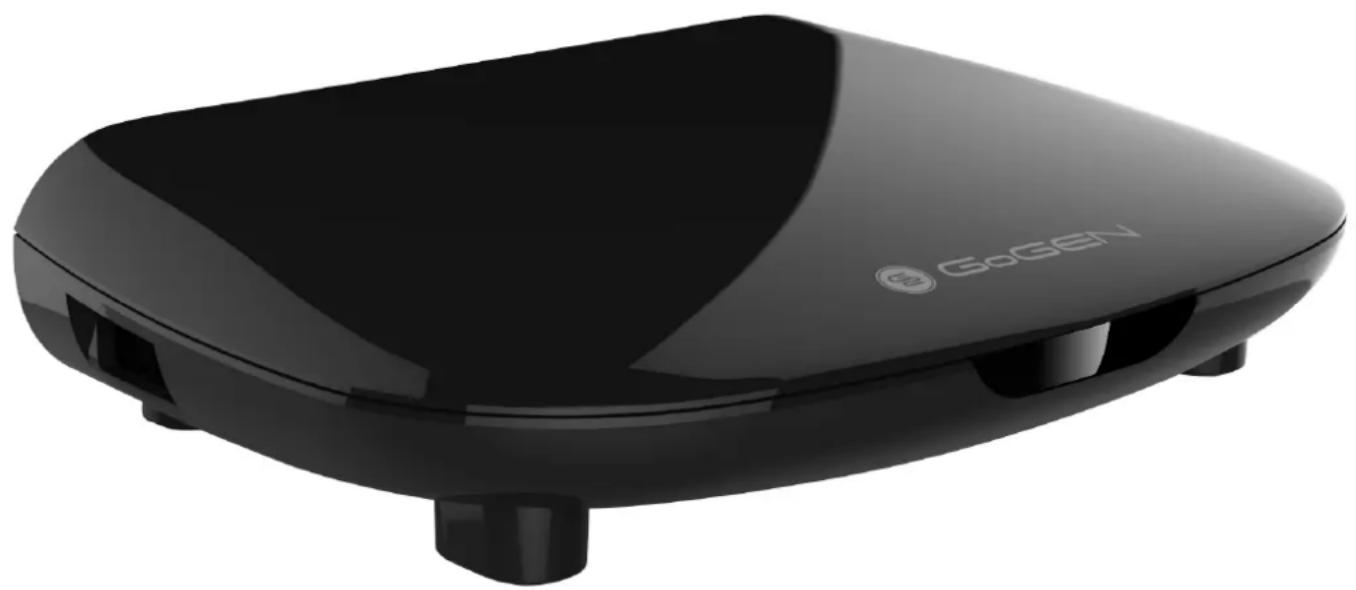
1) PRODUCTION DESCRIPTION
1.1 Front panel
natural_image
Black electronic device with a logo, no visible text or symbols on the body or background1.2 Rear panel
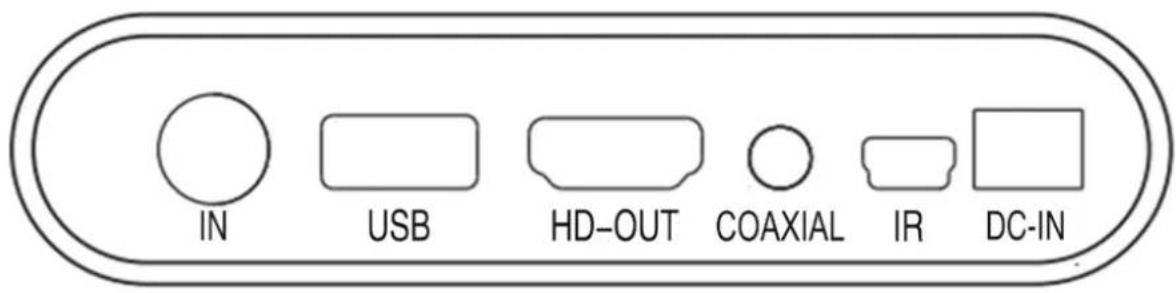
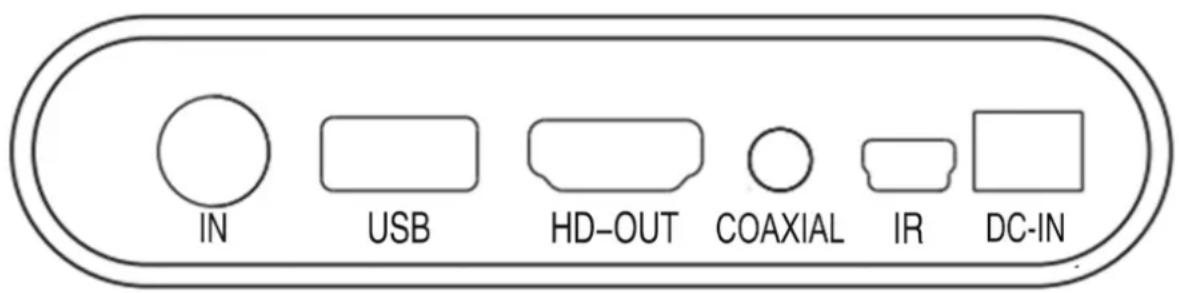
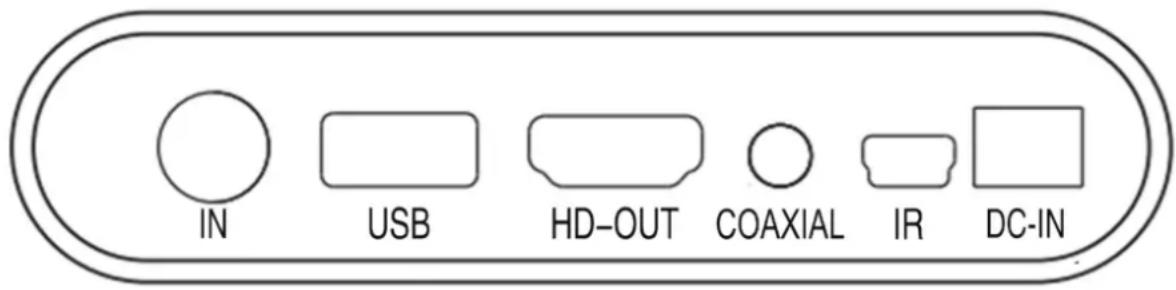
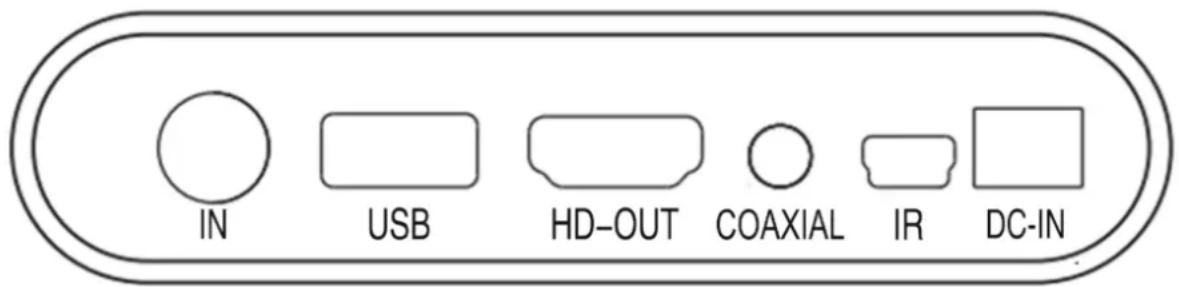
- ANT IN/OUT: Used to connect the ANT to receive/release the signal.
- USB JACK: Used to connect to an external USB 2.0 device.
- HD OUT: This socket connects to HDMI in device.
- COAXIAL: This socket connects to a coaxial socket on your surround sound system.
- „DC-12 V-IN: Used to connect 12 V DC adapter.
2) IR
2.1 Appearance of remote controller
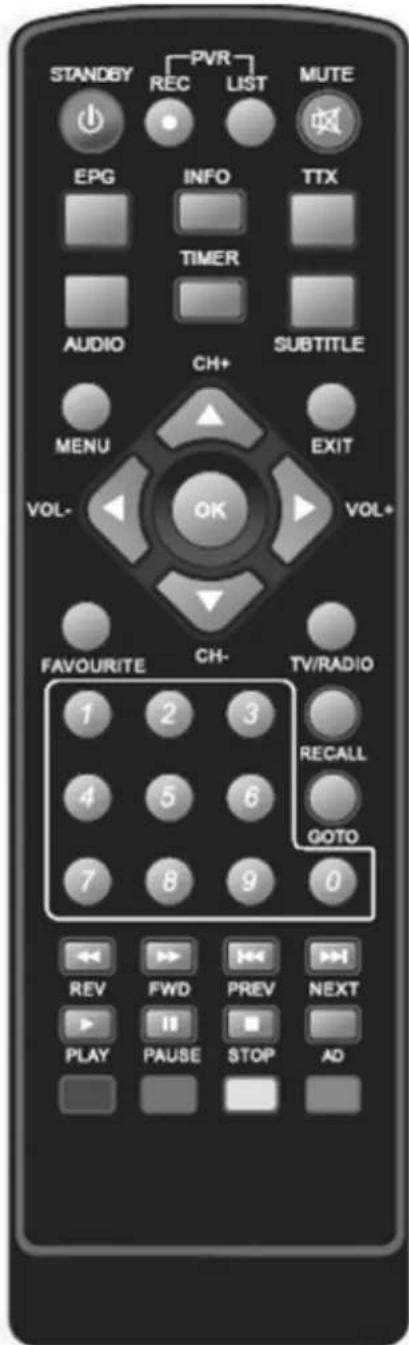
2.2 Instruction to keystroke of remote controller
- MUTE: Mute or Restore Audio Output.
- INFO: Displays additional channel information.
- TTX: Displays Teletext information.
- SUBTITLE: Selects Subtitle Language.
- EXIT: Exits the current menu or returns to the previous menu.
-
OK: Confirms an entry or selection/Displays the list of channels.
-
LEFT/RIGHT: Navigates through the menus/ Increases or decreases the volume.
-
TV/RADIO: Switches between the TV and Radio functions.
-
RECALL: Used to switch between the last two viewed channels.
-
GOTO: Selects a specific time index.
-
PREV: Skips to the previous media track.
-
NEXT: Skips to the next media track.
-
STOP: Stops media play.
-
STANDBY: Turns the set top box ON or to Standby.
-
EPG (Electronic Programme Guide) turns the programme guide ON/OFF.
-
AUDIO: Selects an Audio Language or Audio mode.
-
NAHORU/DOLÜ: Navigates through the menus or selects the next or previous channel.
-
MENU: Turns on the Main menu.
-
FAVOURITE: Turns on the Favourites menu.
-
0-9 (Numeric Buttons): Selects a channel or setting.
-
FWD: Searches forwards during media play.
-
REV: Searches backwards during media play.
-
PLAY: Starts or resumes play.
-
PAUSE: Pauses media play.
-
BAREVNÁ TLAČÍTKA: Operates different functions in TEXT screen.
-
REC: Used to record programmes.
-
LIST: Used to show the recorded programme list in the current disk. (Also used with the USB play/record functions).
-
TIMER: timed playing.
-
AD: Turns on audio description function.
3) BASIC FUNCTIONS
3.1 First Installation
First installation shall setup some important configures.
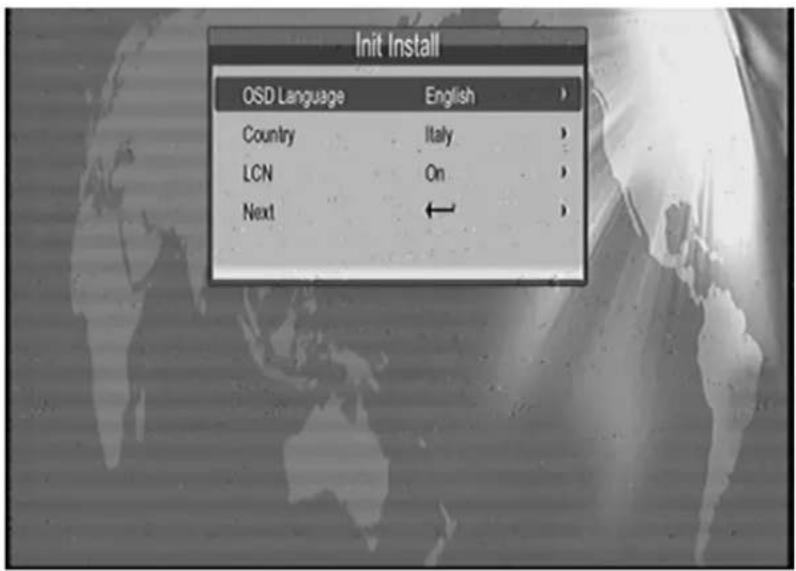
User can select OSD Language, Country, and LCN from this menu; when it is set completely, User can use "Next" to search channels.
4) INSTALLATION
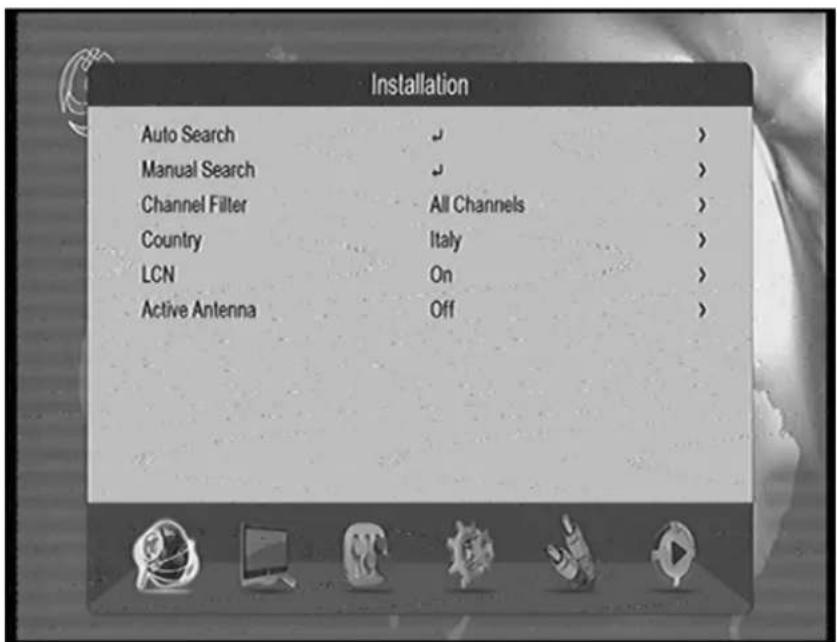
Press "enter" or "up" to into first submenu item.
4.1 Auto Search
- Move the cursor to "auto search", then press "enter" to into Auto searching page.
- During scanning, press "EXIT" key to stop and exit scanning.
4.2 Manual Search
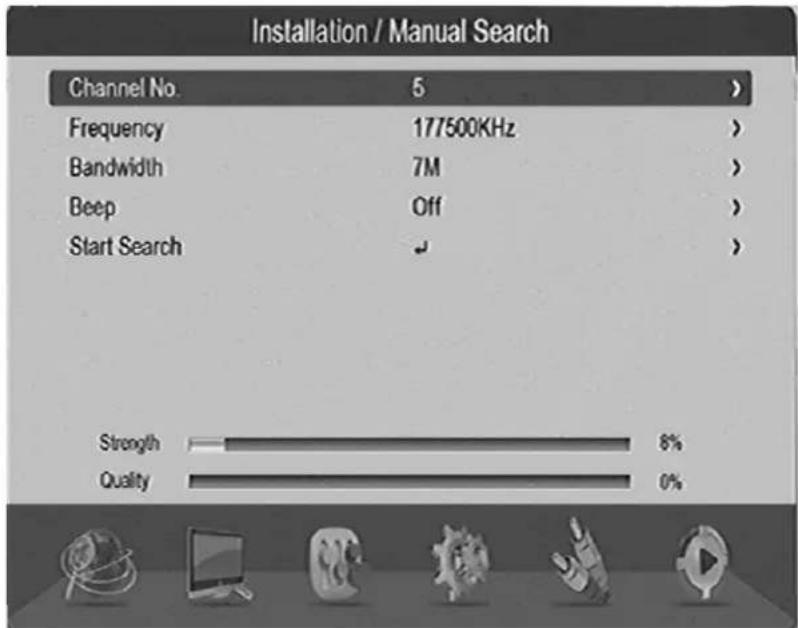
- You need to configure relevant parameters including:
Frequency(KHz): input relevant digitals to modify it
BandWidth: set it to 6 MHz, 7 MHz, 8 MHz. - Start search, press "ENTER" key to start manual scan.
4.3 Channel Filter
Set to search all of channels or only unencrypted channels.
4.4 Country
Select the different country.
4.5 LCN
Set the logical channel number will be searched or not.
4.6 Active antenna
Set the antenna voltage to on or off.
5) CHANNEL
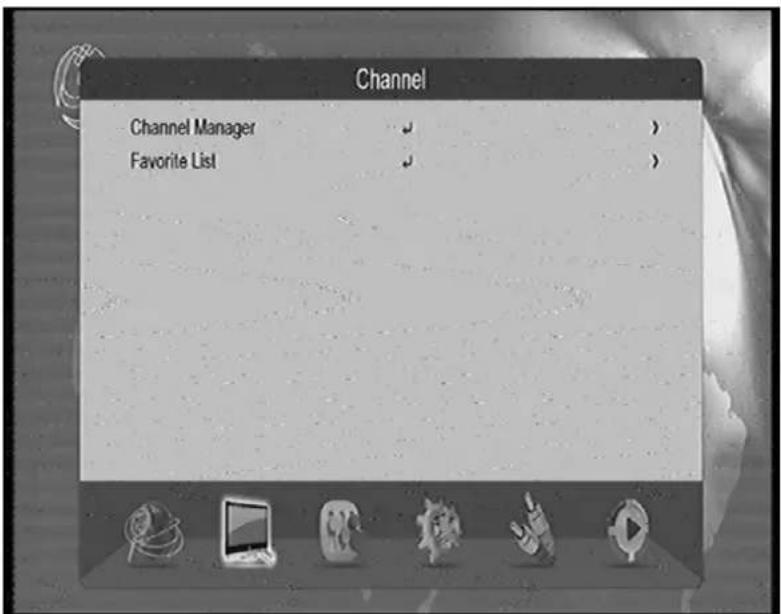
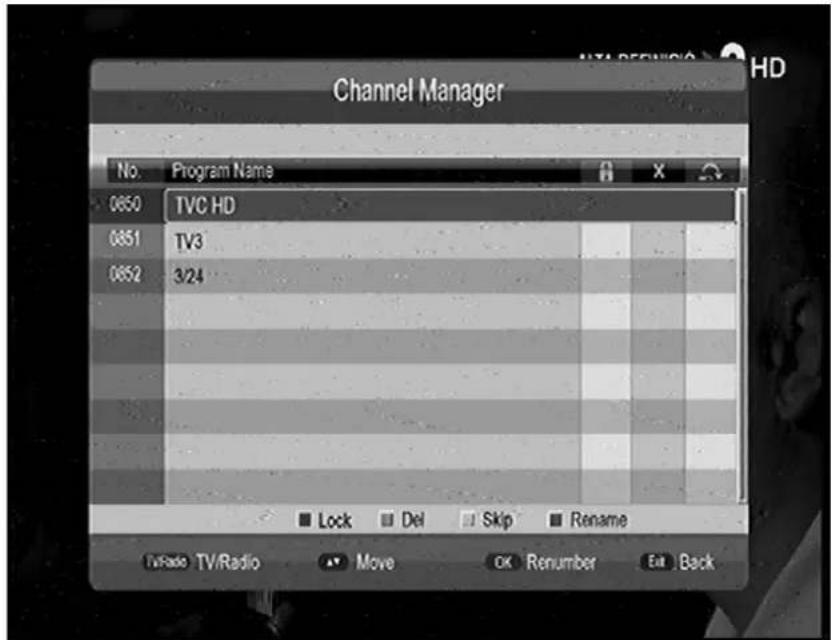
5.1 Channel Manager
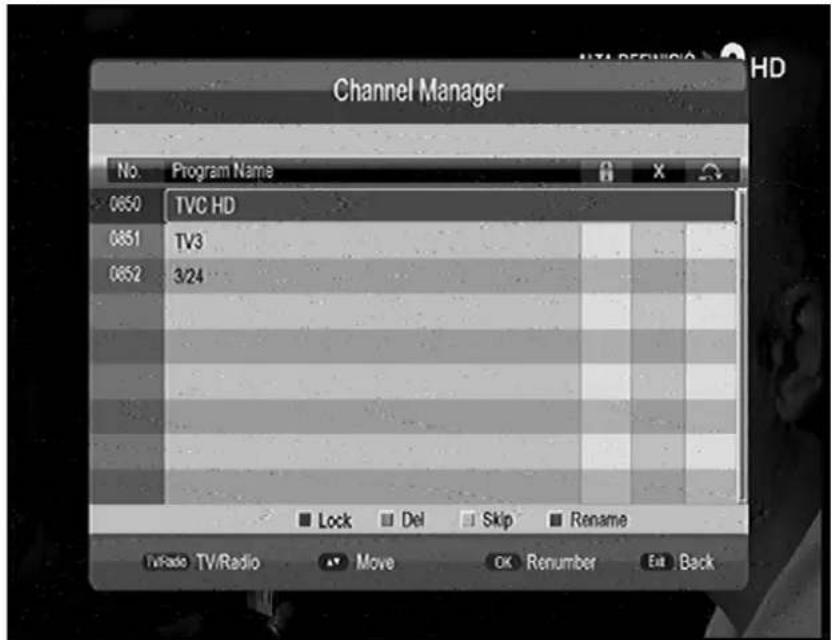
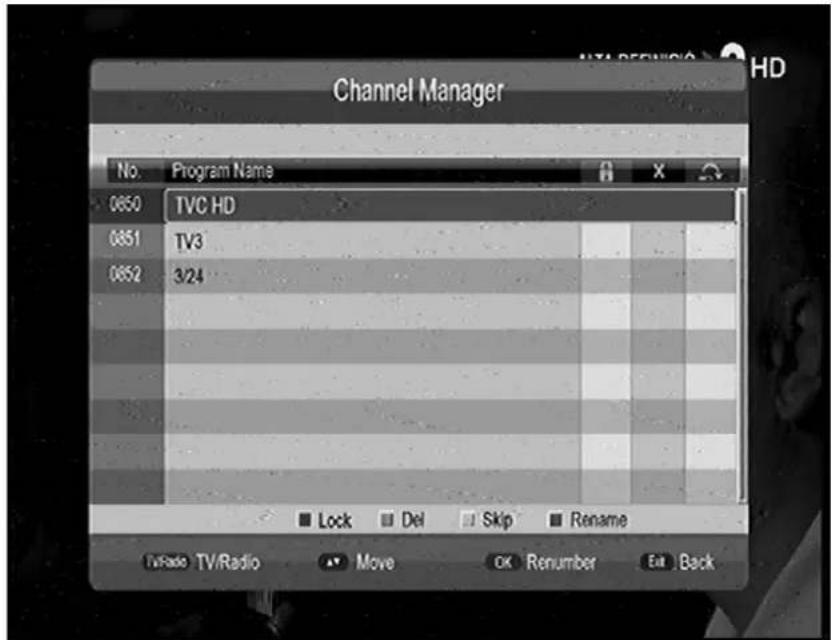
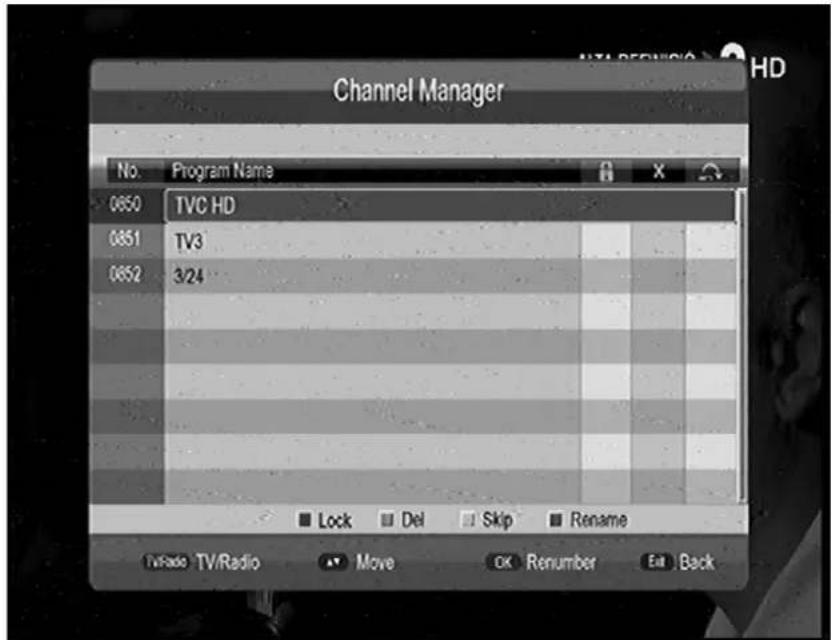
- Channel Manager menu includes: Delete, Skip, Lock and rename channel.
- Press UP/DOWN key to choose the Channel, then press the 4-color key on the remote controller
- Red key set or cancel lock Channel, green key set or cancel Delete Channel, yellow key set or cancel Skip Channel, blue key set or cancel rename Channel
- To set or cancel Lock Program, the system will hint to input "0000"
- Press EXIT key to exit Channel manager page and saving the edit result.
5.2 Favorite List
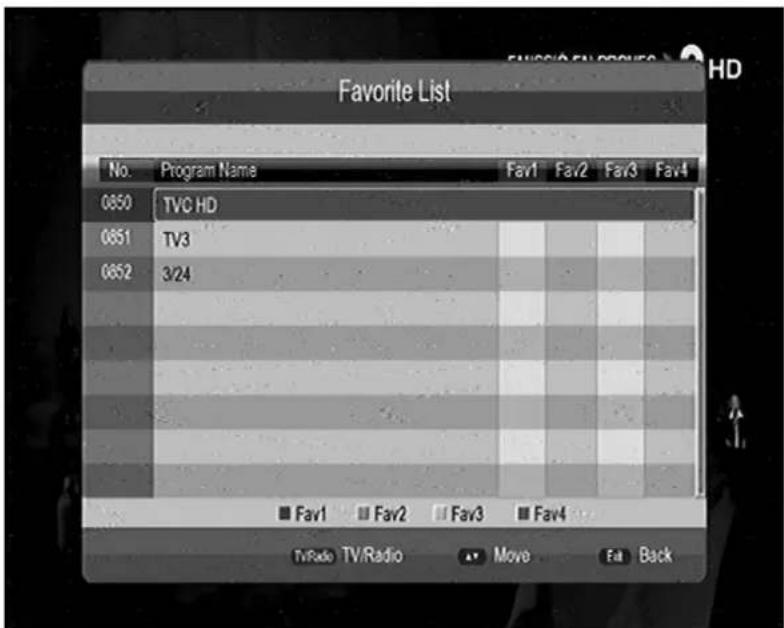
- Press UP/DOWN key to choose the line, then press the color keys on the remote controller to set different channel group.
- After channel is edited, press exit key to exit the menu.
6) PREFERENCE SETTING
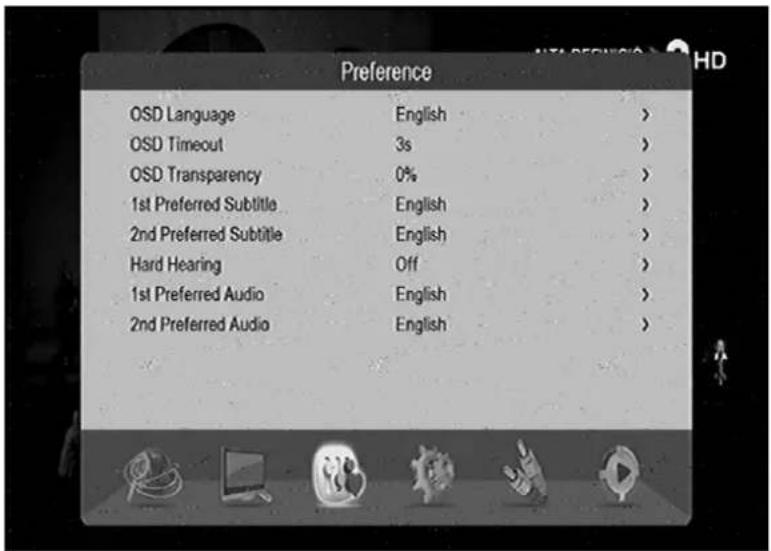
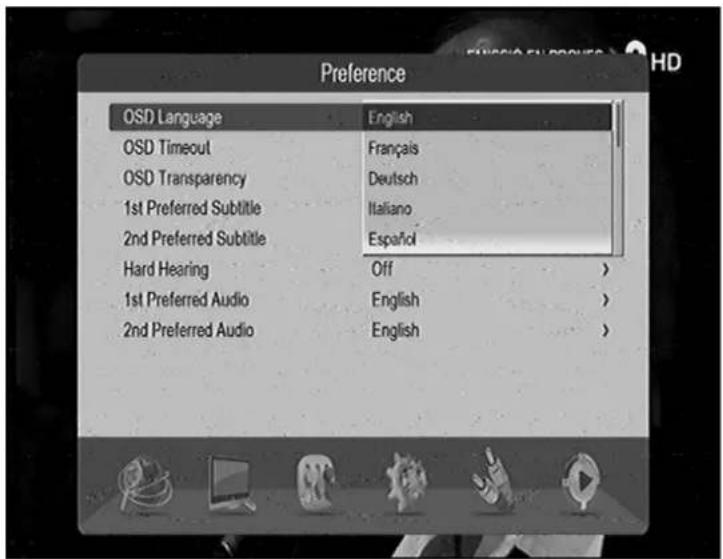
6.1 OSD Language
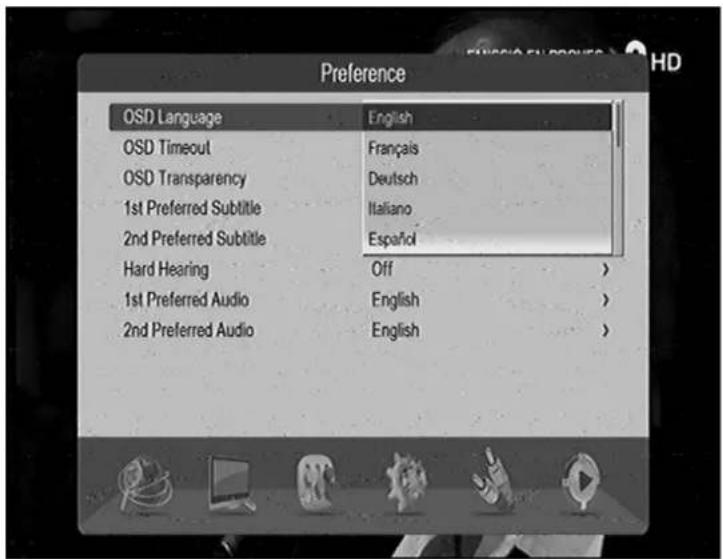
- Move the cursor onto OSD Language option, Press RIGHT key to enter OSD Language List.
- Press UP/DOWN key choose language.
- Press ENTER key to confirm language selection.
6.2 Preferred Subtitle
- Preferred subtitle be select, it will display the selected subtitle automatically while the stream has the suited subtitle.
- Set another preferred subtitle in the "2nd Preferred subtitle".
6.3 Hard Hearing
Hard hearing is a special service for someone who's hard of hearing.
6.4 Preferred Audio
- Preferred audio option: Press RIGHT key to enter the currently supported Audio Language list.
- Set another preferred audio in the "2nd Preferred audio".
7) SYSTEM SETTING
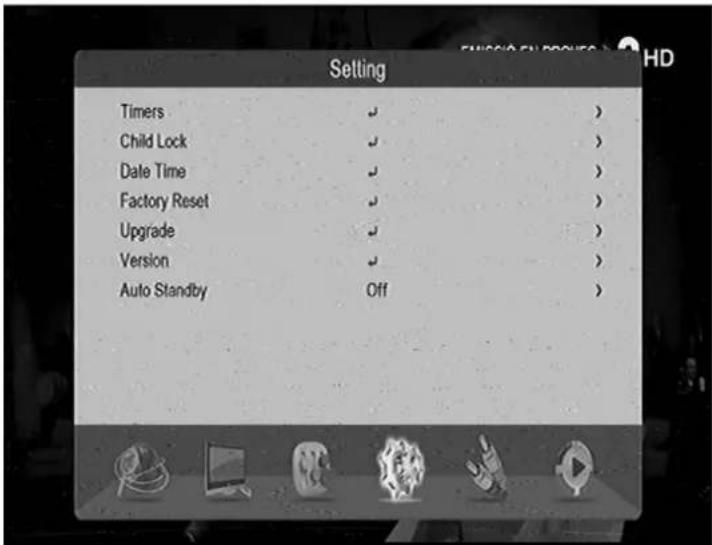
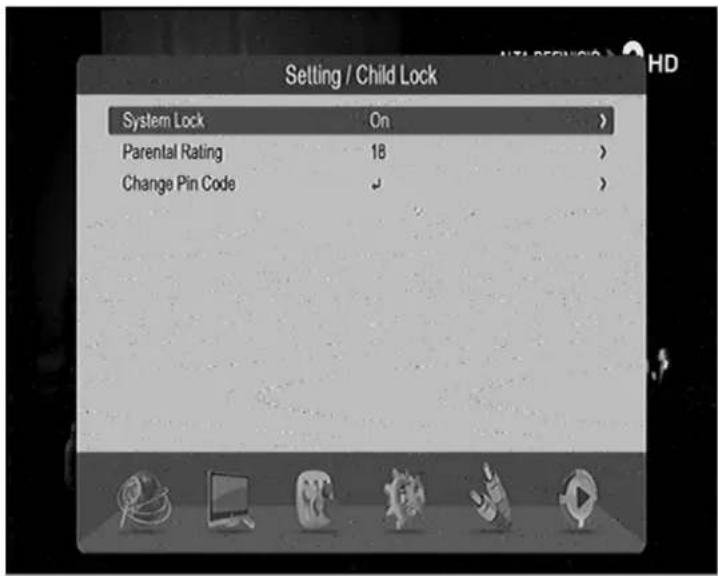
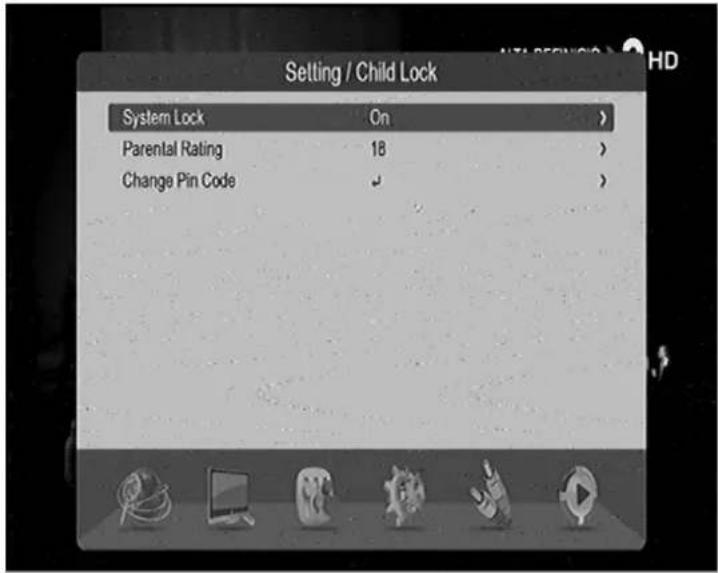
7.1 Child Lock
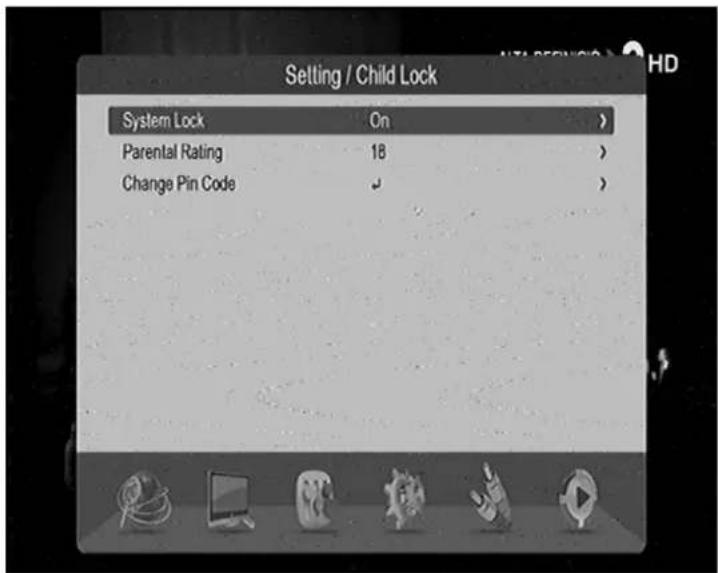
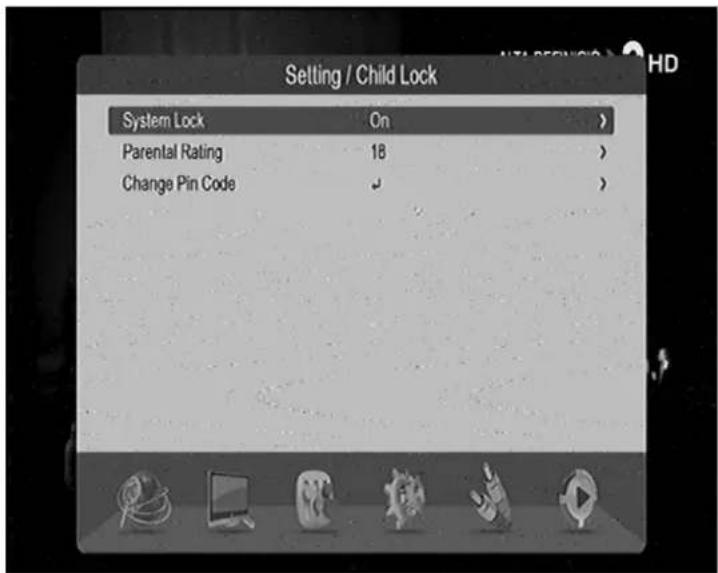
- Set system lock or not
- Set the parental rating from 0 to 18.
- Change pin code can revise system Password:
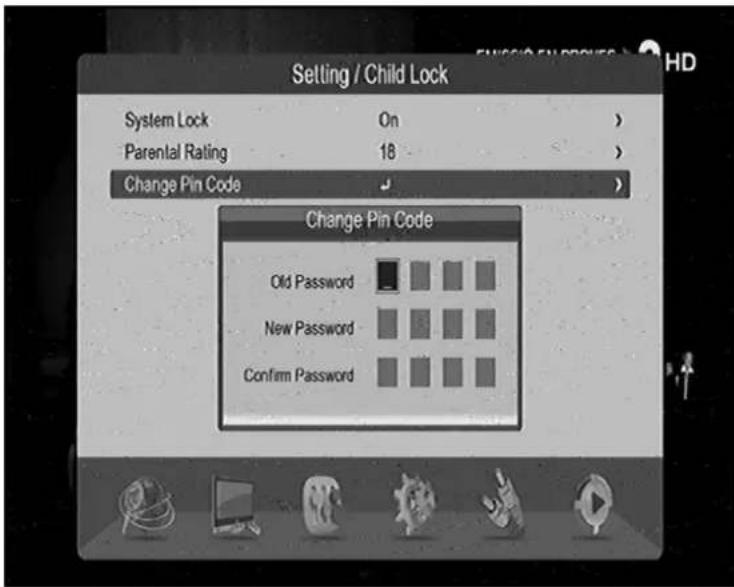
- Old password, defaults password as "0 0 0 0".
- New password ,press 0 - 9 number key to input new 4-digit password.
7.2 Date Time
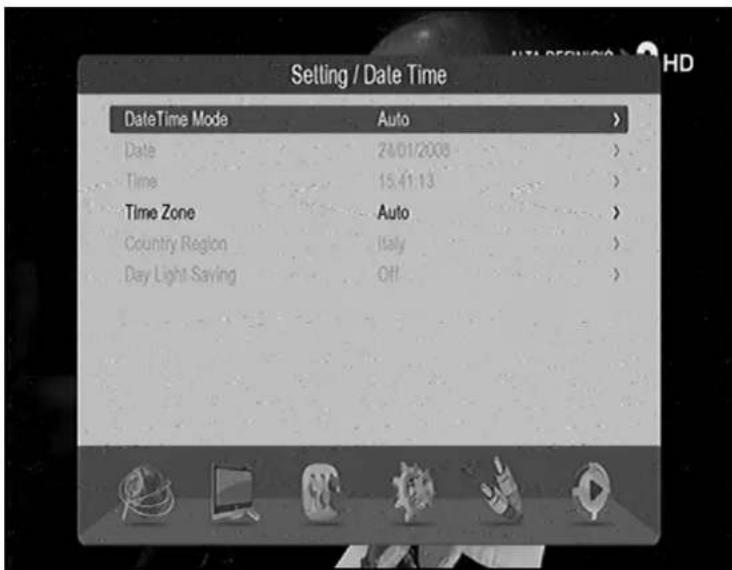
If the "Time Mode" is set to "Auto" then, "Time Zone" and "DST" shall be active for editing. If the "Time Mode" is set to "Manual" then, "Date" and "Time" shall be active for editing.
7.3 Factory Reset
There will be Reset to factory default, password "0000".
7.4 Upgrade
Refer to SOFTWARE UPGRADE by usb.
7.5 Version
System software information, including H/W Version, S/W Version, F/W Version, Build Date and Time, Press RECALL key to return previous menu.
7.6 Auto Standby
Set the timer of Auto Standby.
8) AV SETTING
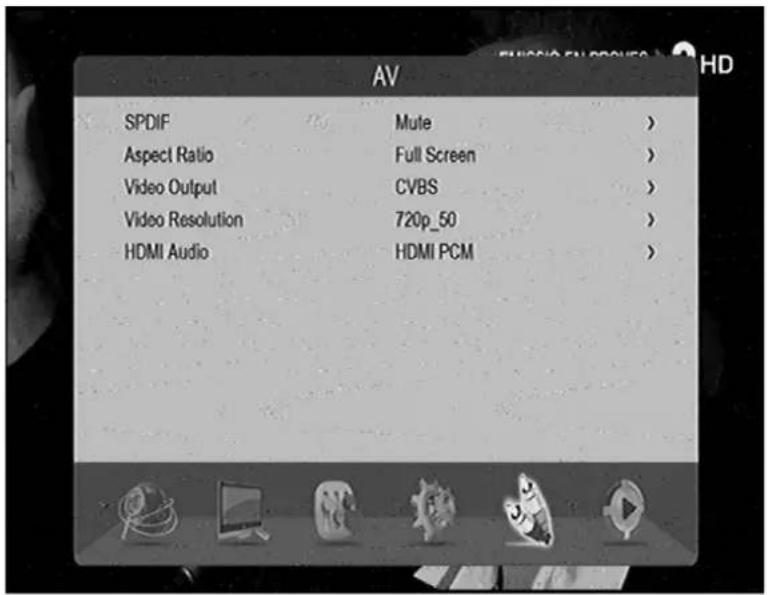
8.1 SPDIF
Can set Mute, PCM and Bitstream.
8.2 Aspect Ratio
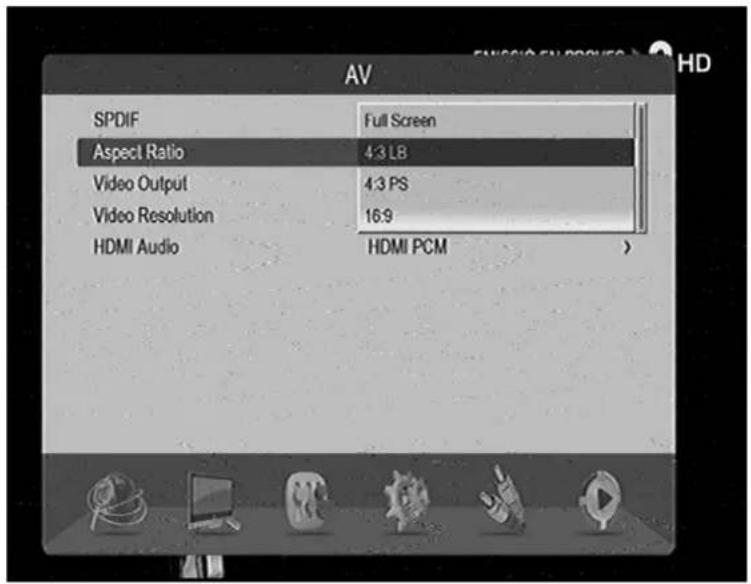
Aspect Ratio can be set as 16: 9, 4: 3PanScan, 4: 3 LetterBox and Full screen.
8.3 Video Output
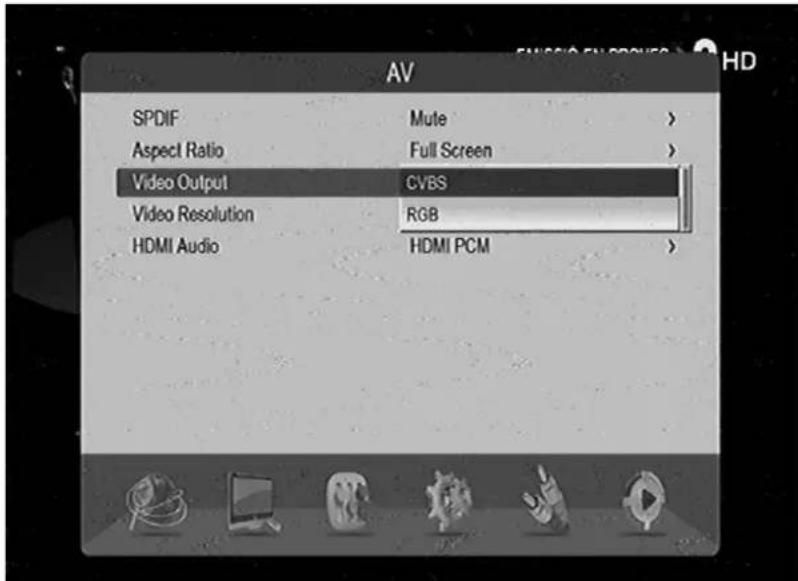
Video Output mode can be set as CVBS, RGB, YUV.
8.4 Video Resolution
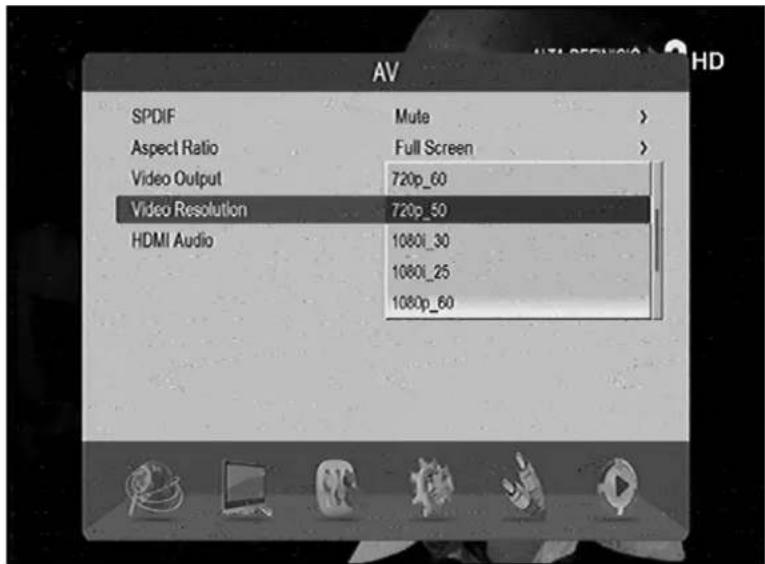
- Move the cursor to Aspect Ratio option, press ENTER/RIGHT to pop up the options. Then press UP/DOWN key to move circularly and choose options.
- Video Output mode can be set as:
576i_25, 720p-60, 720p_50, 1080i_30, 1080i_25, 1080p_60, 1080p_50, 480p_60, 480i_30, 576p_50
8.5 HDMI audio
Set audio output of HDMI to Mute, HDMI PCM, HDMI RAW.
9) MEDIA CENTER
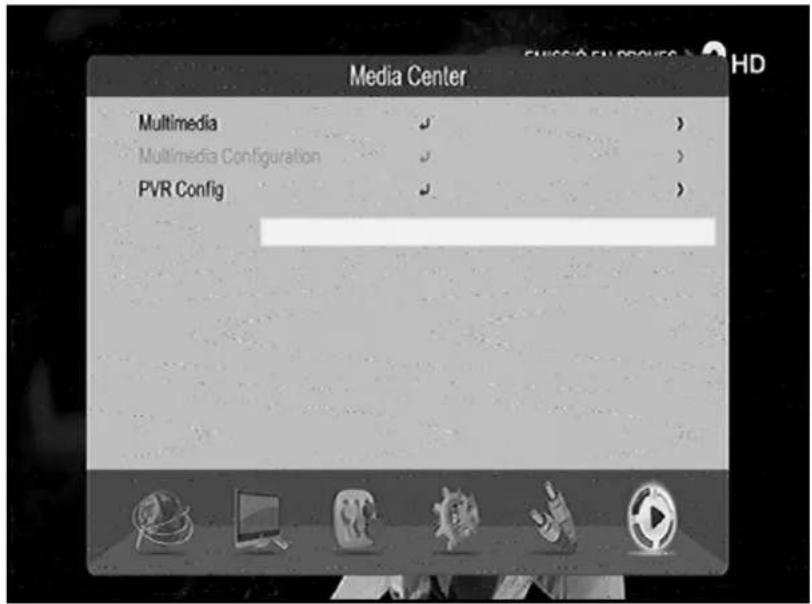
9.1 Multimedia
1) FILTER SELECTION MODE
- This menu helps the user to change the filter mode from movie to music or from music to photo and so on.

- Press exit key to exit the menu
2) Movie
![Movie Audska1movie AC3 AUDIO CONT-4C(AC-3 multicanal).mkv CONT-4F(subtitle) mkv MPEG AUDIO HD trailer "The Eye" (2008) 1080... MASN.avi Interview(2007)DvDrip AC3[Eng]-FXG.avi](/content/2026/06/1147959/images/d3e908429f1beee0ee4bf3c6fb80ffa74fefca550f5203be86bc5b0d6f1ffc9e.jpg)
- This menu helps the user to select and play a movie from a list of movies
- Supported file formats are MPG, AVI, VOB, MP4, MKV, MOV, WMV, TS.
- Press enter key to play movie, then press play\pause\stop key to control.
- Press exit key to exit movie file
3) MUSIC
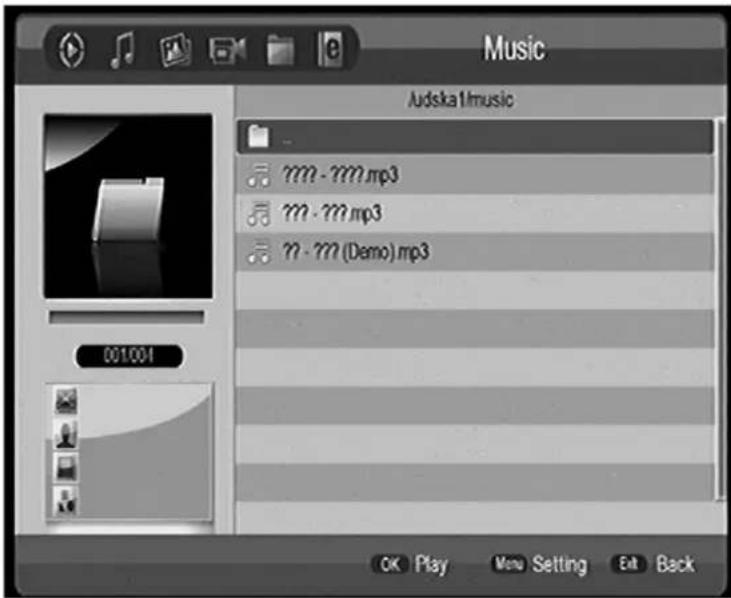
- This menu helps the user to select and play a song .WMA, WAV and MP3 format will be supported.
- Press play\pause\stop key to control.
4) PHOTO
![Photo Audska1/?? F160097??[1].jpg F160297.jpg F160301.jpg F160444 ONE SOURCE NETWORKS (1).jpg 001005 Thumbnail Menu Setting Edit Back](/content/2026/06/1147959/images/c8c4d7b73c36c89564b0e36b640d55d85737b140bb05771cfef164f2ddde382a.jpg)
- Contain the Photos, Supported file formats are JPG, PNG and BMP.
- Press enter key to play photo.
- Press yellow key can displays the thumbnail view of the photos.
5) RECORDER MANAGER

- The recorded TV programs stored in storage device.
- Press the colour key to rename\delete the record file.
- Play the file as movie
9.2 Multimedia Configuration
Set Media source when watch media file.
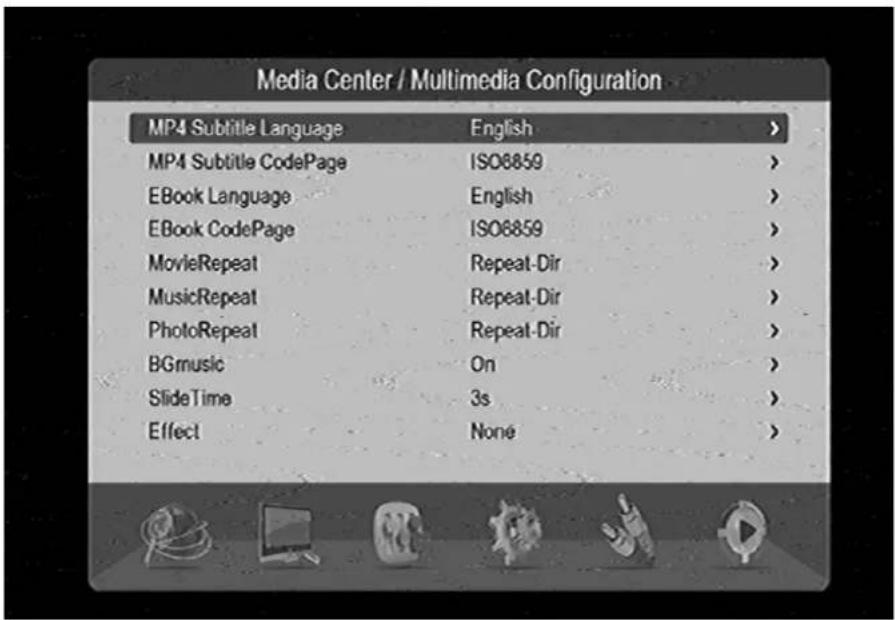
9.3 PVR Config
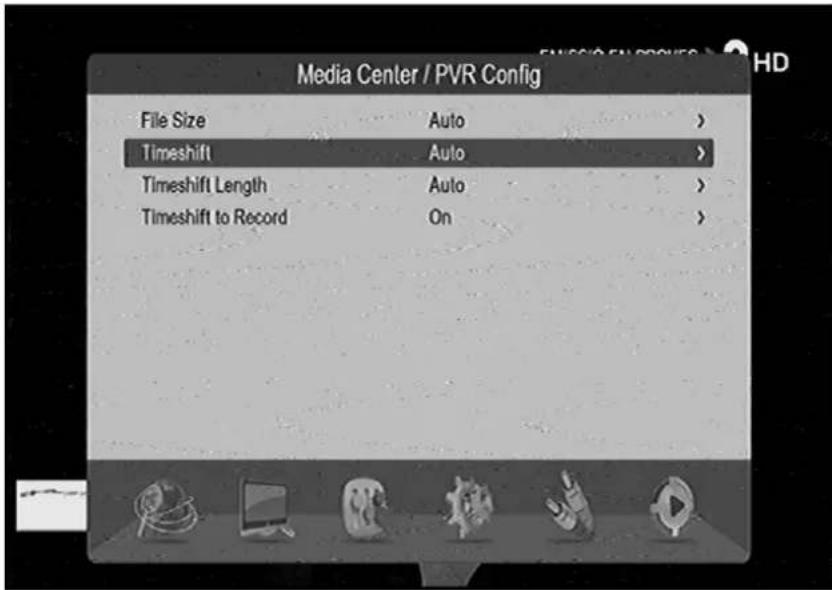
1. File Size:
Set the size of the file to be recorded.
2. Timeshift:
Set the status of the current timeshift.
3. Timeshift Length:
Set the time depth of the timeshift.
4. Timeshift to Record:
Set timeshift to record.
10) TECHNICAL SPECIFICATIONS
| Items Features | ||
| High Frequency Tuner | Input Frequency Range 170 - 2 | 30 MHz, 470 - 860 MHz(VHF a UHF) |
| Bandwidth 6, 7 or 8 MHz | ||
| Input Signal Level -75 až -20 dBm | ||
| RF Input Connector IEC169-2, | FEMALE | |
| Input impedance 75 Ω | ||
| Demodulation Mode | Waveform COFDM (Code Orthogonal Frequency Division Multiplexing) | |
| Demodulation QPSK, QAM16, | QAM64 | |
| Transmission Mode 2K, 8K | ||
| Guard interval 1/4, 1/8, 1/16, 1/32 | ||
| Code rate 1/2, 2/3, 3/4, 5/6, 7/8 | ||
| Video, Audio Decoding | Video decoding ISO/IEC13818-2 H.265 Compatible | |
| Video resolution PAL 720 x 576 / NTSC 720 x 480, 1080i, 1080P | ||
| Video input code rate 15 Mbit/s max. | ||
| Teletext Support DVB-ETS300472 | ||
| Audio decoding ISO 11172-3 | ||
| Audio Track Stereo, Monophony (L, P) | ||
| Audio Sample rate 32, 44.1, 48 KHz | ||
| USB USB Port USB | 2.0 | |
| System FAT32, NTFS | ||
| Power Supply Voltage | 110 – 240 V, 50/60 Hz | |
| Maximum Power Consumption | < 8 W | |
| Standby Power Consumption < | 0,5 W | |
| Work Environment | Temperature | 0 - +40 °C |
| Humidity | ≤ 95 % | |
WE RESERVE THE RIGHT TO CHANGE TECHNICAL SPECIFICATIONS.


TO AVOID DANGER OF SUFFOCATION, KEEP THE PLASTIC BAG AWAY FROM BABIES AND CHILDREN. DO NOT USE THIS BAG IN CRIBS, BEDS, CARRIAGES OR PLAYPENS. THIS BAG IS NOT A TOY.
Disposal of old Electrical & Electronic Equipment (Applicable in the European Union and other European countries with separate collection systems)

This symbol on the product or on its packaging indicates that this product shall not be treated as household waste. Instead it shall be handed over to the applicable collection point for the recycling of electrical and electronic equipment. By ensuring this product is disposed of correctly, you will help prevent potential negative consequences for the environment and human health, which could otherwise be caused by inappropriate waste handling of this product. The recycling of materials will
help to conserve natural resources. For more detailed information about recycling of this product, please contact your local Civic Office, your household waste disposal service or the shop where you purchased the product.
Hereby, ETA a.s. declares that the radio equipment type DVB116T2PVR is in compliance with Directive 2014/53/EU. The full text of the EU declaration of conformity is available at the following internet address: http://www.gogen.cz/declaration_of_conformity
natural_image
Black electronic device labeled 'GoGEN' on a white background (no additional text or symbols visible)1.2 Hinteres Panel
5.1 Kanal Manager
6.1 OSD-Sprache
7.1 Kindersicherung
9.1 Multimedia
1) FILTER-AUSWAHLMODUS
1. Dateigröße:
natural_image
Abstract logo design with white stylized 'S' inside a black circle (no text or symbols)GoGEN
- GoGEN
- DŮLEŽITÉ BEZPEČNOSTNÍ POKYNY
- Zadní panel
- Správce kanálů
- Dětský zámek
- Multimédia
- 1) REŽIM VÝBĚRU FILTRU
- DÔLEŽITÉ BEZPEČNOSTNÉ POKYNY
- Zadný panel
- Správca kanálov
- Detský zámok
- 1) REŽIM VÝBERU FILTRA
- IMPORTANT SAFETY INSTRUCTIONS
- 1) PRODUCTION DESCRIPTION
- Front panel
- Rear panel
- 2) IR
- Appearance of remote controller
- Instruction to keystroke of remote controller
- 3) BASIC FUNCTIONS
- First Installation
- 4) INSTALLATION
- Auto Search
- Manual Search
- Channel Filter
- Country
- LCN
- Active antenna
- 5) CHANNEL
- Channel Manager
- Favorite List
- 6) PREFERENCE SETTING
- OSD Language
- Preferred Subtitle
- Hard Hearing
- Preferred Audio
- 7) SYSTEM SETTING
- Child Lock
- Date Time
- Factory Reset
- Upgrade
- Version
- Auto Standby
- 8) AV SETTING
- SPDIF
- Aspect Ratio
- Video Output
- Video Resolution
- HDMI audio
- 9) MEDIA CENTER
- Multimedia
- 1) FILTER SELECTION MODE
- 3) MUSIC
- 4) PHOTO
- 5) RECORDER MANAGER
- Multimedia Configuration
- PVR Config
- File Size:
- Timeshift:
- Timeshift Length:
- Timeshift to Record:
- 10) TECHNICAL SPECIFICATIONS
- WE RESERVE THE RIGHT TO CHANGE TECHNICAL SPECIFICATIONS.
- Disposal of old Electrical & Electronic Equipment (Applicable in the European Union and other European countries with separate collection systems)
- Hinteres Panel
- Kanal Manager
- OSD-Sprache
- Kindersicherung
- 1) FILTER-AUSWAHLMODUS
- Dateigröße:
Brand : GoGen
Model : DVB 116 T2PVR
Category : Receiver