FDL-220R - Television SONY - Free user manual and instructions
Find the device manual for free FDL-220R SONY in PDF.


User questions about FDL-220R SONY
0 question about this device. Answer the ones you know or ask your own.
Ask a new question about this device
Download the instructions for your Television in PDF format for free! Find your manual FDL-220R - SONY and take your electronic device back in hand. On this page are published all the documents necessary for the use of your device. FDL-220R by SONY.
USER MANUAL FDL-220R SONY
Operating Instructions
Mode d'emploi
Sony Corporation ©1997 Printed in Japan
A
text_image
AA(LR6) x 3 ab
to a wall outlet vers la prise numale a una toma mural 벽면의 콘센트에
text_image
DC IN 4.5V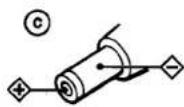
Polarity of the plug Polarité de la fiche Polaridad del enchufe 극성통입형 플러그
B
text_image
RADIO TUNING RADIO/TV/OFF BRT VOL Ω RELEASE CH +/- UHF/VHF, AM/FM DC IN 4.5V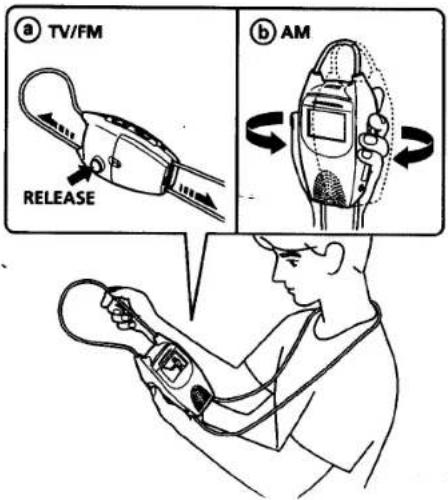
text_image
a TV/FM RELEASE b AMEnglish
Precautions
- Operate the unit only on 4.5 V DC
For AC operation, use the recommended Sony AC power adaptor. Do not use any other type of AC power adaptors for this unit. - Do not open the unit. Refer servicing to qualified personnel only.
- Do not place the unit in a hot or humid place, or in a place subject to excessive dust or vibration.
- Avoid rough handling.
- Clean the unit with a soft cloth slightly dampened with a mild detergent solution. Never use strong solvents, such as thinner or benzine, as they may damage the finish.
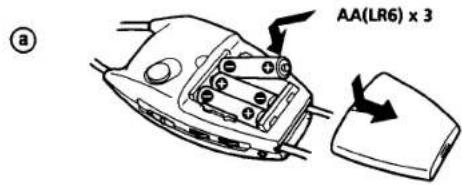
Power Sources (see fig. A)
Alkaline Batteries
See fig. A-①.
Battery Life: With continuous use, Sony LR6/AM3(N) alkaline batteries will last about 2.5 hours.
Note
When the picture becomes dim or the tuning does not lock onto a channel, replace all the batteries with new ones.
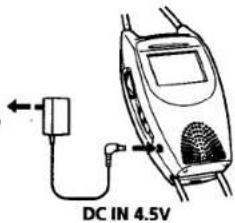
House Current
See fig. A—b.
Note
Use only the recommended AC power adaptor. (For the polarity of the plug, see fig. A-©).
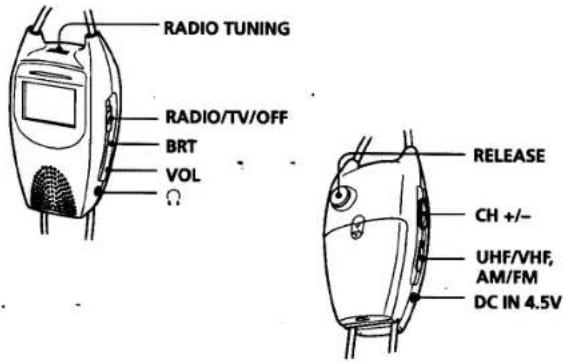
Operation (see fig. B)
Watching the TV
1 Set the RADIO/TV/OFF switch to TV.
2 Set the VHF/UHF switch to VHF or UHF, whichever band you want to watch.
3 Press the CH +/- button to select a channel.
4 Adjust the volume with the VOL dial.
5 Adjust the brightness with the BRT dial.
Listening to the radio
1 Set the RADIO/TV/OFF switch to RADIO.
2 Set the AM/FM switch to AM or FM, whichever band you want to receive.
3 Tune in to a station with the RADIO TUNING dial.
4 Adjust the volume with the VOL dial.
To switch off the TV and radio: Set the RADIO/TV/OFF switch to OFF.
To improve the broadcast reception
TV, FM: Fully extend the right side of the strap antenna while pushing the RELEASE button and move the unit in every direction. (See fig. B-①). AM: Move the unit in every direction. (See fig. B-⑥).
To adjust the strap length: Hold the RELEASE button down and adjust the right side of the strap antenna.
Note
For safety reasons, the left side of the strap antenna is designed to disconnect when pulled too strongly. If this happens, please contact your nearest Sony dealer.
Listening with headphones: Connect headphones (not supplied) to the (headphones) jack.
Français
Précautions
This symbol is intended to alert the user to the presence of uninsulated "dangerous voltage" within the product's enclosure that may be of sufficient magnitude to constitute a risk of electric shock to persons.
This symbol is intended to alert the user to the presence of important operating and maintenance (servicing) instructions in the literature accompanying the appliance.
CAUTION
This device complies with part 15 of the FCC Rules. Operation is subject to the following two conditions: (1) This device may not cause harmful interference, and (2) this device must accept any interference received, including interference that may cause undesired operation.
You are cautioned that any changes or modifications not expressly approved in this manual could void your authority to operate this equipment.
Owner's Record
The model and serial numbers are located at the rear. Record the serial number in the space provided below. Refer to these numbers whenever you call upon your Sony dealer regarding this product.
Model No. ____ Serial No. ____
Troubleshooting
The unit does not operate.
• The AC power adaptor is disconnected.
• Incorrect battery polarity.
- Weak batteries.
Herringbone pattern, double images, stripes, too indistinct, etc.
- Improper tuning or antenna setting.
Dotted lines or stripes
- Often caused by interference from other electric appliances.
- Adjust the strap antenna.
No sound from the speaker
• Volume is turned down completely.
• Headphones are connected.
No sound and picture from the TV but sound from the radio is normal.
- Weak batteries.
If you have any questions or problems concerning your unit, please consult your nearest Sony service facility.
Specifications
TV
TV standard
American TV standard
Channel coverage
VHF: 2 - 13
UHF: 14 - 69
Display format
Transmission type TN liquid crystal panel
Drive format Passive matrix
Picture 2.2 inches measured diagonally
Radio
Frequency AM: 530–1605 kHz
FM: 87.5–108 MHz
Antenna VHF/UHF/FM: Strap antenna
AM: Ferrite bar antenna
(mounted within the unit)
Output Headphones: minijack (mono) Impedance 8 - 45 ohms
Power requirements
4.5 V DC
Power consumption
Approx. 3.3 W
Speaker ∅28 mm (1 1/8 in.), 0.1 W
Dimensions Approx. 82.0 × 149.8 × 49.8 mm
(3 ^1 /4×6×2 in.)(w/h/d)
excl. projecting parts and controls
Strap length Approx.1,420 mm (56 in.)
Mass Approx. 280 g (9.9 oz), excl.
batteries
Design and specifications are subject to change without notice.
Optional accessories
AC power adaptor AC-E45HG/Size AA (LR6)
alkaline battery
한국어
Especificaciones
TV
Televisor estándar