Line & Power SE - Receiver Block - Free user manual and instructions
Find the device manual for free Line & Power SE Block in PDF.


User questions about Line & Power SE Block
0 question about this device. Answer the ones you know or ask your own.
Ask a new question about this device
Download the instructions for your Receiver in PDF format for free! Find your manual Line & Power SE - Block and take your electronic device back in hand. On this page are published all the documents necessary for the use of your device. Line & Power SE by Block.
USER MANUAL Line & Power SE Block
Manual issued 09/2017
CONTENTS
PREFACE....3
IMPORTANT SAFETY INSTRUCTIONS ....4
TRANSPORT 6
UNPACKING 6
PACKAGE CONTENT 6
FRONT PANELS FEATURES....7
BACK PANELS FEATURES....8
BLOCK REMOTE 9
Functions 9
Pairing / Unpairing....9
Battery Replacement....9
DISPLAY CONTENT 10
Content FULL 10
Content SMART 10
INSTALLATION....11
Placement.... 11
Adjusting feet 11
Connecting the DC Supply and Control cables 11
Connecting the Line Input / Output Cables.... 11
Connecting Turntable (Phono Input).... 11
System Remote Control (REM).... 12
Connecting AC mains Cable 12
OPERATION....13
Turning On/Off 13
Power Supply....13
Select Input.... 13
Volume Control....13
Mute 13
Setup Menu 13
GND LIFT switches 13
SETTINGS 14
GENERAL CONTROL / NAVIGATION.... 14
SETUP MENU Base-Level 14
SETTINGS Menu.... 15
ADVANCED SETTING Menu 15
INPUT SETUP Menu 16
DISPLAY SETUP Menu 18
VOLUME CONTROL SETUP Menu 19
SURFACE CLEANING....20
TROUBLESHOOTING 20
SPECIFICATIONS....21
NOTES 21
PREFACE
The BLOCKAUDIO team congratulates you on your purchase of this device. But before you start listening to your new LINE & POWER BLOCK, please read this manual carefully so you are able to use and enjoy all functions of this unique equipment without drawback on music quality.
IMPORTANT SAFETY INSTRUCTIONS
READ ALL INSTRUCTIONS: All the safety and operating instructions of your Block Audio device should be read before power is applied to the equipment.
RETAIN THIS OWNER'S MANUAL: This safety and operating instructions should be retained for future reference.
HEED WARNINGS: All warnings on the unit and in the operating instructions should be adhered to.
FOLLOW INSTRUCTIONS: All operating and use instructions should be followed.
CLEANING: Unplug the unit from the wall outlet before cleaning.
GROUNDING: Do not defeat the safety purpose of the grounding-type plug. A grounding-type plug has two blades and a third grounding prong. The third prong is provided for your safety. If the provided plug does not fit into your outlet, consult an electrician for replacement of the obsolete outlet.
MAINS CABLES: Ensure that the mains cables (power supply cables) are not damaged. Never use the device if the mains cable is damaged. Protect the mains cables from being walked on or pinched particularly at plugs, convenience receptacles and the point where they exit from the apparatus.
LIGHTNING: Unplug this apparatus during lightning storms or when unused for long periods of time.
REPAIR: Any repairs or adjustment may only be performed by qualified personnel. The warranty will become void if the user attempts to open and repair the apparatus. Improper intervention may interfere with the electrical safety of the unit.
The manufacture assumes no liability for any accidents suffered by the user if the unit has been opened.
SERVICING: There are no user serviceable components inside this product. Servicing is required when the apparatus has been damaged in any way, such as if the power-supply cord or plug is damaged, liquid has been spilled inside the appliance or it has been exposed to moisture, the appliance does not operate normally, or has been dropped.
To reduce the risk of fire or electric shock, DO NOT expose this apparatus to rain or moisture.
Never push anything into holes or slots in the case - this could result in an electric shock and could cause damage of the set.
DO NOT connect any grounds (Input/Output) together, or to the chassis.
DO NOT connect the input of this preamplifier to a power amplifiers output.
NOTES ON ENVIRONMENTAL PROTECTION
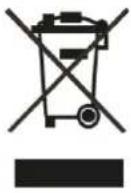
At the end of its useful life, this product must not be disposed of with regular household waste but must be returned to a collection point for the recycling of electrical and electronic equipment. The symbol on the product, user's manual and packaging, point this out.
The materials can be reused in accordance with their markings. Through re-use, recycling of raw materials or other forms of recycling of old products, you are making an important contribution to the protection of our environment. Your local administrative office can advise you of the responsible waste disposal point.
INFORMATION ABOUT COLLECTION AND DISPOSAL OF WASTE BATTERIES (DIRECTIVE 2006/66/EC OF THE EUROPEAN PARLIAMENT AND THE COUNCIL OF EUROPEAN UNION) (FOR EUROPEAN CUSTOMERS ONLY)
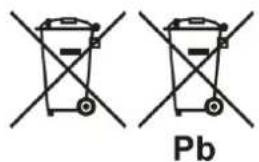
Batteries bearing any of these symbols indicate that they should be treated as "separate collection" and not as municipal waste. It is encouraged that necessary measures are implemented to maximize the separate collection of waste batteries and to minimize the disposal of batteries as mixed municipal waste.
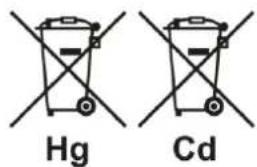
End-users are exhorted not to dispose waste batteries as unsorted municipal waste. In order to
achieve a high level of recycling waste batteries, discard waste batteries separately and properly through an accessible collection point in your vicinity. For more information about collection and recycling of waste batteries, please contact your local municipality, your waste disposal service or the point of sale where you purchased the items.
By ensuring compliance and conformance to proper disposal of waste batteries, potential hazardous effects on human health is prevented and the negative impact of batteries and waste batteries on the environment is minimized, thus contributing to the protection, preservation and quality improvement of the environment.
TRANSPORT
Please transport the product only in the included package. Always use the provided foamed foil protection to prevent scratches on the housing.
Please allow the equipment to adapt to the climatic conditions in your listening room before you switch on the unit for the first time after transport.
UNPACKING
All Block Audio shipping boxes have been specially designed to protect their contents and special care has been taken to prevent damage under normal shipping conditions. Mishandling should be evident upon inspection of the shipping box.
We strongly recommend that you keep all original packaging in order to protect your components from damage should you later wish to store or ship them.
PACKAGE CONTENT
Enclosed you will find the following items:
√ The Control Unit LINE BLOCK
√ The Supply Unit POWER BLOCK
√ The Owner's Manual (that you are currently reading)
√ 3 Detachable IEC Power Cords (with V-Lock)
√ 2 Multi-pin "DC VOLT. INPUT / OUTPUT" Cables
√ Multi-pin "SUPPLY / CONTROL" Cable
√ 2 "REM" Cables (System Remote Control)
√ Block Remote Unit
√ One small bubble level
√ Cotton gloves
√ Dispatch Form & Final Test Certificate
FRONT PANELS FEATURES
flowchart
graph TD
    A["LINE BLOCK"] --> B["Display"]
    C["POWER BLOCK"] --> D["Adjustable feet"]
    E["Rotary/Push Button"] --> F["Status LED"]
    B --> G["Display"]
    D --> H["Adjustable feet"]
    F --> I["Status LED"]
    style A fill:#f9f,stroke:#333
    style C fill:#f9f,stroke:#333
    style E fill:#f9f,stroke:#333
    style B fill:#ccf,stroke:#333
    style D fill:#ccf,stroke:#333
    style F fill:#ccf,stroke:#333
    style G fill:#cfc,stroke:#333
    style H fill:#cfc,stroke:#333
    style I fill:#cfc,stroke:#333
IR Receiver & Light Sensor
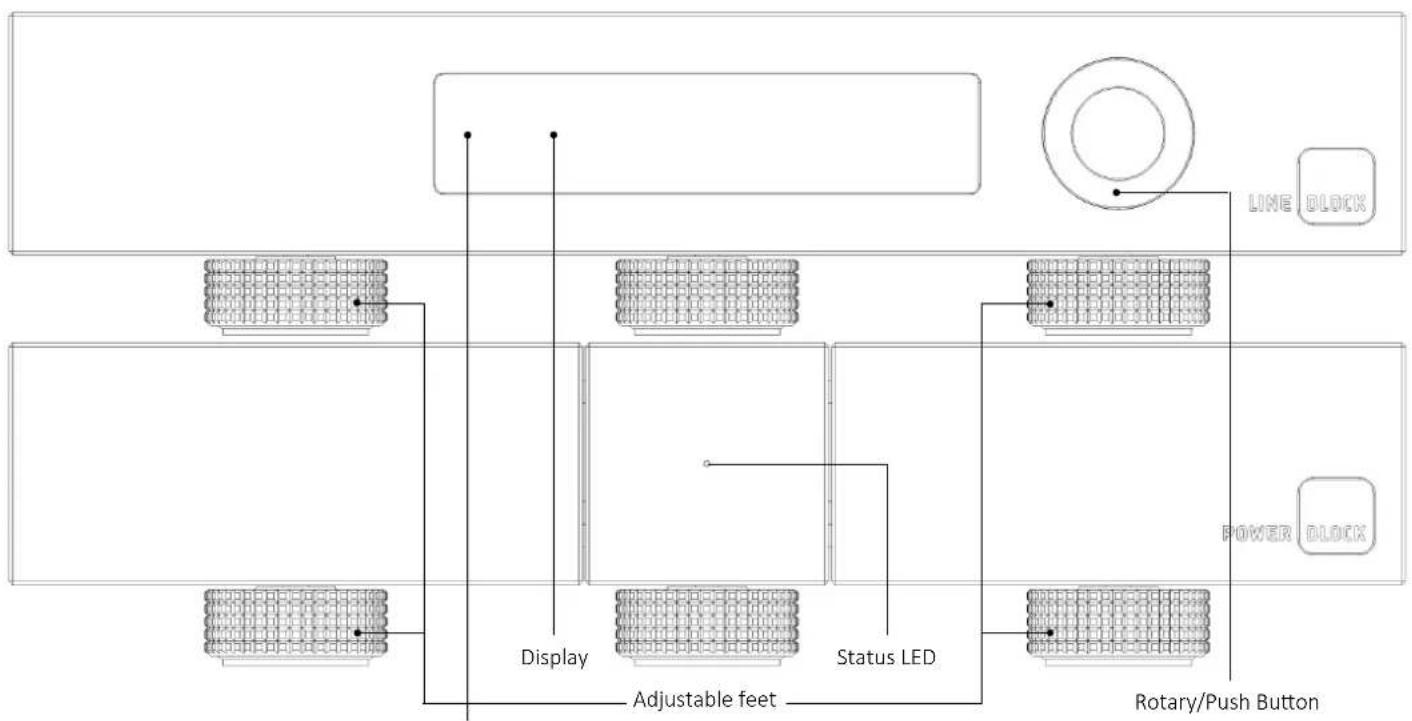
Rotary/Push Button: Turn this knob to adjust the volume level. Also used to put the Line Block into and out of the Standby mode, for Input selection and Setup Menu navigation.
Display: Displays the selected input and the main volume level, as well as the settings menus.
IR Receiver: The IR receiver receives commands from the included remote control.
Light Sensor: This sensor receives ambient light to automatically dim Display and Status LED.
Status LED: Shows current operation mode:
• Steady light indicates - White: Battery operation, Orange: AC Mains operation (Battery Off)
• Red illuminates dimly: Standby mode
• Flashes during battery operation: Battery status Weak
• Flashes Orange: Battery Charging
- Flashes Red: Error
Adjustable feet: For accurate setup of horizontal position. Only front two feet are adjustable! See INSTALLATION section for details.
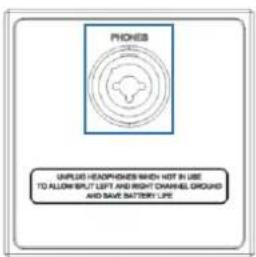
PHONES: Headphones Output - 3 pole XLR receptacle and 6.35 ~mm / 1/4 stereo jack.
Inserting a headphone jack into this socket automatically switches off the outputs and turns off the Mono Blocks. Other options are in the Setup Menu.
BACK PANELS FEATURES
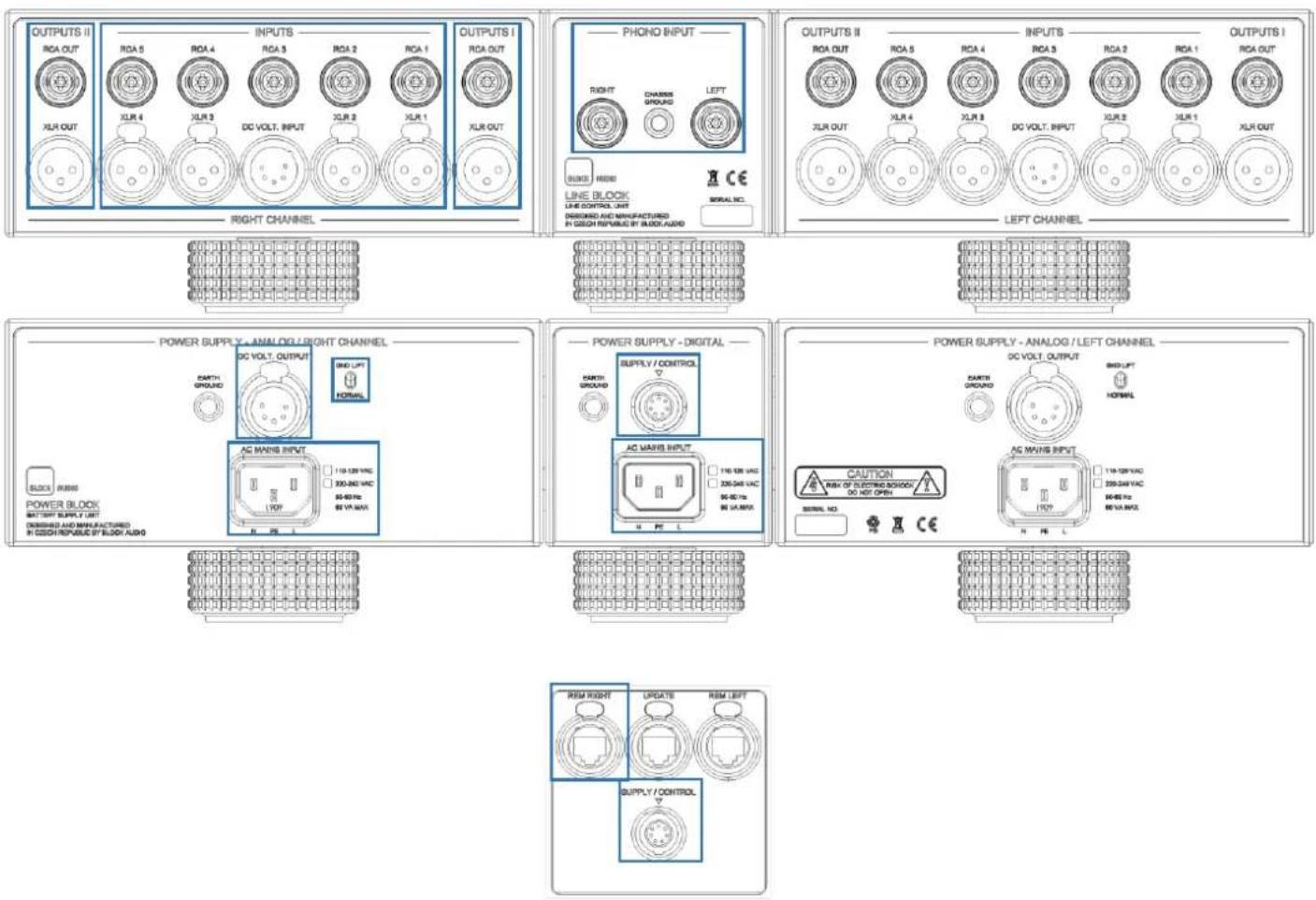
RCA INPUTS: Unbalanced (single-ended) Input Connectors, white for left channel, red for right.
XLR INPUTS: Balanced (symmetrical) Input Connectors.
PHONO INPUT: Phono Input Connectors, white for left channel, red for right. and Phono/Chassis Ground Conn.
DC VOLT. INPUT: Power Supply Input Connector.
OUTPUTS I / II ("I" and "II" are identical):
RCA OUT: Unbalanced (single-ended) Output Connectors, white for left channel, red for right.
XLR OUT: Balanced (symmetrical) Output Connectors.
DC VOLT. OUTPUT: Power Supply Output Connectors.
SUPPLY / CONTROL: Control Interface and Power Supply for none-audio circuits.
AC MAINS INPUT: Mains supply inputs / 15 A power socket with V-Lock notch. Marking of the AC mains version.
REM LEFT / RIGHT: RJ45 connectors for system remote control.
GND LIFT / NORMAL: Ground lift switches. See OPERATION section for details.
BLOCK REMOTE
Functions
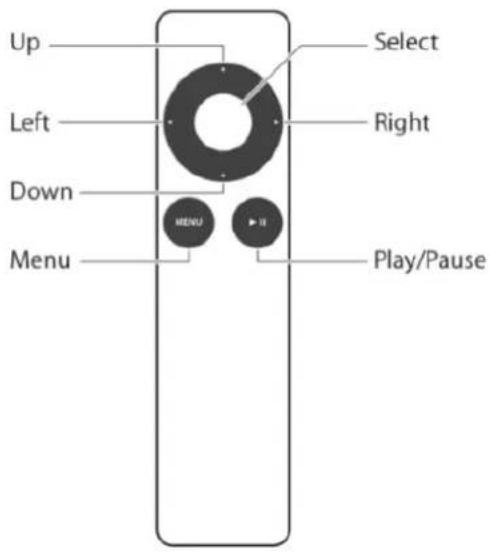
UP/DOWN: Press these buttons to adjust the volume level. Use also to move the cursor, or to change values in the Settings.
LEFT/RIGHT: Press these buttons to select the desired input. Use also to move the cursor, or to change values in the Settings.
SELECT: This button can be used to put the Line Block, or system into and out of the Standby mode. Use also to select/enter menu item in the Settings.
MENU: Press this button to display and escape the Setup Menu.
PLAY/PAUSE: This button allows you to mute and unmute the audio signal.
Pairing / Unpairing
Open Setup Menu, choose SETTINGS > ADVANCED > PAIR REMOTE: Instructions for the Pair / Unpair of the Block Remote with the Line Block will be displayed.
Battery Replacement
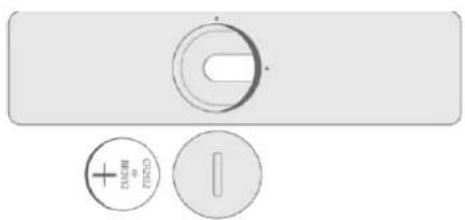
• Find the battery component on the back of your Remote.
- Use a coin to turn the battery door counterclockwise until the door opens.
- Remove the old battery.
- With the positive side facing up toward you, put in the new CR2032 or BR2032 lithium 3V coin battery (available at most electronic and drug stores).
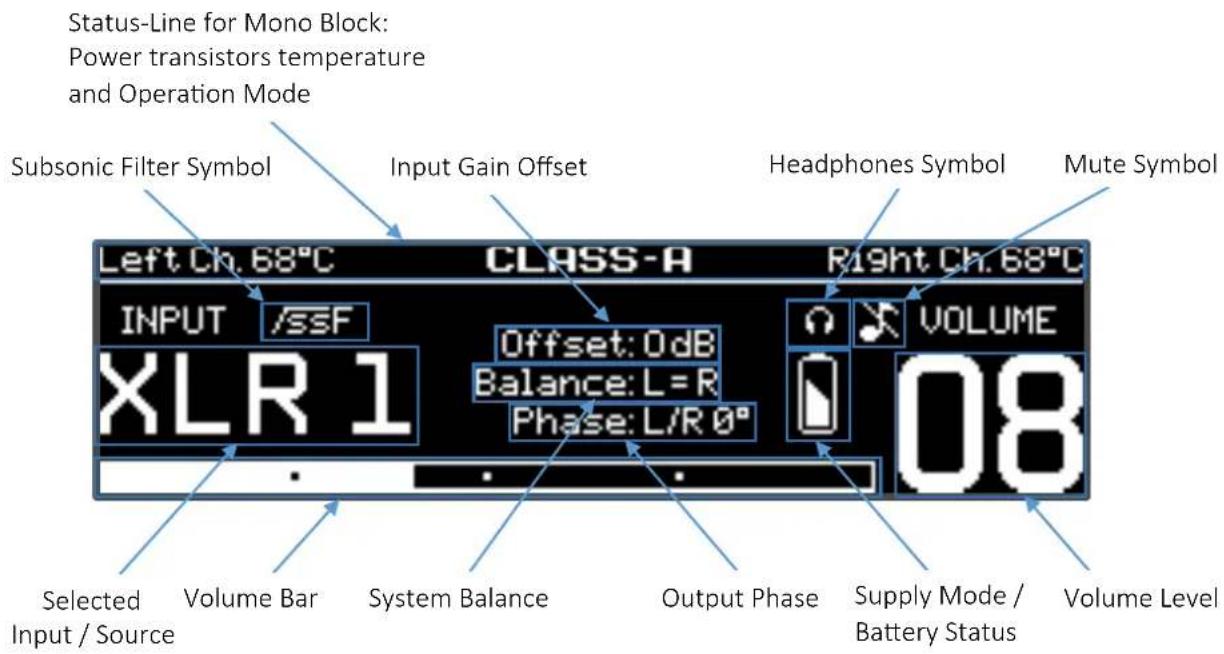
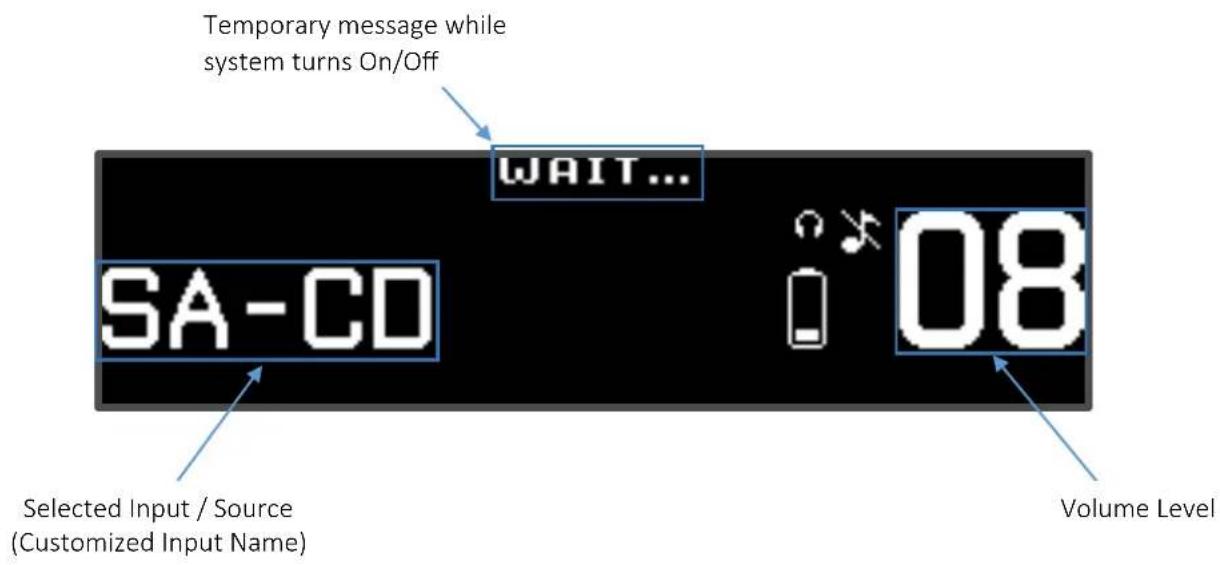
DISPLAY CONTENT
Content FULL
Content SMART
INSTALLATION
WARNING:
- Be sure to install it in a safe place from which it cannot fall or tip over.
- Do not connect loudspeaker wires or other high voltage sources to the inputs.
- Do not short-circuit the outputs.
- Do not allow the chassis to touch any metal parts, such as the frame of an equipment rack. This might create a parallel ground path that could degrade the sound of your system.
Placement
The unpacked devices can be placed one by one on the shelves of a stable rack eider side by side, or can be laid directly over each other: Line Block ON Power Block.
Install the Preamplifier chassis as close as possible to associated audio components to keep interconnecting cables as short as possible.
Adjusting feet
The Line & Power Blocks are equipped with adjustable feet. After placing the units to the desired place, it is possible to precisely adjust the horizontal position by rotating the front feet. This is especially important at Power Block, because there is hanging transformer and should not have nothing to touch. A supportive bubble level is enclosed.
Connecting the DC Supply and Control cables
DC Volt. Connectors: These connectors provide DC power from the Power Block chassis to the Line Block chassis. Use the two supplied Multi-pin "DC VOLT. INPUT/OUTPUT" cables to connect Left / Right DC Volt. Output to the Left / Right DC. Volt Input.
Using the supplied Multi-pin "SUPPLY / CONTROL" cable, connect the Power Block's SUPPLY / CONTROL connector to the Line Block's SUPPLY / CONTROL connector.
The upper position of the connectors is indicated by the triangle ( ) for easier orientation.
Connecting the Line Input / Output Cables
Connect the left channel output of a source to the desired left channel input number of the Line Block unit and do the same for right channel.
You can use single ended RCA or balanced XLR cable for the connection.
Connect the left channel output of the Line Block unit to the left channel input of the power amplifier or to the left monoblock. Do the same for right channel.
You can use single ended RCA or balanced XLR cable for the connections.
For the best sound performance, we recommend to use a balanced XLR cables, coming from the balanced outputs on the source device to your Line Block and for connection to the Power Amplifier as well.
Note: To release the XLR connectors press on the release button next to the XLR socket, and pull the XLR plug out at the same time. Do not pull on the cable, only on the plug.
Connecting Turntable (Phono Input)
Connect the twin RCA cable from your turntable to the Phono input, white for left channel, red for right. Turntables normally includes a single wire earth lead. Use the Chassis Ground connector to connect this lead. Unscrew the terminal to expose the hole, which will accept the lead. After insertion, tighten the terminal to secure the lead.
Select your phono cartridge system (MC/MM) and other appropriate options in the Phono settings menu.
System Remote Control (REM)
The Line Block is equipped as standard with an RJ45 plug for system remote control.
If you own the Block Audio's Mono Block, using the two supplied "REM" Cables, connect the REM Left and REM Right to the left and right Mono Block.
Connecting AC mains Cable
If everything is connected, plug all three mains cables from a wall outlet or Power distributor to the AC Mains Input sockets.
Appropriate AC mains version (115 V/60 Hz or 230 V/50 Hz) is factory pre-configured and is marked on the back panel close to the AC mains sockets.
The device connector of enclosed mains cord is equipped with V-Lock system. This may prevent accidental disconnection. To release the device mains connector, press on the yellow release button and pull the plug out at the same time.
For best performance, try to route the power cord away from signal cables.
OPERATION
WARNING:
- DO NOT remove, or connect any cable while the preamplifier is running. Doing so risks damage to your loudspeakers or the amplifier.
Turning On/Off
Press and hold the Rotary/Push Button or Select Button on Block Remote longer than two seconds to switch the preamplifier on or off.
If the system remote control (REM cable) is applied, the whole system including Mono Block's will in few seconds turn into normal operation. The switch-on phase is indicated by the word "WAIT ..." in the display status line. Other system On/Off options are in the Setup Menu.
Power Supply
The status LED on the Power Block shows current operation mode:
• Steady light White: Battery operation
• Steady light Orange: AC Mains operation (Battery Off)
• Steady light dimly Red: Standby mode
• Flashes White: Battery status Weak
• Flashes Orange: Battery Charging
- Flashes Red: Error
The supply mode can be selected in the Setup Menu. Battery Charging will be automatically activated when the battery gets empty during operation, or the device is switched to Standby, or AC Mains operation. Charging the battery may also be enforced in the Setup Menu.
If the device is not going to be used for a long time, the batteries must be fully charged at least every six months to maintain their service life.
Select Input
By short clicks on the Rotary / Push Button, or Left / Right button on the Block Remote, you can select the desired input / signal source. The Input optional settings are possible in the Input Setup Menu.
Volume Control
Start playback of the selected source and after it adjust carefully the volume to the desired level by turning the Rotary Button on the LINE BLOCK, or pushing Up / Down buttons on the Block Remote. The optional settings are possible in the Volume Control Setup Menu.
Mute
Press PLAY/PAUSE button on the Block Remote to mute and unmute the audio signal of the Outputs. The Mute Symbol blinks when the sound is muted. The Mute volume level can be determined in the Volume Control Setup Menu.
Setup Menu
Press the Rotary / Push Button longer than two seconds, or press Menu button on the Block Remote to display the Setup Menu and press again to exit.
GND LIFT switches
The ground lift switches, located on the back panel of the Power Block, can eliminate unwanted hum and buzz (50/100 Hz) by interrupting the ground loops between two devices. Ideally only the source device remains grounded and on the preamplifier and power amps. are the ground switches set to GND LIFT. You can try also other combinations and then leave on the set up with the best result.
SETTINGS
This section explains the use of the setup menus on your LINE BLOCK, which allows you to customize and configure the unit.
GENERAL CONTROL / NAVIGATION
Press & hold the Rotary/Push Button longer than two seconds, or press Menu Button on Block Remote to show the Setup Menu on the display.
When the Setup Menu is active, use the Rotary Button, or Up/Down/Left/Right Buttons on Block Remote to navigate, move the cursor through menu and to adjust parameters.
The Rotary/Push Button, or Select Button on Block Remote use to select and deselect options.
After selection of the DEFAULT option in the current menu, the default values will be returned.
After selection of the SAVE option in the current menu, the changes will be saved.
After selection of the CANCEL option in the current menu, the menu will move back a level in the menu structure without changes saving.
After press Menu Button on Block Remote again will Setup Menu exit without changes saving.
After press & hold the Rotary/Push Button, or Select Button on Block Remote longer than two seconds, the changes will be saved and the Setup Menu exits.
SETUP MENU Base-Level
Move the cursor to the desired position and then choose an option according the table below via Rotary/Push Button, or via Select Button on the Block Remote.
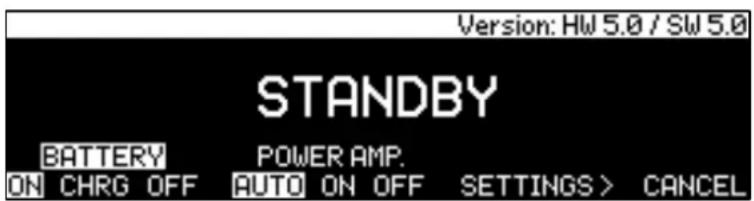
| SETUP Menu | OPTIONS | DEFAULT |
| STANDBY | STANDBY after Enter, or 5 sec. countdown | STANDBY after 5 sec. |
| BATTERY | ON / CHARGE / OFF | ON |
| POWER AMP. ^1) / OUTPUT | AUTO / ON / OFF | AUTO |
| SETTINGS > | Moves to the SETTINGS Menu | None |
| CANCEL | Exit the Setup Menu | None |
STANDBY: After the selection, the Preamp / System switches to the Standby state.
BATTERY: This option lets you change the power supply mode:
• ON: Battery operation
- CHRG: Battery charging
• OFF: AC Mains operation
POWER AMP. / OUTPUT: This option lets you control the Mono Block units and the Line Block outputs:
- AUTO: The Mono Block units and the Line Block outputs will switch off/on after plug/unplug the Phones.
- ON: The Mono Block units and the Line Block outputs will be enforced to On and remain in this state.
- OFF: The Mono Block units and the Line Block outputs will be enforced to Off and remain in this state.
SETTINGS Menu
Move the cursor to the desired position, select and then adjust value/option according the table below.
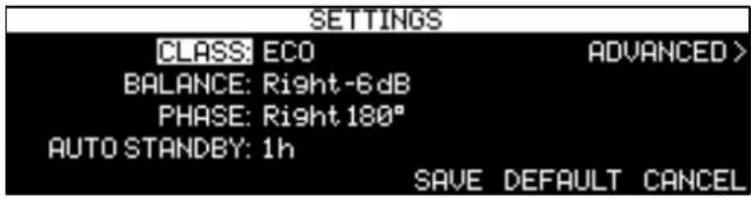
| SETUP Menu | SETTINGS | OPTIONS | DEFAULT |
| STANDBY | CLASS1) | A-ECO / A / ECO | A-ECO |
| BATTERY | BALANCE | Right -20 dB to Left -20dB | L = R |
| POWER AMP... | PHASE | L/R 0° / Left 180° / Right 180° / L/R 180° | L/R 0° |
| SETTINGS > | AUTO STANDBY | OFF / 0.5 h / 1 h / 3 h | OFF |
| CANCEL | ADVANCED > | Moves to the ADVANCED SETTING Menu | None |
CLASS 1): This option lets you control the operation mode of the Mono Block. See Mono Block Owner's Manual for more details.
BALANCE: This setting lets you adjust Left-to-Right channel balance
PHASE: This setting lets you change the phase between the Input and Output audio signal.
AUTO STANDBY: This setting lets you adjust the timer that the preamplifier/system turns off during inactivity. (no audio signal, and no user control input).
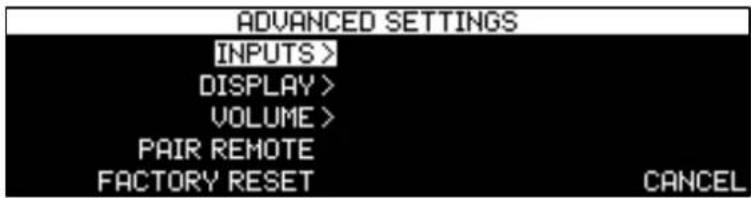
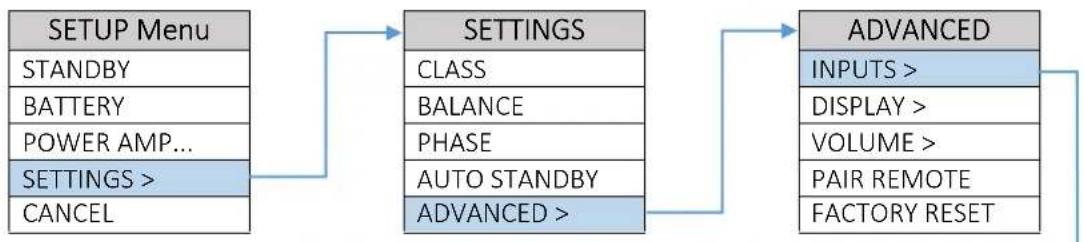
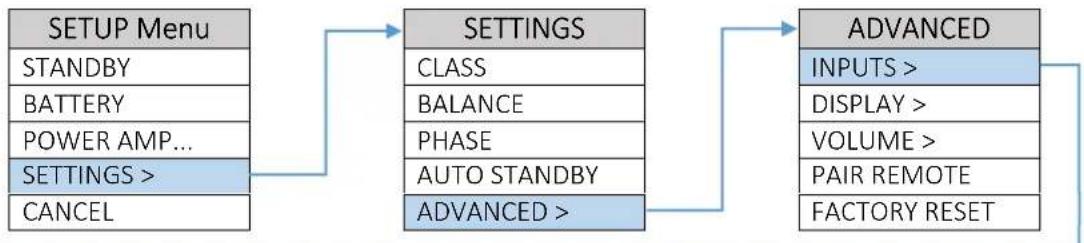
ADVANCED SETTING Menu
Move the cursor to the desired position and select option according the table below.

flowchart
graph LR
    A["SETUP Menu"] --> B["SETTINGS"]
    B --> C["ADVANCED"]
    C --> D["OPTIONS"]
    D --> E["DEFAULT"]

    A --> A1["STANDBY"]
    A --> A2["BATTERY"]
    A --> A3["POWER AMP..."]
    A --> A4["SETTINGS >"]
    A --> A5["CANCEL"]

    B --> B1["CLASS"]
    B --> B2["BALANCE"]
    B --> B3["PHASE"]
    B --> B4["AUTO STANDBY"]
    B --> B5["ADVANCED >"]

    C --> C1["INPUTS >"]
    C --> C2["DISPLAY >"]
    C --> C3["VOLUME >"]
    C --> C4["PAIR REMOTE"]
    C --> C5["FACTORY RESET"]

    D --> D1["Moves to INPUTS Menu"]
    D --> D2["Moves to DISPLAY Menu"]
    D --> D3["Moves to VOLUME Menu"]
    D --> D4["PAIR / UNPAIR REMOTE"]
    D --> D5["Factory Reset menu"]

    E --> E1["None"]
    E --> E2["None"]
    E --> E3["None"]
    E --> E4["None"]
    E --> E5["None"]
PAIR REMOTE: This option lets you Pair / Unpair your Block Remote with the Line Block. After the selection, the instructions for Pair / Unpair will be displayed.
FACTORY RESET: This option lets you return all default values. After the selection, the Factory Reset menu will appear.
INPUT SETUP Menu
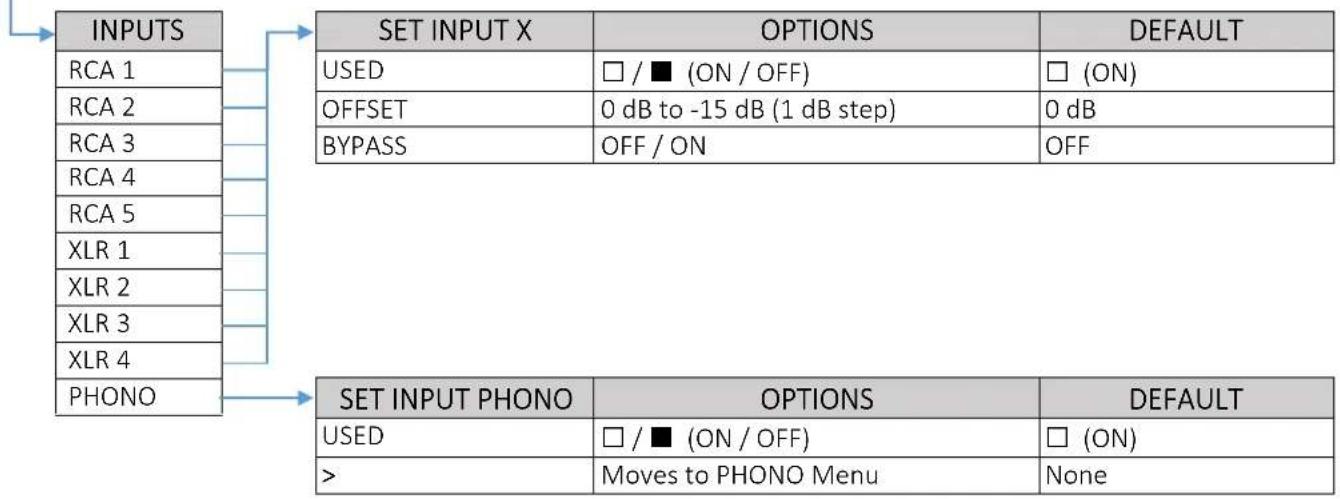
The following settings are available for all Inputs.
Move the cursor to the desired input, select one of the next column, and then choose value/option according to the table below.
![INPUT USED OFFS. BYPASS INPUT USED OFFS. BYPASS RCA 1 ■ -15dB OFF XLR 1 ■ -15dB ON RCA 2 [□] -10dB OFF XLR 2 □ -3dB OFF RCA 3 [□] -3dB ON XLR 3 ■ 0dB OFF RCA 4 □ -15dB OFF XLR 4 □ -15dB OFF RCA 5 □ 0dB OFF PHONO ▶> SAVE CANCEL](/content/2026/06/1147839/images/3007f9dbce086acda859f262538c7e359fe3b04b705294bc530521193045f823.jpg)
flowchart
graph LR
    A["SETUP Menu"] --> B["SETTINGS"]
    B --> C["ADVANCED"]
    A -->|STANDBY| B
    A -->|BATTERY| B
    A -->|POWER AMP...| B
    A -->|SETTINGS >| B
    A -->|CANCEL| B
    B -->|CLASS| C
    B -->|BALANCE| C
    B -->|PHASE| C
    B -->|AUTO STANDBY| C
    B -->|ADVANCED >| C
    C -->|INPUTS >| D
    C -->|DISPLAY >| E
    C -->|VOLUME >| F
    C -->|PAIR REMOTE| G
    C -->|FACTORY RESET| H
flowchart
graph TD
    A["INPUTS"] --> B["RCA 1"]
    A --> C["RCA 2"]
    A --> D["RCA 3"]
    A --> E["RCA 4"]
    A --> F["RCA 5"]
    A --> G["XLR 1"]
    A --> H["XLR 2"]
    A --> I["XLR 3"]
    A --> J["XLR 4"]
    A --> K["PHONO"]
    L["SET INPUT X"] --> M["USED"]
    L --> N["OFFSET"]
    L --> O["BYPASS"]
    L --> P["OPTIONS"]
    L --> Q["DEFAULT"]
    R["SET INPUT PHONO"] --> S["USED"]
    R --> T[">"]
    R --> U["OPTIONS"]
    R --> V["DEFAULT"]
    W["□ / ■ (ON / OFF)"] --> L
    X["□ (ON)"] --> L
    Y["0 dB to -15 dB (1 dB step)"] --> L
    Z["0 dB"] --> L
    AA["OFF / ON"] --> L
    AB["OFF"] --> L
    AC["□ / ■ (ON / OFF)"] --> V
    AD["□ (ON)"] --> V
    AE["Moves to PHONO Menu"] --> V
    AF["None"] --> V
USED: This option removes the selected input from the list of available inputs. The input will be skipped when selecting the active input.
OFFSET: This setting lets you adjust all associated devices in your system to output at a similar volume level.
BYPASS: This mode allows users to optimally integrate the LINE BLOCK with AV systems. In Bypass mode, the input signal by-passes the preamplifier section without any adjustment for volume.
The following settings are available only for the Phono Input.
Move the cursor to the desired input, select the next column, and then choose value/option according to the table below.
![PHONO SYSTEM: MC GAIN OFFSET: -18dB LOAD RESISTANCE: 100Ω INPUT CAPACITANCE: 350pF SUBSONIC FILTER: SENSITIVITY +10dB: [□] L/R TRIM: Right -6dB SAVE DEFAULT CANCEL](/content/2026/06/1147839/images/4b7584a38637a372149d661c7d0c47b598301d6e0c8e9a5fc42e48ed3396bf11.jpg)
flowchart
graph LR
    A["SETUP Menu"] --> B["SETTINGS"]
    B --> C["ADVANCED"]
    A -->|STANDBY| B
    A -->|BATTERY| B
    A -->|POWER AMP...| B
    A -->|SETTINGS >| B
    A -->|CANCEL| B
    B -->|CLASS| C
    B -->|BALANCE| C
    B -->|PHASE| C
    B -->|AUTO STANDBY| C
    B -->|ADVANCED >| C
    C -->|INPUTS >| D
    C -->|DISPLAY >| D
    C -->|VOLUME >| D
    C -->|PAIR REMOTE| D
    C -->|FACTORY RESET| D
| INPUTS | SET PHONO | OPTIONS | DEFAULT |
| RCA 1 | SYSTEM | MC / MM | MC |
| RCA 2 | GAIN OFFSET | 0 dB to -20 dB (1 dB step) | 0 dB |
| RCA 3 | LOAD RESISTANCE | MC: 10 Ω to 1 kΩ, MM: 47 kΩ / 1 kΩ | MC: 100 Ω, MM: 47 kΩ |
| RCA 4 | INPUT CAPACITANCE | 50 pF to 400 pF | MC: 50 pF, MM: 350 pF |
| RCA 5 | SUBSONIC FILTER | ■/□ (OFF/ON) | ■(OFF) |
| XLR 1 | SENSITIVITY +10dB * | ■/□ (OFF/ON) | ■(OFF) |
| XLR 2 | L/R TRIM | 0 dB to -6 dB (1 dB step) | L = R |
| XLR 3 | |||
| XLR 4 | |||
| PHONO |
SYSTEM: This setting lets you choose from two phono cartridge types preset settings. MC (Moving-Coil) and MM (Moving-Magnet) presets include Gain, Load Resistance, Input Capacitance, L/R Trim.
GAIN OFFSET: This setting lets you adjust the phono input to a similar volume as all associated devices in your system.
LOAD RESISTANCE: This setting offers a choice of resistive loading values for the Phono input:
• For MC: 10, 15, 30, 40, 50, 70, 100, 200, 300, 600 and 1000 Ω
• For MM: 1 kΩ, 47 kΩ
INPUT CAPACITANCE: This setting offers a choice of capacitive loading values for the Phono input:
• 50, 100, 150, 200, 250, 300, 350, 400 pF
SUBSONIC FILTER: This setting lets you engage or disengage a 20 Hz high-pass filter for the Phono input, allowing for a reduction of infrasonic interference.
SENSITIVITY +10dB *: This setting offers to increase the input sensitivity for very low-output cartridges.
L/R TRIM: This setting lets you compensate for subtle left-to-right channel imbalances in the phono playback system.
We recommend initially setting the Load Resistance and Input Capacitance parameters to match your phono cartridge manufacturer's recommendations. Feel free to experiment with other values to fine-tune phono performance to your preference.
* Not implemented yet
DISPLAY SETUP Menu
Move the cursor to the desired position, select and then adjust value/option according the table below.
flowchart
graph TD
    A["SETUP Menu"] --> B["STANDBY"]
    A --> C["BATTERY"]
    A --> D["POWER AMP..."]
    A --> E["SETTINGS >"]
    A --> F["CANCEL"]
    B --> G["CLASS"]
    C --> H["BALANCE"]
    D --> I["PHASE"]
    E --> J["AUTO STANDBY"]
    F --> K["ADVANCED >"]
    G --> L["ADVANCED"]
    H --> L
    I --> L
    J --> L
    K --> L
    L --> M["INPUTS >"]
    L --> N["DISPLAY >"]
    L --> O["VOLUME >"]
    L --> P["PAIR REMOTE"]
    L --> Q["FACTORY RESET"]

    R["DISPLAY Menu"] --> S["AUTO / 20 / 40 / 60 / 80 / 100 %"]
    R --> T["TIME-OUT"]
    R --> U["CONTENT"]
    R --> V["CUST. INPUT NAME"]
    R --> W["TEMPERATURE UNITS¹"]

    S --> X["FULL / SMART"]
    T --> Y["FULL: N/A, SMART: None, AUX, CD, SA-CD, ..."]
    U --> Z["°C / °F"]

    S --> AA["DEFAULT"]
    T --> AB["AUTO"]
    U --> AC["OFF"]
    V --> AD["FULL"]
    W --> AE["N/A"]
    X --> AF["°C"]
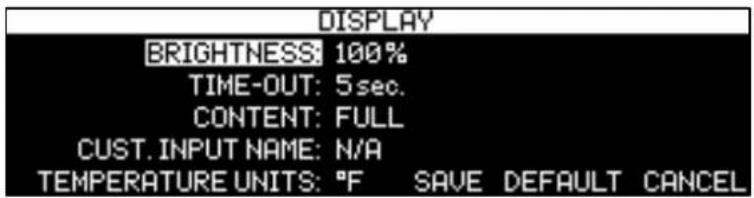
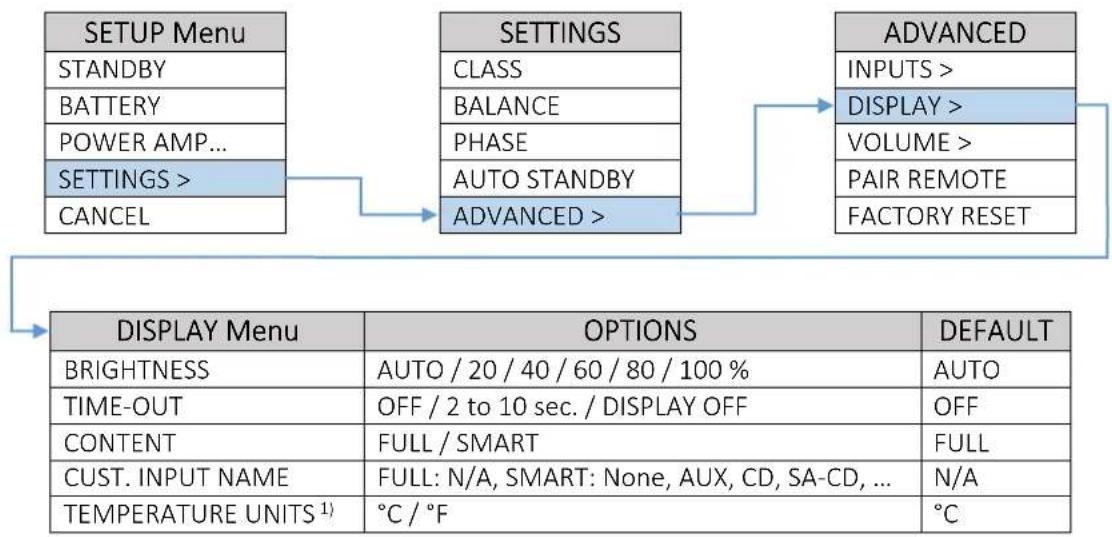
BRIGHTNESS: This setting lets you manually adjust the Display and status LED brightness. While AUTO option chosen, the brightness will be adapted depending to ambient light.
TIME-OUT: This setting lets you choose how long the display remains lit after the last time a control is operated. In OFF mode display remains on, in DISPLAY OFF mode display remains off also during volume control operation.
CONTENT: This setting lets you choose the display mode:
- FULL: In this mode, the complete content of the display will be shown, see chapter DISPLAY for further details.
- SMART: Only the most important information's for usual usage will be shown, see chapter DISPLAY for further details. The Input name can be customized for this display mode.
CUST. INPUT NAME: This option, while Smart content mode is chosen, offers you to rename the inputs by preset labels or even to create your own names.
- Preset labels: AUX, CD, SA-CD, DVD-A, DVD, BLU-RAY, TUNER, TAPE, SAT, DAC, MP3, PC, TV, DAB.
- Own names: Use the Rotary Button on the LINE BLOCK to choose from the list of available characters and press the Rotary Button to confirm each character.
TEMPERATURE UNITS 1): This setting lets you choose desired units for display of the power amplifier temperature.
VOLUME CONTROL SETUP Menu
Move the cursor to the desired position, select and then adjust value/option according the table below.
flowchart
graph TD
    A["SETUP Menu"] --> B["STANDBY"]
    A --> C["BATTERY"]
    A --> D["POWER AMP..."]
    A --> E["SETTINGS >"]
    A --> F["CANCEL"]
    B --> G["SETTINGS"]
    G --> H["CLASS"]
    G --> I["BALANCE"]
    G --> J["PHASE"]
    G --> K["AUTO STANDBY"]
    G --> L["ADVANCED >"]
    L --> M["ADVANCED"]
    M --> N["INPUTS >"]
    M --> O["DISPLAY >"]
    M --> P["VOLUME >"]
    M --> Q["PAIR REMOTE"]
    M --> R["FACTORY RESET"]
    S["VOLUME MENU"] --> T["TURN ON"]
    S --> U["MAXIMUM"]
    S --> V["MUTE"]
    S --> W["PHONES OUTPUT"]
    S --> X["MAXIMUM"]
    S --> Y["VOL. OFFSET"]
    T --> Z["OPTIONS"]
    U --> AA["LAST, 03 to 20"]
    V --> AB["20 to 50"]
    V --> AC["00 to 05"]
    W --> AD["OPTIONS"]
    X --> AE["20 to 50"]
    Y --> AF["-15 dB to +15 dB"]
    Z --> AG["DEFAULT"]
    AA --> AH["50"]
    AB --> AI["00"]
    AD --> AJ["DEFAULT"]
    AE --> AK["50"]
    AF --> AL["0 dB"]
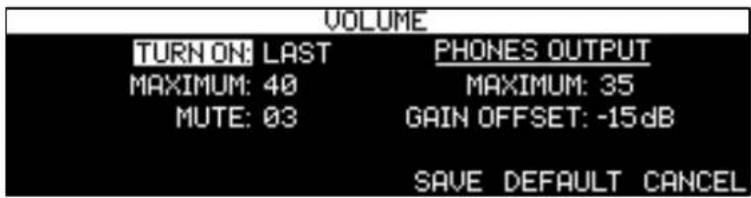
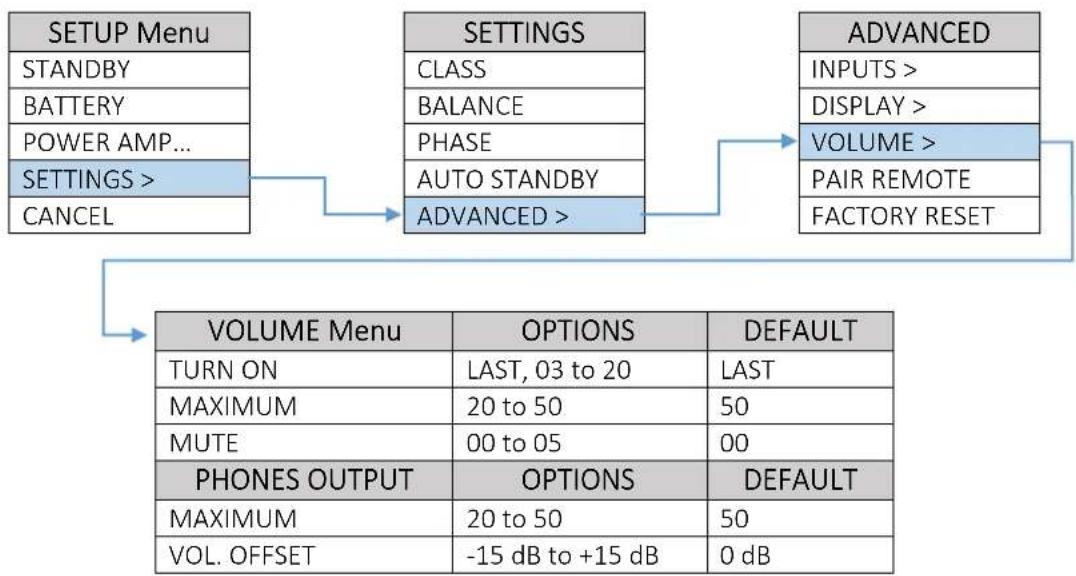
TURN ON: This setting lets you set a line output volume level to which your Line Block will default every time you turn it on. While LAST option chosen, the volume level setting from the previous time the unit was powered down is retained.
CAUTION: Setting the TURN ON parameter to LAST can result in louder-than-expected power-up volume if the Line Block was set to a high volume level setting when last powered down.
MAXIMUM: This setting lets you set a maximum line output volume level.
MUTE: This option lets you set the line output volume level that occurs when the PLAY/PAUSE button on the Block Remote is engaged.
PHONES OUTPUT
MAXIMUM: This setting lets you set a maximum phones output volume level.
VOL. OFFSET: This option allows you to match the volume of your headphones with the speaker volume in the system.
SURFACE CLEANING
The cabinet outside is coated with a special paint that is resistant to spotting. However, from time to time you may wish to clean the surface of your Block Audio equipment to remove dust, or any material build up from the atmosphere or from common use. Therefore, we recommend only gently clean the dust off, eventually wiping the water moistening microfiber cleaning cloth while observing the following guidelines:
• As a safety precaution, always unplug the unit from the wall outlet before cleaning
• Always use a cloth that is soft and clean
- Never use abrasives or polishing compounds anywhere on the unit
- Never apply liquid directly to the surface of the unit
• Use the cloth dry or with mild surface cleaners of either liquid or foaming type
- Apply only small amounts of cleaner to the cloth
- DO NOT rub the surface but wipe clean only. Excessive rubbing may wear the coating or screen printed text.
TROUBLESHOOTING
| PROBLEM | POSSIBLE CAUSE | ACTION |
| Preamplifier does not start up and front status LED is flashing red. | One of the mains cable is not properly connected but AC mains supply is required due to battery charging or AC Mains operation. | Check AC mains cables connection. |
| Preamplifier does not start, the front status LED is flashing red and DC Voltage Detection warning is displayed. | The source device output signal contents too high DC voltage part. Defective source device. | Check/change the signal source device. |
| Hum (50/100 Hz) comes from the speakers. | Ground loop between the individual components. | See capture GND LIFT switch. |
| No reaction on the On/Off button. | AC Mains cable is not properly connected. | Check AC mains cable connection. |
| Home circuit breaker is tripped. | Check home circuit breaker. | |
| Wrong or missing Mains voltage. | Have line voltage checked. | |
| A Mains/Line fuse placed inside of the Power Block can be blown. | Contact your Block Audio dealer. Fuse failure may indicate a severe problem. | |
| Front status LED lights white or orange, but no sound on speakers and headphones. | No signal out to preamplifier. | Check audio signal source and connections to the Line Block. |
| Wrong input selected. | Check input connection/selection on the Line Block. | |
| Front status LED lights white or orange, but no sound on speakers. | Headphones, or stereo jack adapter is connected. | Unplug the headphones, or adapter, or change POWER AMP. / OUTPUT mode in the Setup Menu Base-Level to ON. |
| The POWER AMP. / OUTPUT mode is OFF in the Setup Menu Base-Level. | Change POWER AMP. / OUTPUT mode in the Setup Menu Base-Level to AUTO or ON. |
SPECIFICATIONS
| Distortion: | THD+N <0.0005 %, IMD <0.0007 % (at 6 Vrms out) |
| Frequency Response: | DC - 300 kHz -0.5 dB, DC - 20 kHz -0.01 dB |
| Signal/Noise Ratio: | >130 dB A-weighted, >128 dB unweighted (related to full output) |
| Channel Separation: | Infinite (>130 dB) |
| Max. Voltage Gain: | +12 dB balanced, +18 dB unbalanced |
| Input Impedance: | 40 kΩ balanced, 20 kΩ unbalanced |
| Output Impedance: | 50 Ω balanced, 25 Ω unbalanced |
| Maximum Output Voltage: | 20 Vrms balanced, 10 Vrms unbalanced |
| Inputs: | 4 balanced (XLR) pairs, 5 unbalanced (RCA) pairs |
| Phono Input: | 1 unbalanced (RCA) pair |
| Outputs: | 2 balanced (XLR) pairs, 2 unbalanced (RCA) pairs |
| Phones Output: | 3 pole XLR receptacle and 6.35 mm / ¼" stereo jack |
| Battery Operation Time: | >15 hours |
| System Remote Control: | Yes*, Neutrik RJ45 |
| Power Consumption: | 150 W max. at charging, 50 W at idle, <0.5 W in Standby |
| Mains Voltage: | 230 / 115 V AC ±10 %, 50 / 60 Hz (factory pre-configured) |
| Dimensions - LINE: | 460(w) × 105(h) × 360(d) mm, 18.1(w) × 4.1(h) × 14.2(d) inch |
| Dimensions - POWER: | 460(w) × 105(h) × 360(d) mm, 18.1(w) × 4.1(h) × 14.2(d) inch |
| Weight in total: | 28 kg / 62 lbs., ~40 kg / 88 lbs. shipping |
* works only in combination with appropriate BLOCK AUDIO Power Amplifier
NOTES