100908 - Memory card reader MANHATTAN - Free user manual and instructions
Find the device manual for free 100908 MANHATTAN in PDF.


| Product Type | Memory Card Reader |
| Brand | Manhattan |
| Model | 100908 |
| Interface | USB 2.0 |
| Compatible Memory Cards | SD, SDHC, SDXC, microSD, microSDHC, microSDXC, MMC, RS-MMC |
| Supported Operating Systems | Windows, macOS, Linux |
| Power Supply | Bus-powered via USB |
| Dimensions (approx.) | 65 x 25 x 10 mm |
| Weight (approx.) | 30 g |
| Material | Plastic casing |
| Color | Black |
| Data Transfer Speed | Up to 480 Mbps (USB 2.0) |
| LED Indicator | Yes (power/activity) |
| Hot Swappable | Yes |
| Plug and Play | Yes |
| Maintenance | Wipe with a soft, dry cloth. Do not use liquids. |
| Safety | Keep away from water and extreme temperatures. Do not disassemble. |
| Spare Parts | Not available; device is not serviceable. |
| Repairability | Non-repairable; replace if defective. |
Frequently Asked Questions - 100908 MANHATTAN
User questions about 100908 MANHATTAN
0 question about this device. Answer the ones you know or ask your own.
Ask a new question about this device
Download the instructions for your Memory card reader in PDF format for free! Find your manual 100908 - MANHATTAN and take your electronic device back in hand. On this page are published all the documents necessary for the use of your device. 100908 by MANHATTAN.
USER MANUAL 100908 MANHATTAN
MULTI-CARD READER WITH BUILT-IN DATA PANEL QUICK INSTALL GUIDE
MODEL 100908
Thank you for your purchase of the MANHATTAN® Multi-Card Reader with Built-In Data Panel, Model 100908.
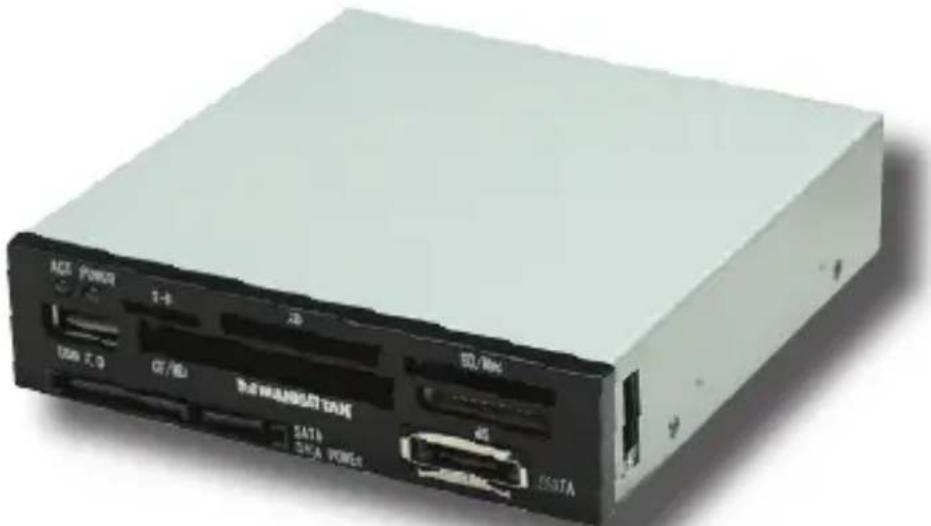
For use with many of today's popular flash memory card formats, this handy device lets you copy, back up, restore or recover data without opening your PC case or installing additional drives! Just connect SATA, eSATA and Hi-Speed USB 2.0 storage devices/peripherals through the front-mount ports. (See the back of this sheet for basic installation, specifications and a compatibility list.)
natural_image
White electronic device with ports and labels (no readable text or symbols beyond branding)- Slot-to-slot read/write/copy and USB mass-storage capabilities
- Front-mount SATA, eSATA and Hi-Speed USB 2.0 ports
- Compatible with Memory Stick, SecureDigital, MultiMedia, XD and CompactFlash
• Supports automatic card detection and data transfer speeds up to 480 Mbps
• Fits in 3.5" drive bay
- Windows and Mac compatible; hot swappable, Plug and Play
- Lifetime Warranty

text_image
MANHATTANBRINGING COMPUTERS TO LIFE
MANHATTAN ^® offers a complete line of PC Components, Peripherals, Cables and Accessories. Ask your local computer dealer for more information or visit us online at
www.manhattan-products.com
Copyright © MANHATTAN
All products mentioned are trademarks or registered trademarks of their respective owners.
BASIC INSTALLATION
- Insert the Multi-Card Reader into an available 3.5" bay and secure it in place with the included screws.
- Connect the two SATA cables to the controller card; the USB 9-pin to the motherboard; and the 4-pin pass-through.
Wire Connector Label
Red, orange POWER, VCC, SVCC, +5V
White, yellow P-, DATA-, SBD-
Green, gray P+, DATA+, SBD+
NOTE: At right are examples of
how different computer manufacturers may label connectors corresponding to specific cable wires, plus a typical dual-head USB connection found on the motherboard.
(Normally, the connectors are labeled on the board; if not, contact the manufacturer.)
- No driver installation is required. Four flash memory card icons (Removable Disks) will display in the My Computer files.
Black, blue, brown GROUND, GRND, GND

text_image
7 19 3 5 2 4 6 8SPECIFICATIONS
Standards & Certifications
- USB 2.0; USB 1.1; SATA; CE; FCC
General
- Internal connections: 2 SATA L-typ data (male), USB 9-pin (motherboard) 4-pin Molex pass-through
- External connections: eSATA, SAT data, SATA power and Hi-Speed USB 2.0 port
- Throughput: Hi-Speed USB 2.0, up to 480 Mbps; SATA, up to 3.0 Gbps - LED power and activity indicators - Windows 2000/XP/Vista compatible
dPhysical
• Fits in 3.5-inch drive bay
A 102 x 105 x 25 mm (4 x 4.13 x 1 in.)
• Weight: 267 g (9.4 oz.)
SUPPORTED MEMORY CARD FORMATS
C-Flash, CompactFlash Type I/II, Ultra II CF, MagicGate, MagicGate PRO, MagicGate PRO Duo, Memory Stick, Memory Stick Duo, Memory Stick PRO, Memory Stick PRO Duo, Memory Stick Select, Memory, Stick Extreme PRO, Memory Stick Extreme III PRO, Memory Stick Ultra II PRO Duo, Microdrive, DV-RS MMC, MMC / MMC II, MMC 4.0, MMCmicro, MMCmobile, MMCplus, RS-MMC, Ultra MMC, SecureDigital (SD), Elite Pro SD, Extreme SD, Kingma SD, microSD / TransFlash, miniSD*, SecureDigital Ultimate, Ultra II SD and X
* Requires an adapter (not included)