
100946 - Memory card reader MANHATTAN - Free user manual and instructions
Find the device manual for free 100946 MANHATTAN in PDF.


| Product Type | Memory Card Reader/Writer |
| Brand | MANHATTAN |
| Model | 100946 |
| Color | Blue |
| Interface | Hi-Speed USB 2.0 |
| Compatible Operating Systems | Windows Server 2003/XP/Vista/7; Mac OS 10.4.5 or higher |
| Supported Memory Cards | Multi-card support including XD, SD, MMC, MS |
| Power Source | USB bus-powered (5V DC) |
| LED Indicators | Power LED (green when connected, red when ready) |
| Dimensions (Approx.) | 90 x 50 x 15 mm |
| Weight (Approx.) | 50 g |
| Operating Temperature | 0°C to 40°C |
| Storage Temperature | -10°C to 60°C |
| Certifications | FCC Part 15 Class B, CE |
| Warranty | Refer to www.manhattan-products.com/warranty |
| Included Accessories | USB cable |
| Installation | Plug and play, no driver needed for supported OS |
| Maintenance | Clean with a dry cloth; avoid moisture and extreme temperatures |
| Safety Precautions | Follow instructions; do not insert incorrect card types; avoid bending cards |
Frequently Asked Questions - 100946 MANHATTAN
User questions about 100946 MANHATTAN
0 question about this device. Answer the ones you know or ask your own.
Ask a new question about this device
Download the instructions for your Memory card reader in PDF format for free! Find your manual 100946 - MANHATTAN and take your electronic device back in hand. On this page are published all the documents necessary for the use of your device. 100946 by MANHATTAN.
USER MANUAL 100946 MANHATTAN
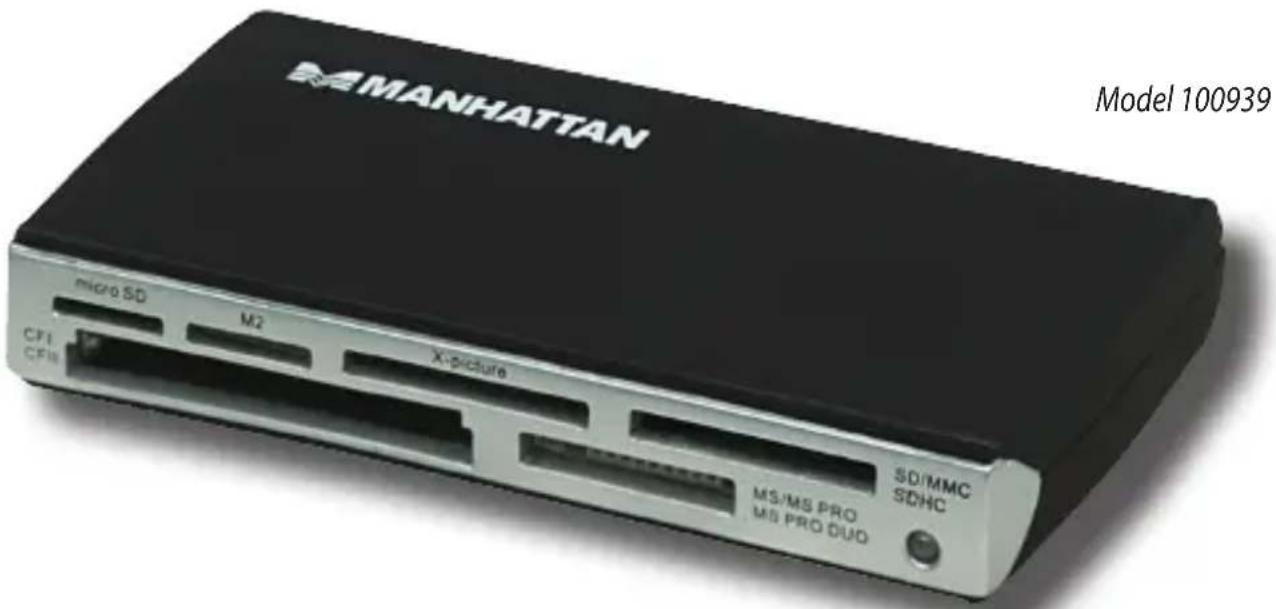
MULTI-CARD READER/WRITER USER MANUAL
MODELS 100939 & 100946
English
PORTUgUÊs
EsPañOl

MAN-100939/100946-UM-ML3-0610-01
Hi-Speed USB 2.0 to SATA/IDE Adapter • User Manual English
Thank you for purchasing the MANHATTAN® Multi-Card Reader/Writer, Model 100939 (black) or Model 100946 (blue). To view a datasheet with a full list of features and specifications, go to www.manhattan-products.com.
Operation
- Use the included USB cable to connect the Multi-Card Reader/Writer to a USB port on your computer. The operating system will automatically detect the device and install the necessary driver(s).
- Confirm that the Power LED lights green to indicate a proper connection.
- Insert a memory card into the corresponding slot.
- Confirm that the Power LED changes to red to indicate that the device is ready for operation.

Power LED
Memory Card Formatting (if needed)
XD users may need to format the memory card prior to use (indicated by a "write protection" or "read/write error" message. If this is the case, simply follow these steps to use the Flash Ranger tool to format the memory card.
-
On your computer desktop (with the memory card still inserted in the reader/writer), go to Start / Programs / Multimedia Card Reader / Flash Ranger.
-
Select the XD icon, then click "Low Level Format."
-
When prompted with "Low level format is completed. Please remove the card," click "OK" and remove the memory card.
-
Re-insert the memory card and continue with the Operation steps above.
System Requirements
• Windows Server 2003/XP/Vista/7; or Mac OS 10.4.5 or higher
- USB port
ENGLIsH — For warranty information, go to www.manhattan-products.com/warranty.
www.manhattan-products.com/warranty.
www.manhattan-products.com/warranty.
This equipment has been tested and found to comply with the limits for a Class B digital device, pursuant to Part 15 of Federal Communications Commission (FCC) Rules. These limits are designed to provide reasonable protection against harmful interference in a residential installation. This equipment generates, uses and can radiate radio frequency energy, and if not installed and used in accordance with the instructions may cause harmful interference to radio communications. However, there is no guarantee that interference will not occur in a particular installation. If this equipment does cause harmful interference to radio or television reception, which can be determined by turning the equipment off and on, the user is encouraged to try to correct the interference by one or more of the following measures:
• Reorient or relocate the receiving antenna.
- Increase the separation between the equipment and the receiver.
- Connect the equipment to an outlet on a circuit different from the receiver.
- Consult the dealer or an experienced radio/TV technician for help.
CE FC
MANHATTAN® offers a complete line of PC Components, Peripherals, Cables and Accessories. Ask your local computer dealer for more information or visit www.manhattan-products.com.
All products mentioned are trademarks or registered trademarks of their respective owners.

Brand : MANHATTAN
Model : 100946
Category : Memory card reader