RM/419 - Water dispenser Ramtons - Free user manual and instructions
Find the device manual for free RM/419 Ramtons in PDF.


| Product Type | Water Dispenser |
| Brand | Ramtons |
| Model | RM/419 |
| Hot Water Temperature Range | 35°C - 95°C |
| Cold Water Temperature Range (Compressor Models) | 5°C - 15°C |
| Cold Water Temperature Range (Electronic Models) | 12°C - 16°C |
| Refrigerator Cabinet | Yes (select models) |
| Sterilize Cabinet | Yes, with ozone timer (5-10 min fresh, 15 min sterilize) |
| Operation Modes | Hot and Cold, Warm and Cold, Hot and Warm (depending on model) |
| Heating System | Electric heating element |
| Cooling System | Compressor or electronic (depending on model) |
| Indicator Lights | Power (green), Heating (red), Cooling (green), Warming (green) |
| Water Dispensing Faucets | Hot (red), Cold (blue), Warm (blue) |
| Water Drainage | Hot water drain cock, cold water drain cock |
| Ventilation Clearance | 10-20 cm behind the unit |
| Operating Temperature Range | 0°C - 35°C |
| Operating Atmospheric Pressure | 86 - 106 kPa |
| Safety Precautions | Do not operate heating without water; keep away from children; tilt angle <45° during transport |
| Cleaning Instructions | Use water-soaked soft cloth; do not spray water directly; descale hot tank with 2% citric acid solution |
| Maintenance | Drain water if not used for long; clean condenser dust with soft cloth |
| Repairability | Contact dealer or service center for repairs; special cord obtainable from service center |
Frequently Asked Questions - RM/419 Ramtons
User questions about RM/419 Ramtons
0 question about this device. Answer the ones you know or ask your own.
Ask a new question about this device
Download the instructions for your Water dispenser in PDF format for free! Find your manual RM/419 - Ramtons and take your electronic device back in hand. On this page are published all the documents necessary for the use of your device. RM/419 by Ramtons.
USER MANUAL RM/419 Ramtons
Model 26,50,56
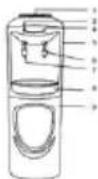
Model 52
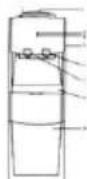
Model 70
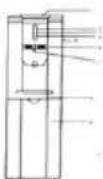
Model 50
Troubleshooting guide
| problem | Possible cause |
| Water dispenser does not operate | Not plugged inThe circuit breaker tripped or blown fuse. |
| Water cooler is not cold enough | Check to be sure the cold switch on the back is on.The water dispenser does not have the correct clearance. |
| Water dispenser hot water is not hot enough | Check to be sure the hot switch on the back is on. |
| Compressor turns on and off frequently | The room temperature is hotter than normal.The water dispenser does not have the correct clearance. |
| vibration | Check to assure that the water dispenser is level. |
| The water dispenser seems to make too much noise. | The ratting noise may come from the flow of the refrigerant ,which is normal.As each cycles ends, you may hear gurgling.Sound caused by the flow of refrigerant in your water dispenser.Contraction and expansion of the inside walls may cause popping and cracking noises.The water dispenser is not level. |
| The refrigerator perform improperly | There is direct sunlight and sources of heat (stove , heater ,radiator etc) around it.There is too much food in refrigeratorThe door does not close well.Door open frequently. |
Maintenance and trouble shooting
- Remove power plug or disconnect from the mains before performing any maintenance or servicing the product.
- Never use detergent or chemicals harmful to health to clean the water tanks.
- Do not directly spray water on the surface of the product.
Wipe the front and back of the product with water-soaked soft cloth. - If dust of other foreign substance has accumulated on the condenser ,wipe off with water-soaked soft cloth.
- After cleaning the product, completely dry it. Fill the water to the tanks until waters comes out of the hot water tap, then connect the electric power plug. If the surface of the electric heater in the hot water tank is deposited by water deposition, heating capacity will decrease. Fill hot water tank with aqueous solution of 2% aitric acid and keep for about two hours then cleaning if the problems can not be solved, contact your dealer or the Service Center of our company.
- If the supply cord on this device is damaged. It must be replaced with a special cord which is obtainable at Service Center of our company.
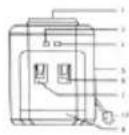
Model 18,60,62
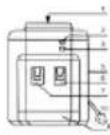
Model 12,15,16,23
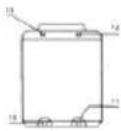
No. NAME
I. WATER GUARD
2 HEATING INDICATOR
COOLING INDICATOR
3. POWER INDICATOR
4. COOLING INDICATOR
WARMING INDICATOR
5. BODY
- COLD WATER FAUCET(BLUE)
WARM WATER FAUCET(BLUE)
- HOT WATER FAUCET(RED)
WARM WATER FAUCET
-
WATER HOLDER
-
DOOR
-
POWER CORD
-
HOT WATER DRAIN COCK
-
REFRIGERATE SWITCH
-
COOLING SWITCH (GREEN)
-
HEATING SWITCH (RED)
IS. REFRIGERATE THERMOSTAT
16 COOLING THERMOSTAT
-
CONDENSER
-
COLD WATER DRAIN COCK
-
STERILIZE TIMER
Operation:
- Ambient temperature
• Temperature 0-35℃
• Atmosphere 86-106kpa
• Desktop: Position the water on a desk or a teapoy
Upright: Position the water dispenser on the horizontal, structurally sound ground. Leave an adequate open space (10cm-20cm) behind the water dispenser for good ventilation. - When using the bottles holding ultra-pure water, distilled water or space water with the so-called clever lid, tear off the hygienic label on the lid. Place the bottles at the intake, then the core of water guard will automatically open the valve and seal it in the meantime, when moving the bottles, the valve will also seal automatically to avoid any possible oozing.
-
Push the hot water valve ,bubbles"are generated inside the bottle, indicating that water is flowing into hot water and cold water tanks, keep pressing the hot water valve until water flows out ,dispensing cold water required need no particular adjustment.
-
Caution: Do not connect the electrical power plug, until water comes out of the hot water tap.
- After water is flowing out from the hot tap, power can be on, the yellow LED indicator on the front light on (Model 26, Model 30)
- Turn the heating switch on, the red LED indicator on the front lights on and the heating system starts working. When the hot water comes up(35-95°C) or so, the red light goes off, the heating system stops working is on a warm-keeping status. When the hot water temperature is lower than 85°C, the heating system will resume working again automatically.
- Turn on the cooling switch, the green LED indicator on the front lights on and the cooling system starts working when the cold water falls down to 5·15°C (for compressor-cooling) or 12·16°C (for electronic-cooling), the green light goes off, the cooling system stops working and is on a cold keeping status. When the cold water temperature goes up to a set degree, the cooling system will resume working again automatically.
- Since the temperature has already been adjusted before leaving the factory, it is unnecessary for customers to set the temperature.
- Turn the heating, cold water and fridge switch on. Then the heating and refrigerating processes start working, the heating indicator is red showing it is heating. When the hot water temperature reaches the set limit, the heating process starts working automatically. When the refrigerating is lit green, the cold water and fridge system starts working. The refrigerating indicator goes out as the temperature of the cold water and fridge get the set lower limit. The refrigerating process stop working, when either the cold water temperature or fridge temperature get the set upper limit. The refrigerating indicator is lit and the process of cold water and fridge starts working again. Turn on either the cold water switch or fridge switch, the process can work separately.
- Warm and hot water dispenser: The red indicator lights on and the green light goes off, the heating system starts working; The red light goes off and the green indicator lights on, the heating system stops working is on a warm-keeping status.
- Warm and cold water dispenser: The green indicator lights on, the cooling system starts working; The green light goes off, the cooling system ends working.
- Cold and hot water dispenser: The red indicator lights on, the heating system works. The red light goes off, it is on a warm-keeping status; The green indicator light on, the cooling system works; The green light goes off, it is on a cold-keeping status.
- Cold and hot water dispenser (double color indicator): The heating system starts
working, the indicator is red; When the heating system stops working is on a warm-keeping status, the red indicator change into green. When the cooling system starts working, the indicator is green, when the cooling system stops working is on a cold-keeping system, the green indicator change into yellow.
• How to operate sterilize cabinet
Please turn around the switch: sterilize timer. Set at the 5-10min for keeping fresh, or set at 15 min for sterilizing, when the working is ended, the switch will come back to off location. Please still let the door closed for about one hour when there is no smell of ozone. It need for about one hour for the decomposition of ozone
• How to operate refrigerator cabinet
When first using refrigerator cabinet. Don't put store in until it run the device about two hours. Hot food should be cooled to room temperature before he put in the cabinet. Proper space should be left for cool air to circulate.
- If the device is not applied for a long time, after the hot water cools down, please remove the power plug and revolve the drain cap to drain the rest water in the hot tank then tighten the cap open the cold water tap to drain the rest water in the cold tank.
- If there is no water flowing from cooling tap, please shut down the cooling switch until there is water flowing out.
Caution:
- The back of the device should be kept away from wall and high-temperature elements, TV or vedip valuables and be put in shady places.
- Do not switch on until water comes out of the hot water valve to prevent any damage on the heating tube.
- During operation keeping it beyond the children to avoid scald.
- Never turn on the heating switch when there is no water.
- When carrying it, the angle of inclination should be less than 45°
- Choose the proper electrical wire and plug, keep the plug from being too hot. Meanwhile, adopt the ground wire to avoid any electric shock. Please shut down the power before leaving or during night.
Brand : Ramtons
Model : RM/419
Category : Water dispenser