NG1S3633 - Uncategorized Chief - Free user manual and instructions
Find the device manual for free NG1S3633 Chief in PDF.


| Product Type | Wall Mount for Flat Panel Displays |
| Brand | Chief |
| Model | NG1S3633 |
| Mounting Pattern (VESA) | 100x100 mm to 600x400 mm |
| Screen Size Compatibility | 32" to 65" |
| Maximum Load Capacity | 125 lbs (56.7 kg) |
| Movement Type | Fixed (low profile) |
| Material | Steel, Alloy, Plastic |
| Finish | Black powder coat |
| Wall Plate Dimensions (W x H) | 29.1" x 10.2" (740 x 260 mm) |
| Depth from Wall | 1.6" (40 mm) |
| Weight | 9.5 lbs (4.3 kg) |
| Hardware Included | Mounting screws, spacers, level, template |
| Safety Features | Ruggedized construction, security screws included |
| Installation Type | Single stud or dual stud, on 16" or 24" centers |
| Cleanability | Wipe with a damp, non-abrasive cloth |
| Warranty | 10 years |
| Country of Origin | USA |
| Compliance | UL Listed, TUV Certified |
Frequently Asked Questions - NG1S3633 Chief
User questions about NG1S3633 Chief
0 question about this device. Answer the ones you know or ask your own.
Ask a new question about this device
Download the instructions for your Uncategorized in PDF format for free! Find your manual NG1S3633 - Chief and take your electronic device back in hand. On this page are published all the documents necessary for the use of your device. NG1S3633 by Chief.
USER MANUAL NG1S3633 Chief
INSTALLATION INSTRUCTIONS
NG1S28/36/44 Side Panels
The NG1S side panels are designed for use with Chief® G1 Series racks. See the specific installation instructions provided with the rack for additional installation information.
PARTS INCLUDED
![A (2) [Side panel]](/content/2026/06/1146839/images/f592f5483edac576344abe03dfffcdf2a86542a0db294b384b47909a15623ed1.jpg)

WARNING: FAILURE TO READ, THOROUGHLY UNDERSTAND, AND FOLLOW ALL INSTRUCTIONS CAN RESULT IN SERIOUS PERSONAL INJURY, DAMAGE TO EQUIPMENT, OR VOIDING OF FACTORY WARRANTY! It is the installer's responsibility to make sure all components are properly assembled and installed using the instructions provided.
NG1S Side Panels Installation
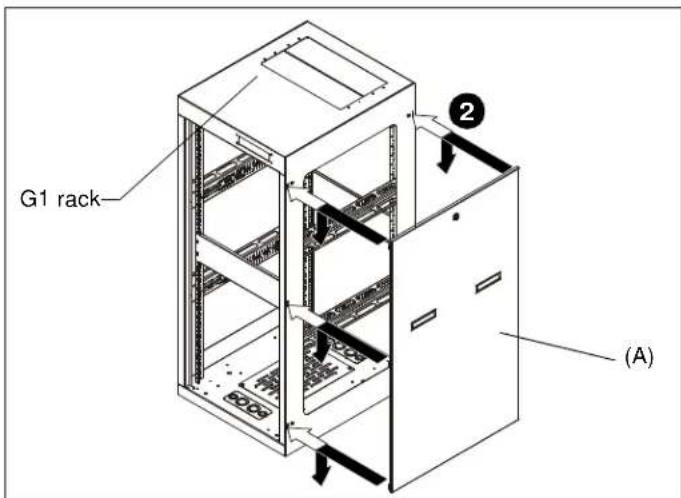
Figure 1
- Align side tabs in side panel (A) with slots in G1 rack side. (See Figure 1)
NOTE: The number of tabs and slots will vary dependent on G1 rack being used. - Place side panel tabs into rack slots and lower side panel into place. (See Figure 1)
- OPTIONAL: Turn key in lock to lock panel into place. (See Figure 2)
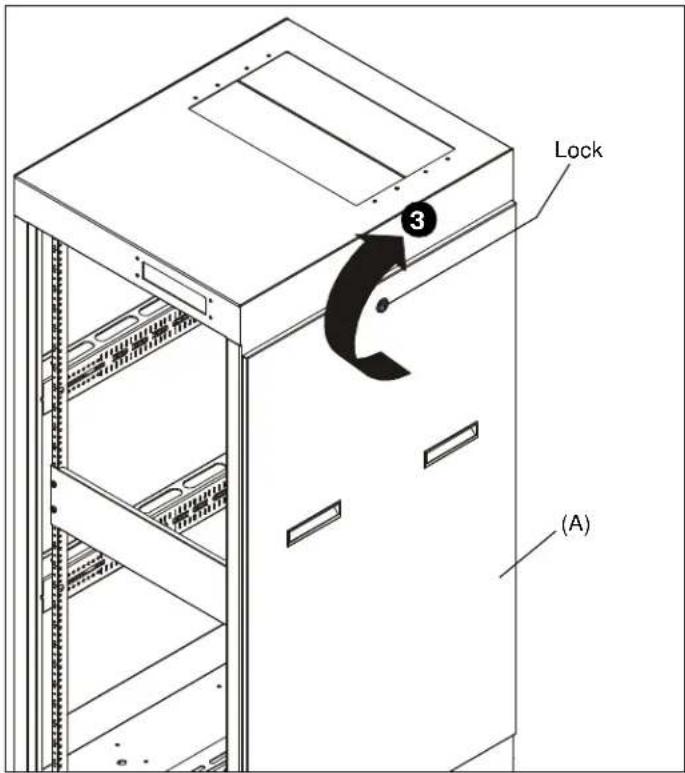
Figure 2
- Attach additional side panels as required.
®Chief is a registered trademark of Milestone AV Technologies. All rights reserved.
Milestone AV Technologies, and its affiliated corporations and subsidiaries (collectively, "Milestone"), intend to make this manual accurate and complete. However, Milestone makes no claim that the information contained herein covers all details, conditions or variations, nor does it provide for every possible contingency in connection with the installation or use of this product. The information contained in this document is subject to change without notice or obligation of any kind. Milestone makes no representation of warranty, expressed or implied, regarding the information contained herein. Milestone assumes no responsibility for accuracy, completeness or sufficiency of the information contained in this document.
Brand : Chief
Model : NG1S3633
Category : Uncategorized