Yarra M - Rowing Machine Flow Fitness - Free user manual and instructions
Find the device manual for free Yarra M Flow Fitness in PDF.


| Product Type | Rowing Machine |
| Brand | Flow Fitness |
| Model | Yarra M |
| Resistance Type | Magnetic |
| Max User Weight | 120 kg |
| Product Dimensions (L x W x H) | 200 x 50 x 50 cm |
| Foldable | Yes |
| Display | LCD (Time, Distance, Calories, Strokes) |
| Power Supply | Batteries (2x AAA) |
| Number of Resistance Levels | 8 |
| Pedals | Adjustable Foot Straps |
| Seat | Sliding Seat with Ergonomic Design |
| Handlebar | Multi-Grip |
| Transport Wheels | Yes |
| App Connectivity | No |
| Main Frame | Steel |
| Weight | 30 kg |
| Assembly Required | Yes (Tools Included) |
| Maintenance | Wipe Clean, Check Bolts Regularly |
| Safety | Emergency Stop Magnet |
| Warranty | 2 Years on Parts |
Frequently Asked Questions - Yarra M Flow Fitness
User questions about Yarra M Flow Fitness
0 question about this device. Answer the ones you know or ask your own.
Ask a new question about this device
Download the instructions for your Rowing Machine in PDF format for free! Find your manual Yarra M - Flow Fitness and take your electronic device back in hand. On this page are published all the documents necessary for the use of your device. Yarra M by Flow Fitness.
USER MANUAL Yarra M Flow Fitness
natural_image
Black stationary rower machine with digital display and control panel (no visible text or symbols)Manual (English) 30 - 60
Copyright © Flow Fitness
All rights reserved. Nothing in this instruction manual may be used or reproduced in any form or way without the express written permission of Flow Fitness.
natural_image
Silhouettes of a person performing various postures in various poses (e.g., stretching, squatting, stretching posture)Head Roll
Stap 3
Stap 4
Stap 5
5.1 Training schema's
Cooling down 5 minutes.
Trainingsschema week 3 en 4
Cooling down 5 minutes.
Trainingsschema week 5 en 6
Cooling down 5 minutes.
Warming up 5 - 10 minutes.
Train 7 minuten.
Rust 1 minuut.
Train 5 minuten.
1 minuut rustig bewegen.
Cooling down 5 minutes.
Trainingsschema week 9 en verder
Cooling down 5 minutes.
Cooling down 5 minutes.
Trainingsschema week 9 en verder
Warming up 5 - 10 minutes.
Train 10 minuten.
Rust 1 minuut.
Train 10 minuten.
Cooling down 5 minutes.
https://www.flowfitness.com/nl/registreer-uw-product/
natural_image
Black stationary exercise machine with mounted levers and control panel (no visible text or symbols)1. Important information 32
1.1 Health 32
1.2 Safety 32
2. Introduction 34
2.1 Important parts 35
2.2 Specifications 35
3. Fitness 36
3.1 Training by heart rate 36
3.2 Warming up and cooling down 38
4. Use 39
4.1 Assembly 39
4.2 Use of the computer 44
4.3 Storage 48
4.4 Maintenance 49
5. General information 50
5.1 Training schedule 50
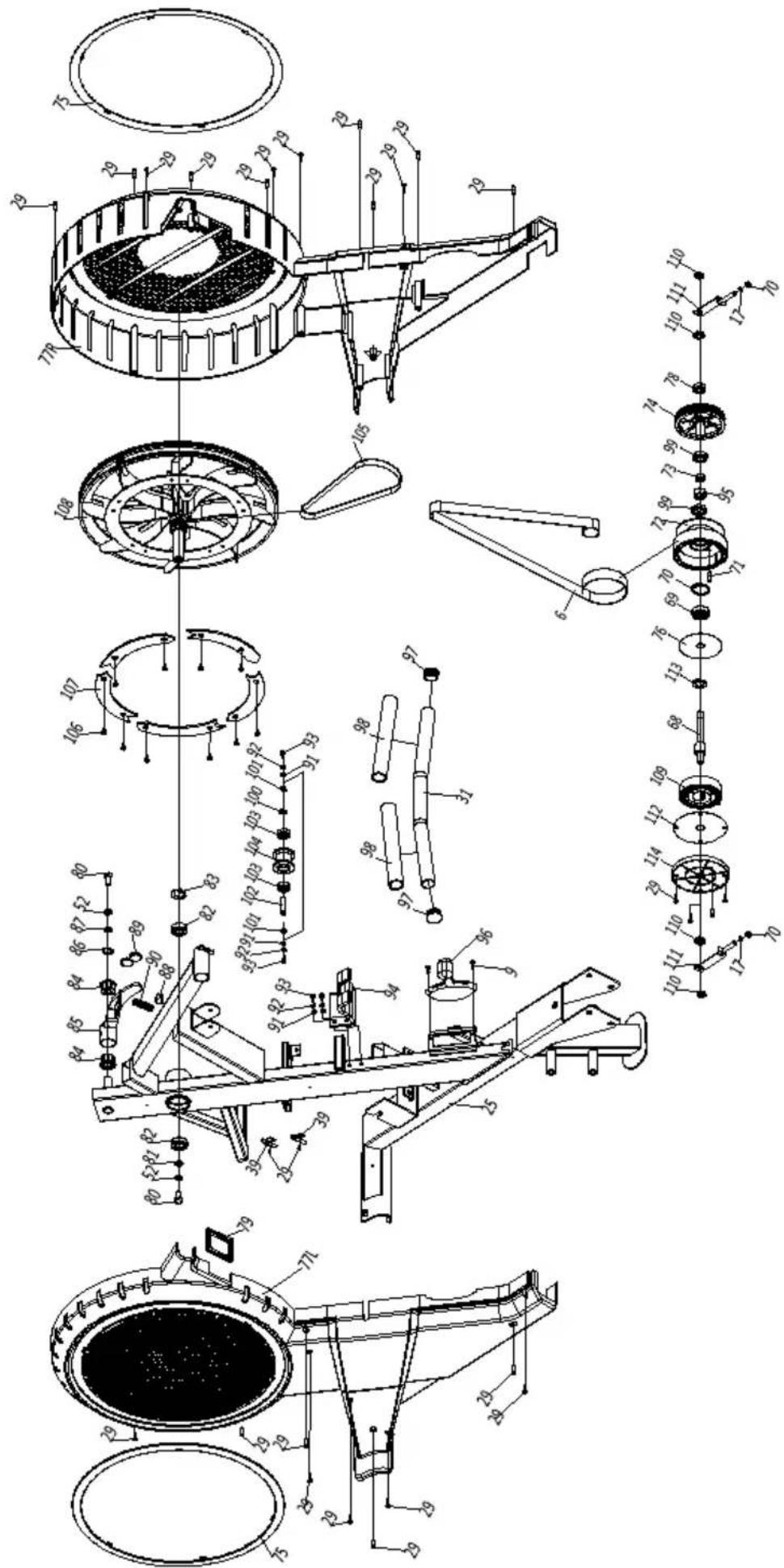
5.2 Exploded view 52
5.3 Troubleshooting 55
6. Warranty 56
5.4 Warranty 56
1.1 Health
Important: read this instruction manual first and follow the instructions carefully before using the product.
- Consult an expert to determine the training level that is most suitable for you.
- If you experience any dizziness, nausea or any other physical discomfort while training, cease the training immediately and consult a physician.
- Watch your heart beat during the training and immediately stop training when values are inconsistent.
- We advise you to do warming up and cooling down exercises during five to ten minutes before and after use of the product. This way your heart rate can increase and decrease gradually and you can prevent painful muscles.
1.2 Safety
- Only use this product as described in this instruction manual.
- Before using this product check that the product functions as it should. In case of malfunction or a defect stop training immediately and contact your vendor.
- Do not use the product when there is a malfunction.
- The product is only meant for use in the home and it has to be positioned on a flat surface.
- The product can only be used by one person at the time.
- The product can be used by persons with a body weight of up to 135 kilos.
- Always make sure that there is at least one meter of free space in all directions around the product when you are training.
- Don't stick any objects in any opening of the equipment.
- Keep children and pets away from the product.
- Handicapped persons should get consent from a medical expert and follow their directions for training with the product.
-
Do not place hands or feet under the product.
-
Never hold your breath during a training session. Your breathing should be at a normal interval depending on the intensity of the training.
- Start your training schedule slowly and build it up gradually.
- Always wear appropriate clothing during training. Don't wear anything that's too loose and can get caught between moving parts of the equipment.
- When moving the equipment always use the appropriate lifting techniques to prevent back injury.
- Check screws and bolts regularly and fasten them if they are loose.
- The owner of the product is responsible for all users to be aware of the warnings and instructions as mentioned in this instruction manual.
- This product is intended for use in a clean and dry environment. Storage in cold and / or moist areas could lead to problems with the product.
- This product is not suitable for therapeutic supports / or professionally use in physical therapy.
WARNING
Have your physical condition checked by a licensed physician before you start training. This is particularly important for persons over 35 years old or persons who have any problems with their health. Read all instructions before using the equipment. Flow Fitness is not responsible for any personal injury or damage to property caused by the use of this equipment.
2. Introduction
In this instruction manual you will find all information necessary to use the rower. Also you will find tips and advice on how to make the most of your training sessions.
We advise you to carefully read this instruction manual before using the Yarra m Rower, so that you can use it safely and benefit from it maximally.
Flow Fitness wishes you successful and enjoyable training sessions.
2.1 Important parts
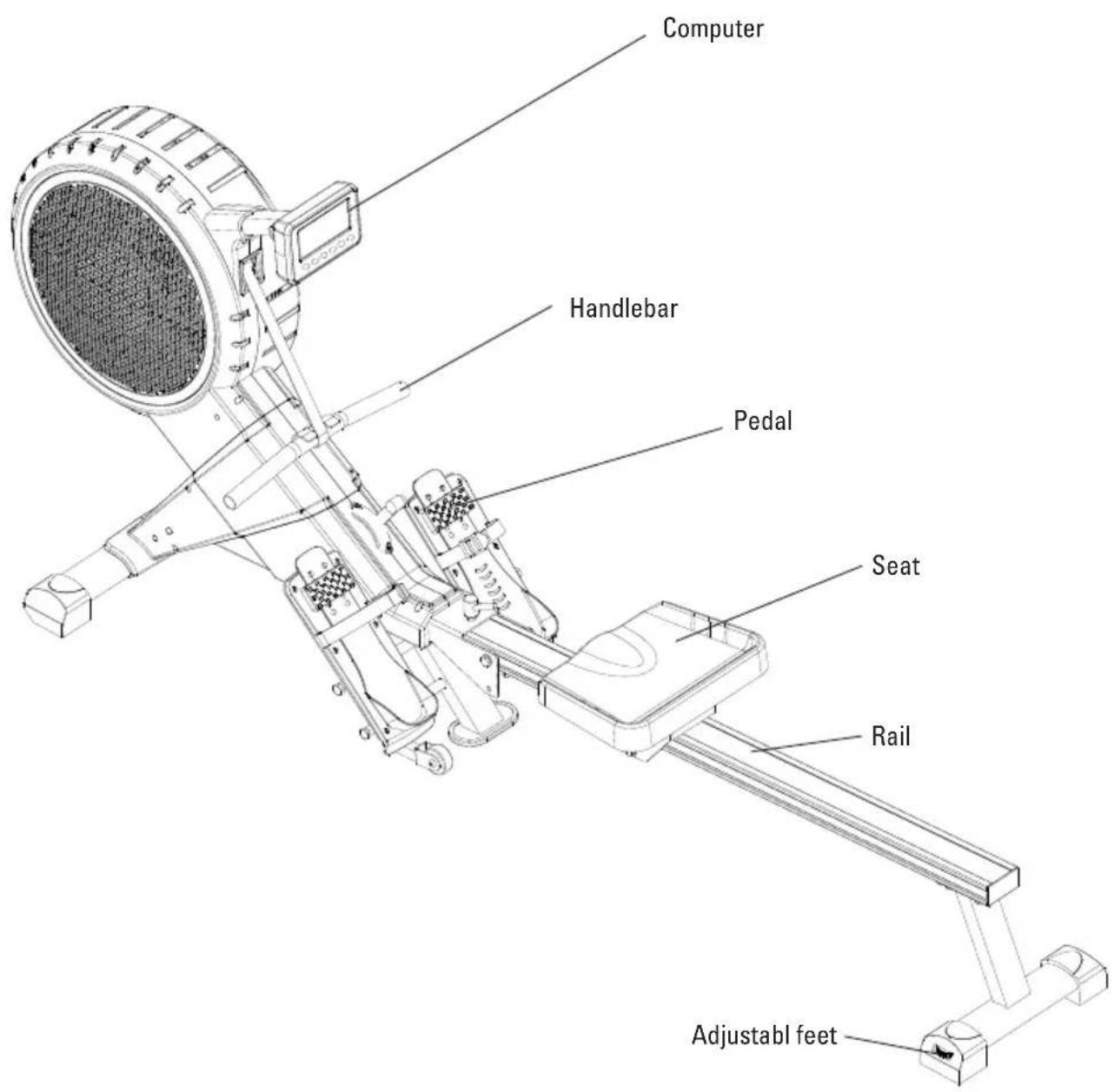
2.2 Specifications
Length: 235 cm
Height: 54 cm
Width: 93 cm
Weight: 34.5 kg
What is fitness? In general a fitness exercise can be described as an activity that makes your heart pump more oxygen from your lungs to your muscles by means of circulating the blood. The more strenuous the training, the more fuel (oxygen) the muscles need and the more work the heart has to do to pump oxygen rich blood to the muscles. If you are in good physical shape your heart can pump more blood to the muscle with each contraction. This means the heart doesn't have to contract as many times to transport the necessary oxygen to your muscles. Your resting heart beat and heart beat when exercising will therefore decrease.
3.1 Training by heart rate
While training it is important to monitor your heart rate. The heart rate is essential for the result of your training. Your best training heart rate depends firstly on your age. Your maximum heart beat can be determined by this. Secondly the most effective heart rate depends on your training goals. If your training goal is to lose weight, then the most effective training is at 60% of your maximum heart rate. If your training goal is to improve your stamina, then you should train at 85% of your maximum heart rate.
The body stores energy in two forms: carbohydrates and fat. When we exercise we use a combination of these two energy supplies. If the training intensity is at a high level the body will mostly choose the energy that burns fast: carbohydrates. Since there is a limited supply of these carbohydrates you can't continue this for a long period of time. When training at a low intensity the body will mostly choose to use a long lasting source of energy: fat. Since this is stored in large quantities in the body, you can continue this kind of training for a longer time.
Below you will find a schedule allowing you to calculate the best heart rate for your training. In this schedule each age category has a range that your heart rate should be in during your training. The middle column has the values you should try to maintain if you want to lose weight. If you want to improve your stamina you should try to maintain the rates in the right column.
| Age | Weight lost(beats per minute)60% | Improve stamina(beats per minute)85% |
| 20 - 24 120 - 118 170 - 167 | ||
| 25 - 29 117 - 115 166 - 163 | ||
| 30 - 34 114 - 112 162 - 158 | ||
| 35 - 39 111 - 109 157 - 154 | ||
| 40 - 44 108 - 106 153 - 150 | ||
| 45 - 49 105 - 103 149 - 145 | ||
| 50 - 54 102 - 100 144 - 141 | ||
| 55 - 59 99 - 97 140 - 137 | ||
| 60 and older 96 - 94 136 - 133 |
For each individual the best way to start training is different. If you have not exercised in some time or are overweight, you should start your training schedule slowly and gradually increase the level of activity.
In the last chapter of this instruction manual you will find several different training schedules (chapter 5. general information). You can use these schedules to reach your training goals. The schedules are divided in two phases. The first phase can be used for beginners or persons who start training after a long period of inactivity. During this phase the level of intensity is built up gradually. After six weeks the second phase begins. You can then choose a training schedule to lose weight or improve your stamina.
3.2 Warming up and cooling down
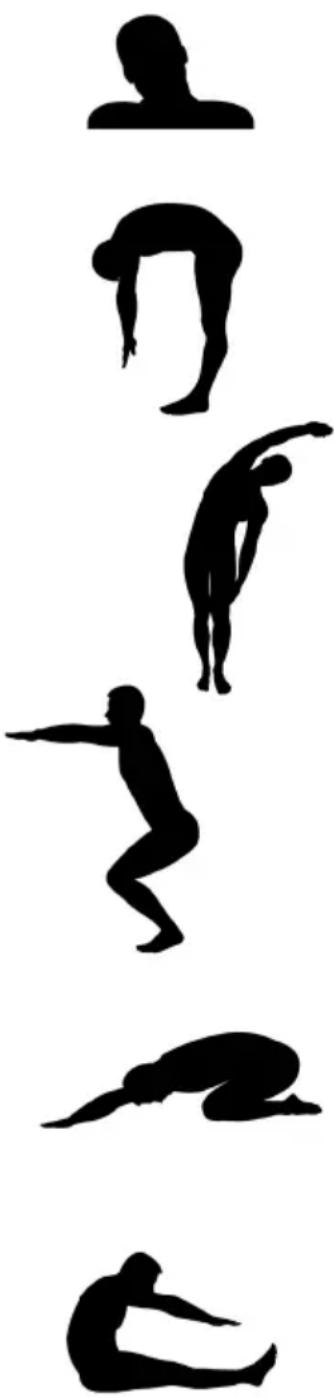
A good training schedule starts with a good warming up and ends with a cooling down of the muscles. This will prevent painful muscles and injury. Below you will find some suitable exercises.
Head Roll
Tilt your head to the right. Hold this for one second, so that you feel a little pull in the muscles on the left side of your neck. Do the same for the other side, front and back. Repeat two or three times.
Toe Touch
Slowly bend forward with your back and arms relaxed. Bend as far as you can and hold the position for ten seconds. Repeat this two or three times.
Side Stretch
Extend both your arms up in the air and reach as high as you can with your right arm. Lean a bit to the left so that the muscles in the right side of your torso are stretched. Hold this position for one second. Relax and make the same motion on the other side of your body. Repeat this three or four times.
Knee bend
Set your feet shoulder-width apart and your stretched your hands out. Lower yourself no more than 10cm by bending your knees. Come back up again and repeat several times.
Lower back stretch
Begin on all fours. Stretch your arms out in front of you, allowing your face to lower to a position near the floor. Gently sit back. Rest your glutes just above your heels. Ease back and feel the gentle stretch in your lower back.
Hamstring Stretch
Sit down on the floor with your right leg extended in front of you and place the sole of your left foot on the inside of your right upper leg. Bend forward in the direction of your right foot and hold this position for ten seconds. Relax and then do the same with your other leg. Repeat two or three times.
natural_image
Silhouettes of various human postures in various poses, arranged vertically (no text or symbols)4.1 Assembly
First get all of the parts out of the packaging and place the main frame on the ground with enough space around it for an easy and safe assembly.
Assembly set
All tools and fasteners are included in the assembly set as shown below.
Step 1
-
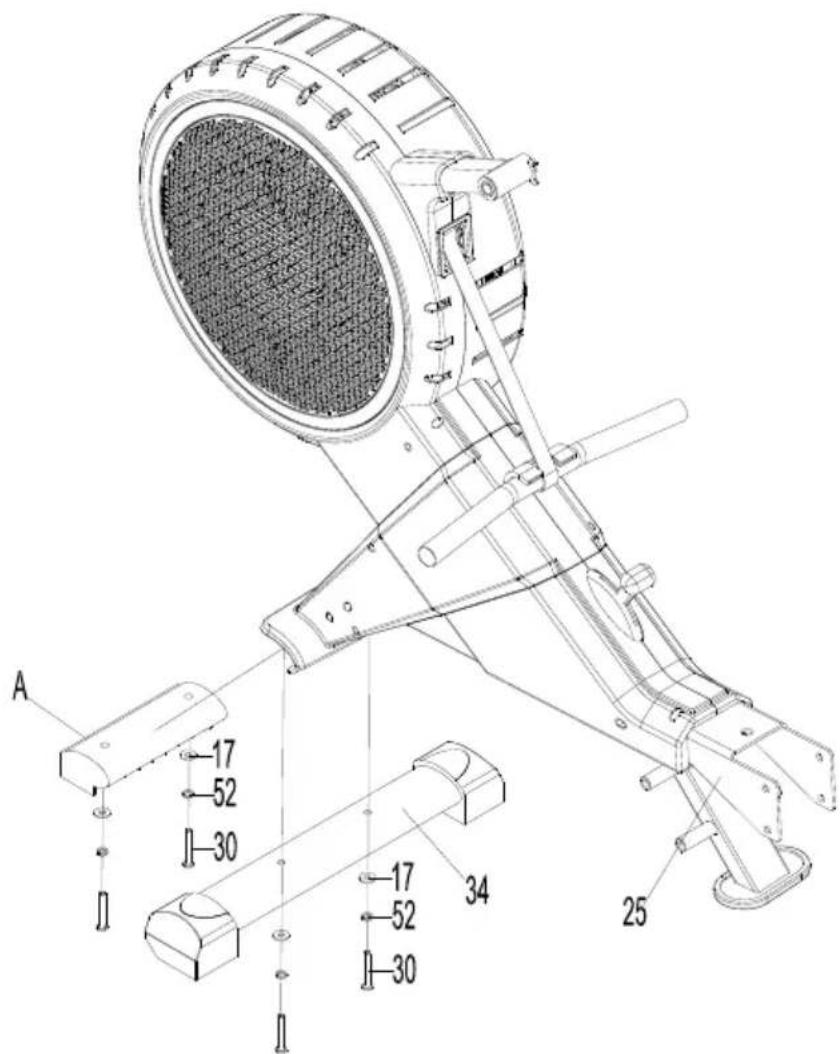
Remove the plastic transporting stabilizer (A) from the main frame (25) by removing bolts (30), spring washers (52) and washers (17). The plastic transporting stabilizer (A) can be trashed. The bolts and washers are needed for the next step.
-
Assemble the front stabilizer (34) by fastening 2x bolts (30), spring washers (52) and washers (17). Tighten all bolts firmly.
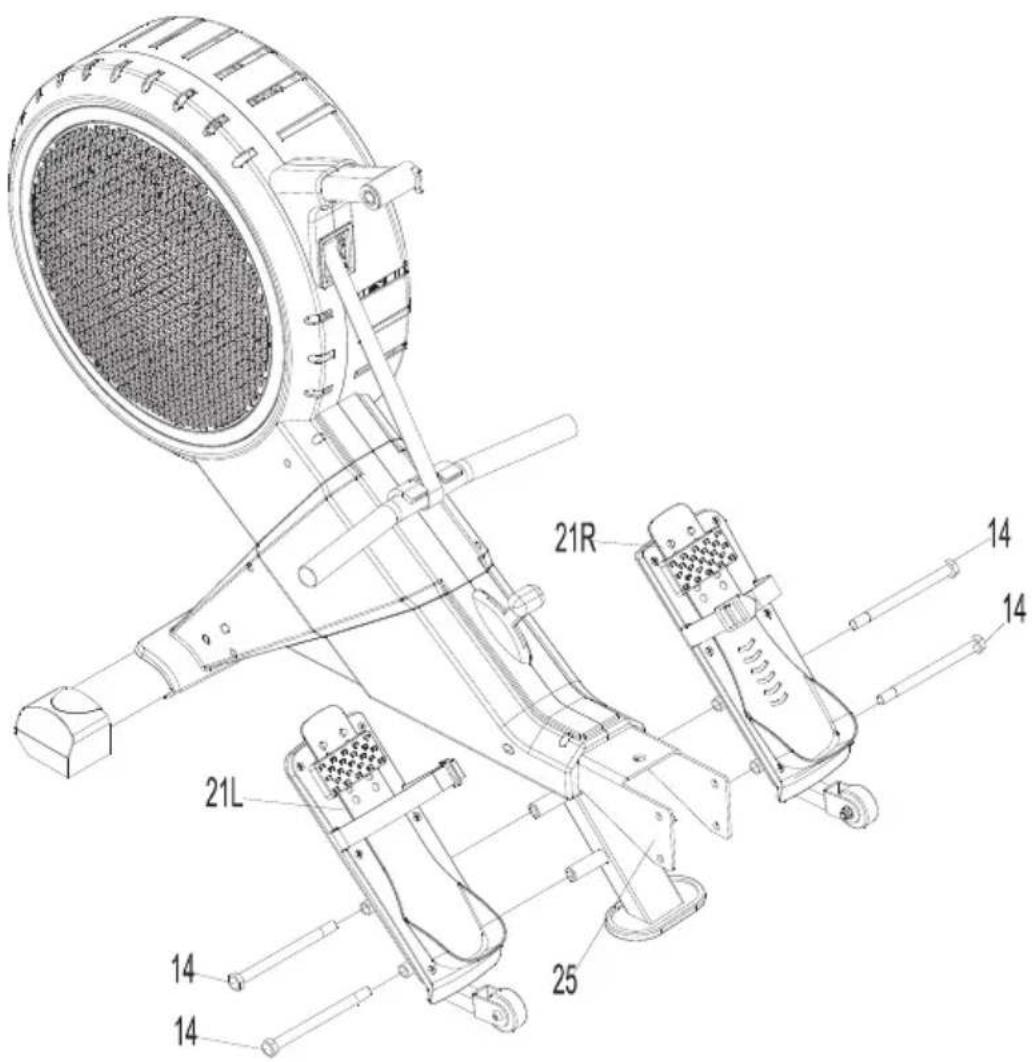
Step 2
- Assemble the right pedal (21R) to the main frame (25) by fastening 2x bolts (14).
- Assemble the left pedal (21L) to the main frame (25) by fastening 2x bolts (14).
- Tighten all bolts firmly.
Step 3
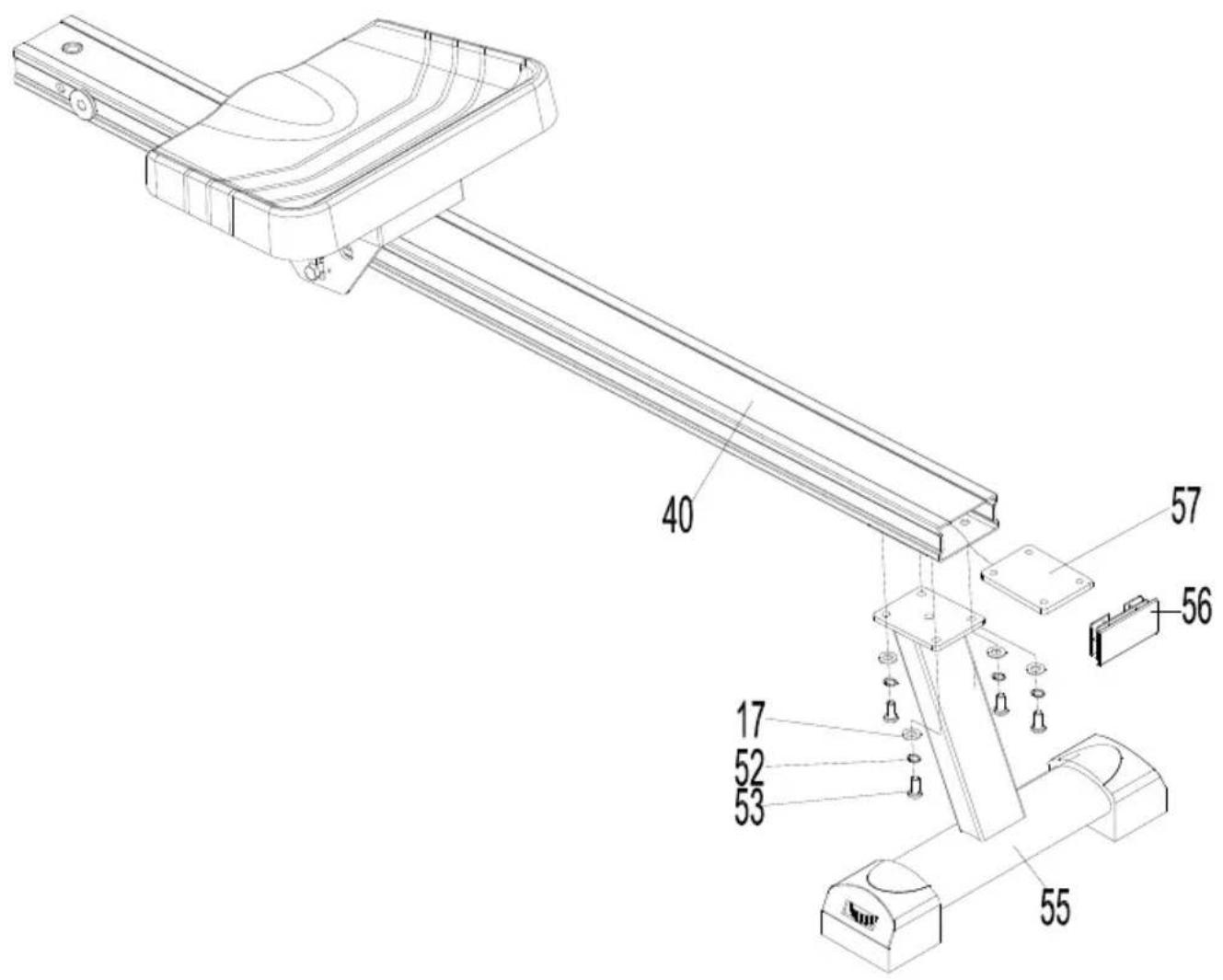
- Place the metal bracket (57) on the inside of the aluminum rail (40).
- Assemble the rear stabilizer (55) to the rail (40) and bracket (57) by fastening 4x bolts (53), spring washers (52) and washers (17).
- Place the endcap (40) at the end of the aluminium rail (40).
Step 4
-
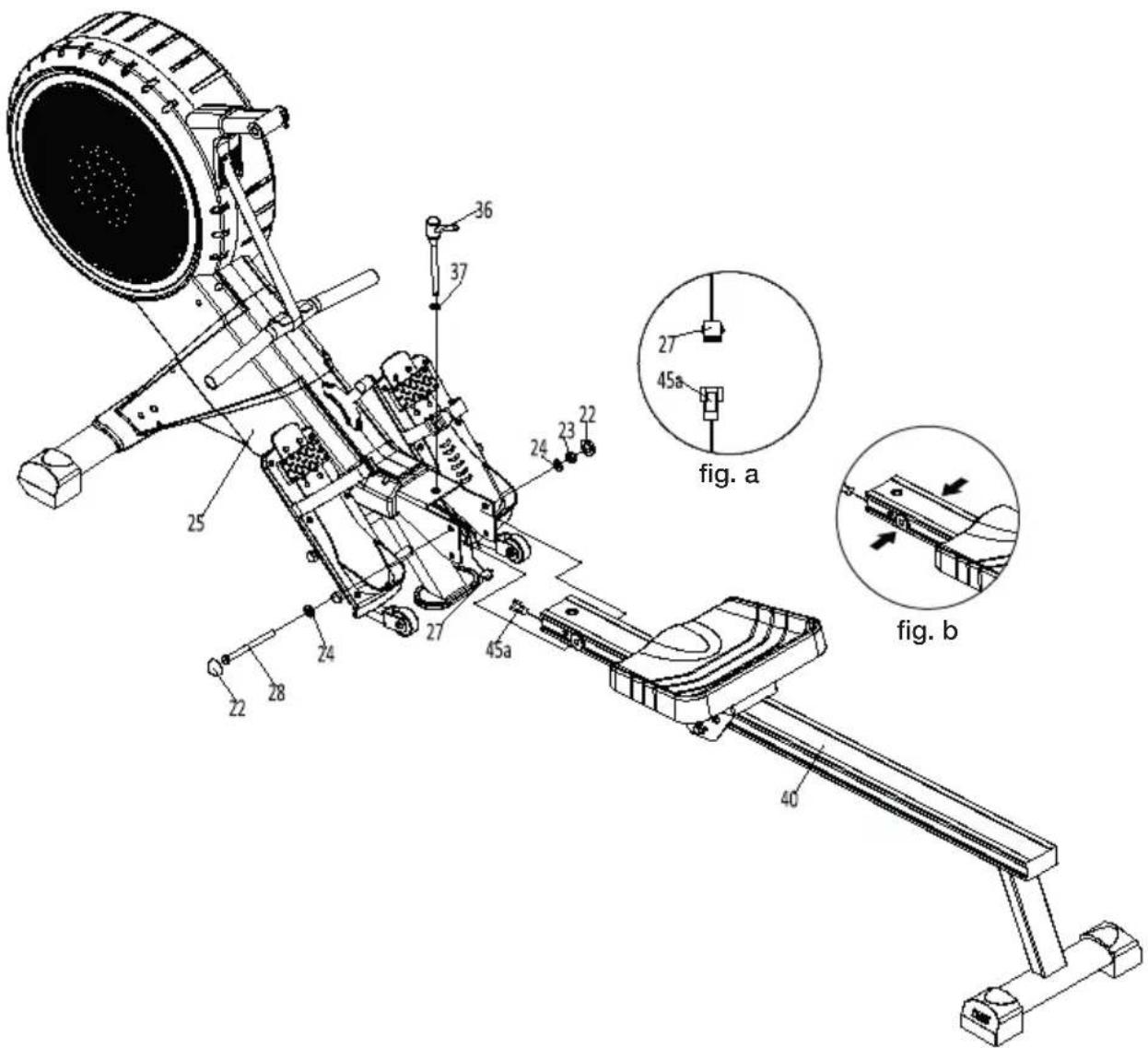
In this step the rail assembly will be connected to the main frame. But before connecting these part the heart rate sensor cables need to be connected. Connect the cables (27) and (45a) as illustrated in the figure a below.
-
Place the spacer inside the rail as shown in figure b before assembling the rail.
-
Now assemble the aluminium rail (40) to the main frame (25) by fastening bolt (28), washers (24) and self locking nut (23). Do not overtighten this bolt. After securing the rail place the end caps (22) on the bolt head and nut.
-
Secure the rail by fastening knob (36) with washer (37). Tighten the knob firmly.
Step 5
-
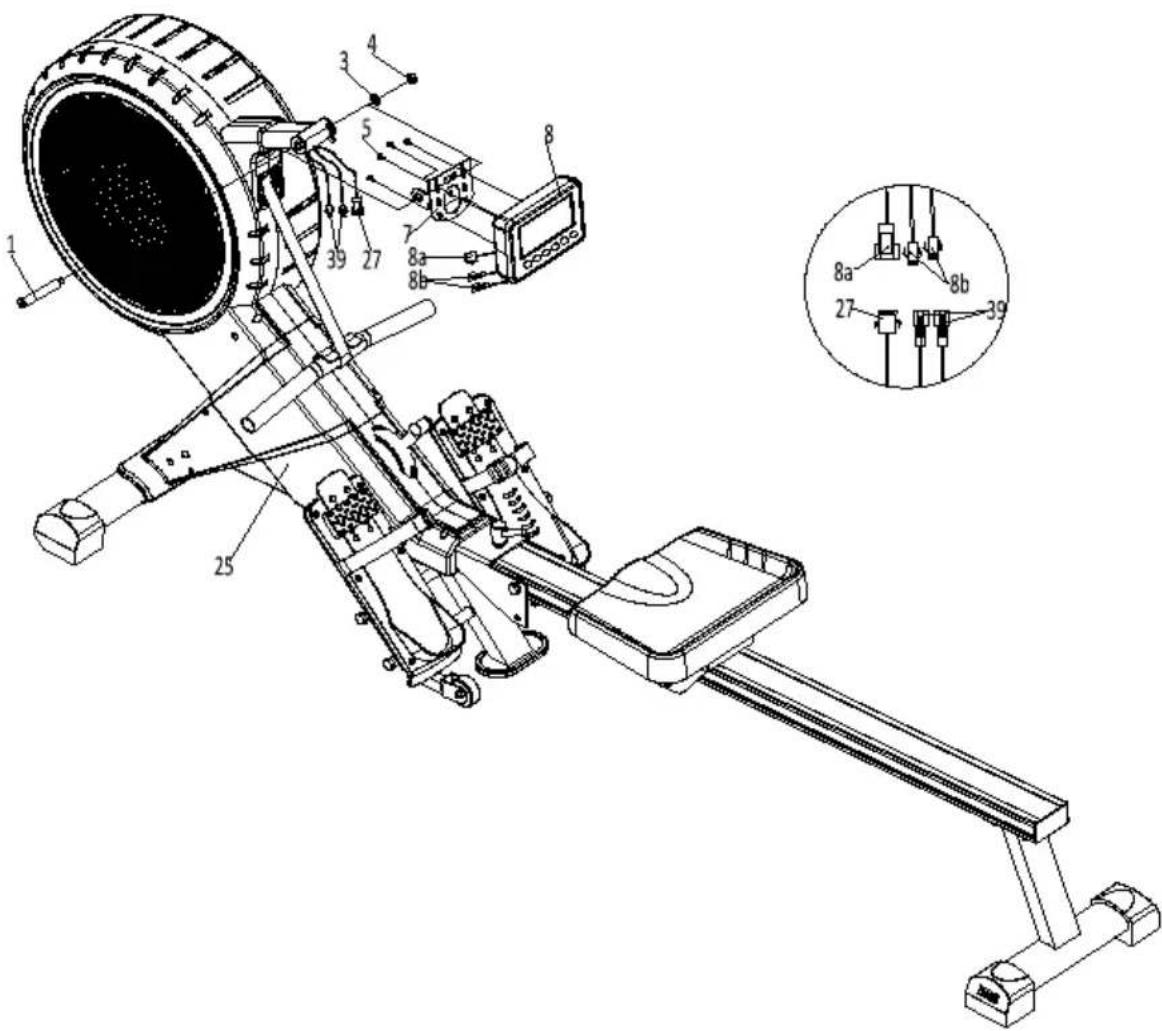
Assemble the computer bracket (7) to the main frame (25) by fastening bolt (1) with washer (3) and self locking nut (4).
-
Remove the four screws from the back of the computer before assembly the computer (8) to the computer bracket (7). Feed all three cables to the hole in the computer bracket, then fasten the four removed screws to assemble the computer (8) onto the computer bracket (7).
-
Connect the cables (8a) and 2x(8b) from the computer (8) to the cables (27) and 2x(39) from the main frame.
-
The Yarra rower is now ready for use.
4.2 Use of the computer
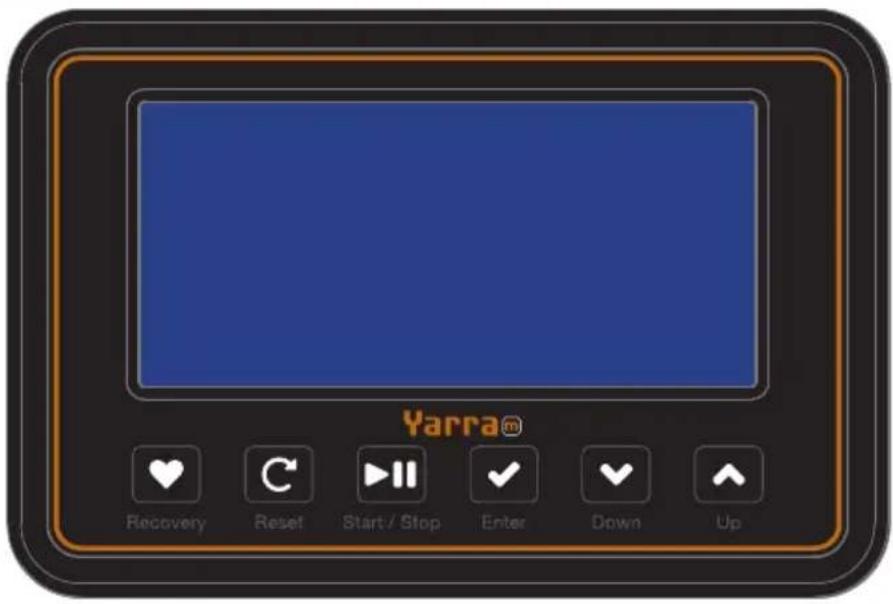
Recovery
Analyses your stamina on the basis of your heart rate recovery. Only works with a optional chest belt.
Reset
Resetting current values, return to the training menu. Press and hold to restart the computer.
Start / Stop
Start, pause or stop a training session.
Enter
Confirm the selected value. Selection of the value in the main window during a training session.
Down / Up
Setting the target values. Navigation between programs in the training menu.
Display Values
Window Function
TIME / 500M The elapsed or remaining training time depending on the selected program.
Average 500m time
SPM Strokes Per Minute.
DISTANCE The elapsed or remaining distance depending on the selected program.
STROKES / TOTAL The elapsed or remaining rowing strokes depending on the selected program.
Total rowing strokes.
CALORIES Indication of the burned calories.
PULSE Your current heart rate in BPM (Beats Per Minute).
This value is only visible when wearing the optional
Flow Fitness chest belt.
First use
First place the included 2 AA batteries in the battery compartment at the back of the computer. When the batteries are installed correctly the computer will play a sound signal. After activating the computer the current date and time can be setup. The values can be set by pressing the UP and DOWN buttons. Press ENTER to confirm the current value and proceed.
| 800 | 2705 | 2005 |
| 1 | ||
| 1 |
- Time (Hour)
- Time (Minute)
- Year
- Month
-
Day
-
You are also able to set an alarm. If you do not want to set an alarm press ENTER to continue.
-
Press START / STOP to go into the trainings menu.
Training menu & general use
Within the training menu you are able to select the manual and race program. Select a program by pressing the UP and DOWN buttons. The selected program will start
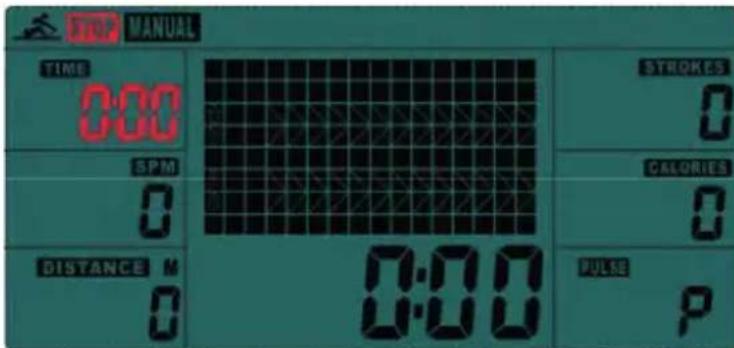
blinking. Press ENTER to confirm and setup the training program. During a training session your are able to set your preferred training value in the main window. Press ENTER to change the value of the main. Press START / STOP to pause a training session. Press START / STOP again to remain the training session or press RESET to quit the training session.
Quick start
By pressing the START/STOP button you can directly start exercising. All training values will increase from 0.
Manual
With the manual program you are able to set one or more target values. Select the manual program for the training menu by pressing the UP and DOWN buttons. Press ENTER to setup the target values.
- Set the target time by pressing the UP and DOWN buttons, confirm with ENTER.
- Set the target distance by pressing the UP and DOWN buttons, confirm with ENTER.
- Set the target strokes by pressing the UP and DOWN buttons, confirm with ENTER.
- Set the target calories by pressing the UP and DOWN buttons, confirm with ENTER.
- Set the target heart rate by pressing the UP and DOWN buttons, confirm with ENTER.
- Press START / STOP to start the training session.
All set target values will decrease. The training is finished when one the target values reaches 0. The computer will play a sound signal to notify you that the target has been reached and the training is finished. Press the UP and DOWN button to scroll trough the training summary. Press RESET to return to the training menu.
Race
With the Yarra rower you are able to virtually race the computer. Select the race program for the training menu by pressing the UP and DOWN buttons. Press ENTER to setup the race settings.
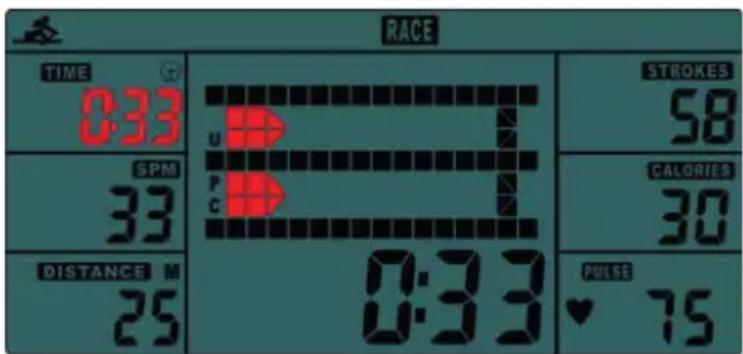
- Select the preferred level (L01-L15) with the UP and DOWN buttons. The duration of the computer is indicated next to the level. Confirm with ENTER
- Set the race distance with the UP and DOWN buttons, confirm with ENTER.
- Press START / STOP to start the race.
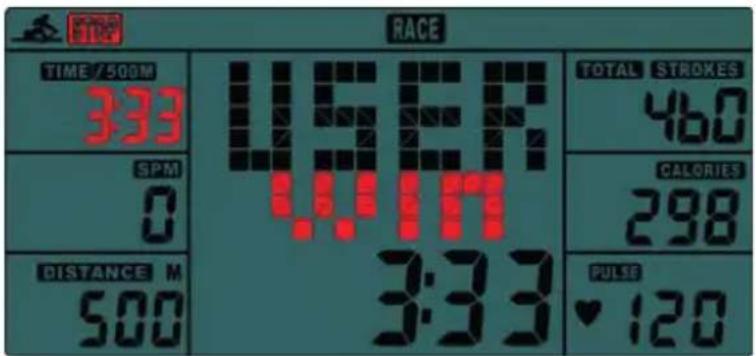
On the screen there are two rowing lanes. Try to beat the computers boat in the lower lane. The race is finished when the first boat crosses the finish. The computer
will now show the winner (PC or USER). Press START / STOP for a rematch or RESET to return to the training menu.
Recovery Test
After a training session you are able to check your stamina by performing a recovery test. The recovery test only works when wearing the optional Flow Fitness chest belt. By directly pressing the RECOVERY button you can perform the recovery test. A countdown will start from 00:60 to 00:00. Stop rowing and keep seated until the 60 seconds have passed.
After the test is finished a code between F1 and F6 will appear on the screen. The code responds to the fitness level displayed below.
| F1: | Excellent | |
| F2: | Good | |
| F3: | Average | |
| F4: | Below | average |
| F5: | Bad |
F6: Very bad / no correct measurement
Important:
-
The RECOVERY stamina test will only start when a heart rate is detected. For a correct measurement wear the optional chest belt according to the chest belt instructions.
-
Your stamina is based upon the time in which your heart rate returns to rest level. Therefore the RECOVERY program can only be done after a intense workout of at least 150 BPM.
4.3 Storage
For a compact storage the Yarra rower can be folded. To fold the rower loosen the knob (36), then pull the knob with washer (37) and fold the rail into the upright position. When the rail is in the upright position lock the rail into place by placing the knob (36) with washer (37) into the hole in the side of the rower frame as displayed in the image below.
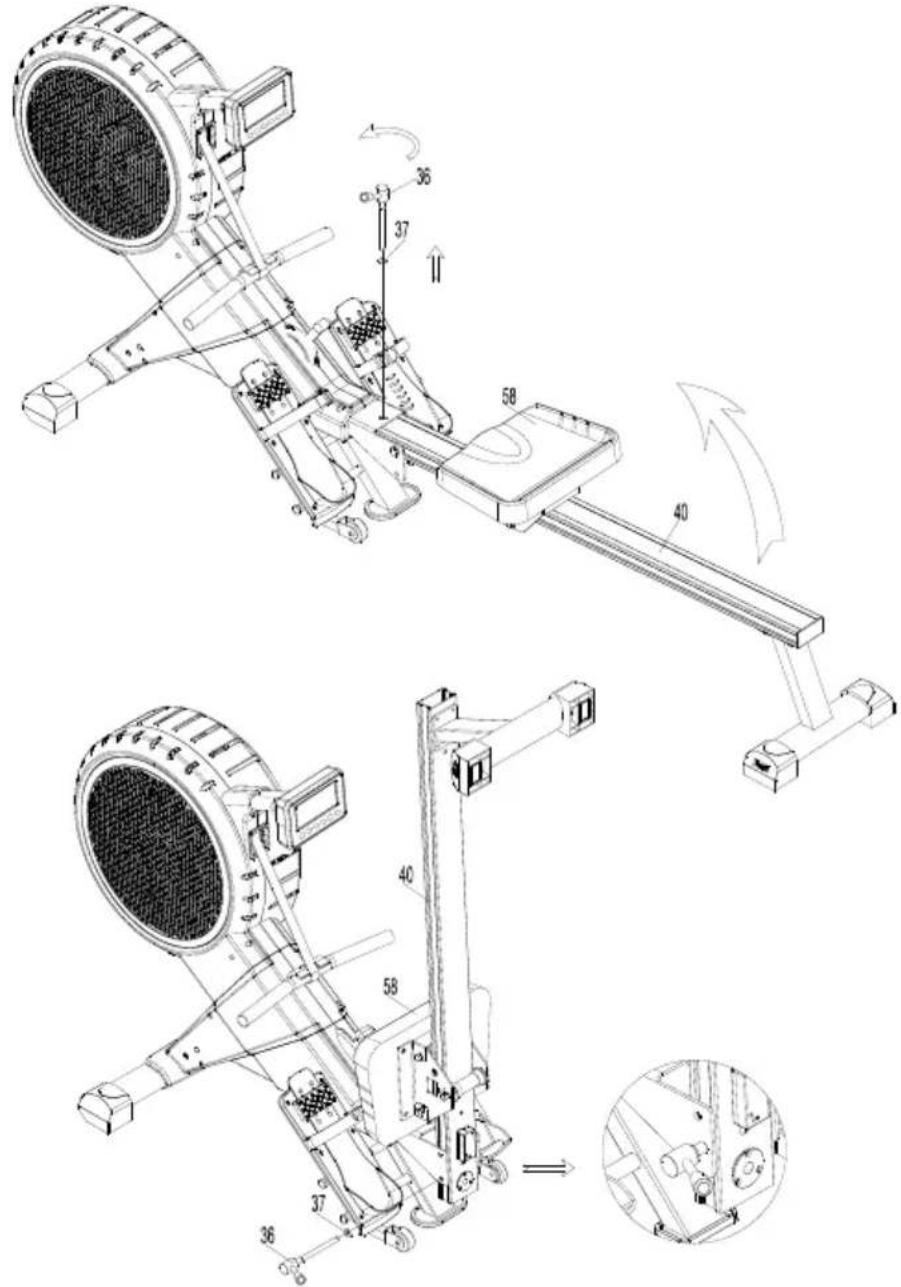
To unfold the rower, remove the knob (36) with washer (37) from the side of the rower. Gently guide the rail down then fasten knob (36) with washer (37). Fasten knob (36) tightly.
4.4 Maintenance
The metal and plastic parts of the product can be cleaned by using standard cleaning products. However, make sure that all parts are completely dry before they are used again.
Flow Fitness advises to fasten nuts and bolts, check and fasten pivot points once every six weeks. For fastening use the tool supplied with the product. To prevent unnecessary wear, the product can only be used indoors and in a dry environment.
5.1 Training schedule
Introduction schedule
Schedule week 1 and 2
Train at 60% of your maximum heart rate. Max. 3 times a week.
Warming up 5 - 10 minutes.
Train 4 minutes.
Rest 1 minute.
Train 2 minutes.
Calmly train 1 minute.
Cooling down 5 minutes.
Schedule week 3 and 4
Train at 60% of your maximum heart rate. Max. 4 times a week.
Warming up 5 - 10 minutes.
Train 5 minutes.
Rest 1 minute.
Train 3 minutes.
Calmly train 1 minute.
Cooling down 5 minutes.
Schedule week 5 and 6
Train at 60% of your maximum heart rate. Max. 5 times a week.
Warming up 5 - 10 minutes.
Train 6 minutes.
Rest 1 minute.
Train 4 minutes.
Calmly train 3 minutes.
Cooling down 5 minutes.
After completing the introduction training schedule for six weeks, you can choose the follow-up training schedule that is best suited to your needs. You can choose a schedule that will maximize your weight loss, or one that will improve your stamina. Both training schedules are on the next pages.
Training schedule to improve stamina
(follow-up to introduction training schedule)
Schedule week 7 and 8
Train at 90% of your maximum heart rate. Max. 6 times a week.
Warming up 5 - 10 minutes.
Train 7 minutes.
Rest 1 minute.
Train 5 minutes.
Calmly train 1 minute.
Cooling down 5 minutes.
Schedule week 9 and beyond
Train at 90% of your maximum heart rate. Max. 6 times a week.
Warming up 5 - 10 minutes.
Train 10 minutes.
Rest 1 minute.
Train 10 minutes.
Repeat training 2 or 3 times.
Calmly train 1 minute.
Cooling down 5 minutes.
Training schedule to lose weight
(follow-up to introduction training schedule)
Schedule week 7 and 8
Train at 60% of your maximum heart rate. Max. 6 times a week.
Warming up 5 - 10 minutes.
Train 7 minutes.
Rest 1 minute.
Train 5 minutes.
Calmly train 1 minute.
Cooling down 5 minutes.
Schedule week 9 and beyond
Train at 60% of your maximum heart rate. Max. 6 times a week.
Warming up 5 - 10 minutes.
Train 10 minutes.
Rest 1 minute.
Train 10 minutes.
Repeat training 2 or 3 times.
Calmly train 1 minute.
Cooling down 5 minutes.
5. General information
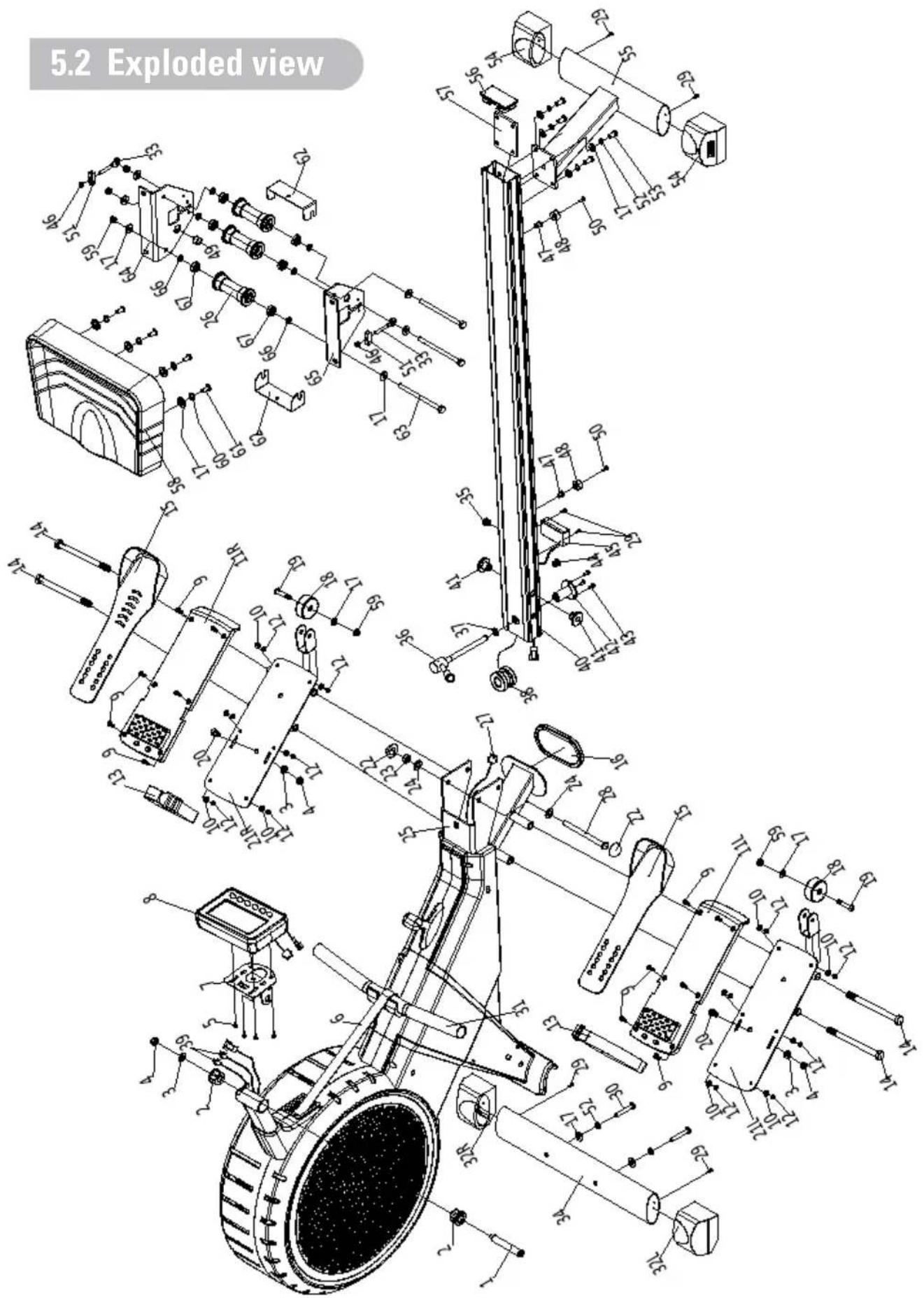
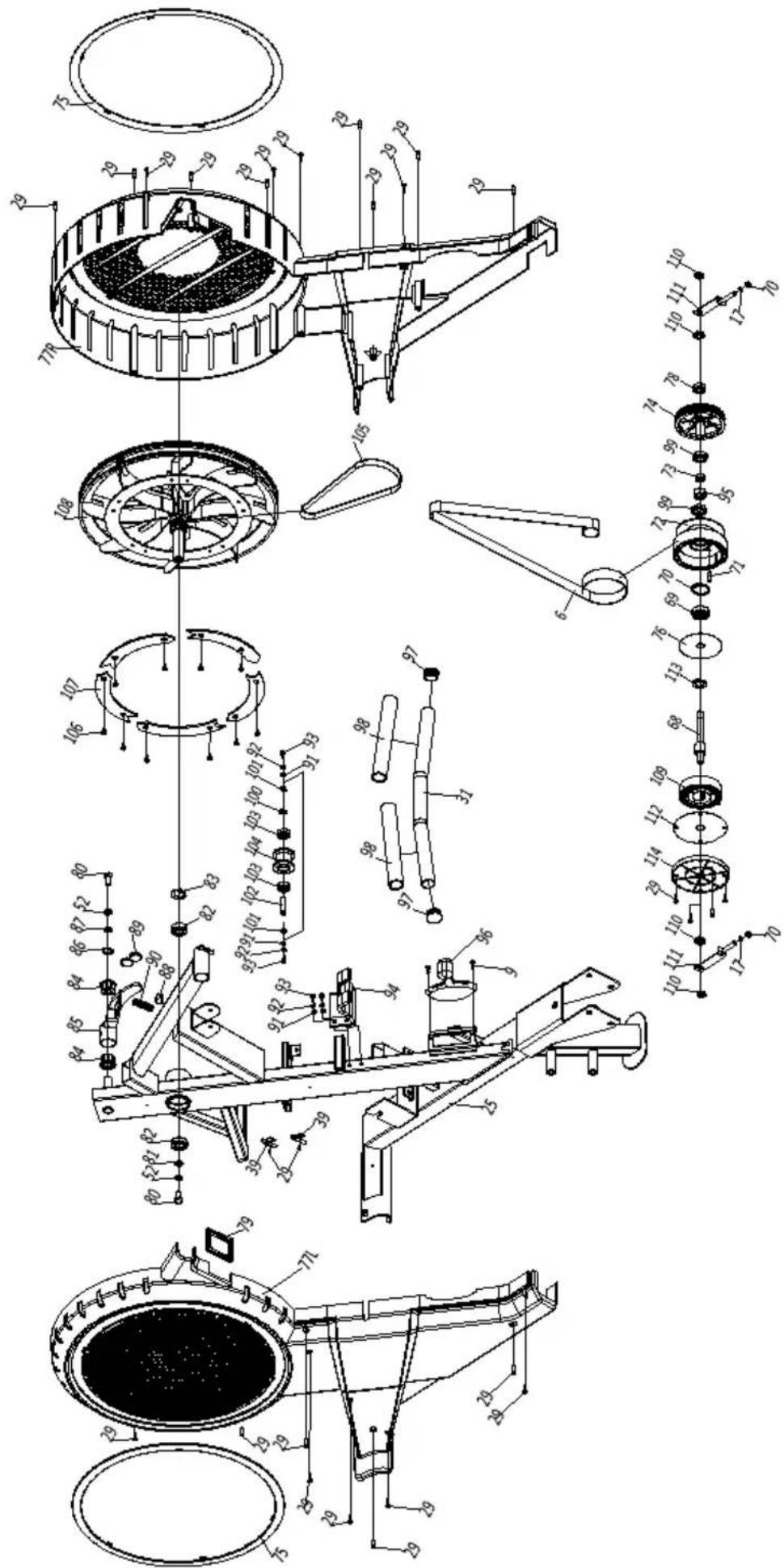
Nr. Omschrijving
| 1 | Step | bolt |
| 2 | Shaft sleeve 2 | |
| 3 | Washer | |
| 4 | Nylon nut 3 | |
| 5 | Cross pan head bolt 4 | |
| 6 | Belt | |
| 7 | Display support 1 | |
| 8 | Display | |
| 9 | Cross pan head screw 14 | |
| 10 | Washer | |
| 11 | Footrest fixation block 2 | |
| 12 | Nylon nut M5 | 12 |
| 13 | Fixation band 2 | |
| 14 | Hex bolt 4 | |
| 15 | Foot rest 2 | |
| 16 | Rubber pad | |
| 17 | Washer | |
| 18 | Wheel | |
| 19 | Allen bolt 2 | |
| 20 | Allen countersunk bolt M8x20 | |
| 21L/R | Foot rest support | |
| 22 | Sphere end cap 2 | |
| 23 | Nylon nut 1 | |
| 24 | Washer | |
| 25 | Mainframe | |
| 26 | Wheel | |
| 27 | Trunk wire 1 | |
| 28 | Hex bolt 1 | |
| 29 | Screw ST | |
| 30 | Allen pan head bolt 2 | |
| 31 | Handlebar | |
| 32L/R | Front stabilizer end cap | |
| 33 | Bolt for chain adjustment 2 | |
| 34 | Front stabilizer 1 | |
| 35 | Wire holder | |
| 36 | Knob | |
| 37 | Washer | |
| 38 | Strengthen column 1 | |
| 39 | Sensor wire 2 | |
| 40 | Aluminum guide rail 1 | |
| 41 | Guide rail sleeve 2 | |
| 42 | Limited column 1 | |
| 43 | Countersunk screw 3 | |
| 44 | Wire holder | |
| 45 | Pulse box 1 | |
| 46 | Nylon nut M6 2 | |
| 47 | Nut | |
| 48 | Cushion pad 2 | |
| 49 | Round magnet 1 | |
| 50 | Allen cylinder head bolt 2 | |
| 51 | U seat | |
| 52 | Spring washer 8 | |
| 53 | Allen bolt | |
| 54 | Adjustable end cap 2 | |
| 55 | Rear stabilizer 1 | |
| 56 | Aluminum guide rail end cap | |
| 57 | Nut plate 1 | |
| 58 | Saddle | |
| 59 | Nylon nut M8 5 |
| 60 | Spring washer | 4 | |
| 61 | Hex bolt | 4 | |
| 62 | U block | 1 | 2 |
| 63 | Hex bolt | 3 | |
| 64 | Saddle support assembly | 1 | |
| 65 | Saddle support | 1 | |
| 66 | Wheel sleeve | 6 | |
| 67 | Bearing 608Z | 6 | |
| 68 | Belt wheel shaft | 3 | |
| 69 | Bearing 6300-2RS | 1 | |
| 70 | Circlip for hole | 1 | |
| 71 | Shaft for belt fixation | 1 | |
| 72 | Friction belt wheel | 1 | |
| 73 | One way bearing | 1 | |
| 74 | Belt wheel | 1 | |
| 75 | 1 | Buckle | 2 |
| 76 | 2PC | plate | 1 |
| 2 | 77L/R | Chain cover | 2 |
| 78 | Bearing 6000-2RS | 1 | |
| 79 | Rubber gasket ring | 1 | |
| 80 | Hex | bolt | |
| 81 | Washer | 1 | |
| 82 | Bearing 6004-2RS | 2 | |
| 83 | Corrugated washer | 1 | |
| 84 | Shaft sleeve | 2 | |
| 3 | 85 | Magnet plate | 1 |
| 86 | Corrugated washer | 1 | |
| 87 | Washer | ||
| 88 | Bush for spring | 1 | |
| 89 | Round magnet | 2 | |
| 90 | Pressing spring | 1 | |
| 91 | Washer | 4 | |
| 92 | Spring washer | 4 | |
| 93 | Allen cylinder head bolt | 4 | |
| 94 | Handlebar fixation plate | 1 | |
| 95 | Bedaring circle | 1 | |
| 96 | Resistance controller | 1 | |
| 97 | Round end cap | 2 | |
| 98 | Foam | 1 | |
| 99 | Bearing 16003-2RS | 2 | |
| 100 | Corrugated washer | 1 | |
| 101 | Shaft ring | 2 | |
| 102 | Shaft of band wheel | 1 | |
| 103 | 1 Bearing 6000-ZZ | 1 | |
| 104 | Belt pulley | 1 | |
| 105 | Multi-V | belt | |
| 106 | 2 Screw | 5 | |
| 107 | Aluminum plate | 1 | |
| 108 | Magnet air wheel | 1 | |
| 109 | Spring | 1 | |
| 110 | 2 Hex thin nut | 4 | |
| 111 | L chain adjusting bolt | 1 | |
| 112 | 4 PC cover | 1 | |
| 113 | Corrugated washer | 1 | |
| 114 | Band wheel outer end cap | 1 | |
| 115 | PC plate | 1 | |
| 116 | Coil spring | 1 | |
| 117 | 1 Band wheel shaft | 1 |
5.3 Troubleshooting
Problem:
During a training the rower makes beeping or scratching noises.
Solution:
Beeping or scratching noise are mostly caused by the plastic cover hitting or scratching the metal frame. The solution to this problem is to spray this components with WD40. WD40 is available in hardware stores.
Problem:
The LCD display is weak.
Solution:
Replace the batteries.
Problem:
De computer doesn't or badly reads your heart rate.
Solution:
When there is no heart rate reception when using a chest belt check the following:
- Is the chest belt coded? Coded chest belts don't work on our equipment. The chest belt must be "Polar Compatible" and send a 5Hz signal.
- Have you read the chest belt's manual? It is important that the sensors are made moist for a better contact with the skin.
- Is there a full and correctly placed battery?
Is the chest belt tight enough around your chest?
Problem:
There is no signal when i row. The values are not counting up or down
Solution:
Check if the display cables are connected correctly.
Problem:
It is heavy folding the rail, the rail cannot be folded smoothly.
Solution:
Loosen bolt 28 in assembly step 4 until the rail moves smoothly.
In case your problem is not resolved or not described, consult the fitness dealer where you purchased this product.
5.4 Warranty
The warranty is provided by the Flow Fitness distributor of your country and the reseller where you have purchased your product. Please check
https://www.flowfitness.com/en/dealers/
for contact information.
FLOWFITNESS
Prestige Yarra m