
ACCS1009 - Computer Cooling Component APC - Free user manual and instructions
Find the device manual for free ACCS1009 APC in PDF.


| Product Type | Front Containment for InRow Cooling Units |
| Model Number | ACCS1009 |
| Brand | APC |
| Compatibility | APC NetShelter SX enclosures; InRow 300mm (300 series) cooling units (ACRC301S/H) |
| Material | Clear polycarbonate door inserts; steel frame |
| Door Type | Lockable with clear polycarbonate inserts |
| Noise Reduction | Yes, when both front and rear containment are installed |
| Modular Design | Yes, compatible with standard NetShelter SX enclosures |
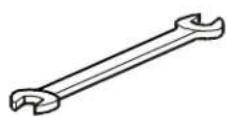
| Installation Tools Required | #2 Phillips screwdriver, T30 Torx screwdriver, 10-mm wrench |
| Cleaning Instructions | Rinse with warm water; wash with mild soap and soft cloth; avoid abrasives and solvents |
| Safety Precautions | Ensure cooling capacity exceeds load; do not install in environments with dew point > 18.3°C |
| Warranty Period | 2 years from date of purchase |
| Manufacturer | American Power Conversion Corporation (APC) |
| Firmware Reconfiguration Required | Yes, after installation |
| Application | Data center cooling containment for improved efficiency and predictability |
| Redundancy Support | N+1 or 2N with additional InRow cooling units |
| Included Components | Front containment door assembly, hardware (specific contents not listed) |
Frequently Asked Questions - ACCS1009 APC
User questions about ACCS1009 APC
0 question about this device. Answer the ones you know or ask your own.
Ask a new question about this device
Download the instructions for your Computer Cooling Component in PDF format for free! Find your manual ACCS1009 - APC and take your electronic device back in hand. On this page are published all the documents necessary for the use of your device. ACCS1009 by APC.
USER MANUAL ACCS1009 APC
Rock Air Containment System (ACCS1000-ACGS1009)—Overview
Introduction
The Rack Air Containment System (RACS) is a mechanical ducting system that attaches to the front or rear of an enclosure to provide increased cooling capacity. The RACS is a modular system that works with APC® NetShelter® SX enclosures and InRow® cooling units to provide maximum cooling predictability, capacity, and efficiency. By attaching the RACS to the rear of the NetShelter SX, air expelled from IT equipment is forced to pass through the cooling unit, where it is conditioned. This ensures that warm exhaust air does not enter the air inlets of installed servers. Redundant configurations allow maximum availability. Optional front containment configurations reduce noise and provide additional control of air flow. The RACS components can be attached to a single enclosure or a group of enclosures. The RACS consists of eight components that can be installed separately or together, depending on your configuration.
- ACCS10000=Rea containment for InRow300mm cooling units
- ACCS1001—Rear containment for NetShelter SX and InRow RP cooling units
- ACCS1001—Rear containment for NetShelter SX and InRow RP cooling units
- ACCS1002—End caps for any rear- or front-containment configuration
- ACCSS0002—Front captafmaeryt for InR dwn30Contain(100nteries)goringunits
- ACCS1004—Front containment for InRow 600mm cooling units
- ACCS1005—Front containment for NetShelter SX enclosures
- ACCS1004—Front containment for NetShelter S X 750 mm enclosures
: ACCS1007—Front containment for NetShelter SX-750-mm enclosures - ACCS1009—Front containment for InRow 300mm (300 series) ACRC301S/H
- ACCS1006—Rear containment for NetShelter SX 750-mm enclosures
- ACCS1007—Front containment for NetShelter SX 750-mm enclosures
Features of the RACS
- Rear containment—Ensures server exhaust air is returned to the InRow cooling unit for maximum cooling predictability. Prevents recirculation of hot exhaust air.
- Front containment—Ensures cold supply air is not captured by neighboring equipment.
- Modular design—Compatible with standard NetShelter SX enclosures, providing maximum system flexibility and scalability.
- Redundant configurations—Provide N + 1 or 2N redundancy by including additional InRow cooling units.
- Clear polycarbonate door inserts—Provide required air containment while allowing visibility to installed IT equipment and a consistent appearance across enclosures.
- Lockable doors—Provide enclosure security.
- Noise reduction—Containment of both the front and rear of the enclosure reduces the level of noise generated by the installed equipment.
Compatibility
The RACS can be coupled with one or more NetShelter SX enclosures in the following configurations:
- A ducted return and flooded supply configuration
- A ducted return and ducted supply (recommended configuration for uncontrolled environments)
The configurations listed in the following table and shown in the following figure provide hot air retrieval and provide coupling for either redundancy or capacity.
| Number of NetShelter SX Enclosures | Number of InRow RC or SC cooling units | Number of InRow RP cooling units |
| 1 | 1 | 0 |
| 2 2, 3, or 4 1 or 2 |
r
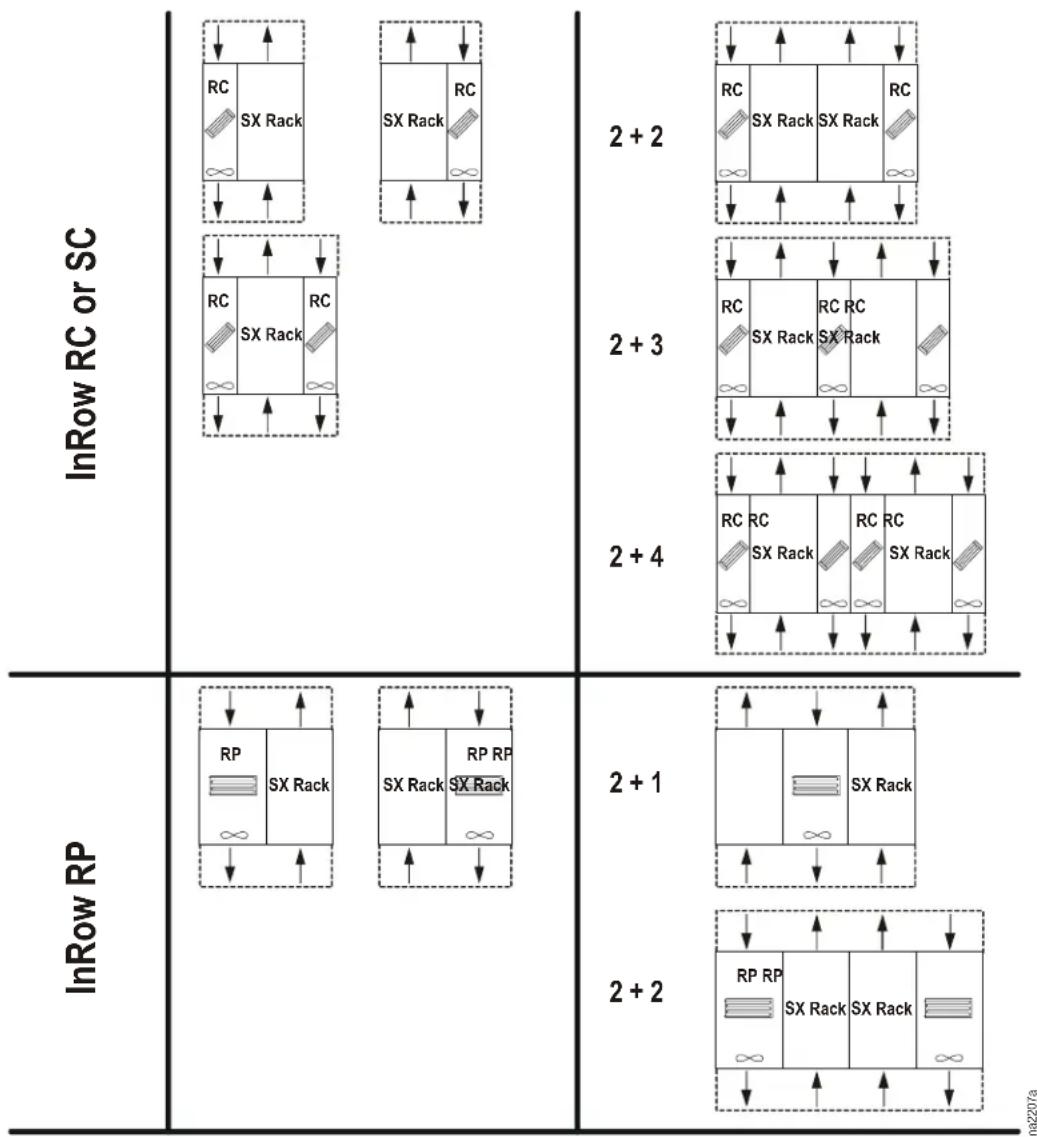
other
| InRow | RC | SX Rack | RC | 2 + 2 | | :--- | :--- | :--- | :--- | :--- | | RC | 1 | 1 | 1 | 1 | | 2 + 3 | 1 | 1 | 1 | 1 | | 2 + 4 | 1 | 1 | 1 | 1 | | InRow RP | 1 | 1 | 1 | 1 | | 2 + 1 | 1 | 1 | 1 | 1 | | 2 + 2 | 1 | 1 | 1 | 1 | The diagram contains four rows of rectangular blocks (RC and SX Rack) with varying internal spacing and spacing dimensions. The labels 'InRow RC or SC' appear above the left column, while the right column contains the same top row. The bottom row is empty, indicating no data or zero values for any segment.Cross-reference symbols
If you need to remove and reinstall other equipment in order to install the RACS, see the documentation provided with that equipment for instructions.
When you see this symbol in the RACS installation instructions, see the installation manual of the unit for detailed instructions.
When you see this symbol in the RACS installation instructions, read the RACS System Overview ACCS1000-ACCS1007 sheet before continuing with the installation of the equipment. This brief document is packaged with the Rack Air Containment End Caps (ACCS1002) and is available at the APC Web site, www.apc.com.
Tools required
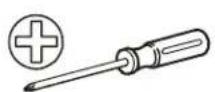
2 Phillips screwdriver T30 Torx
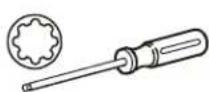
® screwdriver 10-mm wrench
Safety and handling

Note: The RACS is only intended for use with APC NetShelter SX enclosures.
Upon installation of this RACS, firmware reconfiguration of the cooling system is required. For configuration information, see the Operation manual for your cooling unit.

Caution: The air conditioners included in the system must have a capacity exceeding the load in the racks. Temperatures will exceed safe limits if the load exceeds the cooling capacity.

Caution: Do not install the RACS in ambient environments where the dew point (the temperature at which condensation begins) is expected to be greater than 18.3°C (65°F).
Maintenance
Cleaning the clear polycarbonate door inserts
- Rinse the door insert with warm water. Wash the door insert gently with a soft cloth or sponge, warm water, and mild soap or detergent.

Caution: Do not scrub the polycarbonate door insert with brushes or squeegees.
- Rinse the door insert again with warm water. Dry the door insert with a soft cloth or damp cellulose sponge to prevent water spotting.
- To remove wet paint or grease, lightly rub the door insert with VM and P grade naphtha or isopropyl alcohol, then wash and rinse.
Compatible cleaning agents
- Aqueous solutions of soaps and detergents
• Glass and light-duty hard surface cleaner

Caution: Do not use abrasive or highly alkaline cleaners. Never scrape the insert with razor blades or other sharp objects.
Never use acetone, benzene, carbon tetrachloride, or gasoline as a cleaner.
Two-Year Factory Warranty
This warranty applies only to the products you purchase for your use in accordance with this manual.
Terms of warranty
APC warrants its products to be free from defects in materials and workmanship for a period of two years from the date of purchase. APC will repair or replace defective products covered by this warranty. This warranty does not apply to equipment that has been damaged by accident, negligence or misapplication or has been altered or modified in any way. Repair or replacement of a defective product or part thereof does not extend the original warranty period. Any parts furnished under this warranty may be new or factory-remanufactured.
Non-transferable warranty
This warranty extends only to the original purchaser who must have properly registered the product. The product may be registered at the APC Web site, www.apc.com.
Exclusions
APC shall not be liable under the warranty if its testing and examination disclose that the alleged defect in the product does not exist or was caused by end user's or any third person's misuse, negligence, improper installation or testing. Further, APC shall not be liable under the warranty for unauthorized attempts to repair or modify wrong or inadequate electrical voltage or connection, inappropriate on-site operation conditions, corrosive atmosphere, repair, installation, exposure to the elements, Acts of God, fire, theft, or installation contrary to APC recommendations or specifications or in any event if the APC serial number has been altered, defaced, or removed, or any other cause beyond the range of the intended use.
THERE ARE NO WARRANTIES, EXPRESS OR IMPLIED, BY OPERATION OF LAW OR OTHERWISE, OF PRODUCTS SOLD, SERVICED OR FURNISHED UNDER THIS AGREEMENT OR IN CONNECTION HEREWITH. APC DISCLAIMS ALL IMPLIED WARRANTIES OF MERCHANTABILITY, SATISFACTION AND FITNESS FOR A PARTICULAR PURPOSE. APC EXPRESS WARRANTIES WILL NOT BE ENLARGED, DIMINISHED, OR AFFECTED BY AND NO OBLIGATION OR LIABILITY WILL ARISE OUT OF, APC RENDERING OF TECHNICAL OR OTHER ADVICE OR SERVICE IN CONNECTION WITH THE PRODUCTS. THE FOREGOING WARRANTIES AND REMEDIES ARE EXCLUSIVE AND IN LIEU OF ALL OTHER WARRANTIES AND REMEDIES. THE WARRANTIES SET FORTH ABOVE CONSTITUTE APC'S SOLE LIABILITY AND PURCHASER'S EXCLUSIVE REMEDY FOR ANY BREACH OF SUCH WARRANTIES. APC WARRANTIES EXTEND ONLY TO PURCHASER AND ARE NOT EXTENDED TO ANY THIRD PARTIES.
IN NO EVENT SHALL APC, ITS OFFICERS, DIRECTORS, AFFILIATES OR EMPLOYEES BE LIABLE FOR ANY FORM OF INDIRECT, SPECIAL, CONSEQUENTIAL OR PUNITIVE DAMAGES, ARISING OUT OF THE USE, SERVICE OR INSTALLATION, OF THE PRODUCTS, WHETHER SUCH DAMAGES ARISE IN CONTRACT OR TORT, IRRESPECTIVE OF FAULT, NEGLIGENCE OR STRICT LIABILITY OR WHETHER APC HAS BEEN ADVISED IN ADVANCE OF THE POSSIBILITY OF SUCH DAMAGES. SPECIFICALLY, APC IS NOT LIABLE FOR ANY COSTS, SUCH AS LOST PROFITS OR REVENUE, LOSS OF EQUIPMENT, LOSS OF USE OF EQUIPMENT, LOSS OF SOFTWARE, LOSS OF DATA, COSTS OF SUBSTITUENTS, CLAIMS BY THIRD PARTIES, OR OTHERWISE.
NO SALESMAN, EMPLOYEE OR AGENT OF APC IS AUTHORIZED TO ADD TO OR VARY THE TERMS OF THIS WARRANTY. WARRANTY TERMS MAY BE MODIFIED, IF AT ALL, ONLY IN WRITING SIGNED BY AN APC OFFICER AND LEGAL DEPARTMENT.
Warranty claims
Customers with warranty claims issues may access the APC customer support network through the Support page of the APC Web site, www.apc.com/support. Select your country from the country selection pull-down menu at the top of the Web page. Select the Support tab to obtain contact information for customer support in your region.
APC Worldwide Customer Support
Customer support for this or any other APC product is available at no charge in any of the following ways:
- Visit the APC Web site to access documents in the APC Knowledge Base and to submit customer support requests.
- www.apc.com (Corporate Headquarters)
Connect to localized APC Web sites for specific countries, each of which provides customer support information.
- www.apc.com/support/
Global support searching APC Knowledge Base and using e-support.
- Contact an APC Customer Support center by telephone or e-mail.
- Regional centers
Direct InfraStruXure (1)(877)537-0607
Customer Support Line (toll free)
APC headquarters U.S., (1)(800)800-4272
Canada (toll free)
Latin America (1)(401)789-5735 (USA)
Europe, Middle East, (353)(91)702000
Africa (Ireland)
Western Europe (inc. +800 0272 0272
Scandinavia)
Japan (0) 36402-2001
Australia, New Zealand, (61) (2) 9955 9366
South Pacific area (Australia)
- Local, country-specific centers: go to www.apc.com/support/contact for contact information.
Contact the APC representative or other distributor from whom you purchased your APC product for information on how to obtain local customer support.
Entire contents copyright 2008 American Power Conversion Corporation. All rights reserved. Reproduction in whole or in part without permission is prohibited. APC, the APC logo, NetShelter, and InRow are trademarks of American Power Conversion Corporation. All other trademarks, product names, and corporate names are the property of their respective owners and are used for informational purposes only.
- Rock Air Containment System (ACCS1000-ACGS1009)—Overview
- Introduction
- Features of the RACS
- Compatibility
- Cross-reference symbols
- Tools required
- Phillips screwdriver T30 Torx
- Safety and handling
- Maintenance
- Cleaning the clear polycarbonate door inserts
- Compatible cleaning agents
- Two-Year Factory Warranty
- Terms of warranty
- Non-transferable warranty
- Exclusions
- Warranty claims
- APC Worldwide Customer Support
Brand : APC
Model : ACCS1009
Category : Computer Cooling Component