
452D - Switch Tork - Free user manual and instructions
Find the device manual for free 452D Tork in PDF.


User questions about 452D Tork
0 question about this device. Answer the ones you know or ask your own.
Ask a new question about this device
Download the instructions for your Switch in PDF format for free! Find your manual 452D - Tork and take your electronic device back in hand. On this page are published all the documents necessary for the use of your device. 452D by Tork.
USER MANUAL 452D Tork
- Plug the unit into a grounded 120VAC outlet
- Press the RESET button. The unit will display "12:00 AM", along with the day (MO) and OFF
- To set the time, press and hold the CLK button, then press the HOUR, MIN and DAY buttons to set the time in hours, minutes, and the current day of the week.
- When you've finished setting the time, press the MODE button as often as needed to set the unit into the AUTO mode.
PROGRAMMING:
This unit memory can hold up to 7 ON and OFF programs.
They can be set to execute on a daily basis or on a combination of days. MO TU WE TH FR SA SU
- Press the PRG button.
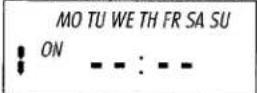
- Use the HOUR and MIN buttons to set the time of day that the event will occur. To select which day(s) of the week the program will execute, press the DAY button, sending you forwards through this list:
MO-SU, MO, TU, WE, TH, FR, SA, SU, MO-FR, SA-SU, (and then back to all days)
When you are satisfied with the day of the week selection, press the PRG Button to store this completed event, and advance you to the first OFF event.
- Program the first OFF event the same way the first ON event was programmed, then press the PRG button to store it. Repeat this entire procedure as often as needed. You can program up to seven (7) ON and OFF events this way.
- When you have finished setting the programs, press the CLK button. The unit will not execute any schedules until it is returned to the CLK mode. On the left hand side of the LCD the operating mode will be displayed. If the unit does not already show the word AUTO, press the MODE button as often as needed until the LCD displays AUTO.
REVIEWING PROGRAMS:
- Press the PRG button. The LCD will display the first event, the "1 ON" event.
- Each successive press of the PRG button will display the next program, alternating ON and OFF schedules.
DELETEING A PROGRAM:
- Press the PRG button until the LCD displays the schedule you want to edit.
- Press and hold the MODE button, then press the PRG button.
EDITING A PROGRAM:
- Press the PRG button until the LCD displays the schedule you want to edit.
- Use the HOUR, MIN and DAY buttons to change the event to the desired time or day.
- Press the PRG button to store the revised scheduled and display the next.
AUTO/MANUAL/RANDOM MODES:
This unit has four operational modes: Manual OFF, Manual ON, AUTO and RND (Random). Each press of the MODE button moves you forwards through this list. In the Manual OFF and Manual ON modes, the unit will not run any programs, until it is put in the AUTO mode.
RANDOM ON/OFF TIMES: This feature gives your lights a lived-in feel, providing added security. The load will continuously turn ON and OFF at random, with the times varying by ±30 minutes from the previously programmed times. To enter the Random mode, press the MODE button until the LCD displays RND on the upper right hand side.
ONE YEAR LIMITED WARRANTY: If this product fails because of a manufacturing defect within one year after purchase, we will, at our option, either repair or replace it at no charge. Our warranty does not cover damage caused by accident, abuse or misuse. We assume no further liability with respect to the sale or use of this product. THIS WARRANTY IS IN LIEU OF ALL OTHER WARRANTIES, EXPRESSED OR IMPLIED, INCLUDING THE WARRANTY OF MERCHANTABILITY. We make no warranty with respect to the fitness of any goods for the users particular application. This warranty gives you specific legal rights, and you also may have other rights which vary from state to state.
It is our intent to provide accurate and current specification information. However, in the interest of product improvement, TORK may alter the specifications or constructional details without prior notice.
TORK, INC. • 888.500.4598 • www.TORK.com
A DIVISION OF NSI NSI INDUSTRIES, LLC
Brand : Tork
Model : 452D
Category : Switch