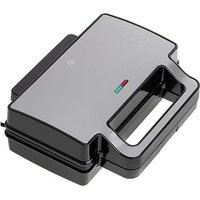
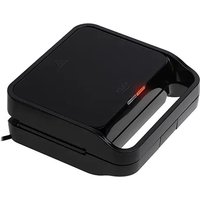
AD 3020 - Toaster ADLER - Free user manual and instructions
Find the device manual for free AD 3020 ADLER in PDF.


User questions about AD 3020 ADLER
0 question about this device. Answer the ones you know or ask your own.
Ask a new question about this device
Download the instructions for your Toaster in PDF format for free! Find your manual AD 3020 - ADLER and take your electronic device back in hand. On this page are published all the documents necessary for the use of your device. AD 3020 by ADLER.
USER MANUAL AD 3020 ADLER
natural_image
Exterior view of a modern office building (no signage)AD 3020
(GB) user manual
(F) mode d'emploi
SAFETY CONDITIONS. IMPORTANT INSTRUCTIONS ON SAFETY OF USE PLEASE READ CAREFULLY AND KEEP FOR FUTURE REFERENCE
The warranty conditions are different, if the device is used for commercial purpose.
-
Before using the product please read carefully and always comply with the following instructions. The manufacturer is not responsible for any damages due to any misuse.
-
The product is only to be used indoors. Do not use the product for any purpose that is not compatible with its application.
-
The appliacable voltage is 230V, \~50Hz. For safety reasons it is not appropriate to connect multiple devices to one power outlet.
-
Please be cautious when using around children. Do not let the children to play with the product. Do not let children or people who do not know the device to use it without supervision.
-
WARNING: This device may be used by children over 8 years of age and persons with reduced physical, sensory or mental capabilities, or persons without experience or knowledge of the device, only under the supervision of a person responsible for their safety, or if they were instructed on the safe use of the device and are aware of the dangers associated with its operation. Children should not play with the device.
Cleaning and maintenance of the device should not be carried out by children, unless they are over 8 years of age and these activities are carried out under supervision.
-
After you are finished using the product always remember to gently remove the plug from the power outlet holding the outlet with your hand. Never pull the power cable!!!
-
Never leave the product connected to the power source without supervision. Even when use is interrupted for a short time, turn it off from the network, unplug the power.
-
Never put the power cable, the plug or the whole device into the water. Never expose the product to the atmospheric conditions such as direct sun light or rain, etc.. Never use the product in humid conditions.
-
Periodically check the power cable condition. If the power cable is damaged the product should be turned to a professional service location to be replaced in order to avoid hazardous situations.
-
Never use the product with a damaged power cable or if it was dropped or damaged in any other way or if it does not work properly. Do not try to repair the defected product yourself because it can lead to electric shock. Always turn the damaged device to a professional service location in order to repair it. All the repairs can be done only by authorized service professionals. The repair that was done incorrectly can cause hazardous situations for the user.
-
Never put the product on or close to the hot or warm surfaces or the kitchen appliances like the electric oven or gas burner.
-
Never use the product close to combustibles.
-
Do not let cord hang over edge of counter.
-
Do not immerse the motor unit in water.
-
During or after use, please do not touch the baking tray or the hot area on the shell before the temperature goes down.
-
Open sandwich maker by holding the handle, after releasing the buckle (4).
-
Be careful, there can be hot steam presence during use of the appliance.
-
This electrical appliance contains a heating function. Surfaces, also different than the functional surfaces, can develop high temperatures. The equipment shall be touch only at intended handles and gripping surfaces, and use heat protection like gloves or similar. Surfaces other than intended gripping surfaces shall get sufficiently time to cool down before getting touched.
-
Let the device cool down before storage.

- Accessible surface temperatures can be high when the appliance is operating. Never touch the hot surfaces of the appliance.
DESCRIPTION OF DEVICE
(1) - lid of the sandwich maker
(2) - power indicator
(3) - ready indicator
(4) - buckle
BEFORE FIRST USE
- Remove all cartons and labels from housing and from inside (between hotplates).
- Wipe hotplates first with wet and next with dry damp cloth.
- Apply a bit of edible oil or other plant fat to the trays, close and plug in, the power indicator lamp will light (2).
- Keep the appliance running for few minutes to get ride of manufacturing odour. Sandiwch maker could emit some smoke during this time. That's normal.
- Clean unit according chapter "Cleaning sandwich maker".
USING SANDWICH MAKER
- Closed appliance plug in grounded socket - power indicator lamp will light (2).
- Wait 5 minutes. After this time sandwich maker should reach required temperature - ready indicator lamp will light (3).
- In the meanwhile, You can make sandwiches to toast. For example: put cheese, tomato and cured meat slices between slices of toast bread. Filling should not be placed to close to edges of the bread, for better welding of the bread slices.
- The sandwich maker is ready to use when the ready indicator lamp turn off(3).
- Open sandwich maker and put on the bottom baking tray prepared before sandwiches.
- Close sandwich maker and snap buckle (4) on the bottom half of the handle. Do not force the upshell (1) to close. Give attention to hot steam emanating from sides during opening and closing the upshell. Hot steam could emanate from under the lid during toasting.
- During toasting the ready indicator lamp (3) will be turning on and off, that's mean that thermostat keep appropriate temperature of the hotplates.
- Toasting time is approximately few minutes and depends on type of used bread, fillings and taste preference.
- Open fully the upshell (1) and take out sandwiches only with wood or plastic paddle.
NOTE! Do not use metal cutlery or other sharp kitchen tools to avoid scraping the nonstick surface of the baking trays. - Before putting next sandwiches close sandwich maker and wait for lighting the ready indicator (3). Turning on the ready indicator lamp (3) means that appropriate temperature has been reached and we can put sandwiches now.
- After use, unplug the electric plug and let appliance to cool down.
CLEANING SANDWICH MAKER
- Unplug the electric plug after use and wait for it to cool down before start cleaning.
- Wipe baking trays first with wet and next with dry damp cloth (you can also use paper towel).
- Hardest to clean dogh rests grease with oil and leave this like that. After few minutes remove this rests with wood paddle gently.
-
Please do not use any metal nor hard abrasive tool to wipe the interior/exterior of the machine body to avoid scraping the surface of the tray.
-
Do not immerse in water.
TECHNICAL DATA:
Voltage: 230V \~50Hz
Power: 700W
Device is made in class I of insulation and has to be connected only to power outlet with ground circuit. Device is compliant with EU directives: - Low voltage directive (LVD) - Electromagnetic compatibility (EMC) Device marked CE mark on rating label
DEUTSCH
text_image
ADLER EUROPESERWIS CENTRALNY
natural_image
Symbol of a trash bin crossed with no text or numbers, representing waste sorting or restriction (no text present)natural_image
Black rectangular appliance with a grid-patterned grille (no visible text or symbols)electric grill AD 6601
natural_image
Exterior view of a modern office building (no signage)convection oven AD 6304
natural_image
Close-up of a black and white disposable water heater (no visible text or symbols)sandwich maker AD 3015
natural_image
Clear glass coffee maker with black handle and silver casing (no visible text or symbols)electric kettle AD 1225

natural_image
Close-up of a black and silver electric shaver with three circular cutouts (no visible text or symbols)electric shaver AD 2901

natural_image
Exterior view of a modern stainless steel water dispenser (no visible text or symbols)coffee grinder AD 443
natural_image
Black and white photo of a modern juicer with handle and side arm (no visible text or symbols)juice extractor AD 4107

natural_image
Modern stainless steel industrial mixer with label 'ADLER' on the base (no other text or symbols visible)pepper mill AD 4434

natural_image
Black ADLER portable toaster with no visible text or symbols on the device bodytoaster AD 3206
ADLER
EUROPE

natural_image
White hairless shower device with circular vent and handle (no visible text or symbols)LINT
REMOVER
AD 9601

natural_image
ADLER-branded hairbrush and toothbrush kit on a black circular base (no text or symbols visible)TRIMMER
AD 2907

natural_image
Black outdoor table with grater and side legs, no visible text or symbolsELECTRIC GRILL
AD 6602
natural_image
White portable medical kit with black handle and label (no visible text or symbols)CAR COOLER
AD 806
natural_image
Black and white photo of a modern black water heater with 'ADLER' branding on the side (no additional text or symbols visible)KETTLE
AD 1220
natural_image
Black digital alarm clock with LCD display showing 12:38 (no visible text or symbols beyond brand and date)ALARM CLOCK
AD 1120

natural_image
Black hair dryer with black handle and white label (no visible text or symbols on body)HAIR DRYER
AD 2221

natural_image
Stacked transparent dishwashers with food containers, no visible text or symbolsFOOD DRYER
AD 6651
natural_image
Black electronic device with a rounded body and a small display screen (no visible text or symbols)LUGAGGE SCALE
AD 8126