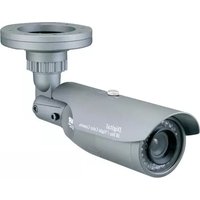
HDC577 - Security Camera Clover Electronics - Free user manual and instructions
Find the device manual for free HDC577 Clover Electronics in PDF.


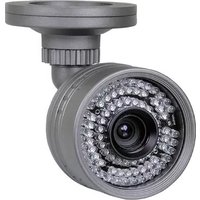
| Product Type | Bullet Security Camera |
| Image Sensor | 1/3" Sony Super HAD CCD (811H x 508V) |
| Effective Pixels | 768H x 494V |
| Horizontal Resolution | 560 TV Lines |
| Minimum Illumination | 0.01 Lux @ F1.2 |
| Lens | DC Auto Iris Vari-focal 4-9mm |
| IR Distance | Up to 80 ft (depends on scene reflection) |
| Weatherproof Rating | IP67 |
| Video Output | Composite 1.0Vp-p @ 75 Ω |
| Scanning System | 525 lines, 2:1 interlace |
| Shutter Speed | Auto, Manual (1/60 to 1/120,000 sec) |
| Signal-to-Noise Ratio | More than 50 dB (AGC off) |
| Power Supply | DC 15V, 1.5A (UL Approved AC Adapter included) |
| Current Consumption | 650 mA Max @ DC15V |
| Operating Temperature | -10°C to 50°C |
| Dimensions | 100(W) x 120(H) x 255(D) mm |
| Weight | 1.8 kg |
| Construction | Rugged Steel |
| Cable Length | 100 ft (6-pin Din cable included) |
| Mounting | Wall or ceiling mount with universal bracket |
| Cleaning | Use soft, clean cloth; avoid fingerprints on window |
| Safety | Do not open case; use only supplied AC adapter; keep away from strong magnetic fields |
| Warranty | 2 years limited (parts and labor) |
| Spare Parts / Accessories | CA100H 100' extension cable, CDR series DVRs |
Frequently Asked Questions - HDC577 Clover Electronics
User questions about HDC577 Clover Electronics
0 question about this device. Answer the ones you know or ask your own.
Ask a new question about this device
Download the instructions for your Security Camera in PDF format for free! Find your manual HDC577 - Clover Electronics and take your electronic device back in hand. On this page are published all the documents necessary for the use of your device. HDC577 by Clover Electronics.
USER MANUAL HDC577 Clover Electronics
- To avoid electrical shock, do not open the case of this product.
- Operate this product using only the supplied AC Power supply.
- Do not overload electrical outlets or extension cords; this can result in fire or electric shock.
- Keep this product away from strong magnetic fields.
- Do not expose this product in direct sunlight or strong reflected rays.
• Refer servicing to qualified personnel only. - Do not change or modify this product, the warranty will be voided.
FEATURES
- Weatherproof (IP67)
• 1/3" Sony Super HAD CCD
• High Resolution 560 TV Lines
• Rugged Steel Construction
• Total 22 Infrared LEDs with a CDS sensor - Up to 80' IR range (depends on scene reflection)
• DC Auto Iris Vari-focal Lens (4-9mm) - Attached Universal Mounting Bracket and 100' cable
- DC12V Power Source
INSTALLATION
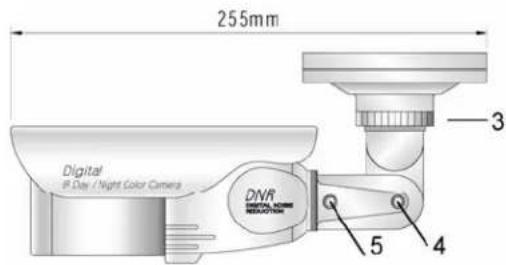
- Attach the mounting bracket base ring① to the wall or ceiling, wherever you want to install the camera. Locate a wall stud or ceiling joist and secure the bracket base ring using the supplied screws. Attach the mounting bracket② to the base ring① and secure them using the supplied screws.
- Lock the mounting bracket with the locking ring③.
- Turn the pivot locking screw ^④ with the provided hex-head wrench counterclockwise to set the desired angle of camera toward objects and turn it clockwise to secure. It can be used for wall-mount or ceiling-mount application depending on setting this pivot locking screw.
- Loosen the locking screw ^⑤ with the provided hex-head wrench and turn the camera clockwise or counter-clockwise to upright images on the screen and turn it clockwise to secure.
- Connect the one end of 100' cable (supplied) to the Din jack of 5' cable attached to the camera. Make sure that two arrows on the top of them should be aimed at each
other. Connect the other end (BNC or RCA) of cable to the video devices such as DVR, monitor/TV. Plug the provided AC adapter to the DC jack (red) of the end of 100' cable.

CEILING-MOUNT

WALL-MOUNT
HOW TO ADJUST ANGLE OF VIEW
- Vari-focal lens①
Easily changeable angle of view: 4 to 9mm
- Unplug the power supply and remove the sun-visor.
Turn the front cover② and ③ counter-clockwise to open and adjust angle of view. Do not stamp your fingerprint on the window, which may affect picture quality.
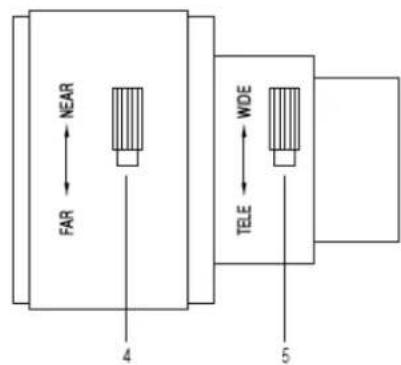
- T↔W (Tele ↔ Wide)⑤
Loosen the locking knob⑤ with a (-) driver (not included) and turn this adjustment knob⑤ clockwise or counter-clockwise to set the focal length. Secure the locking knob⑤ after setting.
- N④
Loosen the locking knob④ with a (-) driver (not included) and turn this adjustment knob④ clockwise or counter-clockwise to set the focus. Secure the locking knob④ after setting.
- Assemble the cover ③, ② and sun-visor. They should be securely fastened so that water can not leak into the camera.

Note:
■ Apply the provided AC adapter only.
- The total length of cable must not exceed 200' including extension cable.
TROUBLE SHOOTING
If the camera does not function properly, check the following points before contacting the service center.
| Troubles | Remedies |
| No video Check the AC adapter and video | cable between the camera and a monitor |
| The image on the screen is dark Check the | brightness control on the monitor |
| The image on the screen is dim Check if the | lens is stained. If dirty, clean it with soft and clean cloth |
| The camera is not working properly, and the surface of the camera case is hot | Check if you have connected the provided AC adapter |
| The contrast on the screen is too weak Adjust | just the contrast feature of the monitor. If the camera is exposed under too strong light, change the position |
| The image on the screen flickers Does the | camera face to directly to the sunlight or fluorescent light? Change the camera position |
| Picture rolls and jumps, scrambled picture | Improper V-hold control. Setting on your monitor |
| Picture smaller than screen House current | may be too low |
SPECIFICATIONS
- Image sensor 1/3" Sony Super HAD CCD, 811H x 508V
• Effective pixels
768H x 494V
- Scanning system
525 lines, 2:1 interlace
• Horizontal resolution 560 TV lines
- Shutter speed Auto, Manual (1/60 to 1/120,000 sec)
- Sync. System
Internal
- S/N ratio
more than 50db (AGC off)
• Minimum illumination 0.01 Lux @F1.2
- Video output
Composite 1.0Vp-p @75 Ω
- AGC
Auto
• Digital Noise Reduction Auto
- White balance
Auto
- Lens
DC Auto Iris Vari-focal Lens 4mm to 9mm
- Current consumption
650mA Max @DC15V
- Power supply
DC 15V, 1.5A
- Operating temperature
-10°C to 50°C
- Dimensions
100(W) x 120(H) x 255(D) mm
- Weight
1.8Kg
LIMITED 2 YEAR WARRANTY
This warranty gives the original purchaser specific legal rights and you may also have other rights, which vary from state to state. If our products do not function because of any defect in material or workmanship, we will repair free of charges for 2 years on parts and labor from the date of original purchase. This warranty does not cover modification, abuse, incidental or consequential damages unless the state of owner's residence specially prohibits limitations on incidental or consequential damages.
HOW TO OBTAIN FACTORY SERVICE
- Original purchaser must fill out a warranty card and mail it to the factory with model number, serial number and the date of purchase.
- We will repair or replace, and return to the owner the system under this limited warranty.
- Please pack the system carefully and securely using the original packing materials, and send it prepaid and insured to: 13073 E. 166 ^th St, Cerritos, CA 90703.
- Please include a check for \$25.00 to cover the cost of return postage and handling. If the system is returned within the warranty period, please include a proof of purchase. If the system is out of warranty, you will receive an estimate of the repair cost for your approval before repair work will be begun.
AVAILABLE ACCESSORIES
| CDR4010 | Stand-alone |
| CDR4170 | Stand-alone |
| CDR1610 | Stand-alone |
| CDR0850 | Stand-alone |
| CA100H 100' 6pin Din Extension cable | |
4 CH Digital Video Recorder (DVR).
4 CH Digital Video Recorder (DVR).
16 CH Digital Video Recorder (DVR).
8 CH Digital Video Recorder (DVR).
PACKAGE INCLUDES
1-Vari-focal Bullet Day & Night Color Camera
1-100' 6pin Din Cable
1-UL Approved AC Adapter
1-BNC to RCA Adapter
1-Hardware Accessories Kit
1-Instruction Manual
1-Warranty Registration Card
Brand : Clover Electronics
Model : HDC577
Category : Security Camera