
HL-4050 - Printer BROTHER - Free user manual and instructions
Find the device manual for free HL-4050 BROTHER in PDF.


User questions about HL-4050 BROTHER
0 question about this device. Answer the ones you know or ask your own.
Ask a new question about this device
Download the instructions for your Printer in PDF format for free! Find your manual HL-4050 - BROTHER and take your electronic device back in hand. On this page are published all the documents necessary for the use of your device. HL-4050 by BROTHER.
USER MANUAL HL-4050 BROTHER
Brother Laserprinter
GEBRUIKERSHANDLEIDING
natural_image
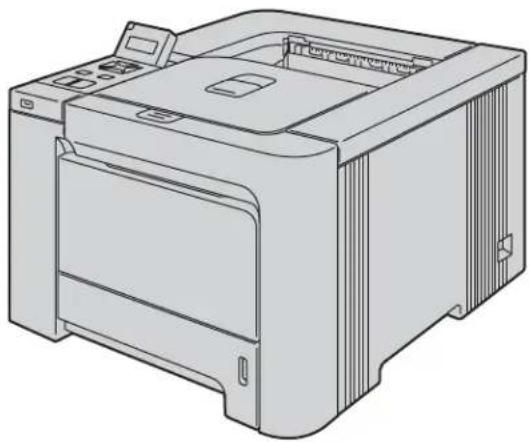
Line drawing of a printer with front panel and side ports (no text or symbols)HL-4040CN HL-4050CDN HL-4070CDW
Voor slechtzienden

natural_image
Illustration of hands cleaning a wall-mounted electrical outlet with water droplets (no text or symbols)
natural_image
Diagram of a printer internal structure showing internal components and a warning symbol (no text or labels present)natural_image
Two people holding a large screen or monitor, viewed from behind (no text or symbols visible)VOORZICHTIG
©2007 Brother Industries Ltd.
C Appendix (for USA and Canada) 194
Brother numbers....194
Important information: regulations ....197
Federal Communications Commission (FCC) Declaration of Conformity (USA only) 197
Industry Canada Compliance Statement (Canada only) 198
Laser safety (110 to 120 volt model only)....199
FDA regulations (110 to 120 volt model only)....199
Internal laser radiation....199
IMPORTANT - for your safety ....200
D l n d e x 2 0 1
1 Over deze printer
natural_image
Two silhouettes of two people exchanging a blue rectangular object (no text or symbols visible)2 Afdrukmethoden
Over papier
natural_image
Five line drawings of folded paper or plastic sheets, showing different shapes and shading (no text or symbols)natural_image
Illustration of a printer being inserted into a plastic case, with a hand holding the case (no text or symbols present)2
natural_image
Illustration of a hand pressing down on a blue plastic tray inside a mechanical device (no text or symbols)natural_image
Illustration of a printer being cleaned with a blue tool, showing the printer's lid and paper roll (no text or symbols present)natural_image
Illustration of a printer being inserted into a paper airplane, showing the printer's internal structure and blue motion arrows (no text or symbols)natural_image
Diagram of a printer with paper feed and paper roll, showing internal components without any text or symbolsnatural_image
Illustration of a printer being inserted into a paper airplane, showing the printer's internal structure and the paper's edge being removed (no text or symbols present)2
natural_image
Diagram of a printer with a blue cover and paper tray, showing internal components and a magnified inset view (no text or symbols)natural_image
Line drawing of a printer with paper being inserted, showing internal components and no text or symbolsnatural_image
Diagram showing a printer being inserted into a paper airplane, with a magnified inset illustrating the process (no text or symbols present)natural_image
Diagram of a printer with paper feed and paper roll, showing internal components without any text or symbolsnatural_image
Illustration of a printer being inserted into a paper airplane, showing the printer's internal structure and the hand holding a plastic clip (no text or symbols present)natural_image
Illustration of a printer being inserted into a paper airplane, showing the printer's internal structure and part of the airplane interior (no text or symbols present)
Opmerking
natural_image
Line drawing of a printer with paper inside, showing internal components and a blue plastic clip (no text or symbols)natural_image
Line drawing of a printer with paper feed and paper tray (no text or symbols)natural_image
Line drawing of a refrigerator with a blue tag and label pointing to the door (no text or symbols present)flowchart
graph TD
    A["Direct Print\n1./XXXX.MAP1"] --> B["/XXXX.MAP1\n3.XXXX.PDF"]
Druk op OK.
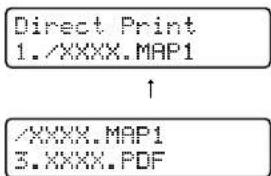
Druk op Back.
LPR-driver
CUPS-driver
■ Brother Solutions Center (1)

Toetsen
Kies ▲▼ of OK Machine-info
flowchart
graph TD
    A["Kies ▲▼ of OK Machine-info"] --> B["Kies ▲▼ of OK LAN"]
2 Druk op OK.
LAN
TCP/IP
3 Druk op OK.
TCP/IP
BOOT Method
IP Address
123.45.67.89
flowchart
graph TD
    A["Kies ▲▼ of OK\nMachine-info"] --> B["Kies ▲▼ of OK\nLAN"]
natural_image
Line drawing of a printer with an open lid and internal structure (no text or symbols)natural_image
Cross-sectional diagram of a printer internal structure (no text or labels visible)VOORZICHTIG
Brother strongly recommends that you do not refill the toner cartridge provided with your printer. We also strongly recommend that you continue to use only genuine Brother brand replacement toner cartridges. Use or attempted use of potentially incompatible toner and/or cartridges in the Brother machine may cause damage to the machine and/or may result in unsatisfactory print quality. Our warranty coverage does not apply to any problem that is caused by the use of unauthorized third party toner and/or cartridges. To protect your investment and obtain premium performance from the Brother machine, we strongly recommend the use of genuine Brother supplies.
VOORZICHTIG
natural_image
Illustration of a printer being inserted into an open stacker machine, showing the process with no text or symbols.natural_image
Illustration of a printer's internal structure before and after disassembly, showing the printer's open base and internal components (no text or symbols present)natural_image
Diagram of a printer internal structure showing internal components and a hand operating the top part (no text or symbols present)VOORZICHTIG
natural_image
Three technical illustrations showing hands operating a mechanical device with no visible text or symbolsOpmerking
VOORZICHTIG
natural_image
Technical illustration of a mechanical assembly with hands installing components, showing internal structure and a magnified inset (no text or symbols)natural_image
Illustration of hands holding a CD or scanner device with a blue arrow indicating the scroll (no text or symbols present)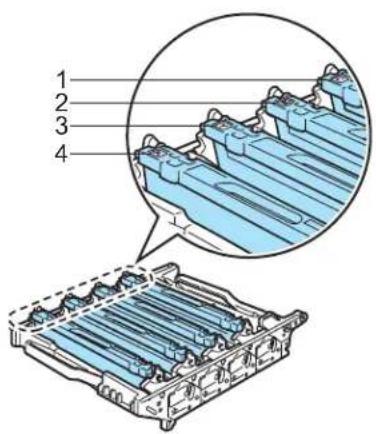
1.C - Cyaan
2.M - Magenta
3.Y - Geel
4.K - Zwart
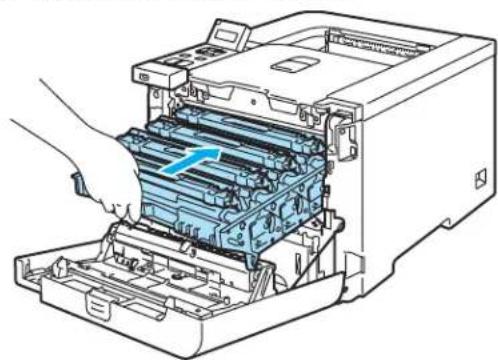
8 Plaats de drumkit weer in de printer.
natural_image
Illustration of a printer's internal structure showing a blue rack with a blue arrow indicating the component (no text or symbols present)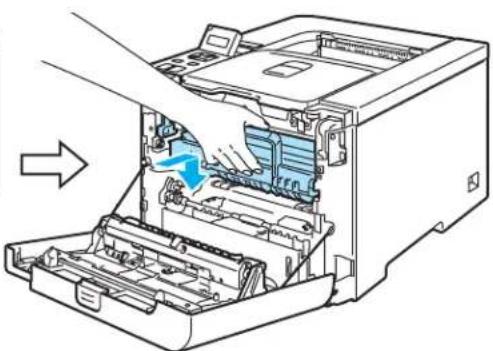
natural_image
Diagram of a printer internal structure showing internal components and a blue arrow indicating motion (no text or symbols present)natural_image
Diagram of a printer internal structure showing paper feeding into a stacker machine (no text or labels)Drumkit
Bestelnr. DR-130CL
natural_image
Diagram showing two steps of a printer press operation: adding a blue cable to the internal structure, then adding a blue cable into the internal frame (no text or symbols present)natural_image
Illustration of a computer printer internal structure being processed, showing part assembly and disassembly (no text or symbols present)VOORZICHTIG
natural_image
Two technical illustrations showing hands holding a mechanical component, with no visible text or symbols.natural_image
Mechanical assembly diagram showing a blue cylindrical component being inserted into a metal frame (no text or symbols visible)VOORZICHTIG
natural_image
Technical diagram of a printer internal structure with blue arrows indicating flow or movement, no visible text or symbolsnatural_image
Three technical illustrations showing hands assembling a mechanical component, with no visible text or symbols.VOORZICHTIG

Opmerking
natural_image
Diagram showing two views of a computer printer's internal structure before and after disassembly, with no visible text or symbols.natural_image
Illustration of a printer being inserted into a stacker machine, showing the process with no text or symbols.natural_image
Diagram showing a printer's internal structure before and after disassembly, with no text or symbols present.natural_image
Diagram showing a printer's internal structure being processed, with a magnified inset highlighting the mechanical component (no text or symbols present)VOORZICHTIG
natural_image
Illustration of hands handling a mechanical component with no visible text or symbols
natural_image
Illustration of hands assembling a mechanical component with blue X-shaped overlay (no text or symbols)natural_image
Technical diagram of a printer internal structure with blue directional arrows indicating airflow or movement (no text or symbols present)natural_image
Diagram showing two views of a printer's internal structure before and after assembly, with no visible text or symbols.natural_image
Diagram showing a mechanical component being processed with a blue tray, accompanied by a magnified inset illustrating the process (no text or symbols present)
Opmerking
natural_image
Diagram showing two views of a printer's internal structure before and after assembly, with no visible text or symbols.natural_image
Diagram showing two steps of file processing: opening a printer into a rack and inserting into a drive into a stacker (no text or symbols present)natural_image
Diagram showing a computer presser's internal structure being processed, with a magnified inset highlighting the component (no text or symbols present)VOORZICHTIG
natural_image
Illustration of hands handling a mechanical component with rollers (no text or symbols)
natural_image
Illustration of hands holding a mechanical component with blue X-shaped markers (no text or symbols)natural_image
Technical diagram of a printer internal structure with blue airflow arrows indicating flow direction (no text or symbols present)natural_image
Illustration of a printer's internal structure with a hand inserting a component (no text or symbols visible)
VOORZICHTIG
natural_image
Diagram of a printer internal structure showing internal components and a hand inserting a component (no text or symbols present)Opmerking
natural_image
Diagram showing a printer's internal structure before and after disassembly, with no text or symbols present.natural_image
Line drawing of a printer with a hand operating it (no text or symbols)natural_image
Line drawing of a hand inserting or adjusting a component into a plastic housing (no text or symbols)natural_image
Illustration of a printer being inserted into a stacker machine, showing the process with no text or symbols.natural_image
Diagram showing two views of a printer's internal structure before and after assembly, with no visible text or symbols.natural_image
Diagram showing a computer tower with internal components being processed, including a close-up of the tower's internal structure (no text or symbols present)VOORZICHTIG
natural_image
Illustration of hands handling a mechanical component with rollers (no text or symbols)
natural_image
Illustration of hands assembling a mechanical component with blue X-shaped markers (no text or symbols)natural_image
Diagram of a printer internal structure with blue arrows indicating flow or movement, showing no text or symbols.natural_image
Line drawing of an open industrial machine with internal components and a hand operating it (no text or symbols visible)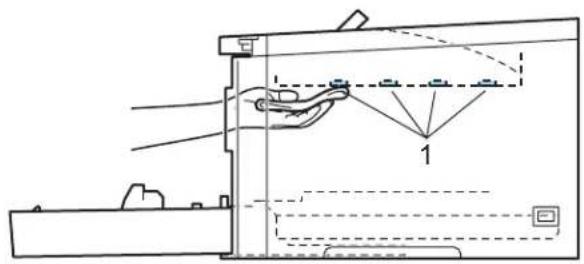

Opmerking
natural_image
Diagram showing two views of a printer's internal structure before and after disassembly, with no text or symbols present.natural_image
Illustration of a printer being inserted into an open file, showing the process with a magnified view of the printer's handle (no text or symbols present)natural_image
Diagram showing two views of a printer's internal structure before and after assembly, with no visible text or symbols.natural_image
Line drawing of a printer internal structure showing internal components and a hand inserting a component (no text or symbols present)VOORZICHTIG
natural_image
Illustration of three different mechanical components with hands operating, showing assembly or assembly steps (no text or symbols present)
Opmerking
VOORZICHTIG
natural_image
Technical illustration of a printer internal structure showing internal components and assembly (no text or symbols)1.C - Cyaan
2.M - Magenta
3.Y - Geel
4.K - Zwart
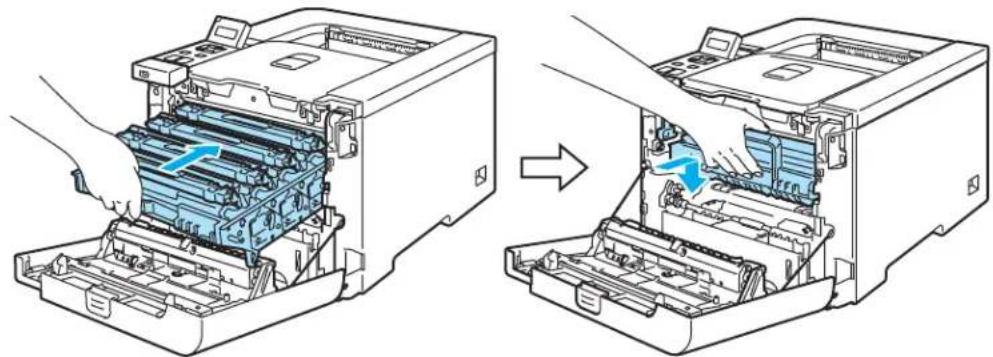
9 Plaats de drumkit weer in de printer.
natural_image
Diagram showing two views of a printer's internal structure before and after disassembly, with no visible text or symbols.natural_image
Illustration of a mechanical assembly process showing hand turning a component and then rolling a roller (no text or symbols present)6

VOORZICHTIG
natural_image
Illustration of hands handling a mechanical device with rollers and a blue cover (no text or symbols)natural_image
Illustration of a hand using a tool to press or install a mechanical component, with no visible text or symbols.natural_image
Illustration of hands holding a mechanical device with blue rollers (no text or symbols visible)VOORZICHTIG
natural_image
Diagram showing a hand operating a mechanical component with a magnified inset highlighting the mechanism (no text or symbols present)natural_image
Illustration of a printer being inserted into a stacker machine, showing the process with no text or symbols.natural_image
Diagram showing two steps of inserting a printer into a rack, with no visible text or symbols.natural_image
Diagram showing a computer tower with internal components being processed, including a close-up of the tower's internal structure (no text or symbols present)VOORZICHTIG
natural_image
Illustration of hands assembling a mechanical component (no text or symbols visible)
natural_image
Illustration of hands assembling a mechanical component with no visible text or symbolsnatural_image
Technical diagram of a printer internal structure with blue arrows indicating airflow or movement, showing no text or symbols.natural_image
Technical illustration of a mechanical assembly with blue components and directional arrows indicating motion (no text or symbols)VOORZICHTIG
natural_image
Illustration of three mechanical assembly steps showing hand-cranked components (no text or symbols)natural_image
Diagram showing a printer's internal structure being cut with a blue arrow indicating rotation (no text or symbols present)natural_image
Diagram showing two views of a printer's internal structure before and after assembly, with no visible text or symbols.
Opmerking
natural_image
Technical illustration of a printer internal structure with a hand inserting a component (no text or symbols present)natural_image
Diagram showing mechanical assembly with two views of a device (no text or symbols present)natural_image
Illustration of hands operating a printer with a blue arrow indicating the paper's front panel (no text or symbols present)natural_image
Diagram showing a printer's internal structure before and after disassembly, with no text or symbols present.natural_image
Technical diagram of a mechanical assembly with multiple cylindrical components and blue flow arrows indicating motion (no text or labels)■ Vast in MP lade (1)
Papier vastgelopen in de multifunctionele lade. (Raadpleeg pagina 148.)
■ Vast in lade1 (2)
Papier vastgelopen in de standaardpapierlade (Lade 1). (Raadpleeg pagina 148.)
■ Vast in lade2 (3)
natural_image
Illustration of two hands holding a folded paper or document, with motion lines indicating movement (no text or symbols present)natural_image
Illustration of a printer being inserted into a plastic tray, with a hand holding the tray (no text or symbols present)natural_image
Illustration of a printer being scanned into a blue sheet, with hands holding the paper (no text or symbols visible)natural_image
Illustration of a printer being inserted into a plastic tray, with a hand holding the tray (no text or symbols present)natural_image
Illustration of hands holding a blue plastic tray inside a rack (no text or symbols)
Opmerking
natural_image
Line drawing of a printer or printer casing with a blue arrow indicating rotation (no text or symbols present)
HEET
natural_image
Technical diagram of a mechanical device with internal components and grid structure (no text or symbols)natural_image
Illustration of hands operating a printer with a blue paper sheet being inserted (no text or symbols visible)natural_image
Technical line drawing of a mechanical device with internal components (no text or symbols)
natural_image
Technical diagram of a computer motherboard showing internal components and ventilation slots (no text or labels)natural_image
Line drawing of a printer or scanner device with a blue cover and directional arrow (no text or symbols)natural_image
Line drawing of a printer with a blue plastic clip inserted into the output (no text or symbols)
HEET
natural_image
Technical diagram of a mechanical device with internal components and no visible text or symbolsnatural_image
Technical line drawing of an open industrial machine with internal components (no text or symbols)
natural_image
Technical diagram of a printer internal structure showing internal components and ventilation slots (no text or labels)natural_image
Diagram showing two steps of a printer press operation: adding a blue plastic component to the left and adding a blue plastic component to the right (no text or symbols present)
Opmerking
natural_image
Diagram showing a printer's internal structure being processed, with a magnified inset highlighting the mechanical component (no text or symbols present)VOORZICHTIG
natural_image
Illustration of hands handling a mechanical component with rollers (no text or symbols)
natural_image
Illustration of hands holding a mechanical component with blue X-shaped markers (no text or symbols)natural_image
Technical diagram of a printer internal structure with blue arrows indicating flow or movement, showing no text or symbols.natural_image
Illustration of hands operating a printer with a blue arrow indicating compression or disassembly (no text or symbols present)
Opmerking
natural_image
Illustration of a printer's internal structure before and after disassembly, showing internal components and blue arrows indicating motion (no text or symbols present)Desktop (7J) Greek8 (8G)
HP German (0G) HP Spanish (1S)
ISO Latin1 (0N) ISO Latin2 (2N)
ISO Latin5 (5N) ISO Latin6 (6N)
ISO2 IRV (2U) ISO4 UK (1E)
ISO5 ASCII (0U) ISO10 Swedish (3S)
ISO11 Swedish (0S) ISO14 JIS ASCII (0K)
ISO15 Italian (0I) ISO16 Portuguese (4S)
ISO17 Spanish (2S) ISO21 German (1G)
ISO25 French (0F) ISO57 Chinese (2K)
ISO60 Norwegian1 (0D) ISO61 Norwegian2 (1D)
ISO85 Spanish (6S) ISO8859 / 7 Latin / Greek (12N)
ISO8859 / 15 Latin (9N) ISO8859 / 15 Latin / Cyrillic (10N)
Legal (1U) Math-8 (8M)
MC Text (12J) MS Publishing (6J)
PC8 (10U) PC8 Bulgarian (13R)
PC8 D/N (11U) PC8 Greek Alternate (437G) (14G)
PC8 Latin / Greek (12G) PC8 PC Nova (27Q)
PC8 Turkish (9T) PC775 (26U)
PC850 Multilingual (12U) PC851 Greece (10G)
PC852 East Europe (17U) PC853 Latin3 (Turkish) (18U)
PC855 Cyrillic (10R) PC857 Latin5 (Turkish) (16U)
PC858 Multilingual Euro (13U) PC860 Portugal (20U)
PC861 Iceland (21U) PC863 Canadian French (23U)
PC865 Nordic (25U) PC866 Cyrillic (3R)
PC869 Greece (11G) PC1004 (9J)
Pi Font (15U) PS Math (5M)
PS Text (10J) Roman8 (8U)
Roman9 (4U) Roman Extension (0E)
Russian-GOST (12R) Symbol (19M)
n = 's1' of 'S1' 2: 1
n = 's3' of 'S3' 2.5: 1
(1) 'T5' of 't5'
(2) 'T6' of 't6'
(3) 'T130' of 't130'
(4) 'T131' of 't131'
Vooringesteld: Door mensen leesbare regel UIT
Alle andere
n = 'u1' of 'U1' 1/10
n = 'u2' of 'U2' 1/100
n = 'u3' of 'U3' 1/12
n = 'u4' of 'U4' 1/120
n = 'u5' of 'U5' 1/10 mm
n = 'u6' of 'U6' 1/300
n = 'u7' of 'U7' 1/720
http://www.brother.com/registration/
http://solutions.brother.com
KLASS 1 LASER APPARAT

Varoitus!
natural_image
Symbol of a trash bin crossed with two diagonal lines, above a horizontal bar (no text or numbers present)If you need to replace the plug fuse, fit a fuse that is approved by ASTA to BS1362 with the same rating as the original fuse.
Always replace the fuse cover. Never use a plug that does not have a cover.
Warning - This printer must be earthed.
The wires in the mains lead are coloured in line with the following code:
■ Green and Yellow: Earth
Blue: Neutral
Brown: Live
If in any doubt, call a qualified electrician.
EC Declaration of Conformity
Manufacturer
Brother Industries Ltd.,
15-1, Naeshiro-cho, Mizuho-ku, Nagoya 467-8561, Japan
Plant
Brother Technology (Shenzhen) Ltd.,
NO6 Gold Garden Ind. Nanling Buji, Longgang, Shenzhen, China
Herewith declare that:
Products description : Laser Printer
Product Name : HL-4040CN, HL-4050CDN
Model Number : HL-40C
are in conformity with provisions of the Directives applied : Low Voltage Directive 73/23/EEC (as amended by 93/68/EEC) and the Electromagnetic Compatibility Directive 89/336/EEC (as amended by 91/263/EEC and 92/31/EEC and 93/68/EEC).
Products description : Laser Printer
Product Name : HL-4070CDW
Model Number : HL-40C
is in conformity with provisions of the R & TTE Directive (1999/5/EC) and we declare compliance with the following standards:
Harmonized standards applied :
Safety EN60950-1:2001+A11:2004
EMC EN55022: 1998+A1: 2000+A2: 2003 Class B
EN55024: 1998 +A1: 2001 +A2: 2003
EN61000-3-2: 2000
EN61000-3-3: 1995 +A1: 2001
Radio EN301 489-1 V1.6.1
EN301 489-17 V1.2.1
EN300 328 V1.6.1
※ Radio applies to HL-4070CDW only.
Year in which CE marking was first affixed: 2006
Issued by : Brother Industries, Ltd.
Date : 1st October, 2006
Place : Nagoya, Japan
Signature

Junji Shiota
General Manager
Quality Management Dept.
Printing & Solutions Company
C
Appendix (for USA and Canada)
Brother numbers
BELANGRIJK
For technical and operational help, you must call the country where you bought the printer. Calls must be made from within that country.
Register your product
By registering your product with Brother International Corporation, you will be recorded as the original owner of the product.
Your registration with Brother:
■ may serve as a confirmation of the purchase date of your product should you lose your receipt;
■ may support an insurance claim by you in the event of product loss covered by insurance; and,
■ will help us notify you of enhancements to your product and special offers.
Please complete the Brother Warranty Registration or, for your convenience and most efficient way to register your new product, register on-line at
http://www.brother.com/registration/
FAQs (frequently asked questions)
The Brother Solutions Center is our one-stop resource for all your printer needs. You can download the latest software and utilities and read FAQs and troubleshooting tips to learn how to get the most from your Brother product.
http://solutions.brother.com
You can check here for Brother driver updates.
Customer Service
In USA: 1-877-284-3238
If you have comments or suggestions, please write us at:
In USA: Printer Customer Support
Brother International Corporation
26250 Enterprise Ct. # 250
Lake Forest, CA 92630
In Canada: Brother International Corporation (Canada), Ltd.
- Marketing Dept.
Service center locator (USA only)
For the location of a Brother authorized service center, call 1-800-284-4357.
Service center locations (Canada only)
For the location of a Brother authorized service center, call 1-877-BROTHER
Internet addresses
Brother Global Web Site: http://www.brother.com
For Frequently Asked Questions (FAQs), Product Support and Technical Questions, and Driver Updates and Utilities: http://solutions.brother.com
(In USA Only) For Brother Accessories & Supplies: http://www.brothermall.com
Ordering supplies
For best quality results use only genuine Brother supplies, which are available at most Brother retailers. If you cannot find the supplies you need and you have a Visa, MasterCard, Discover, or American Express credit card, you can order supplies directly from Brother. (You can visit us online for a complete selection of the Brother accessories and supplies that are available for purchase.)
In USA: 1-877-552-MALL (6255)
1-800-947-1445 (fax)
http://www.brothermall.com
In Canada: 1-877-BROTHER
http://www.brother.ca
| Description Item | |
| Toner Cartridges TN-110BK (Standard, prints approx. 2,500 pages, Black)TN-110C (Standard, prints approx. 1,500 pages, Cyan)TN-110M (Standard, prints approx. 1,500 pages, Magenta)TN-110Y (Standard, prints approx. 1,500 pages, Yellow)TN-115BK (High Yield, prints approx. 5,000 pages,Black)TN-115C (High Yield, prints approx. 4,000 pages, Cyan)TN-115M (High Yield, prints approx. 4,000 pages, Magenta)TN-115Y (High Yield, prints approx. 4,000 pages, Yellow) | |
| Drum Unit DR-110CL | |
| Waste Toner Box WT-100CL | |
| Belt Unit BU-100CL | |
| Lower Tray LT-100CL | |
Important information: regulations
Federal Communications Commission (FCC) Declaration of Conformity (USA only)
Responsible Party: Brother International Corporation
100 Somerset Corporate Boulevard
P.O. Box 6911
Bridgewater, NJ 08807-0911
USA
Telephone: (908) 704-1700
declares, that the products
Product name: Laser Printer HL-4040CN, HL-4050CDN and HL-4070CDW
Model number: HL-40C
Product option: Lower Tray Unit LT-100CL
complies with Part 15 of the FCC Rules. Operation is subject to the following two conditions: (1) This device may not cause harmful interference, and (2) this device must accept any interference received, including interference that may cause undesired operation.
This equipment has been tested and found to comply with the limits for a Class B digital device, pursuant to Part 15 of the FCC Rules. These limits are designed to provide reasonable protection against harmful interference in a residential installation. This equipment generates, uses, and can radiate radio frequency energy and, if not installed and used in accordance with the instructions, may cause harmful interference to radio communications. However, there is no guarantee that interference will not occur in a particular installation. If this equipment does cause harmful interference to radio or television reception, which can be determined by turning the equipment off and on, the user is encouraged to try to correct the interference by one or more of the following measures:
■ Reorient or relocate the receiving antenna.
■ Increase the separation between the equipment and receiver.
■ Connect the equipment into an outlet on a circuit different from that to which the receiver is connected.
- Consult the dealer or an experienced radio/TV technician for help.
Important
A shielded interface cable should be used to ensure compliance with the limits for a Class B digital device. Changes or modifications not expressly approved by Brother Industries, Ltd. could void the user's authority to operate the equipment.
Industry Canada Compliance Statement (Canada only)
Laser safety (110 to 120 volt model only)
This printer is certified as a Class 1 laser product under the U.S. Department of Health and Human Services (DHHS) Radiation Performance Standard according to the Radiation Control for Health and Safety Act of 1968. This means that the printer does not produce hazardous laser radiation.
Since radiation emitted inside the printer is completely confined within protective housings and external covers, the laser beam cannot escape from the machine during any phase of user operation.
FDA regulations (110 to 120 volt model only)
The U.S. Food and Drug Administration (FDA) has implemented regulations for laser products manufactured on and after August 2, 1976. Compliance is mandatory for products marketed in the United States. The following label on the back of the printer indicates compliance with the FDA regulations and must be attached to laser products marketed in the United States.
MANUFACTURED:
Brother Technology (Shenzhen) Ltd.
NO6 Gold Garden Ind., Nanling Buji, Longgang, Shenzhen, China
This product complies with FDA performance standards for laser products except for deviations pursuant to Laser Notice No.50, dated July 26, 2001.
Caution
Use of controls, adjustments or performance of procedures other than those specified in this User's Guide may result in hazardous invisible radiation exposure.
Internal laser radiation
Maximum radiation power: 25 mW
Wave length: 780 - 800 nm
Laser class: Class 3B
IMPORTANT - for your safety
To ensure safe operation, the supplied three-pin plug must be inserted only into a standard three-pin power outlet that is properly grounded through the standard electrical wiring.
Extension cords used with this printer must be three-pin plug type and correctly wired to provide proper grounding. Incorrectly wired extension cords may cause personal injury and equipment damage.
The fact that the equipment operates satisfactorily does not imply that the power is grounded and that the installation is completely safe. For your safety, if in any doubt about the effective grounding of the power, call a qualified electrician.
This product should be connected to an AC power source within the range indicated on the rating label. DO NOT connect it to a DC power source. If you are not sure, contact a qualified electrician.
Disconnect device
You must install this printer near a power outlet that is easily accessible. In case of an emergency, you must disconnect the AC power cord from the AC power outlet to shut off the power completely.
Caution for LAN connection
Connect this product to a LAN connection that is not subjected to overvoltages.
D
Index
Symbols
+ of - 70
A
Afdrukkwaliteit 39
Afmetingen 175
Alarm-lampje 71
Brother Numbers (USA/Canada) 194, 195
BR-Script 3 170
Direct Print 29,85,173
LED (light emitting diode) 71
Lettertypen 172
Linux 33
M
Machine-info 77
Macintosh ^® 54, 170
Menu-instellingen 77
Multifunctionele lade 14
multifunctionele lade 22
N
Netwerk 66
NETWERK menu 82, 83
Register your product 194
Registreer dit product 189
Reprint 42, 56, 69, 70
Reset Menu 84
S
Scannervenster 125
Service centers (USA/Canada) 195
Servicecentra (Europa en andere landen) 189
Servicemeldingen 144, 145
SO-DIMM 93
Software 66
Specificaties 171
Standaardinst. 79
Standaardinstellingen 88
Symbolen 180
T
Tabblad Accessoires 44
TCP/IP 83
Tekensets 180
Toetsen 69
Tonercartridge 98
- Brother Laserprinter
- GEBRUIKERSHANDLEIDING
- Voor slechtzienden
- VOORZICHTIG
- C Appendix (for USA and Canada) 194
- Over deze printer
- Afdrukmethoden
- Over papier
- Opmerking
- ■ Brother Solutions Center (1)
- Toetsen
- Drumkit
- HEET
- Varoitus!
- Warning - This printer must be earthed.
- EC Declaration of Conformity
- C
- Appendix (for USA and Canada)
- Brother numbers
- BELANGRIJK
- Register your product
- FAQs (frequently asked questions)
- Customer Service
- Service center locator (USA only)
- Service center locations (Canada only)
- Internet addresses
- Ordering supplies
- Important information: regulations
- Federal Communications Commission (FCC) Declaration of Conformity (USA only)
- Important
- Industry Canada Compliance Statement (Canada only)
- Laser safety (110 to 120 volt model only)
- FDA regulations (110 to 120 volt model only)
- Caution
- Internal laser radiation
- IMPORTANT - for your safety
- Disconnect device
- Caution for LAN connection
- D
- Index
- Symbols
- A
- M
- N
- S
- T
Brand : BROTHER
Model : HL-4050
Category : Printer