e-studio 242 - Printer TOSHIBA - Free user manual and instructions
Find the device manual for free e-studio 242 TOSHIBA in PDF.


| Product Type | Monochrome Laser Printer |
| Brand | Toshiba |
| Model | e-studio 242 |
| Print Speed (Black) | Up to 24 ppm |
| Resolution | 600 x 600 dpi |
| Paper Size | A4, A5, Letter, Legal |
| Input Capacity | 250 sheets (standard) |
| Output Capacity | 100 sheets (face down) |
| Connectivity | USB 2.0, Ethernet (10/100) |
| Dimensions (W x D x H) | 400 x 370 x 230 mm |
| Weight | Approx. 9.5 kg |
| Power Consumption (Print) | 550W (average) |
| Power Consumption (Standby) | 10W |
| Input Voltage | 220-240V AC, 50/60 Hz |
| Main Functions | Print, Copy, Scan (optional) |
| Maintenance | Replace toner cartridge and drum unit as needed |
| Cleaning | Wipe exterior with dry cloth; keep ventilation slots clean |
| Safety | Class 1 Laser Product; use only approved power cord |
| Spare Parts | Toner (T-242), Drum (D-242), Fuser unit, Transfer roller |
| General Information | Energy Star compliant; quiet operation |
Frequently Asked Questions - e-studio 242 TOSHIBA
User questions about e-studio 242 TOSHIBA
0 question about this device. Answer the ones you know or ask your own.
Ask a new question about this device
Download the instructions for your Printer in PDF format for free! Find your manual e-studio 242 - TOSHIBA and take your electronic device back in hand. On this page are published all the documents necessary for the use of your device. e-studio 242 by TOSHIBA.
USER MANUAL e-studio 242 TOSHIBA
MULTIFUNCTIONELE DIGITALE SYSTEMEN
Kopieerhandleiding
e-STUDIO182/212/242
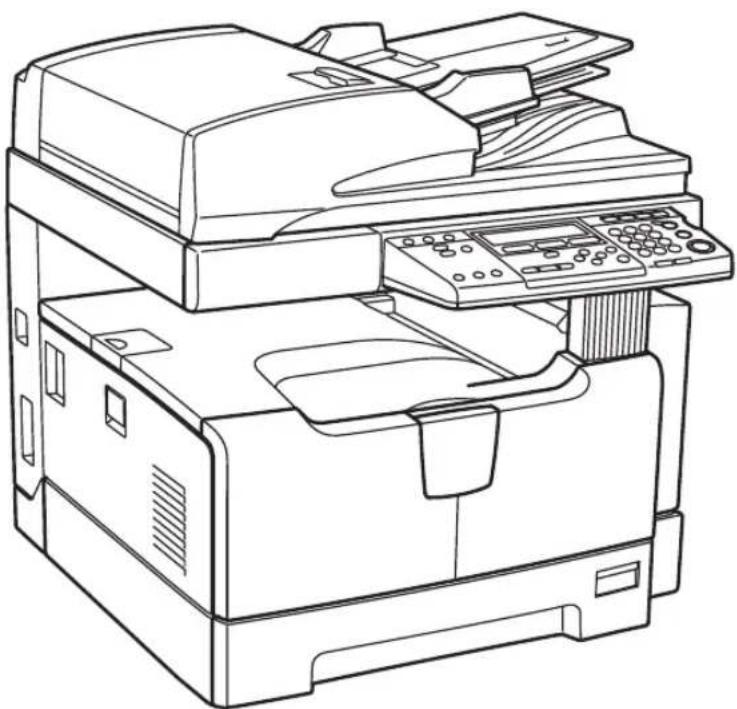
natural_image
Line drawing of a multi-tiered printer with paper sheets and control panel (no text or symbols)natural_image
Technical line drawing of a device with control panel and display (no text or symbols)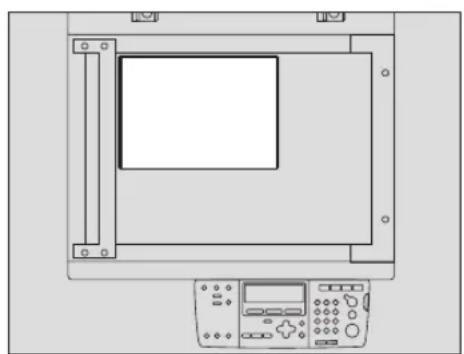
natural_image
Technical line drawing of a device with control panel and display (no text or symbols)Continuous copying speed ....211
Specifications of Options 212
Packing List ....214
Copying Function Combination Matrix ....215
Combination Matrix 1/2....215
Combination Matrix 2/2....216
List Print Format....217
Department code list....217
Function list ....217
Supply notice list....218
Mailbox list....218
Configuration page list....219
NIC status page list ....219
Menu list 220
INDEX 221
Aanbevolen tonercartridges
natural_image
Technical line drawing of an internal machine or device with no visible text or symbolsVOORDAT U GAAT KOPIËREN
1. Afdekklep (optioneel, KA-1650PC)
12. [FUNCTION CLEAR] toets/LED
23. [DRAWER] toets/LED's
natural_image
Diagram of a mechanical component with a directional arrow indicating motion or force (no text or symbols present)LT: Letter, LD: Ledger, LG: Legal, ST: Statement, COMP: Computer
Aanbevolen papier
natural_image
Diagram of a computer drawer with an arrow indicating a component (no text or symbols present)Opmerking
natural_image
Technical line drawing of a mechanical assembly with a downward arrow indicating a component (no text or symbols present)Opmerking
natural_image
Isometric technical diagram of a mechanical component with a labeled arrow pointing to a rectangular feature (no text or symbols present)natural_image
Isometric technical diagram of an internal device housing with a black arrow indicating a component (no text or symbols present)Opmerking
natural_image
Isometric technical diagram of a device chassis with an inset showing a close-up of internal components (no text or symbols)Tip
natural_image
Isometric technical diagram of a computer motherboard with directional arrows indicating movement or assembly (no text or symbols present)Opmerking
natural_image
Technical line drawing of a mechanical assembly with an inset showing a detail of a component (no text or symbols present)natural_image
Isometric technical diagram of a mechanical assembly with a labeled component (no text or symbols present)natural_image
Technical line drawing of an open printer with a closed cover labeled 'BOOK' on the cover (no other text or symbols)natural_image
Illustration of a printer with arrows indicating process flow (no text or symbols)Opmerkingen
natural_image
Diagram of a printer's internal structure showing paper feeding into a slot (no text or symbols)ZOOM AFWERKING BEWERK
5
Tip
natural_image
Diagram of a printer's internal structure showing paper feeding into a slot (no text or symbols)natural_image
Diagram of a printer with a paper sheet being inserted, showing no text or symbols3 Druk de toets [MIXED SIZE] in.
flowchart
graph TD
    A["Document with '××××' at top"] --> B["Document with '××××' at bottom"]
    B --> C["Document with '××××' at top and bottom"]
    style A fill:#f9f,stroke:#333
    style B fill:#f9f,stroke:#333
    style C fill:#f9f,stroke:#333
flowchart
graph LR
    A["Document with '××××' and horizontal lines"] --> B["Arrow pointing to a rectangle with horizontal lines"]
    B --> C["Final layout: rectangular layout with vertical lines and horizontal lines"]
Opmerkingen
natural_image
Diagram showing a whale shape transforming from an original to a dashed-line version, with no text or symbols present.Opmerkingen
natural_image
Two black silhouette figures of an orca inside a frame, transforming into a single figure (no text or symbols)Opmerkingen
natural_image
Two penguin silhouettes showing a change from left to right, no text or symbols present2>1 DUBBELZ. NAAR 2 ENKELZ. (P . 9 3 )
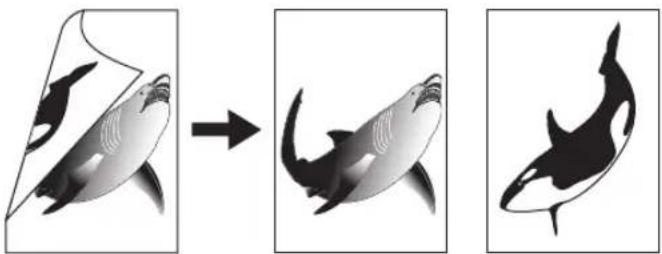
natural_image
Three-panel illustration showing a shark being cut, then being merged into an orca whale shape (no text or symbols)1>2 DUBBELZ.(P . 9 4 )
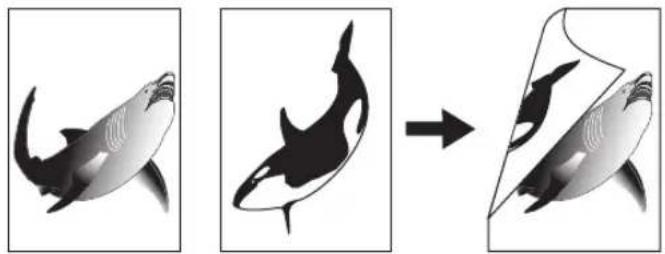
natural_image
Three-panel illustration showing a shark being cut into a shell shape, with no text or symbols present.2>2 DUBBELZ.(P . 9 4 )
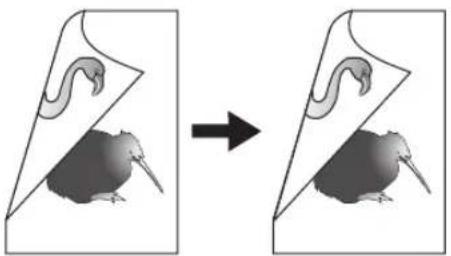
natural_image
Diagram showing a mouse inside a folded paper with an arrow indicating transformation (no text or symbols)BOEK > 2 (P.96)
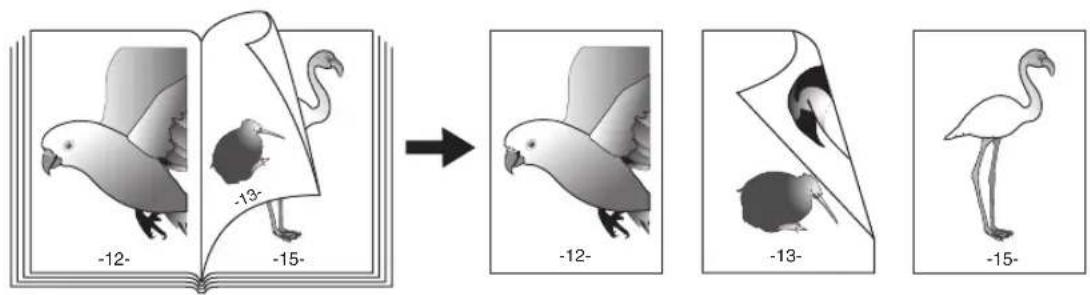
Opmerkingen
natural_image
Technical line drawing of a printer or printer with a paper clip labeled 'BOOK' on the cover (no readable text or symbols beyond label)Voorzichtig
Opmerkingen
natural_image
Line drawing of a printer's internal structure with a paper clip labeled 'Book' (no text or symbols beyond the label)Voorzichtig
natural_image
Diagram showing a whale inside a container transforming into an orca whale shape, with no visible text or symbols.natural_image
Diagram showing a whale inside a container transforming into an orca whale silhouette (no text or symbols present)flowchart
graph LR
    A["Document with letter 'A' at top, letter 'B' at bottom"] --> B["Arrow to section 'a', 'b'"]
    B --> C["Section 'A' with letter 'B' at top, letter 'E' at bottom, letter 'F' at bottom, letter 'G' at bottom, letter 'H' at bottom"]
    C --> D["Arrow to section 'A', 'b'"]
    D --> E["Section 'A' with letter 'E' at top, letter 'F' at bottom, letter 'G' at bottom, letter 'H' at bottom"]
natural_image
Simple diagram with two circles and a rectangular box, no text or symbols presentOpmerking
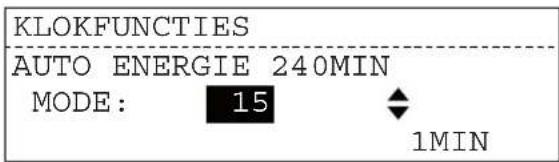
5 Druk de toets [ENTER] in.
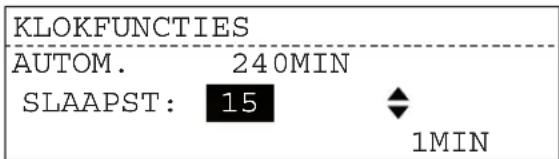
1, 2, 3, 4, 5, 10, 15, 20, 25, 30, 35, 40, 45, 50, 55, 60, 70, 80, 90, 100, 110, 120, 150, 180, 210, 240
1, 3, 5, 10, 15, 20, 25, 30, 35, 40, 45, 50, 55, 60, 70, 80, 90, 100, 110, 120, 150, 180, 210, 240
Selecteer "UIT" in stap 5.
Tip
P.217 "Department code list"
natural_image
Technical line drawing of a mechanical assembly with rollers and shafts (no text or symbols)natural_image
Diagram of a computer monitor with an open lid and a black curved arrow indicating rotation (no text or symbols present)natural_image
Technical diagram of a mechanical assembly with directional arrows indicating movement or force (no text or symbols present)natural_image
Diagram of a computer monitor with an open lid and a black arrow indicating the download or drag (no text or symbols present)natural_image
Diagram of a printer with arrows indicating motion or rotation (no text or symbols)natural_image
Diagram of a printer with a paper roll being inserted, showing mechanical components and motion arrows (no text or symbols)natural_image
Diagram of a printer with a paper feeding into a slot, showing a black arrow indicating the process (no text or symbols present)natural_image
Diagram of a printer with an arrow indicating rotation or movement, no text or symbols presentnatural_image
Technical line drawing of a printer internal structure with no visible text or symbolsnatural_image
Diagram of a mechanical device with directional arrows indicating rotation or movement (no text or symbols present)natural_image
Diagram of a car interior showing airflow direction and component placement (no text or symbols)natural_image
Diagram of a mechanical assembly with directional arrows indicating movement or force (no text or symbols present)natural_image
Diagram of a printer with an arrow indicating the paper's edge, showing no text or symbols on the printer itself.natural_image
Diagram of a printer's internal structure showing paper placement and a black arrow indicating motion (no text or symbols present)natural_image
Diagram of a computer rack with an arrow indicating a component or operation, no text or symbols present.natural_image
Diagram of a printer or scanner mechanism with a paper sheet being inserted, showing no text or symbols.3 Sluit de zijdeur.
Papierstoring na de transporteenheid
Voorzichtig
natural_image
Diagram of a mechanical device with internal components and a black arrow indicating a process or operation (no text or symbols present)natural_image
Mechanical assembly diagram showing internal components with arrows indicating movement (no text or labels)natural_image
Technical line drawing of an open industrial machine with internal components and a numbered callout (no text or symbols)natural_image
Mechanical assembly diagram showing a printer with internal components and directional arrows indicating motion (no text or symbols)natural_image
Technical line drawing of a mechanical assembly with arrows indicating motion or force (no text or symbols present)natural_image
Mechanical assembly diagram showing internal components and a magnified inset of a component detail (no text or symbols)natural_image
Mechanical assembly diagram showing a component inserted into a machine (no text or symbols visible)Naar beneden trekken
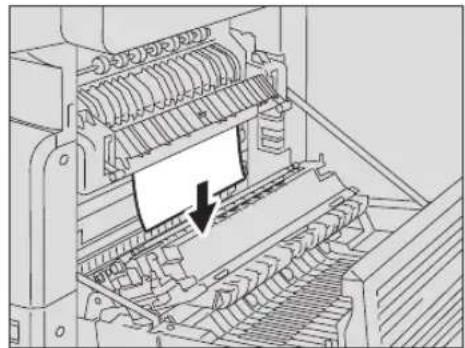
natural_image
Mechanical assembly diagram showing a printer or printer with internal components and a downward arrow indicating motion (no text or symbols present)natural_image
Interior view of a file cabinet with an arrow pointing to a folder (no text or symbols visible)natural_image
Diagram of a file cabinet with a paper roll and arrow indicating compression (no text or symbols)natural_image
Diagram of a computer keyboard with an arrow indicating the press direction (no text or symbols present)natural_image
Diagram of a printer internal structure with an arrow indicating the paper's edge (no text or symbols present)natural_image
Technical line drawing of a mechanical component with a central slot and mounting base (no text or symbols)TOSHIBA
T-1810E
FOR/POUR/FÜR/DA/PARA • STUDIO181/180/211/212/242
e-STUDIO182/212/242
COMPONENTS:
Polyester resin, Wax, Silica,
Carbon black(1333-86-4)
ORIGINAL & GENUINE TOSHIBA TONER
NET 675 g
■ HANDLE WITH CARE.
■ STORE IN A DRY PLACE BELOW 35°C(95°F).
■ READ THE OPERATING INSTRUCTIONS OF
THE MACHINE BEFORE USING.
DO NOT TOUCH THE METAL CONTACT ON THE CIRCUIT BOARD
CONTACT ON THE CIRCUIT BOARD.
TOSHIBA TEC EUROPE IMAGING SYSTEMS S.A.
MARTIN EGLISE 76370 NEUVILLE LES DIEPPE TEL: 23102 35 06 70 00
MADE IN FRANCE : FABRIQUE EN FRANCE
HERGESTELL IN FRANKREICH / HECHO EN FRANÇA / FATTO IN FRANÇA
■ MANIPULER AVEC PRECAUTION.
■ GARDER DANS UN ENDROIT SAN
HUMIDITE OU LA TEMPERATURE AMBIANTE EST MOINS DE 35°C
AMBIANTE EST MOINS DE 35 C. LIBRE LE MANUEL D'EMPLOLDE
L'APPAREIL AVANT D'EN FAIRE USAGE
■ NE PAS TOUCHER LA PIÈCE MÉTALLIQUE
SUR LE TABLEAU DE CIRCUITS.

图 5
TOSHIBA
T-1810D
FOR
e-STUDIO181/182/211/212/242
COMPONENTS:
Polyester resin, Wax, Silica,
Carbon black(1333-86-4)
ORIGINAL & GENUINE TOSHIBA TONER
NET 675 g
■ HANDLE WITH CARE.
■ STORE IN A DRY PLACE BELOW 35°C(95°F).
■ READ THE OPERATING INSTRUCTIONS OF
THE MACHINE BEFORE USING.
■ DO NOT TOUCH THE METAL
CONTACT ON THE CIRCUIT BOARD.
TOSHIBA TEC CORPORATION
2-17-2, Higadigotende, Strögens-eu, Tokyo. 141-8664, Japan. 254595–81, 5-6-20, 7293
MADE IN CHINA/FABRIC
natural_image
Diagram of a printer's internal structure showing a paper feeding into a stack (no text or symbols present)natural_image
Mechanical assembly diagram showing internal components with directional arrows (no text or labels)natural_image
Technical line drawing of a mechanical assembly with a highlighted component (no text or symbols)Waarschuwing
natural_image
Diagram showing a mechanical assembly with a hook and arrow indicating direction (no text or symbols)natural_image
Technical line drawing of a mechanical component with an arrow indicating direction (no text or symbols)natural_image
Mechanical assembly diagram showing a motor and gear mechanism with an inset close-up of a component (no text or symbols)Opmerkingen
natural_image
Mechanical assembly diagram showing internal components with two directional arrows indicating movement or force (no text or labels)Opmerking
natural_image
Diagram of a mechanical device with internal components and a black arrow indicating a process or operation (no text or symbols present)natural_image
Mechanical assembly diagram showing internal components with arrows indicating movement (no text or labels)natural_image
Technical line drawing of a mechanical assembly with an inset showing a zoomed-in view of a component (no text or symbols present)natural_image
Technical line drawing of a mechanical assembly with an inset showing a close-up of a component (no text or symbols present)natural_image
Technical line drawing of an electronic device interior with no visible text or symbols1. Scangebied
natural_image
Diagram of a printer's internal structure with an arrow indicating compression or disassembly (no text or symbols present)2 Reinig de corona.
natural_image
Technical line drawing of a mechanical assembly with directional arrows indicating motion or force (no text or symbols present)Opmerking
natural_image
Diagram of a mechanical device with internal components and a black arrow indicating a process or operation (no text or symbols present)natural_image
Technical diagram of a mechanical assembly with internal components and directional arrows (no text or symbols)natural_image
Technical line drawing of a mechanical assembly with an inset showing a component detail (no text or symbols present)natural_image
Technical line drawing of an electronic device interior with no visible text or symbols6 Sluit de zijdeur.
SPECIFICATIONS AND OPTIONS
e-STUDIO182/212/242 Specifications....210
Continuous copying speed....211
Specifications of Options....212
Packing List....214
Copying Function Combination Matrix....215
Combination Matrix 1/2 215
Combination Matrix 2/2 216
List Print Format 217
Department code list 217
Mailbox list 218
Menu list....220
Function list....217
Supply notice list 218
e-STUDIO182/212/242 Specifications
| Model name e-STUDIO182/212/242 | ||
| Type Desktop type | ||
| Original glass Fixed | ||
| Printing (copying) system Indirect electrophotographic method | ||
| Developing system 2-component magnetic brush developing | ||
| Fusing method 2 halogen lamps | ||
| Photosensor type OPC | ||
| Original scanning system Flat surface scanning system(When the Reversing Automatic Document Feeder / Automatic Document Feeder is installed: Fixed scanning system by feeding the original) | ||
| Original scanning sensor Linear CIS sensor | ||
| Scanning light source LED | ||
| Resolution Scanning 600 dpi x 600 dpi | ||
| Writing 2400 dpi x 600 dpi (Smoothing process) | ||
| Acceptable originals | Sheets, books and 3-dimensional objects | |
| Acceptable original size | Max. A3 | |
| Acceptable copy paper size | Drawer | A3, A4, A4-R, B4, B5, B5-R, FOLIO, LD, LG, LT, LT-R, COMP, 13"LG*1 |
| Bypass | A3, A4, A4-R, A5-R, B4, B5, B5-R, FOLIO, LD, LG, LT, LT-R, ST-R, COMP, 13"LG*1 | |
| Acceptable copy paper weight | Drawer | 64 - 80 g/m2 |
| Bypass | 64 - 80 g/m2 (for continuous feed)50 - 163 g/m2 (for single feed)64 - 80 g/m2 (When the Automatic Duplexing Unit is used.) | |
| Warm-up time | Approx. 25 seconds | |
| First copy time (A4 portrait) | Approx. 7.6 seconds (e-STUDIO182/212), Approx. 7.5 seconds (e-STUDIO242) | |
| Continuous copy speed | See P.211 "Continuous copying speed" | |
| Multiple copying | Up to 999 copies (digital key entry) | |
| Excluded image width | Copy | Leading edge: 3.0±2.0 mm, Trailing edge: 2.0±2.0 mm, Both edges: 2.0±2.0 mm |
| Printer | Leading edge: 5.0±2.0 mm, Trailing edge: 5.0±2.0 mm, Both edges: 5.0±2.0 mm | |
| Reproduction ratio | Actual size | 100±0.5% |
| Zoom | 25 - 200% (in 1% increments) | |
| Storage capacity | Max. 250 sheets or until the memory is full (TOSHIBA's own chart) | |
| Paper supply | Drawer | 250 sheets (80 g/m2) |
| Bypass | 100 sheets (80 g/m2) | |
| Loading capacity for the receiving tray | Approx. 250 sheets (64 g/m2) | |
| Toner density adjustment | Magnetic auto-toner system | |
| Exposure control | Automatic plus manual selection from 7 exposure steps | |
| Memory | Page memory: 112 MB | |
| USB interface | USB2.0 (Hi-Speed) | |
| Environment (for normal use) | Temperature: 10° - 30°C, Humidity: 20 - 85% (No condensation) | |
| Power requirements | 220 - 240 V±10%, 8 A (50/60 Hz), 127 V±10%, 12 A (50/60 Hz) (for Saudi Arabia 100 V version only) | |
| Power consumption 1.5 kW or less (including options), Performance value: Approx. 1.2 kW1.5 kW or less (including options), Performance value: Approx. 1.35 kW (for Saudi Arabia 100 V version only) | |
| Dimensions (equipment only) 600 mm (W) x 658.6 mm (D) x 462.5 mm (H) | |
| Weight (including equipment and drum) | Approx. 32.0 kg (for the EU), approx. 33.0 kg (except for the EU) |
| Space occupied (equipment only) 948 mm (W) x 658.6 mm (D) | |
*1 13"LG size paper can be used only in equipment for the EU.
• These specifications vary depending on the copying conditions and the environment.
- Specifications and appearance are subject to change without notice in the interest of product improvement.
Continuous copying speed
sheets/min.
| Paper size Feeder e-STUDIO182 e-STUDIO212 e-STUDIO242 | ||||
| A4, B5, LT Drawer of the equipment | 18 21 24 | |||
| Drawer of other than the equipment | 16 20 23 | |||
| Bypass tray 16 20 23 | ||||
| A4-R, B5-R, LT-R D | 15.5 (14) *2 | 15.5 (14) *2 | 17.5 (16) *2 | |
| 15.5 | 17.5 | |||
| A5-R, ST-R | 15.5 | 17.5 | ||
| 15.5 | 17.5 | |||
| Bypass tray 16 20 23 | ||||
| Bypass tray 16 20 23 | ||||
| Bypass tray 16 20 23 | ||||
| Bypass tray 16 20 23 | ||||
| Bypass tray 16 20 23 | ||||
| Bypass tray 16 20 23 | ||||
*1 13"LG size paper can be used only in equipment for the EU.
*2 Values of when paper is placed in the lower drawer of the Paper Feed Pedestal (optional) are shown in parentheses.
*3 A5-R and ST-R can be placed only on the bypass tray.
- The values above are measured when originals are set on the original glass, 100% and non-sort multiple copies are made.
- TOSHIBA-recommended paper is used for the values of the specifications above.
- The bypass copying speed is as listed above when specifying the paper size.
- This specification varies depending on the copying conditions and the environment.
Specifications of Options
Reversing Automatic Document Feeder
| Model name MR-3023 | |
| Copy sides 1-side, Duplex | |
| Number of originals (A4) | 100 originals ( 50 - 80 g/m^2 ) or 16 mm or less in height (more than 80 g/m^2 ) |
| Feeding speed 45.5 - 182 mm/s | |
| Acceptable originals A3, A4, A4-R, A5-R, B4, B5, B5-R, FOLIO, LD, LG, LT, LT-R, ST-R, COMP (A5 and ST size are not acceptable.) | |
| Paper weight | 1-sided original: 50 - 127 g/m^2 , 2-sided original: 50 - 127 g/m^2 |
| Power source Power supplied from the equipment | |
| Dimensions 575 mm (W) x 528 mm (D) x 135 mm (H) | |
| Weight Approx. 11.5 kg | |
| Power consumption 33 W max. | |
Automatic Document Feeder
| Model name MR-2020 | |
| Copy sides 1-side | |
| Number of originals (A4) | 100 originals ( 50 - 80 g/m^2 ) or 16 mm or less in height (more than 80 g/m^2 ) |
| Feeding speed 45.5 - 182 | mm/s |
| Acceptable originals A3, A4, A4-R, A5-R, B4, B5, B5-R, FOLIO, LD, LG, LT, LT-R, ST-R, COMP (A5 and ST size are not acceptable.) | |
| Paper weight | 50 - 127 g/m^2 |
| Power source Power supplied from the equipment | |
| Dimensions 575 mm (W) x 528 mm (D) x 135 mm (H) | |
| Weight Approx. 11.0 kg | |
| Power consumption 30 W max. | |
Automatic Duplexing Unit
| Model Name MD-0103 | |
| Acceptable Paper A3, A4 | A4-R, A5-R, B4, B5, B5-R, FOLIO, LD, LG, LT, LT-R, ST-R, COMP, 13"LG*1 |
| Power Source | 64 - 80 g/m2 |
| Weight Approx. 1.2 kg |
*1 13"LG size paper can be used only in equipment for the EU.
Paper Feed Unit
| Model name MY-1027 | |
| Acceptable paper size | A3, A4, A4-R, B4, B5, B5-R, FOLIO, LD, LG, LT, LT-R, COMP, 13"LG ^1 (Non-standard sizes are not acceptable.) |
| Paper weight | 64 - 80 g/m ^2 |
| Maximum capacity | 250 sheets (80 g/m ^2 ) |
| Dimensions 530 mm (W) | x 577 mm (D) x 125 mm (H) |
| Weight Approx. 5.0 kg |
*1 13"LG size paper can be used only in equipment for the EU.
Paper Feed Pedestal
| Model name KD-1022 | |
| Acceptable paper size A3 | A4, A4-R, A5-R, B4, B5, B5-R, FOLIO, LD, LG, LT, LT-R, ST-R, COMP (A5, ST and non-standard size are not acceptable.) |
| Paper weight | 64 - 80 g/m ^2 |
| Maximum capacity | 550 sheets (80 g/m ^2 ) |
| Dimensions 623 mm (W) x 657 mm (D) x 367 mm (H) | |
| Weight Approx. 26.0 kg | |
Drawer Module
| Model name MY-1028 | |
| Acceptable paper size A3, | A4, A4-R, A5-R, B4, B5, B5-R, FOLIO, LD, LG, LT, LT-R, ST-R, COMP (A5, ST and non-standard size are not acceptable.) |
| Paper weight | 64 - 80 g/m2 |
| Maximum capacity | 550 sheets (80 g/m2) |
| Weight Approx. 4.0 kg |
TOSHIBA-recommended paper is used for the values above. Specifications and appearance are subject to change without notice in the interest of product improvement.
Packing List
| Packing list Operator's Manual | |
| Power cable | |
| Set-up report | |
| CD-ROM (2 pcs.) (TOSHIBA Viewer V2 / User Documentation) | |
Combination Matrix 1/2
| Already setting\Next setting | Mixed original sizes | Finishing | Image shift | Edge erase | Paper type | Duplex | ||||||||
| Non-sort | Sort | Alternation | Magazine sort | 1>1 Simplex | 1>2 Duplex | 2>2 Duplex | 2>1 Split | Book > 2 | ||||||
| Mixed original sizes | No Yes | No No Yes | No Yes Yes | Yes Yes Yes No | ||||||||||
| Finishing | Non-sort *1 Yes Yes | Yes Yes Yes | Yes Yes Yes | *1 *1 *1 *1 | ||||||||||
| Sort Yes Yes Yes | Yes Yes Yes | Yes Yes Yes | Yes Yes Yes | |||||||||||
| Alternation No Yes | Yes Yes No | Yes Yes Yes | Yes Yes Yes | Yes No | ||||||||||
| Magazine sort No | Yes Yes Yes | No Yes Yes | No — | — | — | — | ||||||||
| Image shift | Yes Yes | Yes No No | Yes Yes Yes | Yes Yes Yes | Yes No | |||||||||
| Edge erase | No Yes | Yes Yes Yes | Yes Yes Yes | Yes Yes Yes | Yes Yes | |||||||||
| Paper type | Yes Yes | Yes Yes Yes | Yes Yes Yes | Yes Yes Yes | Yes Yes | |||||||||
| Duplex | 1>1 Simplex Yes Yes | Yes Yes Yes | Yes Yes Yes | Yes Yes Yes | Yes Yes Yes | |||||||||
| 1>2 Duplex Yes No | Yes Yes No | Yes Yes Yes | Yes Yes Yes | Yes Yes | ||||||||||
| 2>2 Duplex Yes No | Yes Yes No | Yes Yes Yes | Yes Yes Yes | Yes Yes | ||||||||||
| 2>1 Split | Yes No | Yes Yes No | Yes Yes Yes | Yes Yes Yes | Yes Yes | |||||||||
| Book > 2 | No No | Yes No No | No Yes Yes Yes | Yes Yes Yes | ||||||||||
| Dual page | No No | Yes No No | No Yes Yes Yes | No No No | No | |||||||||
| Annotation | No No | Yes No No | Yes Yes Yes | No — | — | — | — | |||||||
| Job build | No Yes | Yes Yes No | Yes Yes Yes | Yes Yes Yes | Yes Yes No | |||||||||
| 2in1/4in1 | No No | Yes Yes No | Yes Yes Yes | No — | — | — | — | |||||||
| ID card | No No | Yes Yes No | Yes Yes Yes | No — | — | — | — | |||||||
| XY zoom | *2 Yes | Yes *3 *3 Yes | No Yes Yes | Yes Yes Yes | Yes Yes | |||||||||
| Job memory | Yes Yes | Yes Yes Yes | Yes Yes Yes | Yes Yes Yes | Yes Yes Yes | |||||||||
*1 Even when Non-sort has been set, Sort is automatically set.
*2 The function set later will be valid, and the reproduction ratio will be set to 100% automatically.
*3 The function set later will be valid, and the automatic magnification selection (AMS) will be enabled.
Combination Matrix 2/2
| Already setting\Next setting | Dual page | Annotation | Job build | 2in1/4in1 | ID card | XY zoom | Job memory | |
| Mixed original sizes | No No | No No No No Yes | ||||||
| Finishing | Non-sort | *1 *1 | Yes *1 *1 Yes Yes | |||||
| Sort | Yes Yes | Yes Yes Yes Yes Yes | ||||||
| Alternation | No No | Yes Yes Yes No Yes | ||||||
| Magazine sort | No No | No No No No Yes | ||||||
| Image shift | No Yes | Yes Yes Yes Yes Yes | ||||||
| Edge erase | Yes Yes | Yes Yes Yes No Yes | ||||||
| Paper type | Yes Yes | Yes Yes Yes Yes Yes | ||||||
| Duplex | 1>1 Simplex | Yes Yes | Yes Yes Yes Yes Yes | |||||
| 1>2 Duplex | No No | Yes No No Yes Yes | ||||||
| 2>2 Duplex | No No | Yes No No Yes Yes | ||||||
| 2>1 Split | No No | Yes No No Yes Yes | ||||||
| Book > 2 | No No | No No No Yes Yes | ||||||
| Dual page | No No No No Yes Yes | |||||||
| Annotation | No No | No No Yes Yes | ||||||
| Job build | No No | No No No Yes | ||||||
| 2in1/4in1 | No No | No | No No Yes | |||||
| ID card | No No | No No | No Yes | |||||
| XY zoom | Yes Yes | *2 *2 *3 | Yes | |||||
| Job memory | Yes Yes | Yes Yes Yes Yes | ||||||
*1 Even when Non-sort has been set, Sort is automatically set.
*2 The function set later will be valid, and the reproduction ratio will be set to 100% automatically.
*3 The function set later will be valid, and the automatic magnification selection (AMS) will be enabled.
Department code list
DEPARTMENT CODE LIST
| PAGE | : 001 | |||||
| TIME | : 02-10-2009 09:30 | |||||
| TEL NUMBER | : XXX-XXX-XXXX | |||||
| NAME | :XXXXXXXXXX | |||||
| DEPT NBR | NAME | DEPT CODE | COPY PGS | TX PGS | RX PGS | Print PGS |
| D 01 | XXXXXXXXXX | XXXXX | XX | XX | XX | XX |
| D 02 | XXXXXXXXXX | XXXXX | XX | XX | XX | XX |
| D 03 | XXXXXXXXXX | XXXXX | XX | XX | XX | XX |
| D 99 | XXXXXXXXXX | XXXXX | XX | XX | XX | XX |
Function list
FUNCTION LIST
| PAGE | 001 | |||
| TIME | 02-10-2009 09:30 | |||
| TEL NUMBER | XXX-XXX-XXXX | |||
| NAME | XXXXXXXXXX | |||
| AVAILABLE MEMORY | 112MB | RECOVERY TX | OFF | |
| TTI | ON | |||
| GENERAL SETTING | SEND AFTER SCAN | OFF | ||
| DRAWER SIZE | ACCOUNT CODE | OFF | ||
| DRAWER 1 | A4 | SEPARATOR PAGE | OFF | |
| BYPASS | SECURE RX | OFF | ||
| WALKUP SCREEN | COPY | MEMORY RX | ON | |
| TIMERS | REDUCTION | ON | ||
| AUTO CLEAR | 45SEC | DISCARD | OFF | |
| AUTO POWER SAVE | 15MIN | PRIVILEGED RX | OFF | |
| AUTO SLEEP | 15MIN | RTI | OFF | |
| WEEKLY TIMER | OFF | |||
| SPEAKER VOLUME | REPORTS & LIST | |||
| ALARM VOLUME | 0 | JOURNAL | TX & RX | |
| KEY TOUCH VOLUME | 1 | MANUAL OUTPUT | ON | |
| RINGER VOLUME | 4 | AUTO | ||
| MONITOR VOLUME | 4 | COMMUNICATION REPORT | ON ERROR | |
| DOCUMENT TX | ON ERROR (IN) | |||
| COPY SETUP | MEMORY TX | ON ERROR (IN) | ||
| MENU CUSTOMIZE | FINISHING | MULTI TX | ON ERROR | |
| APS/AMS | APS | MULTI POLL | ||
| IMAGE MODE | TEXT/PHOTO | |||
| LIGHT/DARK | AUTO | RELAY | ||
| FINISHING | NON SORT | |||
FAX SETUP
Supply notice list
SUPPLY NOTICE FORM
SETUP INFORMATION
DESTINATION SETUP : XXX-XXX-XXXX
DATE & TIME : 02-10-2009 09:30
CUSTOMER NUMBER : XXX-XXX-XXXX
SHIP TO NAME :XXXXXXXXXX
SHIP TO ADDRESS : XXXXXXXXXX
CONTACT NAME : XXXXXXXXXX
CONTACT TEL NUMBER : XXX-XXX-XXXX
e-STUDIO 182/212/242 Series
MACHINE NAME : XXXXXXXXXX
FAX NUMBER : XXX-X
Mailbox list
MAILBOX/RELAY BOX REPORT
| PAGE | : 001 |
| TIME | : 02-10-2009 09:30 |
| TEL NUMBER | : XXX-XXX-XXXX |
| NAME | :XXXXXXXXXX |
MAILBOX
| BOX NBR | TYPE | PGS | FILE NBR | DATE | TIME | FROM |
| XXXXXXXXXXXXXXXXXX | CONFIDENTIAL BOX | X | XX | XX | XX:XX | XXXX |
| XXXXXXXXXXXXXXXXXX | CONFIDENTIAL BOX | X | XX | XX | XX:XX | XXXX |
| XXXXXXXXXXXXXXXXXX | BULLETIN BOARD | X | XX | XX | XX:XX | XXXX |
| XXXXXXXXXXXXXXXXXX | BULLETIN BOARD | X | XX | XX | XX:XX | XXXX |
RELAY
| RELAY BOX | END STATION | REPLY TO NUMBER | ||
| XXXXXXXXXXXXXXXXXX | ABB | 001 | 002 | ABB. 003 |
| XXXXXXXXXXXXXXXXXX | GROUP | 1111 | XXXXXXXXXX | |
Configuration page list
CONFIGURATION PAGE
| S/N | :XXXXXXXXXX | TIME | : '09-10-02 09:30 |
| F/W Ver. | :XXXXXXXXXX |
GENERAL
| MEMORY SIZE | : 256MB |
| OPTIONAL FUNCTIONAL KIT | : NOT INSTALLED |
NETWORK SETTING
| GENERAL PRODUCT | |
| GENERAL | |
| ETHERNET SPEED/DUPLEX MODE | : 10BASE FULL |
NETWORK
TCP/IP
| ADDRESS MODE | : | DYNAMIC | |||
| IP ADDRESS | : | XXX.XXX.XXX.XXX | |||
| SUBNET MASK | : | XXX.XXX.XXX.XXX | |||
| DEFAULT GATEWAY | : | 0. | 0. | 0. | 0 |
IPX/SPX
| ENABLE IPX/SPX | : ENABLE |
| FRAME TYPE | : AUTO SENSE |
APPLE TALK
| ENABLE APPLE TALK | : DISABLE |
| DEVICE NAME | :XXXXXXXXXX |
| DESIRED ZONE | : * |
SESSION
| DNS SESSION |
| ENABLE DNS |
| PRIMARY DNS SERVER ADDRESS |
| SECONDARY DNS SERVER ADDRESS |
NIC status page list
Unit Serial No :XXXXXXXXX
Network Address : XX;XX;XX;XX;XX;XX
Network Topology : Ethernet Connector: RJ45
Network Speed : auto (default)
Novell Network Information enabled
Print Server Name :XXXXXXXXXXXX
Password Defined
Search Root not defined
Directory Services Tree not defined
Directory Service Context not defined
Scan Rate : 5 Frame Type : Auto Sense
TCP/IP Network Information enabled
| IP Address | : XX.XXX.XXX.XX |
| Subnet Mask | : XXX.XXX.X.XX |
| Default Gateway | : XX.XXX.XXX.XX |
| Primary DNS Server | : XXX.XX.XXX.XX |
| DNS Name | : |
| Host Name | :XXXXXXXXXXXX |
IPP Network Information enable
Internet Printing Protocol : XXXXX
AppleTalk Network Information
Menu list
MENU LIST (PROGRAM)
| PAGE | : 001 | |
| TIME | : 02-10-2009 09:30 | |
| TEL NUMBER | : XXX-XXX-XXXX | |
| NAME | :XXXXXXXXXX | |
| 01.DEFAULT SETTINGS | 04.REPORT & LIST | |
| 01.GENERAL SETTING | 01.JOURNAL | |
| 01.DRAWER SIZE | 01.MANUAL OUTPUT | |
| 02.WALKUP SCREEN | 02.AUTOMATIC JOURNAL | |
| 03.TIMERS | 02.COMMUNICATION REPORT | |
| 04.WEEKLY TIMER | 01.TX REPORT | |
| 05.SPEAKER VOLUME | 02.MEMORY-TX REPORT | |
| 06.DEPARTMENT CODE | 03.MULTI-ADD REPORT | |
| 02.COPY SETUP | 04.MULTIPOLL REPORT | |
| 01.MENU CUSTOMIZE | 05.RELAY ORIGINATOR REPORT | |
| 02.APS/AMS | 06.RELAY STATION REPORT | |
| 03.IMAGE MODE | 07.RELAY END REPORT | |
| 04.LIGHT/DARK | 03.RECEPTION LIST | |
| 05.FINISHING | 01.LOCAL MAILBOX LIST | |
| 03.FAX SETUP | 02.REMOTE MAILBOX LIST | |
| 01.LINE MONITOR | 03.RELAY RECEPTION LIST | |
| 02.RECEIVE INTERVAL | 05.REMOTE SERVICE | |
| 03.ECM | 01.REMOTE ACCESS | |
| 04 DOCUMENT MODE | 02.DOWNLOAD FIRMWARE | |
| 05.DIAL TYPE | 03.RDC PA | |
| 06.REDIAL MODE | ||
| 07.RECEPTION MODE | ||
| 08.MEMORY TX | ||
| 09.SEQUITY TX | ||
| COVER SHEET | ||
Cijfers
2IN1/4IN1 83, 105
A
Continuous copying speed 211
Contrastaanpassing 33
Controle 204
DRAWER toets/LED's 34
DUPLEX 83,92
E
FUNCTION CLEAR toets/LED 33
Fusereenheid 187
G
List printing format 217
M
Maandinstelling 123
MAGAZINE SORT 86
Specifications of options ......212