HMH-RX110 - Diffuseur AV Analog Way - Free user manual and instructions
Find the device manual for free HMH-RX110 Analog Way in PDF.


| Product Type | AV Receiver/Decoder |
| Brand | Analog Way |
| Model | HMH-RX110 |
| Dimensions (W x D x H) | 440 x 200 x 44 mm |
| Weight | 2.5 kg |
| Power Supply | DC 12V, 2A |
| Power Consumption | 24W max |
| Video Input Interface | 1x HDMI, 1x VGA |
| Video Output Interface | 1x HDMI, 1x DVI |
| Max Resolution | 1920x1200 @60Hz |
| Audio Support | Embedded HDMI audio |
| Control Interface | RS-232, Ethernet |
| Operation Temperature | 0°C to 40°C |
| Storage Temperature | -20°C to 60°C |
| Humidity | 10% to 90% non-condensing |
| Mounting | 19" rack-mountable, 1U |
| Compliance | CE, FCC |
| Maintenance | Clean with a soft, dry cloth. Do not use liquid cleaners. |
| Safety | Use only with provided power adapter. Keep away from moisture. |
| Spare Parts / Repairability | Contact authorized service center for repairs. No user-serviceable parts inside. |
Frequently Asked Questions - HMH-RX110 Analog Way
User questions about HMH-RX110 Analog Way
0 question about this device. Answer the ones you know or ask your own.
Ask a new question about this device
Download the instructions for your Diffuseur AV in PDF format for free! Find your manual HMH-RX110 - Analog Way and take your electronic device back in hand. On this page are published all the documents necessary for the use of your device. HMH-RX110 by Analog Way.
USER MANUAL HMH-RX110 Analog Way
Ref. HMH-TX110 Transmitter Ref. HMH-RX110 Receiver
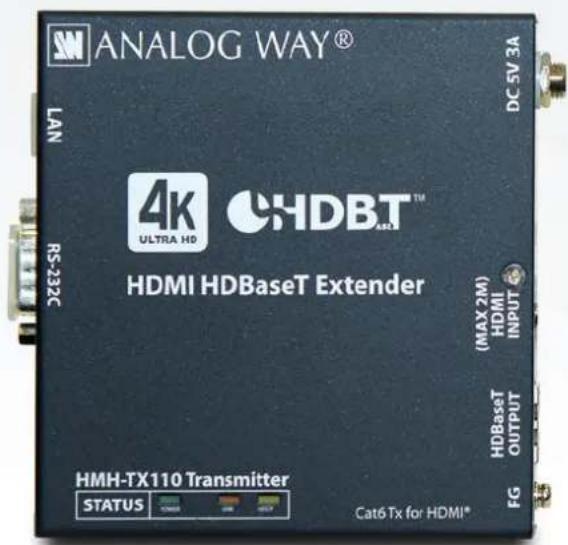
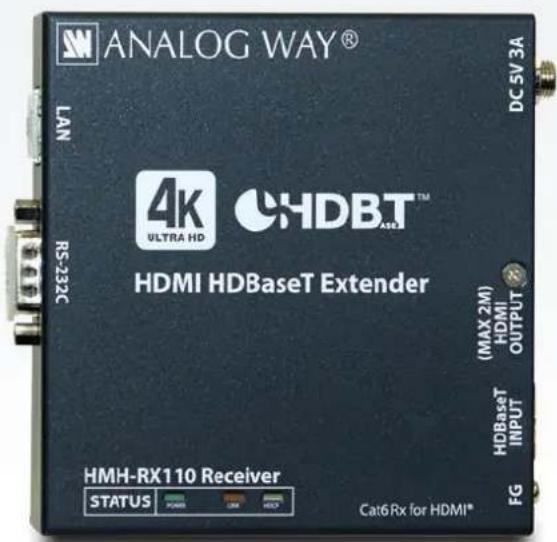
To ensure the best performance of this product, please read this User's Guide fully and carefully before using it and keep this manual beside this product.
Trademarks
- The terms HDMI and HDMI High-Denion Mulmedia Interface, and the HDMI Logo are trademarks or registered trademarks of HDMI Licensing, LLC in the United States and other countries.
- HDBaseT™ and the HDBaseT Alliance Logo are trademarks of the HDBaseT Alliance.
- All other company and product names menoned in this manual are either registered trademarks or trademarks of their respective owners. In this manual, the “®” or “™” marks may not be specied.
Before reading this manual
- All rights reserved.
- Some of the contents in this User's Guide such as appearance diagrams, menu operaons, communicaon commands, and so on may dier depending on the version of the HMH.
- This User's Guide is subject to change without noce.
FCC STATEMENT
This equipment has been tested and found to comply with the limits for a Class A digital device, pursuant to part 15 of the FCC Rules. These limits are designed to provide reasonable protecon against harmful interference when the equipment is operated in a commercial environment. This equipment generates, uses, and can radiate radio frequency energy and, if not installed and used in accordance with the instrucon manual, may cause harmful interference to radio communicaons. Operaon of this equipment in a residential area is likely to cause harmful interference, in which case the user will be required to correct the interference at his own expense.
Note: This equipment was tested with shielded cables on the peripheral devices. Shielded cables must be used with the equipment to ensure compliance with FCC emissions limits.
CE MARKING
This equipment complies with the essenal requirements of the relevant European health, safety and environmental protecon legislaon.
WEEE MARKING
Waste Electrical and Electronic Equipment (WEEE), Direcve 2002/96/EC (This direcve is only valid in the EU.)
This equipment complies with the WEEE Directive (2002/96/EC) marking requirement. The le marking indicates that you must not discard this electrical/electronic equipment in domesc household waste.
Safety instrucons
Read and understand all safety and operang instrucons before using this product. Follow all instrucons and cauons as detailed in this document.
| Enforcement Symbol | Descripon |
 Warning Warning | Indicates the presence of a hazard that may result in death or serious personal injury if the warning is ignored or the equipment is handled incorrectly. |
 Caution Caution | Indicates the presence of a hazard that may cause minor personal injury or property damage if the cauon is ignored or the equipment is handled incorrectly. |
| Symbol | Descripon | Example |
 Cauon Cauon | This symbol is indicated to alert the user. (Warning and cauon) |  Electrical Hazard Electrical Hazard |
 Prohibition Prohibition | This symbol is intended to prohibit the user from acons. |  Do not disassemble Do not disassemble |
 Instrucon Instrucon | This symbol is intended to instruct the user. |  Unplug Unplug |

Warning
 Prohibition Prohibition | Do not place the product in any unstable place.Install the product to a horizontal and stable place. Otherwise, it may fall/turn over and lead to injury. |
| Do not place the product in any environment with vibraon.Otherwise, it may move/fall and lead to injury. | |
| Keep out any foreign objects.In order to avoid re or electric shock, do not allow foreign objects, such as metal and paper, to enter the product from the vent holes. | |
| For power cable/ plug:Do not scratch, heat, or modify, including extending them.Do not pull, put heavy stu on them, or pinch them.Do not bend, twist, or e them together forcefully.If they are used in those states connuously, it may cause re or electric shock. If power cables/plugs become damaged, contact Analog Way. | |
 Do notdisassemble Do notdisassemble | Do not repair, modify or disassemble.Since the product includes high-voltage parts, those acons may cause re or electric shock. For internal inspecons or repairs, contact Analog Way. |
 Do not touch Do not touch | In the event of lighng or thunder, do not touch the main unit or cables such as power cable and LAN cable.Contact may cause electric shock |
 Instrucon Instrucon | For installaon:The product is intended to be installed by skilled technicians. For installaon, please contact a system integrator or Analog Way. Otherwise, it may cause re, electric shock, injury, or property damage. |
| Set the power plug in a convenient place to unplug easily.You can easily unplug in case of any extraordinary failure or abnormal situaon, and it also helps for unplugging when you do not use it for a long period. | |
| Plug the power plug into appropriate outlet completely.If the plug is plugged incompletely, it may overheat which causes electrical shock or re. Do not use damaged plug or loosened outlet. | |
| Clean the power plug regularly.If the plug is covered in dust, it may cause re due to reduced insulang power. | |
 Unplug Unplug | Unplug immediately if the product smokes, makes unusual noise, or smells.If you connue to use the product under those situaons, it may cause electric shock or fire. Aer confirming that the product stops smoking, contact Analog Way. |
| Unplug immediately if you drop the product or if the cabinet is damaged.If you connue to use the product under those situaons, it may cause electrical shock or re. For maintenance and repair, contact Analog Way. | |
| Unplug immediately if water or other objects are directed inside.If you connue to use it under those situations, it may cause electrical shock or re. For maintenance and repair, contact Analog Way. | |
| For conncon | |
 Instrucon Instrucon | Dierences in ground potenal among the product and peripheral devices may cause electric shock or damage of the devices.When using cables to connect devices, including conncon of long-distance transmission, unplug the power cables of all related devices.Aer connecng signal/control cables of each device, plug in the power cables of each device. |

Caution
 Prohibition Prohibition | Do not place the product in any place where it will be subjected to high temperatures.If the product is subjected to direct sunlight or high temperatures, it may cause fire. |
| Do not place the product in humid, oil smoke, or dusty place.If the product is placed near humidiers or dusty area, it may cause re or electric shock. | |
| Do not block the vent holes.If venlaon slots are blocked, it may cause re or failure due to internal heat. | |
| Do not put heavy items on the product.It may fall/turn over and lead to injury. | |
| Do not exceed rangs of outlet and wiring devices.If several plugs are put in an outlet, it may cause re and electric shock. | |
| Use only the provided AC adapter and power cable.If non-compliant adapter or power cables is used, it may cause re or electrical shock. Use the provided AC power connection cable. If you want to use your product in other countries that use dierent AC power cables, contact Analog Way. | |
 No wet hands No wet hands | Do not plug or unplug with wet hands.It may cause electrical shock. |
 Instrucon Instrucon | Use and store the product within the specied temperature/humidity range.If the product is used outside the range connuously, it may cause re or electric shock. |
| Turn o devices when they are connected to another device.It may cause re or electric shock. | |
 Unplug Unplug | Unplug the power plug if you do not use the product for a long period.In case of defect, it may cause re. |
| Unplug the power plug before cleaning.It may cause electric shock. |
For installaon
For rack mount devices:

Instrucon
Mount the product to the rack meeng EIA standards, and maintain spaces above and below for air cooling. For your safety, each an L-shape bracket in addition to the mount bracket kit for the front panel in order to balance the weight.
For devices with rubber feet:

Instrucon
Never insert only the screws into the holes aer removing the rubber feet. It may lead to damage when the screws contact electrical circuit or parts inside of the product. To put the rubber feet back on, use only provided rubber feet and screws.
Altude:

Instrucon
Do not place the product at elevaons of 2,000 meters (6562 feet) or higher above sea level. Failure to do so may shorten the life of the internal parts and result in malfuncons.
Table of Contents
1 Included items....8
2 Product Outline 9
3 Features....10
4 Part names and descripons....11
4.1 Transmier (HMH-TX110).... 11
4.2 Receiver (HMH-RX110) 12
5 Connecng external devices 13
5.1 Preparaon....13
5.2 Precauons....14
5.2.1 Installaon.... 14
5.2.2 Cabling 14
5.2.3 Twisted pair cable for extension 15
5.2.4 Precauons for RS-232C communicaon....15
5.2.5 DVI signals with copyright protecon 16
5.3 Applicaon example....17
6 Specicaons 18
6.1 Pin assignments.... 18
6.1.1 HDMI Type A connector 18
6.1.2 RJ-45 connector 18
6.1.3 RS-232C connector 19
6.2 Product Specicaons 21
7 Troubleshoong 23
1 Included items
Make sure all items below are included in the package.
If any items are missing or damaged, please contact Analog Way.
"HMH" menoned in this manual refers to HMH-TX110 and HMH-RX110 set.
■ Transmier
• HMH-TX110 (main unit) x1
- AC adapter with screw type lock (1.2 m/3.94 feet) x1
- Cable clamp x1
- Receiver
• HMH-RX110 (main unit) x1
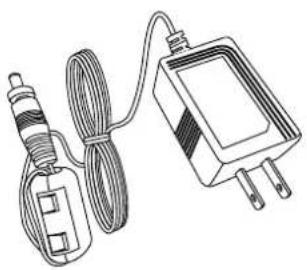
- AC adapter with screw type lock (1.2 m/3.94 feet) x1
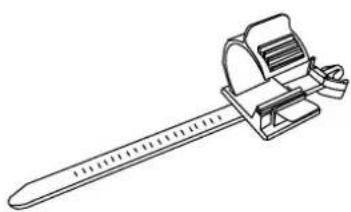
- Cable clamp x1
This User's Guide is common to both the transmier and receiver.
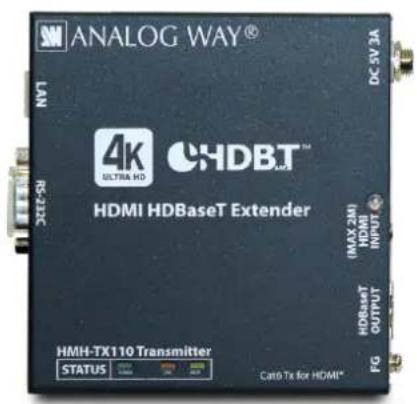
HMH-TX110 (main unit)
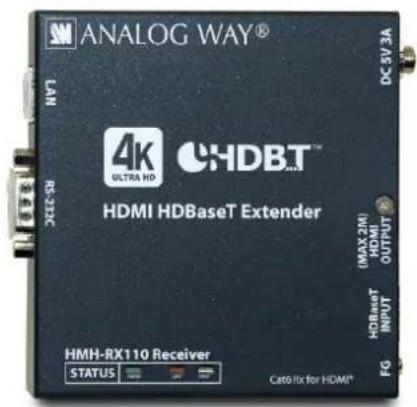
HMH-RX110 (main unit)
natural_image
Line drawing of a cordless electrical plug connected to a rectangular electronic device (no text or symbols)AC adapter with screw type lock (1.2 m/3.94 feet)
natural_image
Line drawing of a measuring tool with a ruler and handle (no text or symbols)Cable clamp
[Figure 1.1] List of included items
2 Product Outline
The HMH-TX110/HMH-RX110 (hereaer referred to as "HMH") is an HDMI extender (transmier and receiver set) for long-distance transmission over twisted pair cables, and it supports 4K@60 (4:2:0). Digital video signals are transmied without conversion to analog signals.
The HMH supports RS-232C serial bidireconal communicaon and LAN transmission.

flowchart
graph LR
    A["Digital video HDMI DVI 1 input"] -->|Up to 2 m/ 6.56 ft.| B["HMH-TX110 HMH RX110"]
    C["RS-232C 1 input"] --> B
    D["LAN 1 input"] --> B
    B -->|Up to 100 m/ 328.08 ft. when Cat6 cable is used| E["AC adapter AC adapter"]
    E --> B
    F["Digital video HDMI DVI 1 output"] --> G["RS-232C 1 output"]
    G --> H["LAN 1 output"]
[Figure 2.1] Applicaon diagram
3 Features
■ Video
• 4K@60 (4:2:0)
• HDCP 1.4/2.2 (pass through)
- Extension: up to 100 m/328.08 feet (4K@60) using Cat6/Cat5e STP cables up to 100 m/328.08 feet using Cat6 UTP cables *1
- Transmission using Cat5e UTP cables is also available. *2
- No substanve transmission delay (10 s or less per 100 m/328.08 feet)
■ Others
• CEC (pass through)
- HDMI signals can be extended using twisted pair cables.
• The AC adapter has a locking mechanism.
*1 For 70 m/229.65 feet or longer 4K formats, Cat6 STP cable and Cat5e STP cable are recommended.
*2 For 50 m/164.04 feet or longer, Cat6 UTP cable is recommended.
■ CEC (Consumer Electronics Control):
Device control protocol dened in HDMI 1.0 specicaon.
This protocol controls mulple devices connected via HDMI cables using a remote control.
4 Part names and descripons
4.1 Transmier (HMH-TX110)
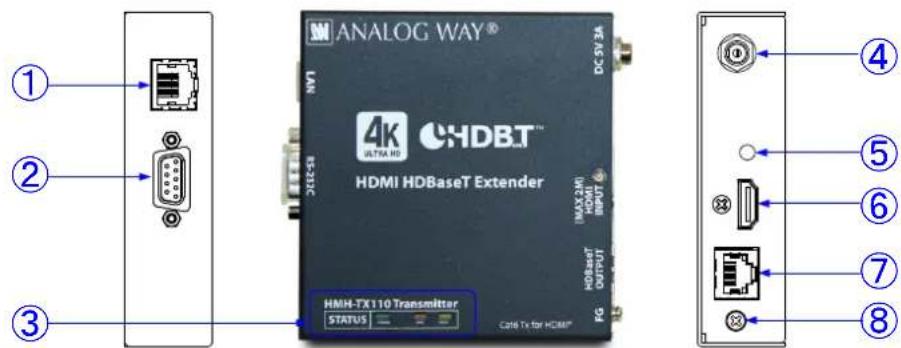
[Figure 4.1] Panel drawing (HMH-TX110)
[Table 4.1] Item descripons (HMH-TX110)
| # | Part name | Descripon |
| 1 | LAN port | Port for LAN signals |
| 2 | RS-232C port | Port for RS-232C signals |
| 3 | LED lights | POWER (Green): Lights when power is supplied from the AC adapter. LINK (Orange): Lights when an HMH receiver is connected.Blinks (0.5 second-interval) when the desnaon is in standby state. LAN and RS-232C communicaons are available.Turns o when no conncon.HDCP (Yellow): Lights when there is an access to HDCP.Blinks when there is no access to HDCP.Turns o when no input signals are recognized. |
| 4 | AC adapter connector | Connector for the supplied AC adapter. |
| 5 | Cable xing hole | Hole for the supplied cable clamp to secure the HDMI cable |
| 6 | HDMI input connector | Input connector for HDMI signalsConnect to source devices such as Blu-ray disk players. |
| 7 | Connector for long-haul extension | Output connector for HDBaseT signals-connected to the receiver of the HMH series. |
| 8 | Frame ground | Ground terminal |
4.2 Receiver (HMH-RX110)
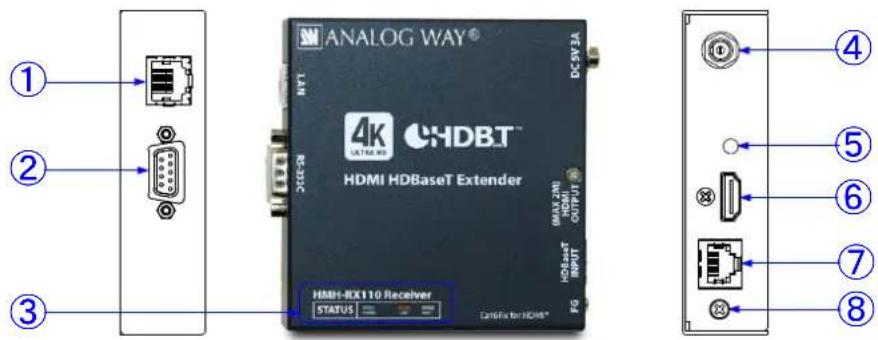
[Figure 4.2] Panel drawing (HMH-RX110)
[Table 4.2] Item descripons (HMH-RX110)
| # | Part name | Descripon |
| 1 | LAN port | Port for LAN signals |
| 2 | RS-232C port | Port for RS-232C signals |
| 3 | LED lights | POWER (Green): Lights when power is supplied from the AC adapter. LINK (Orange): Lights when an HMH transmier is connected.Blinks (0.5 second-interval) when the desnaon is in standby state. LAN and RS-232C communicaons are available.Turns o when no conncon.HDCP (Yellow): Lights when there is an access to HDCP.Blinks when there is no access to HDCP.Turns o when any input signals are not recognized. |
| 4 | AC adapter connector | Connector for the supplied AC adapter. |
| 5 | Cable xing hole | Hole for the supplied cable clamp |
| 6 | HDMI output connector | Output connector for HDMI signalsConnect sink devices such as TV and projector. |
| 7 | Input connector for extension | Output connector for HDBaseT signals-connected to the transmier of the HMH series. |
| 8 | Frame ground | Ground terminal |
5 Connecng external devices
5.1 Preparaon
Before connecng an external device, such as a source device and the sink device, please prepare the required cables.
- 2 m/6.56 . or shorter HDMI cable (Type A 19 pin plug)
- Twisted pair cable for extension (UTP/STP cable meeng Cat5e/Cat6)
• LAN cable meeng 10Base-T/100Base-TX
• RS-232C cable (D-sub9 pin, female)
■ HDMI cable: 2 m/6.56 feet or shorter HDMI cables with Type A (male) connector whose pins are congured correctly
■ Twisted pair cable for extension: UTP/STP cable meeng Cat5e/Cat6 standard
[See "6.1.2 RJ-45 connector"]
■ LAN cable: meeng 10Base-T/100Base-TX standard 100-Mbps Ethernet signals can be transmied over a long distance.
[See "6.1.2 RJ-45 connector"]
■ RS-232C cable: D-sub 9 pin, female RS-232C signals (115.2 Kbps at a maximum) can be transmied in duplex over a long distance. Select a cross cable or straight cable according to the connected devices.
[See "6.1.3 RS-232C connector"]
5.2 Precauons
Before connecng external devices, follow the precauons below.
Installaon 5.2.1
- In order to connect cables to this product or to devices connected to this product, rst remove stac electricity by touching grounded metal such as racks before handling the cables. Otherwise it may cause a malfuncon.
- Do not place the transmier on top of the receiver and vice versa.
- Do not block vent holes. Please secure the space above ambient 30 mm/1.18 inches.
- Do not install the HMH in closed space.
If you have to install this product in closed space, install an additional venlaon space in order to keep the ambient temperature at 40 degrees C/104 degrees F or less. If inadequately vented, the life of parts may be shortened and operaons may be aected.
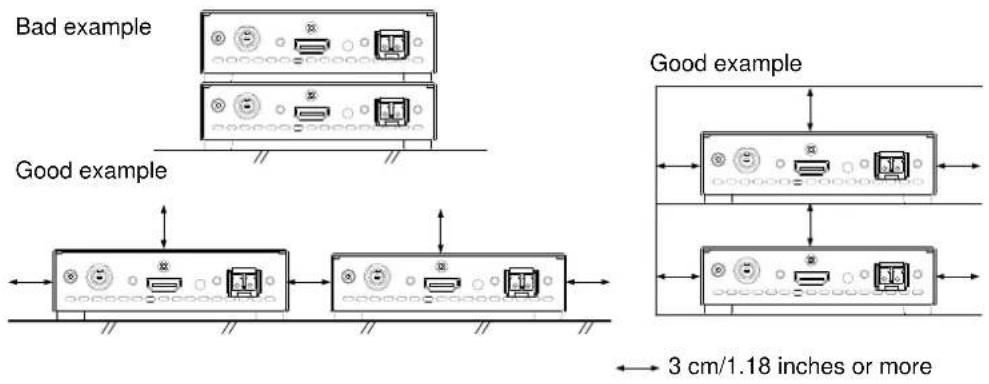
[Figure 5.1] Space required for installaon
Cabling 5.2.2
- Read the instrucon manuals of the external devices carefully.
- Turn o the transmier/receiver before connecng cables.
- Insert the cable into the connector rmly and do not give the connector stress.
- Secure the HDMI cable using a cable clamp in order to prevent it from falling o the HMH.
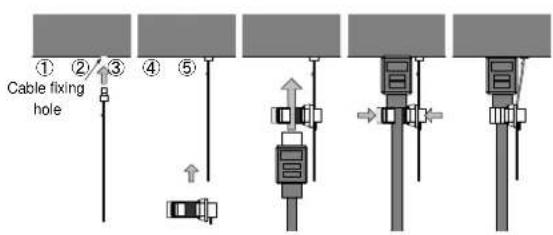
[Figure 5.2] Aaching cable clamp
Twisted pair cable for extension 5.2.3
The connector for a long-haul transmission is the same as the 8-core modular connector that is used for Ethernet. However, it cannot connect to Ethernet since the transmission method is not the same.
To ensure the best performance, select and connect the proper twisted pair cable correctly.
• We recommend a Cat6 UTP/STP cable for the twisted pair cable between the transmier and receiver.
- If using an STP cable, connect the FG connector to a ground source. Otherwise, the shielding feature does not work correctly. When using a UTP cable, we sill recommend using the ground connector.
- For 50 m/ 164.04 feet or shorter transmissions, Cat5e UTP cable can be used.
- The shielded STP cables are less aected by interference or external noise than UTP cables.
- The maximum extension distance of Cat5e/Cat6 UTP/STP cable is the shortest distance of maximum extension distances of HMH-TX110 transmier, HMH-RX110 receiver and sink device.
- For pin assignments apply T568A or T568B standards for straight through cabling.
- Do not give conncon cables a strong pull. The allowable tension of the twisted pair cable is 110 N.
- Do not bend the conncon cable at a sharp angle. Keep the bend radius four mes of the cable diameter or larger.
- Do not e the cable ghtly; leave a space allowing the cable to move slightly.
- If you use the same cables, we recommended keeping a distance between the cables or not to place the cables closely in parallel.
- Keep the twisted pair cable as straight as you can. If you coil the cable, it is easily aected by noise.
- Do not place this product in an electrically noisy environment, since high-speed signals are transmied. Parcularly when you use a high-output radio around the HMH, video or audio may be interrupted.
- If the distance between the transmier and receiver is 100 m/328.08 feet or less, cables can be joined using an RJ-45 plug coupler or wall outlet. Up to two cable couplers are allowed and couplers supporting Cat6A (10GBase-T) are recommended.
- The table below shows supported extension distance for each twisted pair cable category. Note that the distance may shorten depending on the actual environment.
| Category | Extension distance | Dot clock | Remarks |
| Cat5e | 50 m/164.04 . | <=225 MHz | For 50 m/164.04 . or longer, Cat6 is recommended |
| Cat6 | 100 m/328.08 . | ||
| 70 m/229.66 . | >225 MHz(4K format) | For 70 m/229.66 . or longer, Cat6 STP/Cat5e STP is recommended | |
| Cat5eSTPCat6STP | 100 m/328.08 . |
Note: If there is a problem in the transmission path, video or audio may be interrupted. Please check the items above. If the problem sll cannot be solved, shorten the length of the twisted pair cable.
Precauons for RS-232C communicaon 5.2.4
When designing a control program, please note the following points:
- For RS-232C communicaon, unnecessary data may be input to RS-232C signals when the HMH is turned o or the link is established.
- The control by RS-232C communicaon is not available until the link is established.
DVI signals with copyright protecon 5.2.5
The HMH does not support the long-distance transmission of DVI signals that are protected by HDCP (hereaer referred to as "DVI signals with HDCP").
| With HDCP* | Without HDCP | |
| HDMI signals | Supported | Supported |
| DVI signals | Not supported | Supported |
* Depends on the combinaon of source and sink devices
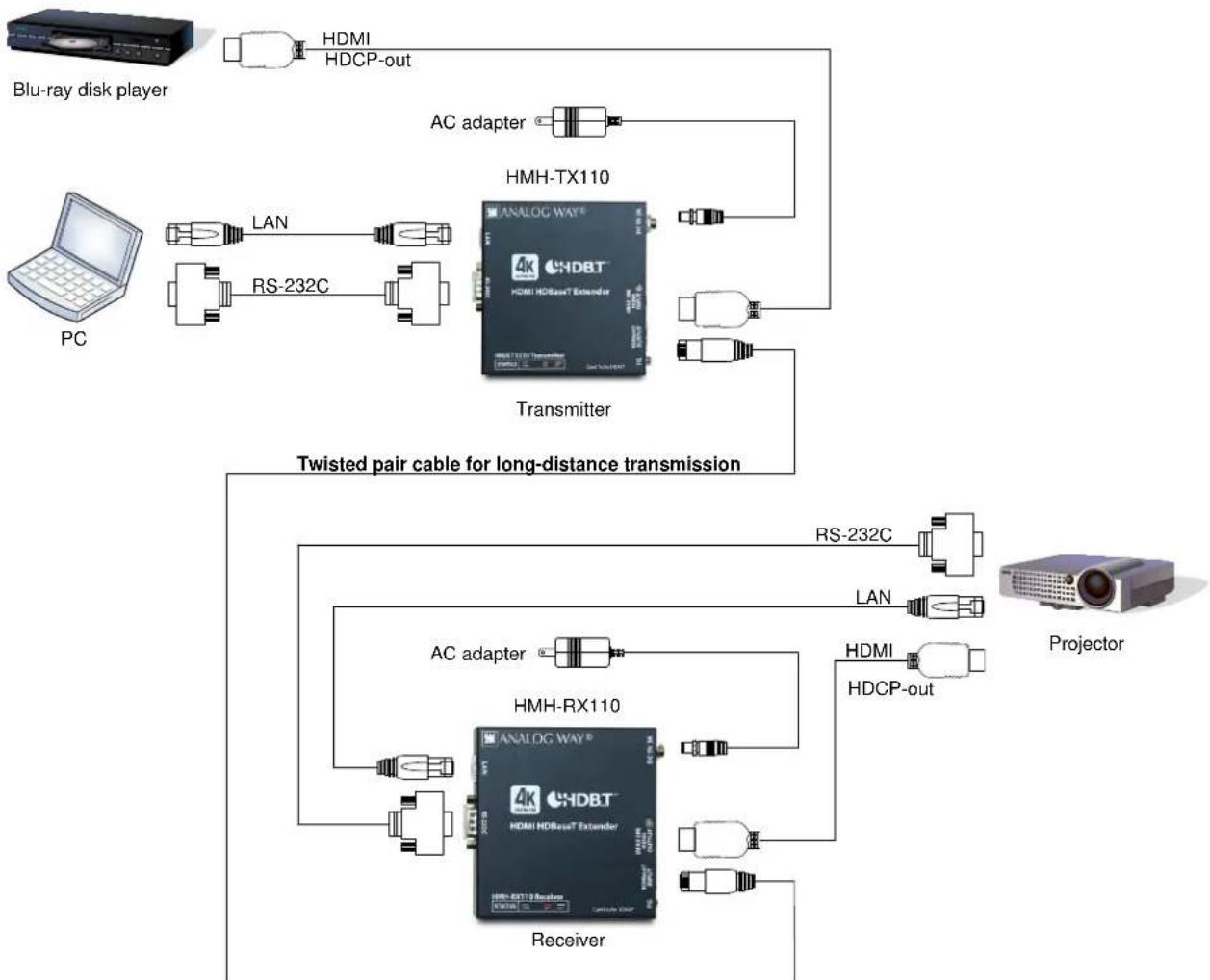
5.3 Applicaon example
Video and audio digital signals are transmied from the Blu-ray disc player to the transmier. The transmier sends these signals to the receiver through a twisted pair cable for extension while the receiver outputs the received video and audio signals from the HDMI output connector to the projector. Projectors and similar devices can be controlled using control devices such as PCs.
[Figure 6.1] HDMI Type A pin assignments
RJ-45 connector 6.1.2
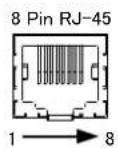
TIA/EIA-568A
| Pin number | Signal |
| 1 | WHITE/GREEN, Stripe |
| 2 | GREEN |
| 3 | WHITE/ORANGE, Stripe |
| 4 | BLUE |
| 5 | WHITE/BLUE, Stripe |
| 6 | ORANGE |
| 7 | WHITE/BROWN, Stripe |
| 8 | BROWN |
TIA/EIA-568B
| Pin number | Signal |
| 1 | WHITE/ORANGE, Stripe |
| 2 | ORANGE |
| 3 | WHITE/GREEN, Stripe |
| 4 | BLUE |
| 5 | WHITE/BLUE, Stripe |
| 6 | GREEN |
| 7 | WHITE/BROWN, Stripe |
| 8 | BROWN |
[Figure 6.2] RJ-45 pin assignments
RS-232C connector 6.1.3
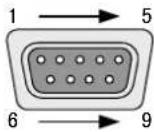
RS-232C
connector
D-sub 9 pin male
■ Connecng to a PC:
For RS-232C cable, make sure to use a cross cable.
HMH
| Pin No. | Signal | |
| 1 | N.C. (No connection) | N.C. |
| 2 | RD (RX data) | RD |
| 3 | TD (TX data) | TD |
| 4 | N.C. (No connection) | N.C. |
| 5 | GND (Ground) | GND |
| 6 | N.C. (No connection) | N.C. |
| 7 | RTS (TX request) | RTS |
| 8 | CTS (RX request) | CTS |
| 9 | N.C. (No connection) | N.C. |
PC
■ Connecng to an Analog Way's product:
For RS-232C cable, make sure to use a cross cable.
HMH Analog Way's product
| Pin No. | Signal | |
| 1 | N.C. (No connection) | |
| 2 | RD (RX data) | |
| 3 | TD (TX data) | |
| 4 | N.C. (No connection) | |
| 5 | GND (Ground) | |
| 6 | N.C. (No connection) | |
| 7 | RTS (TX request) | |
| 8 | CTS (RX request) | |
| 9 | N.C. (No connection) | |
■ Connecng to a product requiring straight conncon:
For RS-232C cable, make sure to use a straight cable.
HMH
Another manufacturer's product
| Pin No. | Signal | |
| 1 | N.C. (No connection) | |
| 2 | RD (RX data) | |
| 3 | TD (TX data) | |
| 4 | N.C. (No connection) | |
| 5 | GND (Ground) | |
| 6 | N.C. (No connection) | |
| 7 | RTS (TX request) | |
| 8 | CTS (RX request) | |
| 9 | N.C. (No connection) | |
N.C.: No Connecon
[Figure 6.3] RS-232C connector pin assignments
6.2 Product Specicaons
■Specicaons
| Item | Descripon | |||
| Model number | HMH-TX110 (Transmier) | HMH-RX110 (Receiver) | ||
| Input | Video | Number / Signal | 1 input / HDMI (*1)- HDCP 1.4 / 2.2: Pass through (*2)- CEC: Pass through- TMDS clock: 25 MHz to 340 MHz | 1 input / HDBaseT |
| Connector | 1 female HDMI Type A (*3) | 1 RJ-45 | ||
| Others | Color depth: 24 bit, 30 bit, 36 bit Deep Color (*4) | |||
| Formats | 480i/480p/576i/576p/720p/1080i/1080p/4K (*5)VGA to 4K (*5) | |||
| Audio | Number / Signal | 1 input / Mul-channel linear PCMup to 8 channels | 1 input / HDBaseT | |
| Connector | 1 female HDMI Type A | 1 RJ-45 | ||
| Output | Video | Number / Signal | 1 output / HDBaseT | 1 output / HDMI (*1)- HDCP 1.4 / 2.2: Pass through (*2)- CEC: Pass through- TMDS clock: 25 MHz to 340 MHz |
| Connector | 1 RJ-45 | 1 female HDMI Type A (*3) | ||
| Others | Color depth: 24 bit, 30 bit, 36 bit Deep Color (*4) | |||
| Formats | 480i/480p/576i/576p/720p/1080i/1080p/4K(*5)VGA to 4K (*5) | |||
| Audio | Number / Signal | 1 output / HDBaseT | 1 output / Mul-channel linear PCMup to 8 channels | |
| Connector | 1 RJ-45 | 1 female HDMI Type A | ||
| Plug & Play | Pass through | |||
| Twisted pair cables | Cat6 UTP/STP cable, Cat5e UTP/STP cable (*6) | |||
| Signal transmission distance (*7) | 330 (approx.) <100 m> (using a Cat6 UTP / STP cable)4K format: 230 (approx.) <70m> (Using a Cat6 UTP / STP cable) | |||
| Control | Serial control port | Number / Signal | 1 port / Full duplex Max. 115.2kbps | |
| Connector | 1 male 9-pin D-Sub | |||
| LAN control port | Number / Signal | 1 port / 10Base-T (Auto Negoaon), 100Base-TX (Auto Negoaon), Auto MDI/MDI-X | ||
| Connector | 1 RJ-45 | |||
| Others | AC adapter | Input: 100 - 240 VAC ± 10%, 50 Hz/60 Hz ± 3 HzOutput: 5VDC 2A 10Wa (AC adapter is supplied) | ||
| Power consumpon | Around 4 Wa | Around 7 Wa | ||
| Dimensions | 4.17(W)×1.08(H)×3.94(D)" (approx.) <106(W)×27.5(H)×100(D)mm>(Quarter rack, not including projecons) | |||
| Weight | 0.88 lbs. (approx.) <0.4kg> | |||
| Temperature | Operang temperature: 32°F to 104°F<0°C to +40°C>Storage temperature: -4°F to +176°F<-20°C to +80°C> | |||
| Humidity | Operang/ Storage humidity: 20 % to 90 % (Non Condensing) | |||
*1 HEC (Ethernet Channel) and ARC (Audio Return Channel) are not supported.
*2 DVI signals protected by HDCP are not supported.
*3 Use an HDMI cable that is 2 m/6.56 feet or shorter.
*4 For 4K format, 24 Hz/25 Hz/30 Hz/60 Hz (4:2:0) are supported.
*5 For 4K format, only 24 bit is supported.
*6 Straight conncon of T568A or T568B. For over 50 m/164.04 feet, Cat6 cables are recommended.
*7 The maximum extension distances of Cat6 UTP/STP cable and Cat5e UTP/STP cable depend on the shortest length of any cable being used to connect the transmier, receiver, and sink device. The shortest cable length in that group is the controlling factor.
Notes:
- Specicaons are subject to change without noce.
• All nominal levels are at ±5%. - The aached AC adapter is only for the HMH. Do not use it for other products.
7 Troubleshoong
In case this product does not operate smoothly, check the following items.
- Are this device and the connected devices turned on normally?
- Are cables connected correctly?
- Are there no loose connecons?
- Are cables that are appropriate to this device being used?
- Are signal speciaons of connected devices matched to each other?
- Are sengs of the sink device correct?
- Are there any close objects that may cause noise?
If additional assistance is required, please perform the following tests and then contact us.
- The problem occurs in all connectors?
- Connect the devices using genuine cables without connecng the HMH.
The problem sll cannot be solved? Please contact us for assistance.
CONTACT INFORMATION
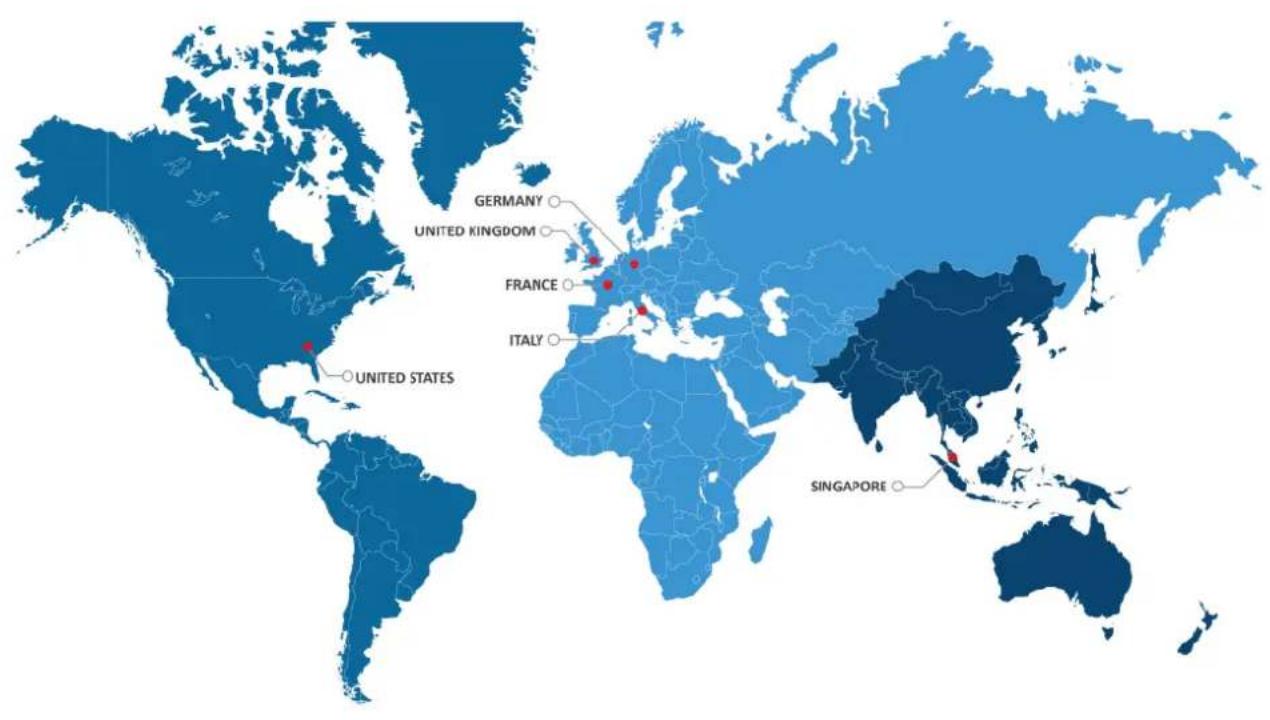

The Americas

ope, Middle East & Africa

Analog Way SAS - Headquarters
Toll free: +1 855 353 4988
Fax: +1 212 269 1943
3047 Summer Oak Place
Buford, GA 30518
USA
Analog Way Pte Ltd
Tel.: +65 6292 5800
Fax: +65 6292 5205
152 Beach Road
15-03 Gateway East
SINGAPORE 189721
Sales/General informaon:
saleseuro@analogway.com
Sales/General informaon:
salesusa@analogway.com
Sales/General informaon:
sales@analogwayasia.com
Technical support:
techsupport@analogway.com