BOXBOXBOY (3DS) - Video game NINTENDO - Free user manual and instructions
Find the device manual for free BOXBOXBOY (3DS) NINTENDO in PDF.


| Product Type | Video Game |
| Platform | Nintendo 3DS |
| Genre | Puzzle / Platformer |
| Developer | HAL Laboratory |
| Publisher | Nintendo |
| Release Date | 2016 |
| Number of Players | 1 |
| ESRB Rating | E (Everyone) |
| Supported Languages | English, French, German, Spanish, Italian, etc. |
| Storage Required | 352 MB |
| Supported Play Modes | Standard |
| Controller | Nintendo 3DS buttons and touch screen |
| Key Features | Puzzle-solving, box creation, level editor, unlockable costumes |
| Maintenance | Keep game cartridge clean and dry; avoid exposure to extreme temperatures |
| Safety Precautions | Follow standard Nintendo 3DS safety guidelines; take breaks to prevent eye strain |
| Spare Parts | Not applicable (digital product) |
| Repairability | Not applicable; replace cartridge if defective |
| General Information | Part of the BoxBoy! series; download via Nintendo eShop |
Frequently Asked Questions - BOXBOXBOY (3DS) NINTENDO
User questions about BOXBOXBOY (3DS) NINTENDO
0 question about this device. Answer the ones you know or ask your own.
Ask a new question about this device
Download the instructions for your Video game in PDF format for free! Find your manual BOXBOXBOY (3DS) - NINTENDO and take your electronic device back in hand. On this page are published all the documents necessary for the use of your device. BOXBOXBOY (3DS) by NINTENDO.
USER MANUAL BOXBOXBOY (3DS) NINTENDO
9 Support Information
1 Important Information
Please read this manual carefully before using the software. If the software will be used by children, the manual should be read and explained to them by an adult.
Also, before using this software, please select ⚠️ in the HOME Menu and carefully review content in "Health and Safety Information." It contains important information that will help you enjoy this software.
You should also thoroughly read your Operations Manual, including the "Health and Safety Information" section, before using this software.
Please note that except where otherwise stated, "Nintendo 3DS™" refers to all devices in the Nintendo 3DS family, including the New Nintendo 3DS, New Nintendo 3DS XL, Nintendo 3DS, Nintendo 3DS XL, and Nintendo 2DS™.
Important Information
Your Nintendo 3DS system and this software are not designed for use with any unauthorized device or unlicensed
accessory. Such use may be illegal, voids any warranty, and is a breach of your obligations under the Agreement. Further, such use may lead to injury to yourself or others and may cause performance issues and/or damage to your Nintendo 3DS system and related services. Nintendo (as well as tend to licensee or distributor) is not responsible for any damage or loss caused by the use of such device or unlicensed accessory. Except as authorized, copying of any Nintendo software is illegal and is strictly prohibited by domestic and international intellectual property laws. "Back-up" or "archival" copies on riletua
Nintendo respects the intellectual property of others, and we ask Nintendo 3DS software Content Providers to do the same. In accordance with the Digital Millennium Copyright Act in the US, the Electronic Commerce Directive in the EU, and other applicable law, we have adopted a policy of removing, in appropriate circumstances and at our sole discretion, any Nintendo 3DS software that appears to infringe anyone else's intellectual property. If you believe your intellectual property rights are iag infringed, please visit www.nintendo.com/ippolicy to view the
.stl
© 2016 HAL Laboratory, Inc. / Nintendo
Trademarks are property of their respective owners. Nintendo 3DS is a trademark of Nintendo.
CTR-N-KCAE-00
2 Information-Sharing Precautions
User-generated content, or UGC, is content created by users, such as messages, Mii™ characters, images, photos, video, audio, etc.
Information-Sharing Precautions
The extent of UGC exchange depends on the software.
- Nintendo bears no responsibility whatsoever for any problems that result from the use of the Internet (for example, the sending of content over the Internet, or the sending or receiving of content with others).
3
Internet Enhancements
This software allows you to connect to the Internet and enjoy sharing screenshots and your impressions of the game with other players via Miiverse™ (page 6).
◆ Refer to your Operations Manual for information about connecting your system to the Internet.
You must go through the initial setup for Miiverse on your system before you can use Miiverse with this game.
This software supports Nintendo .krowteN

NINTENDO NETWORK
Nintendo Network is the name of Nintendo's network service that enables users to enjoy games and other content via the neetnl
Protecting Your Privacy
● To protect your privacy, do not give out personal information, such as last name, phone number, birth date, age, school, e-mail, or home address when
communicating with others.
- Friend codes are a part of a system that allows you to play with people you know. If you exchange friend codes with strangers, there is a risk you could share information with people you do not know or exchange messages that contain offensive language. We therefore recommend that you do not give your friend codes to people you don't know.
4 Parental Controls
You can restrict use of the following feature by adjusting the options in Parental Controls.
◆ Access to this game (as well as other games) can also be restricted through the Software Rating item in Parental Controls.
◆ Refer to your Operations Manual for information on how to set up Parental Controls.
Miiverse
Restricts users from viewing or posting content on Miiverse. When set to Restrict Posting, screenshots, text, and handwritten messages cannot be posted. When set to Restrict Viewing and Posting, screenshots, text, and handwritten messages cannot be posted or viewed.
5
Saving and Erasing Data
This game has one save file. Your progress is saved automatically whenever you clear a stage or exit the shop.
Erasing Save Data
To delete your current save data, launch the software, wait for the Nintendo 3DS logo to disappear, and then press and hold Ⓐ, Ⓑ, ⒕, and Ⓨ simultaneously until a message window appears. Once it appears, you will have a chance to confirm that you want to erase your save data.
Once erased, data cannot be recovered, so please be careful.
Carrying Over Data
Any costumes you obtained while playing the previous title, BOXBOY!™, will be available to you in this game if that data is still saved to your system. You can find those costumes in the shop (page 8).
Data can be lost due to user action, such as repeatedly powering off and on the etay or removing a Game Card or SD Card while saving. Data loss may also be caused by poor vitro are to dirt or dust in the system's ports. Please be
ata .derotser eb ton
natural_image
Pure mechanical diagram showing a spring-loaded component between two blocks (no text or symbols)6
Stages
Guide Qbby through the goal door at the end of a stage to complete it. If you need a reminder about the in-game controls, select Controls or Techniques from the pause menu to view a detailed control guide.

flowchart
graph TD
    A["1"] --> B["Box limit: 2 sets of 2"]
    B --> C["Remaining: 10"]
    C --> D["Hint"]
    D --> E["9"]
    style A fill:#f9f,stroke:#333
    style E fill:#ccf,stroke:#333

Qbby

Quick-restart reminder
These graphics are here to remind you that you can instantly restart from the last checkpoint by pressing Ⓛ + Ⓡ simultaneously.

Creation info
Shows how many sets of boxes you can create at one time and the number of boxes allowed in each set.

Progress info
The number of boxes you can create before the crowns disappear. A crown will be displayed every time you obtain a crown. Collecting all the crowns in a stage will earn you a perfect clear.

Hint
This button changes from gray to black when a hint about how to proceed is available. When it is black, you can tap it to proceed to a new screen and then spend a Play Coin to view the current hint. Play Coins are obtained by carrying your system with you in Sleep Mode as you walk around.

New box
Once you've placed two sets of boxes, the first box or set will fade (☐) anytime you start to create an additional box. It disappears completely the instant the new box is fully formed.
7 Crown
Collect a crown by touching it. If you use up all of your remaining boxes in a stage and then make any additional boxes, any uncollected crowns that remain in the stage will turn gra (y) and you will no longer be able to obtain them.
8 Goal door
Press Ⓐ while standing in front of a stage's goal door to clear the stage.
Miiverse
Tap this button to jump directly to the game's official Miiverse community. There, you can share screenshots and your thoughts with other players.
Pause Menu Options
Press during a stage to open the pause menu.
World Map
Select this option to return to the World Map (page 7).

Retry
Select this option while playing to start the current stage over from the beginning. Any crowns you've collected so far in the stage will be lost.

Controls
Select this option to review the controls.

Techniques
Select this option in the pause menu to review helpful tricks and tips.

natural_image
Pixel art illustration of a street scene with houses, a speaker, and a lamp (no text or symbols)7 World Map
Navigate the World Map either by using the +Control Pad and buttons or by tapping the options on the lower screen. To go through a door, stand in front of it and press Ⓐ.

flowchart
graph TD
    1["Player 1"] --> 2["Player 2"]
    2 --> 3["Player 3"]
    3 --> 4["Player 4"]
    4 --> 5["Player 5"]
    5 --> 6["Player 6"]
    6 --> 7["Player 7"]
    7 --> 8["Player 8"]
    4 --> 9["Shop"]
    style 1 fill:#f9f,stroke:#333
    style 2 fill:#f9f,stroke:#333
    style 3 fill:#f9f,stroke:#333
    style 4 fill:#f9f,stroke:#333
    style 5 fill:#f9f,stroke:#333
    style 6 fill:#f9f,stroke:#333
    style 7 fill:#f9f,stroke:#333
    style 8 fill:#f9f,stroke:#333
    style 9 fill:#f9f,stroke:#333
1 Shop door
Go through this door to access the shop (page 8).
2 World door
Go through a world door to enter a world and tackle the various stages contained within.
flowchart
graph TD
    A["Root"] --> B["Crown Icon"]
    C["Crown Icon"] --> D["Crown Icon"]
    E["Crown Icon"] --> F["Crown Icon"]
    G["Root"] --> H["Crown Icon"]
    I["Root"] --> J["Crown Icon"]
    K["Root"] --> L["Crown Icon"]
    M["Close"] --> N["Next Step"]

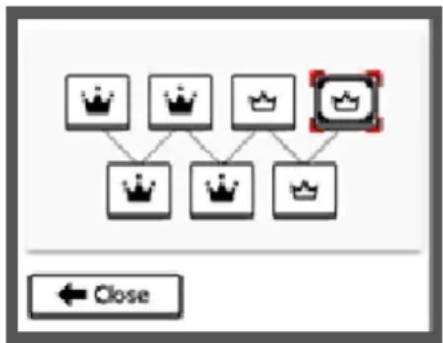
: Cleared

: Cleared perfectly
3 World-door jumps
Tap these to instantly move to any unlocked world's door.

Shop
Tap this to instantly enter the shop (page 8).
5 Crown

: All stages cleared

: All stages cleared perfectly
6 Your medals
7 Turn page
8 Miiverse (page 6)

Unlocking New Content
Treasure chests

When a treasure chest ( ) is dependent will appear and then become available in the shop (page 8).
● Challenge World CW)
Unlock this world to access bonus stages that you complete using costumes optimized for .egats hcae
natural_image
Simple line drawing of four cartoon characters standing on a platform (no text or symbols)8
Shop
smetl ella
You can exchange your medals for a variety of different items.

Comics
Get to know Qbby and his friends by collecting their comics. After you've read a comic, you can return to the shop to revisit it at any time.

Music
Shop here if you want to enjoy background music from the game. Once you've unlocked a track, you can return to this area of the shop and listen to it anytime you want.

Costumes
Shake things up with a new look! Once you've obtained a costume, you can change Qbby into it as often as you like simply by selecting it from the shop.
◆ Any costumes you obtained while playing the previous title, BOXBOY!, will be available to use in this game if that data is still saved to your system.

Collecting Medals
Clear stages to earn medals. Clear stages perfectly to earn even more!



9 Support Information
dGelmer Service SUPPORT.NINTENDO.COM
:adA0073-552-
Latin America/Caribbean: 8707-85