P778A - Tablet HKC - Free user manual and instructions
Find the device manual for free P778A HKC in PDF.


User questions about P778A HKC
0 question about this device. Answer the ones you know or ask your own.
Ask a new question about this device
Download the instructions for your Tablet in PDF format for free! Find your manual P778A - HKC and take your electronic device back in hand. On this page are published all the documents necessary for the use of your device. P778A by HKC.
USER MANUAL P778A HKC
7" Capacitive Multi-Touch Tablet
text_image
HKC Touch the wonderful worldDual-Core Processor
HKC brings you the latest in Android™ technology, giving you the performance you want at an affordable price. The crystal clear 7" capacitive touch screen is great for watching movies, reading books, surfing the web, video conferencing online and more. With Google Play you can take advantage of more than 700,000 apps and games, as well as the world's largest collection of eBooks, millions of songs, thousands of movies, TV shows and magazines. Designed to enhance your entertainment experience at home or on the go and with multiple colors to choose from, you can enjoy your technology in style! Welcome to HKC...
Attention:
This handbook contains important information on security measures and the correct use of the product. In order to avoid accidents, please make sure to read the manual carefully before use the device.
- Please do not use the unit in places that are extremely hot, cold, dusty, or humid. Especially in summer do not leave the device in the car with Windows closed.
- Avoid dropping or violent collisions with the device.
- Please charge battery before use.
A Battery power ICONS show it has no power.
B The system automatically shuts off immediately after startup.
C Buttons have no response.
When the device is formatting or going through upload and download file, please don't disconnect, this could cause application error.
If memory is erased because of damage to the product, repair, or other, the company shall not be liable, please follow the user manual for the standardized operation to use the device.
Don't disassemble the product, don't use alcohol, thinner or benzene to scrub product.
Please don't using the Tablet PC when you are driving or walking down the street.
USB is only for data transmission.
The company reserves the right to improve product, without prior notice.
(This tablet is not waterproof).
【Note】All pictures in this manual are just for your reference. The information is subject to changes without prior notice.
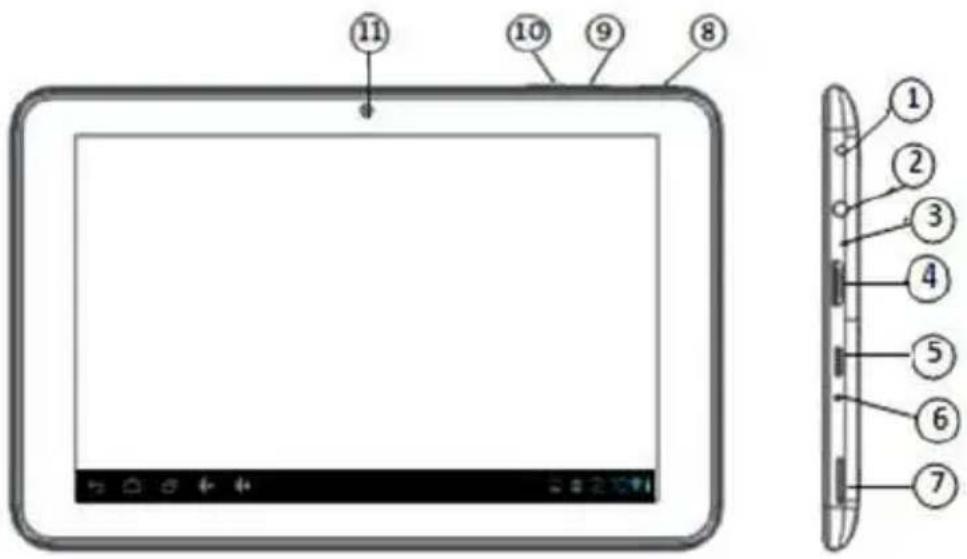
1. Appearance and Buttons
text_image
11 10 9 8 1 2 3 4 5 6 7① Power Jack
② Microphone
③ MIC
④ Mini HDMI
⑤ Mic USB
⑥ Reset
⑦ Micro TF card Jack
⑧ Power on/off
⑨ Volume +
⑩ Volume -
⑪ Camera
⑫ Return
⑬ Home
⑭ Menu

1.1 Touch panel
7" Capacitive touch panel: In the Operation, to click and drag on the touch panel
1.2 POWER
Startup: Press and hold the power button, the system will enter the main interface.
Shutdown: In the main menu interface, Press the power button for about 5 seconds to shutdown, The system can hint "power off" option, Click "ok". Then you can safely shut down.
Lock Screen: Short press power button to lock screen or unlock screen.
Note: When power is depleted, system tablet will shut down automatically.
1.3 ESC
Press ESC button will return the last interface; Long Press ESC button will return the main interface.
1,4 Menu
Short press Menu button will take you back to the home screen
1.5 Volume +, Volume-
The buttons on top Volume (+) Volume (-) achieve changes in the volume.
1.6 Earphone jack
3.5 mm standard earphone jack
1.7 Video Output interface
HDMI output interface
1.8 TF card
TF-CARD solt: external T-FLASH card
1.9 Mini-USB
Mini-USB jack: you can use it to connect the computer for data transmission, charging and external connection to USB flash drive
1.10 Reset
When the tablet has crashed, use the small objects to short press RESET button, tablet will force shutdown.
【Note】: Use RESET option only if unable to shut down any other way.
2. First use
2.1 Battery management and charge
Before first use, please charge battery fully. The first two times charging device you should long charge for about 6 hours, after this you only need 4 hours to charge.
【Note】: This tablet uses Built-in polymer battery, Charge must with standard adaptor (Input: AC110\~240V 50/60Hz Max: 180MA.. Output: DC5.0\~5.5V/1.5A) USB interface can charge as well.
During the charging, the battery icon will scroll
When finished charging, battery icon will become green and stop rolling In order to prolong the service life of the machine, please use out battery power before charging it
【Note】: 1. To avoid power consumption caused damages please charge/use battery at least once a month.
-
After low battery shut down, connect DC adaptor, device will not start right away please let charge before trying to start again.
-
Device charging should be in standby status to reach normal charging time.
2.2 Connection with PC
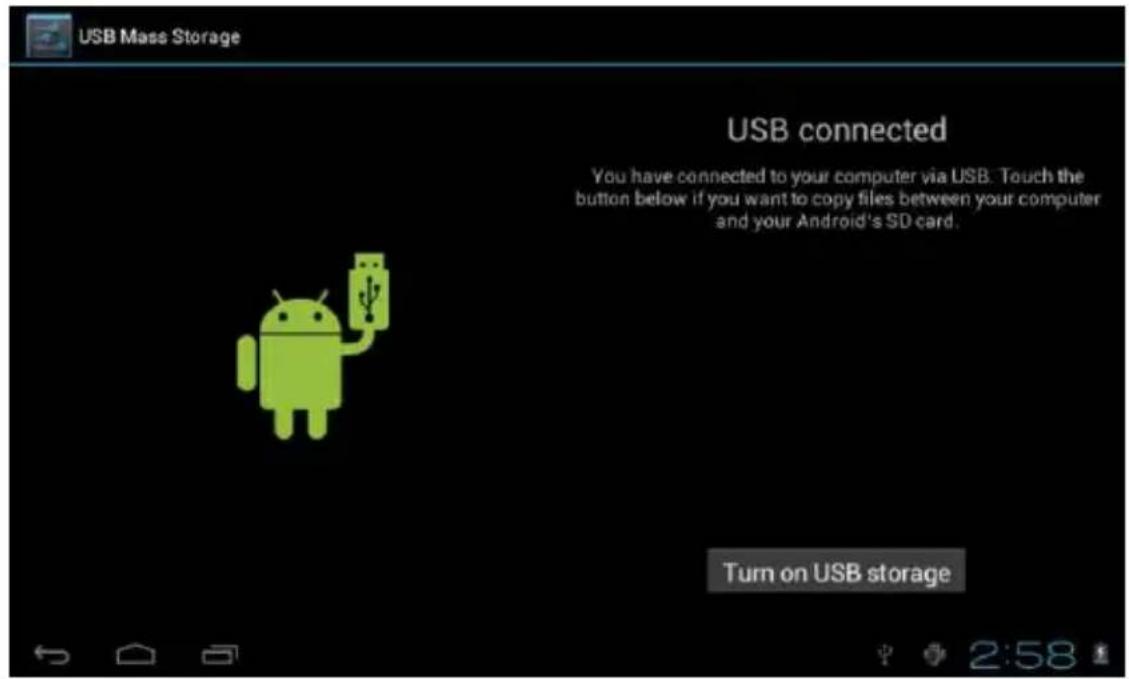
Use USB cable to connect device to PC, device will pop up the USB connection window, click turn on USB storage to connect to PC
text_image
USB Mass Storage USB connected You have connected to your computer via USB. Touch the button below if you want to copy files between your computer and your Android's SD card. Turn on USB storageIn load mode, you can copy or delete the files on the device and on the memory card.
3. Equipment operation interface
3.1 Main interface
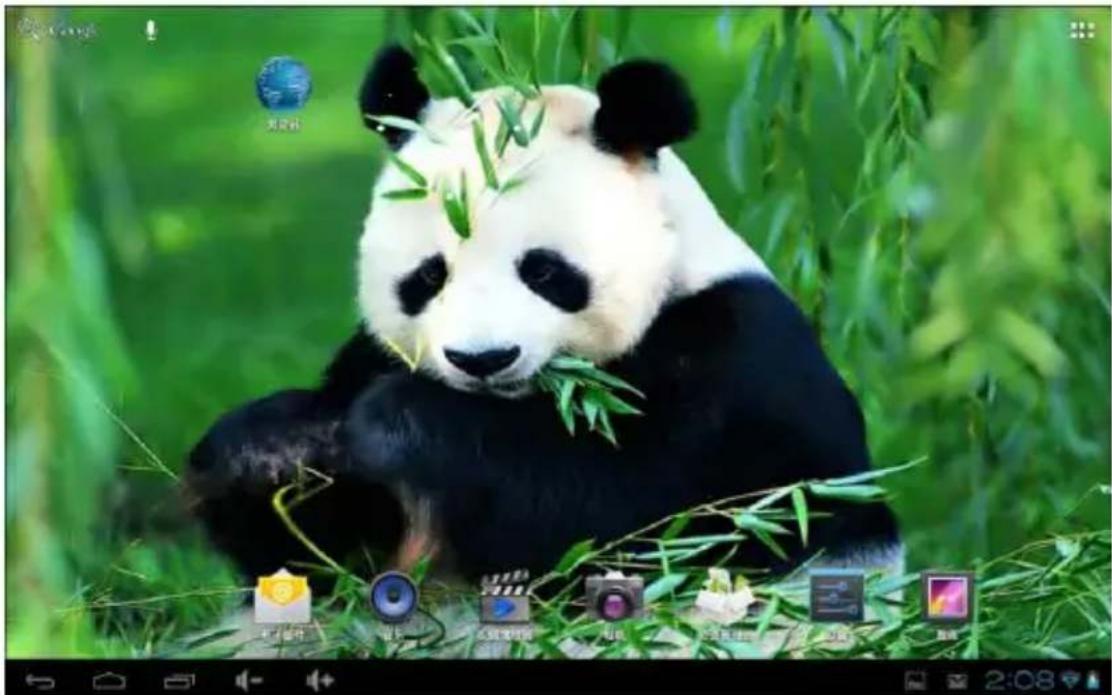
After starting up the device will enter the main interface
natural_image
A giant panda sitting among green bamboo leaves, eating bamboo with visible bamboo stalks (no text or symbols on the panda itself)In the main interface, you can:
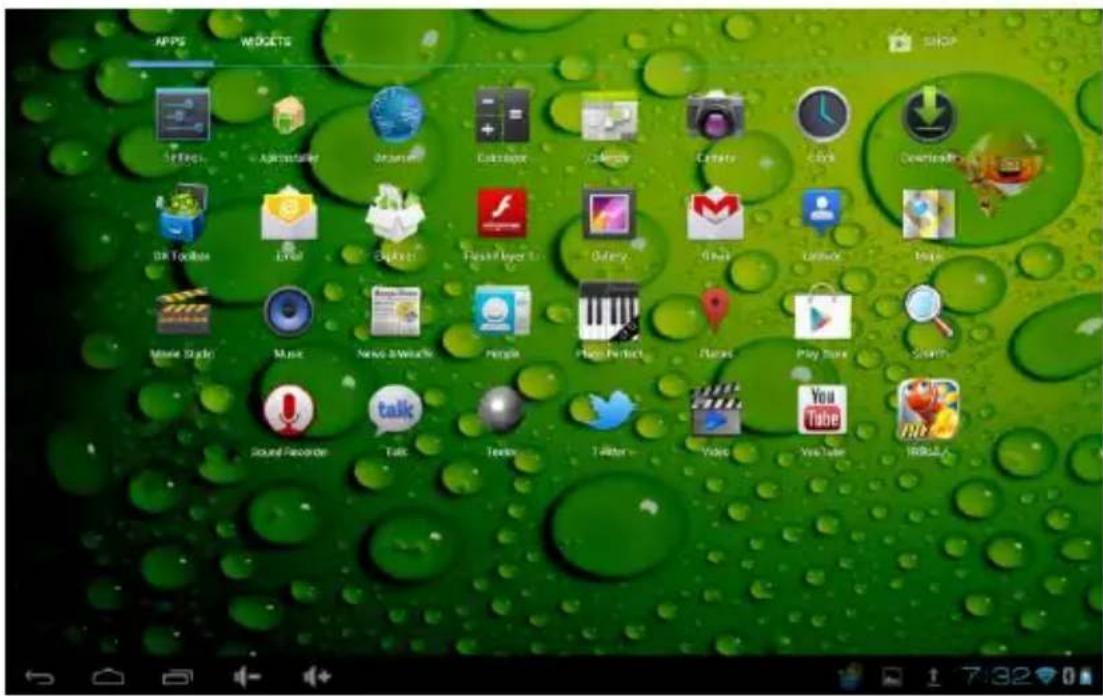
Management main interface software ICONS: long press the icon for 3 second, after the icons will appear bigger, then you can drag anywhere in the interface.
text_image
APPS MOGCTS SHOP SIFRS A2B154568 Draunl CableApp C3Mg Camera Click Download DR Tools Email English Flash Player Binary Share Language Music Movie Style Music News & Reviews People Play Perfect Fluera Play Store Search Sound Recorder Talk Texter Twitter Video YouTube iRMSLDelete icons: long press the icon for 3 second, drag the icon to the Recycle Bin icon, once it becomes red, release, after that you can delete icon.
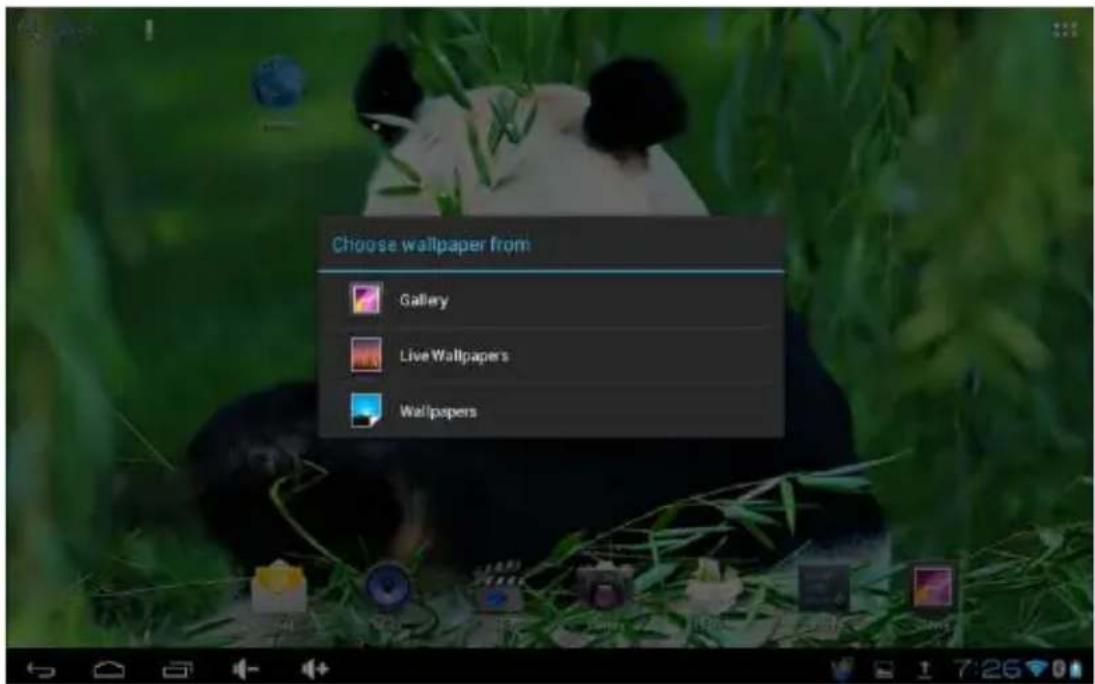
Touch the screen and hold, a dialog box will appear "Add Your Home Screen" as shown below:
text_image
Choose wallpaper from Gallery Live Wallpapers Wallpapers3.2 Status Bar

text_image
← 2:58• The status bar above of the screen
Top left display main interface software, T-Flash card, USB connection's status and so on.
Top right display the battery, battery charge icons, current time, set time, Settings Menu, ESC button.
3.3 Use touch panel
Device equipped with a 7" touch screen.
Screen Functions:
No matter which interface you are on the screen can go back to main screen by pressing the soft key 📋 on the bottom right corner of the main screen.
【Note】The main screen soft key functions as the machine back key In different applications, by tapping the back soft key on the bottom right corner on the touch screen, you can return to previous interface.
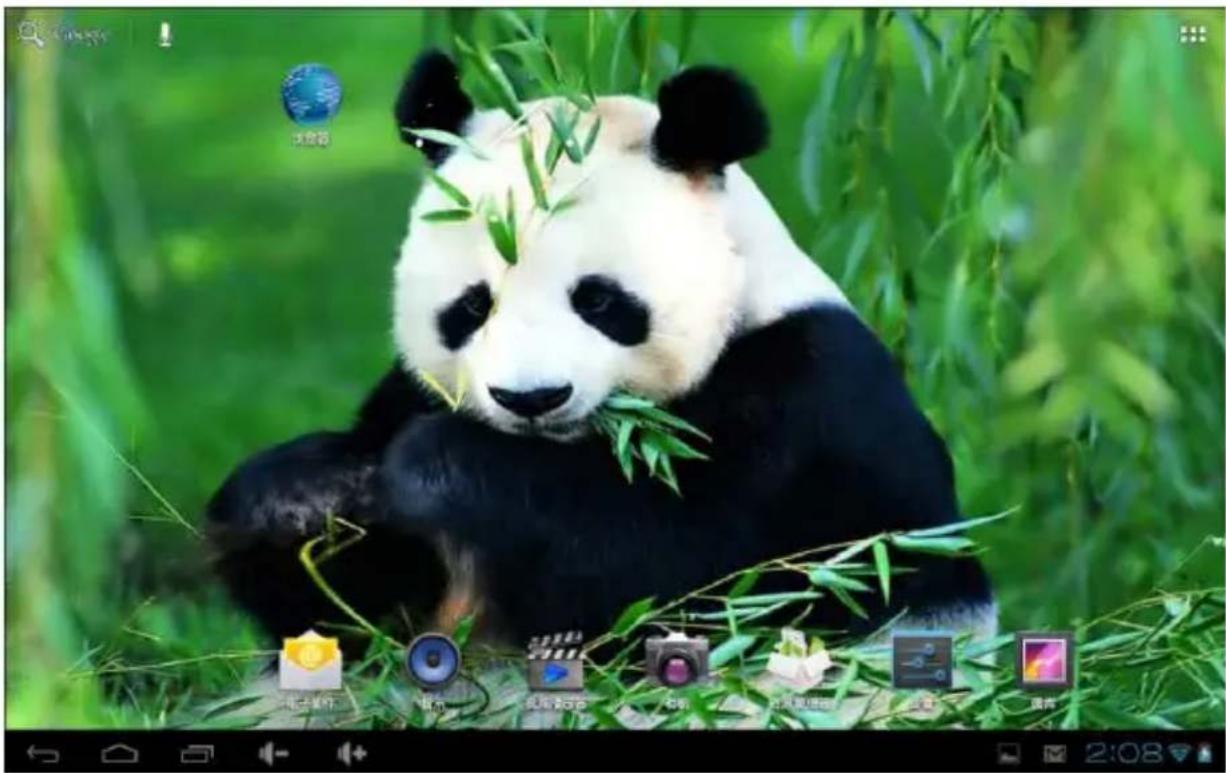
In different applications, by tapping the menu key on the upper right corner of touch screen, the screen will appear the operation setting interface as follows, Remark]: The main screen soft key functions as the machine menu
natural_image
Panda bear eating bamboo in a lush green forest (no text or symbols visible on the panda or bamboo)In the main interface, you can touch the icon to open the APPs
In different browser (file, music, video, pictures), You shift and drag the scroll bar, so that the file list can scroll up or down.
4. Basic Equipment
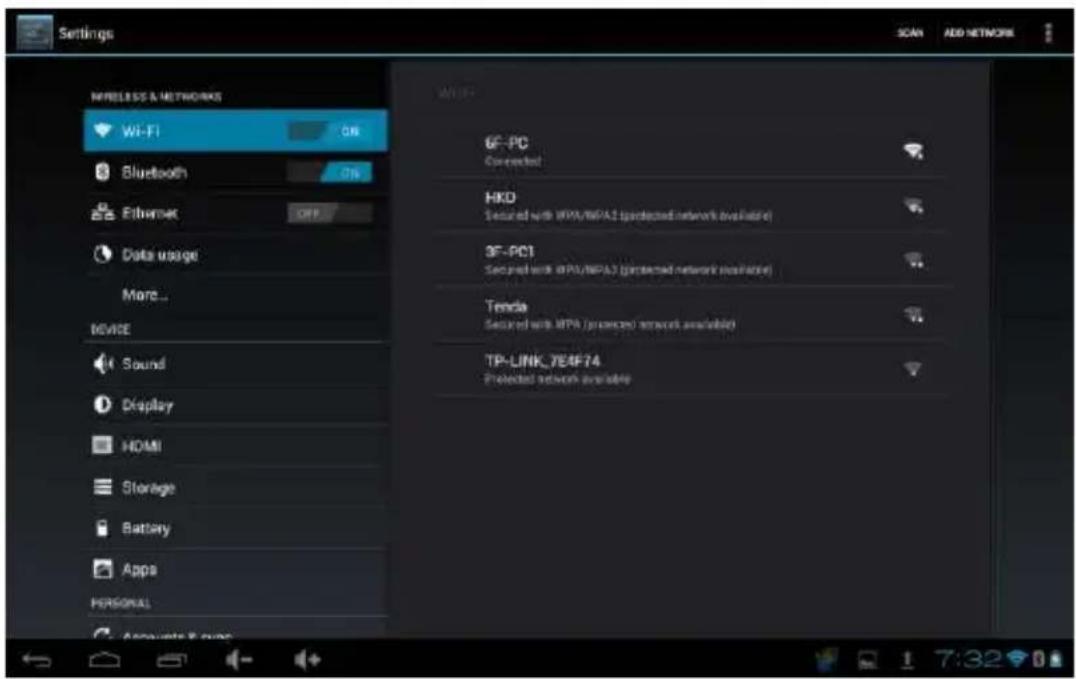
Setting: Click setting icons

enter setting interface
text_image
Settings SNACK ADD NETWORK NRELEASE & NETWORKS Wi-Fi ON Bluetooth 78 Ethernet OFF Data usage More... DEVICE Sound Display HDMI Storage Battery Apps PERSONAL WIFI 6F-PC Connected HKD Secured with ITPA/IEPA1 (protected network available) 3F-PC1 Secured with ITPA/IEPA1 (protected network available) Tenda Secured with ITPA (protected network available) TP-LINK_7E4F74 Protected network available Accounts & sums 1 7:32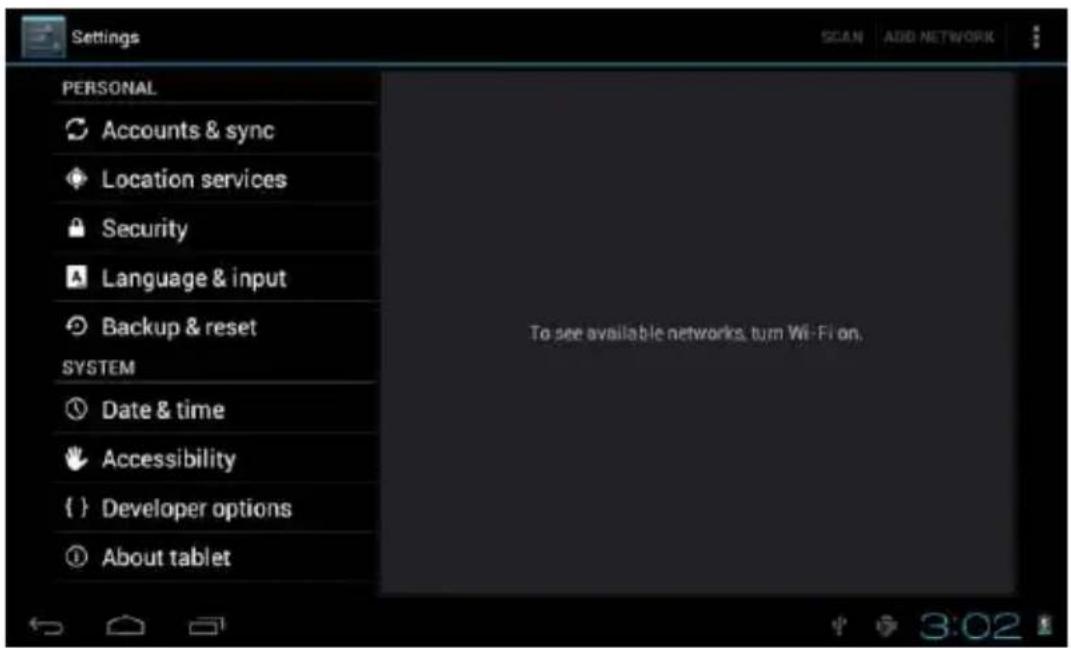
text_image
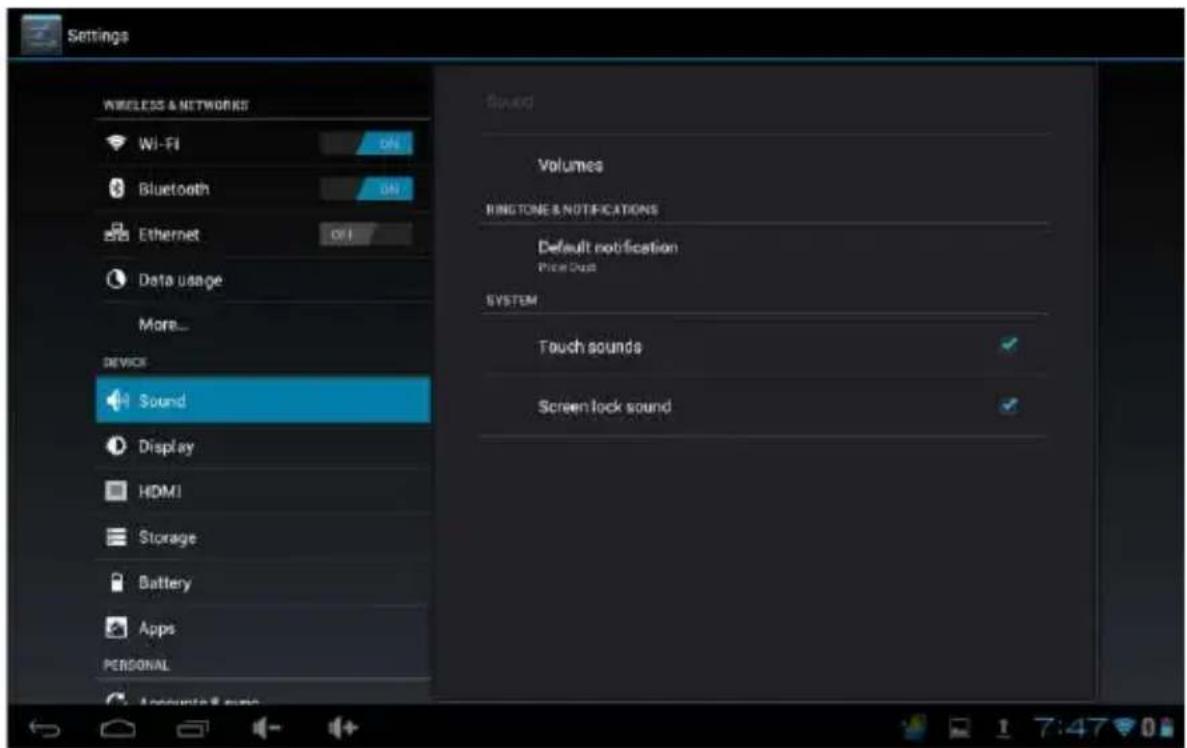
Settings GOAN ADD NETWORK PERSONAL Accounts & sync Location services Security Language & input Backup & reset SYSTEM Date & time Accessibility { } Developer options About tablet To see available networks, turn Wi-Fi on. 3:024.1 Silent mode, Volume, Notification, Ringtones, Audible selection, Screen lock, sounds.
text_image
Settings WIRELESS & NETWORKS Wi-Fi Bluetooth Ethernet Data usage More... DEVICE Sound Display HDMI Storage Battery Apps PERSONAL Speed Volumes RINGTON & NOTIFICATIONS Default notification Price Dash SYSTEM Touch sounds Screen lock sound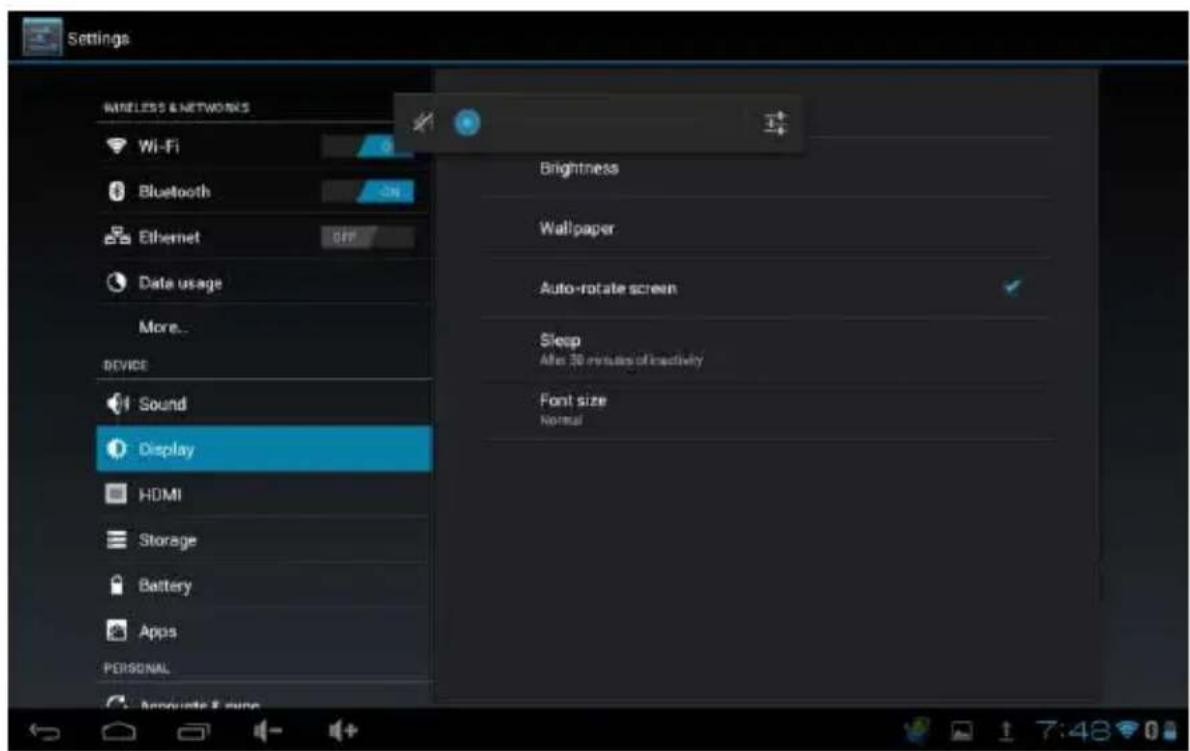
text_image
Settings Wireless & NETWORKS Wi-Fi Bluetooth Ethernet Date usage More... DEVICE Sound Display HDMI Storage Battery Apps PERSONAL Brightness Wallpaper Auto-rotate screen Sleep After 30 revisions of inactivity Font size Normal4.2 Application
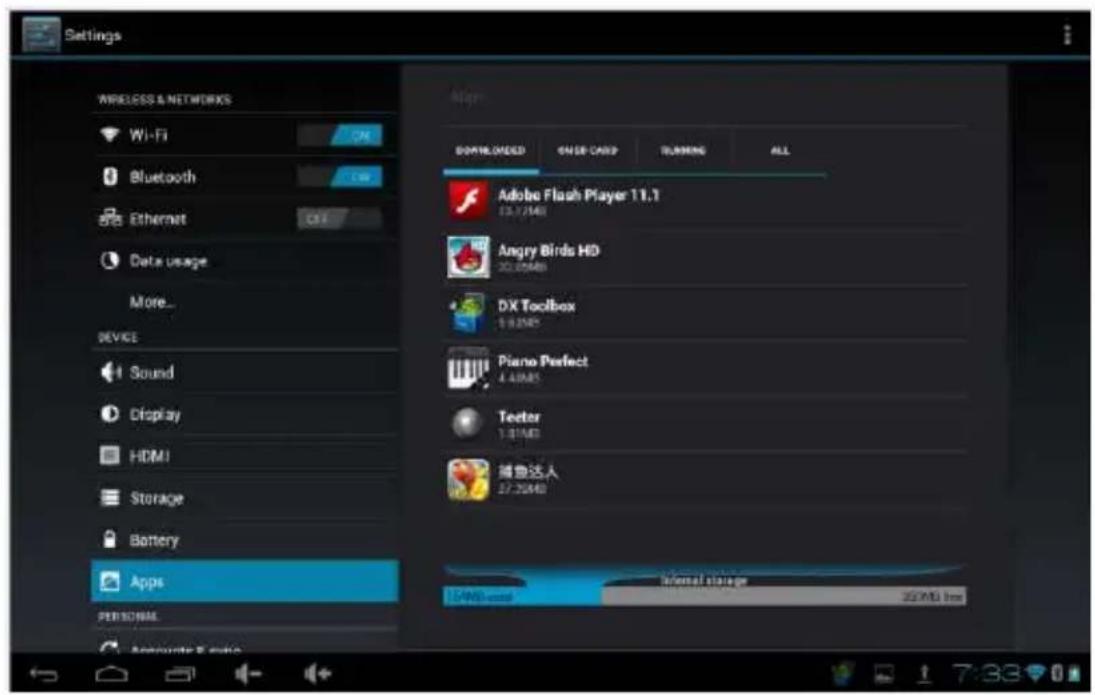
Manage applications
text_image
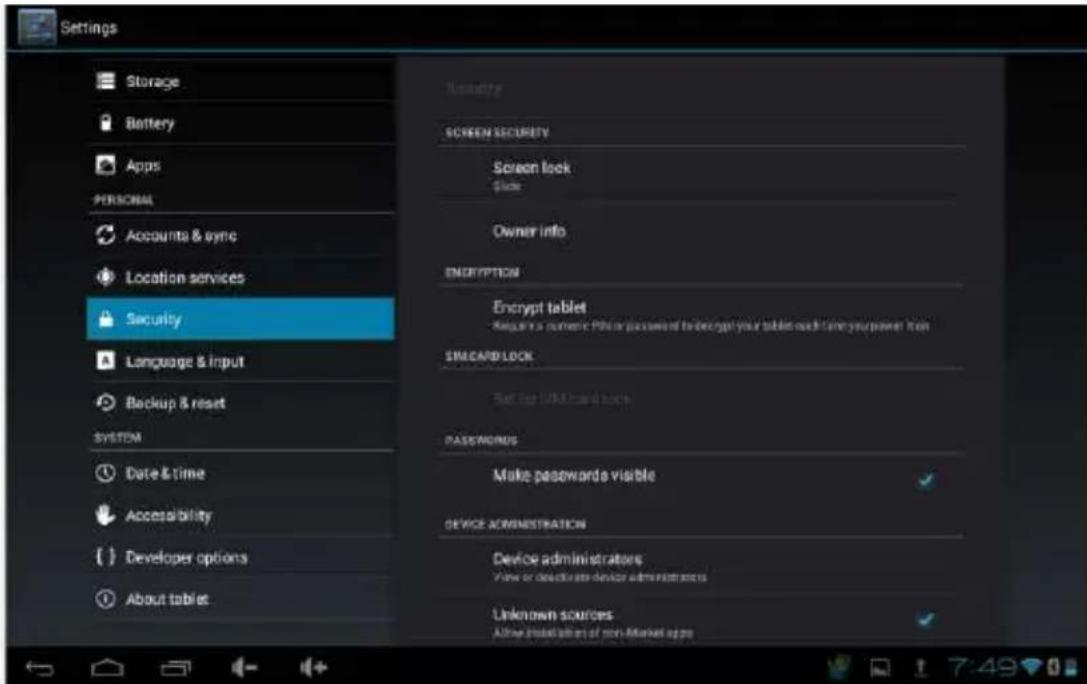
Settings Storage Battery Apps PERSONAL Accounts & sync Location services Security Language & input Backup & reset SYSTEM Date & time Accessibility Developer options About tablet Security SCREEN SECURITY Screen lock Glock Owner info ENCRYPTION Encrypt tablet Regulate a numeric Phone password to encrypt your tablet each time your power from SRECARD LOCK Set up UNI card lock PASSAGNUS Make passwords visible DEVICE ADMINISTRATION Device administrators View or delete an device administrators Unknown sources Active installation of non-Market appsUnknown sources: Click "Unknown Sources", then click "OK"
Manage application: manager and uninstall Application
【Note】: when you Firmware Upgrade, please close the USB connect
How to uninstall?
- Enter setting " >"Application">"Manage application" And then there will be installed program list.
- Click the Application you want to uninstall.
- Click Uninstall, then you can delete the application
text_image
Settings WIRELESS & NETWORKS Wi-Fi Bluetooth Ethernet Data usage More... DEVICE Sound Display HDMI Storage Battery Apps PERSONAL Downloaded GND CARD RUNNING ALL Adobe Flash Player 11.1 12.1/MB Angry Birds HD 30.8MB DX Toolbox 1.9MB Piano Perfect 4.8MB Tectar 1.9MB 瑞鲁达人 17.2MB Internal storage 35MB /nm4.3 Privacy
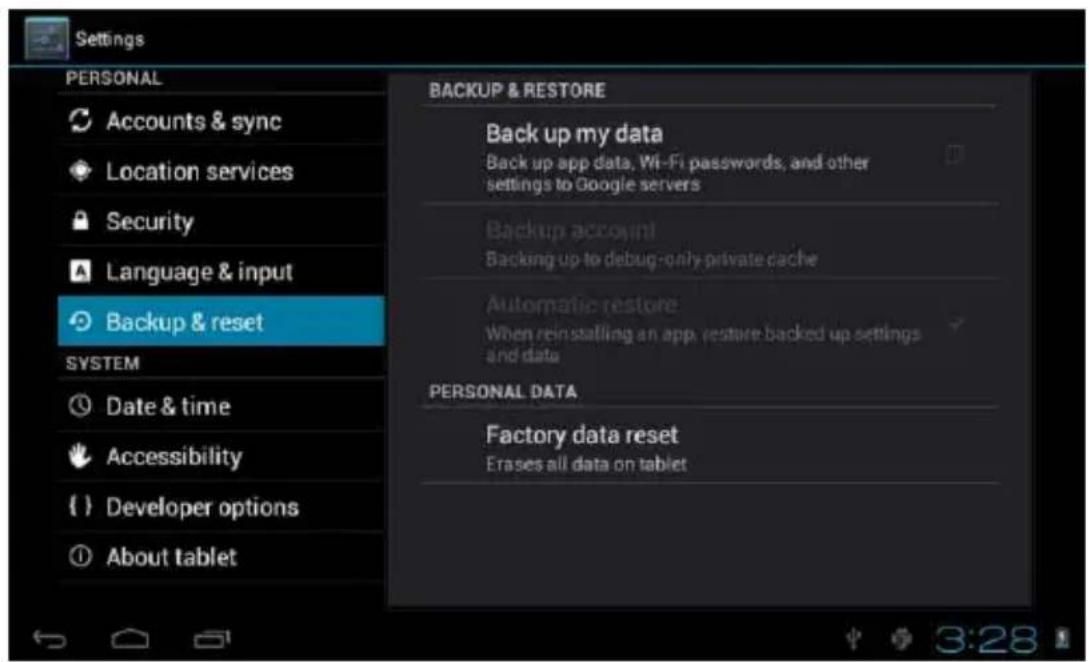
Factory data reset
text_image
Settings PERSONAL Accounts & sync Location services Security Language & input Backup & reset SYSTEM Date & time Accessibility { } Developer options About tablet BACKUP & RESTORE Back up my data Back up app data, Wi-Fi passwords, and other settings to Google servers Backup account Backing up to debug-only private cache Automatic restore When reinstalling an app, restore backed up settings and data PERSONAL DATA Factory data reset Erases all data on tablet4.4 Storage
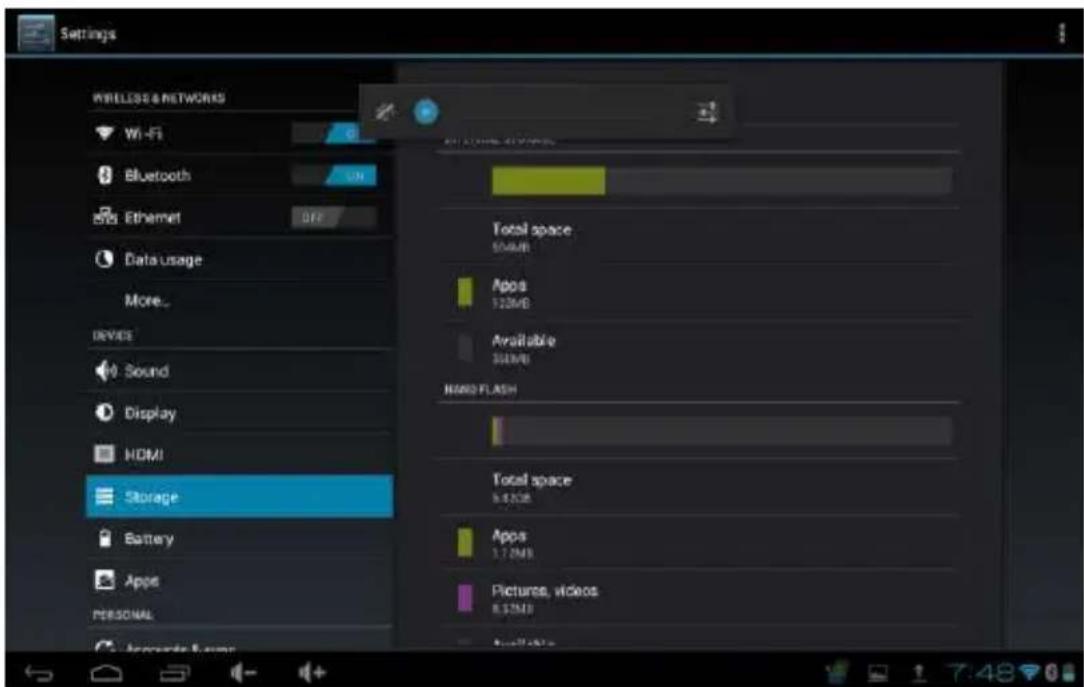
Remove TF card, view of the available storage space.
text_image
Settings WIRELESS & NETWORKS Wi-Fi Bluetooth Ethernet Data usage More... DEVICE Sound Display HDMI Storage Battery Apps PERSONAL Total space 50MB Apps 120MB Available 300MB HARD FLASH Total space 6.47MB Apps 1.72MB Pictures, videos 8.75MB Available【Note】: Please touch option "delete SD card", so that you can safety to remove SD card
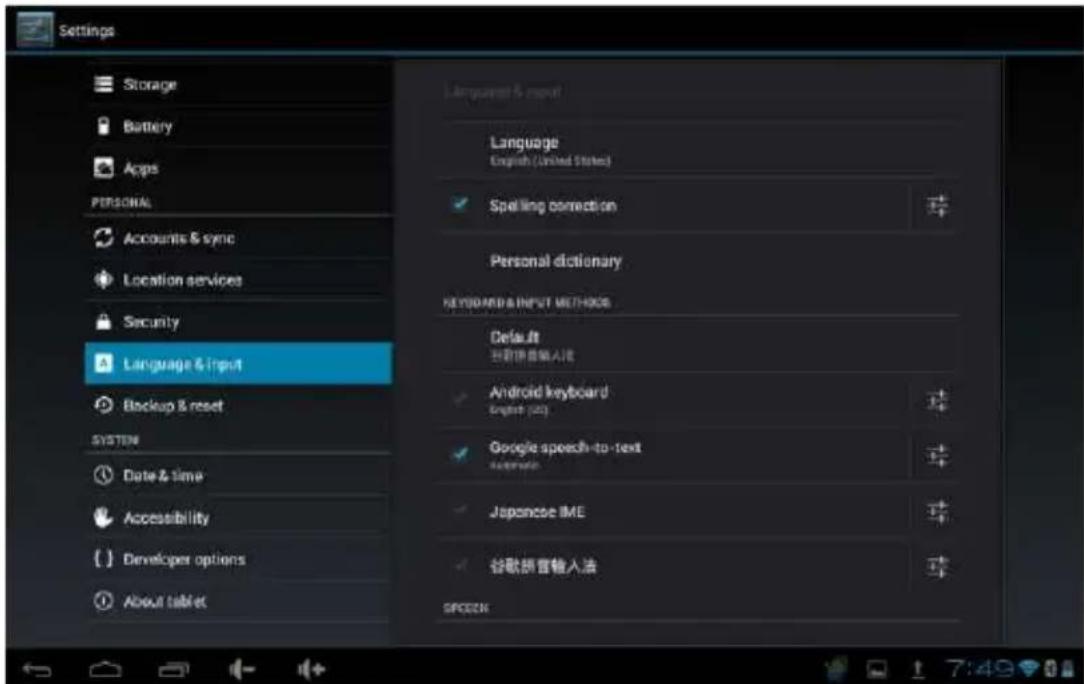
4.6. Language & keyboard
Setting: (Language), text input and automatic error correction options
text_image
Settings Storage Battery Apps PERSONAL Accounts & sync Location services Security Language & Input Backup & reset SYSTEM Date & time Accessibility Developer options About tablet Language & reset Language English (United States) Spelling correction Personal dictionary Keyboard & INPUT METHODS Default 已获取输入法 Android keyboard English (U2) Google speech-to-text Accession Japanese IME 谷歌拼音输入法 SPOCKNSelect Language: 54 kind of national languages are available Remark: Android system can support 54 kind of language; menu interface supports 14 languages.
Android keyboard: Android keyboard setting
■Sound on Key-press
■Auto-capitalization
■Show suggestions: Display suggested words while typing
■Auto-complete: Spacebar and punctuation automatically insert highlighted word
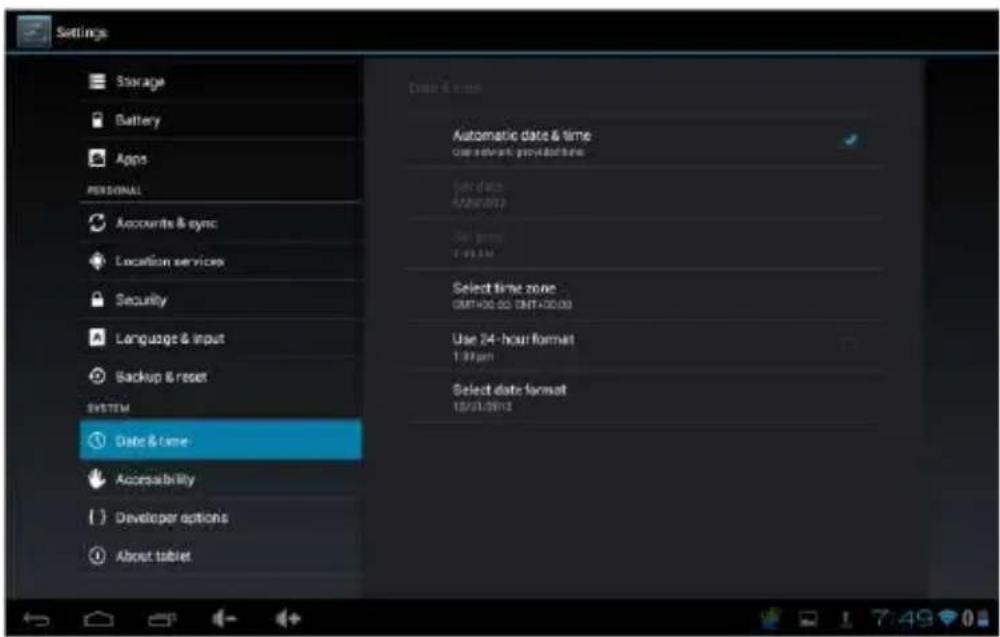
4.7. Date & time setting
Set date, set time, Select time zone and select date format
text_image
Settings Storage Battery Apps PERSONAL Accounts & sync Location services Security Language & Input Backup & reset SYSTEM Date & time Accessibility Developer options About tablet Date & time Automatic date & time Current network: previous date Date date: 01/28/2012 Date frame: 7:39:54 Select time zone GETHOD-50 GETHOD-50 Use 24-hour format 1:37am Select date format 18/01/20124.8 USB Mode Select
Choose USB work pattern: OTG/HOST/SLAVE.....
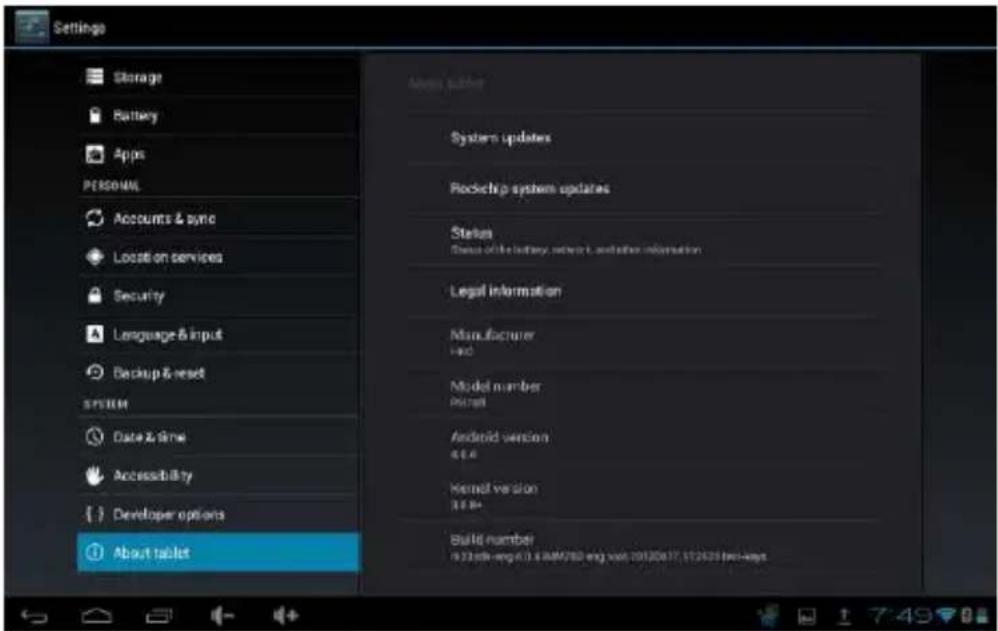
4.9 About device
text_image
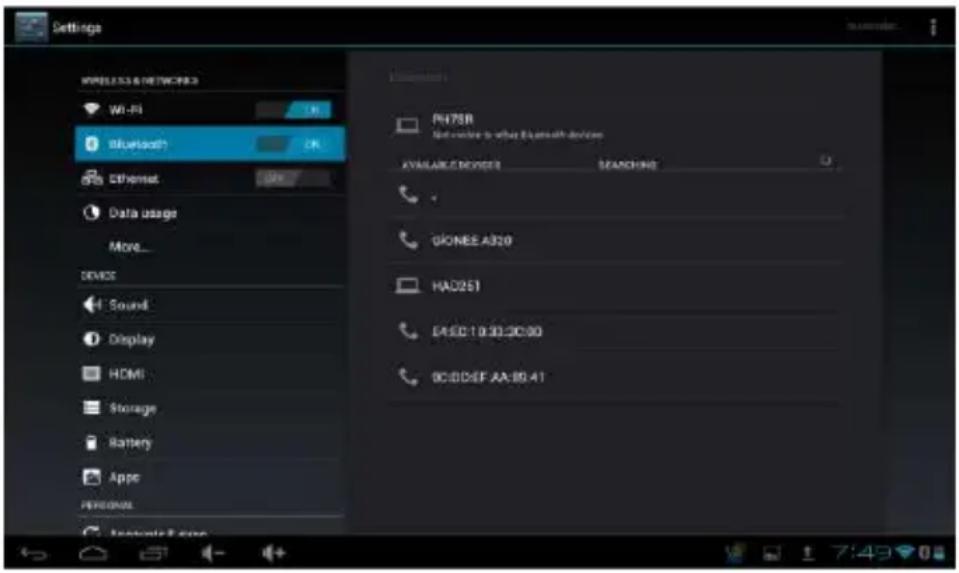
Settings Storage Battery Apps PERSONAL Accounts & sync Locati on services Security Language & input Backup & reset SYSTEM Date & time Accessibility Developer options About tablet System updates Rockchip system updates Status Status of the battery, network, and other information Legal information Manufacturer Hed Model number Punch Android version 4.6.6 Kernel version 3.6.6+ Build number 10238th-eng 0.3.4 RAM/80 eng vast 20120617, $12629 freu-keys5.0 Bluetooth Support
text_image
Settings WIRELESS & NETWORKS Wi-Fi Bluetooth? Ethernet Data usage More... DEVICE Sound Display HDMI Storage Battery Appo PERSONAL INTUSTRY CODE PNT8R Network to what Bluetooth devices AVAILABLE DEVICES SEARCHING GONEE A320 HAD251 EASE: 10:30:30:00 DCDD4F-AA-B9-416. Apps Install and manage
6.1 App installer
This Tablet can support Android Apps in market by third party, most Apps can install in the network, they can be copied to NAND FLASH or SD card.
(NAND flash memory is a type of non-volatile storage technology that does not require power to retain data)
- Click App installer icon, will appear Install, manage, Exit options.
Install:
- Click install, enter App install interface
- Separately for Internal Memory disk and SD Card disk.
- Select the APP you would like to install, click install, and the main menu will display the installed app you just selected.
Note: some 3rd party applications must install properly by memory card, downloaded 3rd party apps may not install properly on device.
Manage:
- Click manage
■ Enter third party interface
■ Click install icon, will enter action interface
7. Problem Solving
Device will not turn on.
■ Check the battery power.
■ Connect adaptor first, then check again.
■ If after charging device still is does not open, please contact the supplier.
After startup screen or the opening picture appears the device shutdowns.
■ There is not enough power, please charge.
Headset is not functioning
■ Please check if volume is set to 0
■ Check if the music file is damaged.
Cannot copy file or play music.
■ Please check connection between computer and device is correctly linked
■ Check if the memory storage space is full
■ Check if the USB cable is good or not
■ If USB connection is disconnected
Basic Specifications
Hardware configuration
Size: (length x wide x thick) 185.63*120*9.5mm
CPU processor speed: Dual-core -1.5GHz
Memory: 4G-32G
RAM: 1G
TF card: 128MB-16GB
Display screen: 7" IPS Capacitive touch screen
Resolution: 1280*800
Battery and capacity: rechargeable Built-in type polymer battery, 3000Mah
USB: USB 2.0OG
G-sensor 3D
Record: built-in microphone
Operation System: Android 4.0
Video: 3D .MKV(H.264HP).AVI.RM/BMVB.FLV.MPEG-1/2
Music: MP3.WMA.APE.FLAC.AAC.AC3.WAV
Pictures: JPEG.BMP.GIF.PNG.TIF
Bluetooth: Support for bluetooth mobile equipment.
HKC Limited Warranty – Tablets
This HKC branded Product and delivered new in the original carton to the original purchaser is warranted by HKC against manufacturing defects in materials and workmanship for a limited warranty period of Ninety (90) Days for Labor and One (1) Year Hardware. However, there will only be a 90 day hardware and labor limited warranty for commercial use. HKC is not responsible for Software defects. Please refer to your Owner's Manual for Software Provider contact information.
This Limited Warranty does not apply to store display products and product sold as a "marked down" special, in "as is" condition, "close outs", "liquidation and clearance sales", 'open box' products missing accessories, no fault found or damaged at time of delivery to HKC's authorized service center listed below.
Proof of purchase in the form of a Bill of Sale, Receipt or Receipted Invoice is evidence the Product is within the limited warranty period. The Bill of Sale, Receipt or Receipted Invoice must be presented as a pre-condition to obtaining the limited warranty service.
This limited warranty begins on the original date of purchase, and is valid only on Products This limited warranty covers manufacturing defects in materials and workmanship encountered in normal, and except to the extent otherwise expressly provided for in this statement, noncommercial use of this product, and shall not apply to the following, including, but not limited to: Damage which occurs in shipment; delivery and installation; applications and uses for which this product was not intended; altered product or serial numbers; cosmetic damage or exterior finish; accidents, abuse, neglect, fire, water, lightning or other acts of nature; use of products, equipment, systems, utilities, services, hardware, supplies, accessories, applications, installations, repairs, external wiring or connectors not supplied or authorized by HKC which damage this Product or result in service problems; incorrect electrical line voltage, fluctuations and surges; customer adjustments and failure to follow operating instructions, cleaning, maintenance and environmental instructions that are covered and prescribed in the instruction book; reception problems and distortion related to noise, echo, interference or other signal transmission and delivery problems; burned-in images. HKC does not warrant uninterrupted or error-free operation of the product.
THERE ARE NO EXPRESS OR IMPLIED WARRANTIES OTHER THAN THOSE LISTED AND DESCRIBED ABOVE, AND NO WARRANTIES WHETHER EXPRESS OR IMPLIED, INCLUDING, BUT NOT LIMITED TO, ANY IMPLIED WARRANTIES OF MERCHANTABILITY OR FITNESS FOR A PARTICULAR PURPOSE, SHALL APPLY AFTER THE EXPRESS WARRANTY PERIODS STATED ABOVE, AND NO OTHER EXPRESS WARRANTY OR GUARANTY GIVEN BY ANY PERSON, FIRM OR CORPORATION WITH RESPECT TO THIS PRODUCT SHALL BE BINDING ON HKC. REPAIR OR REPLACEMENT AS PROVIDED UNDER THIS LIMITED WARRANTY IS THE EXCLUSIVE REMEDY OF THE CONSUMER. HKC SHALL NOT BE LIABLE FOR ANY INCIDENTAL, OR CONSEQUENTIAL DAMAGES FOR BREACH OF ANY EXPRESS OR IMPLIED WARRANTY ON THIS PRODUCT; EXCEPT TO THE EXTENT PROHIBITED BY APPLICABLE LAW, ANY IMPLIED WARRANTY OF MERCHANTABILITY OR FITNESS FOR A PARTICULAR PURPOSE ON THIS
PRODUCT IS LIMITED FOR THE DURATION OF THIS LIMITED WARRANTY. THIS LIMITED WARRANTY SHALL NOT EXTEND TO ANYONE OTHER THAN THE ORIGINAL PURCHASER OF THIS PRODUCT, IS NONTRANSFERABLE AND STATES YOUR EXCLUSIVE REMEDY.
Some states do not allow limitations on how long an implied warranty lasts, or the exclusion or limitation of incidental or consequential damages, so the above limitations or exclusions may not apply to you. This warranty gives you specific legal rights, and you may also have other rights which vary from state to state. Any provision contained herein which is found contrary to state or local laws shall be deemed null and void and the remaining provisions shall continue in full force and effect.
To obtain warranty service, please contact LTI Computer, Inc.at:888-999-1683
This HKC branded Product and delivered new in the original carton to the original purchaser is warranted by HKC against manufacturing defects in materials and workmanship for a limited warranty period of Ninety (90) Days for Labor and One (1) Year Hardware. However, there will only be a 90 day hardware and labor limited warranty for commercial use. HKC is not responsible for Software defects. Please refer to your Owner's Manual for Software Provider contact information.
This Limited Warranty does not apply to store display products and product sold as a "marked down" special, in "as is" condition, "close outs", "liquidation and clearance sales", 'open box' products missing accessories, no fault found or damaged at time of delivery to HKC's authorized service center listed below.
Proof of purchase in the form of a Bill of Sale, Receipt or Receipted Invoice is evidence the Product is within the limited warranty period. The
Bill of Sale, Receipt or Receipted Invoice must be presented as a pre-condition to obtaining the limited warranty service.
This limited warranty begins on the original date of purchase, and is valid only on Products purchased through HKC authorized dealers and used in the United States, Canada, and Puerto Rico by the original purchaser. To receive warranty service, the purchaser must contact HKC for problem determination and service procedures. Warranty service may only be performed by HKC's authorized service center. The original dated bill of sale, receipt or receipted invoice must be presented upon request as proof of purchase.
HKC's service center listed below will repair your Product or if repairs cannot be made, HKC will replace this Product at no charge with the same or similar Product. If the Product is defective as specified in this limited warranty during the limited warranty period, HKC may use new or remanufactured hardware or products to repair or replace the Product with a similar Product at its sole discretion. All replaced hardware and Products become the property of HKC and must be returned to HKC. Replacement hardware and Products assume the remaining original limited warranty, or ninety (90) days, whichever is longer.
Product freight must be prepaid by original purchaser and shipped in either its original packaging or packaging affording an equal degree of protection. HKC shall not be responsible for or obligated to replace damaged goods.
If the product is received damaged by HKC's service center, it is the responsibility of the consumer to file a claim against the carrier. HKC's service center will only store the damaged product for 30 days and reserves the right, in its sole discretion, to dispose of the damaged product or ship it back to the consumer at consumer's expense after 30 days.
This limited warranty covers manufacturing defects in materials and workmanship encountered in normal, and except to the extent otherwise expressly provided for in this statement, noncommercial use of this product, and shall not apply to the following, including, but not limited to: Damage which occurs in shipment; delivery and installation; applications and uses for which this product was not intended; altered product or serial numbers; cosmetic damage or exterior finish; accidents, abuse, neglect, fire, water, lightning or other acts of nature; use of products, equipment, systems, utilities, services, hardware, supplies, accessories, applications, installations, repairs, external wiring or connectors not supplied or authorized by HKC which damage this Product or result in service problems; incorrect electrical line voltage, fluctuations and surges; customer adjustments and failure to follow operating instructions, cleaning, maintenance and environmental instructions that are covered and prescribed in the instruction book; reception problems and distortion related to noise, echo, interference or other signal transmission and delivery problems; burned-in images. HKC does not warrant uninterrupted or error-free operation of the product.
THERE ARE NO EXPRESS OR IMPLIED WARRANTIES OTHER THAN THOSE LISTED AND DESCRIBED ABOVE, AND NO WARRANTIES WHETHER EXPRESS OR IMPLIED, INCLUDING, BUT NOT LIMITED TO, ANY IMPLIED WARRANTIES OF MERCHANTABILITY OR FITNESS FOR A PARTICULAR PURPOSE, SHALL APPLY AFTER THE EXPRESS WARRANTY PERIODS STATED ABOVE, AND NO OTHER EXPRESS WARRANTY OR GUARANTY GIVEN BY ANY PERSON, FIRM OR CORPORATION WITH RESPECT TO THIS PRODUCT SHALL BE BINDING ON HKC. REPAIR OR REPLACEMENT AS PROVIDED UNDER THIS LIMITED WARRANTY IS THE EXCLUSIVE REMEDY OF THE CONSUMER. HKC SHALL NOT BE LIABLE FOR ANY INCIDENTAL, OR CONSEQUENTIAL DAMAGES FOR BREACH OF ANY EXPRESS OR IMPLIED WARRANTY ON THIS PRODUCT; EXCEPT TO THE EXTENT PROHIBITED BY APPLICABLE LAW, ANY IMPLIED WARRANTY OF MERCHANTABILITY OR FITNESS FOR A PARTICULAR PURPOSE ON THIS PRODUCT IS LIMITED FOR THE DURATION OF THIS LIMITED WARRANTY. THIS LIMITED WARRANTY SHALL NOT EXTEND TO ANYONE OTHER THAN THE ORIGINAL PURCHASER OF THIS PRODUCT, IS NONTRANSFERABLE AND STATES YOUR EXCLUSIVE REMEDY.
Some states do not allow limitations on how long an implied warranty lasts, or the exclusion or limitation of incidental or consequential damages, so the above limitations or exclusions may not apply to you. This warranty gives you specific legal rights, and you may also have other rights which vary from state to state. Any provision contained herein which is found contrary to state or local laws shall be deemed null and void and the remaining provisions shall continue in full force and effect. To obtain warranty service, please contact: LTI Computer, Inc. @ 888-999-1683
HKC
P778A