
Freestyle 120 Plus - Simulator BT - Free user manual and instructions
Find the device manual for free Freestyle 120 Plus BT in PDF.


| Product Type | Flight Simulator |
| Brand | BT |
| Model | Freestyle 120 Plus |
| Dimensions (W x D x H) | 120 x 60 x 90 cm |
| Weight | 25 kg |
| Power Supply | AC 100-240V, 50/60Hz |
| Power Consumption | 150 W max |
| Display Type | LCD touchscreen |
| Display Size | 15.6 inch |
| Motion Platform | 2-axis electro-pneumatic |
| Joystick | Force feedback joystick |
| Audio System | Stereo speakers, 10W each |
| Connectivity | USB, HDMI, Bluetooth, Wi-Fi |
| Software | Built-in flight simulator software |
| Number of Pre-installed Scenarios | 120 |
| Languages Supported | English, French, German, Spanish, Italian |
| Safety Certification | CE, RoHS |
| Cleaning Instructions | Wipe with a dry cloth; do not use liquids |
| Repairability Index | 7/10 |
| Warranty | 2 years |
Frequently Asked Questions - Freestyle 120 Plus BT
User questions about Freestyle 120 Plus BT
0 question about this device. Answer the ones you know or ask your own.
Ask a new question about this device
Download the instructions for your Simulator in PDF format for free! Find your manual Freestyle 120 Plus - BT and take your electronic device back in hand. On this page are published all the documents necessary for the use of your device. Freestyle 120 Plus by BT.
USER MANUAL Freestyle 120 Plus BT
Freestyle120 Plus
User guide
Please open this page for a further 'At a glance' guide to your Freestyle 120 Plus.
At a glance
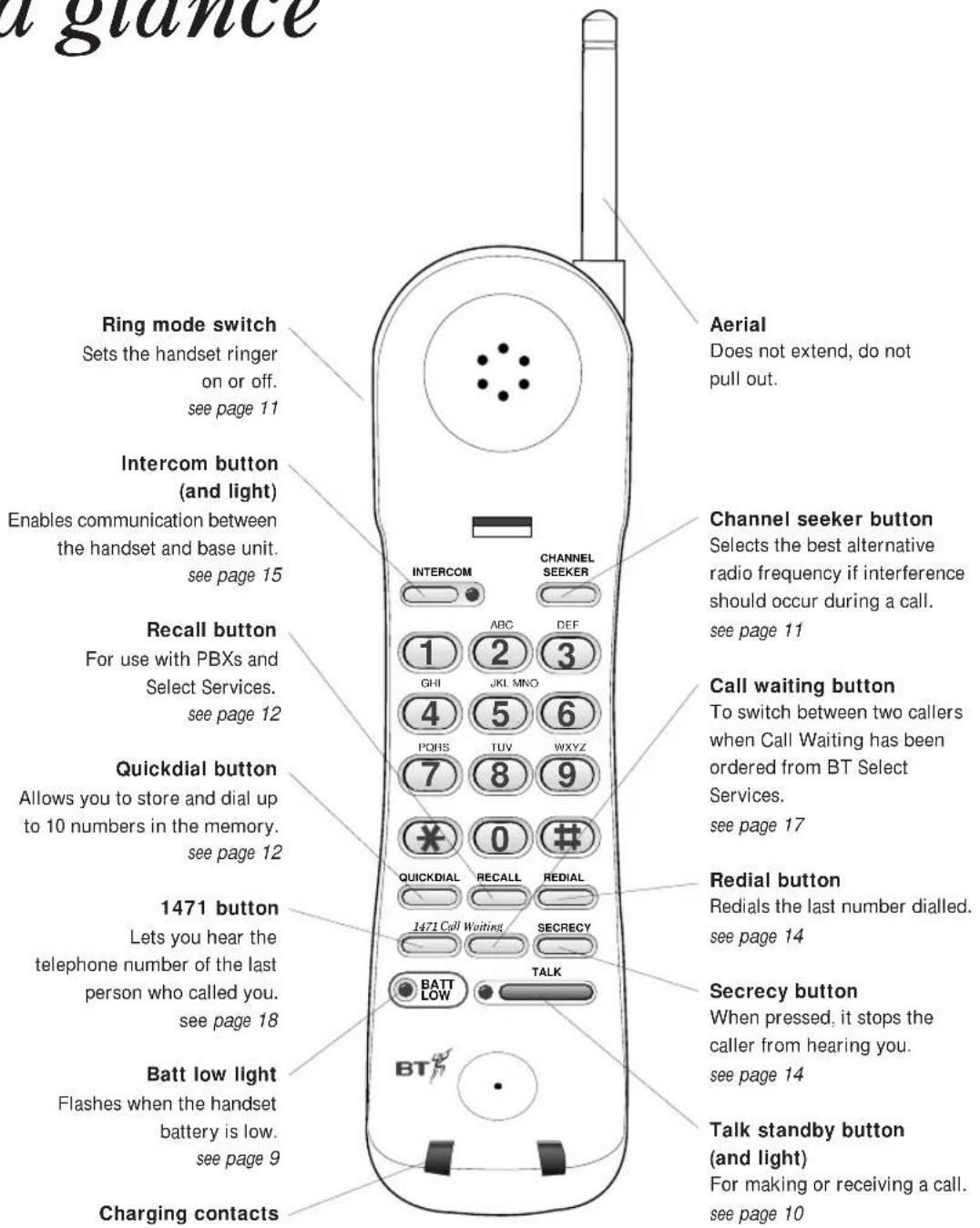
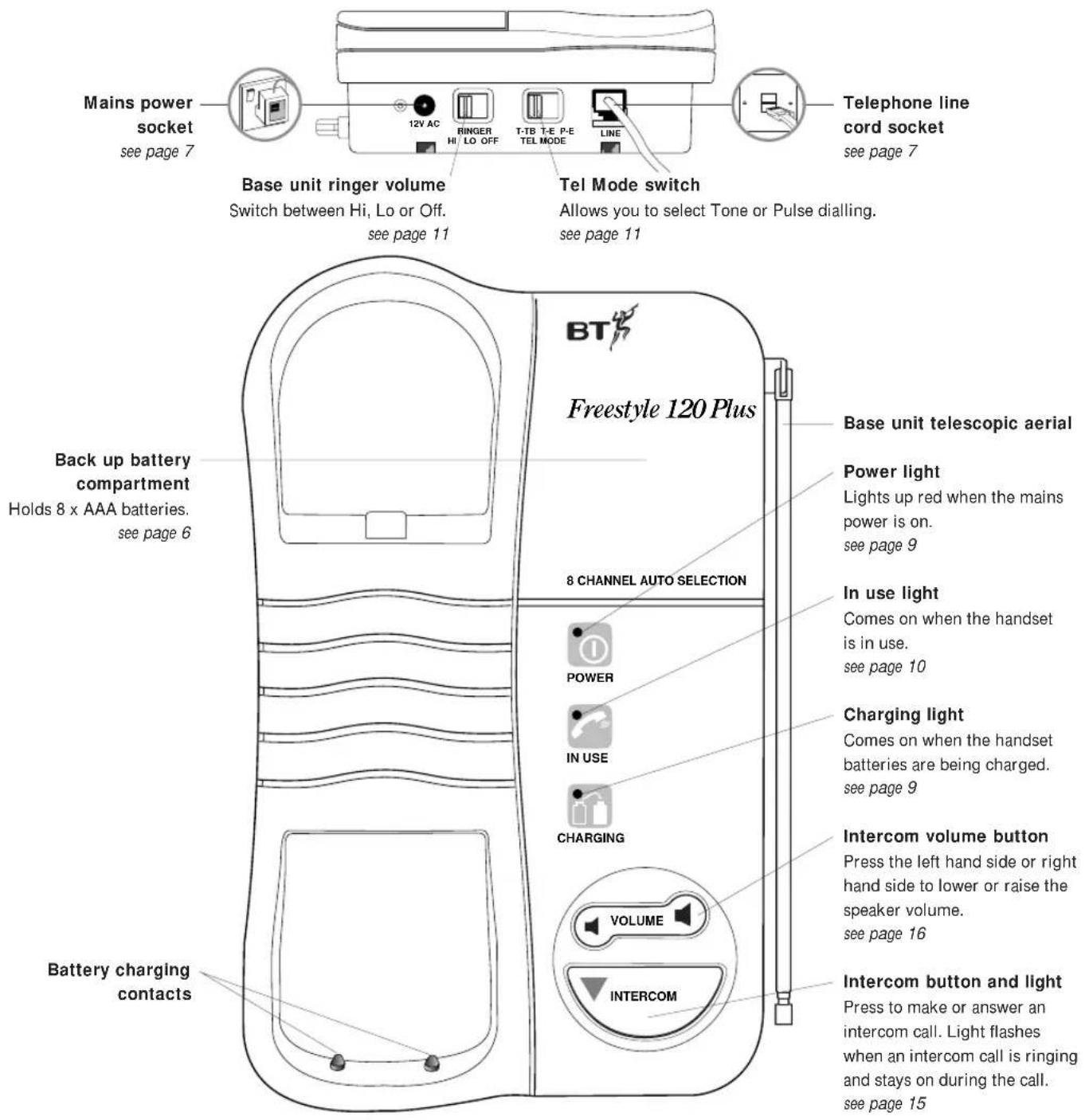
In this guide
At a glance 1
Introduction 4
Setting up 5
Using your Freestyle 120 Plus 10
BT Select Services 17
Help 19
Technical information 21
Maintenance 24
Index 27
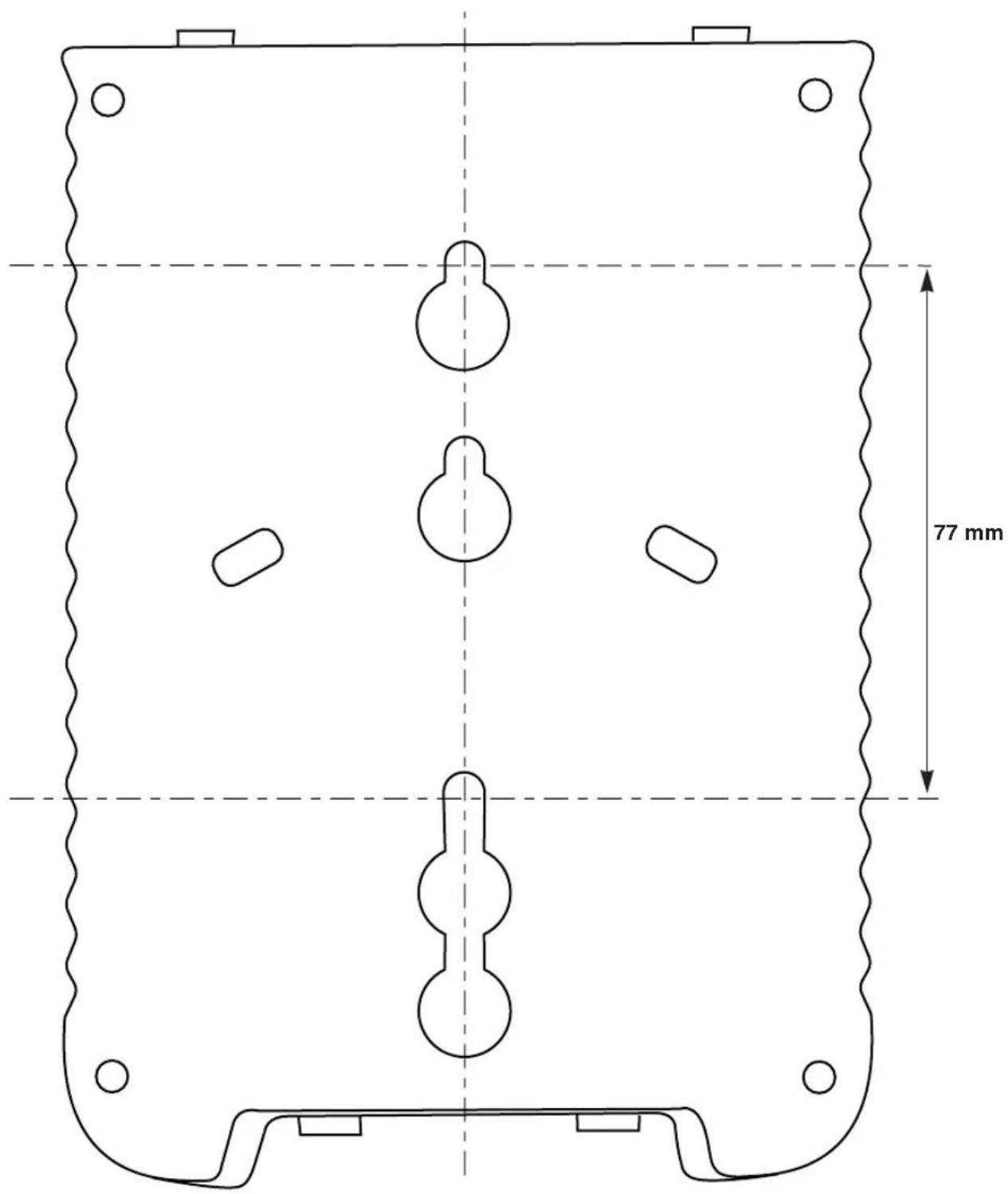
Wall mounting 29
Customer Helpline
Should you have problems with your Freestyle 120
Plus, call the BT Helpline between 9.00am to 5.30pm
Monday to Friday on Lo-call 0345 697146.
Calls will be charged at local rate.
Hints and tips boxes
In this user guide, we've included helpful tips and useful notes. They are shown in a grey box.
Introduction Your Freestyle 120 Plus has been designed for ease of use and made to the very high standards set by BT.
We thank you for making the right choice and expect that you will have many years of quality service.
Please read the instructions carefully before use and keep this user guide for future reference.
For your records
Date of purchase:
Place of purchase:
Serial number:
(on the underside of the machine)
Purchase price:
For warranty purposes, proof of purchase is required, so please keep your receipt.
Emergency Calls
The emergency services can be contacted in the UK by dialling 999. You may also dial 112 which is valid in any country that is a member of the European community.
As the Freestyle 120 Plus is a mains powered cordless telephone there are certain situations where you may not be able to make an emergency call:
- If there is severe radio interference.
• If the handset batteries fail. - If there is a power cut and there are no back-up batteries in the base unit.
If your Freestyle 120 Plus is connected to a PBX, you may have to dial an access number before 999 to contact the emergency services.
Some switchboards are not able to dial out during a power failure.
Setting up
Follow these steps to get your Freestyle 120 Plus
ready for use.
Important
As this product is rechargeable, it is normal that a certain amount of heat will be produced in its day-to-day operation. Whilst this is entirely safe we would advise against placing this product on antique, veneered or wooden surfaces as damage may occur.
Plan where you will put your Freestyle 120 Plus.
- It should be within two metres of a power socket and the phone socket.
- You need enough room for the base unit's telescopic aerial to be fully extended.
- For the best operating conditions, try to place the base unit away from large metal objects and other electrical appliances.
Check that your Freestyle 120 Plus is complete. When you unpack you should have:
• Freestyle 120 Plus handset.
• Freestyle 120 Plus base unit with telephone line cord attached.
- Mains power adaptor plug.
• Wall mounting bracket with screws.
- Spare quick dial directory label
Electrical storm warning
1 Please note that during periods of electrical storm, you are advised to disconnect your apparatus because damage may occur.
2 If a fault occurs during the 12 month warranty period and it is due to accidental or wilful damage (including lightning and electrical damage) BT will not replace or repair free of charge.
Setting up
Like all cordless phones, your Freestyle 120 Plus handset will need charging for 24 hours before use.
1 Handset aerial
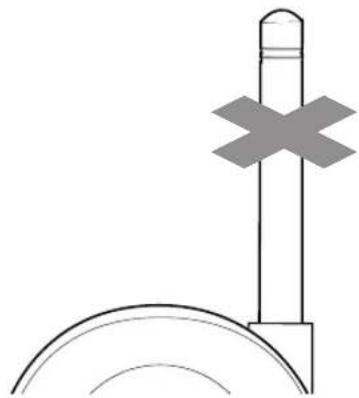
Your Freestyle 120 Plus uses a compact aerial which does not pull out.
2 Check your telephone wall socket
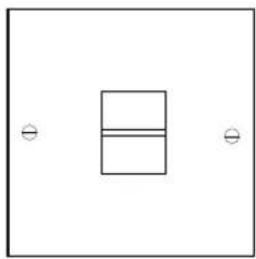
If you do not have a modern phone socket, call BT on Free phone 0800 800 150 and ask for a BT engineer to come and fit the correct socket. This is a chargeable service.
3 Insert battery (for back-up only)
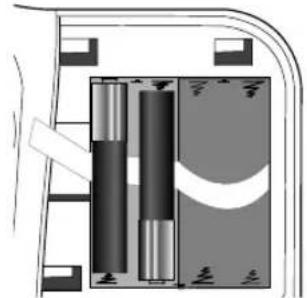
Remember that the flat ends of the batteries should be pressed against the springs.
If your Freestyle 120 Plus is your only phone, you should fit back-up batteries so that your phone can always be used in emergencies.
To fit back up batteries, slide the cover off towards the right and insert 8 new AAA alkaline batteries (not supplied) as shown in the diagram above. The power light on the base unit will come on and light up red. The battery removal ribbon should be placed under the lower layer of batteries. Pulling on the ribbon will assist in removal of the batteries when they need replacing. Replace the battery compartment cover.
Back-up batteries will only engage when the battery compartment cover is correctly replaced.
Good quality, fresh batteries should last approximately six months. To ensure constant battery back-up, replace the batteries every six months.
In the event of a power failure, the batteries will give you up to one hour talk time or seven hours on standby.
4 Plug the power cable into the back of the base unit
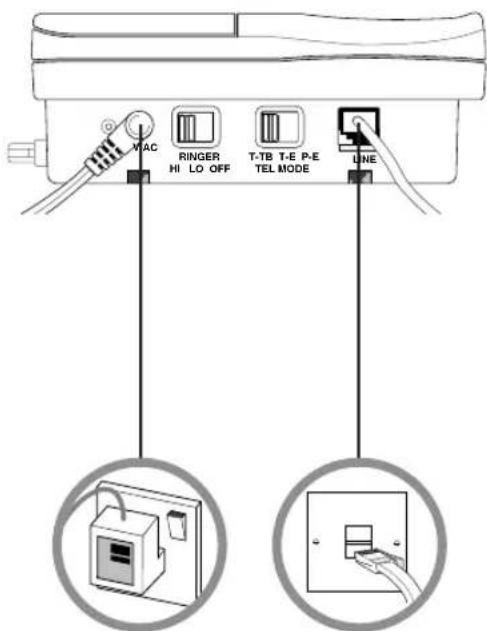
Plug the mains power cable into the socket on the back of your Freestyle 120 Plus.
Warning
1 Do not try to use any power supply other than the one provided. This may permanently damage your Freestyle 120 Plus.
2 Your Freestyle 120 Plus should not be fitted in wet or damp conditions, for example in a bathroom. Also, the handset should not be left out in the rain.
3 There is a slight chance that your phone could be damaged by an electrical storm. We recommend that you unplug the base unit from the mains during storms.
5 Connect the base unit three-pin adaptor to a power socket
Like all cordless phones, your Freestyle 120 Plus handset will need charging for 24 hours before use.
6 Plug the phone into the BT socket
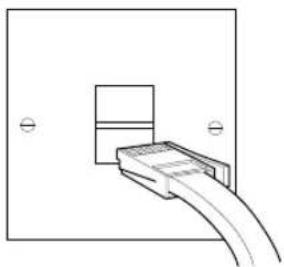
You can now use the telephone and store numbers in the memory.
Setting up
7 Extend the base unit telescopic aerial
Extend the base unit telescopic aerial on your Freestyle 120 Plus (as shown below) to ensure the best possible signal and reception.
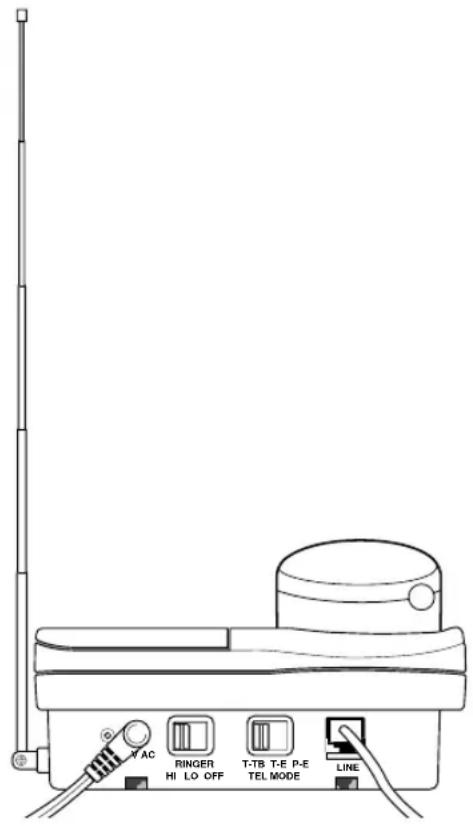
For the best reception
Try to avoid putting the telescopic aerial near other electrical appliances, fluorescent lights and large metallic objects such as cookers, radiators and garage doors as these may cause interference and reduce the quality of your calls.
8 To wall-mount your product
(See 'Wall mounting', page 29)
To plan the location of the base unit
Your Freestyle 120 Plus works by sending and receiving radio signals between the base unit and the handset. The strength of the signal will depend on where you site the base unit and how the aerial is deployed. The higher the base unit is located the better. An upstairs room is ideal. The following points should be considered:
- It should be within easy reach of a mains socket and a telephone socket. A new style telephone socket is required for this product. If you do not have one, call us on Freefone 0800 800 150.
- Try to avoid locations near metallic obstructions or electrical appliances, such as: TV sets, fridges, computers, fluorescent lights, radiators, metal pipes and metal window frames.
- The Freestyle 120 Plus can be wall mounted by using the bracket and screws supplied, see page 31 for template.
9 To charge the handset
When you first use your Freestyle 120 Plus, the rechargeable batteries in the handset need charging for 24 hours.
- Make sure you have connected your Freestyle 120 Plus to the mains power supply, see steps 4 and 5, page 7.
- Make sure the red POWER light is on.
- Place the handset on the base unit, ensuring the contacts are touching. The CHARGING light comes on.
- The charging light will remain constantly lit whilst the handset is placed on the base unit.
As a rule, placing the handset on the base unit overnight, will keep the batteries fully charged for all normal use.
Battery care
Batteries cannot be overcharged. However, leaving the handset on the base unit all the time can deteriorate rechargeable batteries. To get the longest possible life from your batteries, take the handset off the base for a few hours each day.
When fully charged and in good condition, the handset batteries will provide up to 5 hours continuous talk time or 72 hours standby.
If the batteries are running low, the handset will beep every few seconds and the BATT LOW light will flash.

If you are making a call and the batteries are running low, the handset will give a series of beeps.
Place the handset on the base unit to recharge.
Mains power adaptor
The Freestyle 120 Plus must only be used with the adaptor supplied.
Using any other adaptor will result in non-compliance with EN60950:1992, and will invalidate the approval given to this apparatus.
Using your Freestyle 120 Plus
Making and receiving calls
The handset range is up to 250 metres from the base unit in ideal conditions. If you start to go out of range while using the phone, you will hear warning beeps. If you do not come back in range, your call will be disconnected.
To make a call

- Lift the handset off the base.
- Press the TALK button. The TALK light comes on and the handset buttons illuminate. The IN USE light on the base unit comes on.
- Listen for the dialling tone.
- Dial the number you want.
If you do not hear a dialling tone after pressing the TALK button, wait a few seconds. On a few exchanges, there may be a delay.
To end a call
- Press the TALK button.
Or
- Replace the handset on the base.
To switch from Pulse to Tone signalling during a call

If you are connected to a pulse dialling exchange, you can still use services such as phone banking that require tone signalling.
- Call the telephone number you require in pulse mode as usual.
- When you have been connected, press the * button on the keypad to set your telephone to tone signalling for the duration of the call.
- When you hang up, your Freestyle 120 Plus will automatically switch back to pulse dialling.
To receive a call
When the phone rings:

- If your handset is on the base unit, simply pick it up to answer the call.
Or
- If your handset is off the base, press the TALK button to answer the call.
An Inductive Coupler has been built into the handset to improve sound quality for people using hearing aids. Switch your hearing aid to T and adjust the position of the handset until you get the best reception.
To use the Channel seeker

Your Freestyle 120 Plus automatically scans all the available radio channels for quality of reception, and selects the best one to use. If you experience interference during your call, press the CHANNEL SEEKER button to select a different channel.
To adjust the handset ringer
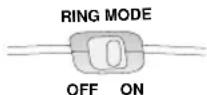
The ring mode switch on the side of the handset can be set to either:
• ON (handset rings) or
• OFF (handset does not ring).
To set the ringer switch
(Located at the back of the base unit)
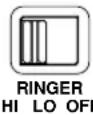
You can set the ringer to HI, LO or OFF. If the base unit ringer is switched OFF, the handset will still ring providing the handset ringer is not switched to OFF.
To set the tel mode switch
(Located at the back of the base unit)
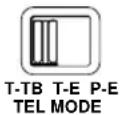
The tel mode switch selects tone or pulse dialling and earth or time break recall:
- T-TB – Your Freestyle 120 Plus is preset to this position. Most modern exchanges use tone dialling and time break recall for faster dialling, and for services such as BT Select Services and telephone banking.
- P-E – If you dial a number when your Freestyle 120 Plus is set to T-TB or T-E and you continue to hear the dialling tone, you may be connected to an older pulse dialling exchange. Set the switch to P-E (pulse dialling).
- T-E– This setting is for use if you are connected to a tone dialling PBX (private branch exchange) that uses earth recall.
To insert a Pause

With some switchboards, after dialling the access code you may have to wait for a moment while the switchboard picks up an outside line. If this is the case, press the REDIAL button before keying in the telephone number to insert a pause.
To use the Recall button
This button signals either time-break recall or earth recall depending on the setting of the TEL MODE switch. If you are connected to a PBX (Private Branch Exchange), contact your PBX supplier for further information. The recall button when set to time-break recall T-TB is also used for BT Select Services. For further information, see page 17.
Using the memory to store and dial numbers
Your Freestyle 120 Plus handset can store up to ten separate phone numbers. You can then dial each number by pressing just two buttons.
To store a number in the memory.

- Press the QUICKDIAL button.
- Press one of the 0-9 buttons to set the location code under which your phone number will be stored.
- Dial the number you want to store.
- Press the QUICKDIAL button. You hear a confirmation beep. The number is stored.
Repeat these steps for any other numbers you want to store, using a different 0-9 location code for each one.
Storing a number in the memory automatically overwrites any previous number stored under the same location code.
Stored numbers can include switchboard and network services that use the * and# buttons as well as PAUSE and RECALL functions.
Quickdial directory label
Use the handset's directory label to keep a record of which 0-9 location code you have used for each number
You can take out the label by removing the handset battery compartment cover and sliding out the label's clear plastic cover.
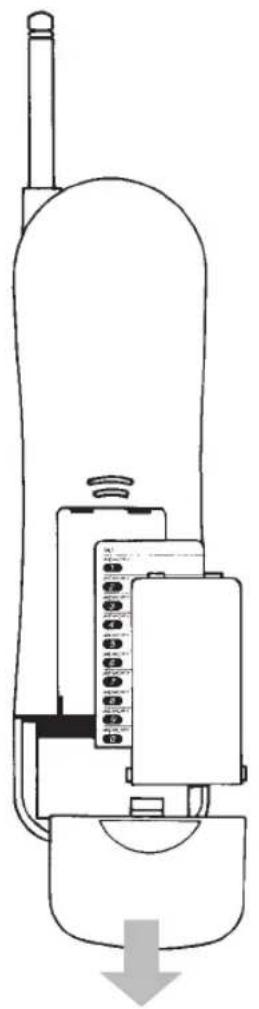
To dial a stored number

- Press the TALK button.
- Press the QUICKDIAL button.
- Press the 0-9 location code under which the number you want is stored. The number is dialled automatically.
To store a number of more than 20 digits

- Press the QUICKDIAL button.
- Press one of the 0-9 buttons to set the location code under which your phone number will be stored.
• Dial the first 20 digits. - Press the QUICKDIAL button. You hear a confirmation beep. The number is stored.
- Press the QUICKDIAL button again.
- Press another 0-9 button to select a second location code under which to store the remaining digits.
• Dial the remaining digits. - Press the QUICKDIAL button. You hear a confirmation beep. The rest of the number is stored.
To dial a stored number of more than 20 digits.

- Press the TALK button.
- Press the QUICKDIAL button, then the first 0-9 location code number. The number begins dialling automatically.
- When the first part of the number has been dialled press the QUICKDIAL button again, then the second 0-9 location code number. The rest of the number is dialled.
You can mix manual and memory dialling as required. For example, you can dial the area code 0181 3120 from the memory and then complete the number manually.
To change a number
Any existing number stored in the memory can be overwritten by entering a new number under the same location code. Simply follow the steps shown in 'To store a number in the memory', page 12.
Using the Secrecy button
During a call, you may want to say something to another person nearby without your caller hearing you.

- Press the SECRECY button. The TALK light flashes. You can hear the caller, but they cannot hear you.
- Press the SECRECY button again to resume your conversation. The TALK light stops flashing.
Last number redial
Freestyle 120 Plus remembers the last number called and enables easy redialling.
To redial the last number called

- Press the TALK button and wait for a dialling tone.
- Press the REDIAL button. The number is dialled automatically.
Using the Intercom
Your Freestyle 120 Plus lets you hold a conversation between the handset and base unit.
To call the base unit from the handset
At the handset:

- Press the INTERCOM button on the handset; the INTERCOM light comes on. The base unit INTERCOM light flashes and both the handset and base unit beep.
If the base unit does not reply to an intercom call, press the INTERCOM button again to cancel the call.
At the base unit:

- Press the INTERCOM button and speak into the microphone. The INTERCOM light stops flashing but stays on.
Ending an intercom call:
- Press the INTERCOM button on the handset or base unit. Both INTERCOM lights on the handset and base go out.
To call the handset from the base
At the base:
- Press the INTERCOM button on the base unit. The INTERCOM lights on the handset and base unit flash. Both the handset and base unit beep.
If the base unit does not reply to an intercom call, press the INTERCOM button again to clear the call. You cannot make an intercom call if the handset is busy.
At the handset:

- Press the INTERCOM button and speak. The INTERCOM stops flashing but stays on.
Ending an intercom call:
- Press the INTERCOM button on the handset or base unit. Both INTERCOM lights on the handset and base go out.
You cannot use the intercom whilst a call is in progress. The intercom will beep for 60 seconds and then automatically cut off if not answered.
Using your Freestyle 120 Plus
To adjust the INTERCOM loudspeaker volume at the base unit.
- Press the left hand side of the VOLUME switch to lower the volume.
- Press the right hand side of the VOLUME switch to raise the volume.
If there is an incoming call when using the intercom, the base unit will ring. To take the call, press the TALK button on the handset. The intercom call is cut off automatically.
BT Select Services
If you are connected to a digital exchange, you can subscribe to a range of BT Select Services. If you wish to subscribe to any of these services contact us on Freefone 0800 800 152 business, 150 residential, 8am to 6pm, Monday to Friday.
Call waiting

If an incoming call arrives while you are already engaged on a telephone call you will hear a soft beep every 5 seconds (This beep is not audible to the person you are speaking to).
Instead of the engaged tone the second caller will hear an announcement to hold on as you are aware that there is a second call.
You can answer the second call, without disconnecting your first caller, by pressing the CALL WAITING button. The first caller will be put on hold.
When you have spoken to the second caller you can return to the first caller by pressing the CALL WAITING button again. You can switch back and forth between the two calls without disconnecting either if you wish.
The second caller will only be charged for their call from the moment you answer and not while they are waiting for your initial contact.
Three Way Calling
Three way calling allows you to hold a conference with two other telephones, or to make a second private telephone call without disconnecting your first call.
It doesn't matter if the first call is incoming or outgoing, but the second call must be made from your telephone.
Call Diversion
Call diversion allows you to set up your telephone to divert calls to another telephone at a different location. If you are going to be away from your home or place of work and at a known location your calls can be forwarded. There are 3 divert options available:
- All calls.
- Any calls unanswered within 15 seconds.
- Calls that come in when your telephone is engaged.
When Call Diversion is on, you will hear an intermittent dialling tone. You can still use your telephone to make calls.
Call Barring
Call Barring helps prevent unauthorised calls with a wide range of options available.
You can also stop incoming calls if you do not want to be disturbed.
Reminder Calls
You can set your telephone like an alarm clock to wake you up or remind you of an appointment. There is no rental charge. Each Reminder costs a few pence, whether you answer it or not.
1471
This free service lets you easily find who called your number last.
To use the 1471 feature

- Press the TALK button and wait for a dialling tone.
- Press the 1471 button. You hear the number of your last caller announced and the time they called. If a call is made and the caller withholds their number the time of the call is still stored but not the number.
- Press the TALK button again – or replace the handset on the base – to return to standby
To withhold your own number
Dial 141 before you dial the number you want. You will need to do this even if you are ex-directory.
Charge Advice
You can set up your telephone to advise you of the charge for an individual call or for all calls. When you have finished a call, the exchange rings you back and tells you the length of the call and the charge. There is no rental charge for this service but you are charged for the call back.
Help If you have any problems using your Freestyle 120 Plus, this section will give you the most common, easy to follow solutions.
Telephone problems Possible cause Solution
| No dialling tone.Telephone will not dial out.Telephone cannot receive calls.Beeps six times and drops calls. | Telephone not connected to telephone line.Mains disconnected and back-up batteries are not installed or are flat.Power cut and back-up batteries are not installed or are flat.Handset battery pack is discharged. | Replace handset on base unit for 10 seconds and try again. If this does not work, disconnect the handset battery from the handset for 10 minutes. Also disconnect the mains power and back-up batteries. Then reconnect the battery and reconnect the base unit to the mains, then replace the handset on the base unit for 10 seconds and try again.Plug the telephone into the telephone line.Reconnect and install or replace back-up batteries.Wait until the power is restored and install or replace back-up batteries.Place handset on base unit and recharge for 24 hours ensuring charge light in on. |
| You have dialling tone but the telephone will not dial out. | You may be trying to use tone dialling on a pulse dialling exchange.You are connected to a PBX and are not dialling the access code. | Set mode switch to P-E (pulse dialling).Use the PBX access code. |
| Handset does not ring.No lights on handset. | Handset discharged. | Place handset on base unit and recharge for 24 hours. |
| Handset does not ring, but lights show on the handset. | The handset ringer may be set to OFF. | Set the handset ringer switch to ON. |
| Base unit does not ring but lights show on base unit. | Telephone not connected to the telephone line.The base ringer switch is set to OFF.Line fault or faulty socket | Plug the telephone into the telephone socket.Set the base ringer switch to HI or LOTry the telephone on another socket or another line. If the telephone works contact BT or your public switched telephone network operator for repairs to the line or socket. |
| The base-unit rings too loudly / softly | The ringer switch on the base unit is set to HI/LO | Set the ringer switch on the base unit accordingly. |
Telephone problems Possible cause Solution
| Neither base or handset ring, but lights show on base and handset. | Check the REN. If you connect too many telephones or devices to your line they may not all operate correctly.If your telephone is connected to an extension socket, it may have been connected incorrectly. | If the REN exceeds 4 disconnect 1 or more telephones or devices.Check with your telephone engineer that the extension socket has been installed correctly. |
| Callers are faint.Interference.Buzzing.Whooshing.Echoing.Tinniness. | The base unit telescopic aerial is not fully extended as high as possible.You are moving out of range.Radio channel interference.Radio channel interference.The base unit or the handset are too close to electrical equipment or metal obstructions. | Extend the base unit telescopic aerial as far as possible.Move closer to the base unit.Press the CHANNEL SEEKER button on the handset, to select a clearer channel.Press the CHANNEL SEEKER button on the handset, to select a clearer channel.Relocate the base unit or move around with the handset until reception improves. |
| No Quickdial store. | You may be trying to store the number with the TALK light on. | Ensure that the TALK light is off before storing the number. |
| Batt low light on the handset is flashing. | The handset needs recharging. | Replace the handset on the base unit, ensuring that the base unit is plugged in and that the CHARGING light is on. |
| No Charging light on the base unit. | Dirty contacts on base unit or handset. | Clean the contacts with a dry cloth. Heavy soiling can be removed with a pencil eraser. |
| Back-up batteries fail frequently. | Frequent power failures will drain the back-up batteries.Unplugging the base unit from the power supply drains the back-up batteries.Switching the mains supply off will drain the back-up batteries. | Leave the base unit plugged in, or remove the back-up batteries before unplugging.Do not switch off, or remove the back-up batteries before switching off. |
Need more help?
Call the BT Cordless Phone Helpline on
Lo-call 0345 697146 where fully trained staff are there to assist you from 9.00am to 5.30pm
Monday to Friday (calls charged at local BT rate).
It is not permitted to interfere with the main BT socket or wiring. If you have a problem, contact BT on Freefone 0800 800 151 for residential or Freefone 0800 800 154 for business lines.
Technical information
Official approval
Freestyle 120 Plus is tested and approved for connection to BT's network, provided that it is used in accordance with the guidelines in this user guide.
You may connect it:
• To direct exchange lines
- To extensions with new plug and socket arrangements provided with these direct exchange lines.
- To compatible switchboards..
You may NOT connect it:
- To shared service (party) lines.
- As an extension to a payphone.
This phone is designed for UK use only. Using it abroad may violate local radio laws.
Approval for use
This apparatus has been approved for use with the following facilities:
- Simple telephone.
- Cordless telephone.
• Time break recall/ earth loop recall.
• Automatic storage of last number dialled.
- Loop disconnect/ Pulse and Multifrequency/ Tone signalling.
- Microphone secrecy.
- PABXs providing secondary proceed indication.
• Memory storage of up to ten numbers.
- Mixed mode dialling.
• Operation in absence of proceed indication.
- Select Services.
The base unit is intended for use when powered from the 12V AC mains adaptor supplied, which conforms to EN60950.
Any other usage will invalidate the approval given to this apparatus if, as a result, it ceases to comply with EN60950.
Call security
Your Freestyle 120 Plus has its own digital security code that prevents other cordless phone owners from using your phone line. This ensures that you are charged only for calls using your phone.
Technical information
However, all approved cordless phones use radio to communicate between the base and cordless handset units. It is therefore possible that your conversations could be overheard by other people, on their cordless phones, or on ordinary radios that use the same radio frequencies.
As this problem applies equally to all similar cordless phones currently available in the UK, call privacy cannot be guaranteed. However, the security coding prevents unauthorised use of your line.
You may find that your Freestyle 120 Plus picks up conversations from other cordless phones being used nearby.
If you experience this type of interference try changing channels using the CHANNEL SEEKER button on the handset.
Transmission frequencies
This cordless telephone has been designed to operate on radio frequencies which have been assigned to the exclusive use of cordless telephones. As the use of cordless telephones becomes more widespread, users may experience a reduction in the quality of service obtained from this apparatus.
Transmission frequencies of available channels:
| Channels Base Unit Tx Handset Tx Frequency/MHz Frequency/MHz | ||
| 1 | 31.0375 | 39.9375 |
| 2 | 31.0625 | 39.9625 |
| 3 | 31.0875 | 39.9875 |
| 4 | 31.1125 | 40.0125 |
| 5 | 31.1375 | 40.0375 |
| 6 | 31.1625 | 40.0625 |
| 7 | 31.1875 | 40.0875 |
| 8 | 31.2125 | 40.1125 |
Ringer Equivalence Number (REN)
Although you may have any number of sockets it it important to limit the number of telephones and other items of apparatus connected to the line by those sockets, to ensure that each telephone will ring.
Every telephone or item of apparatus has a Ringer Equivalence Number (REN). In most cases a standard line should provide enough current for two or more telephones or items of apparatus, if the RENs add up to no more than 4.
Freestyle 120 Plus has a REN of 1. Any telephone provided by BT may be assumed to
have a REN of 1 unless otherwise stated on the base. Even where the number of telephones has been limited, there is no guarantee that different types of telephone on the same line will ring.
If you do not have a compatible switchboard, it cannot be guaranteed that your Freestyle 120 Plus will operate correctly under all possible conditions of connection.
Safety advice
- Don't use your Freestyle 120 Plus in the open air during thunderstorms. Unplug it from the telephone line and the mains socket when there are storms in your area.
- Don't use your Freestyle 120 Plus outdoors in the rain, or handle it with wet hands.
- Don't install the base unit near a sink, bath or shower. Electrical appliances can cause serious injury if used when you are wet or standing in water.
- Don't install the base unit where the various leads can be tripped over or walked on. This may cause injury, or damage to the leads and your Freestyle 120 Plus.
Connection information
- Your Freestyle 120 Plus may be connected to public networks in the United Kingdom.
- It may also be connected to compatible switchboards. If in doubt, your switch supplier or maintainer should be able to offer help. Advice on connection to BT switching systems can be obtained by dialling BT Freefone 0800 800 152.
Maintenance
Installing handset batteries and recharging
Replacing the handset on the base unit to recharge over night should keep the Freestyle 120 Plus operative for normal use. In time the handset battery pack will no longer hold a sufficient charge and should be replaced.
To change the handset batteries
The handset battery compartment is located at the back of the handset at the lower end.
- Firmly hold the handset in both hands with the back towards you and the bottom end away from you.
- Push the depression in the battery compartment cover, inward and away from you with both thumbs, to remove it.
- Undo the plastic belt securing the battery pack.
- Remove the old battery pack by unplugging the small white plug that connects it to the handset.
-
Insert the small white plug of the new battery pack. (If you look at the shape of the plug and socket you will see that it can only be inserted one way).
-
Place the battery pack in the recess, secure it with the plastic belt and refit the compartment cover.
- Replace the handset on the base unit and charge for a full 24 hours.
- The battery pack must be recycled or disposed of properly.
- Do not burn or puncture as it could release toxic material which may cause injury.
Spare parts for your Freestyle 120 Plus are available from your BT shop or supplier, or you can contact us on Lo-call 0345 697146 from 9.00am to 5.30pm Monday to Friday.
In the event of a power failure
During a power failure, if you have fitted fresh alkaline back-up batteries in the base unit, your telephone will continue to work for up to 1 hour in use or 7 hours on standby.
Once power has been restored, you are advised to renew the back-up batteries in the base unit (battery replacement should not be necessary if the power has only been disconnected momentarily).
Care of rechargeable battery pack
- When you first install the Freestyle 120 Plus, or replace the battery pack, the handset must be fully charged for 24 hours before use.
- To maintain optimum charge and battery condition, the handset should be allowed to fully discharge about every 4 months.
- Dispose of Ni-Cad battery packs safely. Do not puncture or burn as they contain toxic materials which could cause injury.
General cleaning
Clean the cabinet of the handset and the base with a soft cloth slightly dampened with a mild solution of water and detergent. Charging contacts should be cleaned with a dry cloth or for heavy soiling a pencil eraser can be used.
- Do not clean with a wet cloth.
- Do not clean with abrasive materials or solvents as these may damage the unit.
- Do not spray aerosol cleaners onto the base or handset.
Do not clean with abrasive materials.
Extended periods of non-use
It is recommended that you:
- Disconnect the base unit from both mains supply and telephone line.
- Remove the back-up batteries from the base unit and handset.
- When reconnecting, check that the CHARGING light on the base unit is on. Recharge the handset batteries for 24 hours.
Maintenance
Guarantee
BT guarantees Freestyle 120 Plus for a year, provided that:
- The goods have only been used for their intended purpose, and have not been subjected to misuse, or been wilfully or accidentally damaged.
- The goods have not been tampered with or repaired by anyone other than BT, its staff or agents.
If you are having problems with your Freestyle 120 Plus, read the Help section on pages 19-20 of this user guide.
If you are still having problems you can contact the BT product helpline on
Lo-call 0345 697146 where fully trained staff are there to assist you from 9.00am to 5.30pm Monday to Friday.
If the unit is faulty within the guarantee period, return it with proof of purchase to your supplier, for repair or replacement.
If the Freestyle 120 Plus should be in need of repair outside of the guarantee period, take the complete Freestyle 120 Plus to any BT shop for forwarding to the repair department (there will be a carriage charge for this service).
Alternatively you can call the repair centres on 01325 304346 or 01642 564444 between 9.00am and 4.30pm, Monday to Friday.
The terms of this guarantee do not affect your statutory rights.
Index
At a glance 1
Introduction 4
Emergency calls 4
Setting up 5
Aerial
Base unit
Handset 6
Batteries - insert into base unit 6
Charging the handset 9
Planning location 8
Power cable 7
Telephone wall socket 7
Using your Freestyle 120 Plus 10
Base unit ringer switch 11
Channel seeker 11
Handset ringer volume 11
Intercom
Base unit
Handset
Volume, base unit
Last number redial 14
Making a call 10
Memory
Change a number 14
Dial 13
Dial more than 20 digits 14
Quick dial directory label 13
Store 12
Store more than 20 digits 13
Pause 12
Pulse and Tone signalling 10
Recall button 12
Receive a call 10
Secrecy button 14
Telephone mode switch 11
BT Select Services 17
1471 button 18
Call Barring 18
Call Diversion 18
Call Waiting 17
Charge Advice 18
Reminder Call 18
Three way calling 17
Index
Help19
Helpline 20
Technical information 21
Call security 21
Connecting to a switchboard 23
REN (Ringer Equivalence Number) 22
Safety advice 23
Transmission frequencies 22
Maintenance 24
Changing handset batteries 24
Care of handset batteries 25
General cleaning 25
Guarantee 26
Installing handset batteries 24
Power failure 25
Wall mounting 29
Template 31
Wall mounting
To wall mount your Freestyle 120 Plus
Before you start ensure that the telephone is in easy reach of the power supply and a telephone socket. Ensure that the wall can support the weight of the unit.
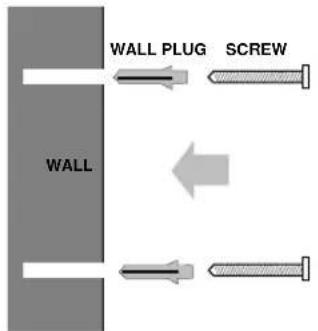
- Use the template on the following page to mark the positions of the screws.
- Drill two holes for the screws and insert the wallplugs provided (if required).
- Put the screws into the wall leaving about 5mm of screw exposed to mount the stand/ bracket.
- Hook the stand/ bracket over the screw heads to check if it fits correctly, then remove again.
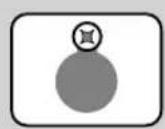
Attach the stand/ bracket by hooking it over the screws protruding from the wall.
Spare parts for your Freestyle 120 Plus are available from your BT shop or supplier, or you can contact us on Lo-call 0345 697146 between 9.00am and 5.30pm Monday to Friday.
- Ensure that the power supply and the telephone lines are connected to the base unit, then fit the lines into the channels on the bottom of the base unit securing the lines under the small tabs.
- Any spare length of mains and telephone lead can be stored in the hollow portion of the wall bracket, but they should not be wound around each other.
- Fit the top end of the base unit over the lugs at the top of the wall bracket.
- Ensure that the lines are fitted into their slots at the bottom of the wall bracket, clip the base unit to the bottom of the wall bracket.
- Place the wall bracket (the thin end of the wedge at the top) over the screw heads and pull down as far as possible to secure.

Offices in Europe, North America, Japan and Asia Pacific.
The telecommunications services described in this publication are subject to availability and may be modified from time to time. Services and equipment are provided subject to British Telecommunications plc's respective standard conditions of contract. Nothing in this publication forms any part of any contract.
TouchTone™ is a registered trade mark of British Telecommunications plc in the UK.
© British Telecommunications plc 1997. Registered Office: 81 Newgate Street, London EC1A 7AJ. Registered in England No. 1800000. Printed in China. Freestyle 120 Plus Issue 1 (12/97). Designed by The Art & Design Partnership Limited.

CE compliant to 89/336/EEC (EMC Directive) & 73/23/EEC (Low Voltage Directive)
APPROVED for connection to telecommunication systems specified in the instructions for use subject to the conditions set out in them

503486


- FREESTYLE120 PLUS
- AT A GLANCE
- IN THIS GUIDE
- CUSTOMER HELPLINE
- HINTS AND TIPS BOXES
- INTRODUCTION YOUR FREESTYLE 120 PLUS HAS BEEN DESIGNED FOR EASE OF USE AND MADE TO THE VERY HIGH STANDARDS SET BY BT
- PLACE OF PURCHASE
- PURCHASE PRICE
- EMERGENCY CALLS
- SETTING UP
- FOLLOW THESE STEPS TO GET YOUR FREESTYLE 120 PLUS
- IMPORTANT
- CHECK THAT YOUR FREESTYLE 120 PLUS IS COMPLETE. WHEN YOU UNPACK YOU SHOULD HAVE
- ELECTRICAL STORM WARNING
- 1 HANDSET AERIAL
- 2 CHECK YOUR TELEPHONE WALL SOCKET
- 3 INSERT BATTERY (FOR BACK-UP ONLY)
- 4 PLUG THE POWER CABLE INTO THE BACK OF THE BASE UNIT
- WARNING
- 5 CONNECT THE BASE UNIT THREE-PIN ADAPTOR TO A POWER SOCKET
- 6 PLUG THE PHONE INTO THE BT SOCKET
- 7 EXTEND THE BASE UNIT TELESCOPIC AERIAL
- FOR THE BEST RECEPTION
- 8 TO WALL-MOUNT YOUR PRODUCT
- TO PLAN THE LOCATION OF THE BASE UNIT
- 9 TO CHARGE THE HANDSET
- BATTERY CARE
- MAINS POWER ADAPTOR
- USING YOUR FREESTYLE 120 PLUS
- MAKING AND RECEIVING CALLS
- TO MAKE A CALL
- TO END A CALL
- TO SWITCH FROM PULSE TO TONE SIGNALLING DURING A CALL
- TO RECEIVE A CALL
- TO USE THE CHANNEL SEEKER
- TO ADJUST THE HANDSET RINGER
- TO SET THE RINGER SWITCH
- TO SET THE TEL MODE SWITCH
- TO INSERT A PAUSE
- TO USE THE RECALL BUTTON
- USING THE MEMORY TO STORE AND DIAL NUMBERS
- TO STORE A NUMBER IN THE MEMORY
- QUICKDIAL DIRECTORY LABEL
- TO DIAL A STORED NUMBER
- TO STORE A NUMBER OF MORE THAN 20 DIGITS
- TO DIAL A STORED NUMBER OF MORE THAN 20 DIGITS
- TO CHANGE A NUMBER
- USING THE SECRECY BUTTON
- LAST NUMBER REDIAL
- TO REDIAL THE LAST NUMBER CALLED
- USING THE INTERCOM
- TO CALL THE BASE UNIT FROM THE HANDSET
- TO CALL THE HANDSET FROM THE BASE
- TO ADJUST THE INTERCOM LOUDSPEAKER VOLUME AT THE BASE UNIT
- BT SELECT SERVICES
- CALL WAITING
- THREE WAY CALLING
- CALL DIVERSION
- CALL BARRING
- REMINDER CALLS
- 1471
- TO USE THE 1471 FEATURE
- TO WITHHOLD YOUR OWN NUMBER
- CHARGE ADVICE
- HELP IF YOU HAVE ANY PROBLEMS USING YOUR FREESTYLE 120 PLUS, THIS SECTION WILL GIVE YOU THE MOST COMMON, EASY TO FOLLOW SOLUTIONS
- NEED MORE HELP
- TECHNICAL INFORMATION
- OFFICIAL APPROVAL
- APPROVAL FOR USE
- CALL SECURITY
- TRANSMISSION FREQUENCIES
- RINGER EQUIVALENCE NUMBER (REN)
- SAFETY ADVICE
- CONNECTION INFORMATION
- MAINTENANCE
- INSTALLING HANDSET BATTERIES AND RECHARGING
- TO CHANGE THE HANDSET BATTERIES
- IN THE EVENT OF A POWER FAILURE
- CARE OF RECHARGEABLE BATTERY PACK
- GENERAL CLEANING
- EXTENDED PERIODS OF NON-USE
- GUARANTEE
- INDEX
- AT A GLANCE 1
- INTRODUCTION 4
- EMERGENCY CALLS 4
- SETTING UP 5
- USING YOUR FREESTYLE 120 PLUS 10
- BT SELECT SERVICES 17
- HELP19
- TECHNICAL INFORMATION 21
- MAINTENANCE 24
- WALL MOUNTING 29
- WALL MOUNTING
- TO WALL MOUNT YOUR FREESTYLE 120 PLUS
- OFFICES IN EUROPE, NORTH AMERICA, JAPAN AND ASIA PACIFIC
Brand : BT
Model : Freestyle 120 Plus
Category : Simulator