
RS12mHD - Loudspeaker SAMSON - Free user manual and instructions
Find the device manual for free RS12mHD SAMSON in PDF.


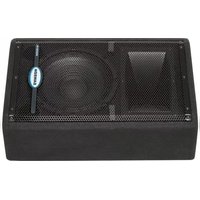
| Product Type | Passive PA Speaker |
| Model | RS12mHD |
| Brand | Samson |
| Speaker Configuration | 2-way |
| Woofer Size | 12 inches |
| Tweeter Size | 1 inch compression driver |
| Power Handling (RMS) | 250 watts |
| Power Handling (Peak) | 500 watts |
| Impedance | 8 ohms |
| Frequency Response | 55 Hz - 20 kHz |
| Sensitivity (1W/1m) | 98 dB |
| Maximum SPL | 124 dB |
| Connectors | 1 x Speakon, 1 x 1/4" input parallel |
| Enclosure Material | Plywood with polyurethane coating |
| Grille | Steel grille with acoustically transparent foam |
| Handles | 2 integrated side handles |
| Mounting Options | Pole mount socket (35mm), fly points |
| Dimensions (H x W x D) | 24.0 x 14.0 x 12.5 inches |
| Weight | 36.5 lbs (16.6 kg) |
Frequently Asked Questions - RS12mHD SAMSON
User questions about RS12mHD SAMSON
0 question about this device. Answer the ones you know or ask your own.
Ask a new question about this device
Download the instructions for your Loudspeaker in PDF format for free! Find your manual RS12mHD - SAMSON and take your electronic device back in hand. On this page are published all the documents necessary for the use of your device. RS12mHD by SAMSON.
USER MANUAL RS12mHD SAMSON
DO NOT EXPOSE THIS EQUIPMENT
TO RAIN OR MOISTURE
AVIS
RISQUE DE CHOC ELECTRONIQUE
NE PAS OUVRIR
CAUTION
FOR CONTINUED PROTECTION AGAINST RISK
OF FIRE, REPLACE ONLY WITH SAME TYPE FUSE
ATTENTION
UTILISER UN FUSIBLE DE
RECHANGE DE MÊME TYPE

CAUTION
RISK OF ELECTRIC SHOCK DO NOT OPEN

WARNING: To reduce the risk of fire or electric shock, do not expose this unit to rain or moisture. To reduce the hazard of electrical shock, do not remove cover or back. No user serviceable parts inside. Please refer all servicing to qualified personnel. The lightning flash with an arrowhead symbol within an equilateral triangle, is intended to alert the user to the presence of uninsulated "dangerous voltage" within the products enclosure that may be of sufficient magnitude to constitute a risk of electric shock to persons. The exclamation point within an equilateral triangle is intended to alert the user to the presence of important operating and maintenance (servicing) instructions in the literature accompanying the product.
Important Safety Instructions
- Please read all instructions before operating the unit.
- Keep these instructions for future reference.
- Please heed all safety warnings.
- Follow manufacturers instructions.
- Do not use this unit near water or moisture.
- Clean only with a damp cloth.
- Do not block any of the ventilation openings. Install in accordance with the manufacturers instructions.
-
Do not install near any heat sources such as radiators, heat registers, stoves, or other apparatus (including amplifiers) that produce heat.
-
Do not defeat the safety purpose of the polarized or grounding-type plug. A polarized plug has two blades with one wider than the other. A grounding type plug has two blades and a third grounding prong. The wide blade or third prong is provided for your safety. When the provided plug does not fit your outlet, consult an electrician for replacement of the obsolete outlet.
-
Protect the power cord from being walked on and pinched particularly at plugs, convenience receptacles and at the point at which they exit from the unit.
-
Unplug this unit during lightning storms or when unused for long periods of time.
-
Refer all servicing to qualified personnel. Servicing is required when the unit has been damaged in any way, such as power supply cord or plug damage, or if liquid has been spilled or objects have fallen into the unit, the unit has been exposed to rain or moisture, does not operate normally, or has been dropped.
Resound HD Features 3
Resound HD Components 4
Controls and Functions 5
Connecting the Resound HD Speaker System
Choosing the Correct Cables
Powering the Resound HD
Quick Set-Up 6
Positioning the Resound HD 7
Setting up your Resound HD 8
Resound HD Wiring Guide 9
Specifications 10 - 11
Notes 12
Copyright 2008, Samson Technologies Corp..
Printed January, 2008 v1.0
Samson Technologies Corp.
45 Gilpin Avenue
Hauppauge, New York 11788-8816
Phone: 1-800-3-SAMSON (1-800-372-6766)
Fax: 631-784-2201
www.samsontech.com
Introduction
Congratulations on purchasing the Samson Resound HD Series loudspeaker system! The Resound HD speaker systems by Samson represent a new level of audio performance and sound quality for mobile or fixed PA systems. The new Resound HD series expands on the previous line offering improved high and low frequency drivers, higher power handling and updated cosmetics. Whether you are using the RS10HD, RS12HD, RS15HD or RS215HD front-firing PA speakers for main "front of house" PA, or the RS10mHD, RS12mHD or RS15mHD for wedge floor monitors, the Resound HD series will provide clear sound with a lot of output. By combining high power handling, advanced crossover design, along with quality speaker and cabinet components, the Resound HD series provides premium audio for any kind of live application. For deep low end that stays tight and punchy, each of the Resound HD loudspeakers features heavy-duty, custom designed low frequency drivers. A ten-inch woofer in the Resound HD RS10HD and RS10mHD, a 12-inch for the Resound RS12HD and RS12mHD and 15-inch woofers for the RS15HD, RS15mHD and RS215HD. To handle the high frequency content, the Resound HD series employs a 1.4-inch (34 millimeter) titanium diaphragm high frequency driver on a 1" throat, wide dispersion horn. The result, the Resound HD series speaker systems offer crystal-clear audio and an ultra-wide sound field. To make your connections simple, each Resound HD model provides both 1/4-inch and NEUTRIK SPEAKON® Input and Extension output connectors. Heavy-grade steel grills and durable carpet covering offer excellent protection against wear and tear. The compact cabinets can be placed on the floor or stand mounted using the integral 1 3/8" pole mount receptacle. With the Resound HD, setup and break down is quick and easy. As fixed sound reinforcement or as a durable, great-sounding road PA, the Resound HD monitor is ideal for sound professionals and performers looking for serious output and studio monitor sound quality from a PA speaker system.
In these pages, you'll find a detailed description of the features of the Resound HD PA system, as well as a description of its front and rear panels, step-by-step instructions for its setup and use, and full specifications. You'll also find a warranty card enclosed—please don't forget to fill it out and mail it in so that you can receive online technical support and so we can send you updated information about these and other Samson products in the future. Also, be sure to check out our website (www.samsontech.com) for complete information about our full product line.
With proper care your Resound HD will operate trouble free for many years. We recommend you record your serial number in the space provided below for future reference.
Serial number: ____
Date of purchase: ____
Should your unit ever require servicing, a Return Authorization number (RA) must be obtained before shipping your unit to Samson. Without this number, the unit will not be accepted. Please call Samson at 1-800-3SAMSON (1-800-372-6766) for a Return Authorization number prior to shipping your unit. Please retain the original packing materials and if possible, return the unit in the original carton and packing materials. If you purchased your Samson product outside the United States, please contact your local distributor for warranty information and service.
Resound HD Features
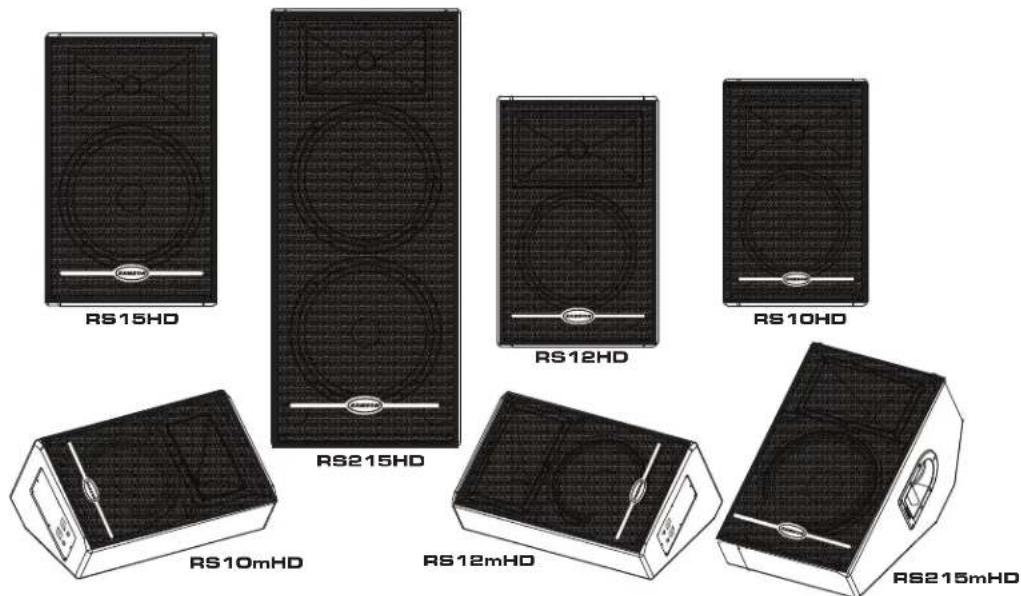
The Samson Resound HD series two-way loudspeaker systems offer several models to manage a variety of live sound applications. With their high quality components, convenient sized trapezoidal and low profile monitor enclosures, ergonomic carry handles and stand mounts, the Resound HD series system will provide great sound with reliability. Here are some of their main features:
- Two-way passive loudspeaker systems featuring high quality components and providing clean, articulate sound reinforcement for vocal and/or music reproduction.
- For deep bass response, the Resound HD series utilizes custom designed, heavy-duty, low-frequency drive units. The RS10HD and RS10mHD feature a 10-inch woofer, while the RS12HD and RS12mHD employ a 12-inch woofer, and 15-inch low frequency drivers are used in the RS15HD, RS215HD and RS15mHD.
- For sweet highs that can cut through the back-line instruments, the Resound HD series systems incorporate a high-frequency compression driver with a 1.4-inch (34mm) Titanium diaphragm fitted to a 1-inch (25mm) throat, 60 x 90 degree hi-frequency horn.
- The Resound HD series speakers carry high power ratings with the RS10HD and RS10mHD capable of 150 watts continuous power handling, the RS12HD and RS12mHD handling 250 watts, the RS15HD and RS15mHD reaching 300 watt continuous power and an enormous 600 watts continuous power handling for the RS215HD
- Neutrik Speakon ^® and 1/4-inch Input connectors interface easily with most any power amp or powered mixer.
- Neutrik Speakon ^® and 1/4-inch Extension output connectors also allow you to "daisy-chain" multiple Resound HD models together to create larger sound reinforcement systems.
- Internal 18 dB/octave crossover with high frequency lamp protection.
• RS10mHD, RS12mHD and RS15mHD floor monitors are low profile and compact. - The RS10HD, RS12HD and RS15HD can be stand mounted via their standard 1 3/8-inch speaker stand receptacles.
- Rugged, road-worthy carpet covered enclosures with steel speaker grills for high reliability.
- Quality build and rugged construction ensure reliable performance from night-to-night and venue-to-venue.
• Three-year extended warranty. - Internal cabinet bracing provides extra strength and freedom from vibration.
Resound HD Components
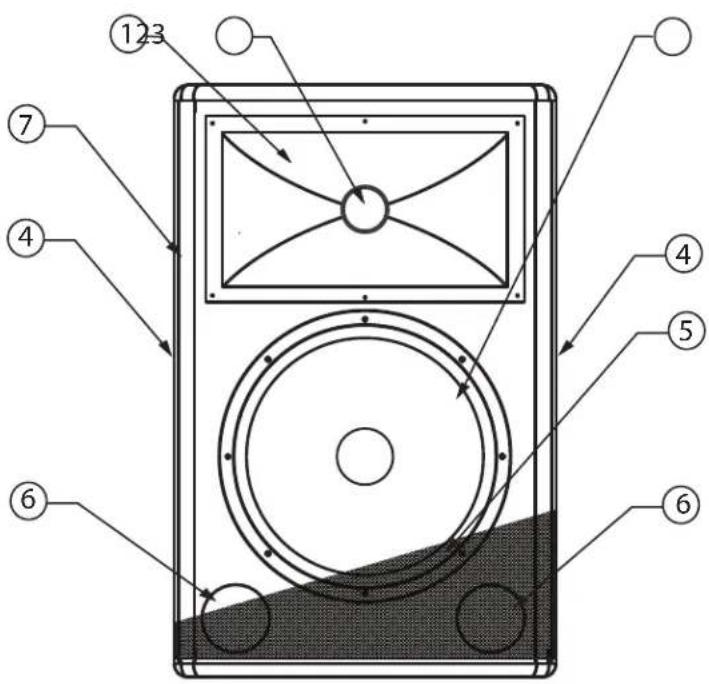
Resound HD FRONT PANEL
1 Wide Dispersion Horn – 1 inch throat, 60 x 90 degree wide dispersion horn provides extensive coverage and linear, off axis response.
2 Titanium Compression Driver
- 1.4inch (34mm), Titanium diaphragm with 1 inch opening.
3 Woofer – Custom designed, heavy-duty, low frequency driver provides deep bass.
4 Handle – One of two, ultra over sized carry handles. (RS15 HD, 15m HD and 215 HD only.)
5 Steel Grill – Durable steel grill provides protection for, and easy access to, LF driver.
6 Shelf Port – Precision tuned ports for accurate and tight bass response.
7 Enclosure – Rugged wooden enclosure durable carpet covering.
Resound HD REAR PANEL
A INPUT – Speakon input connector for connecting to the output of a power amplifier or powered mixer.
B EXTENSION – Speakon parallel output connector for connecting additional Resound HD's.
C INPUT - 1/4-inch phone input connector for connecting to the output of a power amplifier or powered mixer.
D EXTENSION - 1/4-inch parallel output for connecting additional Resound HD's.
Note: For a detailed wiring diagram, see page 9 of this manual.

Connecting the Resound HD Speaker System
Choosing the Correct cables
The Resound HD series speaker connections are made via the rear panel 1/4-inch and/or Neutrik Speakon® connectors. Standard, unshielded speaker wire, available at your local pro audio or music store, with either 1/4-inch phone or Speakon connectors and wire gauge of 12-14 is recommended.
If your amplifier uses binding posts you can use speaker cables with banana plugs, but be sure to pay attention to the plus and minus polarity when making the connections. It is important that your PA system is connected in-phase otherwise you will not have the proper low-end response and stereo image.
In order to ensure that your PA system is-in phase, be careful to pay close attention to the positive and negative marking on the amplifier and wires. Make sure that the + terminal of the speaker, or banana connector, is connected to the + terminal of the power amplifier and that the - terminal of the speaker, or banana connector, is connected to the - terminal of the power amplifier. For a detailed wiring diagram, see page 9 of this manual.
Here's a tip: It's fairly easy to identify a monitor that is out of phase just by listening, especially on a pop recording. Listen for the parts of the music that you would expect to be in the center of the mix (like kick drum and vocals). If you do not hear them directly in the center (for instance they sound like they are two signals panned hard right and left), then you are more than likely listening to an out-of-phase monitor system. (This test won't work on early Beatles records where Ringo's drum kit is panned all the to the right side. Try a Madonna record.)
About Impedance
Before you hook up your speaker cabinet, be sure that you understand a little about impedance. Impedance is the electronic load that the speaker puts on the power amplifier and is measured in Ohms.
Here is the tricky, yet simple rule of impedance: When two speakers, of equal impedance are wired in "Parallel", like when you use the Extension Output, the total impedance is cut in half. When two speakers are wired in "Series", (usually for internal cabinet wiring only), the total impedance is the sum of the speakers individual impedance.
Each of the Resound HD models, EXCEPT the RS215HD is 8 Ohms. So, when two Resound HD models (EXCEPT the RS215HD) are connected together in parallel, the total impedance is 4 Ohms. The RS215HD impedance is 4 Ohms. So, when two RS215HD's are connected together in parallel, the total impedance is 2 Ohms. The impedance of your speaker also has an effect on your amplifier. In general, the lower the impedance, the more power your amplifier will put out.
IMPORTANT NOTE: There is minimum safe impedance for running power amplifiers so be sure to check the manufacturer's recommended impedance for your amplifier to avoid any damage to your amplifier or voiding your warranty.
Using the EXTENSION Output
The Resound HD models provide a convenient Extension Output for connecting additional speaker cabinets in parallel. Be sure to read the section above on impedance to insure a proper hook up with your amplifier. To connect two Resound HDs using the Extension output, connect your amplifier output to the Input of the first Resound HD and then, connect the Extension Output to the Input of the second Resound HD.
Powering the Resound HD
Each of the Resound HD loudspeakers have a specific power rating, which is printed on the input jack-plate, and also, in the Specification section on page 10 of this manual. Be sure to check that your power amp has the correct power output for your Resound HD. Be careful to consider the total impedance if you are connecting more the one Resound HD to one side of a stereo power amplifier. Using a power amplifier with too low of a power rating can be dangerous since the output signal is often clipped in an effort to get the desired level. Over powering the Resound HD can result in catastrophic failure and therefore using any amplifier with a power rating over the recommend power rating may void your warranty.
Quick Set-Up
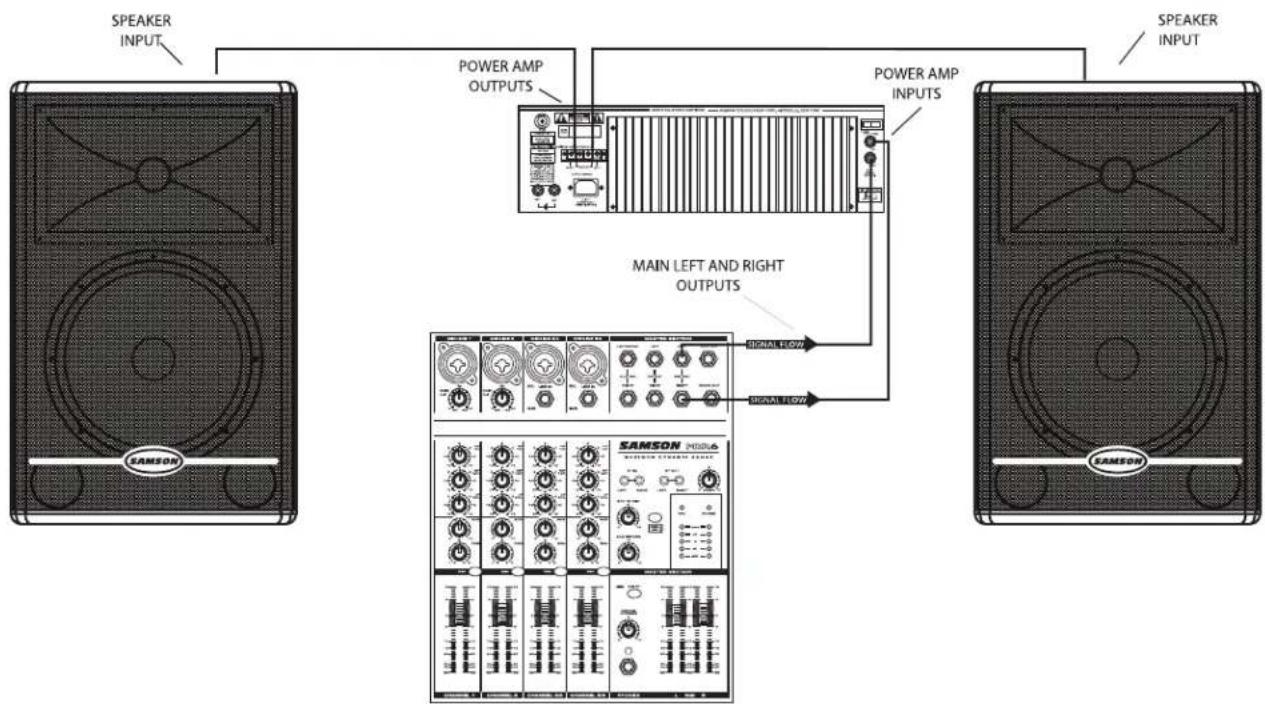
In the following pages of this manual, you will find a detailed explanation of system set-ups, but if you just want to get started quickly, you can follow the diagram and steps below to set up a basic stereo PA system. NOTE: Before plugging in and turning on, it is important to remember the Golden Rule of audio ... "LAST ON, FIRST OFF". Translated, this means that when turning on your system, you should always turn your power amplifiers or powered monitors on LAST, and when turning your system off, turn your power amps off FIRST. This helps avoid any loud pops caused by inrush current at power up, which can sometimes damage loud-speakers.
flowchart
graph TD
    A["SAMSON"] -->|Speaker Input| B["POWER AMP OUTPUTS"]
    B --> C["MAIN LEFT AND RIGHT OUTPUTS"]
    C --> D["SAMSON MODE 6"]
    D --> E["SAMSON INPUT"]
    B --> F["POWER AMP INPUTS"]
    F --> G["SAMSON INPUT"]
    style A fill:#f9f,stroke:#333
    style B fill:#ccf,stroke:#333
    style C fill:#cfc,stroke:#333
    style D fill:#fcc,stroke:#333
    style E fill:#cff,stroke:#333
    style F fill:#ffc,stroke:#333
- Before connecting your Resound HD's, make sure that the power of all your systems components are turned off. Also, make sure that your power amplifier volume controls and the main left and right faders of your mixer are turned all the way down.
- Connect the cables to your microphones and instruments, or a CD player, to your mixer.
- Switch on the power of the mixer, instruments and/or CD player, and then switch on your power amplifier.
- While speaking into the mic (or playing the instrument or CD), raise the mixers main Left and Right faders to the "0" position. Be sure that the mixer's output meters are not clipping. If they are, adjust the mixer volumes down until the signal cleans up.
- Now, slowly raise your power amp controls until you reach the desired listening level.
Positioning the Resound HD
Microphone Positioning - How to Reduce Feedback
Feedback is the annoying howling and squealing that is heard when the microphone gets too close to the speaker and the volume is high. You get feedback when the microphone picks up the amplified signal from the speaker, and then amplifies through the speaker again, and then picks it up again, and so on and so on. In general, it is always recommended that any LIVE mic (a mic that's on) is positioned behind the speaker enclosures. This will give you the best level from your system before feedback. One possible exception is when you are adjusting the sounds of the microphones, since you want to listen in front of the speaker to hear properly. To do this, lower the MAIN VOLUME while setting the EQ and effect from in front of the speakers. Once you have the sound you like, move the microphones to behind the speakers and raise the Main volume.
Speaker Placement
Whenever possible, it is a good idea to raise the speakers above the heads of the listening audience. The Resound HD enclosure features a standard 1 3/8" pole mount receptacle, which is compatible with speaker stands from a variety of manufacturers.
Using the Resound HD as a Floor Monitor
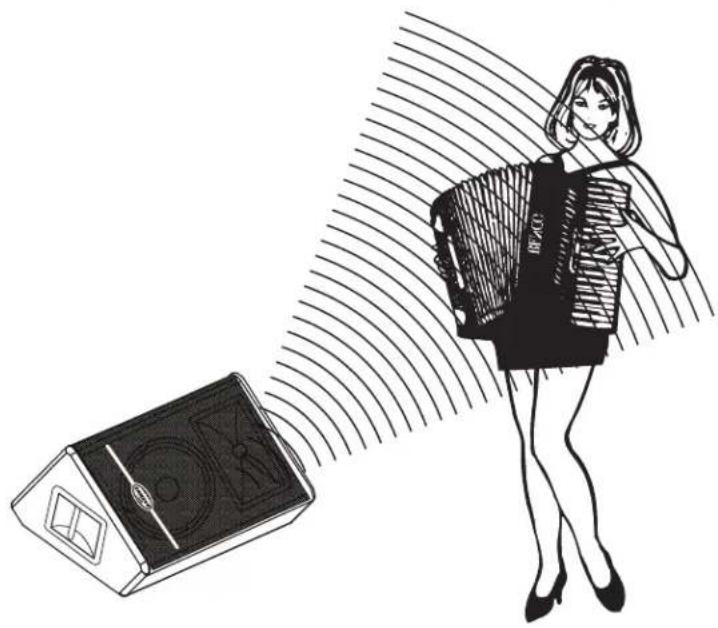
The Resound HD RS10mHD, RS12mHD and RS15mHD are ideal solutions for stage monitoring. The RS15mHD features a wide dispersion pattern and is configured with a 30 degree angle making them ideal for electronic drum and keyboard monitors as well as vocal monitors. In a large stage monitor system, several Resound HD's can be daisy-chained together using the EXTENSION SPEAKER output.
Note: Be sure to check the manufacturers minimum recommended impedance for your power amplifier to avoid overload and possible damage to both the speaker and amplifier. In many instances when using the Resound HD as a monitor system, you may choose to use an external equalizer like the Samson S Curve 131 to increase the volume and reduce the chance of feedback.
natural_image
Illustration of a woman carrying a bag with 'CD48' label, standing beside a CD48 speaker emitting sound waves (no text or symbols on the diagram itself)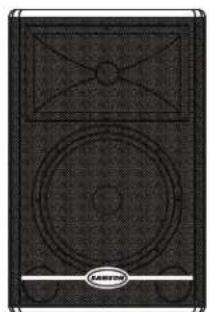
natural_image
Black-and-white illustration of a speaker with two circular speakers and a square antenna (no text or symbols)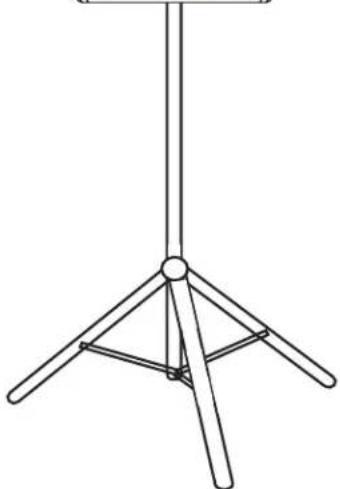
natural_image
Line drawing of a simple tripod stand with four legs and a central hub (no text or symbols)Setting Up Your Resound HD System

flowchart
graph TD
    A["SPEAKER INPUT"] --> B["MAIN POWER AMP INPUTS"]
    C["SPEAKER INPUT"] --> B
    D["SAMSON"] --> E["SAMSON INPUTS"]
    E --> F["SAMSON OUTPUT"]
    F --> G["SPEAKER INPUT"]
    G --> H["SPEAKER INPUT"]
    H --> I["SAMSON OUTPUT"]
    I --> J["SAMSON INPUTS"]
    K["SAMSON"] --> L["SAMSON INPUTS"]
    L --> M["SAMSON OUTPUT"]
    M --> N["SPEAKER INPUT"]
    N --> O["SPEAKER INPUT"]
    O --> P["SAMSON OUTPUT"]
    P --> Q["SAMSON INPUTS"]
    R["SAMSON"] --> S["SAMSON INPUTS"]
    S --> T["SAMSON OUTPUT"]
    T --> U["SPEAKER INPUT"]
    U --> V["SPEAKER INPUT"]
    V --> W["SAMSON OUTPUT"]
    W --> X["SAMSON INPUTS"]
    Y["SAMSON"] --> Z["SAMSON INPUTS"]
    Z --> AA["SAMSON OUTPUT"]
    AA --> AB["SPEAKER INPUT"]
    AB --> AC["SPEAKER INPUT"]
    AC --> AD["SAMSON OUTPUT"]
    AD --> AE["SAMSON INPUTS"]
    AF["SAMSON"] --> AG["SAMSON INPUTS"]
    AG --> AH["SAMSON OUTPUT"]
    AH --> AI["SPEAKER INPUT"]
    AI --> AJ["SPEAKER INPUT"]
    AJ --> AK["SAMSON OUTPUT"]
    AK --> AL["SAMSON INPUTS"]
    AM["SAMSON"] --> AN["SAMSON INPUTS"]
    AN --> AO["SAMSON OUTPUT"]
    AO --> AP["SPEAKER INPUT"]
    AP --> AQ["SPEAKER INPUT"]
    AQ --> AR["SAMSON OUTPUT"]
    AR --> AS["SAMSON INPUTS"]
    AT["SAMSON"] --> AU["SAMSON INPUTS"]
    AU --> AV["SAMSON OUTPUT"]
    AV --> AW["SPEAKER INPUT"]
    AW --> AX["SPEAKER INPUT"]
    AX --> AY["SAMSON OUTPUT"]
This example shows a typical PA system using a mixer with an external power amplifier and a pair of Resound HDs for the main left and right mix. A separate signal from the mixer's AUX/MONITOR bus is sent to two additional Resound HD's placed in the tilt-back, wedge positions for use as floor monitors. In order to increase the output of the monitor system, the use of an external graphic equalizer like one of the Samson "E" or "S curve" series is highly recommended.
Resound HD Wiring Guide
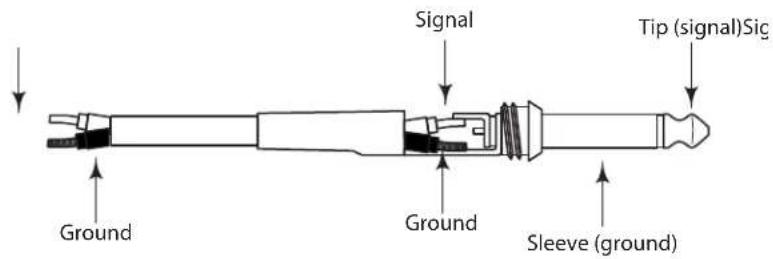
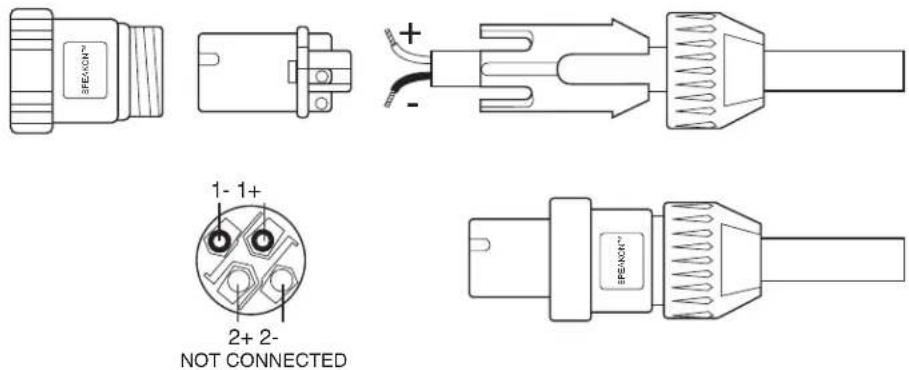
The Resound HD provides both Speakon and 1/4" phone connectors for easy interface with industry standard cables. You can use a variety of standard speaker cables that are available "off the shelf" at your local pro-audio or musical instrument retailer. Be sure that cables use standard, stranded speaker wire. A 12-14 gauge is recommended. If you are making your own cables, use the diagrams following below to ensure a proper hook up.
Unbalanced 1/4" Connector
Speakon Wiring Guide
Resound HD Specifications
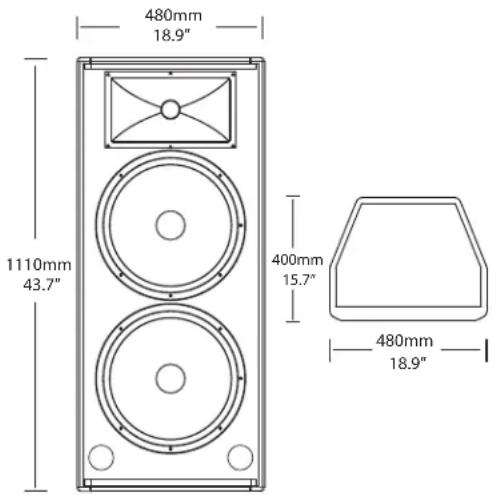
RS215HD
Power Rating (@ 8Ω): 600 Watts RMS, 1200 PEAK
Nominal Impedance: 4 Ohms
Frequency Response: 40 Hz – 19 kHz
Sensitivity: 99 dB SPL @ 1W/1m
MAX SPL: 125dB
LF Driver: 2 x 15-inch heavy-duty driver
HF Driver: 1-inch exit, 34mm Titanium diaphragm
compression driver
Protection: Internal overload Lamp on HF driver
Weight: 75 lbs./34 kg
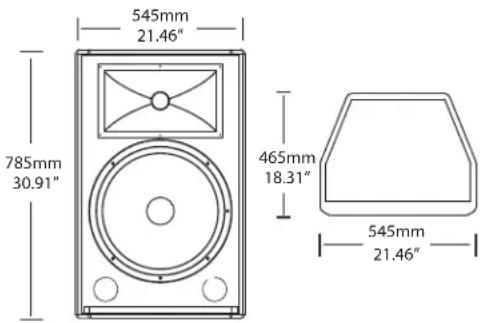
RS15HD
Power Rating (@ 8Ω): 300 Watts RMS, 600 PEAK
Nominal Impedance: 8 Ohms
Frequency Response: 47 Hz – 19 kHz
Sensitivity: 96 dB SPL @ 1W/1m
MAX SPL: 124dB
LF Driver: 15-inch heavy-duty driver
HF Driver: 1-inch exit, 34mm Titanium diaphragm
compression driver
Protection: Internal overload Lamp on HF driver
Mounting: Integral 1 3/8-inch Pole Mount
Receptacle
Weight: 49.60 lbs./22.5 kg
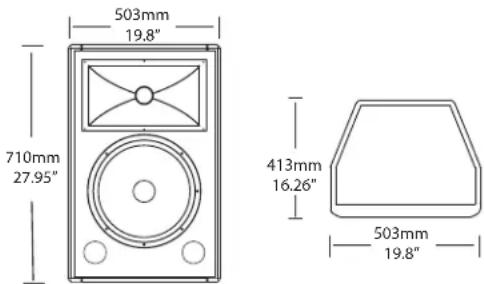
RS12HD
Power Rating (@ 8Ω): 250 Watts RMS, 500 PEAK
Nominal Impedance: 8 Ohms
Frequency Response: 50 Hz – 19 kHz
Sensitivity: 94 dB SPL @ 1W/1m
MAX SPL: 121dB
LF Driver: 12-inch heavy-duty driver
HF Driver: 1-inch exit, 34mm Titanium diaphragm
compression driver
Protection: Internal overload Lamp on HF driver
Mounting: Integral 1 3/8-inch Pole Mount
Receptacle
Weight:
39.7 lbs./18 kg
Resound HD Specifications
RS10HD
Power Rating (@ 8Ω): 150 Watts RMS, 300 PEAK
Nominal Impedance: 8 Ohms
Frequency Range: 60 Hz – 19 kHz
Sensitivity: 92 dB SPL @ 1W/1m
MAX SPL: 116dB
LF Driver: 10-inch heavy-duty driver
HF Driver: 1-inch exit, 34mm Titanium diaphragm
compression driver
Protection: Internal overload Lamp on HF driver
Mounting: Integral 1 3/8-inch Pole Mount Receptacle
Weight: 29.5 lbs./13.4 kg
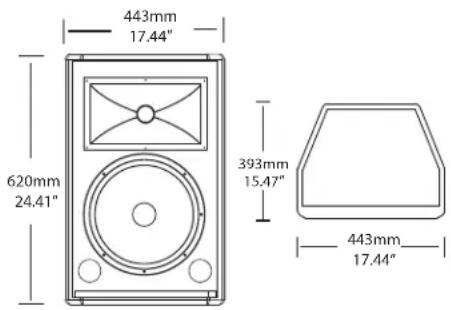
RS10mHD
Power Rating (@ 8Ω): 150 Watts RMS, 300 PEAK
Nominal Impedance: 8 Ohms
Frequency Response: 59 Hz – 19 kHz
Sensitivity: 92 dB SPL @ 1W/1m
MAX SPL: 116 dB
LF Driver: 10-inch heavy-duty driver
HF Driver: 1-inch exit, 34mm Titanium diaphragm
compression driver
Protection: Internal overload Lamp on HF driver
Mounting: 25° and 30° wedge monitor position
Weight: 28.65 lbs. /13 kg
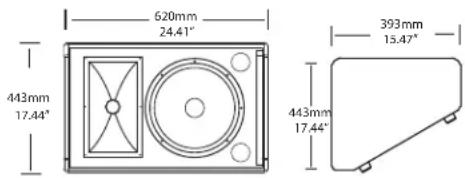
RS12mHD
Power Rating (@ 8Ω): 250 Watts RMS,500 PEAK
Nominal Impedance 8 Ohms
Frequency Response: 50 Hz – 19kHz
Sensitivity: 94 dB SPL @ 1W/1m
MAX SPL: 121dB
LF Driver: 12-inch heavy-duty driver
HF Driver: 1-inch exit, 34mm Titanium diaphragm
compression driver
Protection: Internal overload Lamp on HF driver
Mounting: 25° and 30° wedge monitor position
Weight: 49.60 lbs. /17 kg
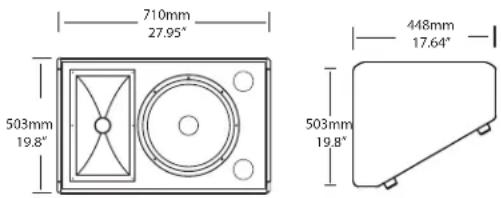
RS15mHD
Power Rating (@ 8Ω): 300 Watts RMS, 600 PEAK
Nominal Impedance: 8 Ohms
Frequency Response: 45 Hz – 19 kHz
Sensitivity: 96 dB SPL @ 1W/1m
MAX SPL: 124dB
LF Driver: 15-inch heavy-duty driver
HF Driver: 1-inch exit, 34mm Titanium diaphragm
compression driver
Protection: Internal overload Lamp on HF driver
Mounting: 30° wedge monitor position
Weight: 42 lbs./21.9 kg
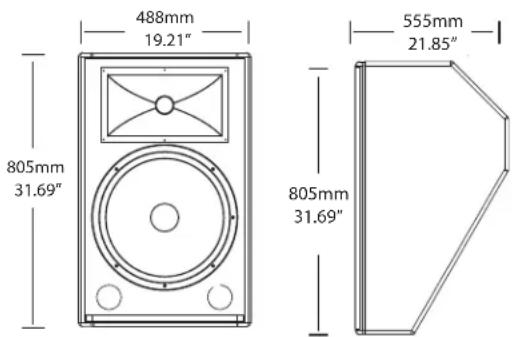
Notes
Samson Technologies Corp.
45 Gilpin Avenue
Hauppauge, New York 11788-8816
Phone: 1-800-3-SAMSON (1-800-372-6766)
Fax: 631-784-2201
www.samsontech.com

- AVIS
- CAUTION
- ATTENTION
- Important Safety Instructions
- Controls and Functions 5
- Introduction
- Resound HD Features
- Resound HD Components
- Resound HD FRONT PANEL
- Resound HD REAR PANEL
- Connecting the Resound HD Speaker System
- Choosing the Correct cables
- About Impedance
- Using the EXTENSION Output
- Powering the Resound HD
- Quick Set-Up
- Positioning the Resound HD
- Microphone Positioning - How to Reduce Feedback
- Speaker Placement
- Using the Resound HD as a Floor Monitor
- Setting Up Your Resound HD System
- Resound HD Wiring Guide
- Unbalanced 1/4" Connector
- Speakon Wiring Guide
- Resound HD Specifications
- RS10HD
- RS10mHD
- RS12mHD
- RS15mHD
- Notes
Brand : SAMSON
Model : RS12mHD
Category : Loudspeaker