
Expedition XP115A - Loudspeaker SAMSON - Free user manual and instructions
Find the device manual for free Expedition XP115A SAMSON in PDF.


| Product Type | Portable PA Speaker |
| Brand | Samson |
| Model | Expedition XP115A |
| Speaker Configuration | 15-inch woofer + 1-inch compression driver |
| Amplifier Power | 250W RMS |
| Frequency Response | 45Hz – 20kHz |
| Maximum SPL | 120 dB |
| Connectivity | Bluetooth, XLR/TRS combo input, RCA input, USB/SD player |
| Power Source | AC 100-240V, 50/60Hz; internal rechargeable battery |
| Battery Life | Up to 4 hours at full power |
| Dimensions (HxWxD) | 27.6 x 16.5 x 15.4 inches (700 x 420 x 390 mm) |
| Weight | 52.9 lbs (24 kg) |
| Enclosure Material | Plywood with carpet covering |
| Handle Type | Retractable handle and wheels for transport |
| Key Features | Built-in mixer, echo/effects, dual-band EQ, feedback elimination |
| Care & Cleaning | Wipe with a dry cloth; avoid moisture and solvents |
| Safety | Do not expose to rain; ensure proper ventilation; use grounded outlet |
| Spare Parts & Repairability | Contact Samson support for replacement parts; repairs by qualified service only |
| General Information | Ideal for live sound, karaoke, DJ performances, and PA applications |
Frequently Asked Questions - Expedition XP115A SAMSON
User questions about Expedition XP115A SAMSON
0 question about this device. Answer the ones you know or ask your own.
Ask a new question about this device
Download the instructions for your Loudspeaker in PDF format for free! Find your manual Expedition XP115A - SAMSON and take your electronic device back in hand. On this page are published all the documents necessary for the use of your device. Expedition XP115A by SAMSON.
USER MANUAL Expedition XP115A SAMSON
natural_image
Top-down line drawing of a device casing with dotted pattern and 'SAMSON' logo on front panel (no text or symbols beyond branding)Owner's Manual

If you want to dispose this product, do not mix it with general household waste. There is a separate collection system for used electronic products in accordance with legislation that requires proper treatment, recovery and recycling.
Private household in the 28 member states of the EU, in Switzerland and Norway may return their used electronic products free of charge to designated collection facilities or to a retailer (if you purchase a similar new one).
For Countries not mentioned above, please contact your local authorities for a correct method of disposal.
By doing so you will ensure that your disposed product undergoes the necessary treatment, recovery and recycling and thus prevent potential negative effects on the environment and human health.
Copyright 2014, Samson Technologies Corp.
v1.1
Samson Technologies Corp.
45 Gilpin Avenue
Hauppauge, New York 11788-8816
Phone: 1-800-3-SAMSON (1-800-372-6766)
Fax: 631-784-2201
www.samsontech.com
Important Safety Information

AVIS RISQUE DE CHOC ÉLECTRONIQUE - NE PAS OUVRIR
CAUTION: TO REDUCE THE RISK OF ELECTRIC SHOCK, DO NOT REMOVE COVER (OR BACK). NO USER-SERVICEABLE PARTS INSIDE. REFER SERVICING TO QUALIFIED SERVICE PERSONNEL.

This lightning flash with arrowhead symbol within an equilateral triangle is intended to alert the user to the presence of non-insulated "dangerous voltage" within the product's enclosure that may be of sufficient magnitude to constitute a risk of electric shock.

The exclamation point within an equilateral triangle is intended to alert the user to the presence of important operating and maintenance instructions in the literature accompanying the appliance.
- Read these instructions.
- Keep these instructions.
- Heed all warnings.
- Follow all instructions.
- This apparatus shall not be exposed to dripping or splashing liquid and no object filled with liquid, such as a vase, should be placed on the apparatus.
- Clean only with a dry cloth.
- Do not block any of the ventilation openings. Install in accordance with the manufacturer's instructions.
- Do not install near any heat sources such as radiators, heat registers, stoves, or other apparatuses (including amplifiers) that produce heat.
- Only use attachments/accessories specified by the manufacturer.
- Unplug this apparatus during lightning storms or when not in use for long periods of time.
- Do not override the intended purpose of the polarized or grounding-type plug. A polarized plug has two blades, with one wider than the other. A grounding-type plug has two blades and a third grounding prong. The wide blade, or third prong, is provided for your safety. If the provided plug does not fit your outlet, consult an electrician to replace the obsolete outlet.
- Protect the power cord from being walked on or pinched, particularly at the prongs, convenience receptacles, the point where they exit from the apparatus.
-
Use only with the cart stand, tripod bracket, or table specified by the manufacture, or sold with the apparatus. When a cart is used, utilize caution when moving the cart/apparatus combination to avoid injury from tip-over.
-
Refer all servicing to qualified service personnel. Servicing is required if the apparatus has been damaged in any way, such as power-supply cord or plug breakage, damage due to liquid or objects falling onto the apparatus, exposure to rain or moisture, or if the apparatus does not operate normally, or has been dropped.
- POWER ON/OFF SWITCH: For products with a power switch, the power switch DOES NOT break the connection from the mains.
- MAINS DISCONNECT: The plug should remain readily operable. For rack-mount or installation where plug is not accessible, an all-pole mains switch with a contact separation of at least 3 mm in each pole shall be incorporated into the electrical installation of the rack or building.
- FOR UNITS EQUIPPED WITH EXTERNALLY ACCESSIBLE FUSE RECEPTACLE: Replace fuse with same type and rating only.
- MULTIPLE-INPUT VOLTAGE: This equipment may require the use of a different line cord, attachment plug, or both, depending on the available power source at installation. Connect this equipment only to the power source indicated on the equipment rear panel. To reduce the risk of fire or electric shock, refer servicing to qualified service personnel or equivalent.

natural_image
Symbolic illustration of a person climbing a ladder inside a circle (no text or symbols)Introduction
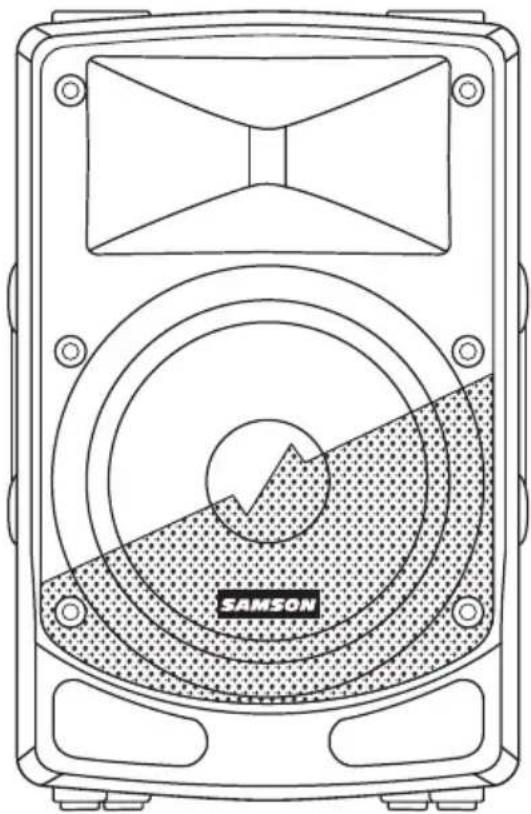
Thank you for purchasing the Samson Expedition professional, powered loudspeaker. The Expedition XP112a and XP115a are compact and powerful speaker cabinets featuring 500 watts of bi-amped onboard power. The Expedition XP112a and XP115a, respectively, feature 12" and 15" heavy-duty, long-excursion woofers, as well as 1" neodymium high frequency driver on 1" throat wide dispersion horns. The speaker cabinets provide both XLR and ¼" phone jacks that handle microphone or line level inputs. The XLR Line Output allows you to "daisy-chain" multiple Expedition cabinets together to create larger sound reinforcement systems.
Each cabinet's trapezoidal shape allows it to be configured for either front-of-house use, or for operation as a wedge-style monitor. In addition, the compact cabinets can easily be stacked, using the built-in bumpers or can be stand-mounted using the integral 1 3/8" pole-mount receptacles.
Each Expedition PA system's durable enclosure is made of high-impact polypropylene with a scuff-resistant textured finish, and include a heavy-grade steel grill, offering excellent protection against wear and tear for truly portable audio. The Expedition active monitors are ideal for live music, DJ, lecture, and installed sound applications, or anywhere serious power and superior sound quality are desired.
In these pages, you'll find a detailed itemization of the features of the Expedition PA system, as well as a description of its front and rear panels, step-by-step instructions for its setup and use, and full specifications. You'll also find a warranty card enclosed—please don't forget to fill it out and mail it in so that you can receive online technical support, and so that we can send you updated information about this and other Samson products in the future. Also, be sure to check out our website (www.samsontech.com) for complete information about our full product line.
We recommend you record your serial number in the space provided below for future reference.
Serial number:
Date of purchase: ____
With proper care and maintenance, your Expedition loudspeaker will operate trouble-free for many years. Should your speaker ever require servicing, a Return Authorization (RA) number must be obtained before shipping your unit to Samson. Without this number, the unit will not be accepted. Please call Samson at 1-800-3SAMSON (1-800-372-6766) for an RA number prior to shipping your unit. Please retain the original packing materials and, if possible, return the unit in its original carton. If your Expedition speaker was purchased outside of the United States, contact your local distributor for warranty details and service information. Also, be sure to check out our website (www.samsontech.com) for information about our full product line.
Features
natural_image
Line drawing of a camera with concentric rings and a labeled 'SAMSON' button (no text or symbols beyond label)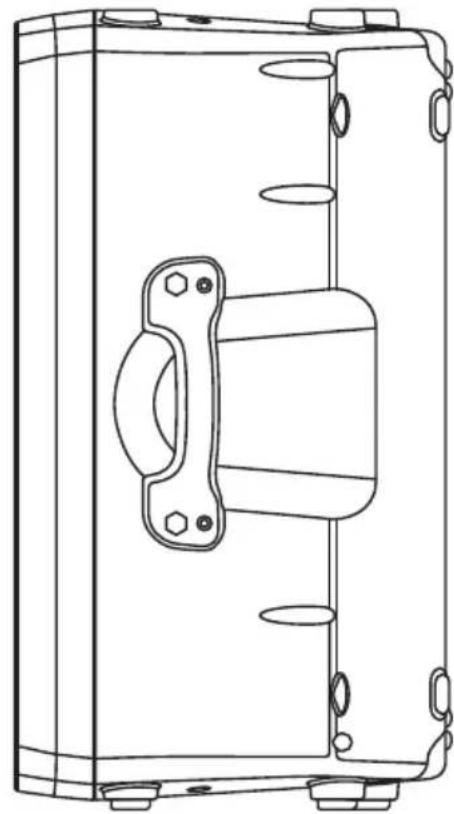
natural_image
Technical line drawing of a mechanical enclosure or enclosure with internal components and mounting holes (no text or symbols)Here is a look at some the features of the Expedition powered loudspeakers:
- 500 watt, two-way active loudspeakers for live sound applications
• Ultra-wide, flat frequency response - Custom-designed, heavy-duty, 12"/15" long throw low frequency drivers provide enhanced bass response
- 1" neodymium tweeter with 1" throat for smooth high-end reproduction
• Balanced Mic/Line input with Volume control and Signal/Limit LED
• Contour equalization switch - XLR Line Output connectors to "daisy-chain" multiple Expedition cabinets
• Internal time aligned electronic crossover
• 45-degree monitor angles for near and far field coverage
• Standard 1 3/8-inch (35mm) speaker stand receptacle - Versatile, portable design with integrated side handles
- Tuned, ported bass reflex design for extended low end
• Rugged, lightweight polypropylene cabinet construction
Quick Start
flowchart
graph TD
    A["RAMSON ON XP115a"] -->|USB 400| B["Central Display"]
    C["RAMSON ON XP115a"] -->|USB 400| B
    D["RAMSON ON XP115a"] -->|USB 400| B
    B --> E["Display Module with Control knobs and buttons"]
    B --> F["Control knobs and buttons"]
The following steps will help you set up your Expedition XP112a/XP115a loudspeakers.
-
Turn the VOLUME control on the rear panel fully counterclockwise.
-
Set the Contour switch in the out (OFF) position.
-
Turn the Power switch OFF.
-
Connect either a line-level signal from your mixer (or other source) or a microphone to the Input jack on the Expedition XP112a/XP115a rear panel.
-
Connect the supplied power cable to the IEC socket on the back of the loudspeaker. Plug the power cable into an AC outlet.
Note: Always make sure that the AC outlet is configured with the correct voltage as indicated on the rear panel of the Expedition loudspeaker.
-
Switch the Expedition's Power switch to the ON position.
-
Run an audio signal from your mixer, or talk into the microphone.
-
Slowly raise the Expedition's VOLUME control until you have reached the desired level.
-
If the volume from the speakers gets really loud, or you see the Limit indicator blinking frequently, turn down the VOLUME control on the Expedition XP112a/XP115a a little until the Peak indicator does not light, or only lights occasionally with signal peaks.
Rear Panel Layout
- XLR & 14 " Combo Input - Use this XLR / 1/4" input for balanced microphone or line level device.
- SENSITIVITY Switch (Mic/Line) - The MIC position changes the gain of the input jacks from MIC to LINE level.
- LINK Output - Male XLR connector used to link multiple Expedition cabinets.
- VOLUME Control - This control adjusts the overall signal level at the input of the power amplifiers.
- SIGNAL / LIMIT Indicator - This indicator lights green when signal is present. It will light red when the amp is near the clipping point and the limiter is engaged. If the indicator frequently lights red, turn down the VOLUME control on the loudspeaker or turn down the signal at the source, until the indicator no longer lights red, or lights occasionally with signal peaks.
- POWER Indicator - This LED lights GREEN when amp is active.
- CONTOUR Switch - This switch enables an equalization curve that is ideal for music playback.
- AC Power Inlet - Connect the supplied standard IEC AC power cable here.
- Fuse Holder - The fuse holder comes from the factory with the appropriately rated fuse for your model. If you need to change this fuse for any reason, replace it with one that has the same exact rating.
- POWER Switch - Switches on the Expedition's main power.

SAMSON
EXPEDITION XP115a


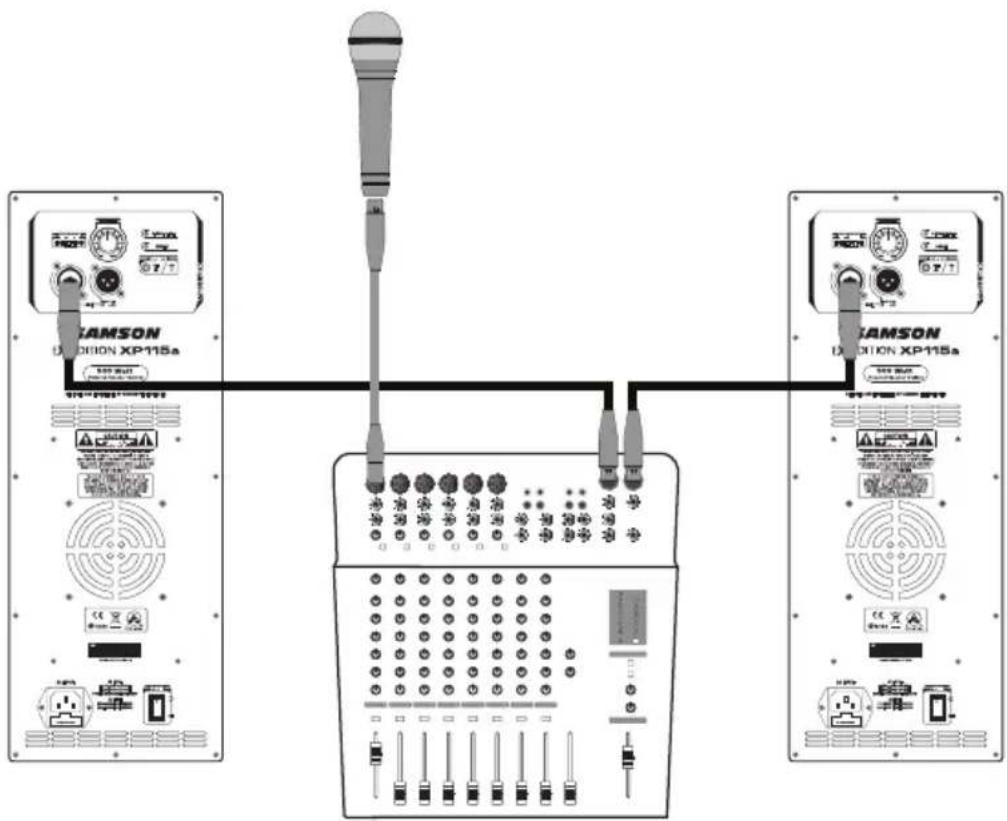
Connecting a Microphone

Follow these steps to connect a dynamic microphone to your Expedition loudspeaker:
- Set the Expedition XP112a/XP115a Power switch to the off position.
- Turn the VOLUME control fully counterclockwise to the off position.
- Connect the power cable to an AC socket.
- Using a standard XLR cable, plug a dynamic microphone into the Expedition's XLR INPUT.
- Set the SENSITIVITY switch to the MIC position.
- Switch the Power switch to the ON position.
- While speaking or singing into the microphone, slowly raise the VOLUME control until you have reached the desired level.
- For larger sound reinforcement you can run several monitors using the Link Output to daisy-chain one Expedition to another. Set the input Sensitivity on the additional cabinets to the LINE level position.
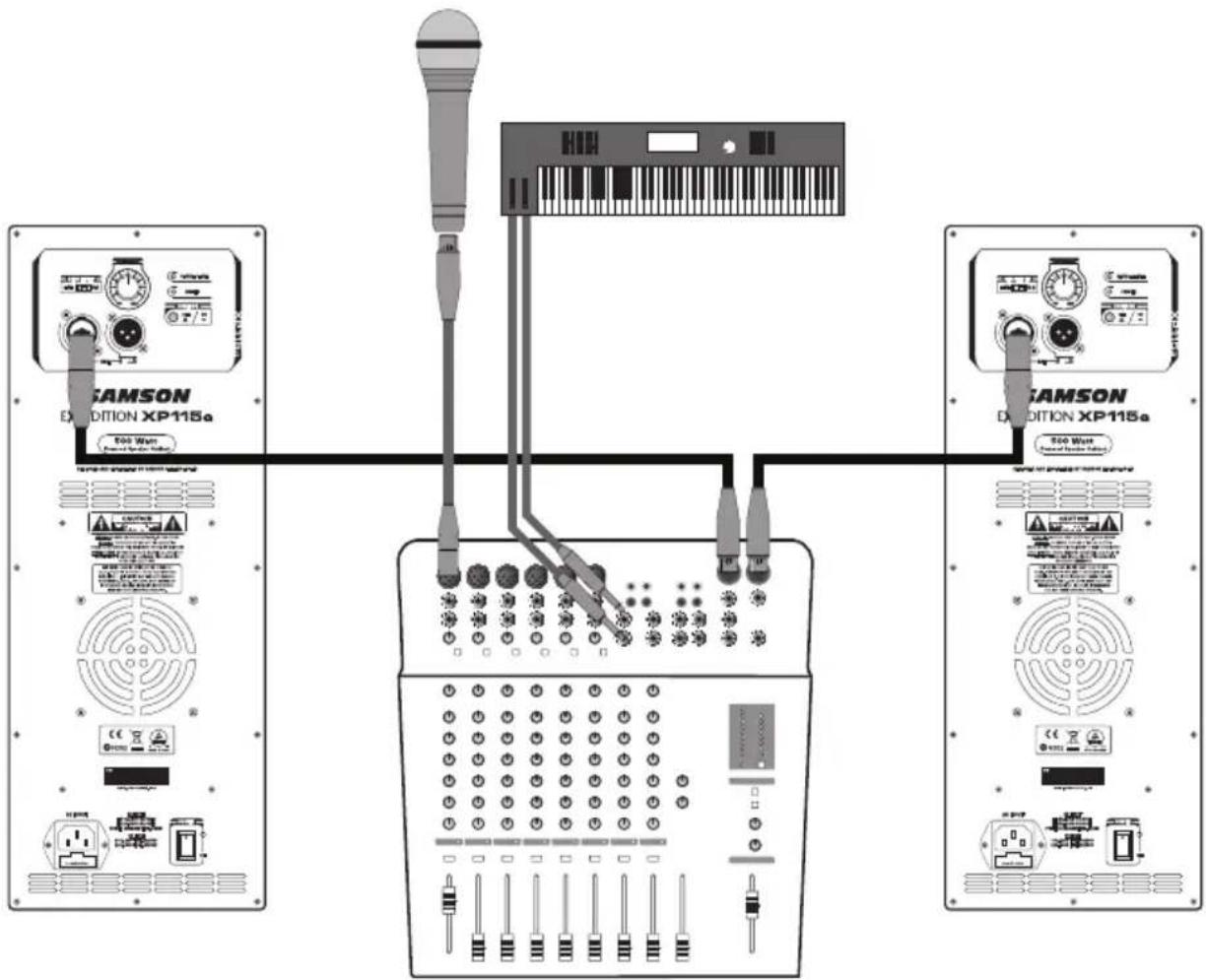
Connecting a Stereo Signal Source
flowchart
graph TD
    A["RAMSON EXDITION XP115a"] -->|800 W/m power input| B["Switch"]
    C["RAMSON EXDITION XP115a"] -->|500 W/m power output| B
    B --> D["Switch"]
    D --> E["Control panel with buttons, switches, and display"]
    style A fill:#f9f,stroke:#333
    style C fill:#f9f,stroke:#333
    style B fill:#ccf,stroke:#333
The following steps describes connecting Stereo Line Level Signal to two Expedition loudspeakers:
- Set the Expedition XP112a/XP115a Power switch to the off position.
- Turn the LEVEL control fully counterclockwise to the off position.
- Connect the power cable to an AC socket.
- Using standard XLR or 1/4" cables, connect the line level signals from a mixer or keyboard into the Expedition Inputs.
- Set the SENSITIVITY switch to the LINE position.
- Switch the Power switch to the ON position.
- Now, run an audio signal from your mixer (like music from a CD) while slowly raising the Expedition's Level control until you have reached the desired level.
Positioning the Expedition XP112a/XP115a
Speaker Placement
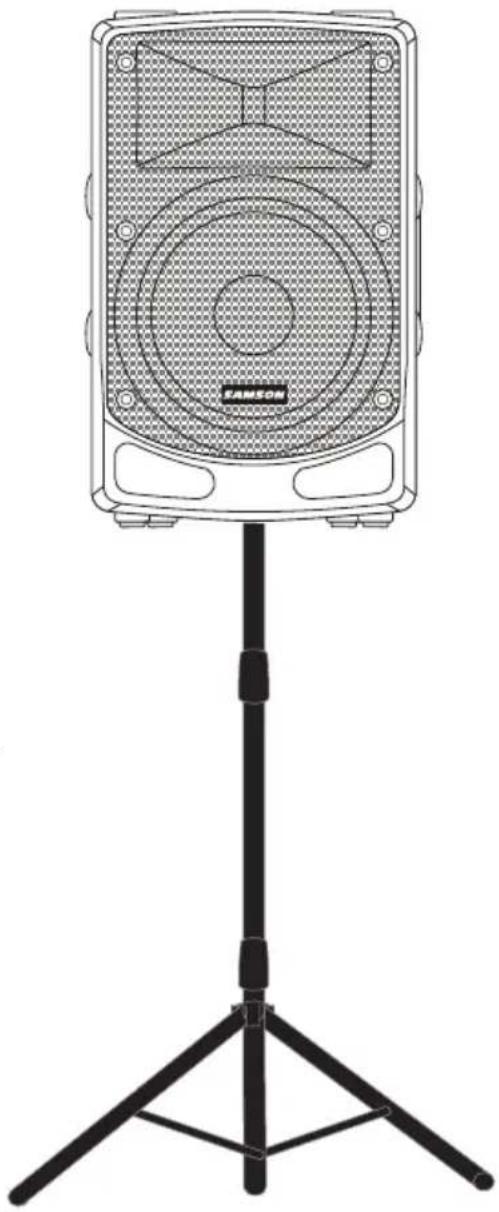
Whenever possible, it is a good idea to raise the speakers above the heads of the listening audience. The Expedition enclosures feature standard 1 3/8" pole mount receptacles with locking bolts, which are compatible with speaker stands from a variety of manufacturers. In a smaller setting like a school cafeteria, library, or a mall kiosk, you can also use the Expedition loudspeaker in the tilt back monitor positions, which will improve the projection of the speakers and may eliminate the need for speaker stands.
Note: When using a speaker pole mount, be sure the pole is capable of supporting the weight of the Expedition loudspeaker.
Note: Always have another person to assist when mounting the Expedition speaker onto a speaker stand, or when adjusting the stand while the speaker is mounted on the stand.
natural_image
Line drawing of a speaker on a stand with a tripod, no text or symbols presentFloor Monitor
The Expedition XP112a/XP115a is an ideal solution for stage monitoring thanks to its wedge monitor positions. When placed on its side, with the high frequency horn facing to the right of the enclosure, the Expedition is tilted at a 45 degree angle, optimizing performance when used on a stage.

natural_image
Technical line drawing of a mechanical housing component with mounting holes and internal mesh structure (no text or symbols)Specifications
| XP112a XP115a | ||
| Output Power | 500 Watts Peak (400 LF + 100 HF) | |
| 250 Watts RMS (200 LF + 50 HF) | ||
| Low Frequency 12" Woofer, 2" Voice Coil 15" Woofer, 2" | Voice Coil | |
| High Frequency 1" Neodymium Driver, 1" Voice Coil | ||
| Frequency Response 60Hz - 20KHz 50Hz - 20kHz | ||
| Max. SPL (1M) 119dB 121dB | ||
| Limiter Optical | ||
| Horn Coverage 90°H x 60°V | ||
| Crossover Frequency 2.5KHz-at 12dB/Oct | ||
| Inputs Balanced XLR / 1/4" Mic/Line Connectors | ||
| Output Balanced XLR Line Output | ||
| Contour Equalization | 100Hz & 12K Hz Boost | |
| Electronic Protection | Thermal, Overload, Analog limiter, Compressor | |
| Power Consumption | 260 W | |
| AC Connector | 3-pin IEC 250 VAC, 20 A male | |
| Fuse | 110V-120V T4A AC250V; 220V-240V T2A AC250V | |
| Enclosure | Polypropylene, Metal grille, Rubber feet, 3* Handles | |
| Dimensions (LxWxH) | 15" x 12.9" x 23.9"380mm x 327mm x 606.5mm | 15.2" x 14" x 24.9"386mm x 356mm x 631.5mm |
| Weight 30.8lb / 14kg | 32.6lb / 14.8kg | |
| Mounting Method | Integral 1 3/8" Pole Mount Receptacle | |
Samson Technologies Corp.
45 Gilpin Avenue
Hauppauge, New York 11788-8816
Phone: 1-800-3-SAMSON (1-800-372-6766)
Fax: 631-784-2201
www.samsontech.com

Brand : SAMSON
Model : Expedition XP115A
Category : Loudspeaker