PRO-A850V - Security Camera SWANN - Free user manual and instructions
Find the device manual for free PRO-A850V SWANN in PDF.


| Product Type | Security Camera |
| Brand | Swann |
| Model | PRO-A850V |
| Resolution | 1080p HD (1920 x 1080) |
| Field of View | 90° |
| Night Vision | Up to 30m (IR LEDs) |
| Power Supply | 12V DC, 1A (adapter included) |
| Power Consumption | 6W (max) |
| Dimensions (Camera Only) | 7.1 x 6.5 x 5.2 cm |
| Weight (Camera Only) | 340 g |
| Weather Resistance | IP66 (outdoor rated) |
| Connectivity | Wired (BNC + power) |
| Video Output | Composite (1Vp-p, 75Ω) |
| Motion Detection | Built-in PIR sensor |
| Audio | Built-in microphone (mono) |
| Mounting | Wall or ceiling bracket included |
| Operating Temperature | -20°C to 50°C |
| Storage | Compatible with Swann DVR |
| Cleaning | Wipe with dry, soft cloth. Do not use solvents. |
| Safety | Indoor use only; keep away from water (unless IP66 rated) |
| Spare Parts & Repairability | Contact Swann support; no user-serviceable parts |
| General Information | Designed for 24/7 surveillance; compatible with Swann systems |
Frequently Asked Questions - PRO-A850V SWANN
User questions about PRO-A850V SWANN
0 question about this device. Answer the ones you know or ask your own.
Ask a new question about this device
Download the instructions for your Security Camera in PDF format for free! Find your manual PRO-A850V - SWANN and take your electronic device back in hand. On this page are published all the documents necessary for the use of your device. PRO-A850V by SWANN.
USER MANUAL PRO-A850V SWANN
For use with Swann 4400 Series HD DVRs
INSTRUCTION MANUAL
EN
Introduction
Congratulations on your purchase of this A850 Vari-Focal HD Security Camera. A highly versatile surveillance camera with manually adjustable zoom and focus to suit any environment. It has a variable focal length of 2.8 - 12mm and offers up to 4x optical zoom on your target area. This lets you adjust the field of view from 24° - 64° for the perfect frame. The 720p (1 Megapixel) resolution is perfect for close up detail such as license plates, facial detail, clothing and more. With the latest infrared cut filter, it has amazing night vision to 65ft/20m and excellent clarity in low light.
Important note - All jurisdictions have specific laws and regulations relating to the use of cameras. Before using any camera for any purpose, it is the buyer's responsibility to be aware of all applicable laws and regulations that prohibit or limit the use of cameras and to comply with the applicable laws and regulations.
Important safety instructions
1) Make sure product is fixed correctly and stable if fastened in place.
2) Do not operate if wires and terminals are exposed.
3) This camera can only be used in combination with Swann's DVR4-4400, DVR8-4400 or DVR16-4400 digital video recorders.
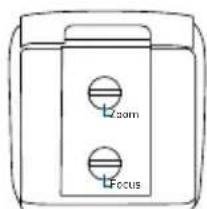
4) Use a small flat-head screwdriver to adjust the zoom and focus settings. Do not overexert when adjusting both settings.
Warning - Modifications not approved by the party responsible for compliance could void user's authority to operate the equipment.
Choosing a location for your Camera
With a vari-focal camera, you have some flexibility on where the camera can be mounted. Some things to consider when choosing a location -
1) What you want to monitor and where you'll get the best view of it.
2) How you're going to connect the camera to your DVR; remember that cables and connections should be kept out of the weather.
3) It's recommended to mount your cameras at an elevated position to keep out of harm's way.
4) Make sure your camera has minimal sky in it as the light in daylight can make the foreground of the image darker.
5) Think about the most likely way a potential offender may approach your home.
6) The camera's casing is resistant to water and tampering. However, the cable and connector are vulnerable and require protection.
7) Even though the camera is weather and water-resistant, prolonged exposure to adverse weather conditions such as sunlight or excessive moisture, may eventually damage the internal components of the camera and adversely affect its performance.
8) When running your cable, try to avoid bending it at sharp angles.
9) Don't put your cable near live electrical wiring. AC electricity generates radio "noise" which can interfere with the signal from your camera.
10) A vari-focal camera allows you to adjust between its top and bottom limits on its view angle. This means that you have the ability to manually set both the view angle and level of zoom. Have a scenario where you need to zoom in on a gate or other access point? Use the 12mm setting (25° and about 4x zoom). Need a wide angle view? Go with 2.8mm (64°). Need something in between? Try 6mm (43°) or 9mm (30°).
Connecting your Camera
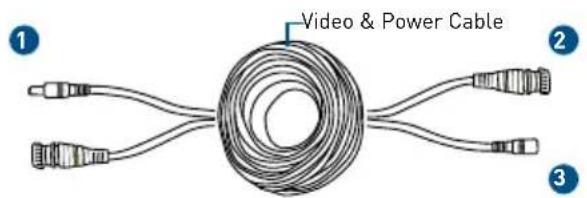
- Connect the video output and power input connection on the camera to the corresponding connections on the video & power cable.
text_image
Video & Power Cable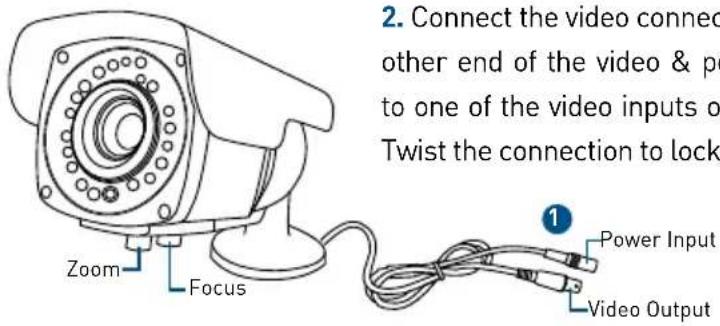
text_image
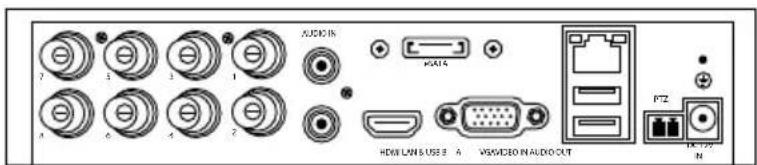
2. Connect the video connect other end of the video & po to one of the video inputs o Twist the connection to lock Zoom Focus 1 Power Input Video Output-
Connect the power adapter to the power input on the video & power cable then connect the power connection to a spare wall socket.
-
Use the zoom function to adjust the viewing angle and the focus function to sharpen the image.
text_image
AUDIO IN HKEYLINS USB 4 VSS/VIDEO IN AUDIO OUT PTZ IN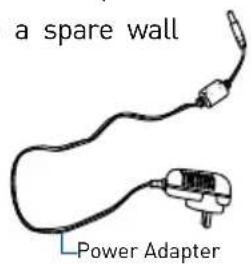
text_image
a spare wall Power AdapterMounting your Camera
text_image
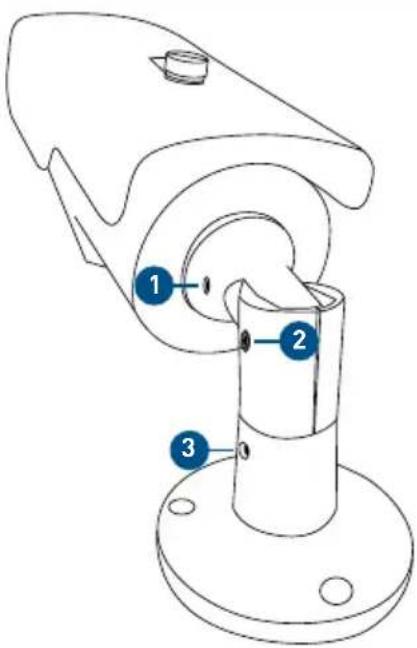
Technical diagram of a mechanical component with numbered parts labeled 1, 2, and 3The camera has three points of articulation. The most obvious is the hex screw secured elbow joint in the centre of the stand [2]. This one is pretty obvious and straight forward – using an Allen key, loosen the hex screw and adjust to the position you want (up or down). Tighten the hex screw again to secure in place.
The second point of articulation (1) is the radial joint where the neck of the stand is attached directly to the camera. To adjust this joint, loosen the hex screw on each side. This enables you to rotate the camera left or right so no matter what direction the camera is facing, your images will be oriented correctly. Tighten the hex screw again to secure in place. To rotate the camera left or right (3), loosen the hex screw on each side of the base then tighten again to secure in place.
Zoom - To zoom in use a flat-head screwdriver and turn the connection anti-clockwise to the desired viewing angle. Turn clockwise to zoom out.
Focus - After setting the desired viewing angle, use the focus connection to sharpen the image.
text_image
Zoom FocusLimited Warranty - Terms & Conditions
Swann Communications warrants this product against defects in workmanship and material for a period of one (1) year from its original purchase date. You must present your receipt as proof of purchase for warranty validation. Any unit which proves defective during the stated period will be repaired without charge for parts or labour or replaced at the sole discretion of Swann. The end user is responsible for all freight charges incurred to send the product to Swann's repair centres. The end user is responsible for all shipping costs incurred when shipping from and to any country other than the country of origin.
The warranty does not cover any incidental, accidental or consequential damages arising from the use of or the inability to use this product. Any costs associated with the fitting or removal of this product by a tradesman or other person or any other costs associated with its use are the responsibility of the end user. This warranty applies to the original purchaser of the product only and is not transferable to any third party. Unauthorized end user or third party modifications to any component will render all warranties void. By law some countries do not allow limitations on certain exclusions in this warranty. Where applicable by local laws, regulations and legal rights will take precedence.
For Australia: Our goods come with guarantees which cannot be excluded under Australian Consumer Law. You are entitled to a replacement or refund for a major failure and for compensation for any other reasonably foreseeable loss or damage. You are also entitled to have the goods repaired or replaced if the goods fail to be of acceptable quality.
FCC Verification
This equipment has been tested and found to comply with the limits for Class B digital device, pursuant to part 15 of the FCC Rules. These limits are designed to provide reasonable protection against harmful interference in a residential installation. This equipment generates, uses and can radiate radio frequency energy and, if not installed and used in accordance with the instructions, may cause harmful interference to radio or television reception, which can be determined by turning the equipment off and on, the user is encouraged to try to correct the interference by one or more of the following measures:
- Reorient or relocate the receiving antenna
- Increase the separation between the equipment and the receiver
- Connect the equipment into an outlet on a circuit different from that to which the receiver is connected
- Consult the dealer or an experienced radio/TV technician for help
These devices comply with part 15 of the FCC Rules. Operation is subject to the following two conditions:
(1) These devices may not cause harmful interference.
(2) These devices must accept any interference received, including interference that may cause undesired operation.
Helpdesk/Technical Support
Technical Support E-mail:
tech@swann.com
Telephone Helpdesk
USA Toll Free
1-800-627-2799
USA Parts & Warranty
1-800-627-2799
(M-F,
9am-5pm
US
PT)
AUSTRALIA
1800 788 210
NEW ZEALAND Toll Free
0800 479 266
UK
0203
027
0979

Swann
Advanced Security Made Easy
MA850V_300315E | © Swann 2015