8554N - Smartwatch SPC - Free user manual and instructions
Find the device manual for free 8554N SPC in PDF.


| Product Type | Smartwatch |
| Brand | SPC |
| Model | 8554N |
| Display Type | Touchscreen LCD |
| Screen Size | 1.3 inches |
| Resolution | 240 x 240 pixels |
| Connectivity | Bluetooth 5.0 |
| Sensors | Heart rate, accelerometer, SpO2 |
| Water Resistance | IP67 (splash and dust resistant) |
| Battery Type | Lithium-ion 200 mAh |
| Battery Life | Up to 7 days typical use |
| Charging Time | Approximately 2 hours |
| Compatibility | iOS 9.0+ / Android 5.0+ |
| Weight | 40 g (including straps) |
| Dimensions | 42 x 35 x 10 mm |
| Strap Material | Silicone |
| Strap Width | 22 mm |
| Functions | Step counter, sleep tracking, heart rate, notifications, music control, weather, stopwatch, alarm |
| Languages Supported | English, Spanish, French, German, Italian, Portuguese |
| Care and Cleaning | Clean with soft, dry cloth. Avoid water exposure if not required. |
| Safety Precautions | Do not expose to extreme temperatures. Remove if skin irritation occurs. |
| Spare Parts Availability | Charging cable and replacement straps sold separately. |
| General Information | User manual available for free download in PDF at notice-facile.com. |
Frequently Asked Questions - 8554N SPC
User questions about 8554N SPC
0 question about this device. Answer the ones you know or ask your own.
Ask a new question about this device
Download the instructions for your Smartwatch in PDF format for free! Find your manual 8554N - SPC and take your electronic device back in hand. On this page are published all the documents necessary for the use of your device. 8554N by SPC.
USER MANUAL 8554N SPC
natural_image
Empty white image with four corner markers (no text or symbols)¡ BIENVENIDO !
Copyright © 2014 SPC
www.spc-universe.com
natural_image
Close-up of a black smartwatch with a white scroll wheel (no visible text or symbols)This guide includes all the information to make the most out of your SPC Sport Watch.
Copyright © 2014 SPC
www.spc-universe.com
The information that this guide contains cannot be transmitted, played or distributed in any case without the written authorization of SPC.
COMERCIAL BRANDNAMES
SPC is a registered brandname of Telecom y Novatecno S.A.
NOTE: SPC reserves the right to modify the information of this guide in any moment. All the information and recommendations that we can find here do not guarantee anything.
BOX CONTENT
■ MP3 Music Player
■ High-quality stereo earphones
- Bracelet
Clip
■ User guide
Warranty sheet
FEATURES
■ Formats: Plays MP3 and WMA music.
Sound: Integrated Microphone, High quality voice recording, preset 8 equalizers (Normal, Rock, Pop, DBB, Jazz, Classical, Soft and User), Repeat function: Normal, Repeat one, Repeat all, Random, Intro, Repeat A-B.
- Other features: Slim, Management of content by folders, Delete files from menu, Languages: Spanish, English and Portuguese, Timer, Power mode, Radio, Explorer, Calendar, Record, Voice, Date and Time, Alarm, Information and Factory settings.
Battery: 9 hours playing MP3 files (Power save activating) and 4 hours in radio mode.
- Operating systems: Windows 8 / XP / Vista / 7, Mac, Linux.
■ Dimensions and weight: 86 x 28 x 11 mm. Peso: 20.5g (only player).
UNIT AND CONTROLS
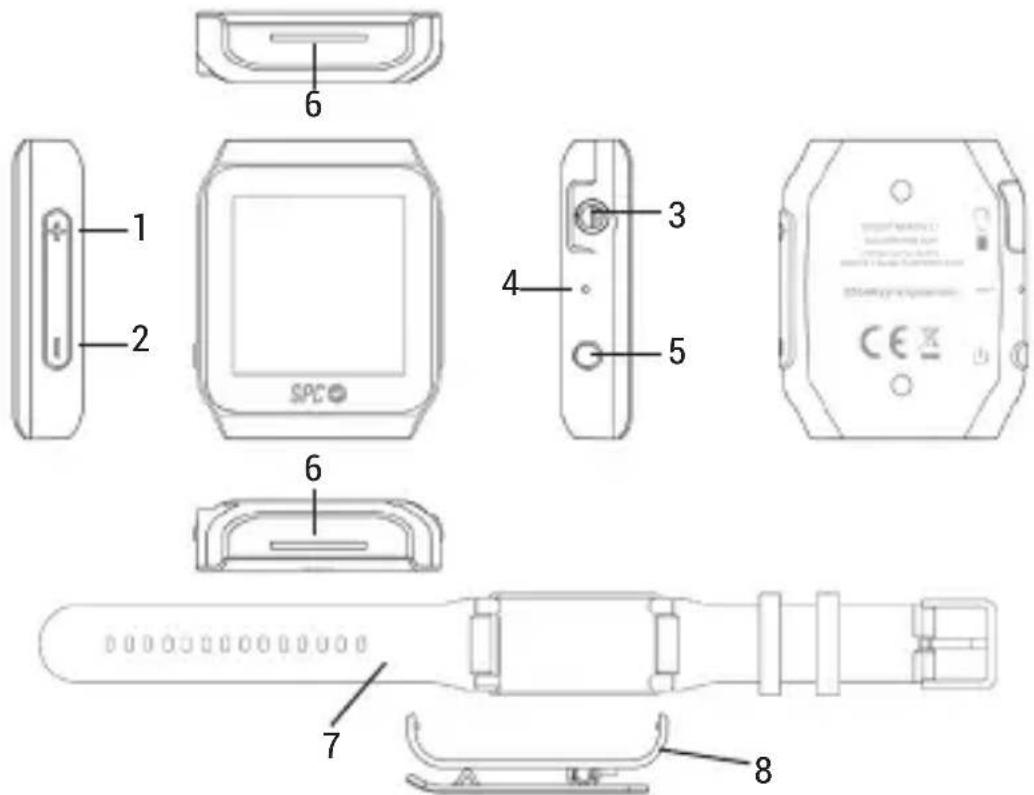
- Short press: Previous / Up
Long press: Fast Reverse - Short press: Next / Down
Long press: Fast Forward / Unlock - Headset Jack / USB Power
- Reset
- Short key: OK / Confirm / Play / Pause
Long press: Power on/ Power off - Grooves to fix the bracelet and the clip.
- Bracelet.
- Clip.
BATTERY CHARGING
The player has an internal has an internal battery. You have to charge it before starting to use it:
- Press to the key ⏻ (5) for 3 seconds to switch on the player.
- With the computer powered on, connect the computer using the USB port (3).
- The battery will start charging. Charge the battery for 2 hours to ensure a maximum usage time and to lengthen its useful life.
NOTE: To charge the player correctly, connect the USB cable directly to your computer's USB port (not via a hub). If the battery is too discharged, it's possible that it needs dome minutes to start charging it. Don't forget to charge the player before the first use and when the battery icon is empty.
CONNECTION TO THE COMPUTER AND MEMORY FORMAT
Connect the player to a computer that uses the 8 / XP / Vista / 7; Linux, MAC Operating System. The computer will automatically recognise the device..
Once the computer has detected the player, it will operate like a portable disk. Therefore, file transfer will be carried out in the same way as with any other storage device (for example, selecting and dropping files to the unit, or copying and pasting files in the unit).
NOTE: Separate the files (audio, images, etc) so that the unit can manage the information better.
To format the unit (in case you need it), in "My PC", right click on the storage drive created by the unit. Then click on the "Format..." option. Select the FAT32 file system and click "Start".
To disconnect it, double click on the small icon displayed on the bottom right-hand part task bar, and extract the formatted unit using the icon "Safely remove hardware", select the unit and click on "Stop" option.

NOTE: Do not disconnect the player during the data copying or deleting process as this could cause the unit to malfunction and damage the software. Do it using the icon of the bottom right-hand task bar. Do not copy files or folders with file names too long or strange characters, because it may cause a wrong performance of the device. If so, change the name of the files or folders.
TOUCH DISPLAY
natural_image
Close-up of a black smartwatch with a white scroll wheel and a white tab (no visible text or symbols)Select items: Tap gently on the display with your fingertip.
Next menu: Moving your finger rightwards.
Previous menu: Moving your finger rightwards.
Increase the volume: Moving your finger upwards of the volume bar.
Decrease the volume: Moving your finger downwards of the volume bar.
Fast backward and fast forward: long touch on | and |, respectively.
LOCK / UNLOCK THE SCREEN
After a time without making any action, the screen is blocked automatically. Then, each time you are going to make any action, the 🔒 icon will appear on the screen. To unlock, press the key – (2) during 3 seconds. And now, the icon 🔒 will be shown in the screen.
STRUCTURE MENU
 | Music Select this option to play songs. | |
 | Stopwatch | Select this option to use the stopwatch and for setting the alarm. |
 | Radio | Select this option to use the FM radio. |
 | Browser | Select this option to explore the folder on the memory. |
 | Calendar | Select this option to use the calendar. |
 | Settings | Select this option access to the player setup. |
 | Record | Select this option to record voice messages by the microphone inside. |
 | Voice | Select this option to listen voice messages. |
UNIT OPERATION
Turn on the player by pressing and holding the ⏻key (5) during 3 seconds.
The player will automatically turn on. In the first use and after a “default settings”, a list of languages will be shown. Use the +/- (1/2) and press ▶∥(5) to confirm.
Turn off the player by touching and holding the ⏻ key (5) during 3 seconds.
RESET
If, at any time, the player gets blocked, turns off and then, turns on. The player will re-start.
And, if the player does not still work, then insert a pin in Reset (4) to re-start the device.
SET THE PLAYING VOLUME
In the music, radio or recording interfaces, touch on the icon and the volume bar will be shown in the screen. Then to move the volume up or down, press the + or - (1/2), keys, respectively. And, at a determined volume, the player notes the risks of listening at a high volume for long periods of time. de To waive this message, press the ⏻ key (5) and go on adjusting by keeping your finger in contact with the display and moving your fingertip up or down.
PLAYING AUDIO FILES
From the main menu you can Access to the following functions: Music, Timer, Radio, Calendar, Manager, Record, Voice y Setting.
- Tap gently on the display with your fingertip, and select Music. You can do it, pressing the +/- keys (1/2) and then the ▶ key (5) to confirm.
- If it is the first time, you will have to choose the song (All songs, Artists, Albums, Genre and Playlist) and press the ▶||key (5) to confirm. And if not, the music interface will be shown with the last song selected.
During playing:
- Press the ▶|| key (5) to pause the playing and press again to come back playing.
- Go to the next and previous song by pressing the +/- keys (1/2).
- Touch and hold the +/- keys (1/2) to fast backward and fast forward.
- Moving your finger rightwards on the screen, you want access to different submenus with the following options: Repeat: normal, one, all, view playing (intro).
Shuffle: On, Off.
Repeat Settings (A-B):
- Repeat Mode (A-B): repeat between 2 points.
- Replay Times: number of times to repeat between 2 points.
- Replay Interval: gaps to repeat between 2 repetitions.
Equalizer: Normal, Rock, Pop, Dbb, Jazz, Classical, Soft and User.
Controls of the playing menu:
 | Battery |
 | Previous song (short press) /Fast backward (long press) |
 | Playing |
| [###] | Playing paused |
| [###] | Next song (short press) /Fast Forward (long press) |
| [###] | Repeat mode |
| [###] | Equalizer mode |
 | Volume |
 | Mode A-B |
RADIO FM
From the main menu, select the Radio function, tapping gently on the icon of the display with your fingertip. You can do it, too, pressing the +/- keys (1/2) and, then, the ▶|| (5) to confirm. Remember to place the earphones in a player, as the earphone cable makes the antenna in radio mode.
■ Manual Searching:
To make a manual searching, follow the next steps:
- Select the Radio function from the main menu.
- Select the Manual tune option to make a manual searching. Press the +/- keys (1/2) to move 0.1MHz. Keep pressed +/- (1/2) to fast forward. The player will stop when it finds a station with enough strength.
- Move your finger rightwards on the screen to access to the submenu. Choose the Save to preset option.
- With +/- keys (1/2), select the FM memory where saving the station and press the ▶||key (5) to confirm.
■ Auto Searching:
To make an auto searching, follow the next steps:
- Select the Radio function from the main menu.
- Select the Auto tune option to make an auto searching. The player will do automatic searching in the whole frequency range, and will save the ones with enough strength.
- Move through the recorded stations using the +/- keys (1/2) and after making the selection of one of them, press the ▶ key (5) to confirm.
NOTE: They are available 30 memories, so, once the player finds the 30 stations, it will not continue with the searching.
Clear preset:
To delete one or all presets, follow the next steps:
- From the main menu, select the Radio function.
- Select the option Presets and press the ▶|| key (5) to confirm.
- When the list is shown, move your finger rightwards.
To delete a preset:
- Select Clear preset and press the▶ key (5) to confirm.
- With +/- keys (1/2), select the FM memory where saving the station and press the ▶|| key (5) to confirm.
To delete all presets:
- Select Clear all presets and press the ▶ key (5) to confirm.
Volume of the radio:
Move your fingertip, upwards or downwards, on the icon of the radio interface and the volume bar will be shown on the screen. Then to move the volume up or down, press the +/- keys (1/2), respectively.
RECORD
This player includes a microphone, which allows you to make voice recordings at short distance. From the main menu, select the Record function, tapping gently on the icon of the display with your fingertip. You can do it, too, pressing the +/- keys (1/2) and then the ▶||key (5) to confirm.
Select Start voice recording and then the ▶ key (5) to confirm. Wait some seconds to start with the You will see the name of the file, the time recorded and the remaining time (depends on the available memory). If you want to pause the recording, press the ▶ key (5); and to go on recording, press the same key. To finish keep your finger in contact with the display and move your fingertip leftwards and confirm it. The recorded voice or son gis stored automatically in the “RECORD” folder of the player.
the recordir
VOICE – PLAY A RECORDED FILE
From this function you can play the voice recordings that are in the player.
From the main menu, press Voice function, tapping gently the icon of the screen with your fingertip. You can do it, too, pressing the +/- keys (1/2) and, then, the ▶|| key (5) to confirm.
The first file will be shown. Press the ▶||key (5) to confirm, and playing the file.
SETTINGS
- Sleep timer: Select the automatic turn-off time.
- Display settings: Brightness, Clock screen select, Backlight timer, Screensaver, Screen saving time and Key Lock time.
- Date and time: Adjust the date and the time.
- Language: Spanish, English and Portuguese.
- Information: Information of the player and the memory.
- Default settings: Return to factory default values.
BEM-VINDO
Copyright © 2014 SPC
www.spc-universe.com
natural_image
Close-up of a black smartwatch with a white scroll wheel (no visible text or symbols)Marca/Brand/Marca: SPC
Denominación comercial/Commercial Name/Nome comercial: 8554N
NORMAS APLICADAS/APPLICABLE NORMS/NORMAS APLICÁVEIS
EN 55022: 2010
EN 55024: 2010
FUNCIONALIDADES/FEATURES/CARACTERÍSTICAS
Director General/General Manager/Diretor-geral
Esta declaración de conformidad está de acuerdo con la Directiva Europea 2004/108/EC. This declaration of conformity is in compliance with the European Directive 2004/108/EC. Esta declaração de conformidade respeita as normas da Diretiva Europeia 2004/108/EC.