D-200L - Computer Case iStarUSA - Free user manual and instructions
Find the device manual for free D-200L iStarUSA in PDF.


| Product Type | Rackmount Computer Chassis |
| Model | D-200L |
| Form Factor | 2U Rackmount |
| Supported Motherboard | Micro-ATX, ATX |
| Drive Bays | 2 x 3.5" Internal; 1 x 5.25" External |
| Expansion Slots | 4 x Full-Height |
| Cooling | 1 x 80mm Rear Fan (optional) |
| Front Panel Ports | 2 x USB 2.0, Audio In/Out |
| Power Supply | Standard ATX PSU (not included) |
| Dimensions (W x D x H) | 19" x 17.7" x 3.5" |
| Weight | Approximately 10 kg |
| Material | Steel Chassis |
| Color | Black |
| Safety Certifications | CE, FCC |
| Operating Temperature | 0°C to 40°C |
| Storage Temperature | -20°C to 60°C |
| Humidity | 10% to 90% non-condensing |
| Maintenance | Clean with dry cloth; avoid liquids |
| Spare Parts Availability | Contact iStarUSA or authorized distributors |
| Warranty | 1 year limited warranty |
Frequently Asked Questions - D-200L iStarUSA
User questions about D-200L iStarUSA
0 question about this device. Answer the ones you know or ask your own.
Ask a new question about this device
Download the instructions for your Computer Case in PDF format for free! Find your manual D-200L - iStarUSA and take your electronic device back in hand. On this page are published all the documents necessary for the use of your device. D-200L by iStarUSA.
USER MANUAL D-200L iStarUSA
natural_image
Front view of a black server rack with ventilation grilles and control panel, set against a blue background (no visible text or symbols)
natural_image
Close-up of a dark blue industrial control panel with ventilation grilles and control buttons (no visible text or symbols)Copyright
Copyright © 2006 by iStarUSA, Inc., all right reserved. No part of this publication may be reproduced, transmitted, transcribed, stored in a retrieval system, translated into any language, in any form or by an means or otherwise, without the prior written permission of iStarUSA Inc. 727 Phillips Drive, City of Industry, CA 91748.
iStarUSA Inc. reserves the right to make modification and additions to this product and manual without notice or taking any liability.
Trademarks
iStarUSA, ImageShape, and D-Storm are all registered trademarks of iStarUSA, Inc. All other trademarks herein are properties of their respective owners.
Disclaimer
iStarUSA Inc. assumes no liability for errors or omissions in this document. Nor dose iStarUSA Inc. make any commitment to update the information contained herein. Pictures in this document are for demonstration purpose only and may not be the same as the actual product.
Safety Instructions
Please read this section carefully and follow the instructions for you own safety and proper use of the device. It also contains information on approval and interference suppression of your machine.
Please pay attention to the warnings and instructions on the device and in the manual.
In order to maintain this condition and ensure safe operation, users must follow the instructions and warnings contained in this manual.
The device must be used in accordance with the instruction for use.
The electrical installation condition in the room must correspond to the requirements of the respective regulations.
Take care that there are no cables, particularly mains cables, in areas where persons can trip over them.
Do not use a main connection in sockets shared by a number of other power consumers. Do not use an e tension cable.
nly use the supplied cable.
The unit is complete disconnected from the power source, only when the power cord is disconnected from the power source. Therefore the power cord and its connectors must always remain easily accessible.
Do not setup the device in the proximity of heat sources or in a damp location. Ake sure the device has adequate ventilation.
All plugs on the connection cables must be screwed or locked to the housing.
Do not touch the board or any other sensitive components without all necessary anti-static protections.

natural_image
Close-up of a black industrial ventilation grilles with control panel and mounting bracket (no visible text or symbols)Table of Contents
D-200
Introduction .... ..1
eatures ..... 1
Specifications . . .... ..2
Package Contents ...
Installation ..... 6
Technical Support .... ...11
▷ warranty Information .... .11

natural_image
Close-up of a blue industrial cabinet with ventilation grilles and control panel (no visible text or symbols)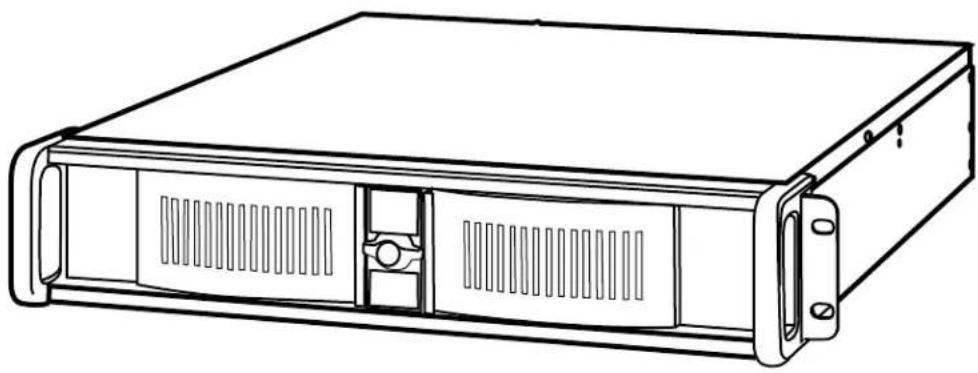
natural_image
Line drawing of a server rack unit with ventilation slots and mounting brackets (no text or symbols)Introduction
Thank you for choosing iStarUSA products.
The 2U compact industrial rackmount chassis D-200 D-200 has full si e I and length supports AT and AT D200 only motherboard. ptonal T- enable hot-swappable storage and support 1 0 1 0 raid configuration, and total storage capacity up to storage drives. D-200D 200 support add-on cards include PCI, PCI-, A P, or PCI- press architecture that provide your server or cluster ma imum fle ibility and performance. tra cooling with 0mm fans D-200 only offers e cellent cooling to dual CPU system.
eatures
Standard 19 rackmount case
1.2mm S CC inc-coated steel body Aluminum e el
ockable front door
Detachable card cage for easy installation and maintenance
ashable air filter
ront access US 2.0 ports
ptional color door
ptional D or low profile ackplane
ptional redundant power supply
CC C industrial Class A approval
Specifications
| odel No. | D-200 D-200 | |
| orm actor 2U | ||
| ternal .2 | 2 | |
| ternal . | 2 | |
| ainboard Si e | 12 10 12 1 | |
| Switches | Power n ff, System Alarm eset | |
| ront Panel Ds | Power n ff, DD, an Alarm | |
| ront connector | ront US 2.0 2 | |
| all aring Cooling ans | 0mm 1 | 0mm |
| Air ilter | emovable | |
| iser Card | 2 bits PCI orA P 1 PCI 2 | |
| Security | ront e el Door ock | |
| Speaker | 0. uilt -ln | |
| aterial of ront e el | Aluminum alloy | |
| aterial of andle | S CC inc -Coated Steel | |
| aterial of ain Chassis | 1.2mm S CC inc -Coated apan Steel | |
| Color of ront e el | Standard lack, ed, lue, Silver, and oldCustom Available | |
| Color of ain Ch assis | Standard lackCustom Available | |
| Dimensions D | 19.0 2 0. . | 19.0 2 .1 . |
| Net eight | 1 .6 lbs | 21.6 lbs |
| ecommended PSU | TC-2U , TC -2U 0TC-2U 6, TC - 0 2UTC-00 2U, TC - 60 2U | |
perating Attitude 1,000 feet Power Supply U, 2U edundant Temperature 0-0C operating 1-0C storage umidity -9 , non-condensing Safety Standard CC C

natural_image
Close-up of a blue industrial control panel with ventilation grilles and a control panel (no visible text or symbols)Package Contents
D-200 D-200 rackmount chassis
Installation anual
Accessories bo
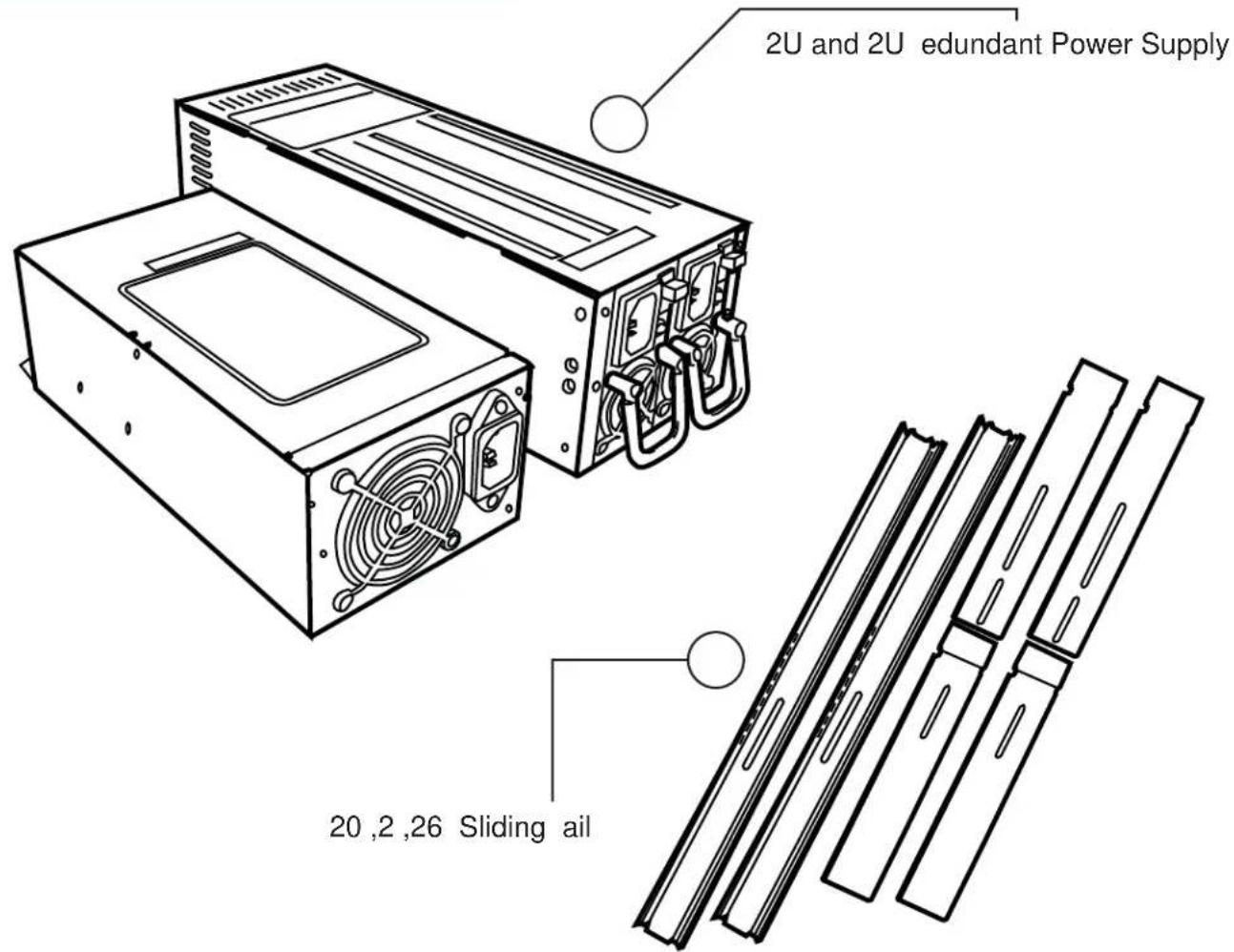
2U 2 it -slots PCI riser card 6th slot, position
iStarUSA 2U Power Supply optional
iStarUSA 2U edundant Power Supply ptonal
Sliding ail 20 ,2 ,26 optional
ptional Accessory

natural_image
Close-up of a blue industrial cabinet with ventilation grilles and control panel (no visible text or symbols)ront iew
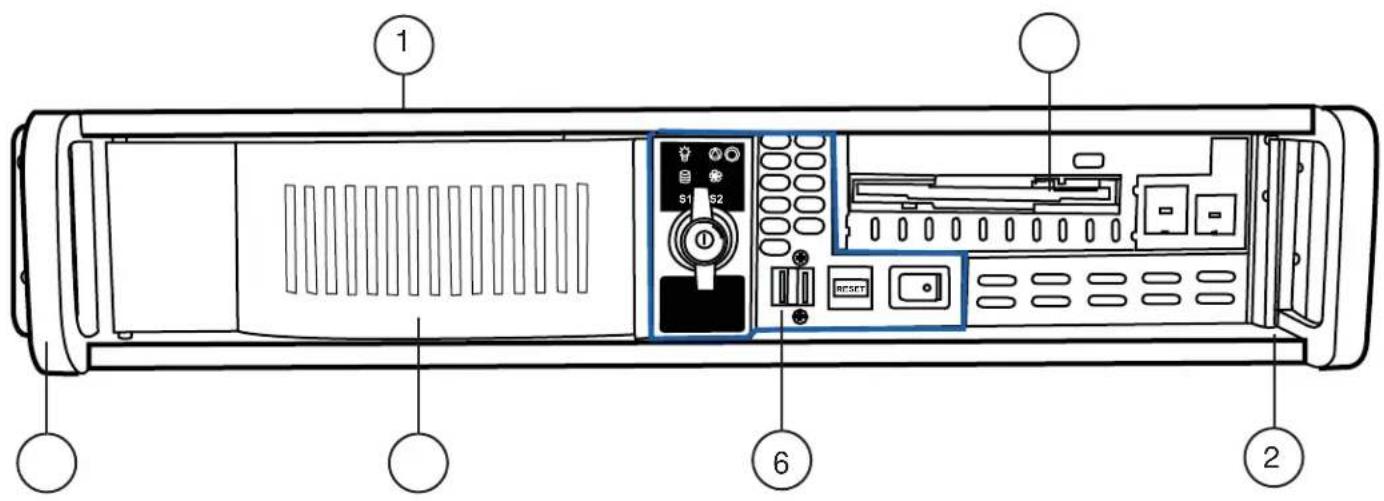
| 1 | Aluminum Crossbar 4 Chassis Handle | ||
| 2 | Patented Door 5 Stylish Aluminum Bezel | ||
| 3 | Drive Cage 6 Front I/O Ports |
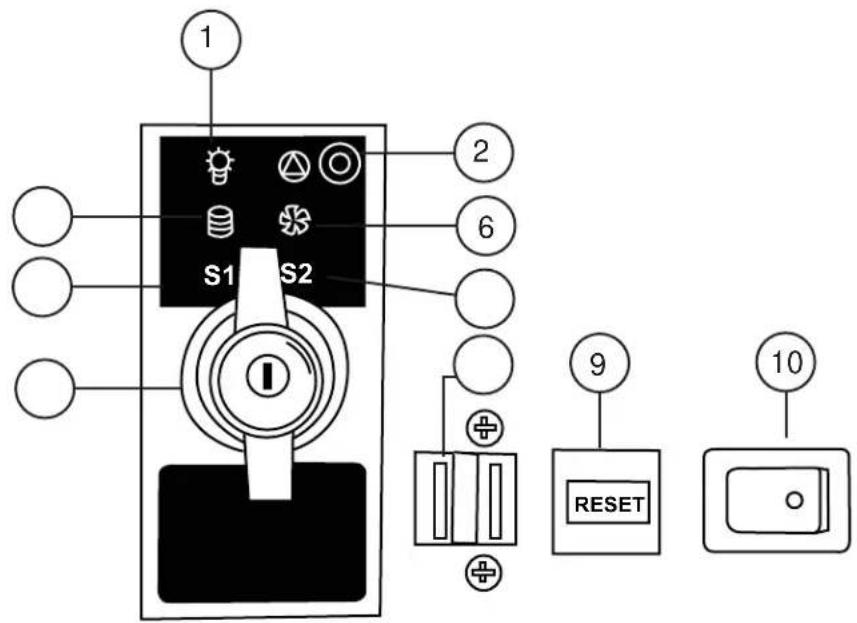
ront Panel Ds and Connectors
| 1 | System Power |
| 2 | Alarm eset Switch |
| D Activity D | |
| Temperature D1 | |
| Security ock | |
| 6 | an ailure D |
| Temperature D2 | |
| US 2.0 2 Ports | |
| 9 | System eset Switch |
| 10 | System N Switch |


natural_image
Close-up of a blue industrial cabinet with ventilation grilles and control panel (no visible text or symbols)Top iew
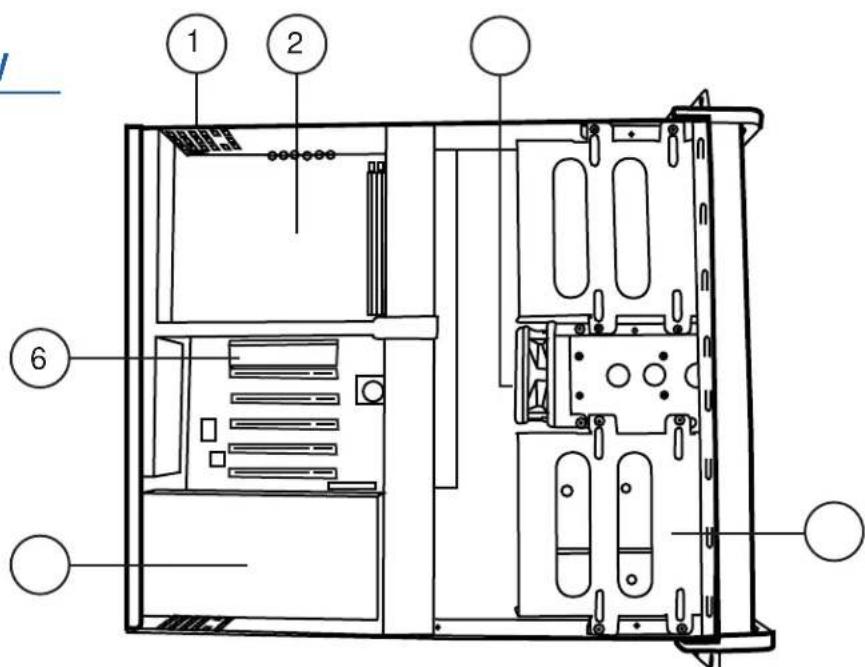
| 1 | Thermal Air Ventilation | 4 | Drive Cage |
| 2 | ATX Motherboard Supported | 5 | 2U or Redundant Power Supply |
| 3 | System Cooling Fan | 6 | 3-Slots PCI Riser Card |
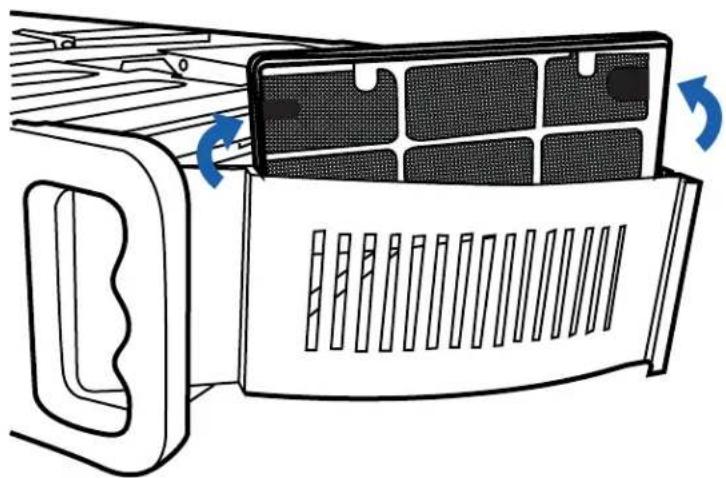
Air ilter
natural_image
Diagram of a refrigerator interior showing airflow direction arrows (no text or symbols)Cleaning fre uency will depend on the operating environment. Clean the air filter mat more often if the environment is e tremely dusty.
To remove the air filter mat located at the front of the system, proceed as following steps
- pen the door and remove the air filter.
- To clean the air filter
a. acuum or blast with warm compressed air
b. inse in water detergent is optional
c. Do not clean the filter with sharp ob ect . einstall air-filter after it is completely dry

natural_image
Close-up of a blue industrial cabinet with ventilation grilles and control panel (no visible text or symbols)Installation
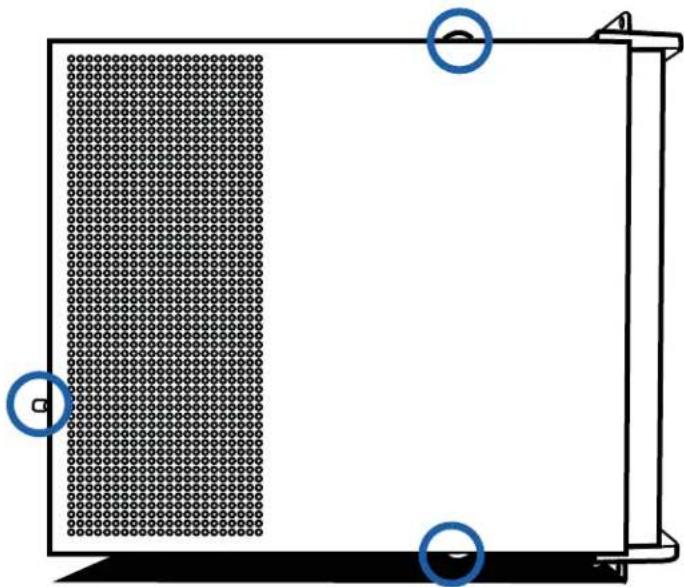
- remove the screws to remove the top cover
natural_image
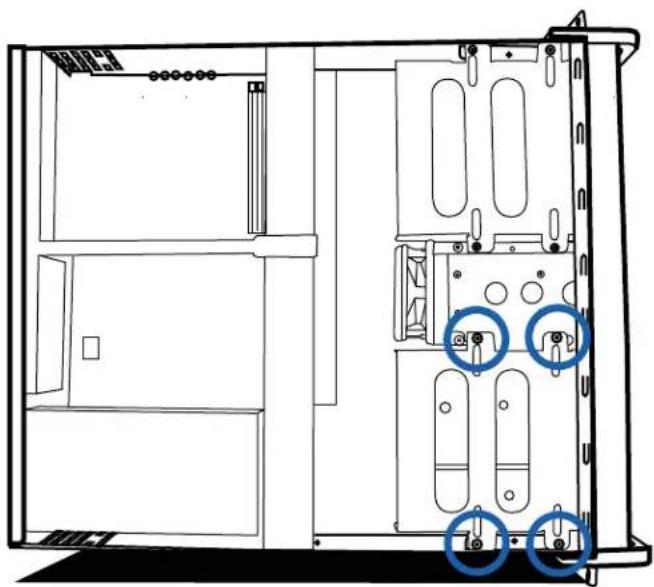
Pure diagram of a rectangular panel with grid pattern and two blue circular markers, no text or symbols present.- remove the screws to remove the drive bay cage
natural_image
Technical line drawing of a server rack cabinet with two blue circular annotations highlighting specific components (no text or symbols present)
natural_image
Close-up of a blue industrial cabinet with ventilation grilles and control panel (no visible text or symbols)Installation
. remove cage cover and mount the D and CD-
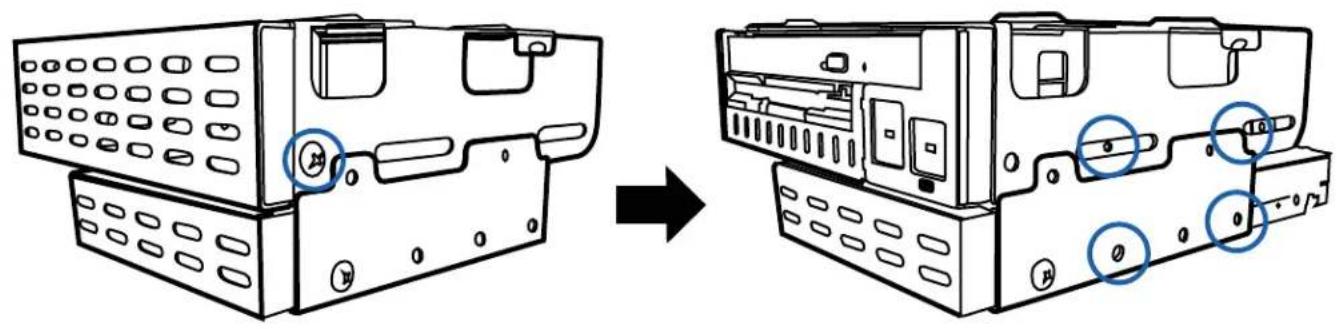
. einstall the drive cage
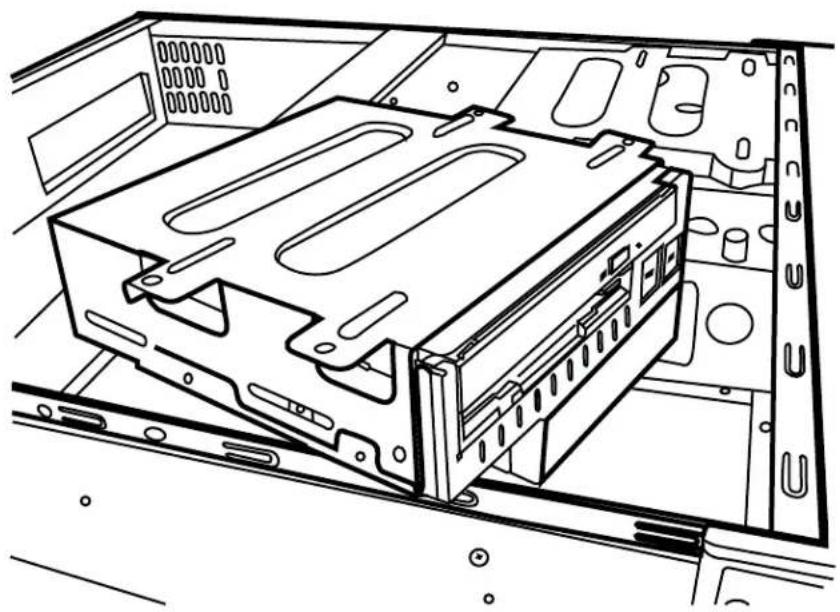
natural_image
Technical line drawing of an internal server rack with visible socket and ventilation slots (no text or symbols)
natural_image
Close-up of a blue industrial cabinet with ventilation grilles and control panel (no visible text or symbols)Installation
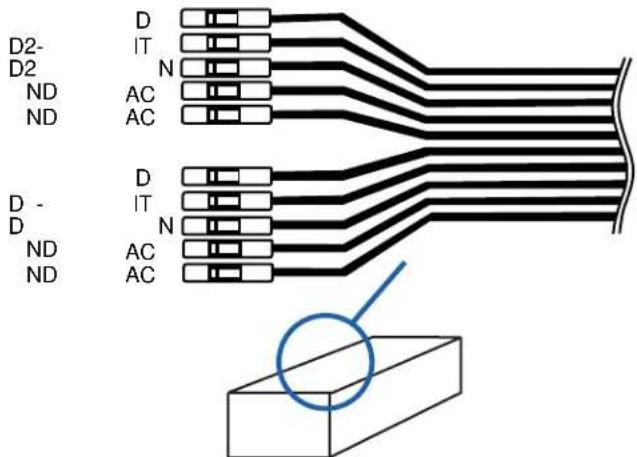
. Install stand off and motherboard. Connect US and ront I Connectors. The US pin-out is on the accessory bo
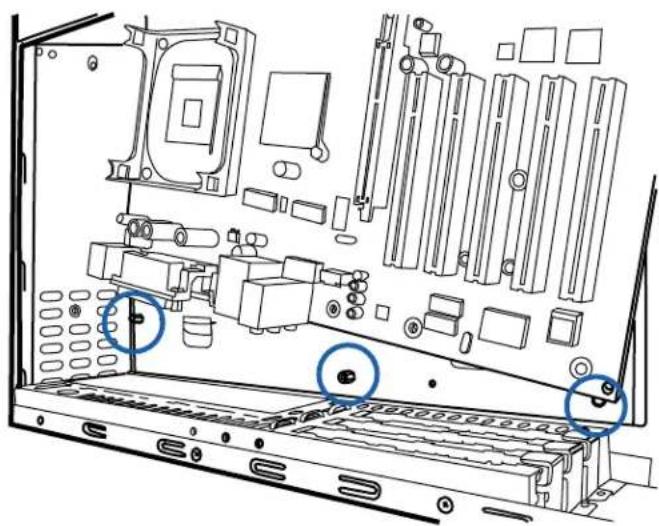
natural_image
Technical line drawing of a computer tower internal structure showing chassis, drive, and socket components (no text or labels)US Cable Connector Draw
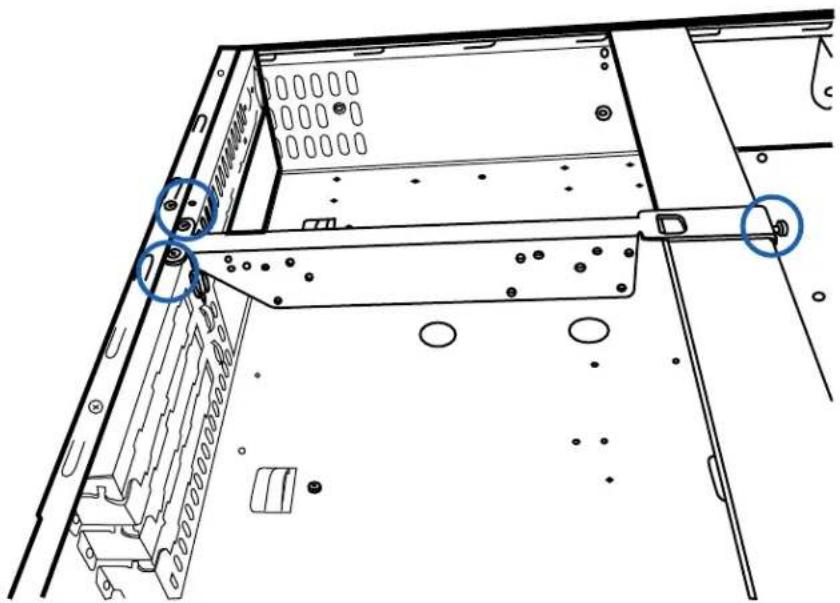
- Install 2U riser card for 6th slot position motherboard, first remove the supporting bar
natural_image
Technical line drawing of a computer tower case with mounting holes and ventilation slots (no text or symbols)
natural_image
Close-up of a blue industrial ventilation grater with control panel (no visible text or symbols)Installation
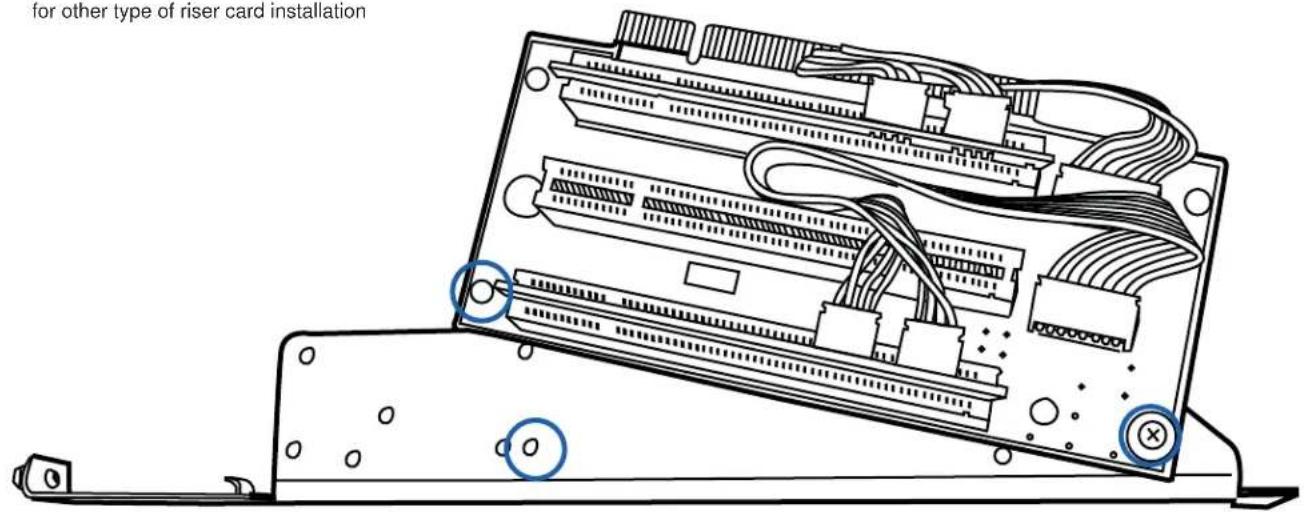
. ount the riser card on to the supporting bar
Please consult professional rechnician for other type of riser card installation
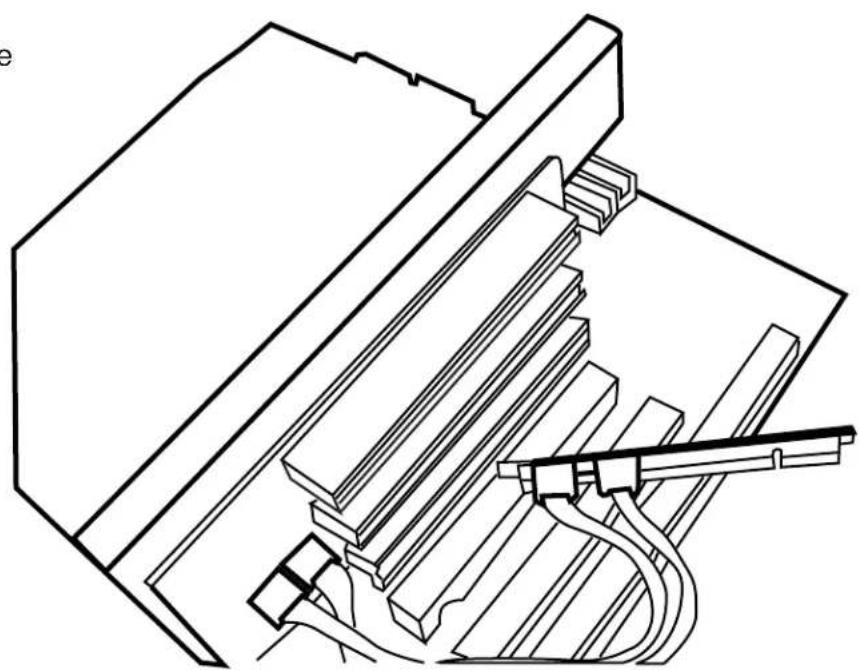
. Plug in the riser card and secure the supporting bar
natural_image
Technical line drawing of a mechanical assembly with no visible text or symbols
natural_image
Close-up of a blue industrial cabinet with ventilation grilles and control panel (no visible text or symbols)Installation
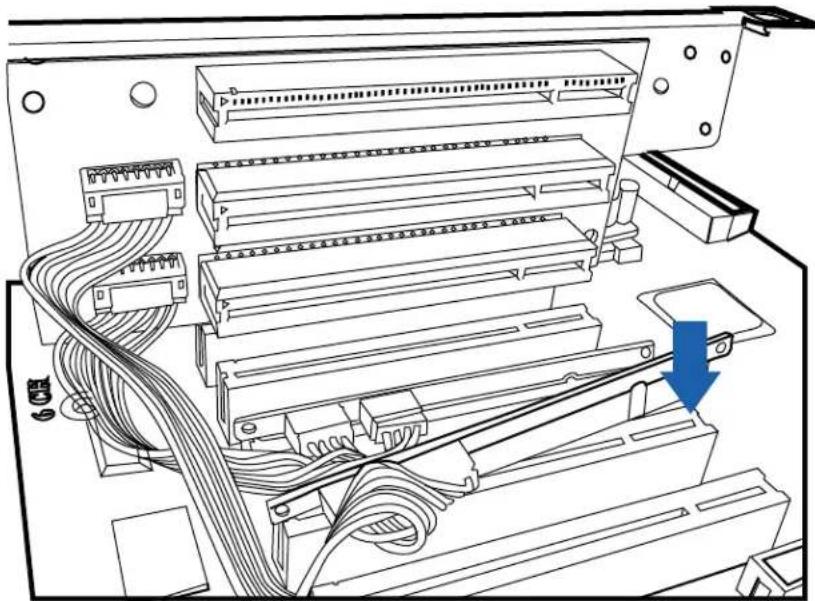
- Plug in the daughter connector to PCI slots
natural_image
Technical diagram of an electronic device showing internal components and wiring, with a blue arrow indicating a specific connection point (no text or symbols present)Technical Support Information
Contact Technical Support
our 9A - P PST
727 Phillips Dr.
City of Industry, CA 91748
Tel 1.626.0.
A 1.626.01.0
mail Tech istarusa.com
ne ear imited arranty
This limited warranty applies to products manufactured or distributed by I-Star USA Inc. iStarUSA, under the I-Star USA Inc brand name within the United States.
iStarUSA warrants that the product you have purchased from iStarUSA or from an authorized iStarUSA reseller is free from defects in materials and workmanship under normal use for a period of one 1 year from the original date of purchase. arranty Period, your sales receipt, showing the date of purchase of the product, is your proof of the date of purchase. This limited warranty e tends only to the original purchaser, is not transferable and e cludes disposable parts.
This limited warranty does not e tend to any product that has been damaged or rendered defective, a as a result of accident, misuse, or abuse, b by improper installation, c as a result of electrical surges or anomalies d by operating outside IPC usage parameters, e by unauthor-i ed modification of products, or f as a result of service by anyone other than iStarUSA. iStarUSA is not responsible for damage to or loss of any software programs data or information, or for damage to other computer hardware and peripherals caused by the product.
Please contact our A department for repair or replacement of defective parts under warranty. Please email to rma istarusa.com to obtain A Number before you send back any products. our shipment will not be accepted without issued A number.

natural_image
Close-up of a blue industrial cabinet with ventilation grilles and control panel (no visible text or symbols)emo
iStar, Good Start!