EXT-2DVI-CAT6DL - Émetteur AV Gefen - Free user manual and instructions
Find the device manual for free EXT-2DVI-CAT6DL Gefen in PDF.


| Product Type | DVI Extender (Transmitter) |
| Brand | Gefen |
| Model | EXT-2DVI-CAT6DL |
| Category | AV Extender |
| Video Interface | DVI-D (Single Link) |
| Max Resolution | 1920x1200 (1080p) |
| Transmission Medium | CAT6 / CAT5e (up to 330 ft / 100 m) |
| HDCP Support | Yes |
| Power Supply | 5V DC, 1A (external adapter) |
| Dimensions (W x D x H) | 3.5 x 2.5 x 1.0 in (89 x 63 x 25 mm) |
| Weight | 0.5 lbs (227 g) |
| Operating Temperature | 32°F to 104°F (0°C to 40°C) |
| Storage Temperature | -4°F to 140°F (-20°C to 60°C) |
| Humidity | 10% to 85% RH (non-condensing) |
| LED Indicators | Power, Link, Signal |
| Included Accessories | Power adapter, mounting brackets, user manual |
| Maintenance | Clean with a soft, dry cloth. Do not use liquids or solvents. |
| Safety Precautions | Avoid exposure to moisture, extreme temperatures, and direct sunlight. |
| Spare Parts & Repairability | No user-serviceable parts. Contact Gefen support for repairs. |
| General Information | Designed to extend DVI signals over long distances using inexpensive CAT6 cables. Plug-and-play installation. |
Frequently Asked Questions - EXT-2DVI-CAT6DL Gefen
User questions about EXT-2DVI-CAT6DL Gefen
0 question about this device. Answer the ones you know or ask your own.
Ask a new question about this device
Download the instructions for your Émetteur AV in PDF format for free! Find your manual EXT-2DVI-CAT6DL - Gefen and take your electronic device back in hand. On this page are published all the documents necessary for the use of your device. EXT-2DVI-CAT6DL by Gefen.
USER MANUAL EXT-2DVI-CAT6DL Gefen
Technical Support Hours:
8:00 AM to 5:00 PM (PST) Monday thru Friday Pacific Time
Write To:
Gefen, LLC
c/o Customer Service
20600 Nordhoff St
Chatsworth, CA 91311
www.gefen.com
support@gefen.com
Notice
Gefen, LLC reserves the right to make changes in the hard ware, packaging and any accompanying doc u men ta tion without prior written notice.
2x Dual Link DVI Extender over CAT-6 is a trademark of Gefen, LLC
1 Introduction
2 Operation Notes
3 Features
4 Sender Unit Layout
5 Sender Unit Descriptions
6 Receiver Unit La yout
7 Receiver Unit Descriptions
8 Connecting the 2x Dual Link DVI Extender over CAT-6
8 WirinDiagram
9 DIP Switch Configuration
11 Adjusting the Signal Quality
12 Network Cable Wiring Diagram
13 Specifications
14 Warranty
Congratulations on your purchase of the 2x Dual Link DVI Extender over CAT-6. Your complete satisfaction is very important to us.
Gefen
Gefen delivers innovative and progressive computer and electronics add-on solutions that harness integration, extension, distribution, and conversion technologies. Gefen's reliable, plug-and-play products supplement cross-platform computer systems, professional audio/video environments, and HDTV systems of all sizes with hard-working solutions that are easy to implement and simple to operate.
The Gefen 2x Dual Link DVI Extender over CAT-6
The 2x Dual Link DVI Extender over CAT-6 extends any dual link DVI source, to two displays up to 200 feet (60 meters) away. Dual-link resolutions up to 3840 x 2400 are supported using four CAT-6 cables. Extending dual-link resolutions over standard DVI cables have a limitation of 15 feet. Exceeding this distance requires additional repeaters and/or boosters. The 2x Dual Link DVI Extender over CAT-6 provides an easy-to-install solution, using CAT-6 cables.
How It Works
Place the 2x Dual Link DVI Extender over CAT6 Sender unit next to the source. Use the included DVI cables to connect the DVI source(s) to the Sender unit. Connect the Receiver unit to the DVI displays using DVI cables. Connect the Sender unit to the Receiver unit using four CAT-6 cables up to 200 feet (60 meters). Connect the included locking power supplies to the Sender and Receiver units, then connect both power cables to available electrical outlets.
READ THESE NOTES BEFORE INSTALLING OR OPERATING THE 2X DUAL LINK DVI EXTENDER OVER CAT6
- The 2x Dual Link DVI Extender over CAT-6 was designed for use with high quality CAT-6a (augmented) cabling. This unit will either not perform to specification or refuse to operate completely if cabling other than CAT-6a is used.
- When field terminating CAT-6a cabling please adhere to the TIA/EIA-568-B specification shown on page 12.
- The 2x Dual Link DVI Extender over CAT-6 has a maximum distance rating based on the bandwidth (i.e. resolution and color) of the video being transmitted. When used with high quality CAT-6a cabling, you can expect a maximum extension range of 200 feet (60 meters) at 3840 x 2400 or 1080p resolution. Lower quality cabling or older standards such as CAT-5 cables will shorten the maximum achievable extension distance.
- For C AT-5e cables, the maximum distance is 150 feet at 1080p Full HD or 2560 × 1600 .
Features
- Extends Dual Link DVI on two Dual Link DVI displays up to 200 feet (60 meters) over tour CAT-6a cables
• Supports Dual Link resolutions up to 3840 x 2400
• EDID management for Local and Pass-through modes - Locking Power Supplies
- Rack-mountable
Application
• Computer Extension over C AT-6 up to 3840 x 240
Package Includes
(1) 2x DVI Dual Link Extender over CAT-6 -Sender unit
(1) 2x DVI Dual Link Extender overCAT-6 - Receiver unit
(2) 6ft. Dual-Link DVI cable (M-M)
(2) 5V DC Locking Power Supplies
(1) Set of Rack Ears
(1) Quick Start Guide
Front Panel

text_image
Gefen 2x Dual Link DVI Extender S Over CAT-6a Back Panel 1 2 3 4 5 6 7 8 CAT-8 LINK 1.1 DVI In1 CAT-6 LINK 1.2 CAT-8 LINK 2.1 DVI In2 CAT-8 LINK 2.2 NV DC1 Power
This LED indicator will glow bright red once the included 5V DC locking power supply is properly connected between the unit and an available electrical outlet.
2 Link 1.1
This port is used to send the signal from DVI In 1 to the Receiver unit using CAT-6 a cable.
3 DVI In
Connect a dual-link cable from this connector to the a DVI (digital only) source.
4 Link 1.2
This port is used to send the signal from DVI In 1 to the Receiver unit using CAT-6 a cable.
5 Link 2.1
This port is used to send the signal from DVI In 2 to the Receiver unit using CAT-6 a cable.
6 DVI In 2
Connect a dual-link cable from this connector to the secondary DVI (digital only) source.
7 Link 2.2
This port is used to send the signal from DVI In 2 to the Receiver unit using CAT-6 a cable.
8 5V CD
Connect the included 5V DC locking power supply to this receptacle.
Front Panel
text_image
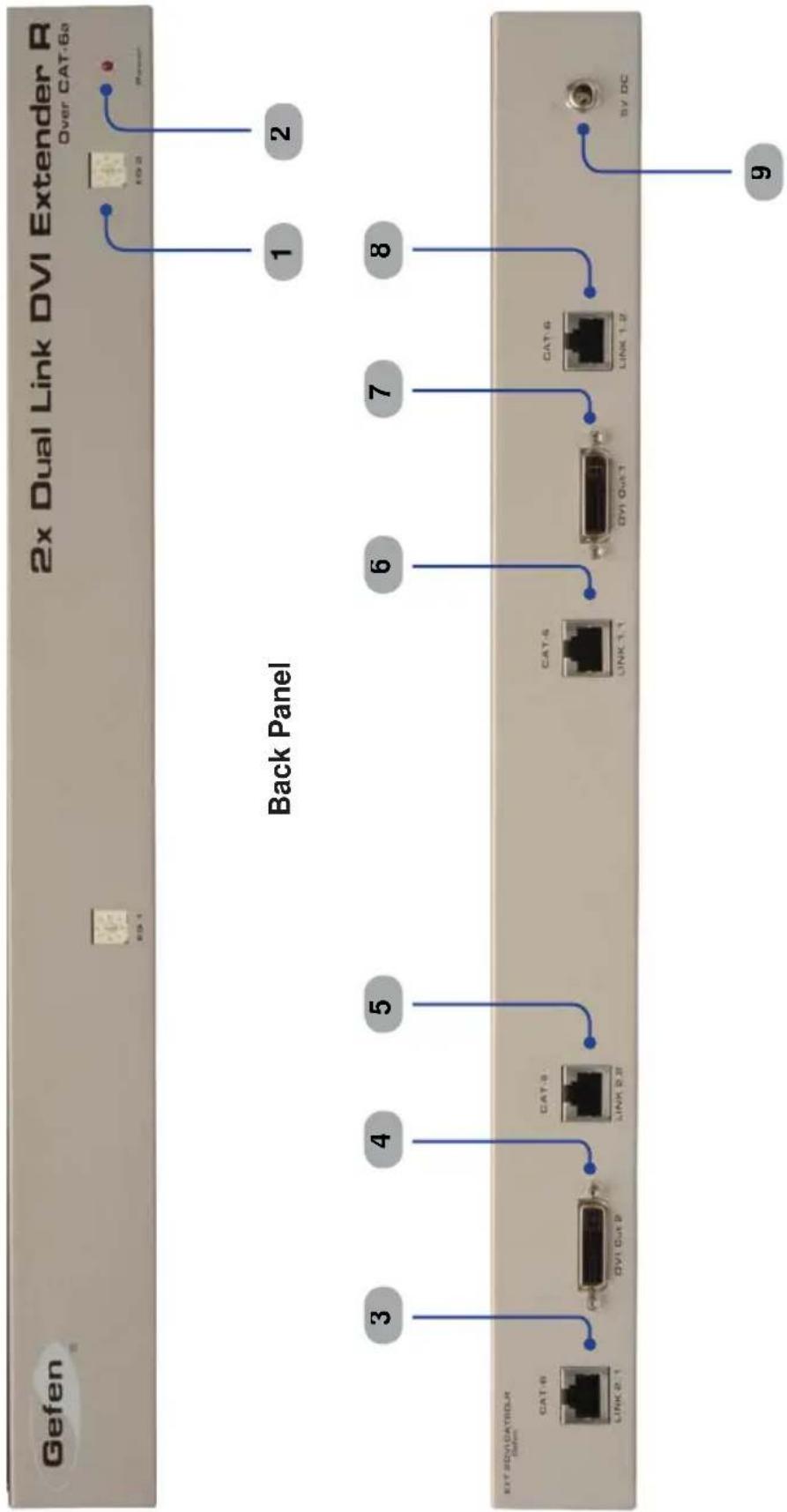
Gefen 2x Dual Link DVI Extender R Over CAT-6a Back Panel 1 2 3 4 5 6 7 8 9 EVT SDV/DAT/SDLR CAT-6 LINK 2.1 DYI Out 2 CAT-3 LINK 2.8 CAT-5 LINK 1.1 DYI Out 1 CAT-6 LINK 1.2 BY DC1 EQ
The EQ adjustment or Trim Pot is used to equalize the signal to compensate for the extension distance and the quality/skew variances that are found in different CAT-6a cabling brands.
2 Power
The LED power indicator will become active once the included 5V DC power supply is properly connected between the unit and an open wall power socket.
3 Link 2.1
This port is used to receive the signal from DVI In 2 on the Sender unit using CAT-6 a cable.
4 DVI Ou
This connector hooks up the Receiver to a DVI-D compliant monitor at the remote destination.
5 Link 2.2
This port is used to receive the signal from DVI In 2 on the Sender unit using CAT-6 a cable.
6 Link 1.1
This port is used to receive the signal from DVI In 1 on the Sender unit using CAT-6 a cable.
7 DVI Ou
This connector hooks up the Receiver to a DVI-D compliant monitor at the remote destination.
8 Link1.2
This port is used to receive the signal from DVI In 1 on the Sender unit using CAT-6 a cable.
9 5V CD
Connect the included 5V DC power supply between this input and an open wall power socket.
How to Connect the 2x Dual Link DVI Extender over CAT6
- Connect the included dual-link DVI cables between the DVI outputs on each computer and the DVI input connectors on the 2x Dual Link DVI Extender over CAT-6 Sender unit.
- Connect four CAT-6a cables between the Sender and Receiver units. Note that each connector on the Sender and Receiver unit is identified by Link 1.1, Link 1.2, Link 2.1, and Link 2.2. When connecting the CAT-6 cables, make sure that the connectors on the Sender unit are connected to the corresponding connectors on the Receiver unit (e.g. Link 1.1 --> Link 1.1, Link 1.2 --> Link 1.2, and so on).
NOTE: When field-terminating CAT-6a cabling please adhere to the TIA/EIA-568-B specification. Please see page 12 for more information. - Connect two dual-link DVI cables from the Receiver unit to each of the two dual-link displays.
- Connect the included 5V DC power supplies (two are included) to the Sender and Receiver units. Connect the AC power cord from each power supply to available electrical outlets.
Wiring Diagram for the 2x Dual Link DVI Extender over CAT6

flowchart
graph TD
    A["Computer"] --> B["Sender"]
    B --> C["Receiver"]
    C --> D["Dual Link DVI Display 1"]
    C --> E["Dual Link DVI Display 2"]
    F["Computer"] --> B
    G["Computer"] --> C
    style A fill:#ccc,stroke:#333
    style B fill:#ccc,stroke:#333
    style C fill:#ccc,stroke:#333
    style D fill:#ccc,stroke:#333
    style E fill:#ccc,stroke:#333
    style F fill:#ccc,stroke:#333
    style G fill:#ccc,stroke:#333
DIP Switch Location
On the bottom of both the Sender unit and Receiver unit is a bank four (4) DIP switches.
The DIP switches on the Sender unit allow the management of EDID, fiber optic extenders, and HDCP. The DIP switches on the Receiver unit do not provide any function and reserved for future expansion.
Sender unit

text_image
The four DIP switches on the Sender unitDIP Switch 1 - EDID Management
• ON - Pass Through EDID
DDC and HPD are passed through. Both the connection status and the full video capabilities of the monitor. All audio and video features of the connected devices are passed to the source device.
• OFF (default) - Local EDID
When Local EDID mode is used, the EDID will be assembled by copying all video and audio features of the connected output device.
DIP Switch 2: +5V for Fiber Optic Extenders
- ON - Enable +5V
Enable +5V for DVI fiber optic extenders.
• OFF(default) - Disable +5V
Disable +5V tor DVI _fi ber optic extenders.
DIP Switch 3: DVI Support\*
DIP switch 3 is only functional when DIP switch 1 is set to OFF (Local EDID).
- ON - DVI Mode
It a DVI connection is used, set DIP 3 to the ON position. DVI is supported by disabling HDCP pass-through.
• OFF (default) - HDCP Pass-Through
If HDMI is connected, set DIP 3 in the OFF position.
DIP Switch 4: Not used
• Reserved for future expansion.

IMPORTANT After changing DIP switch 1 or DIP switch 3, the Sender unit must be power-cycled for the changes to take effect.
Adjusting the Signal Quality
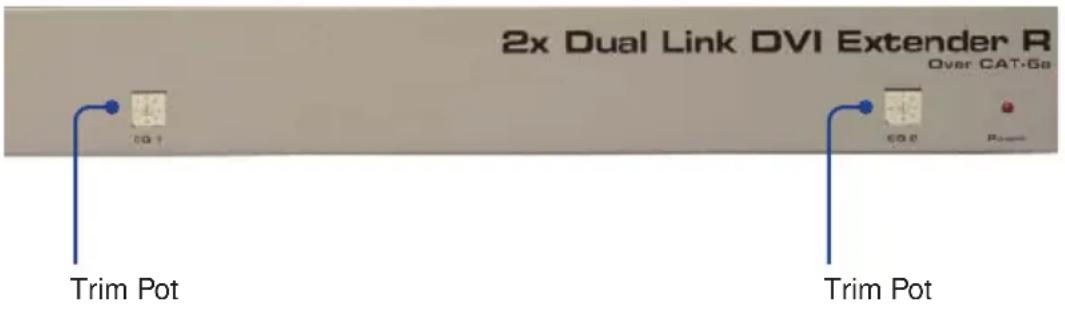
The 2x Dual Link DVI Extender over CAT-6 Receiver unit has two trim pot(trim potentiometers) to compensate for the extension distance and the quality/skew variances that are found in different CAT-6a cabling brands. EQ1 adjusts the output signal for DVI 1 and EQ2 adjusts the output signal for DVI 2. If there is no output video or if output video contains video artifacts and/or video noise such as snow, use the steps below to adjust the trim pot.
- Insert a small flat-headed tool into each of the trim pots on the front panel of the Receiver unit.
- Each trim pot has 8 set positions. Turn the trim pot in a clockwise fashion until it clicks to the next position. Continue adjusting the trim pot by trying all 8 positions until the issue is resolved.
- Carefully remove the adjustment tool.
text_image
2x Dual Link DVI Extender R Over CAT-6a Trim Pot Trim Pot
NOTE: Any time a cable is changed-out or replaced, the trim pots on the Receiver unit will need to be adjusted.
natural_image
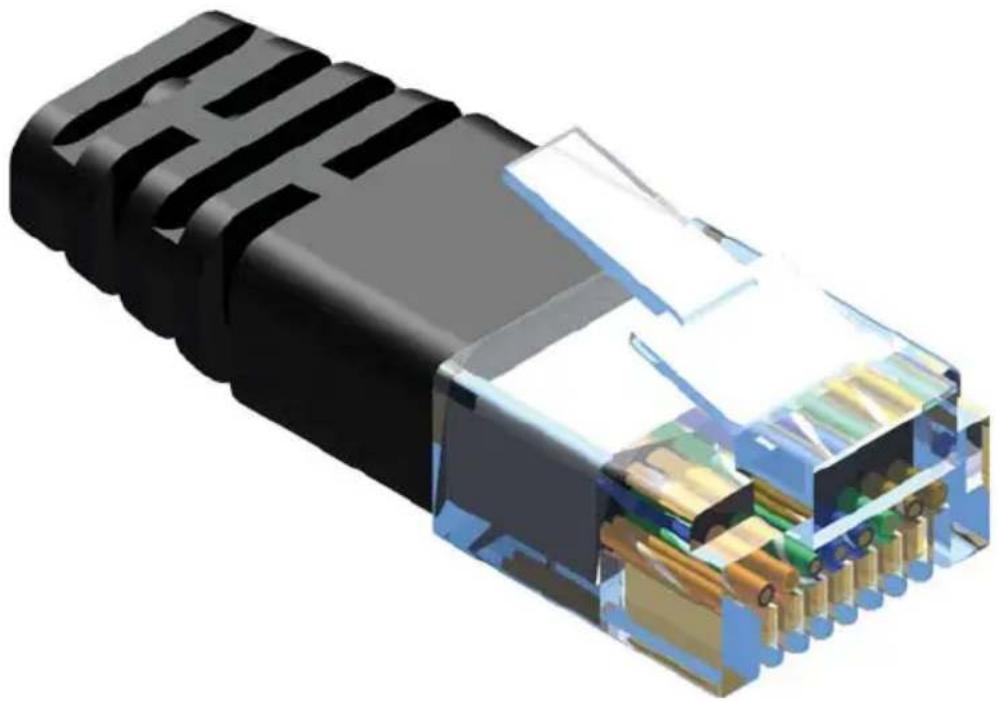
3D cutaway illustration of an Ethernet cable connector showing internal components and casing (no text or symbols)Gefen has specifically engineered products to work with the TIA/EIA-568-B specification. Please follow the table below when field terminating cable for use with Gefen products. Failure to do so may produce unexpected results and reduced performance.
| Pin Color | |
| 1 | Orange / White |
| 2 | Orange |
| 3 | Green / White |
| 4 | Blue |
| 5 | Blue/ White |
| 6 | Green |
| 7 | Brown / White |
| 8 | Brown |

natural_image
Diagram of an Ethernet cable connector with pin numbering (1-7-3) and a top connector, no text or symbols present.This product was designed for use with CAT-6a (augmented) cabling only. This unit will either not perform to specification or refuse to operate completely if cabling other than CAT-6a is used.
Each cable run must consist of a single undivided segment of CAT-6a cabling from Sender to Receiver. Punch-down blocks or splices will not work.
Maximum Pixel Clock....2 x 165 MHz
Input Video Signal....1.2V p-p
Input DDC Signal....5V p-p (TTL)
Video Input Connector (Sender)....(1) DVI-I, 29-pin, female (digital only)
Video Output Connector (Receiver)......(2) DVI-I, 29-pin, female (digital only)
Link Connectors (Sender / Receiver)....(4) RJ-45
Power Supply (Sender / Receiver)....5V DC, locking
Power Consumption....10W per unit (max.)
Operating Temperature....0 - 40 °C
Dimensions....8.4"W x 1.7"H x 4.3." D
Gefen warrants the equipment it manufactures to be free from defects in material and workmanship.
If equipment fails because of such defects and Gefen is notified within two (2) years from the date of shipment, Gefen will, at its option, repair or replace the equipment, provided that the equipment has not been subjected to mechanical, electrical, or other abuse or modifications. Equipment that fails under conditions other than those covered will be repaired at the current price of parts and labor in effect at the time of repair. Such repairs are warranted for ninety (90) days from the day of reshipment to the Buyer.
This warranty is in lieu of all other warranties expressed or implied, including without limitation, any implied warranty or merchantability or fitness for any particular purpose, all of which are expressly disclaimed.
- Proof of sale may be required in order to claim warranty.
- Customers outside the US are responsible for shipping charges to and from Geten.
- Copper cables are limited to a 30 day warranty and cables must be in their original condition.
The information in this manual has been carefully checked and is believed to be accurate. However, Geten assumes no responsibility for any inaccuracies that may be contained in this manual. In no event will Gefen be liable for direct, indirect, special, incidental, or consequential damages resulting from any defect or omission in this manual, even if advised of the possibility of such damages. The technical information contained herein regarding the features and specifications is subject to change without notice.
For the latest warranty coverage information, refer to the Warranty and Return Policy under the Support section of the Gefen Web site at www.gefen.com.
PRODUCT REGISTRATION
Please register your product online by visiting the Register Product page under the Support section of the Gefen Web site.

text_image
* M A - 2 D V I - C A T 6 D L *Rev A2
20600 Nordhoff St., Chatsworth CA 91311
1-800-545-6900 818-772-9100 fax: 818-772-9120
www.gefen.com support@gefen.com


