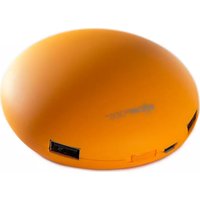
maxpod - Power bank Boompods - Free user manual and instructions
Find the device manual for free maxpod Boompods in PDF.


| Product Type | Portable Power Bank |
| Brand | Boompods |
| Model | maxpod |
| Battery Capacity | 5200mAh |
| Battery Type | Lithium-ion |
| Input Port | Micro USB |
| Output Port | USB Smart Port (1) |
| Charging Time | 8–10 hours (full charge) |
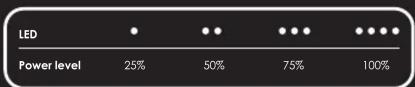
| LED Indicator | 4 LED lights showing battery level |
| Auto Shutdown | Yes, when not in use |
| Package Contents | 1 MAXPOD charger, 1 Micro USB cable, 1 user manual |
| Safety Features | Overcharge protection, short-circuit protection, temperature protection |
| Operating Conditions | Avoid high temperature, direct sunlight, liquids, drops, disassembly |
| Guarantee | 1 year against defects in materials or workmanship |
| Design | Designed in the UK by all design |
Frequently Asked Questions - maxpod Boompods
User questions about maxpod Boompods
0 question about this device. Answer the ones you know or ask your own.
Ask a new question about this device
Download the instructions for your Power bank in PDF format for free! Find your manual maxpod - Boompods and take your electronic device back in hand. On this page are published all the documents necessary for the use of your device. maxpod by Boompods.
USER MANUAL maxpod Boompods
natural_image
Grid of white dots arranged in a triangular pattern on a gray background (no text or symbols)
power.anywhere.everywhere
BOOMPODS™ designed in the UK by dt-design. All rights reserved ©2013. This product uses BOOMPODS™ technology and is covered by international patents, Powerpod- IP: 201230133252.3.

MAXPOD 5200mAh portable recharger User Manual
Introduction:
Before using your MAXPOD charger for the first time, please take a few moments to read through the user manual.
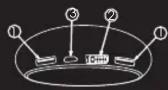
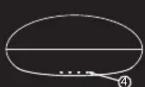
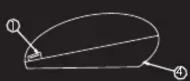
1 - USB smart port 2 - On/off switch 3 - Micro USB connector 4 - LED power indicator

Use:
To charge your phone, tablet or USB device simply plug in the USB cable. For devices that charge via Micro USB sockets you can use the charging cable provided. Switch on MAXPOD and leave connected until your device is fully charged. The 4 LED lights will diminish on the back of the MAXPOD as your device becomes charged. Once all the lights have gone out, your MAXPOD will need be recharged. If your MAXPOD is left switched on and not connected to a device it will automatically power down and switch off. To re-activate you will need to switch off and on again.
Charging:
The LED lights on your MAXPOD charger will flash blue in 4 stages, it is fully charged once all 4 LED lights are solid blue.
Your MAXPOD contains a Lithium-ion battery. Please use the provided Micro USB cable to charge the battery through a PC or USB mains charger. Normally it will take 8-10 hours to fully charge the battery.
Package content & technical details:
1 MAXPOD charger
1 Micro USB cable
1 user manual
High capacity 5200mAh battery
LED light power indicator
General guidelines:
Keep away from high temperature or prolonged exposure to direct sunlight.
Avoid contact with liquids.
Do not disassemble.
Do not drop the product.
Keep out of reach of children.
Guarantee:
Your BOOMPODS™ product is guaranteed against any defects in material or workmanship for one year from the date of original purchase providing it has not been disassembled and it has not suffered accidental damage such as a knock or immersion in water, etc.
The device must be used in accordance with the user manual. The guarantee is subject to presentation of the original invoice or receipt from the retailer and does not apply to normal wear and tear or to any device that has been misused or tampered with. If should be returned to the local service centre, the service centre will not bear any shipping cost of the returned item.
Please check www.boompods.com for your local service centre.

www.boompods.com

Brand : Boompods
Model : maxpod
Category : Power bank