BURGsmart PROTECT Water 2062 - Home Automation BURG WACHTER - Free user manual and instructions
Find the device manual for free BURGsmart PROTECT Water 2062 BURG WACHTER in PDF.


User questions about BURGsmart PROTECT Water 2062 BURG WACHTER
0 question about this device. Answer the ones you know or ask your own.
Ask a new question about this device
Download the instructions for your Home Automation in PDF format for free! Find your manual BURGsmart PROTECT Water 2062 - BURG WACHTER and take your electronic device back in hand. On this page are published all the documents necessary for the use of your device. BURGsmart PROTECT Water 2062 by BURG WACHTER.
USER MANUAL BURGsmart PROTECT Water 2062 BURG WACHTER
Assembly and user manuals
Language
fr and nl, as well as further languages at: www.burg.biz
Aufbau / Manuel
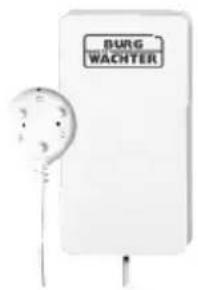
Lieferumfang
Status LED
natural_image
Circular mechanical component with a central circular feature (no visible text or symbols)natural_image
Close-up of a cylindrical mechanical component with a central hole and flange (no visible text or symbols)natural_image
Close-up of a cylindrical electronic component with internal wiring (no visible text or symbols)Steckdosen-Einsatz
Contact 2032
Tür-/Fensterkontakt
natural_image
Simple line drawing of a trash bin with crossed lines indicating no waste or discharge (no text or symbols)natural_image
Simple line drawing of a trash bin with two crossed lines indicating no waste or discharge (no text or symbols)1x BURGsmart PROTECT Water 2062
2x LR6 AA 1.5V batteries
1x set of mounting strips with adhesive backing
1x instructions

Equipment features
• Wi-Fi water detector sensor
- Operation with 2x AA LR6 1.5V batteries, up to 3 years of standby operation
• Installation without screws
- Compatible with 2.4 GHz Wi-Fi, standard IEEE 802.11 b/g/n
- Configure smart scenes, for example, in conjunction with the NOISE 2162 alarm siren
- App operation, push notification in case of alarm or low battery
- An internet connection is required for operation
- Can be used alone or in conjunction with BURGsmart PROTECT devices
Product description
The BURGsmart PROTECT Water 2062 alerts you via push message or in combination with the BURGsmart PROTECT Noise 2162 alarm siren by signal if the sensor surfaces are short-circuited by conductive liquids. Thanks to the energy-saving processor, up to 4000 cycles or up to 3 years can pass before the batteries needs to be changed. The system informs you about the current battery level in the app. By linking with other BURGsmart PROTECT components, you can create scenarios.
Tip: Use the cable length of the sensor to place the detector higher and outside of water.
Note: The detector is not waterproof and is intended for indoor use. Warranty claims are void in the event of improper use. 2.4 GHz Wi-Fi and an internet connection are required.
Safety guidelines
Please read the instructions carefully.
No liability can be assumed for any damage which may result from failure to follow instructions. The device must be used only for the purpose specified in the instructions.
The device should work effectively as an alarm in an emergency! Please check regularly that the device is in working order and that the batteries are charged. This will ensure that it functions correctly in the event of a (hopefully unlikely) emergency.
Due to unusually high electromagnetic radiation, manipulation or other influences, malfunctions may be triggered. The device must not be installed in damp areas or near electrical devices which emit radiation. Batteryoperated devices must not be used in high temperatures, near sources of heat or exposed to direct sunlight.
Ensure that packaging and contents are kept well away from children to avoid any risk of suffocation.
Please keep instructions in a safe place.
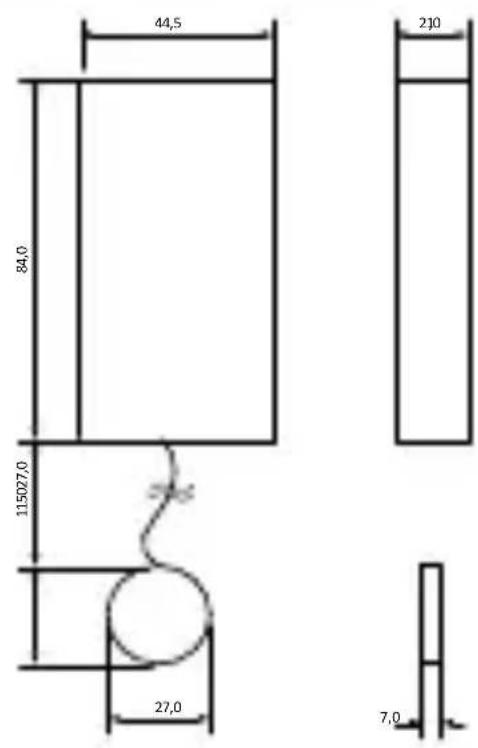
Drawing
Status LED
| LED display Description | |
| Single flash Active alarm | |
| Rapid, persistent flashing | Device is in setup mode |
| Slow, persistent flashing Device is in Access Point (AP) setup mode | |
| 4 seconds on / 2 seconds off | Reset |
Technical details
| Battery voltage =3V DC | |
| Type of battery 2x AA LR6 | 1.5V |
| Max. range inside < 20 m* | |
| Frequency band 2.4 GHz | |
| Supported radio standards | IEEE 802.11b/g/n |
| Max. output <10 mW (10 dBm) | |
| Operating temperature range | 0°C – 40°C |
| Air humidity 20 % – 85 % | |
| Weight | |
| Max. output <10 mW (10 dBm) | |
| Working temperature range | 0°C – 40°C |
| Air humidity 20 % – 85 % | |
| Weight 130 g | |
| Dimensions (H x W x D) excluding adhesive strips | Detector:84 x 44.5 x 21 mmSensor: 27 x 27 x 7.5 mm |
* The actual range depends on the circumstances on site.
Installation instructions
- Check the strength of the Wi-Fi signal at the site of installation with your smartphone. The reception quality should be at least two graduation marks to be able to guarantee an alarm.
- First remove the battery strap from the sensor.
- Set up the sensor in the app before installation and test the function.
- Attach the detector to the desired position with adhesive tape. Make sure that the detector is mounted above the sensor.
- Avoid installation on metallic surfaces and near live cables, as these may impair the function.
Note: If you install the sensor in the cellar of have aluminium or metal frames/doors, please test whether the function works reliably at the desired position before mounting.
Correct location for installation
The radio signal of the sensor is highly dependent on environmental conditions. Metal objects, concrete surfaces, walls and metallic wiring can also reduce the range. The device can also be impaired by other radio signals and environmental influences. Check the function after installation.
IMPORTANT NOTE: The alarm can only work as well as permitted by its installation and environment. The alarm can alert you of dangerous situations but it cannot prevent them.
The device must not be painted, varnished or altered in any way.
Replacing the battery / reset button
To change the batteries or press the reset button, the detector must be opened. To do this, push the upper part of the sensor housing upwards with slight pressure so that it detaches from the base plate.
Resetting to factory settings
To reset the device to factory settings, press and hold the reset button for at least 10 seconds.
Setup via the BURG-WÄCHTER Key App
The following setup describes the state of the app at the time of production. The latest version of the app may differ. Please download the latest version of the manual from our website:

Privacy notice: You can find the current privacy policy in the app and on our homepage at:
https://www.burg.biz/datenschutz/ secuentry-apps/
Setup
The setup of the listed BURGsmart PROTECT components is identical.
• BURGsmart PROTECT Contact 2032
• BURGsmart PROTECT Motion 2012
• BURGsmart PROTECT Noise 2162
• BURGsmart PROTECT Water 2062
Setup
- Connect your smartphone with the 2.4 GHz Wi-Fi connection in which you would like to integrate the sensor. Disable the 5 GHz Wi-Fi for the duration of the setup.
- Remove the battery fuse. The LED of the LED of the system starts flashing quickly (\~3x per second).
Note: If it flashes slowly (<1x per second), the device is in AP mode. You can change the mode by holding down the reset button for approx. 3 seconds to follow the instruction steps immediately.
- Start the key app and select BURGsmart PROTECT in the menu.
- Select "Register and Settings" in the menu that appears.
- Press the "+" button in the device list.
- Enter an individual device name and your Wi-Fi password to carry out the registration. The registration process can take up to one minute.
- The device is then listed in the device list. The setup is complete at this point.
Note: If the setup fails at the first attempt, reduce the distance between the sensor, smartphone and router. You can find more help options on our homepage in the FAQs area.
Operation via the BURG-WÄCHTER Key App
In the BURGsmart PROTECT/Show State menu item, the device-specific settings can be opened and adjusted by selecting the desired component from the device list.
Select the Water 2062 sensor to access the sensor-specific view.
Tapping the buttons takes you to the respective submenus and you can, for example, view the alarm history and the opening status or change the notification settings.
Limitation of liability
This device complies with the technical standards in force at the time of production. We constantly strive to ensure that our products are in line with the latest technologically and that our handbooks are kept up to date. We therefore reserve the right to undertake technical changes and modifications or adjustments to the instructions without providing advance notice. The instructions must be carefully followed. We accept no liability for damage, as a result of e.g. incorrect use or installation, improper handling, insufficient or poor maintenance, disregard of safety guidelines or general conditions of use. When installed and used correctly and under the conditions specified, this device performs the functions described in the handbook. As the alarm is dependent upon the specific arrangement put in place by the customer, there is no guarantee that it will be triggered.
Warranty
BURG-WÄCHTER products comply with the technical standards in force at the time of production and adhere to our own quality standards. The guarantee only covers defects which can be proved to have resulted from production or material defects at the time of purchase. The guarantee expires after two years; further claims are excluded.
A short description of any defects identified must be made in writing and the device returned to the place it was bought, together with the original packaging. After the device has been tested, and within an appropriate period of time, the guarantor will decide whether or not to repair or exchange the item. Any defects or damage which may have resulted from transport, inappropriate or improper use, wear and tear etc. are not included in the guarantee. The battery is not included in the guarantee.
More BURGsmart PROTECT accessories
We would like to recommend the following products for combination with this device:
Motion 2012Noise 2162
natural_image
Circular mechanical component with a central circular feature and a small protrusion (no visible text or symbols)Alarm siren with temperature and air humidity sensor
natural_image
Close-up of a cylindrical mechanical component with a central hole and flange (no visible text or symbols)PIR motion detector with temperature and air humidity sensor
Plug 2142
natural_image
Close-up of a cylindrical electronic component with internal wiring (no visible text or symbols)Wall socket adapter
Contact 2032
Door/window contact
BURGcam
LIGHT 3010
natural_image
Simple black-and-white illustration of a cylindrical object with a rounded top and a base (no text or symbols)White light LED light with day/night camera and intercom function for the entrance area
Notes on disposing of the device

Please be aware that electrical and electronic equipment and batteries marked in this way must not be disposed of with household waste but collected separately. Please obtain information on the collecting points for electrical waste from the responsible authority of your city/municipality.
BURG-WÄCHTER KG hereby declares that this device complies with Directive 2014/53/EU (EMC), 2011/65/EU (RoHS), 2014/53/EU (RED).
The complete text of the EU Declaration of Conformity can be found at the following internet address: www.burg.biz. If you have any technical questions concerning the product, please read the detailed operating instructions and observe the FAQs that can be found on the following homepage: www.burg.biz.
Should you still have questions, please contact us via email at: alarm-service@burg.biz
Legal notice
The copyright for these operating instructions are held exclusively by BURG-WÄCHTER KG. Any reproduction, even into digital storage media requires the written consent of BURG-WÄCHTER KG. Reprinting, even excerpts, is forbidden. All company and product names are trademarks or registered trademarks or brands of the respective owners. Subject to errors and technical changes. Subject to errors and technical changes.
© Copyright:
BURG-WÄCHTER KG

Alternofervveg 15
58300 Wetter, Germany
www.burg.biz