PentaClass ABM - Uncategorized Elmo - Free user manual and instructions
Find the device manual for free PentaClass ABM Elmo in PDF.


User questions about PentaClass ABM Elmo
0 question about this device. Answer the ones you know or ask your own.
Ask a new question about this device
Download the instructions for your Uncategorized in PDF format for free! Find your manual PentaClass ABM - Elmo and take your electronic device back in hand. On this page are published all the documents necessary for the use of your device. PentaClass ABM by Elmo.
USER MANUAL PentaClass ABM Elmo
PentaClass A, AB, ABM
Users manual
- iPod, iPad are trademarks of Apple Inc. Registered in the U.S. and other countries.
- Wi-Fi®, Wi-Fi Alliance® are registered trademarks of the Wi-Fi Alliance.
- The Bluetooth® trademark is owned by the Bluetooth® SIG.
NOTES
- The contents of this user's manual shall not be reprinted in part or whole without permission.
- The contents of this user's manual are subject to change without notice.
Important Safeguards
READ INSTRUCTIONS
All the safety and operating instructions should be read before the appliance is operated.
RETAIN INSTRUCTIONS
The safety and operating instructions should be retained for future reference.
HEED WARNINGS
All warnings on the product and in the operating instructions should be adhered to.
FOLLOW INSTRUCTIONS
All operating and maintenance instructions should be followed.
CLEANING
Unplug this product from the wall outlet before cleaning. Do not use liquid cleaners or aerosol cleaners. Use a damp cloth for cleaning.
ATTACHMENTS
Do not use attachments that are not recommended by the product manufacturer as they may cause hazards.
WATER AND MOISTURE
Do not use this product near water - for example, near a bath tub, wash bowl, kitchen sink, or laundry tub, in a wet basement, or near a swimming pool and the like. Immersion in water will destroy the PentaClass speaker, microphone or remote.
GROUNDING OR POLARIZATION
For US only: This product may be equipped with either a polarized 2-wire AC line plug (a plug having one blade wider than the other) or a 3-wire grounding type plug, a plug having a third (grounding) pin. The 2-wire polarized plug does not fit in the outlet, try reversing the plug. If the plug still fails to fit, contact your electrician to replace your obsolete outlet. Do not defeat the safety purpose of the polarized plug. The 3-wire grounding type plug will fit into a grounding type power outlet. This is a safety feature. If you are unable to insert the plug into the outlet, contact your electrician to replace your obsolete outlet. Do not defeat the safety purpose of the grounding type plug.
For UK only: In UK, a BS approved power cord with molded plug has a Black (five Amps) fuse installed for use with this equipment. If a power cord is not supplied with this equipment please contact your supplier.
POWER-CORD PROTECTION
Power-supply cords should be routed so that they are not likely to be walked on or pinched by items placed upon or against them, paying particular attention to cords at plugs, convenience receptacles and the point where they exit from the product.
LIGHTNING
For added protection for this product during a lightning storm, or when it is left unattended and unused for a long time, unplug it from the wall outlet and disconnect the cable system. This will prevent damage to the product due to lightning and power-line surges.
OVERLOADING
Do not overload wall outlets, extension cords, or integral convenience receptacles as this can result in a risk of fire or electric shock.
OBJECT AND LIQUID ENTRY
Never push objects of any kind into this product through openings as they may touch dangerous voltage points or short-out parts that could result in a fire or electric shock. Never spill liquid of any kind on the product.
SERVICING
Do not attempt to service this product yourself as opening or removing covers may expose dangerous voltage or other hazards. Refer to qualified service personnel.
DAMAGE
Unplug this product from the wall outlet and refer servicing to qualified service personnel under the following conditions:
- When the power-supply cord or plug is damaged.
- If liquid has been spilled, or objects have fallen into the product.
- If the product has been exposed to rain or water.
- If the product does not operate normally by following the operating instructions adjust only those controls that are covered by the operating instructions as an improper adjustment of other controls may result in damage and will often require extensive work by a qualified technician to restore the product to its normal operation.
- If the product has been dropped or damaged in any way.
- When the product exhibits a distinct change in performance - this indicates a need for service.
REPLACEMENT PARTS
When replacement parts are required, be sure that the service technician uses only spare parts approved by Elmo. If you are uncertain, contact Elmo. Unauthorized substitutions may result in fire, electric shock or other hazards and will void the warranty.
SAFETY CHECK
Upon completion of any service or repairs to this product, ask the service technician to perform safety checks to determine that the product is in proper operating condition.
Before Operating
- Be sure to use the power cord and the AC adapter included with your PentaClass.
- Be sure to use the power cord applicable to your local power specifications.
- When storing the product, do not leave it under direct sunlight or near heaters. It may become discolored, deformed, or damaged.
- Do not place this product in any humidity, dusty, salt bearing wind, or vibrating locations. Use it only under the following environmental conditions: temperature: 0^ - 40^ (32°F - 104°F), humidity: 30% - 85% (No condensation).
- Use a soft, dry cloth for cleaning. Do not use any volatile solvent such as thinner or benzene.
FOLLOW THE GUIDELINES BELOW TO PREVENT THE UNIT FROM DROPPING
- Use the product on a stable base, desk, or table. Do not place the product on an unstable base or slanted surface.
- Please install the product as recommended in this user manual.
- Place or wire the unit to prevent the AC adapter cord from pulling.
- Carry the product by holding the lower part of the main unit in both hands. Never hold the product by the tubes or the top part.
• In time, the PentaClass performance and quality may deteriorate due to the lifetime of its parts. To purchase replacement parts, consult the dealer from whom you purchased this product or our branch/office near your location.
REMOTE CONTROL BATTERY PRECAUTIONS
- If this product is not going to be used for a long time, take the batteries out of the remote control.
- Do not use rechargeable batteries (e.g., Ni-Cd (NiCad batteries)).
- Do not try to recharge or short-circuit the batteries.
- When disposing of used batteries, follow the instructions of your local municipality.
- Insert batteries from one side and pay particular attention to the polarity (+/- directions).
- Be sure to use CR2025 type batteries.
- If any liquid from a battery leaks on your skin or clothes, flush the area with clean water immediately. If it gets into your eyes, flush immediately with clean water and then contact a doctor.
MICROPHONE BATTERY PRECAUTIONS
- Do not charge the microphone when it is placed near a heat source or in direct sunlight or another places where the temperature exceeds +40^ (104°F).
- Do not store or leave the Microphone near a heat source or in direct sunlight or other places where the temperature exceeds +40^ (104°F).
- Do not store or leave the Microphone in a cold place under -20^ (-4°F).
- Do not try to recharge the Microphone using an inappropriate charger, please use the USB charger included with this product.
- Do not place the Microphone in liquids, rain and other moist places.
- In the event of any physical damage to the microphone please do not try to charge it. Contact your dealer or repair service.
- If any liquid from a microphone battery leaks onto your skin or clothes, flush the area with clean water immediately. If it gets into your eyes, flush immediately with clean water and then contact a doctor.
PRECAUTIONS REGARDING THE MICROPHONE LANYARD
To prevent unexpected accidents, please note the following:
- This lanyard is for the microphone only and should not be used for any other purposes.
- Do not wrap the lanyard around parts of your body such as your neck, arm, or finger.
- Do not leave it within reach of small children.
- For safety reasons, the break-away section of the lanyard has been designed to separate if too much force is applied. Therefore, please avoid any overly strenuous movements and do not apply excessive force.
- The lanyard length adjustment feature is designed to be simple. Excessive force or strenuous movements may change the length.
- Do not use excessive force when adjusting the lanyard. This could damage the lanyard.
- Be careful using the lanyard in environment where rotating or other mechanical equipment is operating.
PRECAUTIONS REGARDING PACKING PARTS
To prevent unexpected accidents, please note the following points:
- Keep all small parts such as plastic bags and installation hardware away out of reach of small children.
- Do not put the plastic bags on the head, keep them out of reach of small children.
- Do not eat or put in mouth, mounting brackets, cardboard parts, plastic bags, screws or any another parts supplied with the product and keep away them from reach of small children.
OTHER SAFETY PRECAUTION
- Servicing and maintenance must be carried out by authorized service staff only.
- Use only spare parts approved by Elmo. If you are uncertain, contact Elmo.
- Make sure the device is securely mounted and installed in accordance with instructions before starting it.
- Regularly check the screws and other attachment devices.
- In the event of abnormal noise turn off the PentaClass and consult your supplier.
- Electrical installation must be carried out by an authorized electrician only.
• Take special care to not drop the equipment while mounting it to the ceiling. - Never force anything into the openings or source inputs of the speaker equipment.
- Do not use this equipment if it shows obvious signs of damage from shipping or dropping.
- Make sure equipment is properly mounted according to the Mounting Instructions found in this guide. This is the only approved method of installation; any other may cause a loss of your warranty.

NOTATION CONVENTIONS
Warning! Indicates a potentially hazardous situation which, if instructions are not followed, could result in death or serious injury.
Contents
IMPORTANT SAFEGUARDS 02
Before Operating 04
INTRODUCTION 08
What's in the Box? 08
Introducing PentaClass 09
Features for all PentaClass models 09
NAMES OF PENTACLASS PARTS 10
Operation of the Main Unit 10
Rear Panel and Cable Connection 11
Names of Remote Control Parts 11
Preparation of Remote Control 12
Replacement Battery Installation 12
Remote Control Operating Range 12
The Runa Microphone 13
Your Runa Microphone Components and Button Commands 13
Preparing your Runa Microphone 13
Charging Your Runa Microphone Battery 13
The Runa Microphone IR Remote Control Operating Range 14
PENTACLASS MODELS 15
PentaClass A 15
PentaClass AB 16
PentaClass ABM 17
PentaClass Microphone 18
OPERATIONAL DESCRIPTION 20
Turning on the PentaClass 20
Connectivity 20
Connecting to Device Using AUX Input 20
Connecting to Device Using Bluetooth 20
Connecting Microphone to the PentaClass 21
Power Saving Mode 22
| CHANNEL MIXER AND STATUS INDICATION | 22 |
| System Status Indication | 22 |
| Channel Mixer | 22 |
| Mixer Status Indication | 22 |
| VOLUME ADJUSTMENT | 23 |
| Feedback Cancellation | 23 |
| AUDIO PRESETS | 24 |
| SYSTEM RESET | 24 |
| Bluetooth Reset | 24 |
| System Setting Reset | 24 |
| INSTALLATION | 25 |
| Determining Speaker Location | 25 |
| Installation Materials / Tools Required | 26 |
| Safety Rules for Installation | 26 |
| Mounting on the Ceiling | 26 |
| Mounting Procedure for Suspended Ceiling | 27 |
| Mounting Procedure for Wall | 28 |
| DAISY CHAINING | 29 |
| TROUBLESHOOTING | 30 |
| PENTACLASS TECHNICAL SPECIFICATION | 30 |
| Input Source Specifications | 30 |
| PentaClass Speaker Specification | 30 |
| PentaClass Microphone Specification | 31 |
| REGULATORY | 32 |
| NOTES | 34 |
Introduction What's in the Box?
Make sure your box contains everything listed. If any pieces are missing, contact your dealer.
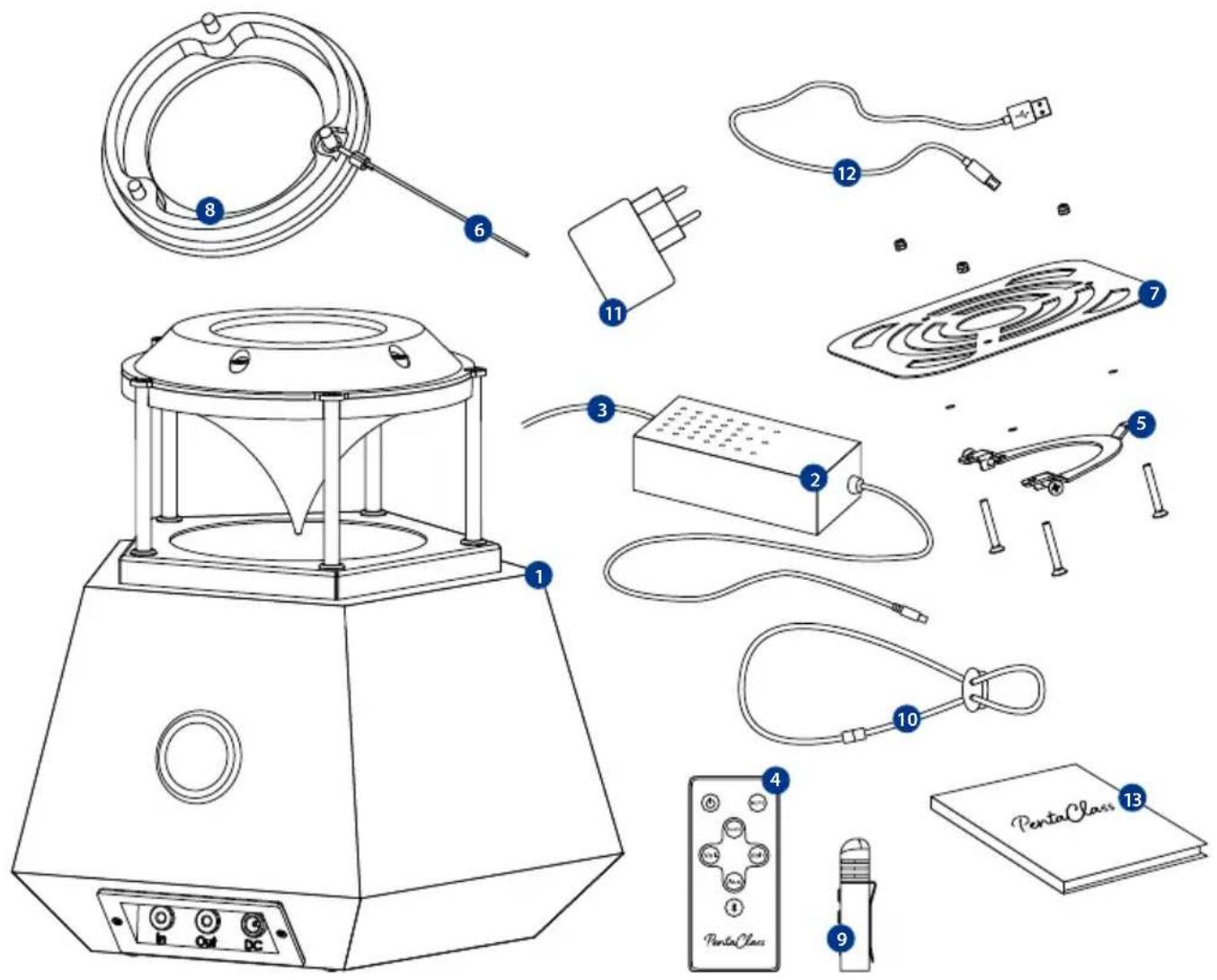
1 PentaClass speaker
2 Power supply 19 V 2A
3 Power cord
4 Remote control with battery
5 Fixation bracket with screws
6 Safety wire
7 Plate for false ceiling
* included with PentaClass ABM version
8 Flange
9 Runa Microphone*
10 Lanyard*
11 USB charger 5V1A*
12 Micro USB cable 1 m*
13 User's manual
Introducing PentaClass
Thank you for purchasing the best classroom and conference room audio system available. The PentaClass enables you to transmit pristine voice clarity from the microphone while giving you the opportunity to project full room multimedia HD audio sound using one device.
Features for all PentaClass models
ALL-IN-ONE DEVICE
PentaClass combines your speaker, amplifier and mixer all in one.
360° OMNIDIRECTIONAL SOUNDFIELD
Enjoy truly rich sounds whenever your audience members are seated in the room.
ONE ROOM - ONE SPEAKER
Thanks to its special design, just one PentaClass speaker is able to spread sound evenly in a room and is suitable for room sizes of up to 120 m^2 ( 1300 ft^2 ). If you have an auditorium larger than 120 m^2 ( 1300 ft^2 ), you can daisy chain up to 3 PentaClass speakers.
SIMPLE INSTALLATION
In a matter of minutes you can install PentaClass using the supplied mount on a ceiling or wall.
SYSTEM STATUS INDICATION
Depending on the PentaClass status, it will illuminate a specific color light.
POWER-SAVING MODE
Automatic power-saving mode switches on if there is no incoming signal for more than 20 minutes.
AUDIO PRESETS
These allows you to choose the audio mode, switching between voice, multimedia and music presets.
BIG AUDITORIUMS WELCOME
Thanks to our smart audio in/out system, you can daisy chain up to 3 PentaClasses and cover auditoriums up to 360m^2 (3875 sq. ft.).
HI-FI ACOUSTIC DESIGN
The PentaClass design ensures pure vocal clarity, full high and mid-ranges and a rich bass for music.
ROBUST DESIGN
The natural birch plywood box, aluminum speaker protector and durable plastic parts are used to ensure a long-term lifespan for your PentaClass. Thanks to its simple and elegant design it will fit into any interior.
BUILT-IN MIXER
The built-in mixer allows you to mix an analog input with Bluetooth or microphone channels without unplugging the cables or disconnecting the wireless connection.
REMOTE CONTROL
All PentaClass versions come with a remote control for the easy operation of devices.
DYNAMIC RANGE COMPRESSION
Whether you are listening at a low or high volume, the DRC ensures the quality of non-distorted sound.
DAISY CHAIN READY
Thanks to the mixed Aux output, you can connect up to 3 PentaClass's to cover much larger spaces including auditoriums.
Names of PentaClass parts
Operation of the main unit
Make sure your box contains everything listed. If any pieces are missing contact your dealer.
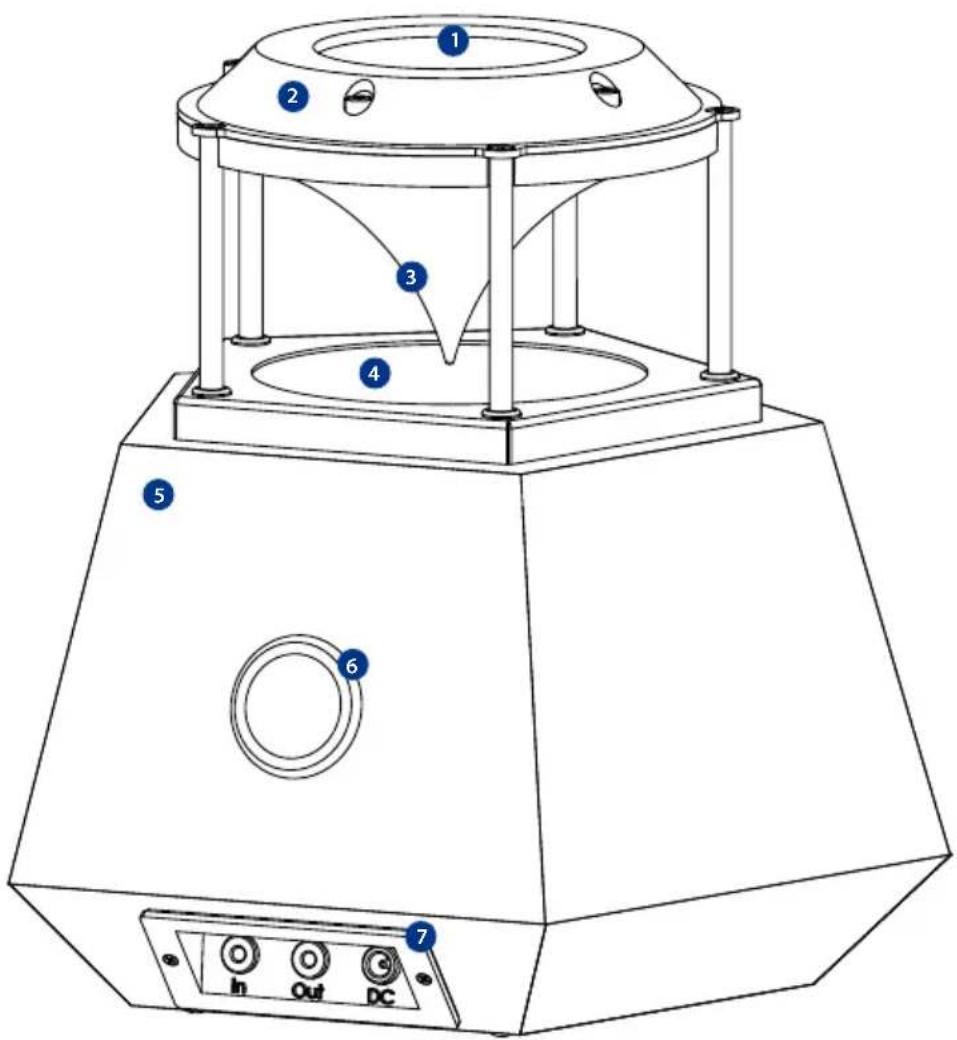
1 System status indication window and IR sensor location
2 Main Board housing
3 Sound reflector cone
4 Speaker grill with protective frame
5 Birch plywood soundbox
6 Phase inverter
7 Connector panel
Rear Panel and Cable Connection
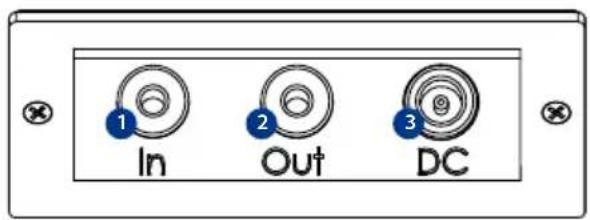
1 Aux in - Audio in (3.5mm mini Jack). An audio cable is not supplied with this product.
2 Aux out - Audio out (3.5mm mini Jack). An audio cable is not supplied with this product.
3 DC - Input for the AC adapter.
Connecting the AC adapter. Before inserting the AC adapter in an outlet, connect the DC plug of the supplied AC adapter to the terminal on the rear panel.
Connecting the unit to another PentaClass (daisy chain), Induction loop devices or another audio preamplified devices with an audio line input terminal on the connector panel.
To connect the unit to a device with an audio line output such as:
- Mobile phone • Microphone
- Tablet - DVD/VHS
- Projector - Computer
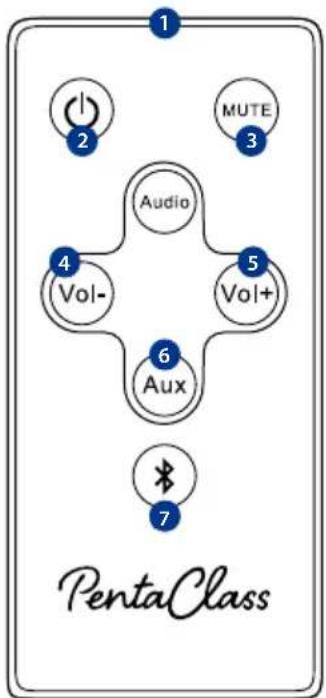
Names of Remote Control Components
1 Infrared Transmitter
2 Power ON/OFF Button
3 Mute Button
4 Volume down Button
5 Volume up Button
6 AUX channel ON/OFF Button
7 Bluetooth channel activation Button
8 Audio Preset
Preparation of remote control
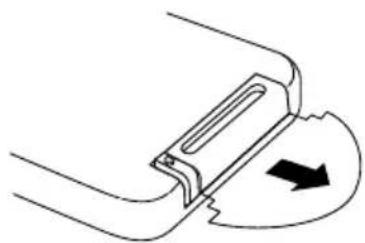
Remove plastic insulating sheet located at the bottom of remote control.
natural_image
Pure diagram of a mechanical component with an arrow indicating direction, no text or symbols presentReplacement Battery Installation
natural_image
Diagram of a mechanical component with arrows indicating direction (no text or symbols)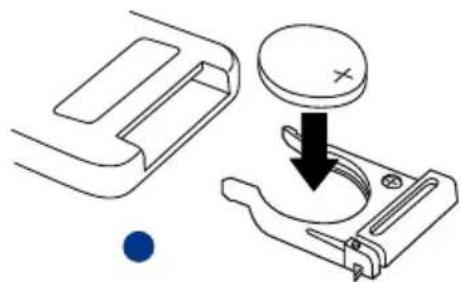
natural_image
Technical diagram showing a mechanical component with a circular component and a downward arrow, no text or symbols present.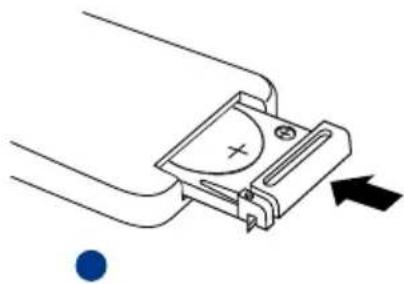
natural_image
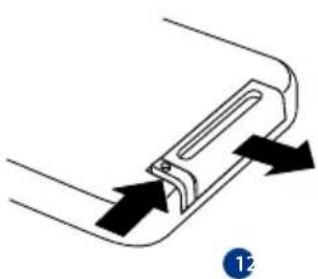
Pure electrical circuit lines without any symbols1 Remove the battery compartment cover by sliding the cover. Pull out the cover.
2 Insert the battery with the polarity "+" facing up.
3 Replace the cover.
CAUTION
- Use only a 3V lithium battery (CR2025).
- Ensure that you have the batteries' polarity (+/−) aligned correctly.
- If the remote control gets wet, wipe it dry immediately.
- Avoid excessive heat and humidity.
- Do not short, heat, or disassemble batteries.
- Do not throw batteries into a fire.
- If you will not be using the remote control for a long time, remove the batteries.
- Dispose of used batteries according to your local regulations.
- Children may ingest small batteries; always keep batteries safe and out of reach of children and pets. WARNING: If a battery is swallowed, consult a doctor immediately as this could result in asphyxiation or be an obstacle to digestion, etc.
Remote control operating range
The remote control uses infrared transmission to control the PentaClass. It is necessary to point the remote directly at the PentaClass. The remote will function well within a radius of about 7 meters (23 feet) and within a 140 degree angle from the PentaClass IR sensor location level. If the PentaClass does not respond to the remote control, move it a little closer.
12 PentaClass Operating Manual
The Runa Microphone
Your Runa Microphone components and button commands
1 Infrared Transmitter
2 Power ON/OFF
Hold Power ON/OFF button for a 3 seconds - Pairs microphone with the PentaClass speaker
3 Arrow Button 1
4 Arrow Button 2
5 LED Indication light
6 Micro USB charging slot
7 2.5mm output for the optional external over-the-ear microphone
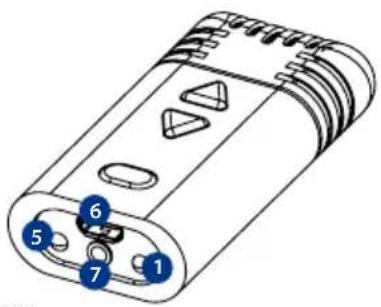
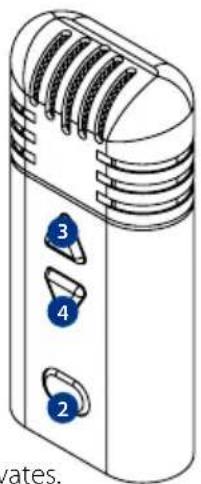
Hold Volume up button together with Power ON/OFF button for 3 seconds - Bluetooth channel activates.
Hold Volume down button together with Power ON/OFF button for 3 seconds - AUX channel ON/OFF activates.
Preparing Your Runa Microphone
Take the microphone from the packaging and charge it before using it for the first time - the charging procedure is described in the next paragraph.
Charging your Runa Microphone Battery
CHARGING PROCEDURE FOR MICROPHONE UNIT
Before using it for the first time, the microphone should be charged accordingly:
- Connect one end of the USB cable to the Micro USB charging slot and connect the other end of the USB cable to the USB charger or your computer.
- If the USB charger is used, connect it to a 100-240V power supply outlet.
A fully charged microphone will last up to 7 hours of use. If microphones are used daily, they should be charged frequently.
It will take up to 3-4 hours for the microphone to obtain a full charge.
MICROPHONE STATUS INDICATION WHILE IT'S CHARGING
• Steady orange - microphone is charging
• Steady green - microphone is fully charged
MICROPHONE STATUS INDICATION WHILE IT'S PAIRED TO THE PENTACLASS
- Blinking green - microphone is paired to the PentaClass
- Blinking red - microphone is paired to the PentaClass, but the battery is running out and it will last up to 30 minutes
- No status indication - microphone is disconnected from the PentaClass, (is not paired), or the Battery has fully discharged
MICROPHONE BATTERY STATUS INDICATION CHECK
It is possible to check the battery level by pushing any button on the microphone:
- If the status indication is green - battery is charged.
- If the status indication is red - battery power is low.
- If there is no status indication - battery is fully discharged.
HOW TO STORE THE RUNA MICROPHONE
The microphone unit has Lithium-polymer battery. Do not store it in extreme temperatures, including, but not limited to, leaving it in the hot sun. Elevated temperature and allowing the battery to sit at the 100% maximum charge for extended periods of time will shorten your battery's life.
The Runa Microphone IR Remote Control Operating Range
Your PentaClass microphone is multifunctional device, it can also be operated as remote control using infrared transmission to control the PentaClass. It is necessary to point the remote directly at the PentaClass.
The remote will function well within a radius of about 7 meters (23 feet) and within a 140 degree angle from the PentaClass IR sensor location level. If the PentaClass does not respond to the remote control, move a little closer.
PentaClass Models
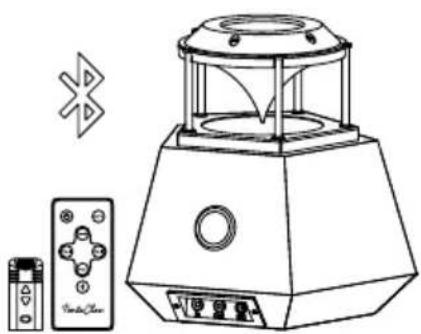
PentaClass A
natural_image
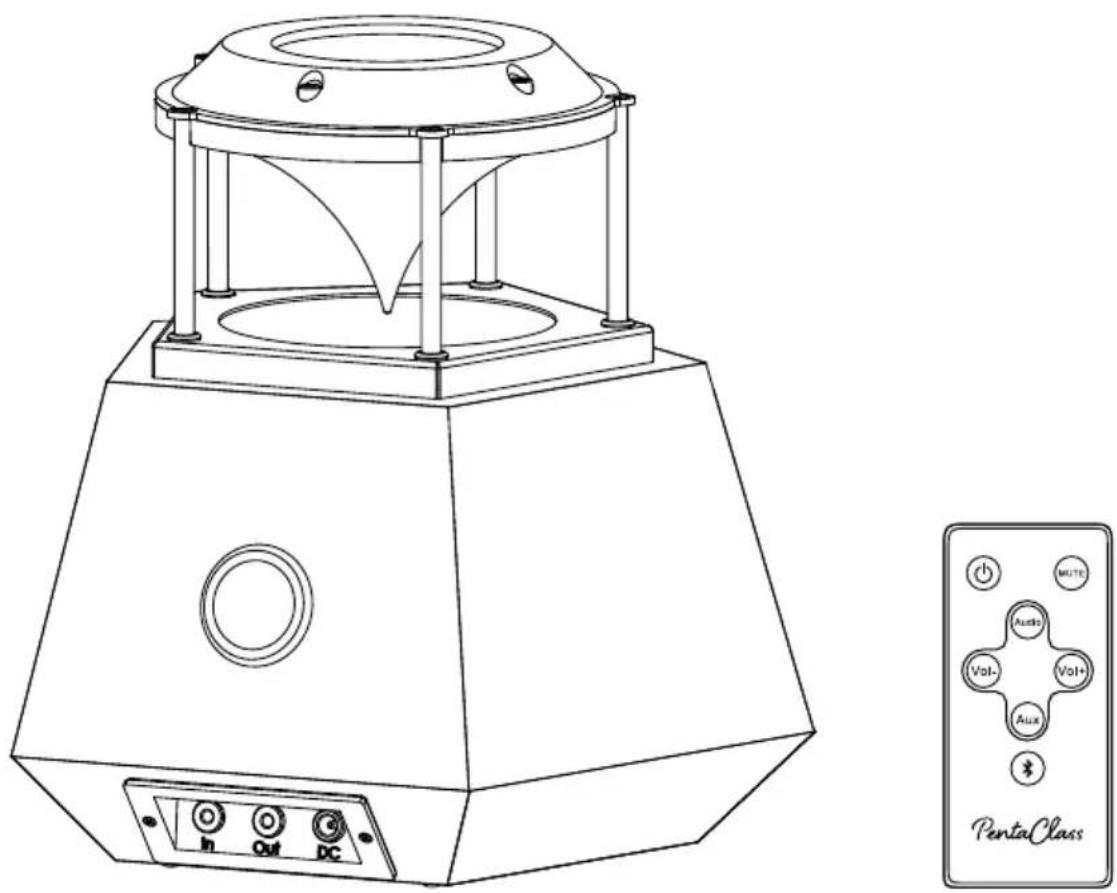
Line drawing of a portable electronic device with control panel and PentaClass remote control (no text or symbols on main body)PentaClass A is a specially designed multimedia system for classrooms with an omnidirectional 360° sound field. This PentaClass A utilizes audio cables for delivering the audio signals to the speaker. It is suitable for classrooms or meeting rooms where there is no need for voice amplification or wireless Bluetooth connectivity.
PentaClass A also is perfect for a daisy chain as slave speaker.
Because the PentaClass is a modular system you can make the following upgrades:
- PentaClass A upgrade to PentaClass AB (Bluetooth version) by ordering the additional Bluetooth Kit (part no. 100111 Bluetooth module).
- PentaClass A upgrade to PentaClass AM, (Microphone version with Bluetooth). Simply purchase the upgrade pack (part no. 106100 Microphone)
- PentaClass A upgrade to PentaClass ABM, (Microphone version with Bluetooth). Simply purchase the Microphone upgrade pack (part no. 106100 Microphone) and Bluetooth Kit (part no. 100111 Bluetooth module).
NOTE
* Upgrades should only be installed by trained dealer personal or authorized repair service.
PentaClass AB
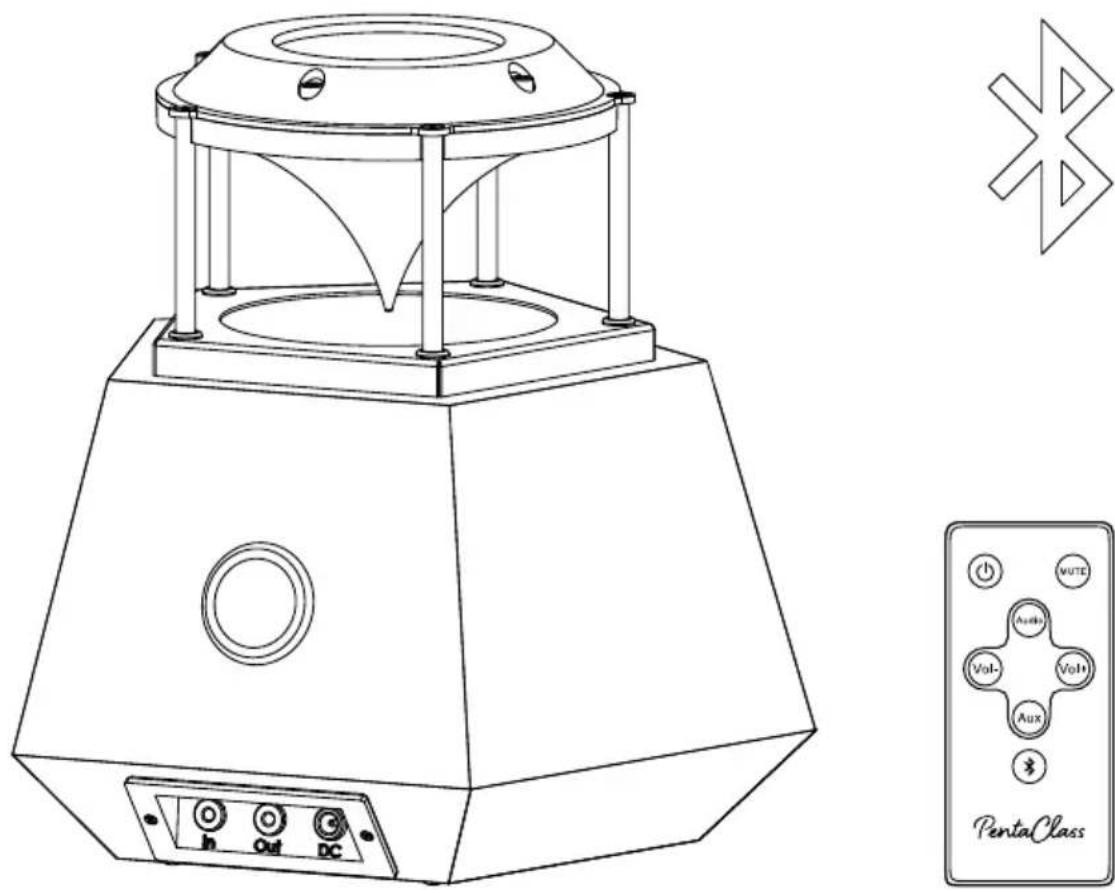
PentaClass AB is a multimedia classroom system with an omnidirectional 360° sound field. It has been designed for both wired and wireless audio connectivity with a Bluetooth audio-ready device. PentaClass AB is the perfect solution for contemporary users using Bluetooth-enabled devices. PentaClass AB is recommended for rooms where voice amplification is unnecessary.
Because the PentaClass is a modular system you can make the following upgrades:
- PentaClass AB upgrade to PentaClass ABM, (Microphone version with Bluetooth). Simply purchase the Microphone upgrade pack (part no. 106100 Microphone).
NOTE
Upgrades should only be installed by trained dealer personal or authorized repair service.
PentaClass ABM
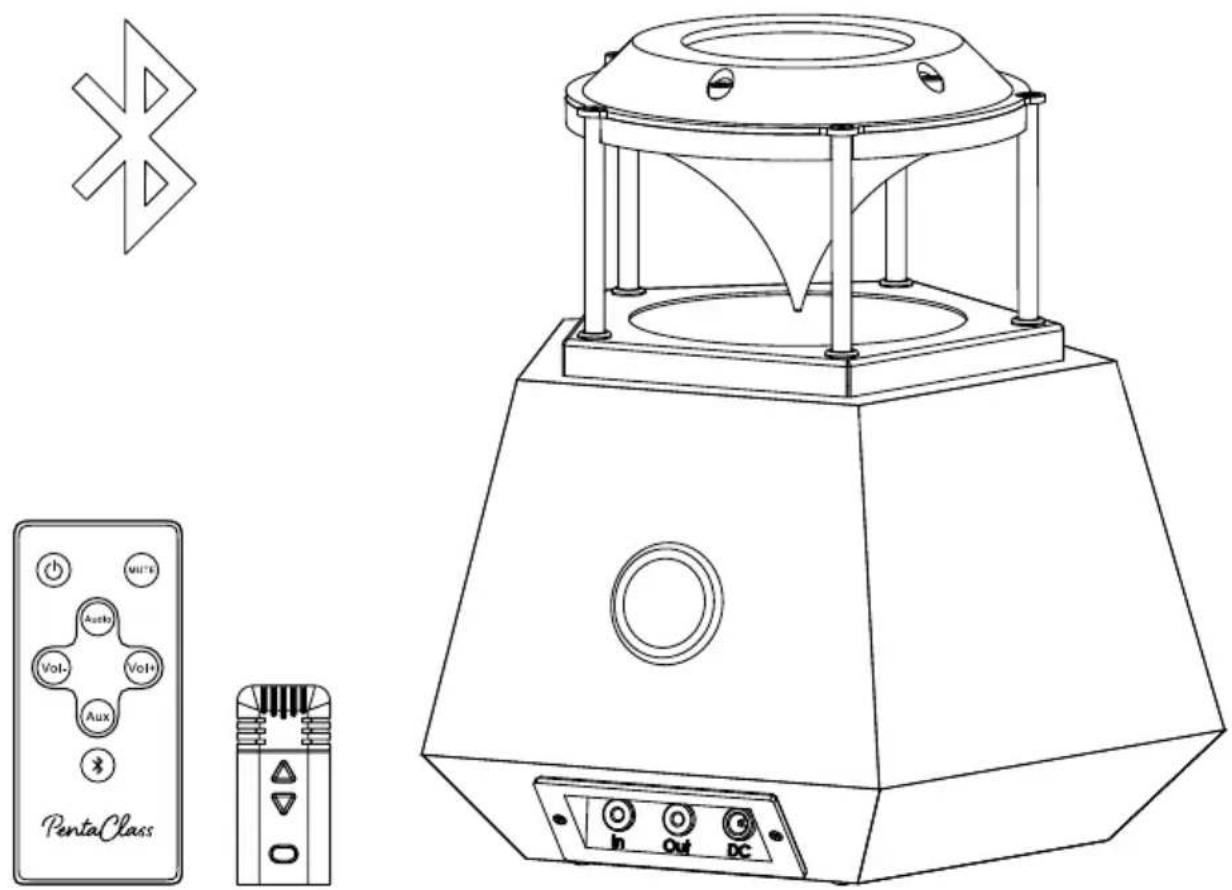
The PentaClass ABM is a fully equipped, 360° omnidirectional audio system with built-in Bluetooth and HD wireless microphone that we call The Runa. The PentaClass ABM is perfect for use in classrooms, conference or meeting rooms.
The wireless 2.4 GHz Runa microphone is designed for comfortable all day use, it's Bluetooth connectivity and many other features allow you to experience all the benefits offered by PentaClass.
The ELMO PentaClass ABM version supports two Runa microphones for simultaneous use - Runa Walnut as the primary microphone and Runa Oak as the secondary. Runa Oak can be purchased separately as an accessory (part no. ECA-RM2)
The ELMO PentaClass A and AB can be upgraded to the Microphone version (ABM) by purchasing the Microphone upgrade pack (part no: ECA-MU).
Runa microphone
PentaClass ABM comes with a thumb-sized microphone/remote control. The smallest speaker's microphone on the market. 60x25x13mm (2.36"x0.79"x0.39"). The microphone weighs just 27 grams (0.95 ounces).
MICROPHONE FEATURES
2-in-1
The microphone has dual functionality - a microphone and a remote control.
FREQUENCY HOPPING
This ensures that only the cleanest frequency bands are automatically selected for the connection between the microphone and PentaClass.
UN-COMPRESSED VOICE
The PentaClass microphone uses a state-of-the-art transmitter and receiver that operate in the 2.4 GHz worldwide license-free band. Thanks to this digital transmission, you get pristine, high-definition voice reproduction.
TWO WEARING OPTIONS
Thanks to its small form factor, the microphone can be worn with a lanyard or clip. Just choose the option that suits you best.
MICROPHONE LANYARD
The Runa microphone lanyard is designed for frequent and comfortable use. Its length is adjustable and has a safety break-away clip.
Please see the pictures describing how to attach the lanyard to the microphone:
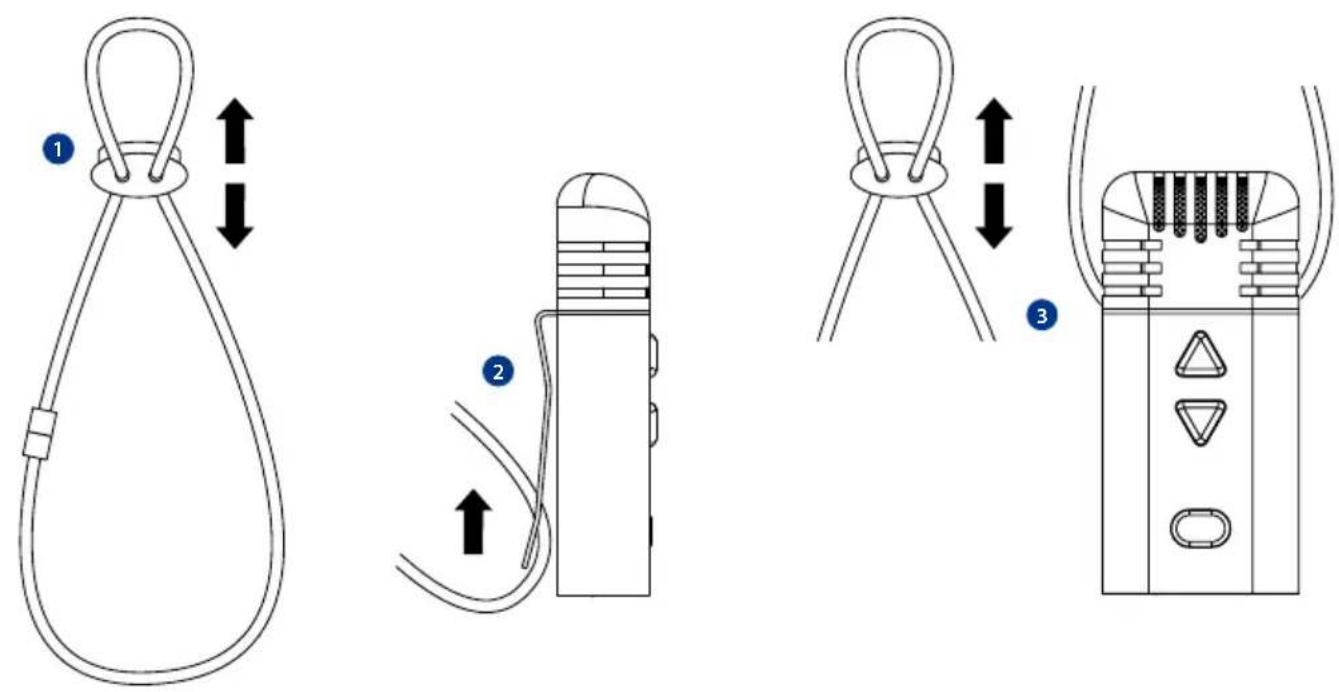
1 Adjust the length by using plastic cord lock.
2 Hang your Runa microphone on the lanyard using the clip.
3 Adjust the length so the microphone would be about 10cm away from mouth.
The safety break-away clip also can be used as a clip for easily taking the lanyard off your neck.
For better microphone performance adjust the microphone lanyard length as short as possible so the microphone is closer to your mouth.
THE RUNA MICROPHONE FUNCTIONS
Your Runa microphone has been designed to be a HD wireless microphone, transceiver and remote control all in one small, beautiful unit.
REMOTE CONTROL FUNCTIONALITY
When your Runa microphone is not paired with the PentaClass speaker, it can function as a remote control for the PentaClass speaker. To send commands to the PentaClass speaker do the following:
1 Point the bottom of your Runa microphone towards your PentaClass Speaker.
2 Push the appropriate buttons on the Runa to send the commands to the PentaClass speaker as described in paragraph 13.
NOTE: Because you are pointing the bottom of the Runa towards the PentaClass speaker in remote control mode, arrow Button 1 serves as Volume down and arrow Button 2 serves as Volume up
MICROPHONE MODE FUNCTIONALITY
When your Runa is functioning as a microphone it will not function as a remote control for the PentaClass speaker. The two arrow buttons on the Runa can raise and lower the volume of the Runa Microphone itself. You will not need to point it towards the PentaClass speaker.
NOTE
In Microphone mode arrow Button 1 serves as Volume Up and arrow Button 2 serves as Volume Down. The center power ON/OFF button disconnects pairing.
NOTE
When your Runa is connected to the PentaClass speaker, the Audio EQ is set to voice preset automatically by default.
Operational Description
Turning on the PentaClass
1 Plug the power adapter into the power input on the PentaClass.
2 Plug the power cord into to a 100-240V AC wall outlet.
3 To start the speaker push the On/Off button on the remote control.
Connectivity
All versions of the PentaClass have different connectivity options, so depending on the PentaClass system you have purchased, please choose the correct one for your PentaClass.
Connecting to Device Using Aux Input
This type of connectivity is available for all PentaClass versions:
1 Connect your audio device, (phone, PC or another), using the 3.5mm mini-jack male/male cable, to the AUX input located on the speaker's connector plate.
2 Start the speaker.
3 Play the audio from your device. Please note - it is recommended that you set the sound level to about 60% on your device to avoid sound distortion. Control the volume by using volume up/down buttons of the PentaClass's remote control.
Connecting to the PentaClass Using Bluetooth
Only PentaClass AB and PentaClass ABM versions have Bluetooth connectivity. The PentaClass A version has no Bluetooth connectivity unless you have upgraded your PentaClass A version with the Bluetooth Kit (part no. 100111 Bluetooth module).
COMMON BLUETOOTH SIGNAL SOURCES
- Mobile phone • Computer
- Tablet • Other device incorporating Bluetooth technology.
To activate Bluetooth by the unit's remote control please do the following:
1 Turn on the speaker.
2 Press the Bluetooth button to activate the Bluetooth channel.
3 The PentaClass speaker Status indicator should start blinking in blue. This command will activate the Bluetooth channel and it will become scanable for Bluetooth devices for 1.5 minutes.
4 In the list of Bluetooth devices on the Settings page of your device please find the Bluetooth device named PentaClass-000000.... (the last 6 symbols will differ as they display the mac address of your PentaClass).
5 Connect your device to the PentaClass Bluetooth channel.
NOTE
- The Bluetooth channel is closed by default for security reasons.
- The Bluetooth channel cannot be opened while the PentaClass is linked to the microphone.
20 PentaClass Operating Manual
- There is no password for the Bluetooth connection.
- Once your Bluetooth device has established a connection to the PentaClass, it will be stored in the PentaClass' memory. The PentaClass will remember your device.
- For security reasons the Bluetooth connection must be activated from your Bluetooth device every time you restart the PentaClass.
- In the event that someone has made an unauthorized connection to the PentaClass, you can erase paired Bluetooth devices from the PentaClass' memory by following these steps: While PentaClass is turned ON, open Bluetooth channel, then push the mute button on the remote, - The PentaClass should display a white light.
- When the PentaClass is connected to an audio source via Bluetooth, the Bluetooth connection disconnects when the microphone sends its pairing command.
Connecting the Runa Microphone to the PentaClass Speaker
MICROPHONE PAIRING
Microphone pairing is designed to be as simple as possible - just press and hold Power ON/OFF button on the mic for a 3 seconds and the system is ready to use. You can use any Runa microphone with any PentaClass system in your school or facility. Just follow these steps:
As long as your PentaClass speaker is plugged into a wall outlet, regardless of your PentaClass' status, whether it is turned On or Off, you can pair it with your Runa microphone.
B Point the bottom of your Runa microphone towards the PentaClass speaker and HOLD the ON/OFF button on the microphone for THREE seconds - The microphone's LED Indication light will illuminate green for 3 seconds and will then change to an orange light which confirms that the command has been sent to the PentaClass.
C Release microphone's On/Off button.
D The status indication light on the top of the PentaClass will light Violet and then Orange or Yellow, (depending on the Aux input status - see Mixer description), followed by 3 short beeps. This indicates that the microphone is paired successfully.
NOTE
- When the PentaClass is connected to the audio source via Bluetooth, the Bluetooth connection will stop when the microphone sends a pairing command.
- You can use multiple PentaClass microphones per building since there is no interference between two rooms / auditoriums next to each other and every microphone pairs point-to-point to the correct PentaClass speaker.
- The Runa microphone's range is 82 feet (25m), and has a frequency hopping feature, but in Wi-Fi busy environments the range can be decreased. Please check carefully to be certain that the local Wi-Fi network doesn't interfere with a paired PentaClass system before installation.
- If the link is lost between the microphone and PentaClass speaker the radio module will try to re-establish the connection within 30 seconds.
To disconnect the microphone from the PentaClass just push the On/Off button on the microphone -> the microphone will disconnect from the PentaClass but the PentaClass will remain ON.
Power Saving Mode
To save on power, the PentaClass audio system has an automatic sleep function that engages after 20 minutes of inactivity. The Runa microphone will go into automatic sleep mode when it is not linked to the PentaClass speaker for a 1 minute.
Channel Mixer and Status Indication
System status indication
System status indication is a feature that allows you to determine your PentaClass' status. The indicator light is located on the top of the PentaClass speaker. Following are the various colors and the status they represent.
LIST OF SYSTEM STATUS INDICATION LIGHTS:
- None - PentaClass is turned OFF.
- Any color - PentaClass is tuned ON.
- White - indicates that the PentaClass settings are being reset or that it has just been plugged in to a power outlet but is not yet turned ON.
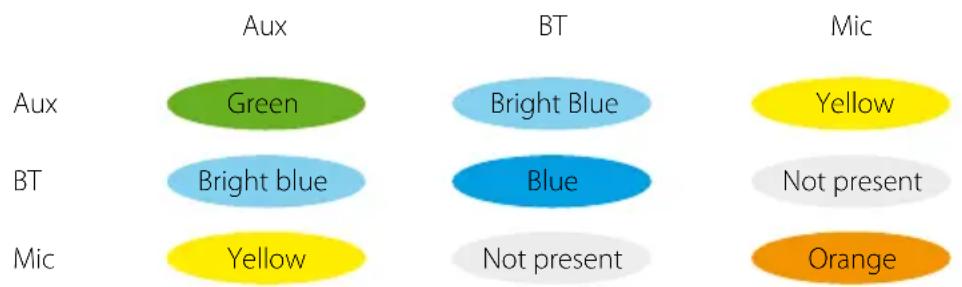
- Green - default status indication that denotes the PentaClass is turned ON and the AUX channel is opened.
- Red - Indicates that the AUX channel is turned off. It is recommended that you close the AUX channel when the PentaClass is connected to a long audio cable that produces a buzzing sound when the cable is not connected to an audio source.
- Blue - The PentaClass is connected to a Bluetooth device and the AUX channel is turned Off.
- Orange - The microphone is connected to the PentaClass and the Aux channel is turned Off.
- Bright Blue - The PentaClass is connected to a Bluetooth device and the AUX channel is turned On.
- Yellow - The microphone is connected to the PentaClass and the Aux channel is turned On.
- Violet - Indicates that the PentaClass is receiving an IR, (Infrared), signal from the remote control unit.
- Blinking any colour - Mute function is activated.
There is also an Audio preset visual signal described on (> page 24).
Channel Mixer
MIXER STATUS INDICATION
The PentaClass can mix 2 channels simultaneously:
- Aux in + Bluetooth (AB and ABM models only)
- Aux in + Microphone (ABM model only)
The Aux in channel can be turned off by pressing the AUX button on the remote control ( page 12).
To display the status of any channel activity, every channel has its own color indication displayed on the top of the PentaClass speaker:
heatmap
| | Aux | BT | Mic | | ------ | ---- | ---- | ---- | | Aux | Green| Bright Blue | Yellow | | BT | Bright blue | Blue | Not present | | Mic | Yellow| Not present | Orange |NOTE
Bluetooth and microphone channels cannot be operated simultaneously to avoid conflicting signals.
Volume Adjustment
There are two methods of adjusting volume:
1 Primary PentaClass amplifier volume adjustment - this can be controlled by using the remote control or microphone volume up and down buttons
2 Audio source and microphone volume adjustment - This can be controlled by the audio source device or the microphone.
NOTE
- When the PentaClass amplifier exceeds 80% of it's volume the bass is automatically decreased to prevent audio distortion.
- It's recommended you set your audio source volume to about 60% and then control the PentaClass's volume by using the remote control.
- When the PentaClass is turned On for the first time, or after reconnecting to a power outlet, the volume resets to the default level. Be careful to decrease your audio source volume level to prevent speaker damage before turning on the PentaClass speaker.
- The PentaClass has DRC - Dynamic Range Compression which helps prevent the speaker from being damaged if the music volume becomes too high.
CAUTION
Protect your hearing: Do not listen to the PentaClass at full volume for a long period of time.
Feedback Cancellation
For better performance it is recommended that you locate the PentaClass speaker as far away as possible from the person using the microphone. If you get distracting feedback from the PentaClass speaker just reduce the microphone volume. In some environments where loud sound near the person speaking is unavoidable it is recommended that you use the optional unidirectional external over-the-ear microphone. This comfortable over-the-ear microphone can be connected to your Runa microphone by plugging it into the 2.5mm audio input located at the bottom of your Runa microphone. When the external microphone is being used the Runa serves as a tiny wireless microphone transceiver and can be put conveniently into your pocket if you wish.
Audio Presets
This function allows you to select pre-equalized audio settings. The PentaClass has 4 audio presets for various usage scenarios and better sound performance:
- Multimedia - is the default preset tuned for multimedia as such as videos or movies
• Voice - tuned for voice frequency
• Music - tuned for music listening - Bass - tuned to emphasize low frequencies
To indicate the active preset the PentaClass status indicator will flash a particular number of times to denote the chosen preset when you are switching between presets:
- Multimedia x 1 • Music x 3
- Voice x 2 • Bass mode x 4
System Reset
Bluetooth Reset
You can erase a paired Bluetooth enabled device from the PentaClass by following these steps:
A While PentaClass is turned ON, open the Bluetooth channel (> page 20) - The System indicator will blink blue.
B Then push the mute button (> page 11), - Your PentaClass will display a white light that confirms the Bluetooth reset has been successful.
After resetting the Bluetooth settings, all paired devices will be erased from the Bluetooth module memory. After a Bluetooth reset on the PentaClass you will be need to delete the previously paired PentaClass device in your mobile phone, iPad, tablet or other Bluetooth enabled device.
To pair your Bluetooth enabled device again just repeat the simple Bluetooth pairing steps (> page 20).
System Setting Reset
You can reset your PentaClass system settings to the factory default by following these steps:
A Be sure the PentaClass is turned OFF, (Status indicator is not illuminated), but the PentaClass is connected to a power outlet.
B While the PentaClass is turned OFF push the Bluetooth channel activation button on the remote control (> page 11), - The PentaClass will display a white light.
Your PentaClass has now been reset to its factory settings.
Installation Determine Speaker Location
The PentaClass speaker has three options for installation:
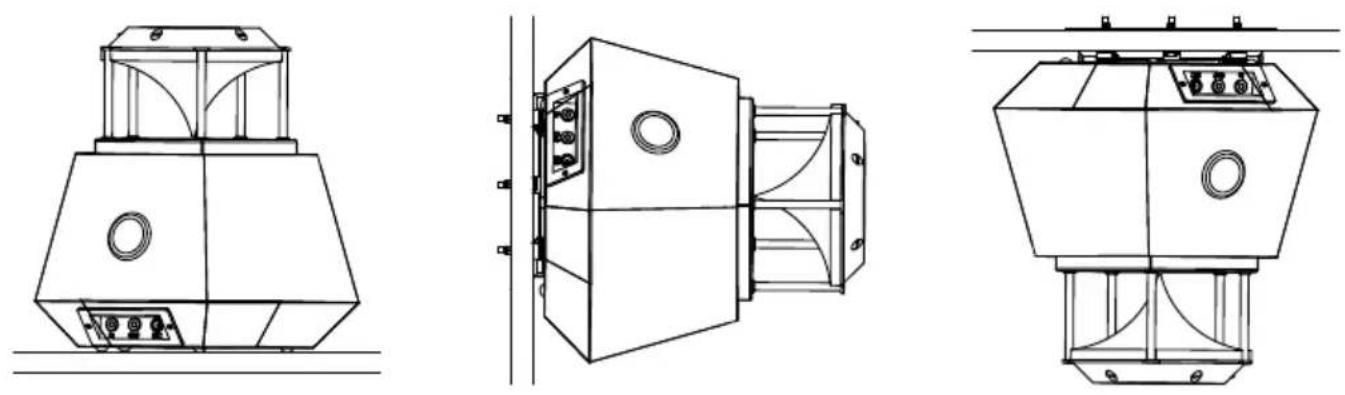
Place it on the table. Mount it on a wall. Mount it on the ceiling.
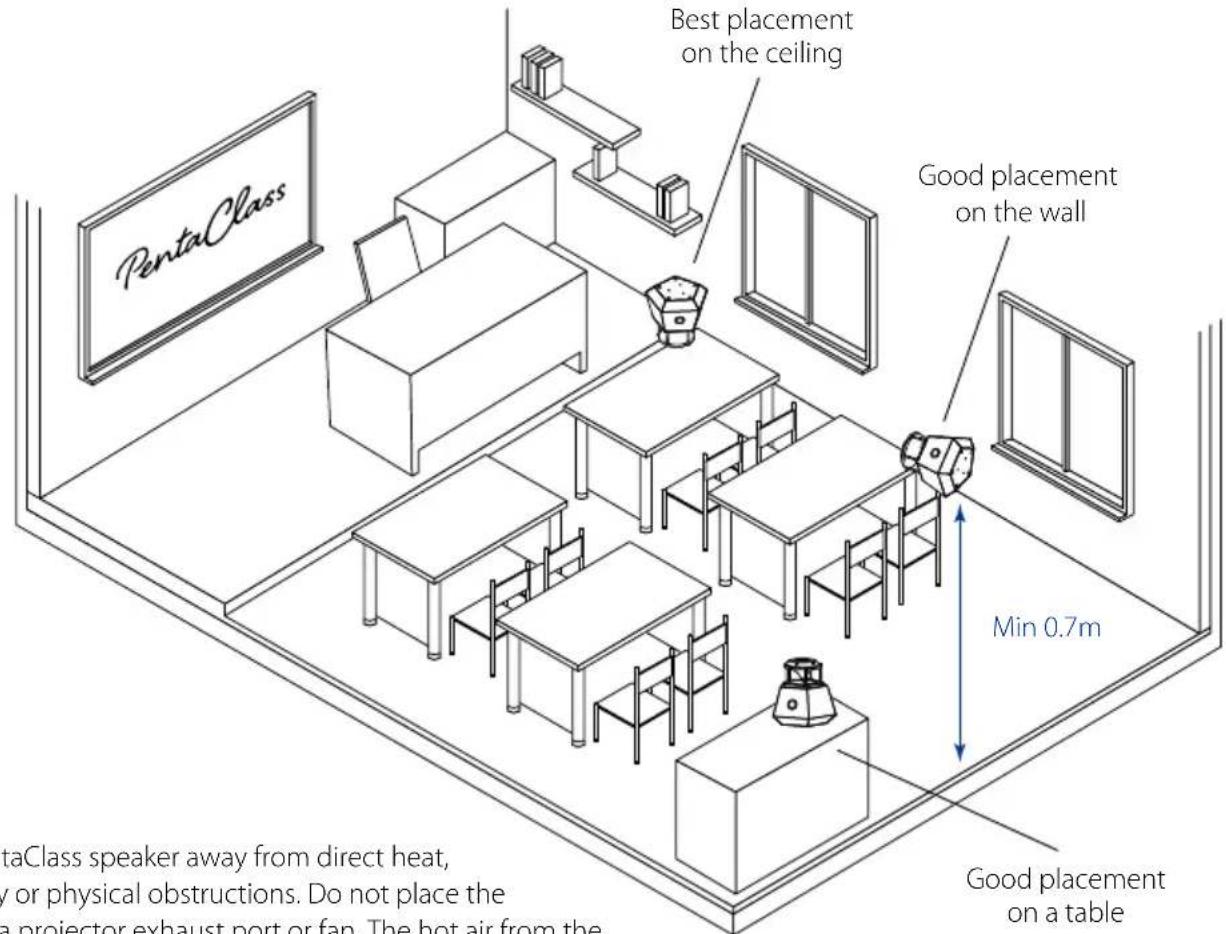
The PentaClass speaker should be placed on a surface at least 0.7 meter, (2.5'), from the floor. Choose a location as far as possible away from the speaker who will be using the microphone, (PentaClass ABM model). Choose a location with the clearest direct line of sight, without obstacles such as furniture, walls, people, etc. between the PentaClass speaker and the microphone for best performance. We recommend placing or mounting your PentaClass speaker in the middle of the room where people are seated. If you like you can choose a location near the projector in order to share the same power source.
NOTE
Place the PentaClass speaker away from direct heat, high humidity or physical obstructions. Do not place the speaker near a projector exhaust port or fan. The hot air from the projector can cause overheating and failure of your PentaClass speaker.
Instalation materials / tools needed
- Drill with 4 and 6mm bit
- Screw driver
• Flange and Ceiling Bracket - Safety wire
- Anchors: Needed for mounting on drywall (3x)
- Screws: M4x14, Countersunk head screw DIN 965 (3x)
- Screws: wood screws or screws appropriate for anchors (3x)
- For False ceiling: Plate for false ceiling, M4x30, Countersunk head screw DIN 965 (3x) and M4 ISO7040 Nylon (5x)
Safety Rules for Installation

Use the suspension wire to be sure the speaker is installed safely.
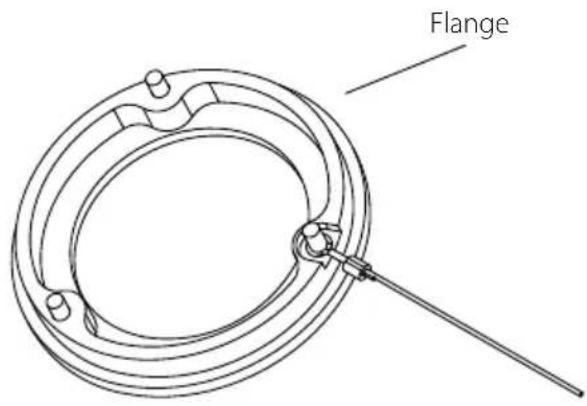
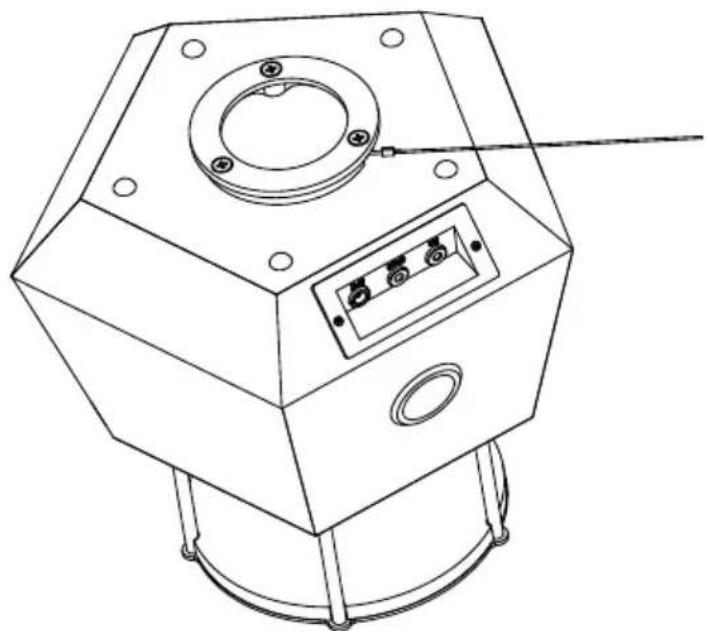
Always attach the safety wire to the speaker as shown in the picture below. Affix the safety wire to a secured location like a pipe or embedded hook.
natural_image
Technical line drawing of a mechanical device with mounting flange and control panel (no text or symbols)Mounting on the ceiling
1 Use the ceiling bracket as a template to mark the holes on the surface.
2 If installing on concrete, drill three holes with a 6mm or 0.24" diameter drill and plug in dowels (anchors).
3 Fasten the ceiling bracket using the appropriate screws for the ceiling surface material, (i.e.; wood, metal or plaster screws).
4 Use screws M4x14, Countersunk head screw DIN 965 (3x) to fasten flange to the speaker.
5 Insert the groove of the flange into the bracket.
6 When the PentaClass is inserted into the bracket, turn the PentaClass so that the power and audio cables can be inserted easily.
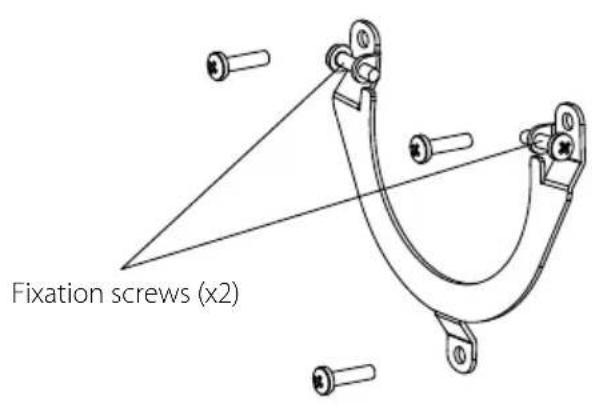
7 Tighten the two fixation screws from sides.
8 Use the safety wire to be sure the PentaClass speaker will not fall.
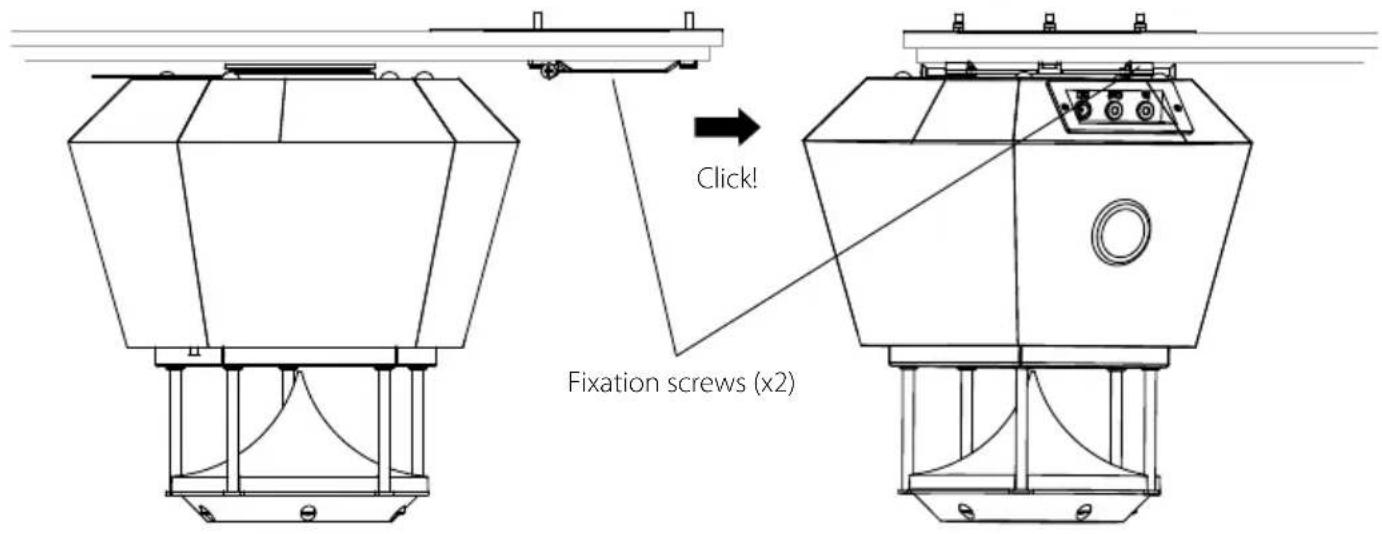

Always attach the safety wire to the speaker as shown in the picture on page 26. Carefully attach the other end of the safety wire to secure surface with the proper fixation screw.
Mounting Procedure for a Suspended Ceiling
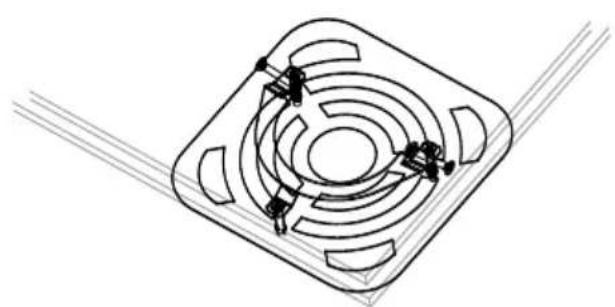
1 Use the Ceiling Plate as a template to mark hole locations on the suspended ceiling tile.
PLEASE NOTE
Position the ceiling plate along the corner of the ceiling tile.
2 Drill three holes in ceiling tile with 4mm or 0.157" diameter drill.
3 Fasten ceiling bracket to the ceiling plate by using screws M4x30.
4 Use screws M4x14, Countersunk head screw DIN 965 (3x) to fasten flange to the speaker.
5 Put the suspended ceiling tile back in place.
6 Insert the groove of the flange into the bracket.
7 When the PentaClass is inserted into the bracket, turn the PentaClass to the best position for inserting the power and audio cables.
8 Tighten two fixation screws from the sides.
9 Use the safety wire to insure that the PentaClass speaker is secure.
natural_image
Isometric technical drawing of a square mechanical component with concentric circular features and mounting holes (no text or symbols)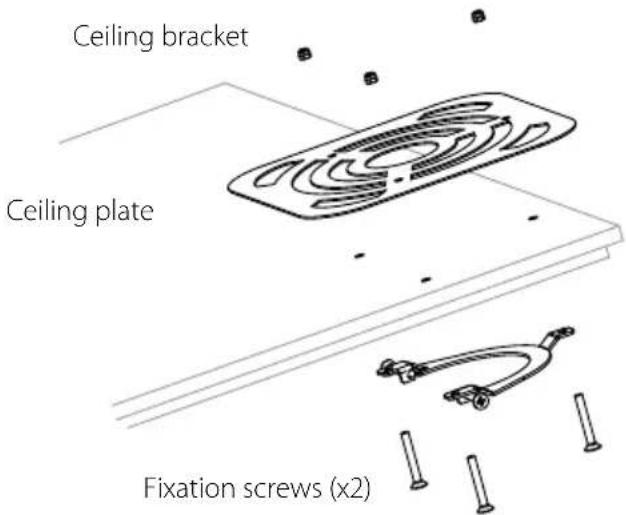

Always attach the safety wire to the speaker as shown in the picture in page 26. Carefully affix the other end of the safety wire to a secure surface with the proper fixation screw.
Mounting procedure for wall
1 Use the ceiling bracket as a template to mark the holes in the surface.
2 If installing on concrete, drill three holes with 6mm or 0.24" diameter drill bit and plug in dowels (anchors).
3 Fasten the bracket using the appropriate screws for the wall surface material, (i.e.; wood, metal or plaster screws).
4 Use screws M4x14, Countersunk head screw DIN 965 (3x) to fasten flange to the speaker.
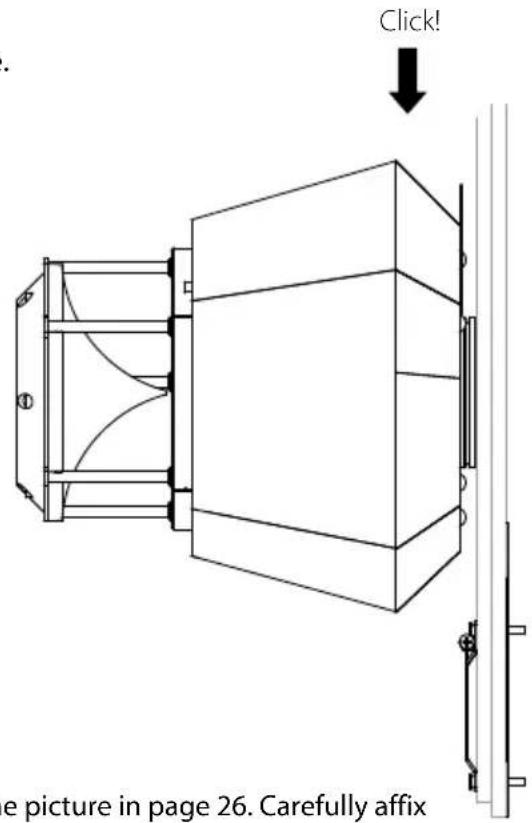
5 Insert the groove of the flange into the bracket, (as shown in the picture in page 28).
6 When the PentaClass is inserted into the bracket, turn the PentaClass to the best position for inserting the power and audio cables.
7 Tighten the two fixation screws from the side.
8 Use the safety wire to insure that the PentaClass speaker is secure.

Always attach the safety wire to the speaker as shown in the picture in page 26. Carefully affix the other end of the safety wire to a secure surface with the proper fixation screw.

Low Voltage Connection
The speaker has AUX IN and AUX OUT 3.5 mm female connectors and a DC connector. First insert the power cable into the power input on the PentaClass. Then insert the audio cables if required. Your PentaClass can be connected to a variety of different A/V devices. Please use only high quality stereo/mono cables, (3.5 mm mini jacks), when connecting your audio source equipment. Input voltage for the PentaClass speaker is: 18-19VDC, 2.2 A. Use only an original PentaClass power supply unit.

High Voltage Connection
If applicable do not connect the PentaClass speaker to the power supply until the ceiling installation is completed! Use only a genuine PentaClass power supply unit. The supply unit input voltage is: 100-240VAC, 1A.
Daisy Chaining
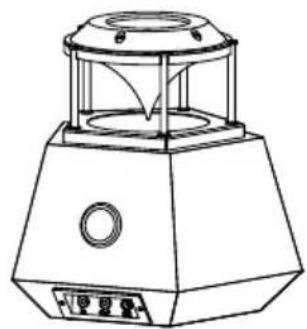
Optionally you can connect several PentaClass speakers in daisy chain by using the AUX channel. Choose one PentaClass speaker to be the master unit. Plug your source audio cable into the audio input of this unit. It is recommended that you do not connect more than 3 speakers in daisy chain.
CONNECTING PROCEDURE FOR DAISY CHAINING
- Use audio cables to connect the speakers to each other. Use the in and out ports on the speakers as shown in the pictures.
• Each speaker requires a separate DC power adapter. - Reset of all the speakers to the default settings, (see the resetting procedure).
- Turn on the speakers using the remote control unit.
natural_image
Technical line drawing of a portable electronic device with control panel and antenna (no text or symbols)Master Slave Slave
natural_image
Line drawing of a mechanical device with a dome-shaped top and control panel (no text or symbols)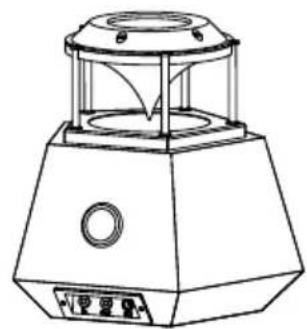
natural_image
Technical line drawing of a mechanical device with a circular top and hexagonal base (no text or symbols)CONTROL OF DAISY CHAINED UNITS
One remote control can be used to control the daisy chained units. Please note that if you point the remote control towards the one PentaClass it can send IR commands to another PentaClass as well.
The volume for all daisy chained PentaClass speakers can be adjusted simultaneously by adjusting the audio source device's volume.
Troubleshooting
Most common Problems and Solutions
No sound is coming out of the PentaClass
- Please make sure the system is turned on and that the status indicator light on the top of the PentaClass is illuminated.
- Be sure that the power supply of the speaker is connected correctly.
Cannot connect the microphone
- Please check the battery status of the mic. Most mic problems are related to low battery levels in the microphone.
Low volume
- Check the volume level of the PentaClass speaker. Increase the volume from your audio source device.
Feedback
• Decrease the volume level.
- Increase the distance between the speaker and microphone.
Signal Connection Problems
- Check the AUX connections cables, plugs and ports. Be sure all connections are tight and that the cables are not damaged anywhere.
Remote control doesn't work
- Check the batteries of the remote control - replace the battery if necessary.
- Check the battery status of the microphone - charge if necessary.
Pentaclass Technical specification
| Frequency Response | 40 Hz - 20 kHz |
| Output | 45 W @ 8 Ω |
| Loudness | 88 dB |
| Inputs | 1 x AUX, 3.5 mm stereo |
| Output | 1 x AUX, 3.5 mm stereo, mixed |
| Power Requirements | 110V/240V AC 50-60Hz 1A |
| Power saving mode | Auto turn OFF after 20 min. inactivity |
| Status indication | Indication of exact status of PentaClass |
| Amplifier | Class D, 44 100 kHz sample rate, 24 bit resolution, digital audio processor (DAP), dynamic range compression (DRC), soft mute |
| Mixer | Two channel mixer: 1) Mixes AUX input channel with Bluetooth (AB and ABM models), and AUX input channel with microphone (ABM model) |
| Control | Infrared remote control with 7 buttons (Speaker power on/off, Mute, Audio presets, Speaker volume up, Speaker volume down, AUX on/off, Bluetooth on/off (enabled for AB and ABM models) |
| Built in equalizer presets | Speech, Multimedia, Music, Mega bass |
| Acoustics | Omni-directional, plywood sound box, fine tuned port. Designed for rooms up to 1291 sq ft (120 m2). |
| Dimensions (W x H x D) | 9.45 x 9.45 x 9.06 inch (24 x 24 x 23 cm) |
| Weight | 6.61 lbs (3 kg) |
| Mounting | Universal wall/ceiling mount for drop and concrete ceilings supplied |
| Included accessories | Power supply, power cord, remote control, wall / ceiling mount, user manual |
AUDIO INPUT / OUTPUT ELECTRICAL CHARACTERISTICS
| Aux In Input Impedance | 29 kΩ |
| Maximal Aux In Input Level | 2.83 Vpp |
| Aux Out Output Impedance | 320 Ω |
| Typical LINE OUT Output level (0 dB @ 10 kW load) | 2.61 Vpp |
BLUETOOTH SPECIFICATION (AB and ABM models)
| Bluetooth version | Version 2.1 + EDR, Class 2 |
| Data rates | Up to 3 Mbps (over the air) |
| Frequency range | 2402 - 2480 MHz |
| Range | Up to 82 feet (25 meters) |
| Receive Sensitivity | Better than -86 dBm |
| Wireless Specification | 802.11 b/g |
| Profiles | A2DP |
| Audio codec support | SBC, AAC and apt-X for high quality audio applications |
2.4 GHZ MICROPHONE RECEIVER (only in ABM model)
| Frequency band | ISM 2.4GHz |
| Audio Transmission | Un-Compressed audio transmission 44,1 kHz 16bit |
| Frequency range | 2400 - 2483.5 MHz, 18 channel adaptive frequency hopping |
| Range | Up to 82 feet (25 meters) |
RUNA MICROPHONE SPECIFICATION (only in ABM model)
| Frequency band | ISM 2.4GHz |
| Audio Transmission | Un-Compressed audio transmission 44,1 kHz 16bit |
| Frequency range | 2400 - 2483.5 MHz, 18 channel adaptive frequency hopping |
| Range | Up to 82 feet (25 meters) |
| Audio Level control | Manual and AGC (Auto Gain Control) |
| Signal to noise ratio (typical) | 74 dB |
| Power | Built in rechargeable Li-Po battery |
| Battery life with full charge (active mode) | 7 hours |
| Recharging time | up to 4 hours |
| Microphone IR range | 23 feet (7 meters) |
| Status indication | RG LED |
| Dimensions (W x H x D) | 1.18 x 2.6 x 0.55 inch (3.0 x 6.5 x 1.4 cm) |
| Weight | 0.98 oz (28g ) |
| Charger | USB 5V 1A |
| Connectivity | Micro USB - charging and firmware upgrade, 2.5mm audio input - external microphone connection |
| Power Requirements | 110V/240V AC 50-60Hz 1A |
| Control in remote control mode | Infrared remote control built in with 3 multifunctional buttons (Speaker power on/off, Mute, Audio presets, Speaker volume up, Speaker volume down, AUX on/off, Bluetooth on/off ) |
| Control in microphone control mode | 3 multifunctional buttons (Microhone on/off, Mute, Microhone volume up, Microhone volume down) |
| Wearing options | Lanyard or clip |
| Included accessories | 1x USB Charger, 1x Lanyard, 1x USB-micro USB Cable |
Features and specifications are subject to change without prior notice.
Regulatory
FCC compliance statement
Changes or modifications not expressly approved by the party responsible for compliance could void the user's authority to operate the equipment.
This equipment has been tested and found to comply with the limits for a Class A digital device, pursuant to part 15 of the FCC Rules. These limits are designed to pro-vide reasonable protection against harmful interference when the equipment is operated in a commercial environment.
This equipment generates, uses, and can radiate radio frequency energy and, if not installed and used in accordance with the instruction manual, may cause harmful interference to radio communications. Operation of this equipment in a residential area is likely to cause harmful interference in which case the user will be required to correct the interference at his own expense.
FCC RF Exposure Information for PentaClass
This equipment complies with the FCC RF radiation exposure limits set forth for an uncontrolled environment. This equipment should be installed and operated with a minimum distance of 20 centimeters between the radiator and your body.
This transmitter must not be co-located or operating in conjunction with any other antenna or transmitter.
FCC RF Exposure Information (SAR) for Runa microphone
Microphone Runa has been tested and meets applicable limits for radio frequency (RF) exposure. Specific Absorption Rate (SAR) is a measure of the rate at which energy is absorbed by the human body when exposed to a radio frequency. The SAR limit is 1.6 watts per kilogram in countries that set the limit averaged over 1 gram of tissue and 2.0 watts per kilogram in countries that set the limit averaged over 10 grams of tissue.
During Testing, Runa was placed into Test Mode at maximum duty cycle transmissions using software commands. The product was tested in the mode which produced the highest conducted power. Product was tested with the back side of it while wearing a clip placed in positions that simulate RF exposure in usage near the body with the separation 0.0cm.
For this device, the highest reported SAR value for near the body is 0.134 Watts per kilogram. The FCC has granted an Equipment Authorization for this model device with all reported SAR levels evaluated as in compliance with the FCC RF exposure guidelines. SAR information on this model device is on file with the FCC and can be found under the Display Grant section of fcc.gov/oet/ea/fccid after searching on FCC ID: 2AFZR-CTPR2
Canadian regulatory statement
This Class A digital apparatus complies with Canadian ICES-003.
This device complies with Industry Canada licence-exempt RSS standard(s). Operation is subject to the following two conditions: (1) this device may not cause interference, and (2) this device must accept any interference, including interference that may cause undesired operation of the device.
CE Confirmation of compliance
The PentaClass models A, AB, and ABM has been manufactured in accordance with following directive:
• 2004/108/EG EMC Directive Electromagnetic Compatibility (EMC-directive)
• 2006/95/EC Low Voltage Directive (LVD).
It has been manufactured in accordance with the following harmonized standards, or parts therefore:
• EN 60950; EN 60065; EN 55032.
SAFETY
The device is labelled with CE label, which means that the device and its associated documentation meet the requirements of Low Voltage Directive (LVD).
CONVERSION OF THE DEVICE
If the device is converted or supplemented with parts that the manufacturer does not approve, this declaration of conformity will not apply to the parts which alter the function of the device.
If the device is upgraded or converted, it is very important to ensure that this instruction manual is also updated immediately to include any new illustrations, photographs and text.
DEVICE IDENTITY
If the device is upgraded or converted, it is very important to ensure that this instruction manual is also updated immediately to include any new illustrations, photographs and text.
Notes
PentaClass
hear. understand.
www.elmousa.com