PSHTCM88 - Camcorder Pyle - Free user manual and instructions
Find the device manual for free PSHTCM88 Pyle in PDF.


| Product Type | Camcorder |
| Brand | Pyle |
| Model | PSHTCM88 |
| Dimensions | 120 x 70 x 50 mm |
| Weight | 300 g |
| Power | Rechargeable Li-ion battery (3.7V, 1000mAh) |
| Video Resolution | 1280x720 (HD) at 30fps |
| Photo Resolution | 5 MP (interpolated) |
| Storage | microSD card up to 32GB |
| Display | 2.7" TFT LCD |
| Lens | Fixed focus, f/3.0 |
| Zoom | 4x digital zoom |
| Connectivity | USB 2.0, HDMI output |
| Night Vision | Built-in IR LED |
| Image Stabilization | Electronic |
| Recording Format | AVI |
| Battery Life | Approx. 1.5 hours |
| Charging | via USB |
| Tripod Mount | Yes |
| Main Functions | Video recording, photo capture, playback, webcam mode |
| Maintenance | Clean lens with soft cloth; avoid moisture |
| Safety | Do not expose to extreme temperatures |
| Spare Parts | Battery, USB cable, user manual |
| General Information | Suitable for beginners, portable design |
Frequently Asked Questions - PSHTCM88 Pyle
User questions about PSHTCM88 Pyle
0 question about this device. Answer the ones you know or ask your own.
Ask a new question about this device
Download the instructions for your Camcorder in PDF format for free! Find your manual PSHTCM88 - Pyle and take your electronic device back in hand. On this page are published all the documents necessary for the use of your device. PSHTCM88 by Pyle.
USER MANUAL PSHTCM88 Pyle
Digital Night Vision Viewer with
Camera, Video and Playback PSHTCM88
natural_image
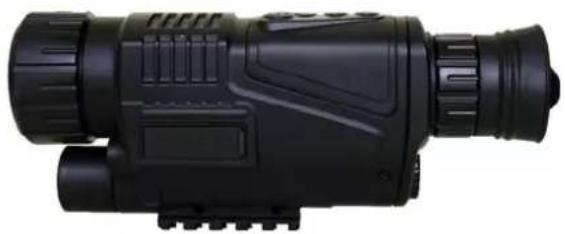
Black-and-white photo of a mounted optical device with dual lenses and a lens (no visible text or symbols)www.pyleaudio.com
Instruction Manual
PSHTCM88
PSHTCM88
Contents
Digital Night Vision Viewer
Operating Manual
Model: PSHTCM88
【Contents】
Introduction 3
Operating Hints 4
Components Introduction 5
Operating Instructions 7
Battery Installation 7
Power On 8
Power Off 8
Scenery Observation 9
Brightness Adjustment 10
Photo Shooting 13
Playback 14
Video Shooting 16
Contents
Monitors Connection 17
PCs Connection 17
Auto Power Off 17
Power management 18
Basic Parameters 19
Configuration Standard 21
Operating Environment and Announcements ······ 22
Introduction
natural_image
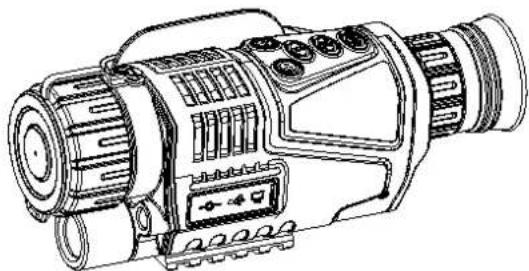
Line drawing of a mounted optical device with multiple lenses and a control panel (no text or symbols)- It is a night vision viewer which can be used to observe objects in the dark and low light situation. Two lighting modes are available to use. The viewing distance in the low light environment will be at infinity, 700 feet, viewing distance in the dark environment.
● Easy to exchange data with other instruments, having USB, AV OUT and DC IN sockets.
3
PSHTCM88
Components Introduction

1 - Objective Cover
2 - Objective Focusing Wheel
3 - High Beam Light
4 - Socket Door
5 - DC 5V
6 - USB2.0
7 - Video/Audio Output Connector
8 - Tripod Receptacle
9 - Battery Cover
10 - Diopter Ring
11 - Eyecup
5
Operating Hints
- It can be used normally in the day or night, with photo shooting, video shooting, playback and other functions. 5X Optical Zoom and 8X digital Zoom.
- It is the best auxiliary tool of extending human's visual senses.
【Operating Hints】
● It is a night vision viewer which can be used to observe objects in the dark and low light situation. Two lighting modes are available to use.
● It is suitable to use in full dark environment.
● Turn the auxiliary light on to observe the objects when it works in the dark situation. Adjusting the brightness by the distance of the objects. CCD is utilized in this viewer. If there is any light resource existing, the auxiliary light cannot be turned on, please adjust the focal distance only to get the sharp image of objects.
● Operating time: 1 hour under auxiliary light mode; 1.5 hours without using auxiliary light mode.
4
PSHTCM88
Components Introduction
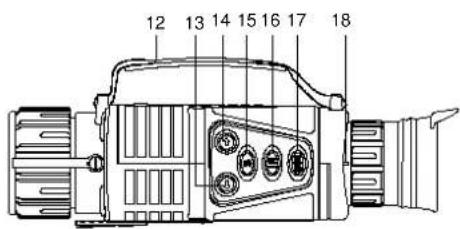
12 - Hand Grip Strap
13 - Up
14 - Down
15- Functions(for photos shooting, video shooting and playback)
16 - Auxiliary Lighting/Brightness Adjustment
17 - POWER/FUNCTION
18 - Diopter Dial
6
Operating Instructions
● Turn the battery cover down; insert one battery correctly

natural_image
Technical line drawing of a mechanical device with lenses and gears (no text or symbols)(note the negative electrodes face down) insert and turn the cover back into position. Turn the viewer on, the screen will light up if the battery is installed correctly. Otherwise, please reinstall the battery again or tighten the cover again.
【Announcements】
Ensure the model of battery is correct;
Ensure the electric Volts and Amps match;
Pay attention to the anode and the cathode of the battery.
7
PSHTCM88
Operating Instructions
● Take the objective cover down, observing the screen from eyecup #11.
-
Adjust the diopter ring #10 until to get the sharp images
-
Adjust the objective focusing wheel #2 to make the images to be sharpest and easy to observe then.
● Automatic fine-tuning control of display brightness could be operated by Viewer.
● Digital zoom could be realized by pressing #13 and #14 ranged at 1x to 8x.
- If the environment is light enough, turn the auxiliary light off to save the power. On the contrary, please turn the auxiliary light on to get the sharpest image to observe
● Otherwise, please turn the auxiliary light on.
【Announcements】
Don't block the light resource.
9
Operating Instructions
【Power On】
● Take the objective cover down.
● Long press #19 for 3 seconds to light screen up, observing from Eyecup #11, if the screen is lit up a normally, the viewer c
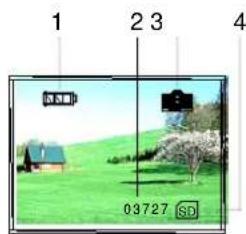
- Icons Instructions:
1 Battery
2 Images Size
3 Current Mode: Photo Shooting Mode
4 Internal Memory Check
● The Observing (Photo Shooting) Mode is available to use after the startup.
natural_image
Scenic outdoor scene with green fields, houses, and a tree, no visible text or symbols【Power Off】
- In any mode, long press #17 for 3 seconds to turn it off.
8
PSHTCM88
Operating Instructions
- In the observing mode, press #16.
- Enter the menu of brightness adjustment. Just as the screen showed, the number after "Bright" means the current brightness index.
- Press #15 to heighten the index and #16 to lower it. 9 means the highest brightness of display. The index ranged at 1 to 9, 9 means the brightest index.

Brightness Adjustment
In the observing mode, press #16 twice to enter the high beam adjustment menu.
The screen will be just as the picture showed.
The index of LAMP shows the intensity of auxiliary light.

High Beam Adjustment
10
Operating Instructions
- Press UP #14, DOWN #15, the high beam will be changed ranged at 0 to 9(9-highest, 0-off).
- When the high beam function is opened, the menu is exited, LAMP shows on the screen will be flickering.
11
Operating Instructions
【Announcements】
On any mode above, the menu will disappear and return to observing (photo shooting) mode if there is no operation within 8 seconds.
Please turn the auxiliary light off if you will not be using it to save the battery.
12
PSHTCM88
Operating Instructions
【Photo Shooting】
● Enter the observing mode automatically after the viewer is turned on and in this mode, you can take the pictures of the scenery.
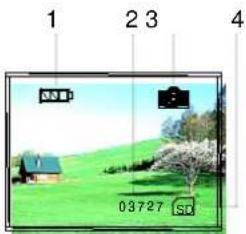
natural_image
Digital camera interface showing a rural landscape with houses, trees, and a green field (no readable text or symbols)Icons Instructions:
1 Battery
2 Images Size
3 Current Mode: Photo Shooting Mode
4 Internal Memory Check
- press #17 to shoot a photo and the photo will be saved automatically in the internal memory.
- The image size is based on the surplus capacity of internal memory.
13
PSHTCM88
Operating Instructions
【Playback】
- In the Observing (Shooting) mode, press #15 to enter the Playback function.
- Icons
Instructions(photo):
- Battery
- The serial number
- Playback mode
-
Internal Memory Check Icons Instructions(video):
-
Battery
- Date
- Timecounting
- Current serial No.
- Playback Mode
- Video Playback Mode
- VGA Video Format
- Internal Memory Check
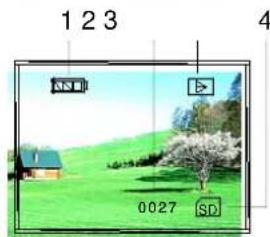
natural_image
Game interface screenshot showing a landscape scene with a house, a tree, and a play button (no readable text or symbols)Photos Playbank


Video Playback
Operating Instructions
- In the playback mode, press #13 and #14 to view the photos and videos. The playback order is based on the shooting mode.
● To identify photos and videos and it will be entered different menus automatically. - In the video playback mode, press#17 to start the video and press again to stop it.
15
PSHTCM88
Operating Instructions
Connect monitor to video Output Interface. Long press #15 for 3 seconds to switch the display on the screen of external monitor.
【PCs Connection】
The viewer is equipped with USB2.0 interface. The PC can identify and detect the internal memory automatically and transfer images. The battery can be charged by connection of USB.
【Auto Power Off】
The viewer will be turned off if there is not any operation within 3 minutes except in video shooting and playback mode.
17
Operating Instructions
【Video Shooting】
- In the observing mode, press #17 twice to enter the video shooting mode.
Icons Instructions:
- Battery
- Timing
- Video Shooting
- Internal Memory Check

- Press #17 to start video shooting.
● The video will be saved in memory automatically.
● The video size is based on the surplus capacity internal memory.
16
PSHTCM88
Power Management
Model: 16340, 650mAh, 3.7V. Please ensure the battery should be charged 10 hours to make it works best in the first time.
【External Power】
Plug the DC IN 5V in.
The viewer will work continuously and won't be powered off automatically.
The viewer could be charged when the external power connected.
【Announcements】
The battery of viewer is in the state of charging when it is connected to your PC.
18
Basic Parameters
【Basic Parameters】
| Type Items Index | ||
| Optical Performance | Magnification 5 | |
| Dimension of Objectives | 40mm | |
| Field of View 5° x3.75° | ||
| The Range of Ocular Adjustment | ± 0.6 | |
| Observing Distance(Low Light Environment) | 6ft~∞ | |
| Observing Distance(Full Dark Environment) | ~700ft | |
19
Basic Parameters
| Power | Voltage 3. | 7V DC |
| Replaceable Battery | Rechargeable Battery | |
| Charging Source | 5.0V/2A Adapter | |
| Other | Measurement (L ×W×H) | 200 x 86 x 56 mm |
| Weight 14 | oz. |
20
PSHTCM88
Configuration Standard
【Configuration Standard】
| Items Amount | |
| video cable 1 | |
| USB cable 1 | |
| Pouch 1 | |
| External power adapter | |
| Operating Manual | 1 |
| Hand grip Strap 1 | |
| battery | 1 |
| Cloths | 1 |
【Operating Environment and Announcements】
The viewer should be kept in the soft pouch. Operating temperature ranged at 20\~104*F. Relative humidity is 80%.
In order to avoid the unit getting wet and mildew, please keep it in the clear and dry environment. Avoid direct impacts, excessive pressure and solar radiation please.
When image vibration or jitter happens or the LCD will not be light up, please charge the battery immediately.
Blow away the dusts before wiping the optical surface.
If the viewer won't be used for a long time, please charge the battery occasionally to avoid long term damage.
- Contents
- 【Contents】
- Introduction
- Components Introduction
- Operating Hints
- 【Operating Hints】
- Operating Instructions
- 【Announcements】
- 【Power On】
- 【Power Off】
- 【Photo Shooting】
- Icons Instructions:
- 【Playback】
- 【PCs Connection】
- 【Auto Power Off】
- 【Video Shooting】
- Power Management
- 【External Power】
- Basic Parameters
- Configuration Standard
- 【Operating Environment and Announcements】
Brand : Pyle
Model : PSHTCM88
Category : Camcorder