
WH18DYA - Drill HiKOKI - Free user manual and instructions
Find the device manual for free WH18DYA HiKOKI in PDF.


| Product Type | Cordless Angle Impact Driver |
| Model | WH18DYA |
| Brand | HiKOKI |
| Power Source | Battery (Lithium-ion) |
| Rated Voltage | 14.4 V – 18 V |
| Battery Compatibility | HiKOKI BSL18 series (1.5 Ah – 8.0 Ah) |
| Charger Model | UC18YFSL |
| Charging Time (approx.) | 22 min (1.5 Ah) to 120 min (8.0 Ah) at 20°C |
| No-Load Speed | 0 – 2,900 min⁻¹ (estimated) |
| Impact Rate | 0 – 3,200 min⁻¹ (estimated) |
| Maximum Tightening Torque | 135 N·m (estimated) |
| Drive Size | Hex. 6.35 mm (1/4 inch) |
| Weight | Approx. 1.5 kg (with battery, estimated) |
| Dimensions (L × W × H) | Approx. 280 × 70 × 200 mm (estimated) |
| Features | LED light, variable speed trigger, forward/reverse rotation, lock button, remaining battery indicator |
| Safety Features | Overheat protection, over-discharge protection, overload protection |
| Included Accessories | Battery charger (UC18YFSL), driver bit, carrying case (may vary by region) |
| Maintenance | Clean with soft dry cloth; inspect bit and screws regularly; store below 40°C |
| Warranty | Standard HiKOKI warranty (check local terms) |
Frequently Asked Questions - WH18DYA HiKOKI
User questions about WH18DYA HiKOKI
0 question about this device. Answer the ones you know or ask your own.
Ask a new question about this device
Download the instructions for your Drill in PDF format for free! Find your manual WH18DYA - HiKOKI and take your electronic device back in hand. On this page are published all the documents necessary for the use of your device. WH18DYA by HiKOKI.
USER MANUAL WH18DYA HiKOKI
natural_image
Line drawing of a handheld device with a circular frame, no text or symbols present
en Handling instructions
zh 使用說明書
ko 취급 설명서
viHướng dẫn sử dụng
th คู่มือการใช้งาน
id Petunjuk pemakaian
③ar 提ليمات المعالجة
1

natural_image
Diagram of a handheld device with a hand holding a tool, showing internal components and a dashed outline (no text or symbols)2
3
4
5


6
7
GENERAL POWER TOOL SAFETY WARNINGS

WARNING
Read all safety warnings and all instructions.
Failure to follow the warnings and instructions may result in electric shock, fi re and/or serious injury.
Save all warnings and instructions for future reference.
The term “power tool” in the warnings refers to your mains-operated (corded) power tool or battery-operated (cordless) power tool.
1) Work area safety
a) Keep work area clean and well lit. Cluttered or dark areas invite accidents
b) Do not operate power tools in explosive atmospheres, such as in the presence of fl ammable liquids, gases or dust. Power tools create sparks which may ignite the dust or fumes.
c) Keep children and bystanders away while operating a power tool. Distractions can cause you to lose control.
2) Electrical safety
a) Power tool plugs must match the outlet. Never modify the plug in any way.
Do not use any adapter plugs with earthed (grounded) power tools.
Unmodified plugs and matching outlets will reduce risk of electric shock.
b) Avoid body contact with earthed or grounded surfaces, such as pipes, radiators, ranges and refrigerators. There is an increased risk of electric shock if your body is earthed or grounded.
c) Do not expose power tools to rain or wet conditions. Water entering a power tool will increase the risk of electric shock.
d) Do not abuse the cord. Never use the cord for carrying, pulling or unplugging the power tool. Keep cord away from heat, oil, sharp edges or moving parts.
Damaged or entangled cords increase the risk of electric shock.
e) When operating a power tool outdoors, use an extension cord suitable for outdoor use. Use of a cord suitable for outdoor use reduces the risk of electric shock.
f) If operating a power tool in a damp location is unavoidable, use a residual current device (RCD) protected supply.
Use of an RCD reduces the risk of electric shock.
3) Personal safety
a) Stay alert, watch what you are doing and use common sense when operating a power tool. Do not use a power tool while you are tired or under the influence of drugs, alcohol or medication.
A moment of inattention while operating power tools may result in serious personal injury.
b) Use personal protective equipment. Always wear eye protection.
Protective equipment such as dust mask, non-skid safety shoes, hard hat, or hearing protection used for appropriate conditions will reduce personal injuries.
c) Prevent unintentional starting. Ensure the switch is in the off position before connecting to
power source and/or battery pack, picking up or carrying the tool.
Carrying power tools with your fi nger on the switch or energising power tools that have the switch on invites accidents.
d) Remove any adjusting key or wrench before turning the power tool on.
A wrench or a key left attached to a rotating part of the power tool may result in personal injury.
e) Do not overreach. Keep proper footing and balance at all times.
This enables better control of the power tool in unexpected situations.
f) Dress properly. Do not wear loose clothing or jewellery. Keep your hair, clothing and gloves away from moving parts.
Loose clothes, jewellery or long hair can be caught in moving parts.
g) If devices are provided for the connection of dust extraction and collection facilities, ensure these are connected and properly used.
Use of dust collection can reduce dust-related hazards.
4) Power tool use and care
a) Do not force the power tool. Use the correct power tool for your application.
The correct power tool will do the job better and safer at the rate for which it was designed.
b) Do not use the power tool if the switch does not turn it on and off.
Any power tool that cannot be controlled with the switch is dangerous and must be repaired.
c) Disconnect the plug from the power source and/or the battery pack from the power tool before making any adjustments, changing accessories, or storing power tools.
Such preventive safety measures reduce the risk of starting the power tool accidentally.
d) Store idle power tools out of the reach of children and do not allow persons unfamiliar with the power tool or these instructions to operate the power tool.
Power tools are dangerous in the hands of untrained users.
e) Maintain power tools. Check for misalignment or binding of moving parts, breakage of parts and any other condition that may affect the power tool's operation.
If damaged, have the power tool repaired before use.
Many accidents are caused by poorly maintained power tools.
f) Keep cutting tools sharp and clean.
Properly maintained cutting tools with sharp cutting edges are less likely to bind and are easier to control.
g) Use the power tool, accessories and tool bits etc. in accordance with these instructions, taking into account the working conditions and the work to be performed.
Use of the power tool for operations different from those intended could result in a hazardous situation.
5) Battery tool use and care
a) Recharge only with the charger specified by the manufacturer.
A charger that is suitable for one type of battery pack may create a risk of fire when used with another battery pack.
b) Use power tools only with specifically designated battery packs.
Use of any other battery packs may create a risk of injury and fire.
c) When battery pack is not in use, keep it away from other metal objects, like paper clips, coins, keys, nails, screws or other small metal objects, that can make a connection from one terminal to another.
Shorting the battery terminals together may cause burns or a fire.
d) Under abusive conditions, liquid may be ejected from the battery; avoid contact. If contact accidentally occurs, fl ush with water. If liquid contacts eyes, additionally seek medical help.
Liquid ejected from the battery may cause irritation or burns.
6) Service
a) Have your power tool serviced by a qualified repair person using only identical replacement parts.
This will ensure that the safety of the power tool is maintained.
PRECAUTION
Keep children and infi rm persons away.
When not in use, tools should be stored out of reach of children and infi rm persons.
CORDLESS ANGLE IMPACT DRIVER SAFETY WARNINGS
Hold power tool by insulated gripping surfaces, when performing an operation where the fastener may contact hidden wiring. Fasteners contacting a "live" wire may make exposed metal parts of the power tool "live" and could give the operator an electric shock.
ADDITIONAL SAFETY WARNINGS
-
This is a portable tool for tightening and loosening screws, bolts and nuts. Use it only for these operation.
-
One-hand operation is extremely dangerous; hold the unit firmly with both hands when operating.
-
After installing the driver bit, pull lightly out the bit to make sure that it does not come loose. If the bit is not installed properly, it can come loose during use, which can be dangerous.
-
Use the bit that matches the screw.
-
Make sure to securely hold the tool during operation. Failure to do so can result in accidents or injuries.
-
Make sure that the battery is installed firmly. If it is as all loose it could come off and cause an accident.
-
Preparing and checking the work environment. Make sure that the work site meets all the conditions laid forth in the precautions.
-
Do not allow foreign matter to enter the hole for connecting the rechargeable battery.
-
Never disassemble the rechargeable battery and charger.
-
Never short-circuit the rechargeable battery. Short-circuiting the battery will cause a great electric current and overheat. It results in burn or damage to the battery.
-
Do not dispose of the battery in fire. If the battery is burnt, it may explode.
-
Bring the battery to the shop from which it was purchased as soon as the post-charging battery life becomes too short for practical use. Do not dispose of the exhausted battery.
-
Do not insert object into the air ventilation slots of the charger. Inserting metal objects or inflammables into the charger air ventilation slots will result in electrical shock hazard or damaged charger.
-
Check the actual tightening torque with a toruqe wrench.
-
Stop the tool before switching the direction of rotation. Always release the switch and wait for tool to stop before switching the direction of rotation.
-
Never touch the turning part. Do not allow the turning part section to get near your hands or any other part of your body. You could be cut or caught in the turning part. Also, be careful not to touch the turning part after using continuously it for a long time. It gets quite hot and could burn you.
-
Please use the designated attachments which are listed in the operations manual and HiKOKI's catalog. Accidents or injuries could result from not doing so.
-
Make sure to firmly install the attachments in the anvil. If the attachments is not firmly installed it might come out and cause injuries.
After installing the driver bit, pull lightly out the bit to make sure that it does not come loose during use. If the guide sleeve does not return to its original position, then the bit is not installed properly.
-
Resting the unit after continuous work.
-
The use of the battery in a cold condition (below 0 degree Centigrade) can sometimes result in the weakened tightening torque and reduced amount of work. This, however, is a temporary phenomenon, and returns to normal when the battery warms up.
-
Do not touch the metal parts, as it gets very hot during continuous work.
-
Do not look directly into the light. Such actions could result in eye injury.
Wipe off any dirt or grime attached to the lens of the LED light with a soft cloth, being careful not to scratch the lens.
Scratches on the lens of the LED light can result in decreased brightness.
CAUTION ON LITHIUM-ION BATTERY
To extend the lifetime, the lithium-ion battery equips with the protection function to stop the output.
In the cases of 1 to 3 described below, when using this product, even if you are pulling the switch, the motor may stop.
This is not the trouble but the result of protection function.
-
When the battery power remaining runs out, the motor stops. In such a case, charge it up immediately.
-
If the tool is overloaded, the motor may stop. In this case, release the switch of tool and eliminate causes of overloading. After that, you can use it again.
-
If the battery is overheated under overload work, the battery power may stop.
In this case, stop using the battery and let the battery cool. After that, you can use it again.
Furthermore, please heed the following warning and caution.
WARNING
In order to prevent any battery leakage, heat generation, smoke emission, explosion and ignition beforehand, please be sure to heed the following precautions.
- Make sure that swarf and dust do not collect on the battery.
- During work make sure that swarf and dust do not fall on the battery.
○ Make sure that any swarf and dust falling on the power tool during work do not collect on the battery.
○ Do not store an unused battery in a location exposed to swarf and dust.
Before storing a battery, remove any swarf and dust that may adhere to it and do not store it together with metal parts (screws, nails, etc.).
-
Do not pierce battery with a sharp object such as a nail, strike with a hammer, step on, throw or subject the battery to severe physical shock.
-
Do not use an apparently damaged or deformed battery.
English
- Do not use the battery in reverse polarity.
- Do not connect directly to an electrical outlets or car cigarette lighter sockets.
- Do not use the battery for a purpose other than those specified.
- If the battery charging fails to complete even when a specified recharging time has elapsed, immediately stop further recharging.
- Do not put or subject the battery to high temperatures or high pressure such as into a microwave oven, dryer, or high pressure container.
- Keep away from fi re immediately when leakage or foul odor are detected.
- Do not use in a location where strong static electricity generates.
- If there is battery leakage, foul odor, heat generated, discolored or deformed, or in any way appears abnormal during use, recharging or storage, immediately remove it from the equipment or battery charger, and stop use.
- Do not immerse the battery or allow any fluids to flow inside. Conductive liquid ingress, such as water, can cause damage resulting in fi re or explosion. Store your battery in a cool, dry place, away from combustible and fl ammable items. Corrosive gas atmospheres must be avoided.
CAUTION
- If liquid leaking from the battery gets into your eyes, do not rub your eyes and wash them well with fresh clean water such as tap water and contact a doctor immediately.
If left untreated, the liquid may cause eye-problems. - If liquid leaks onto your skin or clothes, wash well with clean water such as tap water immediately.
There is a possibility that this can cause skin irritation. - If you find rust, foul odor, overheating, discolor, deformation, and/or other irregularities when using the battery for the first time, do not use and return it to your supplier or vendor.
WARNING
If a conductive foreign matter enters in the terminal of lithium ion battery, the battery may be shorted, causing fire. When storing the lithium ion battery, obey surely the rules of following contents.
- Do not place conductive debris, nail and wires such as iron wire and copper wire in the storage case.
To prevent shorting from occurring, load the battery in the tool or insert securely the battery cover for storing until the ventilator is not seen.
REGARDING LITHIUM-ION BATTERY TRANSPORTATION
When transporting a lithium-ion battery, please observe the following precautions.
WARNING
Notify the transporting company that a package contains a lithium-ion battery, inform the company of its power output and follow the instructions of the transportation company when arranging transport.
○ Lithium-ion batteries that exceed a power output of 100 Wh are considered to be in the freight classification of Dangerous Goods and will require special application procedures.
☐ For transportation abroad, you must comply with international law and the rules and regulations of the destination country.

SYMBOLS
WARNING
The following show symbols used for the machine. Be sure that you understand their meaning before use.
 | WH18DYA: Cordless Angle Impact Driver |
 | To reduce the risk of injury, user must read instruction manual. |
 | Direct current |
 | Rated voltage |
 | No-load speed |
 | Oscillation per minute |
 | Impact rate |
 | Small screw |
 | Ordinary bolt |
 | High tension bolt |
| MT Tightening torque (Maximum) | |
 | Hex. drive size |
 | Weight |
 | Switching ON |
 | Switching OFF |
 | Disconnect the battery |
 | LED light switch |
 | Clockwise rotation |
 | Counterclockwise rotation |
 | Battery capacity |
 | Remaining battery indicator switch |
| [CSH4] | The battery remaining power is nearly empty. Recharge the battery soonest possible |
| [77S2] | The battery remaining power is a half. |
| [4V23] | The battery remaining power is enough. |
 | Warning |
STANDARD ACCESSORIES
In addition to the main unit (1 unit), the package contains the accessories listed on page 49.
Standard accessories are subject to change without notice.
APPLICATIONS
Driving and removing of machine screws, wood screws, tapping screws, etc.
SPECIFICATIONS
The specifications of this machine are listed in the Table on page 49.
NOTE
Due to HiKOKI's continuing program of research and development, the specifications herein are subject to change without prior notice.
CHARGING
Before using the power tool, charge the battery as follows.
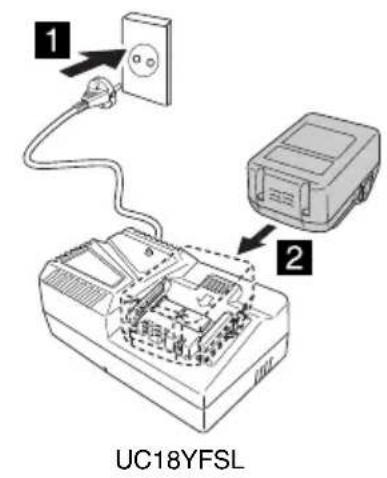
- Connect the charger's power cord to the receptacle.
When connecting the plug of the charger to a receptacle, the pilot lamp will blink in red (At 1-second intervals).
- Insert the battery into the charger.
Firmly insert the battery into the charger as shown in Fig. 2 (on page 2).
- Charging
When inserting a battery in the charger, charging will commence and the pilot lamp will light continuously in red.
When the battery becomes fully recharged, the pilot lamp will blink in red. (At 1-second intervals) (See Table 1)
● Pilot lamp indication
The indications of the pilot lamp will be as shown in Table 1, according to the condition of the charger or the rechargeable battery.
Table 1
| Indications of the pilot lamp | ||||
| Pilot lamp(red) | Before charging | Blinks | Lights for 0.5 seconds. Does not light for 0.5 seconds. (off for 0.5 seconds) | |
| While charging Lights | Lights continuously | |||
| Charging complete | Blinks | Lights for 0.5 seconds. Does not light for 0.5 seconds. (off for 0.5 seconds) | ||
| Overheat standby | Blinks | Lights for 1 second. Does not light for 0.5 seconds. (off for 0.5 seconds) | Battery overheated. Unable to charge. (Charging will commence when battery cools) | |
| Charging impossible | Flickers | Lights for 0.1 seconds. Does not light for 0.1 seconds. (off for 0.1 seconds) | Malfunction in the battery or the charger | |
● Regarding the temperatures and charging time of the battery.
The temperatures and charging time will become as shown in Table 2.
Table 2
| Battery\Charger | UC18YFSL | |
| Charging voltage V 14.4 - 18 | ||
| Weight kg 0.5 | ||
| Temperatures at which the battery can be recharged | 0°C - 50°C | |
| Charging time for battery capacity, approx. (At 20°C) | ||
| 1.5 Ah | min | 22 |
| 2.0 Ah | min | 30 |
| 2.5 Ah | min | 35 |
| 3.0 Ah | min | 45 |
| 4.0 Ah | min | 60 |
| 5.0 Ah | min | 75 |
| 6.0 Ah | min | 90 |
| 8.0 Ah | min | 120 |
| Number of battery cells 4 - 10 | ||
NOTE
The recharging time may vary according to temperature and power source voltage.
CAUTION
When the battery charger has been continuously used, the battery charger will be heated, thus constituting the cause of the failures. Once the charging has been completed, give 15 minutes rest until the next charging.
4. Disconnect the charger's power cord from the receptacle.
5. Hold the charger firmly and pull out the battery.
NOTE
Be sure to pull out the battery from the charger after use, and then keep it.
CAUTION
○ If the battery is charged while it is heated because it has been left for a long time in a location subject to direct sunlight or because the battery has just been used, the pilot lamp of the charger lights for 1 second, does not light for 0.5 seconds (off for 0.5 seconds). In such a case, first let the battery cool, then start charging.
When the pilot lamp flickers (at 0.2-second intervals), check for and take out any foreign objects in the charger's battery connector. If there are no foreign objects, it is probable that the battery or charger is malfunctioning. Take it to your authorized Service Center.
○ Since the built-in micro computer takes about 3 seconds to confirm that the battery being charged with charger is taken out, wait for a minimum of 3 seconds before reinserting it to continue charging. If the battery is reinserted within 3 seconds, the battery may not be properly charged.
○ If the pilot lamp does not blink in red (every second) even though the charger cord is connected to the power, it indicates that the protection circuit of the charger may be activated.
Remove the cord or plug from the power and then connect it again after 30 seconds or so. If this does not cause the pilot lamp to blink in red (every second), please take the charger to the HiKOKI Authorized Service Center.
PRIOR TO OPERATION
○ Setting up and checking the work environment
Check if the work environment is suitable by the above precautions.
MOUNTING AND OPERATION
| Action | Figure | Page |
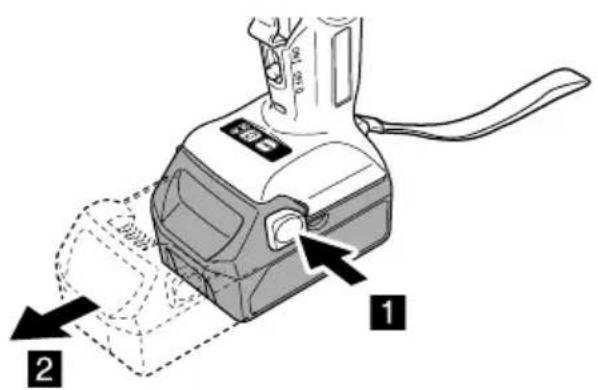
| Removing and inserting the battery | 1 | 2 |
| Charging | 2 | 2 |
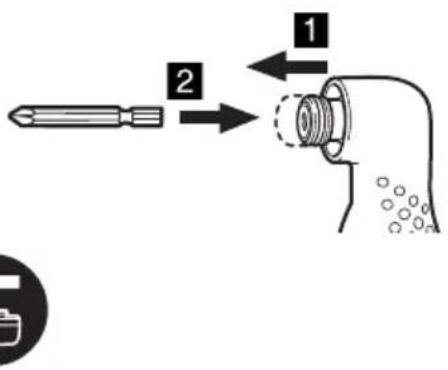
| Mounting the bit*1 | 3 | 2 |
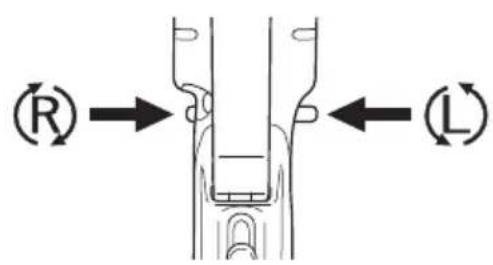
| Reversing the rotational direction | 4 | 2 |
| Switch operation*2 | 5 | 3 |
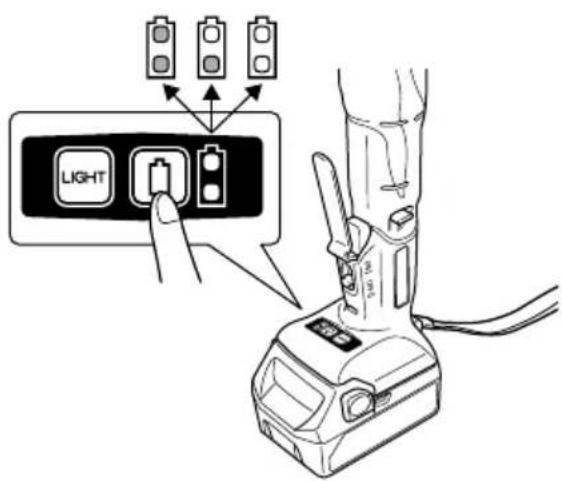
| Remaining battery indicator*3 | 6 | 3 |
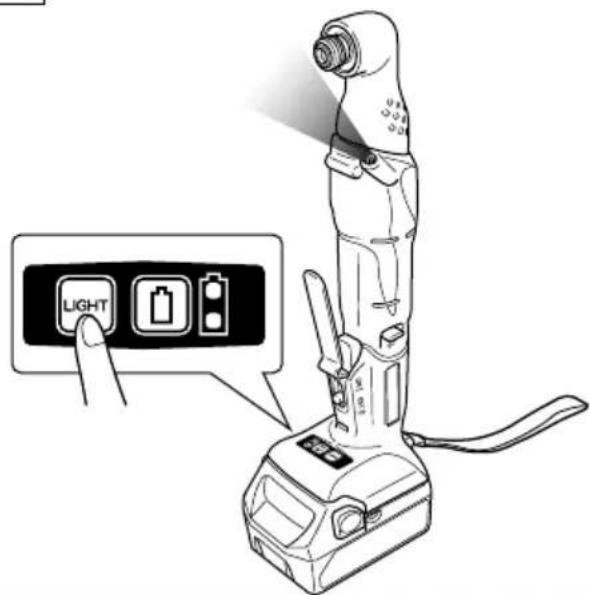
| How to use the LED light*4 | 7 | 3 |
| Selecting accessories | — | 50 |
\*1 CAUTION
If the guide sleeve does not return to its original position, then the bit is not installed properly.
\*2 CAUTION
Before using, confirm that the switch lever returns to its original position when pulled and then released. Failure of the switch lever to operate properly can result in injury.
Do not hang the angle impact driver from a belt and the like by the switch lever. The angle impact driver may drop causing an accident. In addition, this can also damage the switch lever.
When carrying the angle impact driver, confirm that the lock button is in the OFF position. Carrying the angle impact driver with the lock switch in the ON position can cause the switch to inadvertently be turned on resulting in injury.
○ Do not carry the angle impact driver by the switch lever when carrying. This can cause a malfunction.
○ Be careful not to pinch your finger between the switch lever and the angle impact driver. This can cause an injury.
○ Applying the angle impact driver for too long tightens the screw too much and can break it.
Tightening a screw with the angle impact driver at an angle to that screw can damage the head of the screw and the proper force will not be transmitted to the screw.
Tighten with this angle impact driver lined up straight with the screw.
Always make sure to return the lock button to the OFF position after using.
NOTE:
○ A buzzing noise is produced when the motor is about to rotate. This is only a noise, not a machine failure.
Do not use the angle impact driver with the lock button in an intermediate position. If used with the lock button in an intermediate position, the switch may suddenly be turned off while working or suddenly come on when carrying. When changing the position of the lock button, slide the lock button until it reliably reaches and contacts the ON position or OFF position.
☐ Do not change the position of the lock button while the switch lever is being pulled. Only change the position of the lock button after having first released the switch lever.
☐ Do not place the angle impact driver in a manner such that the switch lever is facing downward. This can cause the switch to be turned on as a result of pressing the switch lever.
○ Do not move the switch lever in the direction opposite that of the angle impact driver. This can cause a malfunction.
*3 As the remaining battery indicator shows somewhat differently depending on ambient temperature and battery characteristics, read it as a reference.
NOTE:
○ Do not give a strong shock to the switch panel or break it. It may lead to a trouble.
To save the battery power consumption, the remaining battery indicator lamp lights while pressing the remaining battery indicator switch.
*4 How to use the LED light
NOTE
To prevent the battery power consumption caused by forgetting to turn off the LED light, the light goes off automatically in about 15 minutes.
MAINTENANCE AND INSPECTION
1. Inspecting the driver bit
Using a broken bit or one with a worn out tip is dangerous because the bit can slip. Replace it.
2. Inspecting the mounting screws
Regularly inspect all mounting screws and ensure that they are properly tightened. Should any of the screws be loose, retighten them immediately. Failure to do so could result in serious hazard.
3. Maintenance of the motor
The motor unit winding is the very "heart" of the power tool. Exercise due care to ensure the winding does not become damaged and/or wet with oil or water.
4. Cleaning on the outside
When the power tool is stained, wipe with a soft dry cloth or a cloth moistened with soapy water. Do not use chloric solvents, gasoline or paint thinner, for they melt plastics.
5. Storage
Store the power tool in a place in which the temperature is less than 40^ C and out of reach of children.
NOTE
Storing lithium-ion batteries.
Make sure the lithium-ion batteries have been fully charged before storing them.
Prolonged storage (3 months or more) of batteries with a low charge may result in performance deterioration, significantly reducing battery usage time or rendering the batteries incapable of holding a charge.
However, significantly reduced battery usage time may be recovered by repeatedly charging and using the batteries two to five times.
If the battery usage time is extremely short despite repeated charging and use, consider the batteries dead and purchase new batteries.
CAUTION
In the operation and maintenance of power tools, the safety regulations and standards prescribed in each country must be observed.
Important notice on the batteries for the HiKOKI cordless power tools
Please always use one of our designated genuine batteries. We cannot guarantee the safety and performance of our cordless power tool when used with batteries other than these designated by us, or when the battery is disassembled and modified (such as disassembly and replacement of cells or other internal parts).
NOTE
Due to HiKOKI's continuing program of research and development, the specifications herein are subject to change without prior notice.
一般安全規則
警告
閱讀所有安全警告說明
| WH18DYA | ||
| (NN) | ||
 | 1- | |
| UC18YFSL | ||
 | 2- | |
| BSL18·· | ||
 | 1- | |
 | 1- | |

natural_image
Line drawing of a mechanical device casing with internal compartments and mounting feet (no text or symbols)329674

329897

natural_image
Line drawing of a quill pen with inkwell (no text or symbols)Koki Holdings Co., Ltd.
Shinagawa Intercity Tower A, 15-1, Konan 2-chome, Minato-ku, Tokyo, Japan

- GENERAL POWER TOOL SAFETY WARNINGS
- WARNING
- 1) Work area safety
- 2) Electrical safety
- 3) Personal safety
- 4) Power tool use and care
- 5) Battery tool use and care
- 6) Service
- PRECAUTION
- CORDLESS ANGLE IMPACT DRIVER SAFETY WARNINGS
- ADDITIONAL SAFETY WARNINGS
- CAUTION ON LITHIUM-ION BATTERY
- English
- CAUTION
- REGARDING LITHIUM-ION BATTERY TRANSPORTATION
- SYMBOLS
- STANDARD ACCESSORIES
- APPLICATIONS
- SPECIFICATIONS
- NOTE
- CHARGING
- Disconnect the charger's power cord from the receptacle.
- Hold the charger firmly and pull out the battery.
- PRIOR TO OPERATION
- ○ Setting up and checking the work environment
- \*1 CAUTION
- \*2 CAUTION
- NOTE:
- MAINTENANCE AND INSPECTION
- Inspecting the driver bit
- Inspecting the mounting screws
- Maintenance of the motor
- Cleaning on the outside
- Storage
- Important notice on the batteries for the HiKOKI cordless power tools
- 一般安全規則
- 警告
- Koki Holdings Co., Ltd.
Brand : HiKOKI
Model : WH18DYA
Category : Drill