MM258 - Mp3 player Manta - Free user manual and instructions
Find the device manual for free MM258 Manta in PDF.


| Product Type | MP3 Player |
| Brand | Manta |
| Model | MM258 |
| Storage Capacity | 4 GB (internal) |
| Display | 1.8-inch TFT color screen |
| Supported Audio Formats | MP3, WMA, WAV, FLAC |
| FM Radio | Yes, with auto scan and presets |
| Voice Recording | Yes, built-in microphone (WAV format) |
| Battery Type | Rechargeable lithium-ion (3.7V, 300mAh) |
| Battery Life | Up to 12 hours (music playback) |
| Charging | USB 2.0 (DC 5V, 500mA) |
| Connectivity | USB 2.0, 3.5mm headphone jack |
| Dimensions | 85 x 35 x 12 mm |
| Weight | 28 g |
| Playback Control | Mechanical buttons (play/pause, prev/next, volume, hold) |
| Other Functions | E-book reader, photo viewer, alarm clock |
| Languages | English, French, Spanish, German, etc. (12 languages) |
| Cleaning | Wipe with a soft, dry cloth. Do not use liquids. |
| Safety Notes | Avoid exposure to extreme temperatures; do not disassemble. |
| Repairability | Spare parts available from service center; battery replaceable by professional. |
Frequently Asked Questions - MM258 Manta
User questions about MM258 Manta
0 question about this device. Answer the ones you know or ask your own.
Ask a new question about this device
Download the instructions for your Mp3 player in PDF format for free! Find your manual MM258 - Manta and take your electronic device back in hand. On this page are published all the documents necessary for the use of your device. MM258 by Manta.
USER MANUAL MM258 Manta
To ensure proper use of this product please read this User's Manual carefully and keep for future reference.
MM621 GT Racing Wheel

natural_image
Close-up of a black and white car steering wheel with control buttons (no visible text or symbols)natural_image
Exterior view of a silver rectangular electronic device with a circular lens and drive slots (no visible text or symbols)DVD-037 Emperor Recorder 2

natural_image
White electronic device with a remote control unit and display screen (no visible text or symbols)natural_image
Two metallic mechanical components with circular housing and mounting base (no visible text or symbols)MM258/MM266 - DEMON 3
Instrukcja obsługi
Turn power on and play music 15
Setting 16
Format MP3 player ....18
MM258/MM266 - DEMON 3
Návod k obsluze
MM258/MM266 - DEMON 3
Beállításo0k 32
Formázás 33
MM258/MM266 - DEMON 3
Uwaga!
MM258/MM266 - DEMON 3
Opis odtwarzacza

MM258/MM266 - DEMON 3
MM258/MM266 - DEMON 3
Formatowanie

MM258/MM266 - DEMON 3
W razie kłopotów
Brak zasilania
MP3 Player, USB cable, headphones, warranty card.
Description

MM258/MM266 - DEMON 3
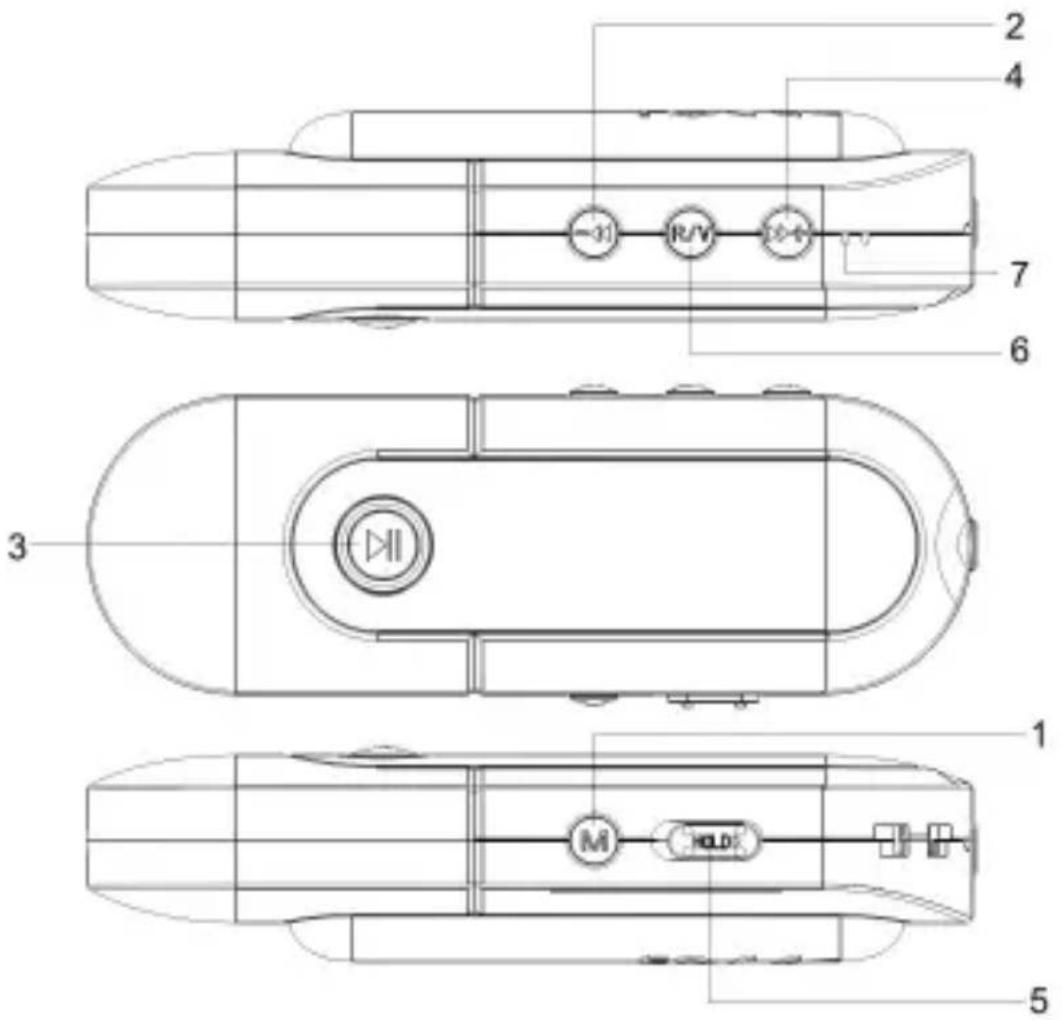
- [M] - Menu button
- [-◀] - Backward
- [▶] + Play/Pause/Confirm button
- [▶]→Forward
- [HOLD] - Lock button
- [R/V] - Record /Volume
- Microphone
Charging
- Connect the PC USB port and the MP3 USB port with the provided USB cable.
- The power sign is shown dynamic when charging, once full charged,, the power sign will stop moving, power is full, please shut off the power. The charging time is approximately 1.5 hours.
- If the unit is being used during charging, it will take longer to charge.
- To stop recharging, disconnect the USB cable.
Notes! For first time use, fully charge your MP3 Li-polymer rechargeable battery. Your computer must be turned on while connected to your MP3 for charging.
Turn power on and play music
To Start:
- Install an AAA battery to the battery slot.
- Connect earphone to earphone jack.
- Switch [HOLD▶] button to "unlock" position.
- Press and hold [▶] button to enter into "MSC" mode.(The default is "Music" mode.)
- Short press [▶] button to play music.
MM258/MM266 - DEMON 3
AB repeat
- In music playback mode, short press [M] button to select "A" point, short press [M] button again to start "AB" repeat.
- Short press [R/V] button for the third time to cancel "AB" repeat.
To return main menu: Press and hold [M] button.
To Pause/play: Short press [▶] button.
To change tracks: Short press [▶] or [ -◀◀ ] button .
To turn unit off: Press and hold [▶] button.
Press and hold [M] button to return to main menu, then press [ ] or [ -◀◀] button to select:
Play Music, Setting, Info, Exit.
Volume adjustment
In video playback, short press [R/V] button to pitch on the volume rim, at this time press / button to turn down or turn up volume.
Setting
Equalizer:
- Select Equalizer mode and short press [M] button to enter.
- Short press [▶] or [ -◀◀] button to select your desired option (e.g. Normal, Pop, Rock, Classical, Jazz, Bass, Exit)
- Short press [M] button to confirm.
Repeat Mode
- Select repeat mode and short press [M] button to enter.
- Short press [▶] or [ -◀◀ ] button to select your desired option(e.g. Normal, Repeat one, Repeat all, Random repeat)
MM258/MM266 - DEMON 3
- Short press [M] button to confirm.
Contrast:
Select Contrast mode and short press [M] button to enter, then press [▶] or [ -◀◀ ] button to adjust the contrast, at last press [M] button to save your setup.
Backlight:
Select Backlight mode and short press [M] button to enter, then press [] or [ -◀◀ ] button to select the backlight time: Always off/5S/10S/Always on.
Power Set:
Select Power Set mode and short press [M] button to enter, then press [▶] or [ -◀◀] button to select the auto off time: 2MIN/10MIN/30MIN
Language:
- Select language mode and short press [M] button to confirm.
- Short press [▶] or [ -◀◀ ] to select your desired option.
- Short press [M] button to confirm.
Info
In the main menu, select Info. menu and enter by pressing [M] button, then you can see some system information, like free flash capacity and total flash capacity.
- Connect the PC USB port and the MP3 USB port with the provided USB cable.
- Add MP3 files/folders to the USB storage's folder.
- Open files/folders to transfer from your computer.
- Open My Computer – Removable Disk from the desktop.
- Select the files/folders to transfer from your computer and draw and put them to a folder of your choice in the Remo-
MM258/MM266 - DEMON 3
vable Disk (you also can transfer files on your PC to the player using the „Copy” and „Paste” functions).
Format MP3 player
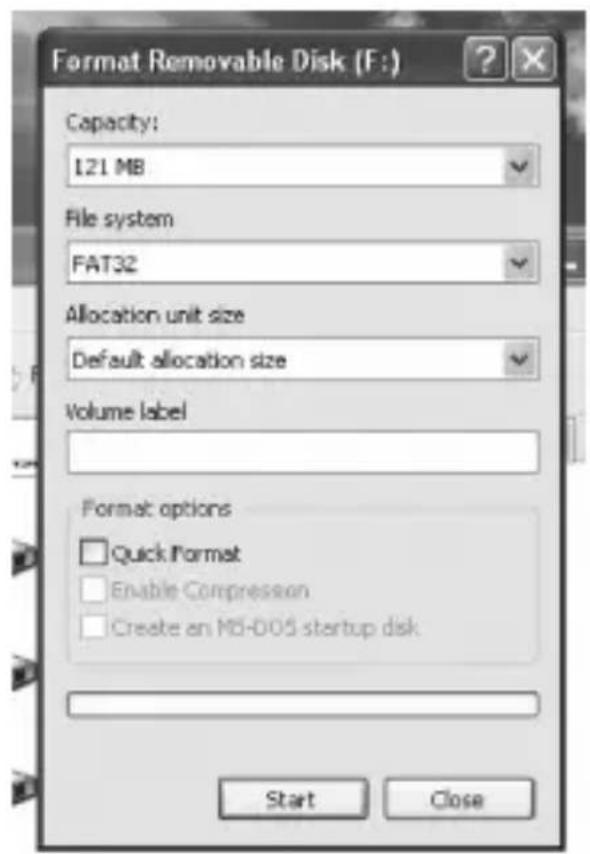
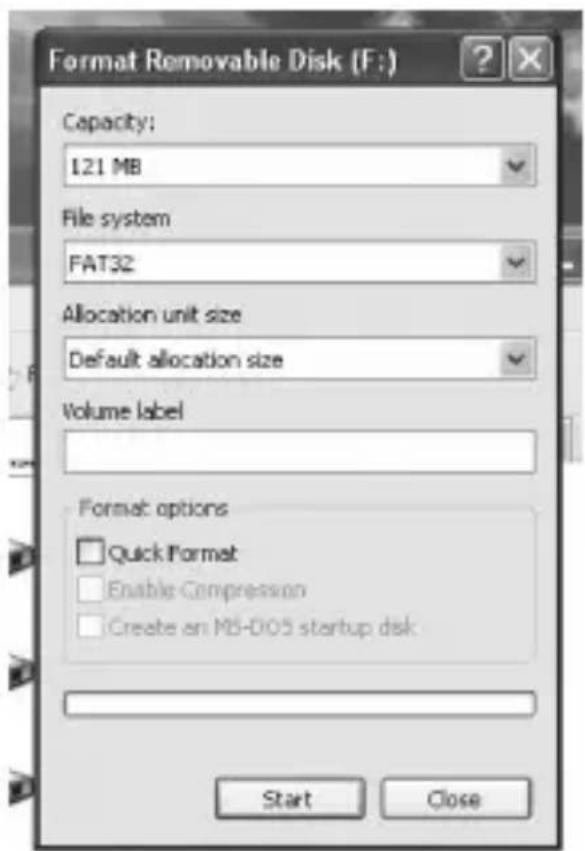
The MP3 player format is “FAT” format. To format the MP3 player, you need to right click the „Removable Disk” and choose „Format” mode, then click „Start” to format in operating system. As following pictures show:


Návod k obsluze
MM258/MM266 - DEMON 3
MM258/MM266 - DEMON 3
Popis přehrávače

MM258/MM266 - DEMON 3
MM258/MM266 - DEMON 3
MM258/MM266 - DEMON 3
V případě problémů
Chybějící napájení
MM258/MM266 - DEMON 3
Figyelem!
MM258/MM266 - DEMON 3
A lejátszó leírása

MM258/MM266 - DEMON 3
Kezelés
Figyelem!
MM258/MM266 - DEMON 3
BeállításoOk
MM258/MM266 - DEMON 3
MM258/MM266 - DEMON 3
Problémák esetén
Nincs tápfeszültség
MM258/MM266 - DEMON 3
Вступ!
MM258/MM266 - DEMON 3
Опис плесра
MM258/MM266 - DEMON 3
Параметри
MM258/MM266 - DEMON 3
- Info
MM258/MM266 - DEMON 3
У разі проблем
natural_image
Black-and-white photo of a person on a computer monitor with a antenna, next to a remote control (no visible text or symbols)natural_image
Two headsets displayed in different angles, one with earphones and the other with a logo (no visible text or symbols)natural_image
Exterior view of a silver audio amplifier with two speakers and a speaker tower (no visible text or symbols)LCD Monitor 1703 with TV

natural_image
Black-and-white photo of a woman on a computer monitor displaying her face (no visible text or symbols)- MM621 GT Racing Wheel
- DVD-037 Emperor Recorder 2
- MM258/MM266 - DEMON 3
- Instrukcja obsługi
- Návod k obsluze
- Uwaga!
- Opis odtwarzacza
- Formatowanie
- W razie kłopotów
- Brak zasilania
- Description
- Charging
- Turn power on and play music
- To Start:
- AB repeat
- Volume adjustment
- Setting
- Equalizer:
- Repeat Mode
- Contrast:
- Backlight:
- Power Set:
- Language:
- Info
- Format MP3 player
- Popis přehrávače
- V případě problémů
- Chybějící napájení
- Figyelem!
- A lejátszó leírása
- Kezelés
- BeállításoOk
- Problémák esetén
- Nincs tápfeszültség
- Вступ!
- Опис плесра
- Параметри
- - Info
- У разі проблем
- LCD Monitor 1703 with TV
Brand : Manta
Model : MM258
Category : Mp3 player