Strider MM215 - Mp3 player Manta - Free user manual and instructions
Find the device manual for free Strider MM215 Manta in PDF.


| Product Type | MP3 Player |
| Model | Strider MM215 |
| Brand | Manta |
| Dimensions | Approx. 4.0 x 2.0 x 0.6 inches (102 x 51 x 15 mm) |
| Weight | 0.14 lbs (65 g) |
| Power Source | Built-in rechargeable lithium-ion battery, 3.7V, 200 mAh |
| Battery Life | Up to 10 hours of music playback |
| Charging | USB 2.0 via included cable; full charge in approximately 2 hours |
| Storage Capacity | Internal: 4 GB (expandable via microSD card up to 32 GB) |
| Display | 1.8-inch TFT color screen, 128×160 pixels |
| Supported Audio Formats | MP3, WMA, WAV, FLAC, APE |
| Main Functions | Music playback, folder navigation, equalizer presets, repeat/shuffle modes, voice recording, FM radio |
| FM Radio | FM tuner with preset support, earphones used as antenna |
| Voice Recording | Built-in microphone, WAV format, up to 8 hours (depending on memory) |
| Connectivity | USB 2.0 for data transfer and charging, 3.5mm headphone jack |
| Supported Operating Systems | Windows XP/Vista/7/8/10, macOS, Linux (as mass storage) |
| Care and Maintenance | Keep dry; clean with soft cloth; avoid extreme temperatures; do not disassemble |
| Safety Warnings | Do not expose to water; use only approved charger; avoid excessive volume to prevent hearing damage |
| Spare Parts and Repairability | Contact Manta support for replacement battery or earphones; device not user-serviceable |
| General Information | Includes: MP3 player, earphones, USB cable, user manual; color: black |
Frequently Asked Questions - Strider MM215 Manta
User questions about Strider MM215 Manta
0 question about this device. Answer the ones you know or ask your own.
Ask a new question about this device
Download the instructions for your Mp3 player in PDF format for free! Find your manual Strider MM215 - Manta and take your electronic device back in hand. On this page are published all the documents necessary for the use of your device. Strider MM215 by Manta.
USER MANUAL Strider MM215 Manta
natural_image
Black rectangular electronic device with a black-and-white photo of a motorcyclist riding on a rocky surface, featuring embossed circular cutouts (no readable text or symbols)To ensure proper use of this product please read this User's Manual carefully and keep for future reference
MM215 - STRIDER MP4
Function features ....14
Descriptions ....15
Charging 16
Basic operations ....16
Play music ....16
Volume Adjustment ....17
Adding/Removing files/Folders 17
Menu Navigation ....17
Mine Menu ....18
Music 18
File 18
Voice ....18
Photo 19
Setup 19
Video 20
EBOOK....20
Format the MP4 player ....21
Instrukcja obsługi
MM215 - STRIDER MP4
W razie kłopotów
Brak zasilania
● The player supports MP3 and WMA music file formats.
● Support USB 2.0 capability, much faster than USB 1.1, to enable faster communication with your PC.
● The player has repeat functions.
● The player has Video Playback, Photo Viewer, etc.
● The player can power off automatically after a preset time.
MM215 - STRIDER MP4
Descriptions
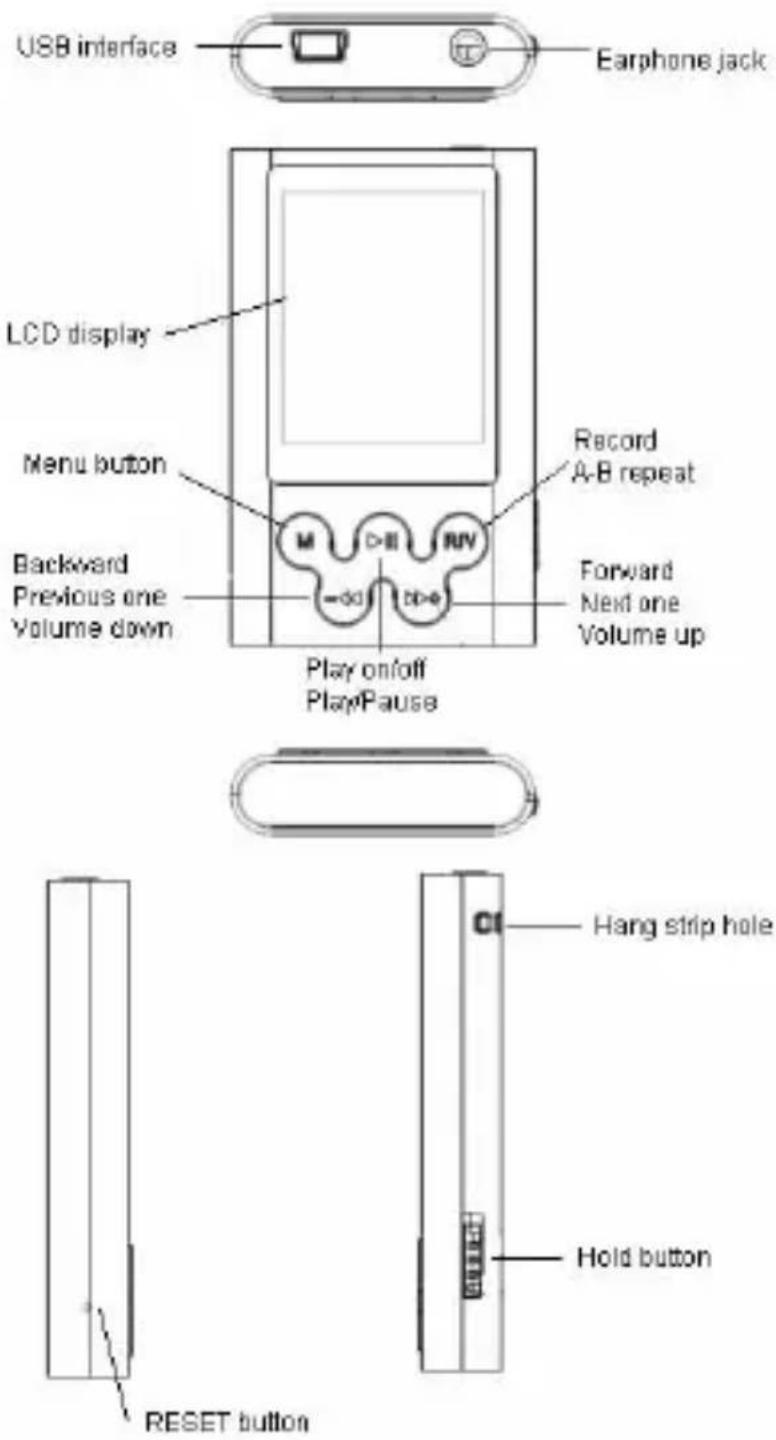
MM215 - STRIDER MP4
Charging
- Connect the PC USB port and the MP3 USB port with the provided USB cable.
- The power sign is shown dynamic when charging, once full charged, the power sign will stop moving, power is full, please shut off the power. The charging time is approximately 2 hours.
- The unit could not be used during charge.
- To stop recharging, disconnect the USB cable.
Notes!
Before your first time use, please recharge your MP4 player.
Your computer must be turned on while connected to your MP4 for charging.
Do not overcharge your player, or it may shorten the battery's life.
Basic operations
Play music
- Connect earphone to earphone jack.
- Switch HOLD button to unlock position
- Press and hold [▶] button to turn on and enter "MUSIC" mode (the default mode is "MUSIC" mode).
- Short press [▶] button to play music.
- To return main menu: Press and hold [M] button.
To Pause/Play: Short press [▶II] button.
To change tracks: Short press[ ] or [ ] button.
To turn unit off: Press and hold [▶] button.
MM215 - STRIDER MP4
Volume Adjustment
In music or MTV files playing, Voice, FM tuner mode, short press [R/V] button to pitch on the volume rim, at this time press[▶▶▶] or [ ] button to turn down or turn up volume.
Adding/Removing files/Folders
- Connect the PC USB port and the MP4 USB port with the provided USB cable.
-
Add files/folders to the USB storage's folder.
-
Open files/folders to transfer from your computer.
- Open My Computer – Removable Disk from the desktop.
-
Select the files/folders to transfer from your computer and draw and put them to a folder of your choice in the Removable Disk (you also can transfer files on your PC to the player using the „Copy” and „Paste” functions).
-
Delete MP3 files from the removable USB storage (use the „Delete” command).
Menu Navigation
[M] button: Enter main menu, submenu or return.
Skip button [ ] or [ ] Shift menus.
Play/Pause button [▶:Play, Pause, or confirm.
- Press and hold [M] button to enter main menu.
- Press [ ]dr [ ]buttons to select your desired option (MUSIC, FILE, VOICE, PHOTO, FM, SETUP, VIDEO, EBOOK, GAME).
MM215 - STRIDER MP4
Mine Menu
Music
Press and hold [▶] button to turn unit on and enter “MUSIC” mode (the default mode is “MUSIC” mode), then short press [▶II] button to play music.
Music Playback Submenu
Short press [M] button to enter into submenu and short press [I]dr [I]buttons to select your desired Mode (e.g. Repeat, Equalizer, 3D, Play Rate, Intro, File Browse, A-B).
File
- In main menu, short press[ ] or [ ] buttons to select FILE mode.
- Short press [▶] button to enter into.
- Short press [ ]dr [ ]buttons to choose your desired file (including MTV files, music files, photo files, and voice files, etc)
- Short press [R/V] button to delete the file, and short press [▶dr [I]buttons to select "No" or "Yes", then short press [▶button to confirm.
- Press and hold [M] button to return to main menu.
Voice
- In main menu, short press[ ] or [ ] buttons to select VOICE mode.
- Short press [▶] button to enter into.
- Short press [ ]dr [ ]button to choose your desired recording file
MM215 - STRIDER MP4
- Short press [▶] button to play the recording file.
- Press and hold [R/V] button to enter record mode.
- Short press [▶] button to save the record file, short press [▶] button to play the record file.
- Whilst in playback mode short press [M] button to enter into submenu (e.g. Repeat, Play Rate, Intro, Record, File Browse, A-B).
Photo
- In main menu, short press[ ] or [ ] buttons to select PHOTO mode.
- Short press [▶] button to enter into.
- Short press [ ]dr [ ]buttons to choose your desired photo file
- Press [R/V] button to delete the photo file, press [] or [] buttons to select "No" or "Yes", then press [] button to confirm.
- Short press [▶] button to scan your desired picture.
- Short press [▶] button again to browse all photos, or short press [▶] dr [ ] buttons to scan previous or next picture
- Press and hold [M] button to return to main menu.
Setup
- In main menu, short press[ ] or [ ] buttons to select "SETUP" mode.
- Short press [▶] button to enter into.
- Short press [ ]dr [ ]buttons to choose your desired mode (e.g. USB Mode, Power, Language, Display, Record, Sys Tools, Storage)
MM215 - STRIDER MP4
- Short press [▶] button to confirm.
USB Mode
Short press [ ]dr [ ]buttons to select USB Mode (MSC mode or MTP mode)
Video
In order to play video files in this MP4 player, you must change the video files into MTV format video files.
- In main menu, short press[ ] or [ ] button to select "VIDEO" mode.
- Short press [▶] button to enter into.
- Short press [M] button to enter submenu (e.g. Repeat), Short press [▶II] button to enter Repeat Menu.
- Short press [▶dr [I]buttons to select Repeat mode (No Repeat, Repeat One, Repeat All, RandomAll, DirRepOne, DirRep, DirRanAll), then short press [▶II] button to confirm.
- Select "MTPMEDIA" file folder, and short press ▶button to enter, then you can select your desired .MTV file.
- Press [R/V] button to delete the MTV file, press []dr [◀◀] buttons to select "No" or "Yes", then press ▶button to confirm.
- Short press [▶] button to play the MTV file.
EBOOK
- In main menu, short press[ ] or [ ] buttons to select EBOOK mode.
- Short press [▶] button to enter into.
- Short press [ ]dr [ ]buttons to choose your desired .TXT file
MM215 - STRIDER MP4
- Press [R/V] button to delete the .TXT file, press [] or [] buttons to select "No" or "Yes", then press [] button to confirm.
- Short press [▶] button to browse your desired file.
- Short press [ ]dr [ ]buttons to scan previous or next page
- Short press [M] button to return to EBOOK catalog
- Press and hold [M] button to return to main menu.
Note: The EBOOK function only can browse .TXT files.
Format the MP4 player
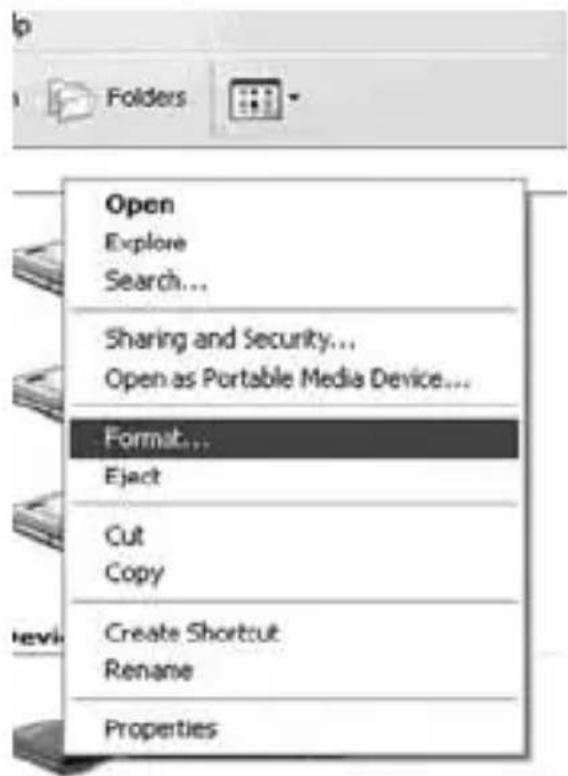
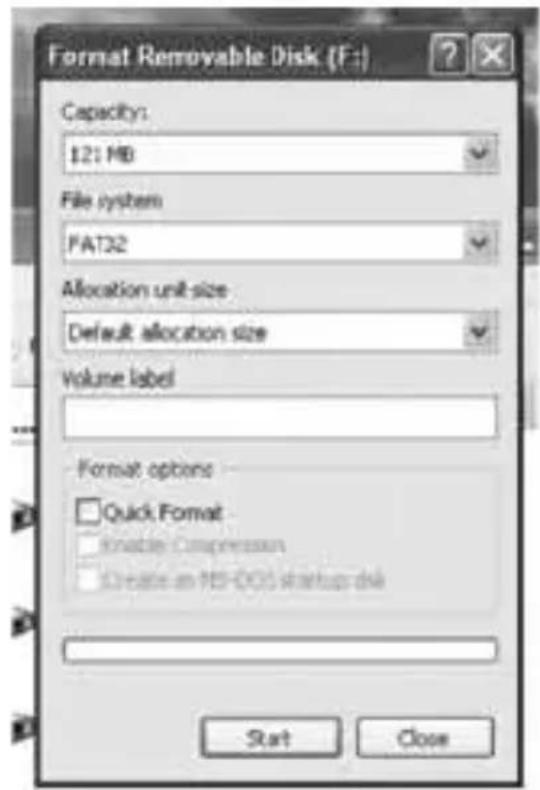
The MP4 player is “FAT” format. If you wish to format it, right click removable disk and choose “Format” mode, then click “Start” to format in operating system. As following pictures show:
NOTE
NOTE

INFORMACJA O PRAWIDŁOWYM POSTĘPOWANIU W PRZYPADKU UTYLIZACJI URZĄDZEŃ ELEKRONICZNYCH I ELEKTRYCZNYCH
- MM215 - STRIDER MP4
- Descriptions ....15
- Basic operations ....16
- Mine Menu ....18
- Instrukcja obsługi
- W razie kłopotów
- Brak zasilania
- Descriptions
- Charging
- Notes!
- Basic operations
- Play music
- Volume Adjustment
- Adding/Removing files/Folders
- Menu Navigation
- Mine Menu
- Music
- Music Playback Submenu
- File
- Voice
- Photo
- Setup
- USB Mode
- Video
- EBOOK
- Format the MP4 player
- NOTE
- INFORMACJA O PRAWIDŁOWYM POSTĘPOWANIU W PRZYPADKU UTYLIZACJI URZĄDZEŃ ELEKRONICZNYCH I ELEKTRYCZNYCH
Brand : Manta
Model : Strider MM215
Category : Mp3 player