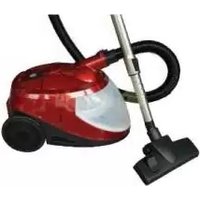
OVC-023 - Vacuum Cleaner ORION - Free user manual and instructions
Find the device manual for free OVC-023 ORION in PDF.


| Product Type | Water-based Vacuum Cleaner |
| Brand | Orion |
| Model | OVC-023 |
| Power Consumption | 1200-1400W |
| Voltage | 220-240V~50Hz |
| Noise Level | ≤79 dBa |
| Dust Tank Capacity (water loading) | 1.5 L |
| Water Suction Capacity | 3 L |
| Filtration System | 6-stage multi-filtration with twin HEPA filters; captures particles down to 0.3 microns |
| Suction Power Settings | 4 speeds (Low, Medium, High, Turbo) with electronic control |
| Power Cord Length | 5 m |
| Net Weight | 9 kg |
| Gross Weight | 10.5 kg |
| Body Dimensions (L x W x H) | 44 x 30 x 29 cm |
| Color | Red |
| Included Accessories | Flexible hose with handle, telescopic stainless steel tube, adjustable metal floor brush, duster brush, crevice nozzle, water brush, air turbo rotating brush, user guide, warranty card |
| Bagless Operation | Yes (water-based) |
| Automatic Cord Rewind | Yes (foot pedal button) |
| Safety Features | Automatic float switch shut-off, overfill protection, thermal protection |
| Filter Maintenance | Wash foam filter regularly; replace HEPA filter every 6 months |
| Warranty | Standard manufacturer's warranty (details in user guide) |
Frequently Asked Questions - OVC-023 ORION
User questions about OVC-023 ORION
0 question about this device. Answer the ones you know or ask your own.
Ask a new question about this device
Download the instructions for your Vacuum Cleaner in PDF format for free! Find your manual OVC-023 - ORION and take your electronic device back in hand. On this page are published all the documents necessary for the use of your device. OVC-023 by ORION.
USER MANUAL OVC-023 ORION
When using an electrical appliance, basic safety precautions should always be observed, including the following
READ ALL INSTRUCTIONS BEFORE USING YOUR VACUUM.
WARNING: To reduce the risk of fire, electrical shock, or injury:
- To ensure safe and correct use of your product, do not operate without first reading this operation manual thoroughly.
- To avoid shortening the life span or damaging your product, do not use the machine with part or accessories not recommended by this manual. Use only original spare parts or accessories.
- Do not allow children or unsuitable persons to operate the system.
- Ensure that the vacuum cleaner is placed on a flat surface when in operation.
- Do not touch the main plug with wet hands. Do not operate the machine with wet hands. Do not operate the machine in an excessively wet environment.
- Do not put any object into openings. Do not use with any opening blocked; keep free of dust, lint, hair and anything that may reduce airflow.
- Keep hair, loose clothing, fingers, and all parts of body away from openings and moving parts.
- Do not use the machine for vacuuming hot or burning objects including ash.
- Turn off the control before unplugging
- Do not use the machine for vacuuming any type of chemicals, acids or solvents. This will damage the machine.
- Do not use the product near explosive materials, inflammable liquids or any type of gas. Such usage can cause fire or explosions.
- Keep end of hose, wands and other openings away from your face and body
- Do not use for any purpose other than described in this user's guide.
- Using improper voltage may result in damage to the motor and possible injury to the user. correct voltage is listed on the rating label.
- Do not disconnect the AC plug from the main outlet roughly. Never remove the AC plug by pulling the cord; always pull out the plug by holding the plug itself.
- Do not connect or disconnect the AC plug from the main outlet with wet hands. This may result in an electrical shock.
- Always switch-off your machine and disconnect the AC plug from the main outlet when the appliance is not in use.
- Do not use your machine if the AC cord or plug is damaged.
- If the cleaner is damages, it must be repaired by the manufacturer or its service agent or a similarly qualified person in order to avoid a hazard.
- This appliance is not intended for use by children or other persons without assistance or supervision if their physical, sensory or mental capabilities prevent them from using it safely. Children should be supervised to ensure that they do not play with the appliance.
- If the supply cord is damaged, it must be replaced by the manufacturer or its service agent or a similarly qualified person in order to avoid a hazard.
- The vacuum cleaner must not be left unattended while it is connected the supply mains.
- This vacuum cleaner is for household use only
- The plug must be removed from the socket-outlet before cleaning or maintaining the vacuum cleaner.
Caution:
- Do not overfill the water container. Note the 'Maximum Level' marking.
- Do not fill the water container with anything other than water.
● Always empty the dirty water, clean and store you machine correctly after each use.
Part and Accessories Index

Features
● Water-based vacuum system plus twin HEPA filters system.
● Multi filtration system (6-stages) capable of capturing bacteria particles down to the size of 0.3Microns.
- Uses no bag and non-direct HEPA filter and as a result: no clogged pores, no loss of suction or airflow, no indoor air pollution and no costly replacement bags.
● 4-Speed motor with electronic control for the best use of suction power and ultimate convenience.
● 2 in 1 water squeegee reaches under low furniture, fixtures and fittings and allows liquid suction.
● Automatic switch off when the float switch goes up for safety.
- Mixing of Bio-fresh anti-bacterial, anti-allergenic & non –chemical fresheners such as Mountain Pine, Tropical Citrus & Country Lavender with water helps to purify and disinfect indoor air as well as eliminate unpleasant odors.
- 2 HEPA filters at system's motor air outlet means the air coming out, is even cleaner than the air going into the system.
- Optional Turbo Rotating Brush allows deep cleaning of mattresses and rugs. Also ideal for removing loose hair and fluff from carpeted floors and upholstered surfaces.
Effectiveness
- Eco-Active water filter captures and retains dust & dirt in water without polluting the indoor air.
- Multi filtration including HEPA filter provides 99.99% efficiency in purifying the air and capturing microorganisms down to 0.3 Microns in size, such as dust, pollen, dust mites and their feces, pet hair & dander.
- A HEPA filter at the motor air outlet stops all the carbon powder from the motor and ensures providing the ultimate indoor air quality. No more 2^nd pollution.
- When operating the product, the water filter system makes and blow out natural Minus Ion, so the product is acting as a Minus-Ion generator or an air cleaner when it is operated.
- By not using dirty and blocked paper bags or direct HEPA filter, the product maintains its maximum airflow & efficiency at all times.
● The product is a real Green Vac, Hygienical Vac, Healthy Vac.
Preparation before Use
1. Setting Up the Product
- Rotate (upside) the release button and rotate the cover upwards. (Fig.1)
- Remove the water container using the handle on the container. (Fig.2)

- Remove the filter assembly from the water container. (Fig.3).
- Fill the container with tap water to ‘Max Water Level’ indicated on the front of the container. This is about 1.5 liters. Please ensure the container is not overfilled. (Fig.4)

- Replace the filter assembly into the water container.(please make sure the direction of the curved tube is correct: towards to the front side, and also make sure the sponge filter is equipped correctly.) Place the water container back to the body holder. Close and lock the body cover. The locking mechanism will "Click" when locked.
- Insert the flexible hose into the hose socket.
- Connect the telescopic tube to the flexible hose handle, and then connecting with accessories such as floor brush, water brush etc. Now it is ready for use.
2. Power On
- Extract the AC power cord fully by holding the cord and pull it towards you. Do not pull the cord by holding the plug, as this will damage the cord.
- Connect the plug to a suitable mains power outlet with the correct voltage.
Caution: Before connect the plug to the power socket; unwind a sufficient length of cable. A yellow mark on the power cable shows the ideal cable length. Don't expend the cable beyond the red mark.
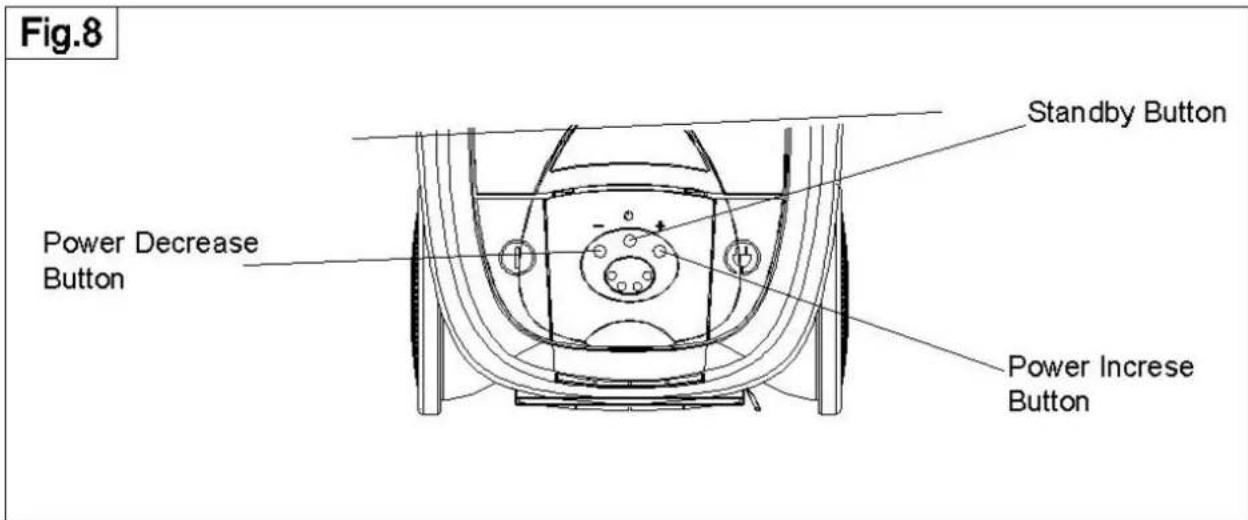
- Press firmly and turn on the main ON/OFF switch. One green indicator light will flash. The machine is now at 'Standby' mode. At this stage, your machine is ready to work.
- Push the standby button on the main body will activate the machine in the lower suction mode.
Caution: Make sure the AC power cord is fully extracted. During the operation a partially extracted power cord will generate excessive heat.
Use of your product
1. Standby Button
- This button is used to switch between standby mode and operation mode. The initial push turns the suction power on at the low mode. While the machine is operating, push this button returns the machine to the standby mode.
2. Suction Power Selection Button
- There are 4 suction power setting, Low, Medium, High and Turbo. Use (+) or (-) button on the main body of the machine to select the desired setting. (Fig.8)
- The suction power class is indicated by the numbers of green indicating lights. For example: three green lights means the suction power is now at the 3^rd high position (total 4 positions).
3. Telescopic Tube
- The extendable Telescopic Tube gives you added flexibility and control. Depending on your application and situation, you may adjust the length of the Telescopic Tube to suit your needs. Push and hold the locking knob, extend or retract the telescopic pole as required. Release the knob and pull the extended tube slightly to lock it in place.
-
Crevice Tool: Use this accessory tool for corners, crevices and cracks.
-
Main Floor Brush: Connect the main floor brush to the telescopic tube, you can clean the carpet and floor.
6. Multi Duster Brush
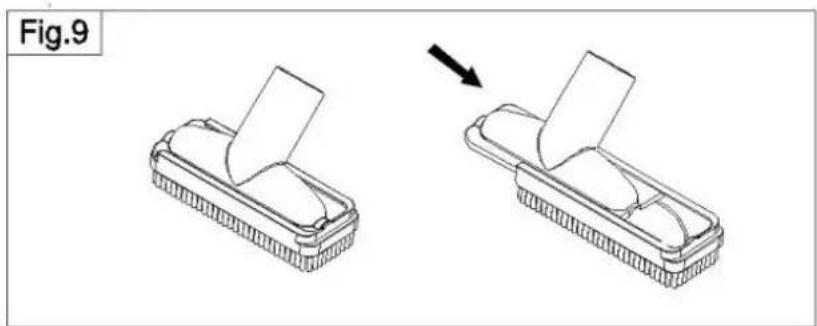
- The Multi Duster Brush (2 in 1) is for removing dust from all type of surfaces such as lampshades, electric equipment, air conditioner grills, car dashboards etc. Separately it can be used as a sofa nozzle. (Fig.9)
natural_image
Diagram showing two steps of a mechanical component being folded, with an arrow indicating the process (no text or symbols present)7. Water Brush & Liquid Suction
- The Water Brush is so versatile that it can be used for vacuuming both solid and liquid dirt and is mainly for use on hard floor surface.
Caution: If you use your machine for liquid suction. Make sure you first reduce the amount of water in the tank by about half. It is also important not to allow the tank to become too full of vacuumed liquid. Before liquid suction you must change the carpet brush with the Water Brush
When you finish, empty the tank completely and vacuum up about one liter of clean water to rinse clean the inside of the Flexible Hose and the Telescopic Tube. Repeat if necessary.
To dry the inside of Hose & the Tube, detach the Water Brush, and run your machine for a few minutes without sucking up any dirt. Wash and dry the water brush separately.
Vacuum soapy liquid or detergent should be avoided, as this causes frothing inside the water tank.
8. Automatic Cord Storage
- Your system comes with an Automatic Code Storage system. Push the button at the back of the machine and the cord is retracted automatically. The large button also allows this to be done with your foot.
Caution: While nearing the end of the retraction, hold on to the end of the cord and guide it into the cord storage compartment. The force and speed of the retraction may cause the plug to snap back and hit something.
Product Care and Storage
Always switch off the main switch and disconnect the AC cord from the electrical outlet before cleaning you machine or replacing any part.
1. General
● You may wipe the machine with a damp cloth. Synthetic detergent may be used on plastic and metal parts
if necessary. Make sure you wipe the machine and its parts dry before storage.
- Do not use strong cleaning agents such as benzene or thinner to clean the machine.
● Always store your product and parts after they are completely dried.
2. Cleaning and Maintenance of the filter assembly.
- It is high recommended that you pour away the dirty water and clean the container and the filter assembly after each use. Keeping your home clean using a clean appliance is an advantage that the machine has over 'bag'-vacuum cleaner.
● To empty the water container, rotate the release button and rotate the cover upwards.(Fig.1)
● Lift up the cover and remove the water tank with the handle on the tank. (Fig.2) - Remove the Filter Assembly and empty the container. Thoroughly clean, rinse and leave to dry.(Fig.3)
● Regularly dismantle and clean the filter assembly. - Remove the curved tube by pulling it from the meshed filter cage.
- Pull out the filter cage and remove the sponge filter. Wash and rinse all the components. Dry before assembling them. (Note: the sponge filter must be equipped on the filter cage during working the machine.)
- To remove stubborn dirt from the container and the filter assembly, use normal washing-up liquid but make sure it is rinsed thoroughly afterwards.
3. Front Sponge Filter
- Rotate the release button and rotate the cover upwards.(Fig.1)
- Remove the sponge and insert a new one. It is recommended that you clean the sponge filter if it is dirty by warm water and fully drying them before putting them back in the cartridge.
4. Air Outlet HEPA Filter
● Push the button on the Air Outlet Grill; remove the Air Outlet Grill from the body. (Fig.12)
● Take out the Air Outlet HEPA Filter. (Fig.13)
- Replace with a new one or wash it if it is dirty. It is recommended to have a wash or replace a new one each half year.
Fig.12

Fig.13

Caution: Use only original spare part.
- Storage: Store your machine with care and in a cool dry place.
Troubleshooting
Do not disassemble or attempt to repair the machine yourself
| Conditions Possible | Cause and Solution |
| The machine stops during operation and all four suction power indicator lights start blinking together. | Wait for about 30 seconds before you operate the machine again. This lets the machine reset whilst you identify one of the following possible causes.The water has turned very dirt and mirky. Empty the water container and replace with clean water.The water level is above the maximum level. Reduce the water level.The selected suction power level is too high for the current cleaning application. Reduce the suction power.The airflow is blocked. Remove the blockage. |
| The machine does not start | AC supply is not properly connected the AC cord to electrical supply. |
| Noticeable decrease in the suction power | The HEPA filter requires replacement. Change a new one.There is a blockage. Remove the cleaning tools and attachments from the machine and remove the blockage. |
| Leakage of water when using for cleaning of liquid waste. | The Switch Float is blocked. Unblock it by cleaning. |
Technical characteristics
| Model | ORION OVC-023 |
| Power | 1200-1400W |
| Voltage | 220/240V~50Hz |
| Noisy level ≤79dBa | |
| Dust tank capacity 1,5L – loading | water, 3L – sucking water |
| Power cord length 5m | |
| Net weight 9kg | |
| Gross weight 10,5kg | |
| Body size | 44 x 30 x 29cm |
| Unit box dimension | 52,5 x 39,5 x 42,5cm |
| Color | Red |
Completion
| Vacuum cleaner |
| Long flexible hose with handle |
| Telescopic stainless steel tube |
| Up-down adjustable metal floor brush |
| Duster brush |
| Crevice nozzle |
| Water brush |
| Air turbo rotating brush |
| User's guide |
| Warranty card |
Extra information on ORION company web-site www.orion.ua
We take your opinion and offers by E-mail support@orion.ua

- READ ALL INSTRUCTIONS BEFORE USING YOUR VACUUM.
- Caution:
- Features
- Effectiveness
- Preparation before Use
- Setting Up the Product
- Power On
- Use of your product
- Standby Button
- Suction Power Selection Button
- Telescopic Tube
- Multi Duster Brush
- Water Brush & Liquid Suction
- Automatic Cord Storage
- Product Care and Storage
- General
- Cleaning and Maintenance of the filter assembly.
- Front Sponge Filter
- Air Outlet HEPA Filter
- Troubleshooting
- Technical characteristics
- Completion
Brand : ORION
Model : OVC-023
Category : Vacuum Cleaner