
CA-BC-PSA.001 - Car accessory PIONEER - Free user manual and instructions
Find the device manual for free CA-BC-PSA.001 PIONEER in PDF.


| Product Type | Camera Adapter Kit |
| Model | CA-BC-PSA.001 |
| Brand | Pioneer |
| Compatible Vehicles | Peugeot 2008 (2016 and later) |
| Kit Contents | Camera adapter, wiring harness, connectors |
| Connector Type | Fakra (24-pin white) and RCA |
| Dimensions (approx.) | 5 × 3 × 1 cm |
| Weight (approx.) | 30 g |
| Operating Voltage | 12V DC (vehicle electrical system) |
| Primary Function | Interface camera signal to factory radio |
| Installation Type | Plug-and-play (no cutting wires) |
| Polarity Protection | Reverse polarity protected (pin marked in red) |
| Material | ABS plastic housing, copper wiring |
| Operating Temperature | -20°C to 70°C |
| Maintenance | Wipe with dry cloth; avoid moisture |
| Safety Precautions | Disconnect battery before installation; ensure correct polarity |
| Spare Parts Availability | Not sold separately; contact Pioneer dealer |
| Repairability | Non-repairable; replace unit if faulty |
| Certifications | CE, RoHS |
| Warranty | 1 year limited warranty |
Frequently Asked Questions - CA-BC-PSA.001 PIONEER
User questions about CA-BC-PSA.001 PIONEER
0 question about this device. Answer the ones you know or ask your own.
Ask a new question about this device
Download the instructions for your Car accessory in PDF format for free! Find your manual CA-BC-PSA.001 - PIONEER and take your electronic device back in hand. On this page are published all the documents necessary for the use of your device. CA-BC-PSA.001 by PIONEER.
USER MANUAL CA-BC-PSA.001 PIONEER
installation kit for :
PEUGEOT
Model:
Peugeot 2008;
Year:
2016>
Kit content:
Camera adapter
Customer code:
CA-BC-PSA.001

natural_image
Coiled black cable with a brown connector attached, mounted on a white rectangular device (no text or symbols visible)1
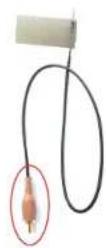
1B

natural_image
Close-up of electronic components with no visible text or symbols3

-
Push the white connector as shown in the picture. Pay attention to polarity (pin circled in red).
-
Plug in the BROWN RCA connector in the R.C. INPUT at the back side of the radio, indicated in the 1B picture.
2

- Fit the white 24 ways connector in to the Fakra connector by inserting it in the circled Red area. See at the following point.
4
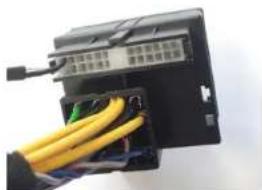
natural_image
Close-up of a black electronic device with yellow cables inserted into a housing (no visible text or symbols)- This is the final result.



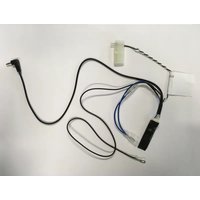
Brand : PIONEER
Model : CA-BC-PSA.001
Category : Car accessory