
HC2200EM - Air Conditioning GORENJE - Free user manual and instructions
Find the device manual for free HC2200EM GORENJE in PDF.


| Product Type | Portable Air Conditioner |
| Brand | Gorenje |
| Model | HC2200EM |
| Cooling Capacity | 9000 BTU/h |
| Cooling Area | Up to 25 m² |
| Energy Efficiency Ratio (EER) | 2.8 |
| Power Supply | 220-240 V, 50 Hz |
| Power Consumption (Cooling) | 1100 W |
| Airflow Rate | 350 m³/h |
| Noise Level (Low/High) | 45/52 dB(A) |
| Refrigerant | R290 |
| Dimensions (W x D x H) | 45 x 38 x 70 cm |
| Weight | 25 kg |
| Functions | Cooling, Dehumidifying, Fan only, Oscillation |
| Dehumidification Capacity | 1.2 L/h |
| Water Tank Capacity | 1.5 L |
| Remote Control | Yes, included |
| Timer | 24-hour programmable timer |
| Filter Type | Washable mesh filter |
| Maintenance | Clean filter every 2 weeks; empty water tank when full |
| Safety Features | Automatic shut-off when water tank full; anti-freeze protection |
| Spare Parts Availability | Filters, remote control, drainage hose available from service centers |
| Reparability Index | 7.5/10 |
| General Information | Portable air conditioner with easy installation via exhaust hose |
Frequently Asked Questions - HC2200EM GORENJE
User questions about HC2200EM GORENJE
0 question about this device. Answer the ones you know or ask your own.
Ask a new question about this device
Download the instructions for your Air Conditioning in PDF format for free! Find your manual HC2200EM - GORENJE and take your electronic device back in hand. On this page are published all the documents necessary for the use of your device. HC2200EM by GORENJE.
USER MANUAL HC2200EM GORENJE
natural_image
Technical line drawing of a vertical cylindrical device with a circular top and base (no text or symbols)HC2200EM
INSTRUCTIONS FOR USE
NAVODILA ZA UPORABO
UPUTSTVO ZA UPOTREBU
UPUTSTVO ZA UPOTREBU
ІНСТРУКЦІЯ 3
ВИКОРИСТАННЯ
This product is only suitable for well insulated spaces or occasional use.
SAFETY INSTRUCTION
- Warning: In order to avoid overheating, do not cover the heater.
- If the supply cord is damaged, it must be replaced by the manufacturer or its service agent or a similarly qualified person in order to avoid a hazard.
- This appliance can be used by children aged from 8 years and above and persons with reduced physical, sensory or mental capabilities or lack of experience and knowledge if they have been given supervision or instruction concerning use of the appliance in a safe way and understand the hazards involved. Children shall not play with the appliance. Cleaning and user maintenance shall not be made by children without supervision.
- The heater must not be located immediately below a socket-outlet.
- Do not use this heater in the immediate surroundings of a bath, a shower or a swimming pool.
- Children of less than 3 years should be kept away unless continuously supervised.
Children aged from 3 years and less than 8 years shall only switch on/off the appliance provided that it has been placed or installed in its intended normal operating position and they have been given supervision or instruction concerning use of the appliance in a safe way and understand the hazards involved. Children aged from 3
years and less than 8 years shall not plug in, regulate and clean the appliance or perform user maintenance.
-
CAUTION — Some parts of this product can become very hot and cause burns. Particular attention has to be given where children and vulnerable people are present.
-
Correct Disposal of this product
This marking indicates that this product should not be disposed with other household wastes throughout the EU. To prevent possible harm to the environment or human health from uncontrolled waste disposal, recycle it responsibly to promote the sustainable reuse of material resources. To return your used device, please use the return and collection systems or contact the retailer where the product was purchased. They can take this product for environmental safe recycling.
- CAUTION— In order to avoid a hazard due to inadvertent resetting of the thermal cut-out, this appliance must not be supplied through an external switching device, such as a timer, or connected to a circuit that is regularly switched on and off by the utility.
WARNING: IN ORDER TO AVOID OVERHEATING, DO NOT COVER THE HEATER.
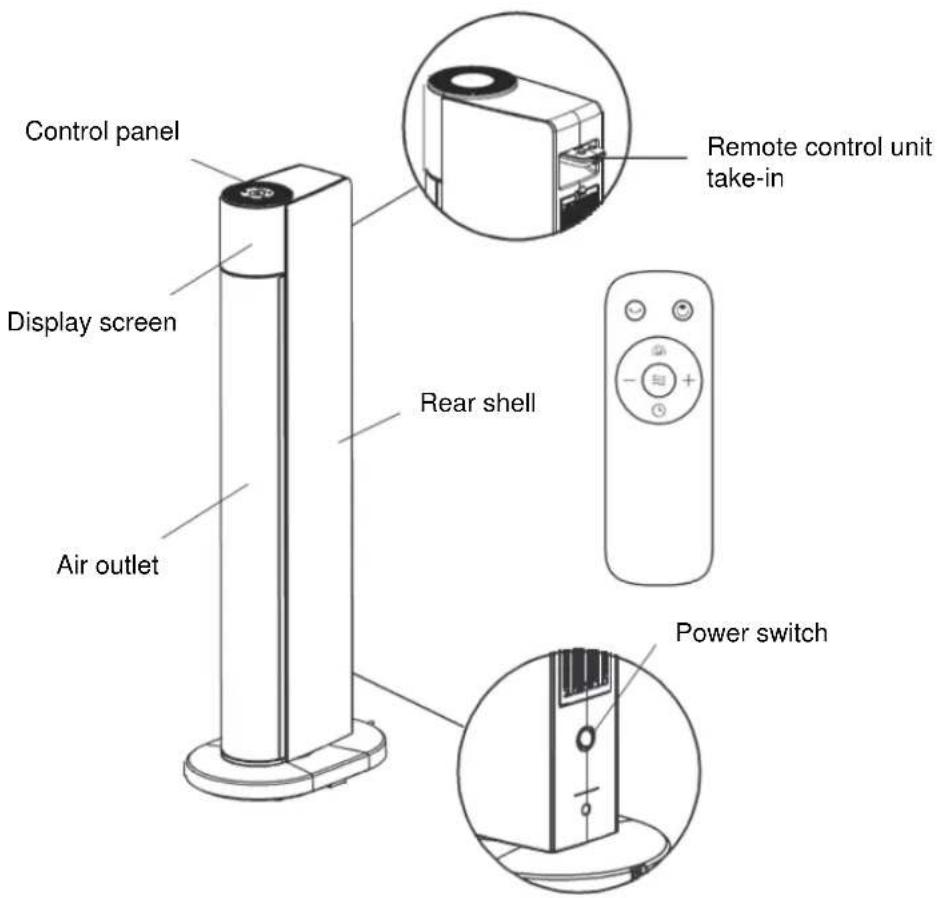
PART FIGURE
PRE-STARTUP CHECK
-
If power line is in good condition.
-
Product power is 220-240V AC, bearing capacity of product socket is no lower than 10A
otherwise, accidents would occur.
HOW TO USE
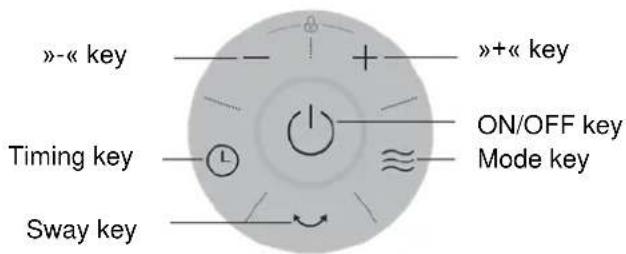
Turn power switch to "I" marked position, then press on-off key on the control panel to start up the machine. After starting up, the machine runs on the mode of last power off.
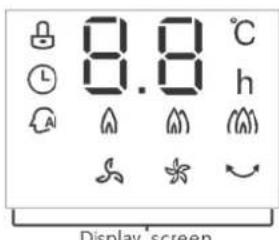
Display screen
| Key | Function Description |
| ON-OFF key | On the idle mode, press on-off key to enter the power-on mode, the warmer starts working and the whole machine runs under the previous remembered mode and temperature. On the power-on mode, press on-off key to enter the idle mode, the warmer stops working. (Note: On the heating mode, draught fan will operate for 15 seconds at low wind speed after power off.) |
| Mode key | After power-on, the warmer is in the intelligent mode by default. Repeatedly press the “mode key”, the warmer shifts in circular order among “intelligent mode, low warm wind, high warm wind, strong warm wind, breeze, and gentle breeze”. |
| + and - key | On the working state, press “+” or “-” keys to set the working temperature. The temperature setting range is 5°C~35°C and every temperature value is of 1°C difference. The machine confirms and displays the set temperature value if without operation within 3 seconds after the setting. After room temperature reaches the set temperature, display screen blinks for 10 seconds and heating unit stops working; when temperature is below the set temperature, machine restarts to heat. In low warm wind, high warm wind, and strong warm wind modes, it can be set to without temperature control, whose display icon is “--”. |
| Timing key | In the power-on mode, press this key to select the timed shutdown setting. The timing indicator lights up, the temperature display icon lights off, and display screen blinks and shows the rest time of last setting. Press “+” or “-” keys to set shutdown time, the setting range is 0~24 hours. The machine confirms the time and quits the timing setting state if without pressing within 5 seconds. If the set time is 0, it means cancelling the timing setting; if the set time is not 0, the machine shuts down automatically, enter the idle mode and turns off the timing icon when reaching the set time. Set again the time after time setting, and the machine is retimed.In the idle mode, press this key to set timing power-on, of the same operation as timing shutdown. The time unit of the timer is hour. |
| Sway key | In the power-on mode, press this key to start swaying, and press again to stop swaying. |
• Light screen off function
When the machine is on the working state, the screen automatically lights off and operating mode icon retains up if without operation within 1 minute. Press at the same time the key and "-" key for 2 seconds to close the light screen off function. Press again at the same time the key and "-" key for 2 seconds to open the light screen off function.
- Temperature sensor short circuit and open circuit protection
In whatever mode, when short circuit or open circuit protection occurs to the temperature sensor, digital screen displays E1 or E2 and blinks unceasingly, any key does not work, and buzzer rings for 10 times.
- Safety protection
In the power-on mode, when room temperature Th exceeds 50°C, the system closes all outputs, the digital screen displays "FF" and blinks at the frequency of 1 time per second, any key does not work, and only power-off can quit protection.
- Toppling over protection function
No matter in power-on or power-off mode, when the machine topples over, the system immediately shuts down all heating components and displays "E3", any key does not work.
- Close key fancy light and buzzer
In the power-on mode, press at the same time the “timing key” and “shift key” for 2 seconds to close key fancy light and buzzer output. Repeat this action to open them.
- Children lock function
No matter in power-on or power-off mode, press “+” and “-” keys simultaneously for the first time for 2 seconds to open the children lock function. Repeat this action to close it.
• Automatic power-off function
Screen displays “--” if the heater is not under Temperature Control mode. When the timer function is off, the heater will automatically shut off with no operation during 12 hours.
- Remote-control unit
The use of remote-control unit: Key function is consistent with machine body control panel. Note: Strong warm wind mode can be opened by pressing “” key on remote-control unit.
- Intelligent mode
In the Intelligent mode, press “+” and “-” keys to set wanted temperature. When environment temperature is lower than set temperature (by more than 2^ C), the product heats in high warm wind mode; when environment temperature is close to the set temperature (by less than 2^ C or more), the product heats on low warm wind mode; when environment temperature is higher than set temperature, the product stops heating.
SPECIFICATIONS
Power supply: AC 220-240V \~ 50Hz
| MODEL | POWER REGULATION RANGE (W) | ||
| LOW | HIGH | STRONG | |
| HC2200EM | 1200 | 2050 | 2200 |
TROUBLESHOOTING
If the product does not operate or does not operate properly, first check according to the following list. If the reason the product does not operate or does not operate properly is not included in the following list, the product may have failed. At this time, it is recommended to send the product to
the dealer for treatment.
| Problem | Possible Cause | Solution |
| After the power is engaged, the machine does not work. | The plug may not be plugged well. | Check whether the plug is properly inserted into the receptacle. |
| The machine suddenly stops during heating. | The temperature exceeds the threshold of the thermal cut-off. | Cool the machine before use. |
CLEANING AND MAINTENANCE INSTRUCTION
- Light accumulated dust may be removed from the heater with a soft cloth. Wipe the exterior surfaces of the heater occasionally with a cloth moistened (not dripping wet) with a solution of mild detergent and water. Dry the case thoroughly with a soft dry cloth before operating the heater.
- The fan motor is lubricated by the factory, and will require no further lubrication.
- No other user maintenance is required or recommended. If service is required, send your heater to the nearest authorized servicedepot.
- Store heater in a clean and dry place when not in use.
REMEMBER - Portable electric heaters are designed for spot heating, or as a supplementary heat source. They are not intended to be main sources of heat during the normal heating season.
Note: There may be trace of smoke or odour when unit is first operated. Do not be on the heating coil during the manufacturing process. It will quickly evaporate, and should not reoccur.
WE RESERVE THE RIGHT TO MAKE CHANGES THAT DO NOT IMPAIR THE FUNCTIONALITY OF THE DEVICE.
Information requirements for electric local space heaters
| Model identifier(s): HC2200EM | ||||||
| Item | Symbol | Value | Unit | Item | Unit | |
| Heat output | Tpye of heat input, for electric storage local space heaters only (select one) | |||||
| Nominal heat output | Pnom | 2,2 | kW | manual heat charge control, with integrated thermostat | [no] | |
| Minimum heat output (indicative) | Pmin | 1,2 | kW | manual heat charge control with room and/or outdoor temperature feedback | [no] | |
| Maximum continuous heat output | Pmax,c | 2,25 | kW | electronic heat charge control with room and/or outdoor temperature feedback | [no] | |
| Auxiliary electricity consumption | fan assisted heat output | [no] | ||||
| At nominal heat output | elmax | 2,2 | kW | Type of heat output/room temperature control (select one) | ||
| At minimum heat output | elmin | 1,2 | kW | single stage heat output and no room temperature control | [no] | |
| In standby mode | eISB | 0,00042 | kW | Two or more manual stages, no room temperature control | [no] | |
| with mechanic thermostat room temperature control | [no] | |||||
| with electronic room temperature control | [no] | |||||
| electronic room temperature control plus day timer | [YES] | |||||
| electronic room temperature control plus week timer | [no] | |||||
| Other control options (multiple selections possible) | ||||||
| room temperature control, with presence detection | [no] | |||||
| room temperature control, with open window detection | [no] | |||||
| with distance control option | [no] | |||||
| with adaptive start control | [no] | |||||
| with working time limitation | [no] | |||||
| with black bulb sensor | [no] | |||||
| Contact details | Gorenje d.d., Partizanska 12, 3320 Velenje | |||||
| Remark: For electric local space heaters, the measured seasonal space heating energy efficiency ηs cannot be worse than the declared value at the nominal heat output of the unit. | ||||||
| The seasonal space heating energy efficiency of all local space heaters except commercial local space heaters, _S(%) | 37.0% |
VARNOSTNA NAVODILA
Zaslon
Кнопка «+»
Екран дисплея
Brand : GORENJE
Model : HC2200EM
Category : Air Conditioning