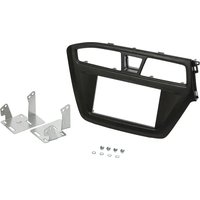
CA-HM-HYU.016 - Amplifier PIONEER - Free user manual and instructions
Find the device manual for free CA-HM-HYU.016 PIONEER in PDF.


| Product Type | Double DIN Installation Kit |
| Brand | Pioneer |
| Model | CA-HM-HYU.016 |
| Compatible Vehicle | Hyundai i20 (2015 and later) |
| Compatible Device Size | Double DIN |
| Kit Contents | Facia plate, mounting brackets, screws |
| Material | Plastic (facia plate), metal (brackets) |
| Color | Black |
| Weight | Approx. 0.5 kg |
| Dimensions (Facia Plate) | Approx. 200 x 100 x 50 mm |
| Installation | Professional installation recommended |
| Safety Warning | Installation must be performed by a qualified professional only. Manufacturer/dealer not liable for incidental or indirect damages. |
| Maintenance | Wipe with a soft, dry cloth. Do not use harsh chemicals. |
| Spare Parts Availability | Contact Pioneer authorized service centers for replacement parts. |
| Reparability | Kits are non-repairable; replace if damaged. |
| General Information | Designed to fit aftermarket double DIN radios into Hyundai i20 (2015+) dashboard. |
Frequently Asked Questions - CA-HM-HYU.016 PIONEER
User questions about CA-HM-HYU.016 PIONEER
0 question about this device. Answer the ones you know or ask your own.
Ask a new question about this device
Download the instructions for your Amplifier in PDF format for free! Find your manual CA-HM-HYU.016 - PIONEER and take your electronic device back in hand. On this page are published all the documents necessary for the use of your device. CA-HM-HYU.016 by PIONEER.
USER MANUAL CA-HM-HYU.016 PIONEER
natural_image
Interior view of a car showing the dashboard and internal compartments (no visible text or symbols)Connect all cables, verify the proper functioning of the system and insert the unit into the housing. Fix it with screws saved before.

natural_image
Interior view of a car dashboard with digital display and control buttons (no visible text or symbols)Place the clips saved before on the new facia plate supplied, mount the air vents and hazard lights button. Mount the facia plate on the dashboard, the plastic shell of the steering and the odometer cover frame. This is the final result.
CA-HM-HYU.016
HYUNDAI
i20 2015 ->
Compatible with double DIN devices

Double DIN Kit content
Facia Plate
Mounting Brackets + screws
04/2015 REV.1ALL RIGHTS RESERVED. Technical changes possible. No liability for misprints.
All installation work must be performed by a qualified professional installer only. The manufacturer / dealer is not liable for any kind of incidental or indirect damages.
Installation Manual Double DIN Kit

natural_image
Interior view of a car dashboard and steering wheel (no visible text or symbols)

natural_image
Interior view of a car dashboard with air conditioner, digital display, and control panel (no visible text or symbols)Remove the odometer cover frame.
Remove the plastic shell of the steering.
Remove the original panel. There are no screws but only pressure clips; take care during this operation. Remove from it and save the air vents, the hazard lights button and the white clips.

natural_image
Interior view of a car dashboard with a digital display and control panel (no visible text or symbols)
natural_image
Close-up of a mechanical component with four circular features and mounting holes (no visible text or symbols)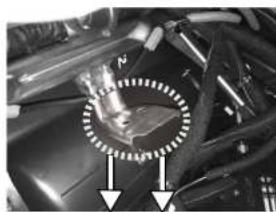
natural_image
Close-up of mechanical components with a highlighted circular region and two arrows pointing to features (no visible text or symbols)Remove the OEM head unit by unscrewing the four screws circled.
Take the left and the right brackets and mount them on the aftermarket unit each with the supplied screws. See the picture for the position of the screws.
Slightly bend downward the circled bracket in order to be able to fit the aftermarket radio.
All installation work must be performed by a qualified professional installer only. The manufacturer / dealer is not liable for any kind of incidental or indirect damages.
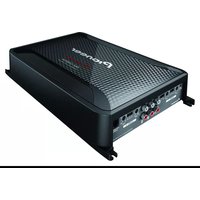
Brand : PIONEER
Model : CA-HM-HYU.016
Category : Amplifier