
S510JA - Tablet PHILIPS - Free user manual and instructions
Find the device manual for free S510JA PHILIPS in PDF.


| Product Type | Tablet |
| Brand | Philips |
| Model | S510JA |
| Display Size | 10.1 inches |
| Display Resolution | 1280 x 800 pixels |
| Processor | Quad-core 1.5 GHz |
| RAM | 2 GB |
| Internal Storage | 32 GB |
| Expandable Storage | microSD up to 128 GB |
| Operating System | Android 11 |
| Rear Camera | 5 MP |
| Front Camera | 2 MP |
| Battery Capacity | 5000 mAh |
| Battery Life | Up to 8 hours of mixed usage |
| Connectivity | Wi-Fi 802.11 b/g/n, Bluetooth 4.2 |
| Ports | Micro USB, 3.5 mm headphone jack |
| Dimensions | 241 x 162 x 9.5 mm |
| Weight | 450 g |
| Power Supply | 5V/2A via Micro USB |
| Main Functions | Web browsing, video playback, e-reading, light gaming, apps |
| Care and Cleaning | Wipe with a soft, dry cloth; avoid liquids and abrasives |
| Safety | Do not disassemble, avoid extreme temperatures, use approved charger |
| Spare Parts and Repairability | Contact Philips support for replacement parts; not user-serviceable |
| General Information | Comes with user manual, charging cable, and power adapter |
Frequently Asked Questions - S510JA PHILIPS
User questions about S510JA PHILIPS
0 question about this device. Answer the ones you know or ask your own.
Ask a new question about this device
Download the instructions for your Tablet in PDF format for free! Find your manual S510JA - PHILIPS and take your electronic device back in hand. On this page are published all the documents necessary for the use of your device. S510JA by PHILIPS.
USER MANUAL S510JA PHILIPS
User manual
User manual
Welcome and important notes
www.phillips.com/support
Product features
Copyright © 2021 TFV Audio and Visual Technology (Shenzhen) Co., Ltd. TFV Audio and Visual Technology (Shenzhen) Co., Ltd. reserves the rights to formally specified information without notice. Pictures without contractual values, Phillips, and the Prime Minister's permission are registered trademarks of Kevin-He Philippines K.V. and are used under license. This product has been manufactured by and is sold under the responsibility of TFV Audio and Visual Technology (Shenzhen) Co., Ltd or one of its affiliates, and TFV Audio and Visual Technology (Shenzhen) Co., Ltd. is the successor in relation to this product. Document version 10. 2021 03 23
Your device
Device contents

Main unit preview

① Camera
② Speaker holes
③ Headphone jack
④ Type-C
⑤ Card tray
⑥ Volume keys
07 Power supply
(4) Total information key
⑨ Upright projection head
10 Flash
Card insertion instructions
Safety information

· Do not insert or remove the card while the device is on.
· Pay attention to the notch direction near the card slot.
Names and Contents of Hazardous Substances
Environmental Protection Use Period
The, any others in the search of 30 years, are my, which is a conservation solution in electrons and electrol photodetted can have an estimate so that the use of these substances will not result in any severe environmental pollution, any body injury or damage to any assets.
Service
S
Service
GUARANTEE
This guarantee card is valid in China. This guarantee card should be retained by the user.
This special card is valid in China. The user should keep this card.

Shop name and address
Purchase number and address ____ ____
Tel No/Post Code
Telephone/Inquiry
Customer service hotline: 400 955 5866
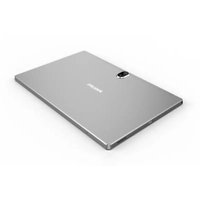


Brand : PHILIPS
Model : S510JA
Category : Tablet