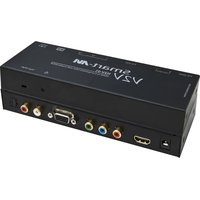
V2V-H2V-01 - Audio/video converter Smart-AVI - Free user manual and instructions
Find the device manual for free V2V-H2V-01 Smart-AVI in PDF.


| Product Type | Audio/Video Converter |
| Brand | Smart-AVI |
| Model | V2V-H2V-01 |
| Input Interface | HDMI Type A (19-pin female) |
| Output Interfaces | Component Video (YPbPr via RCA), VGA (HD-15 female), Stereo Audio (RCA L/R), SPDIF Optical |
| Video Standards | HDMI 1.3b (Deep Color, xvYcc), DVI-D 1.1, HDCP 1.0/1.1 |
| Video Bandwidth | Single-link 340 MHz (10.2 Gbps) |
| Supported Resolutions | 480i, 480p, 576i, 576p, 720p, 1080i (50/60 Hz), VGA up to 2048x1536 @60 Hz |
| Audio Input | HDMI (7.1ch audio) |
| Audio Output | Stereo Unbalanced (RCA) and SPDIF Optical (DTS-HD, Dolby TrueHD, LPCM 7.1, etc.) |
| Power Supply | External 100-240 V AC to 5 V DC, 2 A (10 W) |
| Dimensions (W x H x D) | 7.25 in x 2.5 in x 1 in (184 x 64 x 25 mm approx.) |
| Weight | 0.83 lb (0.38 kg) |
| Operating Temperature | 0 to 55 °C (32 to 131 °F) |
| Storage Temperature | -20 to 85 °C (-4 to 185 °F) |
| Humidity | Up to 95% (non-condensing) |
| HDCP Compliance | HDCP 1.2 Protocol Compliant |
| Indicators | LED indicators for power and signal status |
| Installation | Plug-and-play, no software required |
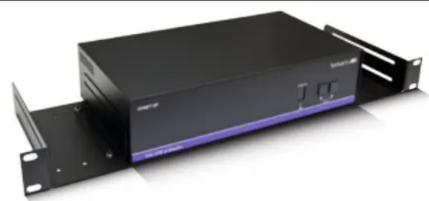
| Rack Mountable | Optional with SmartRack (sold separately) |
| Maintenance | Clean with dry cloth; avoid liquids |
| Safety | Use only supplied power adapter; keep away from moisture |
| Reparability | No user-serviceable parts; contact support for repairs |
| Included Accessories | Power adapter (PS5VDC2A), user manual |
Frequently Asked Questions - V2V-H2V-01 Smart-AVI
User questions about V2V-H2V-01 Smart-AVI
0 question about this device. Answer the ones you know or ask your own.
Ask a new question about this device
Download the instructions for your Audio/video converter in PDF format for free! Find your manual V2V-H2V-01 - Smart-AVI and take your electronic device back in hand. On this page are published all the documents necessary for the use of your device. V2V-H2V-01 by Smart-AVI.
USER MANUAL V2V-H2V-01 Smart-AVI
| PART NO. QTY DESCRIPTION | ||
| V2V-H2V-01 1 DVI-D and Audio to HDMI Converter | ||
| PS5VDC2A 1 5 Volt2 Amp Power Supply |
Technical Specifications
| HDMI VIDEO | |
| Format HDMI 1.3b [Deep supported] | Color, xvYcc color space |
| DVI Compliance | Single-link DVI-D 1.1 |
| HDCP Compliance | 1.0/1.1 |
| Video Bandwidth | Single-link 340MHz [10.2Gbps] |
| Resolution | 480i,480p,720i,720p,1080i |
| Input Interface | (1) HDMI[7.1ch audio & video] |
| Connector | Type A[19-pin female] |
| Maximum Distance | 25 ft. |
COMPOSITE VIDEO
| Format (RCA) Y (75Ω, 1.0/p-p), PbPr (75Ω, 0.7Vp-p) | |
| Resolution | 480i, 480p, 576i, 576p, 720p, 1080i(24/25/30Hz) |
VGA VIDEO
| Format | VGA RGB Analog (75Ω, 0.7Vp-p) |
| Resolution | Up to 1600x1200 @ 85Hz2048x1536 @ 60Hz |
| Output Interface | (1) HD-15 Female |
| H Frequency Range | 30-95KHz |
| V Frequency Range | 50-180Hz |
AUDIO
| Signal Type | Stereo Unbalanced |
| Output Interface | Left/Right RCA (Female) |
SPDIF AUDIO
| Signal Type | DTS-HD/Dolby-trueHD/LPCM7.1/DTS/Dolby-AC3/DSD |
| Output Interface | (1) SPDIF Optical |
OTHER
| Power External 100-240 VAC/SVDC2A @10W | |
| Dimensions 7.25 in W x 2.5 in H x 1 in D | |
| Weight 0.83 lb | |
| Operating Temp. 0-55 °C | (32-131°F) |
| Storage Temp. -20-85 °C | (-4-185°F) |
| Humidity Up to 95% | |
© Copyright 2012 SmartAVI, All Rights Reserved
NOTICE
The information contained in this document is subject to change without notice. Smart-AVI makes no warranty of any kind with regard to this material, including but not limited to, implied warranties of merchantability and fitness for any particular purpose.
Smart-AVI will not be liable for errors contained herein or for incidental or consequential damages in connection with the furnishing, performance or use of this material.
No part of this document may be photocopied, reproduced or translated into another language without prior written consent from Smart-AVI.
For more information, visit www.smartavi.com.
Rack Mountable Option
natural_image
Exterior view of a black server rack unit with attached black panel and drive slots (no visible text or symbols)Our SmartRack is the perfect solution to allow virtually all SmartAVI devices to be custom mounted in a standard 19" server rack. The SmartRack is fully adjustable and can secure/organize several devices.
Smart-AMI SMART AUDIO VIDEO INNOVATION
SmartAVI, Inc. / Twitter: smartavi
11651 Vanowen St. North Hollywood, CA 91605
Tel: (818) 503-6200 Fax: (818) 503-6208
http://www.SmartAVI.com
Smart-AM
SMART AUDIO VIDEO INNOVATION
V2V FAMILY
Installation
Manual
V2V-H2V-01

natural_image
Black SmartAM V2V device with ports and connectors (no visible text or symbols on body)HDMI to Component/VGA Converter

www.smartavi.com
Introduction
The V2V-H2V-01 Converts HDMI to Component Video/VGA with Stereo Audio/SPDIF.
Features
- Converts One HDMI Input Signal to One YPbPr+SPDIF or VGA+SPDIF Signal
• Supports Video input : HDMI 1.2a
• Supports Audio output : SPDIF(Optical)+ R/L Analog
• Supports Video Output : Supports up to WUXGA and 1080I(50/60Hz)
• HDCP 1.2 Protocol Compliant
• No loss of quality
• LED Indicators
• Easy to install within minutes
Applications
• Home Theater
• PC Networking
• Conference Center Systems
- Point of Sale
- Camera Surveillance
- Video Phone
• Control Room Systems
- Recording Studios
Product - Installation Diagram

Installation
- Connect as HDMI input device to the HDMI input on the V2V-H2V-01.
- Connect a digital audio output device (SPDIF) or the stereo audio RCA outputs.
- Connect an Component or VGA display to the outputs on the V2V-H2V-01.
- Connect the power cord to the V2V-H2V-01.
- Power on the input devices, speakers and the display.
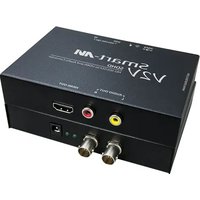
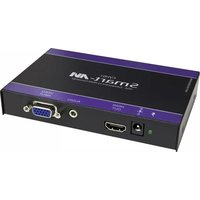
V2V-H2V-01 Front

V2V-H2V-01 Rear


Brand : Smart-AVI
Model : V2V-H2V-01
Category : Audio/video converter