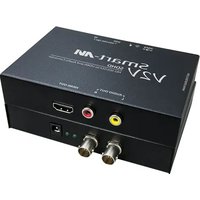
V2V-SDHD - Audio/video converter Smart-AVI - Free user manual and instructions
Find the device manual for free V2V-SDHD Smart-AVI in PDF.


| Product Type | Audio/Video Converter |
| Brand | Smart-AVI |
| Model | V2V-SDHD |
| Input Ports | 1x VGA, 1x 3.5mm Audio |
| Output Ports | 1x HDMI, 1x 3.5mm Audio |
| Max Resolution | 1920x1080@60Hz |
| Power Supply | 5V DC, 1A (USB-powered) |
| Dimensions | 100mm x 60mm x 20mm |
| Weight | 100g |
| Video Formats | VGA, HDMI |
| Audio Support | Stereo audio extraction via 3.5mm jack |
| Operating Temperature | 0°C to 40°C |
| Housing Material | Metal |
| LED Indicators | Power (blue), Signal (green) |
| Key Features | Plug and Play, no driver required, EDID passthrough |
| Compliance | CE, FCC |
| Maintenance | Clean with a soft, dry cloth |
| Safety Precautions | Avoid liquids, do not disassemble, keep away from heat |
| Spare Parts Availability | Not applicable (integrated unit) |
| Repairability | Not user-serviceable; contact support |
Frequently Asked Questions - V2V-SDHD Smart-AVI
User questions about V2V-SDHD Smart-AVI
0 question about this device. Answer the ones you know or ask your own.
Ask a new question about this device
Download the instructions for your Audio/video converter in PDF format for free! Find your manual V2V-SDHD - Smart-AVI and take your electronic device back in hand. On this page are published all the documents necessary for the use of your device. V2V-SDHD by Smart-AVI.
USER MANUAL V2V-SDHD Smart-AVI
Technical Specifications
| HD-SDI/SDI VIDEO | |
| Format | SMPTE-259/292/296 Compliant |
| Input Interface | BNC |
| Resolution | 525i, 625i, 720p 50/59.94/60, 1080i 50/59.94/60 |
| Output Interface | BNC Loopback Equalized |
| AUDIO | |
| Signal Type | DTS-HD/Dolby-trueHD/LPCM7.1/DTS/Dolby-AC3/DSD |
| Output Interface | 2-Channel RCA R/L Analog |
| HDMI VIDEO | |
| Format HDMI 1.3b [Deep] | Color, xvYcc color space supported] |
| DVI Compliance | Single-link DVI-D 1.1 |
| HDCP Compliance | 1.0/1.1 |
| Video Bandwidth | Single-link 340MHz [10.2Gbps] |
| Resolution | 480i,480p,720i,720p,1080i,1080p |
| Output Interface | (1) HDMI[7.1ch audio & video] |
| Connector | Type A[19-pin female] |
| Maximum Distance | 25 ft. |
| OTHER | |
| Power External 100-240 V | AC/SVDC2A @10W |
| Dimensions 5 in W x 1 in H x 3.375 in D | |
| Weight 0.5 lb | |
| Operating Temp. 0-55 °C | (32-131°F) |
| Storage Temp. -20-85 °C | (-4-185 °F) |
| Humidity Up to 95% | |
© Copyright 2012 SmartAVI, All Rights Reserved
NOTICE
The information contained in this document is subject to change without notice. Smart-AVI makes no warranty of any kind with regard to this material, including but not limited to, implied warranties of merchantability and fitness for any particular purpose.
Smart-AVI will not be liable for errors contained herein or for incidental or consequential damages in connection with the furnishing, performance or use of this material.
No part of this document may be photocopied, reproduced or translated into another language without prior written consent from Smart-AVI.
For more information, visit www.smartavi.com.
Rack Mountable Option

natural_image
Exterior view of a black server rack unit with attached cable and drive bays (no visible text or symbols)Our SmartRack is the perfect solution to allow virtually all SmartAVI devices to be custom mounted in a standard 19" server rack. The SmartRack is fully adjustable and can secure/organize several devices.

SmartAVI, Inc. / Twitter: smartavi 11651 Vanowen St. North Hollywood, CA 91605 Tel: (818) 503-6200 Fax: (818) 503-6208 http://www.SmartAVI.com

V2V _FAMILY
Installation Manual
V2V-SDHD
natural_image
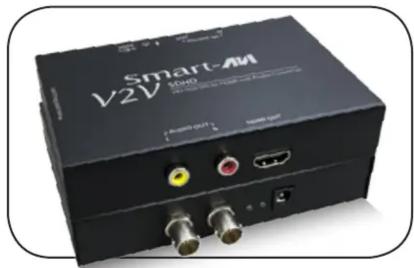
Black Smart-AM V2V audio device with ports and connectors (no visible text or symbols on body)HD-SDI/SDI to HDMI and Audio Converter

www.smartavi.com
Introduction
The V2V-SDHD enables you to connect your high-definition HD-SDI or SDI devices to HDMI displays or TVs with embedded HDMI audio. It also features 2-channel RCA audio output for monitoring or connection to external speakers. Often the display or TV will have poor sound or no sound at all, requiring the additional audio output. The V2V-SDHD also features a looping HD-SDI/SDI connection that allows you to daisy chain the signal to other outputs. This means that you can have multiple HDMI displays playing the HD-SDI/SDI signal.
Features
- Converts HD-SDI/SDI input signal to one HDMI 1.1 signal with embedded audio
• Also has 2-channel RCA Audio output - Looping HD-SDI/SDI allows for daisy-chaining additional equipment
• HDMI output : Supports up to 1080p/60HZ
• HDCP 1.3b protocol compliant
• Audio formats supported : DTS-HD/Dolby-trueHD/LPCM7.1/DTS/Dolby-AC3/DSD
• Digital with no loss of quality
• Installs in minutes
Applications
• Home Theater
• Presentation Rooms
• Conference Center Systems
- Camera Surveillance
- Video Phone
• Control Room Systems
- Recording Studio

Installation
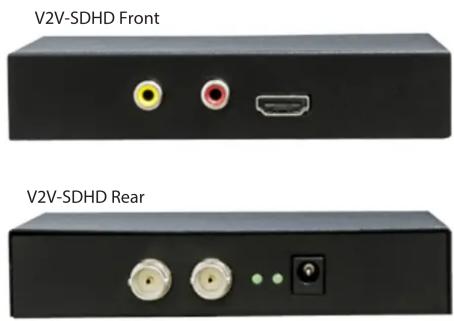
- Connect an HD-SDI/SDI video input device to the HD-SDI/SDI IN port on the rear of the V2V-SDHD.
- Connect an HDMI display to the HDMI OUTPUT port on the front of the V2V-SDHD.
- Optionally connect speakers or a stereo receiver with the AUDIO OUT ports on the V2V-SDHD.
- Optionally connect additional HD-SDI/SDI output devices to the HD-SDI/SDI OUT port on the V2V-SDHD.
- Connect the power cord to the V2V-SDHD.
- Power on the input device and the display/speakers.
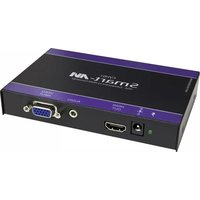

Brand : Smart-AVI
Model : V2V-SDHD
Category : Audio/video converter