
DAMP 2000 - Radio BLAUPUNKT - Free user manual and instructions
Find the device manual for free DAMP 2000 BLAUPUNKT in PDF.


| Product Type | Portable Radio |
| Brand | Blaupunkt |
| Model | DAMP 2000 |
| Frequency Bands | FM, AM |
| Tuning Type | Digital |
| Preset Stations | 20 (FM) + 10 (AM) |
| Built-in Speaker | Mono, 3W |
| Headphone Jack | 3.5mm stereo |
| Audio Input | AUX (3.5mm) |
| Power Source | AC 220-240V, 50Hz or 4x AA batteries (not included) |
| Power Consumption | 5W |
| Dimensions (W x H x D) | 200 x 100 x 50 mm |
| Weight | 0.5 kg |
| Display | LCD with backlight |
| Antenna | FM: telescopic; AM: built-in ferrite |
| Additional Features | Sleep timer, alarm clock, snooze |
| Cleaning Instructions | Wipe with a soft, dry cloth. Do not use liquids or abrasives. |
| Safety Precautions | Do not expose to moisture or extreme temperatures. Use only supplied adapter. |
| Repairability | Replaceable speaker, antenna, and batteries. Consult a professional for internal repairs. |
Frequently Asked Questions - DAMP 2000 BLAUPUNKT
User questions about DAMP 2000 BLAUPUNKT
0 question about this device. Answer the ones you know or ask your own.
Ask a new question about this device
Download the instructions for your Radio in PDF format for free! Find your manual DAMP 2000 - BLAUPUNKT and take your electronic device back in hand. On this page are published all the documents necessary for the use of your device. DAMP 2000 by BLAUPUNKT.
USER MANUAL DAMP 2000 BLAUPUNKT
Thickness - 1.9 mm | Size - 800mm x 460mm | Coverage Area - 3.96 sqft
Get Better Sound - Hear More Music - Get Better Bass
Blaupunkt DAMP 2000 is a super sticky butyl rubber bonded to an aluminum alloy skin. It is very simple to cut and install. The butyl rubber and heavy aluminum alloy skin will stick and contour better than any other product in the market without tearing. It will conform easily to all interior surfaces, and the sticky butyl rubber will adhere to a surface and stay in place without any special surface prep, and without leaving any odor or dripping material.
Make any SPEAKER SOUND BETTER!
How to sound insulate your car

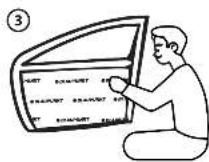
Step 1: Remove door pads to provide access to install DAMP 2000.
Step 2: Clean the sheet metal surface area of the door skin preferably with acetone to ensure the butyl rubber sticks properly or use an appropriate cleaning agent such as rubbing alcohol and a rag to clean the sheet metal surface.
Step 3: Take measurements. Measure the door sheet metal panels and floor to install the dampening sheet - DAMP 2000.
Step 4: Cut the dampening sheet to the desired sizes using a sharp utility knife.
Step 5: Stick the dampening sheet to the sheet metal panels. This will help reduce vibrations caused by the speaker by adding mass to the thin sheet metal panels.
Step 6: Press the dampening sheet in place. When applying the material, start with the innermost sections and around holes. Simply peel off a protective layer to reveal the butyl rubber bonded side. Once you apply the material, use a roller on the aluminium alloy side while applying some pressure to make it stick firmly. This will also remove all bubbles.
Step 7: Use the roller to remove any lumps in the insulation.
Step 8: Allow time to dry. Allow the materials to dry in place before proceeding.
Step 9: Put back all door pads and check for panel vibration caused by speakers.
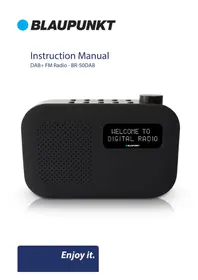

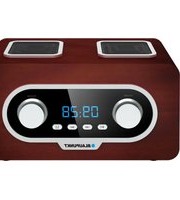
Brand : BLAUPUNKT
Model : DAMP 2000
Category : Radio