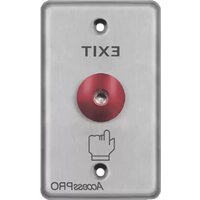
APBRRLC - Bouton poussoir de sortie AccessPRO - Free user manual and instructions
Find the device manual for free APBRRLC AccessPRO in PDF.


| Product Type | Electronic Accessory |
| Brand | AccessPRO |
| Model | APBRRLC |
| Dimensions | Approximately 15 x 5 x 2 cm |
| Weight | Approximately 100 g |
| Power Supply | 2 x AAA batteries (not included) |
| Battery Life | Up to 6 months under normal use |
| Main Functions | Control compatible devices remotely |
| Compatibility | Various electronic devices |
| Operating Range | Up to 10 meters |
| Material | Durable plastic |
| Color | Black |
| Care and Cleaning | Wipe with a dry, soft cloth. Do not use liquids. |
| Safety | Keep away from water and extreme temperatures. Do not disassemble. |
| Spare Parts | Batteries (standard AAA), replacement units available |
| Repairability | Not user-serviceable; contact AccessPRO support for repairs |
| Package Contents | 1 x Remote control, 1 x User manual |
| Warranty | 1 year limited warranty |
Frequently Asked Questions - APBRRLC AccessPRO
User questions about APBRRLC AccessPRO
0 question about this device. Answer the ones you know or ask your own.
Ask a new question about this device
Download the instructions for your Bouton poussoir de sortie in PDF format for free! Find your manual APBRRLC - AccessPRO and take your electronic device back in hand. On this page are published all the documents necessary for the use of your device. APBRRLC by AccessPRO.
USER MANUAL APBRRLC AccessPRO
AccessPRO®
Botón de salida tipo hongo
APBRRLC
Los botones de salida de ACCESSPRO de uso rudo tiene la capacidad para. Este equipo es ideal para instalaciones en escuelas, hospitales, oficinas o clínicas.

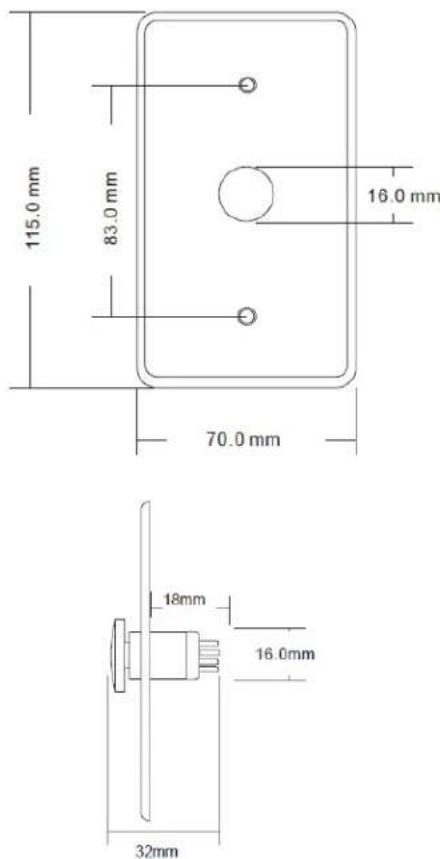
Dimensiones:
Especificaciones:
| Parámetros | Descripción |
| Dimensiones | 115 x 70 x 32 mm |
| Voltaje | 12vcc |
| Material del panel | Acero inoxidable |
| Corriente soportada | 24VCD@3A Max |
| Temperatura de operación | -10 a 55°C |
| Salidas de contacto | NO/COM |
| Tipo de botón | Momentáneo |
| Peso | 0.1 Kg. |
| Vida mecánica | 500,000 accionamientos |
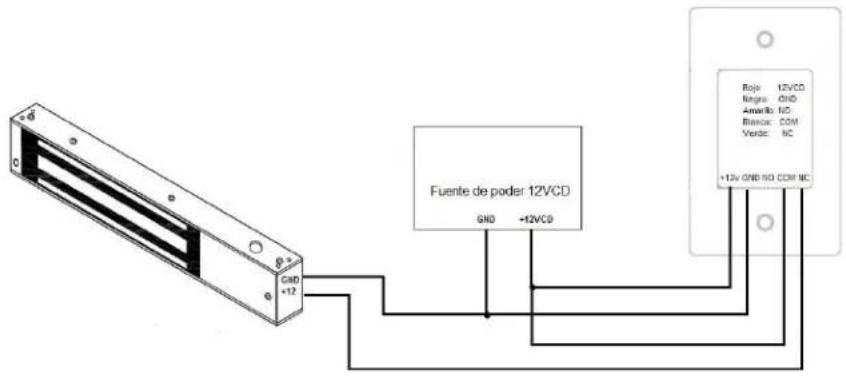
Diagrama de colores:
ROJO: +12VCD
NEGRO: GND
AMARILLO: COM
AMARILLO: NO
Indicaciones de seguridad
- Lea, siga y conserve estas instrucciones.
- Preste atención a todas las advertencias.
- Utilice exclusivamente los dispositivos o accesorios indicados por el fabricante.
Información de seguridad eléctrica
- Es obligatorio cumplir los requisitos de corriente, frecuencia y voltaje indicados en la etiqueta del fabricante. La conexión a una fuente de alimentación diferente a las especificadas puede ocasionar un funcionamiento incorrecto, daños en el equipo o riesgo de incendio si no se respetan las limitaciones.
- Este equipo no contiene piezas que un operador pueda reparar. Solo un técnico de servicio cualificado debe proporcionar servicios.
Datos de Contacto para Soporte
Ponemos a su disposición nuestros datos de contacto para soporte técnico, dudas, recomendaciones o cualquier otro requerimiento:
Página de soporte: http://soporte.syscom.mx
Teléfono: 01 (614) 415-2525,
Información adicional sobre los productos y accesorios: http://www.syscom.mx
Brand : AccessPRO
Model : APBRRLC
Category : Bouton poussoir de sortie