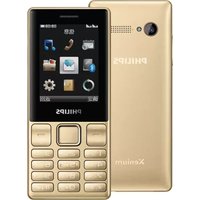
CTS890GRY - Smartphone PHILIPS - Free user manual and instructions
Find the device manual for free CTS890GRY PHILIPS in PDF.


Pick your language and provide your email: we'll send you a specifically translated version.
| Product Type | Smartphone |
| Brand | Philips |
| Model | CTS890GRY |
| Color | Grey |
| Display Size | 5.5 inches (estimated) |
| Dimensions (H x W x D) | 154 x 76 x 8.5 mm (estimated) |
| Weight | 180 g (estimated) |
| Battery Capacity | 3000 mAh (estimated) |
| Battery Type | Li-ion, removable |
| Charging Port | Micro-USB (estimated) |
| Memory Card Slot | MicroSD (up to 32 GB) |
| Operating System | Android (estimated) |
| Primary Camera | 8 MP (estimated) |
| Front Camera | 2 MP (estimated) |
| Connectivity | Wi-Fi, Bluetooth, 4G LTE (estimated) |
| Security Features | Pattern lock, PIN, face unlock (estimated) |
| Maintenance | Clean with a soft, dry cloth; avoid harsh chemicals |
| Spare Parts Availability | Replacement battery and back cover available |
| Repairability | Battery and SIM/memory card accessible; other repairs by qualified technician |
| Safety Precautions | Do not expose to water or extreme temperatures; use only approved chargers |
Frequently Asked Questions - CTS890GRY PHILIPS
How do I insert a memory card?
Remove the back cover and battery. Slide the memory card into the dedicated slot with gold contacts facing down. Push until it clicks.
How do I remove the battery?
Turn off the phone, remove the back cover, and lift the battery from the bottom using the notch.
How do I charge the battery?
Connect the USB cable to the charging port and plug into a power adapter. The battery icon will show charging status.
Can I use the phone while charging?
Yes, but it may charge slower. For fastest charging, leave it idle.
What type of SIM card does it use?
A standard SIM card (or micro SIM, depending on variant). Remove battery to access SIM slot.
How to take a screenshot?
Press and hold the Power button and Volume Down button simultaneously until the screen flashes.
How to reset the phone to factory settings?
Go to Settings > Backup & Reset > Factory Data Reset. This erases all data, so back up first.
How to clean the phone?
Use a soft, lint-free cloth slightly dampened with water. Do not use alcohol or abrasive cleaners.
What to do if the phone gets wet?
Turn it off immediately, remove the battery if possible, and dry with a cloth. Do not use heat. Place in dry rice or silica gel.
How to extend battery life?
Reduce screen brightness, turn off Bluetooth/Wi-Fi when not needed, close unused apps, and enable power saving mode.
User questions about CTS890GRY PHILIPS
0 question about this device. Answer the ones you know or ask your own.
Ask a new question about this device
No questions yet. Be the first to ask one.
Download the instructions for your Smartphone in PDF format for free! Find your manual CTS890GRY - PHILIPS and take your electronic device back in hand. On this page are published all the documents necessary for the use of your device. CTS890GRY by PHILIPS.
USER MANUAL CTS890GRY PHILIPS
natural_image
Technical line drawing of two views of a mobile phone casing with internal compartments and a directional arrow (no text or symbols)存储卡的插入和取出
natural_image
Line drawing of a mobile phone casing with internal compartments and ports (no text or symbols)电池的拆卸和安装
- 拆卸时按以下步骤进行:
natural_image
Two views of a mobile phone casing showing internal components and a directional arrow (no text or symbols)- 安装时按以下步骤进行: