
6200 - Smartphone BLACKBERRY - Free user manual and instructions
Find the device manual for free 6200 BLACKBERRY in PDF.



User questions about 6200 BLACKBERRY
0 question about this device. Answer the ones you know or ask your own.
Ask a new question about this device
Download the instructions for your Smartphone in PDF format for free! Find your manual 6200 - BLACKBERRY and take your electronic device back in hand. On this page are published all the documents necessary for the use of your device. 6200 by BLACKBERRY.
USER MANUAL 6200 BLACKBERRY
Where this document states "Published in XXXXX" on the last page, the printer should change XXXXX to the country in which this document is published.
BATTERY CHARGER
INFORMATION BOOKLET
For the BlackBerry 6200
Series of wireless handhelds,
BlackBerry 6500
Series of wireless handhelds,
andBlackBerry6700
Series of wireless handhelds
English
Please read these safety instructions and the operation instructions provided in this booklet before using the battery charger. Retain these instructions for future use.
The battery charger is for indoor use only. Do not use the battery charger outside or in any area exposed to the elements.
Do not place the battery charger or the handheld being charged on any unstable surface, such as a cart, stand, tripod, bracket, or table. It may fall, thereby potentially causing serious injury to a child or adult, and/or serious damage to the handheld. Take care when using the battery charger. Place the charger in a secure and stable spot and route the USB cable in a way that reduces the risk of injury to others, such as by tripping or choking.
The battery charger should be operated only from the type of power source indicated on the marking label. The USB cable of the battery charger should be routed so that it is not likely to be walked on, tripped over or pinched by items placed upon or against it. Pay particular attention to the battery charger at the point where it plugs into the power outlet or convenience receptacles, the point where the USB cable plugs into the battery charger, and the point where the USB cable connects to the handheld.
Safety information
Do not overload power outlets, extension cords, or integral convenience receptacles as this can result in a risk of fire or electric shock. To reduce the risk of damage to the cord or the plug, pull by the plug rather than the cord when you disconnect the battery charger from the power outlet or convenience receptacle.
Never push objects of any kind into the handheld or battery charger through openings as they may short-out parts and could result in a fire or electric shock. Never spill liquid of any kind on the battery charger.
Do not use the battery charger near water (for example near a bathtub, or a sink, in a wet basement, near a swimming pool, etc.). Whether in use or not, the battery charger should be situated away from heat sources, such as radiators, heat registers, stoves, flames, lit candles, cigarettes, or other products (including amplifiers) that produce heat.
WARNING: To reduce the risk of fire or electric shock, do not expose the battery charger to water, rain, or other moisture.
Service: Disconnect the USB cable from the handheld and unplug the battery charger from the power outlet and refer the handheld, charging unit, and any accessories for service to qualified service personnel if:
- The USB cable or plug, or connector to the handheld is damaged.
Liquid has been spilled on the battery charger. - The battery charger has been exposed to rain or water.
- The battery charger becomes very hot to the touch.
- The battery charger has been dropped or damaged in any way.
- The battery charger does not operate normally, and you followed the instructions contained in this booklet.
- The battery charger exhibits a distinct change in performance.
Use the battery charger in accordance with the directions provided in this booklet. Improper use may result in damage and will often require extensive work by a qualified technician to restore the battery charger to its normal operation. Do not attempt to disassemble the battery charger.
For information on qualified service personnel in your area, please contact your network operator or BlackBerry reseller.
Disconnect the USB cable from the handheld and unplug the battery charger from the power outlet before cleaning either the handheld or the battery charger. Do not use
Safety information
liquid or aerosol cleaners. Rather, use a dry cloth to clean the unit. Unplug the battery charger during lightning storms or when unused for long periods of time.
Failure to observe all these instructions will void the Limited Warranty, and may lead to suspension or denial of services to the offender, or legal action, or both.
Charging a battery in the battery charger
You can recharge a battery by placing it in the battery charger for the following BlackBerry Wireless HandheldsTM:
- BlackBerry 6200 Series of wireless handhelds
- BlackBerry 6500 Series of wireless handhelds
- BlackBerry 6700 Series of wireless handhelds
Charging a battery in the battery charger
To charge a battery in the battery charger
- Insert the appropriate attachment piece into the power adapter.
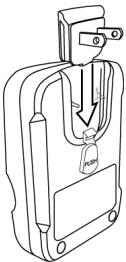
Inserting the attachment piece

Europe

North America

United Kingdom

Australia
Charging a battery in the battery charger
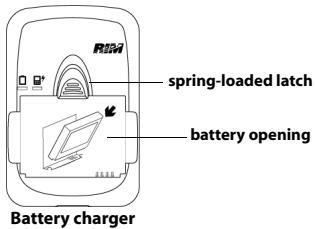
- Insert the battery into the battery opening, as illustrated, and press the battery into place. The battery will snap over the edge of the spring-loaded latch and lock into place.
- Plug the battery charger into a power outlet.
- Let the battery charge to full power before you remove it from the charger. Refer to "LED charging indicators" on page 18 for more information on charging status.
- After the battery is charged, unplug the battery charger from the power outlet.
- Use your thumb to raise the spring-loaded latch above the battery opening.
- Remove the battery from the charger.
Charging a battery in the battery charger
- Push the button below the attachment piece (1) to remove it from the battery charger (2).
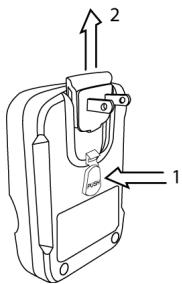
Removing the attachment piece
Charging a battery inside a wireless handheld
You can recharge a battery by connecting the handheld to the battery charger for the following BlackBerry Wireless Handhelds:
- BlackBerry 6200 Series of wireless handhelds
- BlackBerry 6500 Series of wireless handhelds

Note: This feature is not available for the BlackBerry 6700 Series of wireless handhelds.
Charging a battery inside a wireless handheld
To charge a battery inside a wireless handheld
- Insert the appropriate attachment piece into the power adapter.
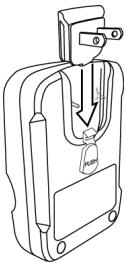
Inserting the attachment piece

Europe

North America

United Kingdom

Australia
Charging a battery inside a wireless handheld
- Insert the large USB-A connector at the end of the USB cable into the battery charger.
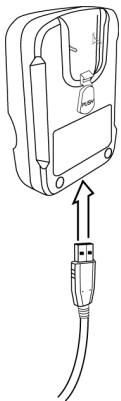
Inserting the USB-A connector into the battery charger
Charging a battery inside a wireless handheld
- Insert the smaller connector at the end of the USB cable into your handheld.
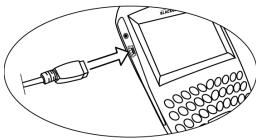
Inserting the connector into your handheld
- Plug the battery charger into a power outlet.
- Let your handheld charge to full power before you disconnect it from the battery charger. Refer to "LED charging indicators" on page 18 for more information on charging status.
Charging a battery inside a wireless handheld
When your handheld is charging, the battery power icon on the Home screen changes to a charging icon.

battery power icon

charging icon
After your handheld is fully charged, the battery power icon replaces the charging icon.
- After the handheld is charged, unplug the battery charger from the power outlet.
- Remove the smaller connector at the end of the USB cable from your handheld.
Charging a battery inside a wireless handheld
- Push the button below the attachment piece (1) to remove it from the battery charger (2).
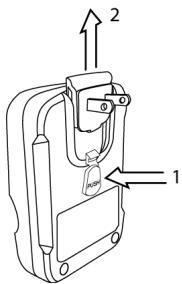
Removing the attachment piece
Battery charging time
It takes approximately two hours to fully charge a battery. A battery charged in a wireless handheld generally takes longer to charge than a battery charged directly in the battery charger.
Simultaneous battery and handheld charging
You can charge a battery in the battery charger and charge a battery in a wireless handheld at the same time. If you do this, the battery in the wireless handheld takes priority. Both batteries are charged; however, the battery in the handheld will likely finish charging before the battery in the battery charger.
Contact your service provider for specific information regarding battery and wireless handheld charging times.
LED charging indicators
LED charging indicators
The battery charger displays two LED charging indicators, which are located above the battery opening.


The charging indicators appear amber, green, or red, depending on the status of the battery or handheld being charged.
| LED color | Description |
| off | • no battery inserted for charging • no handheld connected for charging |
| amber | • battery inserted and charging • handheld connected and charging |
| green | • battery inserted and charged • handheld connected and charged Note: Handheld LED will also show green when handheld is connected without battery. |
| flashing red | • battery error |
Regulatory compliance statement
This device complies with Part 15 of the FCC Rules. Operation is subject to the following two conditions:
- This device may not cause harmful interference.
- This device must accept any interference received, including interference that may cause undesired operation.
This equipment has been tested and found to comply with the limits for a Class B digital device, pursuant to Part 15 of the FCC Rules. These limits are designed to provide reasonable protection against harmful interference in a residential installation. This equipment generates, uses and can radiate radio frequency energy and, if not installed and used in accordance with the manufacturers instructions, may cause interference harmful to radio communications.
There is no guarantee, however, that interference will not occur in a particular installation. If this equipment does cause harmful interference to radio or television reception, which can be determined by turning the equipment off and on, the user is encouraged to try to correct the interference by one or more of the following measures:
Reorient or relocate the receiving antenna.
Regulatory compliance statement
- Increase the separation between the equipment and receiver.
- Connect the equipment into an outlet on a circuit different from that to which the receiver is connected.
- Consult the dealer or an experienced radio/TV technician for help.
Changes or modifications to this unit not expressly approved by the party responsible for compliance could void the user's authority to operate this equipment.
Industry Canada information
EU Regulatory Conformance
Research In Motion hereby declares that this battery charger complies with the appropriate standards of EMC directive 89/336/EEC and Low Voltage directive 73/23/ EEC.

Regulatory compliance statement
The Declaration of Conformity is available for viewing at the following location in the EU community:
Research In Motion UK Limited 36 Station Road, Egham, Surrey TW20 9LF, United Kingdom
Standards
The battery charger has been found compliant with the following regulatory standards:
- UL60950 Safety of Information Technology Equipment
ETSI EN 301 489-1/-7 Electromagnetic Compatibility standard for radio equipment and services as per 89/336/EEC Electromagnetic Compatibility Directive
EN60950 Safety of Information Technology as per 73/23/EEC Low Voltage Directive - AS/NZS3260 Safety of Information Technology and Business Equipment (Pending)
AS/NZS3548 Information Technology Equipment - Radio Disturbance Characteristics (Pending)
FCC Part15 Class B Radio Frequency Devices - IC ICES-003 Class B Interference-Causing Equipment Standard Digital Apparatus
Regulatory compliance statement


(Pending)
Temperature
For best results, your battery charger should be operated and stored in conditions of moderate temperature and humidity.
Recommended operating temperature range: 0 to 45^ Recommended storage temperature range: -30 to 75^
Operational Requirements
The battery charger model ASY-04234-001 is for use only with the BlackBerry 6200 Series of wireless handhelds, BlackBerry 6500 Series of wireless handhelds, and BlackBerry 6700 Series of wireless handhelds.
Research In Motion UK Limited 36 Station Road, Egham, Surrey TW20 9LF, Regno Unito
Standard
Research In Motion UK Limited 36 Station Road, Egham, Surrey TW20 9LF, Reino Unido
Normas
© 2003 Research In Motion Limited. All rights reserved. The BlackBerry and RIM families of related marks, images and symbols are the exclusive properties of Research In Motion Limited. RIM, Research In Motion, 'Always On, Always Connected', the "envelope in motion" symbol and the BlackBerry logo are registered with the U.S. Patent and Trademark Office and may be pending or registered in other countries. All other brands, product names, company names, trademarks and service marks are the properties of their respective owners. The handheld and/or associated software are protected by copyright, international treaties and various patents, including one or more of the following U.S. patents: 6,278,442; 6,271,605; 6,219,694; 6,075,470; 6,073,318; D,445,428; D,433,460; D,416,256. Other patents are registered or pending in various countries around the world. Please visit www.rim.com/ patents.shtml for a current listing of applicable patents.
This document, including any graphics contained within the document, may contain technical inaccuracies or typographical errors. The content contained in this document, including related graphics, are provided "as is" without warranty of any kind, express or implied. Updates are periodically made to the information herein and Research In Motion reserves the right to make improvements and/or changes in the product(s) described herein and/or the contents of this document at any time without notice.
Published in XXXXX. MAT-06050-001 rev. 002.