
ExtremeCap SDI BU111 - Camera AVERMEDIA - Free user manual and instructions
Find the device manual for free ExtremeCap SDI BU111 AVERMEDIA in PDF.


| Product Type | Video Capture Device |
| Brand | AVerMedia |
| Model | ExtremeCap SDI BU111 |
| Input Interface | 1x SDI (BNC) |
| Output Interface | USB 3.0 (Type-C) |
| Supported Video Input | Up to 1080p60 |
| Supported Video Output | Up to 1080p60 |
| Audio Support | Embedded SDI audio |
| Power Supply | 5V DC via power adapter |
| Power Consumption | <5W |
| Dimensions | 100 x 60 x 20 mm (approx.) |
| Weight | 100 g (approx.) |
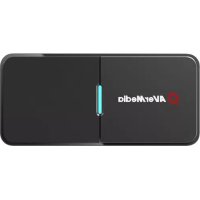
| LED Indicator | Solid blue (power on), solid red (no input), flashing blue (booting/updating firmware) |
| Operating Temperature | 0°C to 50°C |
| Storage Temperature | -20°C to 70°C (approx.) |
| Compliance | FCC Class B, CE, ICES-3 |
| Included Accessories | Quick guide, USB cable, power adapter, bracket |
| System Requirements | Windows 7/8/10, macOS (with compatible software) |
| Software | AVerMedia RECentral (recommended), OBS, etc. |
| Cleaning | Use a dry cloth; unplug before cleaning |
| Safety | Do not disassemble; refer servicing to qualified personnel |
| Reparability | No user-serviceable parts; contact AVerMedia support |
Frequently Asked Questions - ExtremeCap SDI BU111 AVERMEDIA
User questions about ExtremeCap SDI BU111 AVERMEDIA
0 question about this device. Answer the ones you know or ask your own.
Ask a new question about this device
Download the instructions for your Camera in PDF format for free! Find your manual ExtremeCap SDI BU111 - AVERMEDIA and take your electronic device back in hand. On this page are published all the documents necessary for the use of your device. ExtremeCap SDI BU111 by AVERMEDIA.
USER MANUAL ExtremeCap SDI BU111 AVERMEDIA
ExtremeCap SDI BU111 Quick Guide

EnglishPortuguês
DeutschРусский
Français 繁體中文
Italiano 简体中文
Español
Disclaimer
All the images in this documentation are examples only. The images may vary depending on the product and software version. Information presented in this documentation has been carefully checked for reliability; however, no responsibility is assumed for inaccuracies. The information contained in this documentation is subject to change without notice.
Copyright and Trademark Information
©2016 by AVerMedia Technologies, Inc. All rights reserved. No part of this publication, in whole or in part, may be reproduced, transmitted, transcribed, altered or translated into any language in any form by any means without the written permission of AVerMedia Technologies, Inc. Information and specification contained in this manual are subject to change without notice and do not represent a commitment on the part of AVerMedia.
For more information, please refer to www.avermedia.com. "AVerMedia" and "ExtremeCap" are trademarks or registered trademarks of AVerMedia Technologies, Inc. The pictures contained in this manual are provided for reference purposes only. Made in Taiwan (except accessories).
Headquarters
Address No.135, Jian 1st Rd., Zhonghe Dist., New Taipei City 23585, Taiwan
Website http://www.avermedia.com
Telephone +886-2-2226-3630
US Office
Address 47358 Fremont Blvd., Fremont, CA 94538
Telephone (408)263-3828
Europe Office
Address Distributieweg 13, 2742 RB Waddinxveen, The Netherlands
Telephone +31 10 7600 500
國際總部
Important Safety Instructions and Disclaimer
WARNING: Failure to follow these safety instructions could result in fire, electric shock, other injury or damage to device or other property, and/or loss of life. AVerMedia is not responsible for damage or injury arising from failure to follow safety instructions relating to the product's use.
General Guidelines and Warning
- Read and follow these instructions.
- Do not use the device on uneven or unstable surfaces.
- Do not use this device in a wet environment or near water.
- Unplug the device before cleaning. Clean only with a dry cloth.
- Use in a well ventilated environment. Do not block any ventilation openings.
• Use the device in environments with ambient temperatures between 0°C (32°F) and 50°C (122°F). - Use power sources within the specified voltage range.
- Do not place heavy objects on the device.
- Do not install near heat sources such as radiators or stoves.
- Do not defeat the safety purposes of the polarized or grounding-type plug.
- Protect the power cord from being walked on or pinched, particularly where the cord connects with plugs or adapters.
- Only use the attachments and accessories specified by the manufacturer.
- Unplug this device during lightning storms or when unused for prolonged time.
- Do not modify or disassemble the device in any way.
• Refer all servicing to qualified personnel. - Do not dispose the device as general household waste. Dispose in accordance with local environmental laws.
Inside the Box
EN
These are what you'll find in the box:

Installation & LED Status

flowchart
graph LR
    A["Camera"] --> B["Sensor"]
    C["Sensor"] --> B
    B --> D["I/O/Video"]
    D --> E["Laptop"]
    E --> F["OR"]
LED Indicator Status
Solid Blue Powered On
Solid Red No Input
Flashing Blue Booting / Updating Firmware
Scan this QR code for specs and more information.

Verpackungsinhalt
This device complies with Part 15 of the FCC Rules. Operation is subject to the following two conditions: (1) this device may not cause harmful interference, and (2) this device must accept any interference received, including interference that may cause undesired operation.
Federal Communications Commission Statement
NOTE - This equipment has been tested and found to comply with the limits for a Class B digital device, pursuant to Part 15 of the FCC Rules. These limits are designed to provide reasonable protection against harmful interference in a residential installation. This equipment generates, uses and can radiate radio frequency energy and, if not installed and used in accordance with the instructions, may cause harmful interference to radio communications. However, there is no guarantee that interference will not occur in a particular installation. If this equipment does cause harmful interference to radio or television reception, which can be determined by tuning the equipment off and on, the user is encouraged to try to correct the interference by one or more of the following measures:
- Reorient or relocate the receiving antenna.
- Increase the separation between the equipment and receiver.
- Connect the equipment into an outlet on a circuit different from that to which the receiver is connected.
- Consult the dealer or an experienced radio/television technician for help.
CAUTION ON MODIFICATIONS
To comply with the limits for the Class B digital device, pursuant to Part 15 of the FCC Rules, this device must be installed in computer equipment certified to comply with the Class B limits. All cables used to connect the computer and peripherals must be shielded and grounded. Operation with non-certified computers or non-shielded cables may result in interference to radio or television reception.
Changes and modifications not expressly approved by the manufacturer or registrant of the equipment can void your authority to operate the equipment under Federal Communications Commission rules.

European Community Compliance Statement Class B
This product is herewith confirmed to comply with the requirements set out in the Council Directives on the approximation of the laws of the Member States relating to Electromagnetic Compatibility (EMC) Directive 2014/30/EU.
Waste Electrical and Electronic Equipment
The mark of crossed-out wheeled bin indicates that this product must not be disposed of with your other household waste. Instead, you need to dispose of the waste equipment by handing it over to a designated collection point for the recycling of waste electrical and electronic equipment. For more information about where to drop off your waste equipment for recycling, please contact your household waste disposal service or the shop where you purchased the product.
CAN ICES-3 (B)/NMB-3 (B)
Canada - Canada Industry Canada (IC) Labelling Requirements
Every manufacturer or importer shall ensure import or before offering for sale, as appropriate, that each unit of the type that they offer for sale bears, in a location convenient for inspection, a permanent label or marking containing (in French and English), the following statement:
ICES-003 (Interference - Causing Equipment Standards)
"This class B digital apparatus complies with Canadian ICES-003."
MSIP Class B Statement
MSIP-REM-AVM-BU111
Class B (Home): As this equipment has undergone EMC registration for house hold purpose ("B" Class), this product can be used in any area and designed to be used mainly in a household.

Technical Regulations of the Customs Union
TR CU 020/2011
TR CU 004/2011

AS/NZS Regulatory Compliance Mark


HIGH-DEFINITION MULTIMEDIA INTERFACE

Capture Box
Model No.: BU111
P/N: 300ABU111EAC
MADE IN TAIWAN
www.avermedia.com
- ExtremeCap SDI BU111 Quick Guide
- Disclaimer
- Copyright and Trademark Information
- Headquarters
- US Office
- Europe Office
- 國際總部
- Important Safety Instructions and Disclaimer
- General Guidelines and Warning
- Inside the Box
- Installation & LED Status
- LED Indicator Status
- Verpackungsinhalt
- Federal Communications Commission Statement
- CAUTION ON MODIFICATIONS
- European Community Compliance Statement Class B
- Waste Electrical and Electronic Equipment
- CAN ICES-3 (B)/NMB-3 (B)
- MSIP Class B Statement
Brand : AVERMEDIA
Model : ExtremeCap SDI BU111
Category : Camera